
Server data from the Official MCP Registry
Let your AI read any video: timed transcript, full-resolution frames, screen text, claim checks.
About
Let your AI read any video: timed transcript, full-resolution frames, screen text, claim checks.
Security Report
Valid MCP server (2 strong, 1 medium validity signals). No known CVEs in dependencies. Package registry verified. Imported from the Official MCP Registry.
6 files analyzed · 1 issue found
Security scores are indicators to help you make informed decisions, not guarantees. Always review permissions before connecting any MCP server.
Permissions Required
This plugin requests these system permissions. Most are normal for its category.
What You'll Need
Set these up before or after installing:
Environment variable: TYPESAFE_API_KEY
How to Install
Add this to your MCP configuration file:
{
  "mcpServers": {
    "io-github-linboxin-boson-video": {
      "env": {
        "TYPESAFE_API_KEY": "your-typesafe-api-key-here"
      },
      "args": [
        "boson-video"
      ],
      "command": "uvx"
    }
  }
}Documentation
View on GitHubFrom the project's GitHub README.
Boson-Video
Get the point of any video without watching all of it. Paste a YouTube link or drop a video file. Every line of the summary, the transcript and the screen text carries the second it came from, and questions are answered from the video and checked against it.
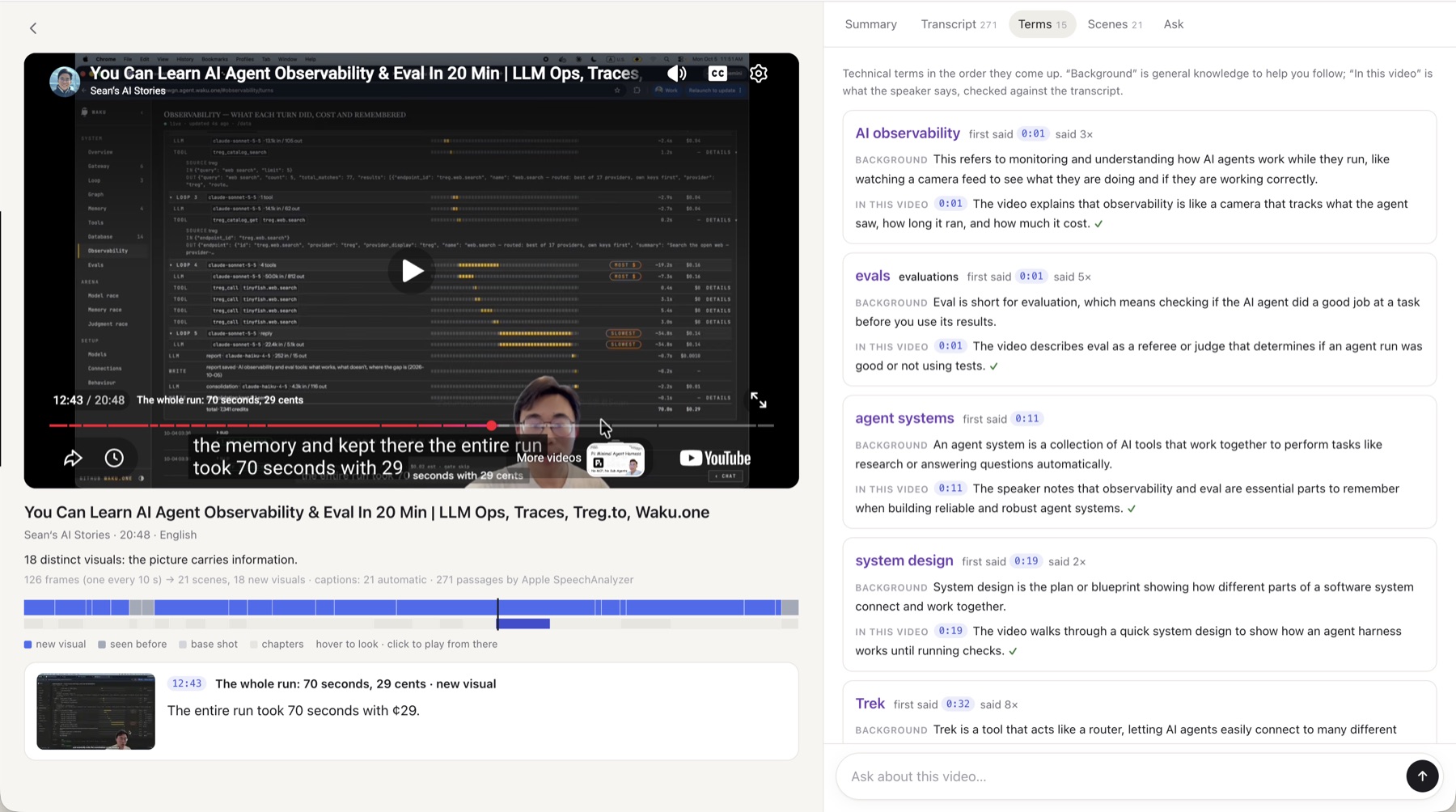
- The ribbon: the whole video on one strip (scenes, chapters, most replayed). Hover to see any second's frame and words.
- Summary: sections with their frames; every sentence timed and checked (✓ ? ✗).
- Transcript: the original with English beneath, technical terms explained, on-screen text read in.
- Ask: answers that cite their moments and show the frames; anything the video doesn't say is marked as background.
- Your own AI: the same document as an MCP plugin for Claude, Cursor, Codex and more.
Built for long talks, lectures and finance videos in a language you half know (Chinese and English today).
In your own AI
In Claude Code, one line (uv runs it; nothing else to install):
claude mcp add boson-video -- uvx boson-video mcp
Claude Desktop, Cursor and Codex take the same command, uvx boson-video mcp, in their MCP settings;
claude.ai and ChatGPT need a web address instead: setup for each app.
Then paste a YouTube link and ask. Your AI opens the video, reads the transcript, looks at the frames that matter at full resolution, and checks its claims, citing every moment. No keys needed, and everything runs on your computer. In apps that show interactive pages (Claude Desktop, claude.ai, ChatGPT, Cursor), the video's page opens right in the chat, and questions you ask there go to your AI.
Run the page
uvx boson-video web # http://127.0.0.1:8770; the first run prints your invite code
Two optional models make it fuller. Without their keys you still get the scenes, the transcript and search.
- A writer writes the summary, the English and the terms: Mercury from
Inception by default (
INCEPTION_API_KEY), or any OpenAI-compatible model (BOSON_WRITER_BASE_URL,BOSON_WRITER_MODEL,BOSON_WRITER_API_KEY). - A checker checks every sentence against what was said and finds the moments that answer a
question: Jev from TypeSafe (
TYPESAFE_API_KEY).
Put the keys in a .env file in the folder you start from, or in ~/.boson-video/.env; the server says
at start which one is missing. Off by default: with OPENAI_API_KEY and BOSON_SCREEN_CHECK=1, a sentence
the words can't confirm is also checked against the frames on screen (OpenAI's Decisions API, about a
cent a video).
Tested videos
Measured, one run each unless a range is shown. Mac: M5 MacBook with Apple's transcriber. Windows: a 12-thread laptop with SenseVoice or Parakeet on the CPU. Full tables: docs/measured.md.
| Video | Length | Scene map | Words | Transcript errors¹ | Screen text | Summary ✓ |
|---|---|---|---|---|---|---|
| Money or Life 美股频道, Meta and AI (zh, talking head) | 24:53 | 1.3 s | 13.8 s (Mac) | no human captions | — | 13 / 13 |
| Money or Life 美股频道, AI drug discovery (zh, slides) | 28:24 | 1.1 s | 18.5 s (Mac) | not scored | 36 moments read | 15 / 16 |
| 程序员老王, LLM abliteration (zh, animated diagrams) | 11:35 | — | 10.0 s (Windows) | not scored | 88 moments; burned-in subtitles told apart at 85 | 21 of 22 to 22 of 23 (several runs) |
| 陳永儀, TEDxTaipei (zh, talk) | 14:29 | — | 7.1 s (Mac) | 5.3% chars (Mac), 4.8% (SenseVoice) | — | 14 / 14 |
| Ken Robinson, TED (en, talk) | 20:06 | — | 9.9 s (Mac) | 10.0% words (Mac), 10.5% (Parakeet) | — | 22 / 25 |
| Sean's AI Stories, agent observability (en, screen recording) | 20:48 | 1.5 s | 13.2 s (Mac) | not scored | none: YouTube refused full resolution | 23 / 26 |
| Andrej Karpathy, Intro to LLMs (en, slides) | 59:48 | 1.6 s | 30.5 s (Mac) | only automatic captions | 19 of 20 slides right | 22 / 23 |
| Rick Astley, Never Gonna Give You Up (fast cuts) | 3:33 | 0.7 s | — | — | — | — |
¹ Against human captions (scripts/accuracy.py); about half the English errors are filler words the captions leave out.
Summary ✓: summary sentences the checker confirmed against what was said (Jev, with numbers compared in code).
Command line
uvx boson-video <link | id | file>        # build a video: scenes, words, screen text, summary
uvx boson-video ask <video> "question"    # the moment that answers it
uvx boson-video models                    # fetch the local speech models now instead of on first use
From a clone: uv sync, then uv run boson-video …; uv run pytest runs the tests (offline).
More
- docs/workflow.md: how the workflow is designed: stages, the document, the ways in
- docs/how-it-works.md: the pipeline, what YouTube allows, limits
- docs/DIRECTION.md: what we're building, milestones, decisions
- docs/timeline-format.md: the document format, for other tools
- CONTRIBUTING.md: how to set up, test and propose a change
- AGENTS.md: the guide for coding agents
MIT licensed. YouTube's terms don't allow automated access for products, so everything that touches YouTube runs on your own computer.
Reviews
No reviews yet
Be the first to review this server!
More Developer Tools MCP Servers
Fetch
Freeby Modelcontextprotocol · Developer Tools
Web content fetching and conversion for efficient LLM usage
Git
Freeby Modelcontextprotocol · Developer Tools
Read, search, and manipulate Git repositories programmatically
Toleno
Freeby Toleno · Developer Tools
Toleno Network MCP Server — Manage your Toleno mining account with Claude AI using natural language.
MCP Marketplace
Freeby mcp-marketplace · Developer Tools
Search and install MCP servers from inside your AI client.
mcp-creator-python
Freeby mcp-marketplace · Developer Tools
Create, build, and publish Python MCP servers to PyPI — conversationally.
FinAgent
Freeby mcp-marketplace · Finance
Free stock data and market news for any MCP-compatible AI assistant.