
Server data from the Official MCP Registry
Ranks new GitHub issues for your AI assistant: what to pick up, what may break your projects.
About
Ranks new GitHub issues for your AI assistant: what to pick up, what may break your projects.
Security Report
Valid MCP server (3 strong, 1 medium validity signals). 10 known CVEs in dependencies (0 critical, 1 high severity) ⚠️ Package registry links to a different repository than scanned source. Imported from the Official MCP Registry. Trust signals: 3 highly-trusted packages. 1 finding(s) downgraded by scanner intelligence.
9 files analyzed · 11 issues found
Security scores are indicators to help you make informed decisions, not guarantees. Always review permissions before connecting any MCP server.
Permissions Required
This plugin requests these system permissions. Most are normal for its category.
What You'll Need
Set these up before or after installing:
Environment variable: GITHUB_TOKEN
Environment variable: SCORING_MODE
How to Install
Add this to your MCP configuration file:
{
  "mcpServers": {
    "io-github-mac146-issuewatcher": {
      "env": {
        "GITHUB_TOKEN": "your-github-token-here",
        "SCORING_MODE": "your-scoring-mode-here"
      },
      "args": [
        "-y",
        "issuewatcher-mcp"
      ],
      "command": "npx"
    }
  }
}Documentation
View on GitHubFrom the project's GitHub README.
IssueWatcher


Watches the GitHub repositories you have starred, detects newly opened issues, and emails you a digest with an AI-generated summary and a suggested fix for each one.
Use it from your AI assistant (MCP)
Ask Claude, Cursor or VS Code "What GitHub issues should I work on today?" and get the new GitHub issues worth your time, ranked, with the reason for each. It works through MCP, is read-only, and needs only a GitHub token (no AI key).
claude mcp add issuewatcher -e GITHUB_TOKEN=github_pat_xxxxxxxx -- npx -y issuewatcher-mcp
Claude Desktop has a one-click bundle. Full guide, token walkthrough, other apps and troubleshooting: docs/MCP.md. Test your setup any time with npx -y issuewatcher-mcp --check.
The rest of this page describes the other way to use the project: a scheduled email digest.
What makes it different
Besides your starred repos, IssueWatcher reads the package.json and requirements.txt of your own repos and also watches the libraries you depend on. New issues are scored 0-100 (is it a library you use? does it mention your version? does it sound severe?). Only the top ones get an AI summary and a "why you are seeing this" line; the rest are listed compactly.
Try it without sending anything: DRY_RUN=true npm run dev prints the ranked list.
What the email looks like
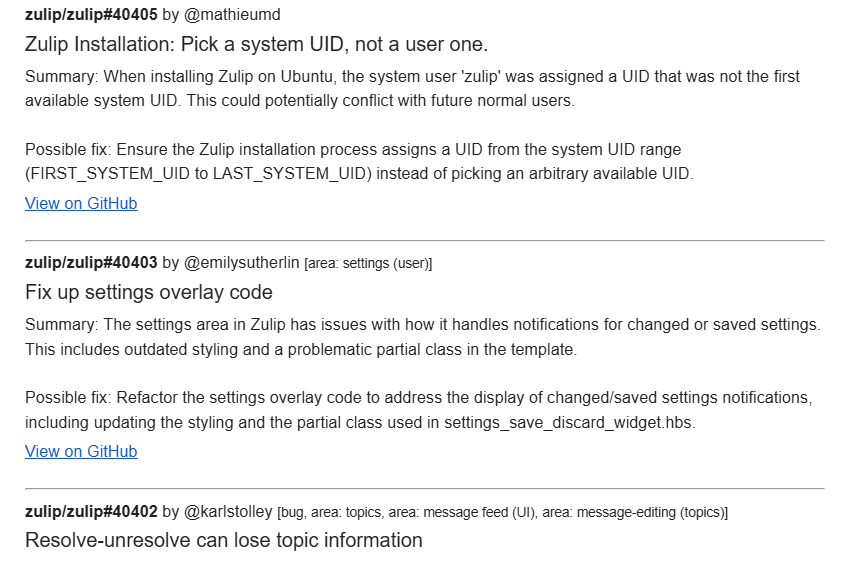
Each entry has an AI summary and a possible fix. Newer versions also add a relevance score and a "why you're seeing this" line (for example "good first issue; unassigned; opened 3h ago"), and list lower-relevance issues compactly at the bottom. This screenshot was taken from an earlier version of the email.
How it works
- Lists your starred repos and their open issues (fully paginated, with retry and rate-limit handling).
- Compares them against a local state file to find issues you have not been told about.
- Summarises new issues with the LLM of your choice in batches (summary + possible fix per issue), reusing cached summaries.
- Sends one HTML/plain-text email, then records the issues as seen.
Behaviour worth knowing:
- No flood on first run. A repo seen for the first time (including a newly starred one) is recorded silently; only issues opened afterwards are reported.
- No lost issues. State is saved only after the email is delivered. If GitHub, Gemini or SMTP fails, the issues are retried next cycle. If only the summary fails, the issue is still emailed without one.
- Free-tier friendly. Issues are summarised several per request, requests are rate-limited, summaries are cached, and if a provider runs out of quota the app switches to the next one. With none left, the digest still goes out with plain excerpts instead of AI summaries. The AI is optional: with no key at all the app works fully (ranking, reasons, links, excerpts). The free
gemini-2.5-flashtier allows only about 20 requests/day;GEMINI_MODEL=gemini-2.5-flash-liteworked in testing. - Bounded cost. At most
MAX_ISSUES_PER_EMAILissues are summarised per digest (the rest are still listed), and issue bodies are truncated before being sent to the model.
Setup
Requires Node.js 22+.
git clone https://github.com/mac146/IssueWatcher
cd IssueWatcher/mcp-server
npm install
Copy .env.example to .env (in mcp-server/) and fill it in:
# Required
GITHUB_TOKEN=ghp_xxx            # PAT; needs read access to your starred repos and their issues
SMTP_USER=you@gmail.com
SMTP_PASS=app-password          # for Gmail use an App Password
MAIL_TO=you@example.com         # comma-separated for several recipients

# Optional (defaults shown)
SMTP_HOST=smtp.gmail.com
SMTP_PORT=465
SMTP_SECURE=true                # defaults to true when port is 465
MAIL_FROM=                      # defaults to SMTP_USER

# AI summaries (optional): set any of these; keys that are set are tried in this order
GOOGLE_API_KEY=                 # Gemini
OPENAI_API_KEY=                 # OpenAI
ANTHROPIC_API_KEY=              # Claude
GROQ_API_KEY=                   # Groq
OPENROUTER_API_KEY=             # OpenRouter
CUSTOM_LLM_BASE_URL=            # any OpenAI-compatible server, e.g. Ollama http://localhost:11434/v1
CUSTOM_LLM_MODEL=
LLM_PROVIDERS=                  # optional explicit order, e.g. groq,gemini ("none" turns AI off)
REDIS_URL=                      # optional, e.g. redis://localhost:6379 (summary cache)
WATCH_INTERVAL=1800000          # ms between polls, minimum 60000 (default 30 min)
STATE_FILE=data/state.json      # resolved relative to the working directory
MAX_ISSUES_PER_EMAIL=50
MAX_BODY_CHARS=4000
LLM_CONCURRENCY=3
DEPENDENCY_SCAN=true            # also watch libraries your repos depend on
SCORING_MODE=both                # consumer, contributor (issues you could fix) or both
MIN_SUMMARY_SCORE=30            # only issues scoring this high get an AI summary (default 45 in contributor mode)
IGNORE_REPOS=                   # e.g. 100xdevs-*/*  (star wildcard)
IGNORE_LABELS=                  # e.g. question,duplicate
DRY_RUN=false                   # print the ranking only; no email, LLM or state change
LLM_BATCH_SIZE=8                # issues summarised per LLM request
LLM_RPM=5                       # requests per minute per provider (5 suits free tiers)
RUN_ONCE=false                  # true: run a single cycle and exit (handy for cron)
Configuration is validated at startup; every missing or invalid variable is reported at once.
Run it free on GitHub Actions
No server needed: a scheduled workflow in your own fork runs IssueWatcher every 3 hours.
- Fork this repository (keep the fork public; see the note below).
- In the fork go to Settings > Secrets and variables > Actions and add these secrets:
GH_PAT: a GitHub personal access token that can read your starred repos (and your own repos, if you want dependency watching of private projects). The built-in token cannot read your stars.SMTP_USER,SMTP_PASS,MAIL_TO: your mail settings (for Gmail, use an App Password).- Optional AI keys:
GOOGLE_API_KEY,OPENAI_API_KEY,ANTHROPIC_API_KEY,GROQ_API_KEY,OPENROUTER_API_KEY. With none, digests use plain excerpts.
- Optionally add variables (same page, Variables tab) such as
SCORING_MODE,IGNORE_REPOS,MIN_SUMMARY_SCORE,LLM_PROVIDERS. - Open the Actions tab, enable workflows for the fork, and run Watch issues once by hand (tick dry run first to preview the ranking without sending anything).
How it behaves:
- The first run only records where each repo stands (no email). You hear about issues opened after that.
- State is kept in the Actions cache, which is private to your repository. If GitHub evicts it, the next run re-seeds silently: nothing is re-sent, but issues opened during the gap are missed.
- GitHub may delay scheduled runs by several minutes, and it disables scheduled workflows in repositories with no activity for 60 days. Re-enable it in the Actions tab if that happens. Workflow failures are emailed to you by GitHub.
- Public repositories get free Actions minutes; check GitHub's current billing page before using a private fork.
Do not commit your .env, and keep your tokens in Secrets only.
Is the ranking any good? Measure it
The scoring weights are educated guesses, so there is a built-in way to test them on your own watch list:
cd mcp-server
npm run eval:export     # writes eval/labels.csv: 100 random recent issues, scores hidden
# open eval/labels.csv, read each issue and put u (useful) or n (noise) in the label column
npm run eval:report     # precision of the top 5/10/20 vs newest-first and random, AUC, and which signals help
Options: -- --size=100 --per-repo=4 --seed=42. Label at least 40 issues (100 is better) before trusting the numbers. The sample is random and shuffled and the CSV contains no scores, so your labels are not influenced by the ranking. Use the same SCORING_MODE you run day to day. The eval/ folder is git-ignored.
The report re-scores your labelled issues with the current code every time, so you can change the weights and re-run eval:report against the same labels. Export refuses to overwrite a sheet that already has labels (--force overrides). If your sheet was exported by an older version, run npm run eval:rebuild once; it re-fetches the issues and leaves your labels alone. Because tuned weights are then graded on issues they were tuned on, confirm any improvement on a fresh sample (--seed=7).
Choosing an AI provider
| Provider | Key | Default model (override with *_MODEL) |
|---|---|---|
| Gemini | GOOGLE_API_KEY | gemini-2.5-flash |
| OpenAI | OPENAI_API_KEY | gpt-4o-mini |
| Claude | ANTHROPIC_API_KEY | claude-haiku-5-5 |
| Groq | GROQ_API_KEY | llama-3.3-70b-versatile |
| OpenRouter | OPENROUTER_API_KEY | meta-llama/llama-3.3-70b-instruct:free |
| Anything OpenAI-compatible (Ollama, LM Studio, vLLM) | CUSTOM_LLM_BASE_URL + CUSTOM_LLM_MODEL | yours |
Use several to survive rate limits: the first one in order is used until it is rate-limited or out of quota, then the next takes over (and the first is retried after a while). Default model names change over time, so set *_MODEL if a default is retired. Only Gemini has been exercised against the live service; the others are covered by tests against faked HTTP responses.
Summary cache (Redis)
Set REDIS_URL to cache finished summaries for 30 days (CACHE_TTL_DAYS). An issue is then summarised once, even across restarts, and cached summaries are still served when every provider is out of quota. If Redis is unreachable the app logs one warning and uses an in-memory cache. docker compose up -d starts the app together with Redis.
Docker
Build locally (a published image is planned for tagged releases):
docker build -t issue-watcher mcp-server
docker run -d --name issue-watcher --restart unless-stopped \n  --env-file mcp-server/.env -v issue-watcher-data:/data issue-watcher
State is stored in the /data volume; keep it, or every repo is re-seeded on the next start. The container runs as a non-root user.
Commands
Run in mcp-server/:
| Command | Purpose |
|---|---|
npm run dev | Run with hot reload |
npm run build | Compile TypeScript to build/ |
npm start | Run the compiled service |
npm test | Build and run the test suite |
npm run typecheck | Type-check without emitting |
npm run lint | ESLint |
npm run format | Prettier |
The process handles SIGINT/SIGTERM by finishing the current cycle and exiting. Keep STATE_FILE on persistent storage if you run it in a container.
Project docs
- docs/MCP.md: the MCP server (setup for every client)
- docs/PUBLISHING.md and docs/DEMO_SCRIPT.md: releasing and recording a demo
- DECISIONS.md: design decisions and their rationale
- CONTRIBUTING.md: development workflow
Layout
mcp-server/src/
  config.ts          env parsing and validation
  index.ts           wiring and process lifecycle
  watcher.ts         one poll cycle + non-overlapping scheduler
  github/api.ts      paginated GitHub client with retry/rate-limit handling
  poller/poller.ts   pure new-issue detection
  llm/               providers (Gemini, OpenAI-compatible, Claude), fallback chain,
                     batching, summary cache (Redis/memory), excerpt fallback
  mail/mailer.ts     SMTP digest (HTML + text)
  utils/state.ts     atomic JSON state persistence
  __tests__/         node:test suites
Notes
- Despite the repo's earlier naming, this is a standalone service and does not run an MCP server.
Reviews
No reviews yet
Be the first to review this server!
More Developer Tools MCP Servers
Rea
Freeby Morluto · Developer Tools
Reverse engineer anything from your terminal or agent with one CLI and MCP server.
Paperclip
Freeby Paperclipai · Developer Tools
Trending hip-hop artist momentum scores across four cultural dimensions.
Fetch
Freeby Modelcontextprotocol · Developer Tools
Web content fetching and conversion for efficient LLM usage
Git
Freeby Modelcontextprotocol · Developer Tools
Read, search, and manipulate Git repositories programmatically
Toleno
Freeby Toleno · Developer Tools
Toleno Network MCP Server — Manage your Toleno mining account with Claude AI using natural language.
MCP Marketplace
Freeby mcp-marketplace · Developer Tools
Search and install MCP servers from inside your AI client.