
Server data from the Official MCP Registry
MCP server for the ESET ecosystem - Connect cloud + PROTECT On-Prem, multi-tenant, RO/RW
About
MCP server for the ESET ecosystem - Connect cloud + PROTECT On-Prem, multi-tenant, RO/RW
Security Report
ESET-MCP is a well-architected MCP server with strong security foundations. Authentication is properly implemented with both single-tenant (env) and multi-tenant (basic-auth) modes, credentials are handled securely (hashed in pool keys, never logged), and permissions match the server's purpose. The RO/RW mode gating provides good defense-in-depth. Minor observations include broad exception handling in a few places and a lack of explicit input validation examples in tested code, but these are low-severity code quality issues that do not undermine the overall security posture. Supply chain analysis found 4 known vulnerabilities in dependencies (0 critical, 3 high severity).
3 files analyzed · 8 issues found
Security scores are indicators to help you make informed decisions, not guarantees. Always review permissions before connecting any MCP server.
Permissions Required
This plugin requests these system permissions. Most are normal for its category.
How to Install
Add this to your MCP configuration file:
{
  "mcpServers": {
    "io-github-maciekaz-eset-mcp": {
      "args": [
        "eset-mcp"
      ],
      "command": "uvx"
    }
  }
}Documentation
View on GitHubFrom the project's GitHub README.
ESET-MCP



A Model Context Protocol server for the entire ESET management surface: ESET Connect (cloud, all regions), ESET PROTECT On-Prem, ESET Inspect, and ESET Cloud Office. Drive any of them from any MCP host (Claude Desktop, Claude Code, or a custom agent) through tools, resources, and prompts.
Built as a single hub for any number of ESET deployments. One process fronts cloud and on-prem consoles at the same time; clients pick the target per request via headers. As long as MCP receives valid credentials (Basic auth, plus an optional URL override and optional Cloudflare Access service token) it routes the call to the right backend, mints its own tokens, and keeps tenants isolated in the pool.
⚠️ Just to be clear, fellas
This is an independent, community-driven open-source project and is not affiliated with, officially supported by, or endorsed by ESET, spol. s r.o. ESET and its product names are registered trademarks of their respective owners.While every effort has been made to ensure this software is safe and robust (including the strict Read-Only mode gate), this code is provided "AS IS", without any warranty of any kind. You are solely responsible for how you use this tool and any changes made to your ESET environment.
Table of contents
- Features
- Architecture at a glance
- Security
- Quick start
- Configuration
- Multi-tenant deployment (basic-auth mode)
- On-prem ESET PROTECT support
- Production deployment (HTTPS via Caddy)
- Tools, resources & prompts
- Architecture
- Tests
- Refreshing the OpenAPI specs
- License
Features
Complete API coverage
- 102 tools auto-generated from 16 official ESET Connect OpenAPI 3.0.1 specs, covering application-management, asset-management, automation, device-management, identity, incident-management, installer-management, mobile-device-management, network-access-protection, patch-management, policy-management, quarantine-management, user-management, vulnerability-management, and web-access-protection.
- 4 high-level composites that fold 3-6 raw calls into one:
eset_search,device_full_profile,incident_full_context,latest_detections.
Read-only / read-write modes
ESET_MODE=RO→ catalog exposes only read-only tools (51 total). Write tools are hidden fromlist_toolsentirely.ESET_MODE=RW→ all 106 tools advertised; mutating tools carrydestructiveHint: truein their MCP annotations.- Independent of the ESET account's underlying permissions.
- A defence-in-depth in-memory gate rejects RW tool names in RO mode before any HTTP request is sent.
Authentication
ESET_AUTH_MODE=env- single tenant, credentials from.env.ESET_AUTH_MODE=basic- multi tenant, clients passAuthorization: Basic <base64(user:password)>per request (plus optionalX-ESET-Regionfor a different cloud region, orX-ESET-Server-URLto route the request to an on-prem PROTECT console). One server fronts many ESET accounts and can mix cloud + on-prem in the same process.- Per-tenant OAuth tokens, pooled and isolated by
(user, password_hash, deployment, region-or-server-url, cf_secret_hash). Rotating a password or Cloudflare Access service token mints a fresh client; cloud and on-prem clients for the same user never share a pool entry.
Transports
- stdio - JSON-RPC over stdin/stdout for local hosts.
- Streamable HTTP - the current MCP transport (Nov 2025 spec).
Multi-region
eu / de / us / ca / jpn. Fixed via ESET_REGION in env mode;
per-request via X-ESET-Region in basic mode.
Cloud + on-prem in one process
In addition to the cloud regions, a single MCP server can front
customer-hosted ESET PROTECT On-Prem consoles. The on-prem auth wire
format (POST /GetTokens with a camelCase response) and per-host URL
structure are handled transparently; clients pick the target per request
via the X-ESET-Server-URL header. See
On-prem ESET PROTECT support.
Cloudflare Access (optional)
When the on-prem console sits behind a Cloudflare Access tunnel, MCP
authenticates as a service token
(env-default or per-request X-ESET-CF-Access-Client-Id /
X-ESET-CF-Access-Client-Secret) and rides through to the origin. The
CF token is an extra ingress layer in front of - not a replacement for -
the ESET account credentials. Cloud requests never carry these headers.
Resilience
- OAuth2 with proactive refresh ~5 min before token expiry and a forced refresh + retry on 401.
- 429 retries with exponential backoff (up to 3 attempts, honours
Retry-After). - Pagination (
nextPageToken) walked transparently. - 202 long-polling with the
response-idheader, up to 10 minutes.
Response shaping (context-window protection)
A single uncapped list_* call can return hundreds of KB - enough to
overflow a model's context. Two transformations are applied to every
tool response:
fieldsprojection - every GET tool exposes an optionalfields: [string]parameter that filters each list-item down to the requested keys (e.g.["uuid", "displayName"]). Applied server-side after fetch.- Byte cap (
ESET_MCP_RESPONSE_BYTES_MAX, default 100 KB) - if a payload still exceeds the budget, the longest list is trimmed while every top-level field (nextPageToken,totalSize, …) is preserved, and a_cappedmetadata block is attached with an actionable hint on how to continue. Agents retain full access to the data through pagination.
Agent-friendly errors
HTTP errors are mapped to readable hints: 403 → check Permission Sets in ESET PROTECT Hub; 401 → server refreshes the token automatically; 429 → back off; 5xx → retry shortly.
Observability (logs + Prometheus)
- Structured logs to stderr. Text (default) for dev, JSON Lines for
prod log shippers via
ESET_MCP_LOG_FORMAT=json. Every tool call, token refresh, HTTP retry and pool eviction emits a typedeventrecord with low-cardinality fields (tool, deployment, status, duration_ms, response_bytes, ...). - Prometheus metrics at an opt-in
/metricsendpoint (ESET_MCP_METRICS_ENABLED=true, requirespip install eset-mcp[metrics]). Counters for tool calls, token refreshes, HTTP retries, cap hits; histograms for tool duration and response sizes; gauge for client pool size. - What never enters logs or metrics: passwords,
Authorizationheaders, CF Access secrets, request/response bodies, query strings, substituted path parameters (which can leak UUIDs). A defensive deny-list in the logger strips known-sensitive keys before any formatter sees them. - Failure isolation: telemetry emission is wrapped in a try/except so
a broken metrics registry or formatter can never turn a successful
tool call into an error to the agent.
/metricsreturns 500 (not 503) if exposition ever raises - the worker stays up. - Quieting in production: set
ESET_LOG_LEVEL=WARNINGto mute the per-call INFO events but keep retries / errors visible; setESET_LOG_LEVEL=ERRORto silence everything but hard failures. Disable metrics entirely withESET_MCP_METRICS_ENABLED=false(default). The three knobs are independent.
Architecture at a glance
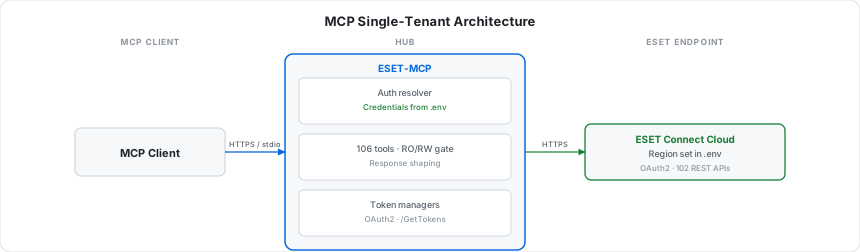
The simplest setup: credentials in .env, one MCP host, one ESET cloud
region. Good for personal use, a single team, or a desktop AI client like
Claude Desktop or Claude Code.
For real multi-tenant or enterprise deployments, put a credentials manager in front of ESET-MCP. The diagram below shows one such pattern using IBM mcp-context-forge as the "creds management" layer - any equivalent MCP gateway (or your own auth proxy) works the same way:
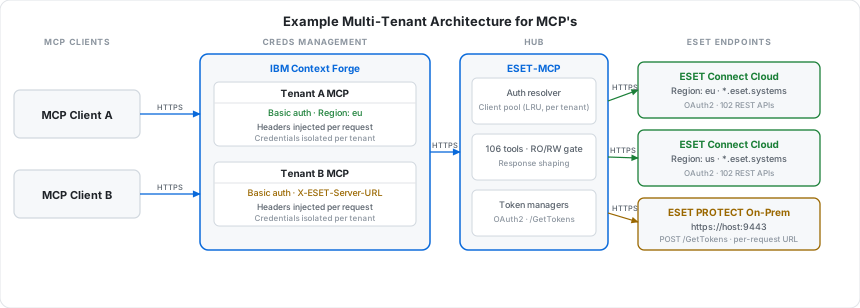
The forge holds per-tenant secrets and injects Authorization: Basic,
X-ESET-Region, X-ESET-Server-URL, and X-ESET-CF-Access-* headers per
request. ESET-MCP routes each request to the right backend (cloud region,
on-prem PROTECT console, or on-prem behind Cloudflare Access) and the
per-tenant LRU client pool keeps OAuth tokens fully isolated between
tenants. This is a working pattern, not aspirational - the headers, pool
keys, and routing rules described here are all in the test suite under
tests/test_concurrency.py and tests/test_onprem.py.
Security
Credentials
- In
envmode the password is read once at startup and kept in memory. - In
basicmode the password is on the wire only for the duration of the request, and in memory only while the per-tenant client is hot in the LRU pool. It is never logged. - The pool key uses a SHA-256 hash of the password rather than the password itself.
- OAuth access/refresh tokens are held per-tenant; tokens never cross tenant boundaries within a single session.
Authentication modes & transport
| Mode | Transport allowed | Credentials source |
|---|---|---|
env | stdio or http | .env (ESET_USER / ESET_PASSWORD) |
basic | http only | Authorization: Basic header per request |
basic mode over plain HTTP would leak passwords. The server enforces
HTTP transport for basic mode at startup but does not enforce TLS -
that is the deployment's job. The prod docker-compose profile fronts
the server with Caddy + Let's Encrypt.
Missing / malformed Authorization in basic mode → HTTP 401 with a
WWW-Authenticate: Basic challenge. Unknown region in X-ESET-Region
→ HTTP 401.
RO / RW isolation
Two independent layers:
- Catalog hiding -
list_toolsfilters out every non-GET tool in RO mode. The agent never sees write tools. - Defence-in-depth gate -
call_toolvalidates the tool's declared mode againstESET_MODEbefore any HTTP request goes out. Hard-coded clients, prompt-injection attempts, and stale agent snapshots all hit the gate and receive a structuredModeForbiddenErrortext response (no exception, no network call).
In RW mode, mutating tools carry destructiveHint: true so MCP hosts
that respect annotations can require a per-call confirmation.
Per-tenant isolation (basic-auth mode)
- Auth headers are parsed in dedicated ASGI middleware and stashed in a
ContextVar; they never enter request bodies or logs. - Each request resolves to a
Credentialsinstance keyed by(user, password_hash, region). - An LRU bound on the client pool prevents unbounded memory growth from random-credential spraying.
Network surface
- In dev (
docker compose up) the MCP server publishes:8765. - In the
prodprofile the MCP container has no published port - Caddy joins the same docker bridge network and proxies HTTPS in. The only host ports are 80 (HTTP-01 ACME) and 443 (HTTPS). - No outbound traffic except to
*.eset.systems(auth + APIs).
Dependency & code audit
- Snyk Code: 0 issues in
eset_mcp/. - Ruff: clean (
select = E F W I B UP RUF). - Runtime dependencies:
mcp,httpx,pydantic,python-dotenv. Plusstarlette+uvicornwhen running HTTP.
Out of scope (by design)
- No webhook receivers.
- No persistent storage; logs go to stdout.
- No on-disk caching of OAuth tokens.
- No write-back of
basic-mode credentials to disk.
Responsible disclosure
Please open a private security advisory rather than a public issue: https://github.com/maciekaz/ESET-MCP/security/advisories/new.
Quick start
The fastest path is the published Docker image. No Python install, no
venv, no source checkout - just .env + docker run. The image is
multi-arch (amd64 + arm64), signed with cosign, ships with SBOM +
build provenance, and is published to GHCR on every release.
cp .env.example .env          # fill in ESET_USER / ESET_PASSWORD / ESET_REGION
docker run --rm -i --env-file .env ghcr.io/maciekaz/eset-mcp:1
Pin policy:
:1- latest 1.x.x (auto-updates within the major):1.0- latest 1.0.x (auto-updates within the minor):1.0.1- exact version (production):latest- most recent stable release:main/:sha-<short>- edge builds from main (not for production)
Wire up to Claude Desktop / Claude Code (stdio)
// claude_desktop_config.json
{
  "mcpServers": {
    "eset": {
      "command": "docker",
      "args": ["run", "--rm", "-i", "--env-file", "/absolute/path/to/.env",
               "ghcr.io/maciekaz/eset-mcp:1"]
    }
  }
}
HTTP transport (single-tenant or behind your own proxy)
docker run -d --name eset-mcp \
  --env-file .env -p 8765:8765 \
  -e ESET_MCP_TRANSPORT=http \
  ghcr.io/maciekaz/eset-mcp:1
# MCP endpoint: http://localhost:8765/mcp
Verify the image (cosign keyless)
cosign verify \
  --certificate-identity-regexp '^https://github.com/maciekaz/ESET-MCP/' \
  --certificate-oidc-issuer https://token.actions.githubusercontent.com \
  ghcr.io/maciekaz/eset-mcp:1
From source (contributors / local hacking)
git clone https://github.com/maciekaz/ESET-MCP.git
cd ESET-MCP
cp .env.example .env
python -m venv .venv && source .venv/bin/activate
pip install -e ".[dev]"
eset-mcp
Docker Compose (uses the published image)
docker compose up -d eset-mcp-http
# MCP endpoint: http://localhost:8765/mcp
By default the compose file pulls ghcr.io/maciekaz/eset-mcp:1 - no
local build, fast first start. Pin a specific version by editing the
image: line in docker-compose.yml.
One-off stdio via compose:
docker compose --profile stdio run --rm eset-mcp-stdio
Hacking on the source? Use the dev profile to build from your local checkout instead of pulling:
docker compose --profile dev up --build eset-mcp-http-dev
Configuration
All settings live in .env. Required fields are marked in
.env.example.
| Variable | Default | Purpose |
|---|---|---|
ESET_AUTH_MODE | env | env (single tenant) or basic (multi tenant) |
ESET_USER | - | API user (required in env mode) |
ESET_PASSWORD | - | API password (required in env mode) |
ESET_MODE | RO | RO (read-only catalog) or RW |
ESET_REGION | eu | eu / de / us / ca / jpn |
ESET_MCP_TRANSPORT | stdio | stdio or http |
ESET_MCP_HTTP_HOST | 127.0.0.1 | HTTP bind address |
ESET_MCP_HTTP_PORT | 8765 | HTTP port |
ESET_MCP_RESPONSE_BYTES_MAX | 100000 | Per-call response byte cap; 0 disables |
ESET_LOG_LEVEL | INFO | DEBUG / INFO / WARNING / ERROR |
ESET_MCP_LOG_FORMAT | text | text (dev, human-readable) or json (prod log shippers) |
ESET_MCP_METRICS_ENABLED | false | Mount Prometheus /metrics; requires eset-mcp[metrics] |
ESET_MCP_METRICS_PATH | /metrics | Where to mount the metrics endpoint |
ESET_DEPLOYMENT | cloud | cloud (ESET Connect) or onprem (customer-hosted PROTECT) |
ESET_ONPREM_SERVER_URL | - | https://host[:port] of the on-prem console (req. in env+onprem) |
ESET_ONPREM_VERIFY_SSL | true | Set false for on-prem consoles with self-signed certs |
ESET_ONPREM_CF_ACCESS_CLIENT_ID | - | Cloudflare Access Service Token client-id (on-prem behind CF) |
ESET_ONPREM_CF_ACCESS_CLIENT_SECRET | - | Cloudflare Access Service Token client-secret (paired with the above) |
ESET_PUBLIC_DOMAIN | - | Domain Caddy issues a TLS cert for (prod profile only) |
ESET_ACME_EMAIL | - | Email Let's Encrypt uses for renewals (prod profile only) |
Use a dedicated API user - not your console login. Create one in ESET PROTECT Hub / ESET Business Account → API users.
Multi-tenant deployment (basic-auth mode)
# .env
ESET_AUTH_MODE=basic
ESET_MCP_TRANSPORT=http
ESET_REGION=eu   # default region; clients can override per request
Every HTTP request must carry:
| Header | Required | Notes |
|---|---|---|
Authorization | yes | Basic <base64(user:password)> |
X-ESET-Region | no | Override default region (eu/de/us/ca/jpn) |
X-ESET-Server-URL | no | Route this request to an on-prem PROTECT console (e.g. https://protect.example.com:9443) - see On-prem support |
X-ESET-CF-Access-Client-Id | no | Cloudflare Access Service Token client-id (on-prem behind CF Access) |
X-ESET-CF-Access-Client-Secret | no | Paired with the above - both must be sent together |
Example Python client:
import base64
from mcp import ClientSession
from mcp.client.streamable_http import streamablehttp_client

token = base64.b64encode(b"api-user@tenant.tld:secret").decode()
headers = {"Authorization": f"Basic {token}", "X-ESET-Region": "us"}

async with streamablehttp_client(
    "https://eset-mcp.example.com/mcp/", headers=headers
) as (r, w, _):
    async with ClientSession(r, w) as session:
        await session.initialize()
        tools = await session.list_tools()
⚠️ Basic auth without TLS leaks credentials. Always run
basicmode behind HTTPS.
On-prem ESET PROTECT support
ESET ships PROTECT as both a cloud service (the ESET Connect API at
*.eset.systems) and an on-prem console customers self-host. The on-prem
REST API lives on a single host (default port 9443) and uses a different
authentication endpoint - POST /GetTokens with a JSON body and a
camelCase response - but otherwise shares the URL structure of the cloud
API. ESET-MCP supports both, in the same process.
How the server decides cloud vs on-prem
ESET_AUTH_MODE | What controls the deployment per request |
|---|---|
env | Static: ESET_DEPLOYMENT (cloud) or ESET_DEPLOYMENT=onprem + ESET_ONPREM_SERVER_URL |
basic | Per request: presence of X-ESET-Server-URL switches that single request to on-prem; absence falls back to the env default (cloud or on-prem) |
So a single MCP server can front the cloud for most clients and route
specific requests to one or more on-prem consoles - keyed entirely by which
URL each client sends in X-ESET-Server-URL.
Single-tenant on-prem (env mode)
# .env
ESET_AUTH_MODE=env
ESET_DEPLOYMENT=onprem
ESET_ONPREM_SERVER_URL=https://protect.company.local:9443
ESET_ONPREM_VERIFY_SSL=true     # set to false only for self-signed certs you trust
ESET_USER=api-user@company.local
ESET_PASSWORD=...
Multi-tenant on-prem (basic auth, per-request URL)
# .env
ESET_AUTH_MODE=basic
ESET_MCP_TRANSPORT=http
ESET_DEPLOYMENT=cloud            # default; clients opt into on-prem per-request
# ESET_ONPREM_SERVER_URL is optional - if set it becomes the on-prem default
Client targeting on-prem:
headers = {
    "Authorization": f"Basic {token}",
    "X-ESET-Server-URL": "https://protect.client-a.local:9443",
}
Same MCP server, different request - same headers minus X-ESET-Server-URL
- stays on cloud.
What works on on-prem vs cloud
The tool catalog is identical for both deployments (all 102 OpenAPI-derived tools plus the 4 composites). At call time the server uses cloud paths for cloud credentials and on-prem paths for on-prem credentials.
- Shared & verified:
device_*,asset_groups_*,policy_*and most oftask_*(Automation) work the same on cloud and on-prem. - Cloud-only modules:
incident_*,mobile_*,wap_*,nap_*,quarantine_*and most ofvuln_*correspond to separate ESET products (ESET Inspect, Cloud Office Security, MDM) that are not part of the on-prem PROTECT installation. Calling them against an on-prem console returns a plain 404 from ESET - surfaced to the agent as anESET API error: 404text response with no special handling. - Path overrides: a few endpoints have a different URL on-prem - e.g.
POST /v1/devices/{uuid}:renameis:renameDeviceon-prem. These are declared ineset_mcp/openapi/onprem-path-overrides.jsonand applied automatically when the request targets on-prem.
Cloudflare Access in front of the on-prem console
When the on-prem PROTECT console is exposed via a Cloudflare tunnel and gated by Cloudflare Access, MCP can authenticate as a service token. The chain becomes MCP → Cloudflare Access → ESET on-prem.
Two values per token pair, supplied either via .env:
ESET_ONPREM_CF_ACCESS_CLIENT_ID=abc1234567890.access
ESET_ONPREM_CF_ACCESS_CLIENT_SECRET=<long-secret>
…or per-request in basic-auth mode (overrides the env defaults - handy when each tenant has its own tunnel and its own service token):
headers = {
    "Authorization": f"Basic {token}",
    "X-ESET-Server-URL": "https://protect.client-a.local:9443",
    "X-ESET-CF-Access-Client-Id": "abc1234567890.access",
    "X-ESET-CF-Access-Client-Secret": "<long-secret>",
}
MCP translates the X-ESET-CF-* input headers into the actual
CF-Access-Client-Id / CF-Access-Client-Secret headers that Cloudflare
Access expects, and attaches them to every outbound call - both the
POST /GetTokens auth handshake and every subsequent ESET API request.
The CF secret is treated like the password: never logged, only its SHA-256 hash enters the client pool key. Rotating the secret mints a fresh client
- fresh ESET token. Cloud requests never carry CF Access headers regardless of env defaults - ESET Connect is a public SaaS.
Security notes for on-prem
X-ESET-Server-URLaccepts onlyhttps://URLs with no path, query or fragment. Trailing slashes are stripped. Anything else → HTTP 400.ESET_ONPREM_VERIFY_SSL=falsedisables TLS certificate verification and exposes the connection to MITM. The server logs a single WARNING per client construction when it's disabled. Use only on trusted intranets with self-signed certs you cannot replace.- On-prem tokens are held in memory per
(user, password_hash, server_url, cf_secret_hash)- same isolation rules as cloud tokens. The pool keys them separately so cloud and on-prem clients never collide, and two clients hitting the same on-prem URL with different CF service tokens get separate pool entries. - Sending only one of the two
X-ESET-CF-*headers returns HTTP 400 rather than silently falling back to the env default (almost certain operator typo).
Production deployment (HTTPS via Caddy)
The prod docker-compose profile launches Caddy in front of the MCP
server. Caddy fetches a Let's Encrypt cert on first start (HTTP-01
challenge - ports 80 / 443 must be reachable from the public internet)
and proxies HTTPS to the internal MCP container.
# .env
ESET_AUTH_MODE=basic
ESET_PUBLIC_DOMAIN=eset-mcp.example.com
ESET_ACME_EMAIL=ops@example.com

docker compose --profile prod up -d
# MCP endpoint: https://eset-mcp.example.com/mcp
You get:
- HTTPS on 443 with auto-renewing Let's Encrypt cert.
- HTTP-01 challenge on 80.
- MCP container bound only to the docker bridge network - no published port.
- gzip / zstd compression, JSON access logs on stdout.
Tools, resources & prompts
Composite high-level tools
| Tool | Returns |
|---|---|
eset_search(query, kinds?, limit_per_kind?) | Case-insensitive substring matches across devices / users / policies / groups |
device_full_profile(deviceUuid) | Device record + recent detections + vulnerabilities + recent scans |
incident_full_context(incidentUuid) | Incident + comments + related detections + affected devices |
latest_detections(hours=24, limit=10, severity_min?) | Newest detections in a time window, sorted by occurTime desc; v2 → v1 fallback |
Each composite degrades gracefully when a sub-call returns 403/404
(e.g. on tenants missing a module). The shape carries skipped /
truncated flags where applicable.
Resources
eset://config/mode-ROorRW.eset://config/region- current region (per-request in basic-auth mode).eset://config/deployment-cloudoronprem (<server-url>)for this request.eset://config/tools-catalog- JSON catalog of all 106 tools (name, mode, method, path, service, description).eset://docs/rate-limits- quick reminder about the 10 req/s ceiling.
Prompts
audit_inactive_devices(days=30)- offboarding candidates.vulnerability_report- per-device CVE report.incident_triage- open incidents + related detections.
Architecture
eset_mcp/
├── __main__.py         # entrypoint - stdio or HTTP, wires resolver + pool
├── server.py           # MCP server (tools / resources / prompts) + telemetry
├── credentials.py      # Credentials + EnvResolver / BasicAuthResolver + ContextVar
├── middleware.py       # ASGI Basic-auth middleware (basic mode only)
├── client_pool.py      # LRU pool of EsetHttpClient keyed by (user, region, ...)
├── http_client.py      # async httpx + 202 polling + 429 retry + 401 refresh
├── auth.py             # CloudTokenManager (OAuth2) + OnPremTokenManager (/GetTokens)
├── regions.py          # cloud region → per-service domains + on-prem URL resolver
├── modes.py            # RO/RW gate
├── errors.py           # HTTP error → agent-friendly text
├── config.py           # .env loading
├── response_shaping.py # fields projection + byte cap
├── composite_tools.py  # hand-written high-level tools
├── tools_loader.py     # generator: tools from OpenAPI specs + on-prem path overrides
├── observability/      # JSON/text structured logging + Prometheus metrics
└── openapi/            # 16 ESET Connect OpenAPI 3.0.1 specs + onprem path overrides
Tests
pytest                  # full suite (RO smoke + unit + integration)
pytest -m "not rw"      # RO only (default in CI)
pytest -m rw            # RW (requires an account with RW permissions)
Integration tests hit a real ESET tenant - credentials supplied via the
same .env. CI workflow:
.github/workflows/integration.yml
runs on PR, on push to main, and once a day at 03:17 UTC. The cron
catches drift between the server and ESET's published OpenAPI specs.
Refreshing the OpenAPI specs
cd eset_mcp/openapi
for name in business-account application-management asset-management automation \
            device-management iam incident-management installer-management \
            mobile-device-management network-access-protection patch-management \
            policy-management quarantine-management user-management \
            vulnerability-management web-access-protection; do
  curl -sO "https://eu.esetconnect.eset.systems/swagger/api/${name}.json"
done
tests/test_catalog_vs_openapi.py flags any new or changed operations
after a refresh.
License
MIT
Reviews
No reviews yet
Be the first to review this server!
More Developer Tools MCP Servers
Git
Freeby Modelcontextprotocol · Developer Tools
Read, search, and manipulate Git repositories programmatically
Fetch
Freeby Modelcontextprotocol · Developer Tools
Web content fetching and conversion for efficient LLM usage
Worldmonitor
Freeby Koala73 · Developer Tools
Live markets, conflicts, country risk, chokepoints, energy, and China decision signals. 89 tools.
Paperclip
Freeby Paperclipai · Developer Tools
Trending hip-hop artist momentum scores across four cultural dimensions.
Toleno
Freeby Toleno · Developer Tools
Toleno Network MCP Server — Manage your Toleno mining account with Claude AI using natural language.
mcp-creator-python
Freeby mcp-marketplace · Developer Tools
Create, build, and publish Python MCP servers to PyPI — conversationally.