
Server data from the Official MCP Registry
Work a running OrcaSlicer with AI: slice, tune, and understand what each setting costs
About
Work a running OrcaSlicer with AI: slice, tune, and understand what each setting costs
Security Report
Valid MCP server (0 strong, 2 medium validity signals). No known CVEs in dependencies. Package registry verified. Imported from the Official MCP Registry.
3 files analyzed · 1 issue found
Security scores are indicators to help you make informed decisions, not guarantees. Always review permissions before connecting any MCP server.
What You'll Need
Set these up before or after installing:
Environment variable: ORCA_API_TOKEN
Environment variable: ORCA_API_URL
Environment variable: ORCA_MCP_ALLOW_KEYS
Environment variable: ORCA_PRINTER_URL
Environment variable: ORCA_PRINTER_API_KEY
Environment variable: ORCA_PRINTER_ID
How to Install
Add this to your MCP configuration file:
{
  "mcpServers": {
    "io-github-maxellis-orcaslicer-mcp": {
      "env": {
        "ORCA_API_URL": "your-orca-api-url-here",
        "ORCA_API_TOKEN": "your-orca-api-token-here",
        "ORCA_PRINTER_ID": "your-orca-printer-id-here",
        "ORCA_PRINTER_URL": "your-orca-printer-url-here",
        "ORCA_MCP_ALLOW_KEYS": "your-orca-mcp-allow-keys-here",
        "ORCA_PRINTER_API_KEY": "your-orca-printer-api-key-here"
      },
      "args": [
        "orcaslicer-mcp"
      ],
      "command": "uvx"
    }
  }
}Documentation
View on GitHubFrom the project's GitHub README.
OrcaSlicer MCP




Let Claude work alongside you in a real, running OrcaSlicer. It loads models, arranges the plate, tunes settings, slices, and reads the result back as numbers you can question: which feature ate the print time, what a setting actually does, whether a profile breaks your printer's physics. Every change lands in the GUI while you watch, so the slicer stays yours and you get better at it as you go.
This package is an MCP server: it bundles no model. It talks to OrcaSlicer, at an address you configure (localhost by default), and, when you use the printer tools, makes read-only requests to your 3D printer. It sends the printer no commands and uploads nothing to it. The model comes from your MCP client. If that client uses a hosted one, your conversation goes there as any chat does; your models, profiles, and gcode stay on the machine running the slicer. Point the client at a local model and nothing goes to a hosted service.
What it can do
Knowing what the settings mean
An offline settings reference ships with the package, carrying the authoritative label, tooltip, type, range, enum, and default for each key, so describe_setting, search_settings, and compare_settings answer from OrcaSlicer's own source instead of guessing. consult composes curated slicing knowledge and your saved notes by topic, symptom, or goal.
check_profile_physics is a deterministic gate. It overlays proposed changes on the live config, runs flow, temperature, geometry, and cooling math, then returns ok, warnings, or blocked. Accelerations your printer cannot reach and speeds past the flow ceiling get caught before they reach a print.
Settings
Read and write any of roughly 800 OrcaSlicer settings on the live config, for the whole plate or scoped narrower: get_config, set_config, find_config_keys, set_layer_height, set_height_range for a band of layers, and set_object_config for one object's overrides.
On a multi-filament setup, per-filament keys are read merged across every loaded slot but written one preset at a time, and selecting a preset discards unsaved overrides in every group. So make filament edits first and print edits second; docs/order-of-operations.md explains why and gives the sequence.
Presets
list_presets, select_preset, get_preset_config, edit_preset, save_preset, rename_preset, delete_preset. select_preset discards unsaved overrides in every group, not only the one switched; see docs/order-of-operations.md.
Slicing, and reading the result back
slice, slice_and_wait, apply_and_slice, cancel_slice, get_slice_status, get_slice_warnings, get_gcode.
get_slice_breakdown returns per-feature time, filament, and flow. OrcaSlicer shows the same information in the legend beside its preview, sized for a screen; this returns it as numbers an assistant can compare and act on:
role                    time      share   filament   mean flow
inner_wall              5m 41s    30.8%     6.43 g    16.0 mm3/s
outer_wall              3m 19s    18.0%     3.20 g    13.6 mm3/s
sparse_infill           3m 07s    17.0%     3.57 g    17.0 mm3/s
internal_solid_infill   2m 01s    11.0%     1.72 g    11.8 mm3/s
bridge                     52s     4.7%     0.26 g     4.4 mm3/s
support_interface          36s     3.2%     0.52 g    12.3 mm3/s
overhang_perimeter         28s     2.5%     0.13 g     3.7 mm3/s
internal_bridge            21s     1.9%     0.45 g    19.9 mm3/s
top_surface                19s     1.7%     0.29 g    12.5 mm3/s
brim                       12s     1.1%     0.21 g    14.7 mm3/s
bottom_surface              7s     0.7%     0.10 g    11.8 mm3/s
                        18m 24s            16.89 g
It answers which feature is eating the time without slicing repeatedly to find out. A prediction_check rides along and flags any role where the profile's requested speed got throttled at the flow ceiling.
compare_slices slices the current plate under several named variants and returns one comparison, so "what does layer height actually cost me?" is a single question rather than four manual slices. It applies each variant over your original config, restores it when done, and hands back a verdict plus a table with every delta already worked out:
Recommended: 0.4mm - fastest with no warnings.

variant     time      filament   vs 0.4mm (baseline)
0.3mm       8h 10m    41.0 g      +1h 30m (+22%), -7.0 g (-15%)
0.4mm  *    6h 40m    48.0 g      baseline
0.5mm       5h 20m    53.4 g      -1h 20m (-20%), +5.4 g (+11%)
0.6mm       4h 35m    57.1 g      -2h 05m (-31%), +9.1 g (+19%)  thin-wall warning
It only crowns a winner when one variant genuinely beats the rest on time, filament, and warnings; when they trade off, it names the fastest, the lightest, and where the warnings landed, and leaves the choice in front of you. Pass detail=True for the per-feature split of each variant.
Models and the plate
load_model (.stl, .obj, .3mf, plus .step and .stp on fork v2.3.2-mcp.3 and later), list_objects with each object's world-space bounding box and an on_plate flag, transform_object, duplicate_object, delete_object, arrange_plate, auto_orient, check_placement, diagnose_plate, get_job_status.
Several plates
list_plates, add_plate, select_plate, delete_plate and move_object_to_plate build a multi-plate project the way the toolbar does: one part per plate, each sliced on its own. Slicing, G-code, renders and job status always act on the current plate, so select a plate before you slice it. list_objects reports the plate each object sits on. Keep arrange_plate away from a layout like this: OrcaSlicer's arrange packs every unlocked plate together again. These need fork v2.4.2-mcp.13 or later.
Plate renders
render_plate hands back a PNG, so the assistant can look instead of inferring from coordinates. A rotation reads instantly as a picture and barely at all as three Euler angles. Seven camera angles cover iso, top, front, left, right, rear, and bottom. Use frame="plate" to stand back for the whole bed, or frame="object" to lean in on the part. Requires fork v2.3.2-mcp.4 or later.
view="editor" | view="preview" |
|---|---|
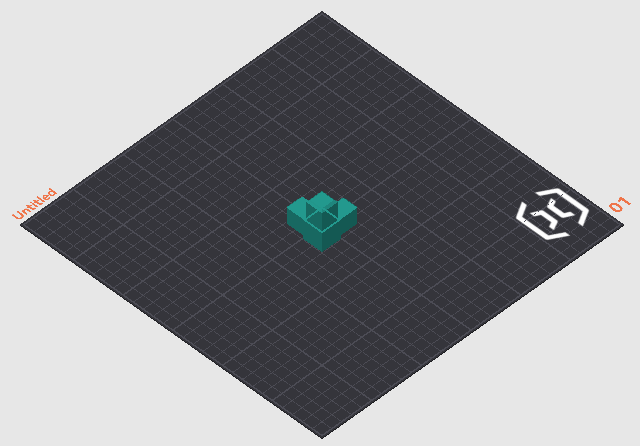 | 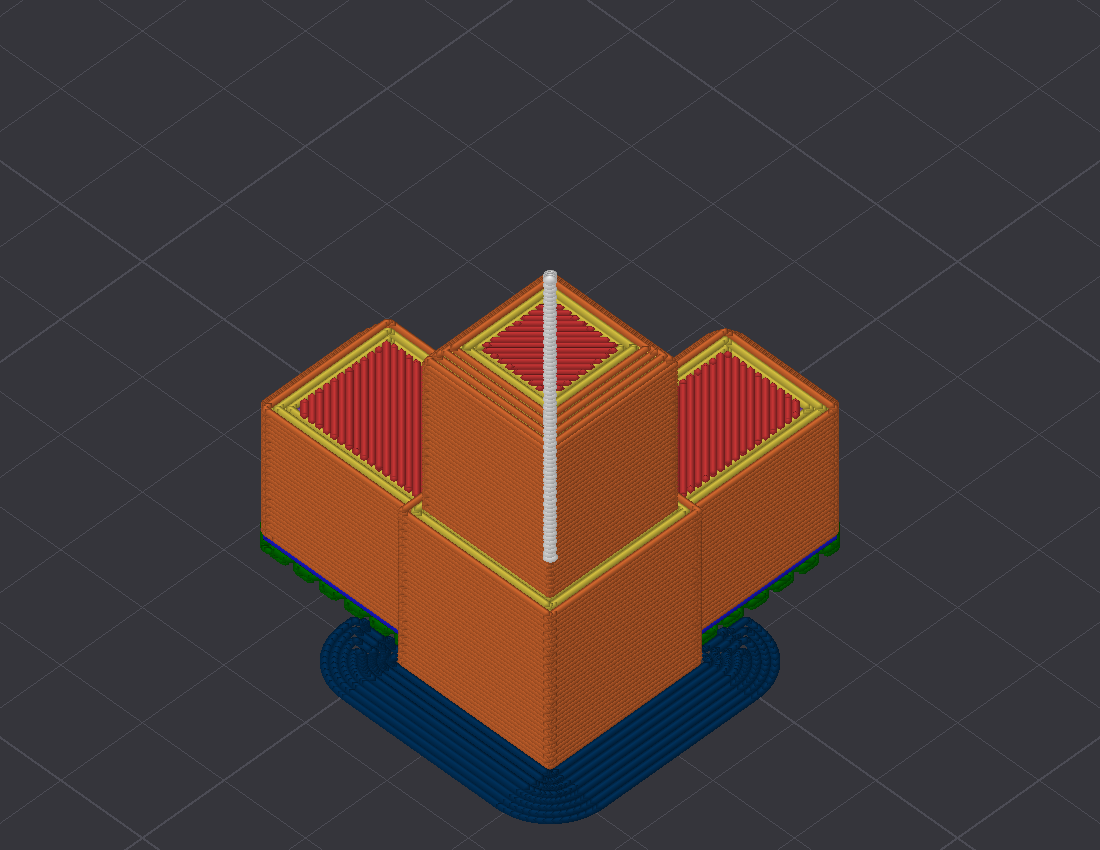 |
| Your models on the bed. Answers orientation, plate contact, and first-layer footprint. | Sliced toolpaths coloured by feature role, so support placement is plain to see. |
describe_plate answers the same questions as numbers and one sentence per object, computed from the sliced G-code: how the part stands (flat, tilted, or on an edge or corner, from first-layer contact against its widest layer), the first-layer footprint as islands, where overhang extrusions concentrate by height band, where support stands and where it touches the part, and which side the seams sit on, checked against seam_position. It exists because an assistant reads a sentence more reliably than a picture. Copies of an object are aggregated; the islands still show each copy's contact patch. On a plate of three tilted bracket copies it reads: "bracket.stl (3 copies) stands on an edge or corner: first-layer contact is 5% of its widest layer, in 3 islands of about 50 mm2 each. Overhang extrusions concentrate at Z 0 to 10 mm. Support is present from Z 0.4 to 56.8 mm, standing in 3 places and touching the part in 7 zones. Seams align on the +Y side (91%), matching seam_position=back."
Live state and memory
get_status and watch_events report what the slicer is doing now. remember persists machine, user, and project facts for later sessions, as plain local files in ~/.orcaslicer-mcp/notes/, relocatable with ORCA_MCP_NOTES_DIR.
Printer feedback
get_printer_status reports what the printer is doing now: idle, heating, printing, paused, finished, or stopped by a fault, with nozzle and bed temperatures, the job's progress and time left, and any problems the printer reports in its own words. Common Klipper messages come with a short plain-English hint. wait_for_printer waits until the printer has heated, started extruding, or finished the first layer, or until the job ends (completed, cancelled or failed). OctoPrint reports no extrusion, so there waiting for printing means waiting until the job is running with the heaters at temperature. It returns early if the printer reports a fault, or if the job ends before the point it waits for, as when you cancel a print while it heats. It rides out brief network drops: after three failed checks in a row it stops and reports "Lost contact with the printer" along with the last status it saw. list_print_history lists recent jobs with how each one ended, how long it took against the slicer's estimate, and, for failed ones, the printer's reason while its console still holds it. check_printer_match compares the active profile with the printer's own settings: nozzle size, bed size, speed and acceleration limits, maximum temperatures, and firmware retraction. A check without enough data comes back as unknown, and when nothing could be checked the answer says so instead of reporting a match. Asking for more acceleration than Klipper's max_accel earns a warning because current Klipper accepts the higher value when the G-code sets it (M204 or SET_VELOCITY_LIMIT), so the printer accelerates harder than its configured limit. A speed above max_velocity is slowed down unless the G-code raises the limit.
The server finds the printer through OrcaSlicer. It reads the address from the active printer profile's connection settings, so there is nothing more to set up once the printer is connected in OrcaSlicer. Klipper printers (Moonraker) get all four tools; OctoPrint gets status and waiting, except for the first-layer wait. Set ORCA_PRINTER_URL when that address doesn't work from the machine running this server, ORCA_PRINTER_API_KEY when the printer needs a key, and ORCA_PRINTER_ID to name the printer in the outcome store. Without it the name is the host name of ORCA_PRINTER_URL when that is set, otherwise the printer profile's name, otherwise unknown. ORCA_PRINTER_URL may carry a user name and password, as in http://user:password@192.0.2.10; percent-encode special characters in them, for example @ as %40. A user name and password stored in OrcaSlicer's own printer address are not read, so use ORCA_PRINTER_URL or ORCA_PRINTER_API_KEY instead. These tools only read from the printer. They never send G-code, change a temperature, or start or stop a job.
Learning from real prints
save_gcode saves the last successful slice's G-code and records the model name, a fingerprint of the objects' names and sizes, the full settings snapshot, and OrcaSlicer's time and filament estimates that produced it. The G-code goes into a gcode folder under PRINT_OUTCOMES_DIR when that is set; otherwise under the shared print-outcomes folder (~/projects/_shared/print-outcomes/) if it already exists on this machine, and under ~/.orcaslicer-mcp/ (the same folder remember uses) if it does not. recall_prints reads the outcome store before you slice, so the assistant can say how past prints of this model actually went: success, cancelled, or the verdict you gave it, the printer's reason when one failed, and the settings used.
save_gcode records every slice in a local outcome store, ~/.orcaslicer-mcp/outcomes/ unless PRINT_OUTCOMES_DIR says otherwise (an existing ~/projects/_shared/print-outcomes/ folder is used as it is). list_print_history copies finished jobs from a Klipper printer's own history into the same store and matches them to those slices by filename, so recall_prints learns from real results with no other software. In those rows duration_s is Moonraker's whole job time, which includes heating up and any pauses, so beside the estimates it overstates an overrun; list_print_history compares the print time, which leaves both out, with the estimate. filament_g is the G-code file's own estimate, because printers report filament in millimetres, not grams. The klipper-mcp companion still works alongside: its recorder writes each result as the print finishes, and its start_print tool uploads the file save_gcode saved. A finished print's row you delete from the store by hand comes back, without its saved slice settings, while the job is still in Moonraker's recent history, because list_print_history and klipper-mcp's recorder copy recent jobs into the store again; to drop it for good, delete the job from Moonraker's history too. Neither project contacts you on its own; the assistant sees new results when it next calls list_print_history or recall_prints.
What you need
Stock OrcaSlicer ships without a control API, so a matching build does that half of the job.
- The OrcaSlicer MCP build. OrcaSlicer 2.3.2 with an embedded local API, token-authenticated and bound to localhost until you say otherwise. Get it from the releases page. If no binary is up for your platform yet, build the
remote-apibranch from source. - This package (
orcaslicer-mcp). The MCP server that connects your AI client to that build.
Updating: take new builds from the releases page, never from inside the app. The in-app updater offers stock OrcaSlicer, which drops the control API. Builds mcp.2 and later turn that updater off for you. On an older build, click Skip this Version if a "new version available" prompt appears.
Quickstart
Install uv first, because it provides the uvx command that runs the server. One line does it: curl -LsSf https://astral.sh/uv/install.sh | sh on macOS and Linux, or irm https://astral.sh/uv/install.ps1 | iex in PowerShell on Windows.
-
Install the OrcaSlicer MCP build, launch it, and finish the one-time setup by picking your printer. A fresh install may show a “Bambu Network Plug-in Required” dialog. Click Skip for Now, since that plug-in only serves Bambu cloud printing. The control API starts once setup is finished.
-
Open Preferences (Ctrl+P), go to Remote API, and tick Enable Remote API. Copy the token shown on that page. Access stays localhost-only unless you also switch on "Allow LAN access".
-
Connect your MCP client.
Claude Desktop: download
orcaslicer-mcp-<version>.mcpbfrom the releases page and open the file. Claude Desktop offers to install it. Open the extension's settings afterwards, paste the token from step 2, and enable it.Ignore any guide that tells you to hand-edit
claude_desktop_config.json. Current Claude Desktop builds rewrite that file themselves and drop addedmcpServersentries, so the edit will not stick. The extension leaves the file alone and findsuvxby itself.Claude Code and other MCP clients: add the server to your client's MCP config. For Claude Code that means a project
.mcp.json:{ "mcpServers": { "orcaslicer": { "command": "uvx", "args": ["orcaslicer-mcp"], "env": { "ORCA_API_TOKEN": "<token from Preferences>" } } } }ORCA_API_URLdefaults tohttp://127.0.0.1:13130. Set it only if you changed the port, or if OrcaSlicer runs on another machine with LAN access enabled there.Windows note: if
uvx orcaslicer-mcpfails with "The process cannot access the file because it is being used by another process" while installingpywin32, Windows Search or Defender grabbed a freshly written file mid-install (uv does not retry). Use a pip-based fallback, which does retry, and point"command"at the resulting exe:python -m venv "$env:USERPROFILE\.venvs\orcaslicer-mcp" & "$env:USERPROFILE\.venvs\orcaslicer-mcp\Scripts\python" -m pip install orcaslicer-mcpThen set
"command"toC:\Users\<you>\.venvs\orcaslicer-mcp\Scripts\orcaslicer-mcp.exewith noargs. Upgrade later with the same pip command plus-U.macOS note for GUI clients other than Claude Desktop: apps launched from the Dock do not inherit your terminal's PATH, so
"command": "uvx"can fail silently. Runwhich uvxin Terminal, then paste the full path it prints into"command". It is usually~/.local/bin/uvx. -
Restart your client and ask: "Load benchy.stl, slice it with the current profile, and tell me the print time."
Security
- The control API binds 127.0.0.1 only by default. LAN access is an explicit opt-in in Preferences.
- Every request must carry the API token. OrcaSlicer generates it on first run and can regenerate it at any time.
- The MCP server runs as a local stdio process. Its only connections are to OrcaSlicer and, when you use the printer tools, read-only HTTP GET requests to your printer at the address in OrcaSlicer's active printer profile (or
ORCA_PRINTER_URL). It sends the printer no commands and uploads nothing to it. No telemetry. - The MCP server refuses to change config keys that run code or drive the printer directly. They are
post_process, every*_gcodetemplate,printer_model,printer_technology,filename_format, and the printer connection settings (print_host,printhost_*,host_type,printer_agentand the rest of OrcaSlicer's physical-printer keys). The list lives insrc/orcaslicer_mcp/guard.py. An assistant holding the API token can be steered by text it reads, such as model names, G-code or web pages. Sincepost_processruns shell commands after export, these stay a human decision in the OrcaSlicer GUI. - Writing a key back to the value it already has is allowed, so restores keep working. The host address and its credentials are the exception. OrcaSlicer never reports their current value, so any write to them is refused.
edit_presetruns the check before it selects the preset, which means a refused edit leaves your unsaved changes alone. - To let the MCP write specific keys anyway, list them in
ORCA_MCP_ALLOW_KEYS, comma separated. Wildcards work, for example*_gcode. The Claude Desktop extension exposes it as a setting. At startup the server logs any name that matches no protected key, which is usually a typo. - This check covers the MCP server's own tools only. An assistant that can also run shell commands could read the token and call OrcaSlicer directly. OrcaSlicer MCP v2.4.2-mcp.10 and later apply the same rule inside the slicer, and it stays on until you tick Allow script, G-code and connection edits in Preferences → Remote API. On those builds the assistant needs both: that box ticked and the keys listed in
ORCA_MCP_ALLOW_KEYS. get_preset_confighidesprinthost_apikey,printhost_userandprinthost_password. It also hides theuser:password@part ofprint_hostandprint_host_webui, cutting at the last@, so a password that contains/,@,?,#or a space is hidden too. A URL with an@in its path loses the part before that@as well, because it looks the same as a password with a/in it. A value carrying the<redacted>placeholder is never written back.
Development
uv venv && uv pip install -e ".[dev]"
uv run pytest   # unit tests against a mock API, plus a guarded live smoke test
The live smoke test skips itself unless ORCA_API_URL and ORCA_API_TOKEN point at a running OrcaSlicer MCP build.
Design specs and protocol notes live in docs/.
Privacy policy
The server talks to OrcaSlicer's local API at the address you configure, localhost by default, and, when you use the printer tools, to your 3D printer at the address in your OrcaSlicer printer profile (or ORCA_PRINTER_URL). It talks to nothing else. It has no backend, so there is no service of ours for anything to reach. Apart from those printer requests, what leaves your machine is whatever your MCP client sends its model: the conversation, plus any settings or file contents you or the assistant put into it. Their terms govern that traffic, and it is the same traffic any other use of that client produces. A local model removes it entirely.
- Data collection: none. The server collects nothing about you or your usage.
- Usage and storage: models, settings, and gcode stay on the computer running OrcaSlicer. They pass through the server in memory while a request runs, and the server writes to disk only what the data-retention entry below lists. The API token authenticates the server to OrcaSlicer, and your MCP client stores it. The printer key, if you set
ORCA_PRINTER_API_KEY, authenticates the server to the printer and is stored the same way. Printer status, history, and settings come back to your MCP client as tool results, so they join the conversation like any other tool output. Claude Desktop keeps the settings marked sensitive (the OrcaSlicer API token and the printer key) in the operating system's credential store. A password inORCA_PRINTER_URLis stored as an ordinary setting, so preferORCA_PRINTER_API_KEYwhere the printer accepts a key. - Third-party sharing: none by this server, which has no analytics and no backend. Traffic between your client and its model provider sits outside this project and falls under their policies.
- Data retention: the only data written to disk is notes you save yourself with
remember, stored as plain files under~/.orcaslicer-mcp/notes/; the G-code thatsave_gcodewrites, under~/projects/_shared/print-outcomes/when that shared folder already exists, otherwise under~/.orcaslicer-mcp/; the outcome store (outcomes.db), which holds slice records (the model name, a fingerprint of the objects' names and sizes, and the settings each slice used) and the finished-print resultslist_print_historycopies from your printer, in that shared folder when it exists, otherwise in~/.orcaslicer-mcp/outcomes/; and~/.orcaslicer-mcp/printer.json, which remembers the last printer address that answered (never a password).PRINT_OUTCOMES_DIRrelocates the G-code and the store. Read or delete any of it whenever you like. Delete it and nothing remains. - Contact: questions and concerns go in an issue.
Status
Early public release, soft launch. The server has a test suite of more than 500 unit tests and gets exercised on real print jobs. Prebuilt OrcaSlicer MCP builds cover Windows, macOS, and Linux on the releases page. Issues and reports are welcome.
Support
The project is free and stays that way. If it saves you time and you feel like saying thanks, you can buy me a coffee.
License
AGPL-3.0, matching OrcaSlicer, from whose source the bundled settings schema derives. See LICENSE.
Reviews
No reviews yet
Be the first to review this server!
More Developer Tools MCP Servers
Paperclip
Freeby Paperclipai · Developer Tools
Trending hip-hop artist momentum scores across four cultural dimensions.
Fetch
Freeby Modelcontextprotocol · Developer Tools
Web content fetching and conversion for efficient LLM usage
Git
Freeby Modelcontextprotocol · Developer Tools
Read, search, and manipulate Git repositories programmatically
Toleno
Freeby Toleno · Developer Tools
Toleno Network MCP Server — Manage your Toleno mining account with Claude AI using natural language.
MCP Marketplace
Freeby mcp-marketplace · Developer Tools
Search and install MCP servers from inside your AI client.
mcp-creator-python
Freeby mcp-marketplace · Developer Tools
Create, build, and publish Python MCP servers to PyPI — conversationally.