
Server data from the Official MCP Registry
Self-hosted agent memory in an Obsidian vault: hybrid search, link graph, tasks, safe writes, OAuth
About
Self-hosted agent memory in an Obsidian vault: hybrid search, link graph, tasks, safe writes, OAuth
Security Report
Valid MCP server (1 strong, 1 medium validity signals). No known CVEs in dependencies. Imported from the Official MCP Registry.
3 files analyzed · No issues found
Security scores are indicators to help you make informed decisions, not guarantees. Always review permissions before connecting any MCP server.
Permissions Required
This plugin requests these system permissions. Most are normal for its category.
What You'll Need
Set these up before or after installing:
Environment variable: DATABASE_URL
Environment variable: VAULT_PATH
Environment variable: SECRET_KEY
Environment variable: MCP_HOSTNAME
Environment variable: EMBEDDING_PROVIDER
Environment variable: OLLAMA_URL
Environment variable: OPENAI_API_KEY
Environment variable: TEI_URL
Environment variable: TEI_EMBEDDING_MODEL
Environment variable: TEI_EMBED_BATCH_SIZE
Environment variable: TEI_API_KEY
How to Install
Install command not verified. See the repository for install instructions.
View repositoryDocumentation
View on GitHubFrom the project's GitHub README.
Obsidian MCP Server




Your agents' memory, in the vault you already have, reachable from claude.ai, ChatGPT, Claude Code and your phone.
A self-hosted Model Context Protocol server that turns an Obsidian vault into long-term memory for every agent you use. Agents search it by meaning or by exact words, follow its wikilinks, see what changed since their last session and who changed it, keep their to-dos in it, and write back through guarded, atomic edits. 33 tools over plain markdown files that you can open, edit and grep.
What sets it apart:
- Your existing vault, served in place. No imposed note format, no sidecar syntax, no "memory" folder you have to adopt. Agents read what you read, follow your wikilinks, and pick up your folder layout, frontmatter schema and tag conventions from the vault itself.
- Remote and multi-user. OAuth 2.0 PKCE and API keys, so claude.ai, Claude Desktop, Claude mobile, ChatGPT, Claude Code and n8n all read and write the same files, each user confined to their own vault root.
- Writes are guarded. An edit that carries
expected_hashis refused when the note changed since it was read, and a deployment can require the hash on every edit (Guarding edits against stale reads). Every publish is atomic, a create refuses a path that is already taken, deletes go to.trash/, anddry_runreturns the diff before anything lands.
Connect from Claude Code:
claude mcp add obsidian --transport http \
  --url "https://obsidian-mcp.<your-domain>/mcp" \
  --header "Authorization: Bearer omcp_..."
In claude.ai, Claude Desktop or ChatGPT, add a custom connector at
https://obsidian-mcp.<your-domain>/mcp and sign in through the OAuth
consent page. Connect a client has the rest.
Stack: Python 3.12, FastAPI, PostgreSQL with pgvector, and an embedding backend of your choice (Ollama, OpenAI or Hugging Face TEI; see Pick an embedding backend).
Contents
- Why this exists
- A session at the keyboard
- A session away from the keyboard
- What's in the box
- vs. other Obsidian MCP servers
- Who this is for
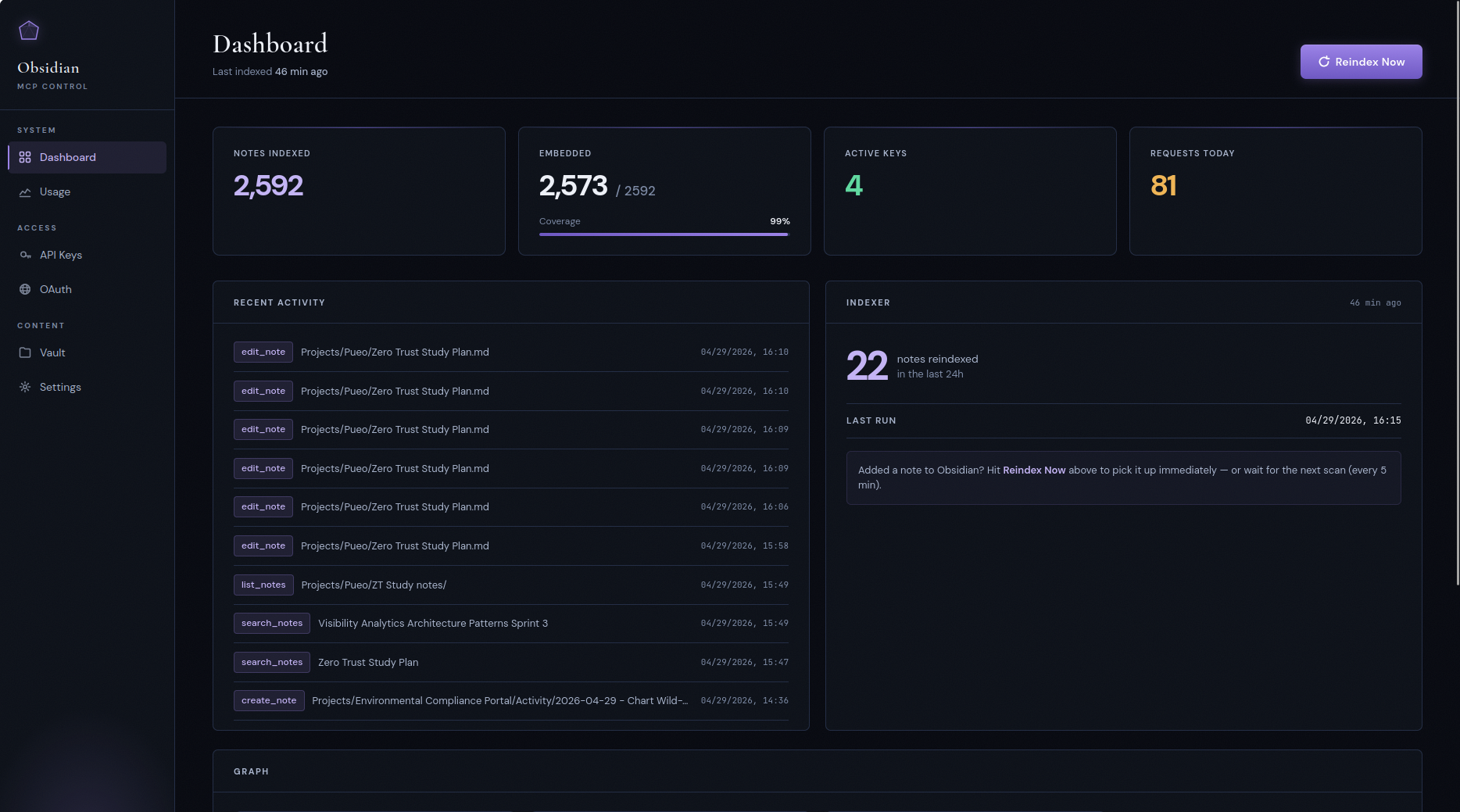
- Control panel
- Quick start
- Versioning and compatibility
- Upgrading
- Cost expectations
- The self-describing vault
- Multi-user mode
- Configuration
- Architecture
- Project layout
- Development
- Security notes
Why this exists
There are three things going on here, and they're more interesting together than apart.
1. Agent memory that you can actually read
If you let an agent run for a while, it needs memory. Most setups solve this with an opaque vector store, a SQLite blob, or a managed "memory" service that you can't see into. That works until you want to know what the agent thinks it knows about you, or you need to correct something, or you want to understand why it just made a weird suggestion.
This server gives you a different deal. Agent memory lives as markdown files in your vault. Folder structure, file names, frontmatter, all visible. You can open the file in Obsidian and read it. You can edit it. You can delete it. You can grep it. The agent's "memory" is a human-auditable artifact that sits in the same place as your own notes, with the same tools available.
The home lab is the use case that sold me on this. My vault has notes on the rack, the network, and every Home Assistant integration. I can say "set up a night-light mode in the master bathroom, 1% after 11pm" and a sysadmin agent finds the right config, makes the change, and updates the doc in the same pass. Six months later when I've forgotten how it works, the answer is in the vault, not buried in some chat history I can't search.
The semantic search and wikilink graph still work over that material, so retrieval is fast and conceptual. But the substrate is files you own, not a black box.
To be precise about the scope: what the server supplies is MCP-accessible storage, keyword and semantic search, and graph operations over markdown notes, for whatever MCP clients you connect. The agents direct their own reads and writes. There is no extraction or decay pipeline running behind them, and nothing rewrites a note because a model judged it stale: an agent remembers something because it wrote a note, and forgets it because someone deleted one. By late 2026 that is less of a contrarian position than it sounds. Every vendor's consolidation step (the "dreaming" or "sleep-time" job) has turned into a separate process you can inspect, rather than silent extraction inside the write path. This server keeps the agent as the author. The consolidation help it will grow is a hygiene report that proposes merges and flags duplicates, and never writes (#359), not a pipeline that edits your notes while you are not looking.
2. A shared memory layer between you and your agents
The other half runs the other way: the vault isn't only the agents' memory, it's mine. I think of my Obsidian vault as my exocortex. The "big me" that includes notes, calendars, scripts, search, and AI assistants is substantially more capable than the "small me" of the biological brain alone. It's also where I do most of my thinking, because writing something down is itself a form of thought.
The problem is that until recently, the vault was passive. I had to go find things. Agents that wanted to help me had to be briefed from scratch every session, and they had no way to see what I'd already written about a topic.
This server fixes that. Now the same vault feeds my own daily writing and any agent I plug into it. The agent reads what I read, links what I link, follows the same wikilinks, sees the same frontmatter. When I write a project note on Sunday, my Monday-morning briefing agent already knows about it. When the agent leaves notes from a research session, they show up in my normal Obsidian search.
A concrete version of this: I'll spend a session in Claude Code on a project, wrap up, push the commits, and then just say "update Obsidian." The agent reads the vault guide, figures out where project notes live in my structure, picks the right format and frontmatter, and leaves a session log I can later roll into a status report. No path-passing, no telling it what to write — the conventions are already in the vault, and it follows them.
The same goes for commitments. My to-dos are checkbox lines in those notes, and the task tools let an agent read the same list I do: what is overdue, what is due this week, what I am waiting on from someone else. It can add a follow-up from a conversation or tick one off when the work is done, and the change is one line in a file I can see. That part is optional. Plenty of vaults hold no tasks at all, and nothing else depends on it.
That's the exocortex idea made concrete: one place that holds context, and both the human and the agents reading and writing into it on the same terms.
3. The vault follows you
The thing that still surprises me is that this is internet-facing. Same vault, same notes, reachable from anywhere I happen to be talking to an agent — Claude in a browser tab, Claude on my phone on the train, an n8n workflow firing on a schedule, a Claude Code session on whatever laptop is in front of me. All behind OAuth or a bearer key, all hitting the same source of truth.
So when I hear an interesting podcast on a commute and want to think out loud about it with Claude on my phone, the agent isn't starting cold. It can pull up what I've already written on adjacent topics, surface a note I half-finished six months ago, and at the end of the conversation suggest updates and write them in. The vault doesn't have to be near me to be the thing I'm working in. (A session away from the keyboard walks through exactly one of these.)
A session at the keyboard
To make the abstract concrete, a short transcript from a real session. Tool calls inline; the user types in plain English and the agent picks the right tool.
you  > find anything I've written about why retrieval-augmented
       chat is hard

claude
  → semantic_search(query="why retrieval-augmented chat is hard")
    • 2025-12-03 - RAG failure modes.md
    • 2025-10-18 - Chunking tradeoffs.md
    • 2024-06-22 - Vector recall vs precision.md

  the closest hit is your December note on RAG failure modes. let
  me see what it's connected to.

  → get_neighborhood(path="2025-12-03 - RAG failure modes.md",
                     depth=1)
    8 connected notes. notable ones:
    • "Hybrid search" — a re-ranking design you sketched but
      didn't ship
    • "Out-of-distribution queries" — a half-finished draft from
      October
    • "Embedding model choice" — links to bge-m3, your current
      model

  you have three connected pieces here: a failure-modes catalog,
  an unshipped hybrid-search sketch, and an abandoned O-O-D draft.
  want me to summarize all three together, or pull up the draft
  so you can decide whether to finish it?

you  > pull up the draft, and tag it #revisit-2026 in frontmatter
       while you're there

claude
  → read_note(path="2025-10-18 - OOD queries (draft).md")
  → set_frontmatter(
      path="2025-10-18 - OOD queries (draft).md",
      updates={"tags": ["draft", "rag", "revisit-2026"]}
    )

  here's the draft, and the tag is on. you stopped right before
  the section on confidence thresholds; the open question you
  left yourself was…
Two things to notice. First, the agent didn't need to be told what
folder to look in or what tools to use — it picked them. Second, the
write at the end is structured (set_frontmatter mutating YAML, not
a regex over the file body), so the note round-trips cleanly. The
self-describing vault and the wikilink graph are doing the work that
makes this feel natural.
A session away from the keyboard
The transcript above is the easy case: I'm at a desk, I can see what the agent is doing, and Obsidian is one alt-tab away. The session that actually changed how I think about this server had none of that.
I was out walking with a health podcast in my ears — a long one, two people who clearly disagreed with each other, an hour of it. I had my phone and no intention of going home to a laptop. So I pulled the episode's transcript, handed it to Claude on my phone, and we talked it through while I kept walking: what the actual claim was, which parts I already had notes on, where it cut against something I'd decided months ago and written down at the time.
The agent had the vault the whole way. It surfaced what I'd already written on the topic, flagged that two dates in an older note were wrong, and asked whether a decision I'd recorded last year still stood given what the episode argued. By the time I got back it had written all of it in: the health-related decisions I'd actually landed on during the walk, the date corrections in the old note, a couple of new notes on the episode itself — and, because the conversation kept circling back to it, a durable note on how I decide which experts to trust on medical questions in the first place. That last one is the artifact I keep returning to. It wasn't about the episode at all; it was the reasoning underneath a whole class of decisions, and it now sits in the vault where the next agent will find it.
I never opened Obsidian. Not on the walk, not when I got home. The whole session — retrieval, argument, correction, and the writing that came out of it — went through an agent, and the vault is simply where it landed. Obsidian is how I check the work afterwards, not how the work gets done. That inversion is most of the reason this project looks the way it does.
What's in the box
The server exposes 33 MCP tools across six families, plus the auth and ops layer around them.
Every tool is published with a title and MCP ToolAnnotations, all
four hints set explicitly: readOnlyHint on the nineteen tools that only
read (search, read, list, graph, list_tasks, task_agenda, get_changes, check_upload), destructiveHint on
the eleven that can replace or remove something (edit_note,
move_note, delete_note, set_frontmatter, write_file,
delete_file, import_from_url, complete_task, update_task,
move_task, and request_upload, whose link can overwrite on
redemption),
openWorldHint on import_from_url only. create_note, add_task
and request_download are additive. Clients that honour
annotations run read-only tools without a per-call confirmation (Claude
Code also runs them in parallel) and keep prompting on destructive ones.
They are hints: the server enforces read-only credentials itself,
regardless of what a client does with them. The initialize result also
carries a short instructions paragraph — what the vault is, which tool
to reach for, and the write-safety rules — for clients that load only
tool names at session start. No description exceeds 4,000 characters on
the wire, so none is cut off by a client's description limit.
Search and discovery
keyword_search(query, folder?, tags?, frontmatter?, limit=20), full-text via PostgreSQLtsvector. A note's title and frontmatteraliasesrank above its body, so a query that is a note's title finds that note first; its tags (frontmatter and inline#tags, a nested#a/balso asaandb) are indexed below the title and above the body, andmatched_innames which oftitle,tagsandbodymatched; bare terms are ANDed, and when the full matches do not fill the page, partial matches follow taggedmatch: any; every row carries asnippet:with the matches highlighted (orhead:, the note's opening words, for a title or tags match). The text-search config(s) are configurable viaFTS_CONFIGS(see Full-text search language(s))semantic_search(query, folder?, tags?, frontmatter?, limit=15, rerank=false), vector similarity via pgvector, one one-line preview chunk per note. Notes are chunked at their headings, and each chunk is embedded under aTitle > Heading > Subheadingcontext prefix. A fresh row names the section it matched:§ "Plan/Risks" (#7)or§ (top of note), andread_note(path, section="#7")reads exactly that section. Previews start on a word; a section too short to stand alone (under 200 characters) is grouped with its neighbour, so a preview can include an inner heading line and its§names the enclosing section. Stale rows, and rows not yet re-embedded since the upgrade to heading-aware chunks, carry no locator. While any of your notes is still on the old chunking, each response says so on anindex_transition:line under its headerhybrid_search(query, limit=10, folder?, tags?, frontmatter?, rerank=false), both of the above fused by reciprocal rank fusion over each arm's top 50, one line per note with its fused score, each arm's rank and the1/(k+rank)terms behind the score. The three are peers, and every description carries the same routing sentence: exact identifiers, code symbols, titles or known phrases go tokeyword_search; conceptual or paraphrased questions tosemantic_search; unsure which,hybrid_search. A single arm can beat the fusion on its own kind of query. If the embedding provider is down,hybrid_searchreturns the keyword ranking markedarms: keyword-only (semantic unavailable: …), never silently degraded: the marker is on every return path, so a keyword-only page cannot pass for a fused one.- Every page of
semantic_searchandhybrid_searchcarries aconfidence: ok | lowheader token.lowmeans no keyword note matched all the terms and the closest semantic candidate is underSEARCH_LOW_CONFIDENCE_SIMILARITY, with a one-line hint to trykeyword_searchorget_neighborhoodwhen it costs no row. Nothing is filtered. The threshold ships at 0 (off: alwaysok) until you calibrate it. rerank=trueon either of the last two asks an optional, operator-configured reranker (RERANK_URL) to reorder the candidates the call already fetched (at most 50 notes). Each note is scored on the best of up to four of its fetched chunks, sent as the same text they were embedded from (title, heading path and tags, then the chunk); a reranked row's preview and§locator show the chunk that scored. The response is either fully reranked (reranked: true (candidates: N), arerank_scoreper row) or the unreranked page markedreranked: false (<reason>); without a reranker it answersreranked: false (not_configured). Its rows are one-line quoted objects, likehybrid_search'slist_notes(folder?, limit=50, since?, until?, order_by?, cursor?), sorted by modified timeget_recent(folder?, limit=20, since?, until?, order_by?, cursor?), recently changed, with each modification time in UTC (YYYY-MM-DD HH:MM UTC). On both,order_by="content_changed"withsincelists notes whose content changed (a touch or a re-sync that keeps the bytes does not count);sinceis inclusive anduntilexclusive, each a UTC date (YYYY-MM-DD, the whole day) or an ISO 8601 datetime with an explicit offset. Any of the four switches to keyset paging with amore: cursor=…footer; a call with none of them is unchangedget_changes(since, folder?, kinds?, by="any", limit=50), the change feed: one line per note created, modified, moved or deleted after a cursor, oldest first, each attributed to the API key or OAuth client that made it ((you)for your own credential) orhuman/syncfor an edit the index discovered (Obsidian, a sync client, git). It returnsnext_since, an exactev:<n>cursor an agent stores in its own notes for the next session;byisany | me | agents | human. Deletions say why (removed,not_indexable,quarantined);gapandresetlines say when the view is incompleteget_tags(limit=50), tag and countlist_tasksandtask_agendalist checkbox tasks across the vault from the index; see Tasks (optional)get_vault_guide(), the Obsidian primer plus this vault'sCLAUDE.md, served live- Retrieval changes are measured with
make search-evalagainst judgments mined from the operator's own usage log (a search followed by a read of one of its results); see the search evaluation harness
Read and write
read_note(path, section?, offset=0, limit?)returns a structured result —path,title,tags,frontmatter_yamland a JSONfrontmatterview,heading(section reads),content, and truncation as data (truncated,offset,next_offset,total_chars,outline,notice). Bounded byMAX_READ_RESPONSE_CHARS(default 40,000) — see Response size limits.section=<heading>returns one section's body instead of the whole note;offsetcontinues a truncated read.create_note(path, content), atomic write, refuses overwriteedit_note(path, …)with four mutually exclusive modes: full replace (default),append=True,find=…(with optionalreplace_all), orsection=<heading>(ATX headings, supportsParent/Childpath-style and#Nordinal disambiguation).dry_run=Truereturns a unified diff without writing. Legacy clients may useoperation="append";operation="replace"explicitly selects full replace.move_note(from_path, to_path, rewrite_links=False), relocates and optionally rewrites incoming[[Old]],[[Old|alias]],[[Old#anchor]],![[Old]], and[[folder/Old]]references in source notesdelete_note(path, permanent=False), soft-delete to.trash/<YYYYMMDD-HHMMSS>-<basename>-<8 hex>by default, via a single non-replacing rename, so it never overwrites an existing trash entry (a filesystem that cannot do that rename makes the soft delete refuse with a named error rather than fall back).permanent=Trueunlinks.set_frontmatter(path, updates, remove?), structured YAML mutation. Body is byte-identical when only frontmatter changes.
Tasks (optional)
An agent that keeps notes usually also keeps commitments: a follow-up it promised, a next action, something to check again on Friday. These five tools let it keep them as checkbox lines in the same vault as its notes, and find, add and close them without reading files. Nobody has to use them. A vault without checkboxes behaves exactly as before, and no other tool depends on them.
What counts as a task. By default, any markdown checkbox list item:
- [ ] Renew the certificate, * [x] …, 1. [/] …, including one inside
a blockquote or callout, or indented under another item. A plain checkbox
is a complete task, and Obsidian does not have to be installed. A vault
whose checkboxes are not all tasks can narrow this with a task rule; see
Which checkboxes are tasks. The optional
fields use the Obsidian Tasks plugin's
emoji format, so the same notes also work in Obsidian, with or without
that plugin:
| Field | Written as |
|---|---|
| due | 📅 2026-11-20 |
| scheduled | ⏳ 2026-11-18 |
| start | 🛫 2026-11-15 |
| priority | 🔺 highest, ⏫ high, 🔼 medium, 🔽 low, ⏬ lowest |
| recurrence | 🔁 every week |
| done | ✅ 2026-11-10 |
| cancelled | ❌ 2026-11-10 |
| created | ➕ 2026-11-01 |
[ ], [/] and every other marker are open, [x] and [X] are done,
and [-] is cancelled. A checkbox inside a code block is not a task, and
a Tasks-plugin query block (```tasks) is text the server does
not evaluate. The server supplies the mechanics (listing, one-line
edits, moving a task between notes, and recurrence for the rules listed
below) and no policy: where
tasks live, what a tag means and what is due when are up to you, your
agents and your vault guide.
Which checkboxes are tasks. A checkbox is not always a task. People use checkboxes for checklists, runbooks, verification steps, acceptance criteria, packing lists, meeting agendas and the step lists inside work tickets. None of those is a commitment someone has to act on, but a tool that treats every unchecked box as an open task reports them all.
This matters more in a vault that AI agents write into. Agents produce
checkbox lists freely: a plan, a step-by-step procedure, the "done when"
criteria of a ticket, a status note. Each list adds open "tasks". An
agent that asks "what is on my plate" then gets an answer made mostly of
procedure steps; a text search for a task also matches the same words
in a runbook; and add_task's duplicate check refuses a new task, or
lists "similar tasks", because of a checklist line that was never a task.
In one real vault, 1,868 checkboxes were open: 314 were tasks and 1,554
(83%) were not. In that vault's dedicated task lists, every open checkbox
carried a date, a priority, a recurrence rule or a workflow tag. The
plain checkboxes sat in the same folders and often the same notes as the
tasks, so excluding folders or note tags could not separate them.
So each user (in single-user mode, the server) has a task rule that says which checkboxes count as tasks:
| Rule | A checkbox is a task when | Choose it when |
|---|---|---|
all (default) | always | Your checkboxes are your tasks, for example a small agent-memory vault. |
fields | it carries a task field (a due, scheduled, start, created, done or cancelled date, a priority or a recurrence rule) or one of your task tags | Your real tasks carry a date, a priority or a tag such as #waiting, and your checklists do not. |
filter | its text contains your global filter text, such as #task | You mark every task with one marker, or you already use the Tasks plugin's "Global task filter". |
Task tags match the way list_tasks(tags=…) does: ignoring case and by
/ segment, so the task tag waiting matches #Waiting/bob but not
#waitingroom. The global filter is the Tasks plugin's own mechanism: a
plain text match that respects case, anywhere on the line. #Task does
not satisfy #task, while #tasks and a #task inside inline code do;
the filter does not have to be a tag (TODO works).
The default stays all for three reasons: plain checkboxes keep working
for a vault whose checkboxes are its tasks; it is what the Tasks plugin
does when no global filter is set; and an existing deployment sees no
change until someone picks another rule (under all every response is
byte for byte what it was before). A vault that agents write into
should choose fields or filter, and say in its vault guide (the
vault's CLAUDE.md, served by get_vault_guide) how a task is
written, for example "every task has a 📅 due date or the #waiting
tag" or "every task line contains #task". Agents then create tasks the
rule recognises. add_task helps: under filter it adds the filter text
itself, and under fields it says when the line it wrote is not a task.
The rule is chosen on the panel's Tasks card, or for
everyone without a choice of their own by TASKS_RULE,
TASKS_RULE_TAGS and TASKS_GLOBAL_FILTER (see
Configuration). It applies to the default scope only:
default listings from list_tasks and task_agenda, and add_task's
duplicate check across the index. Nothing is hidden silently. While
fields or filter is in force, a default-scope response carries one
more header line, for example:
Rule — task rule: filter "#task" — excluded by rule: 2 tasks — kept though unsure (text cut): 1 tasks — pass scope="all" to list every checkbox
It names the rule, counts the checkboxes the rule left out (excluded by rule, apart from excluded by scope, which counts the folder and
note-tag exclusions), and counts the ones kept only because the server
could not judge them: a line whose stored text was cut at 1,000
characters before the filter text appeared, or whose tags were cut past
64. Those are listed rather than hidden. scope="all" lists every
checkbox, whatever the rule. Under fields, while rows still await
the first index pass after an upgrade, the line also says the rule is
approximate for them. A stored rule the server cannot apply (only a
manual database edit can produce one) is treated as all, and the line
says so.
Writes under a rule. The rule never blocks a write: complete_task
and update_task address any checkbox by path and id, including one
that only scope="all" lists.
- Under
filter,add_taskputs the filter text at the start of the new task's text when the line does not already contain it, as the Tasks plugin's own task dialog does, and the response addsglobal filter added: "#task". A text that would pass 1,000 characters with the filter added is refused, with nothing written. - Under
fields,add_taskwrites a line with no field and no task tag as asked, and the response addsnote: not a task under your task rule "fields" …: default listings will not show it.update_taskadds the same note, underfieldsorfilter, when its edit leaves a line that is not a task by the rule, for example after removing the last date or the filter text.update_tasknever adds the filter text back. add_task's check against the note it writes into still compares every open checkbox in that note: the same words in the same note are most likely the same thing (update_taskcan give that line a date;allow_duplicate=trueadds anyway).- Under
filter, the duplicate check recognises an existing task whether its filter text sits in front (where the server puts it) or as a trailing tag (where people usually put one):add_task(text="Renew passport")is refused as a duplicate ofRenew passport #task.
A list_tasks cursor is refused (invalid_argument) once the rule
changes in a way that changes the rows (another rule, other task tags
under fields, another filter text under filter); list again.
| Tool | What it does |
|---|---|
list_tasks | Lists tasks from the index without reading a note. Filters: status, folder, path, tags and excluded tags, due / scheduled / done date ranges, undated, priority, words in the text, recurring. Ordered by due date, priority, scheduled date, done date or path, and paged with a cursor. Every row carries the task's id. |
task_agenda | A dated overview from the index: overdue, due today, scheduled and now due, and due in the next days days (default 7). Every section states its count, and a section that is cut short ends with the exact list_tasks call that continues it. |
complete_task | Marks one task done ([x], plus ✅ <date> by default) and, for a recurring task, writes its next occurrence in the same edit. |
update_task | Changes one task's dates, priority, tags, recurrence, status (open, in progress, cancelled) or description, or adds one context line under it. |
add_task | Inserts one new - [ ] line into an existing note, after the last top-level task of the note or of a named section and everything indented under it. |
move_task | Moves one top-level task, with every line indented under it, to another note or section, byte for byte. The destination is written before the source, so an interrupted move leaves the task in both notes, and resume=true completes it; an outside save of an older destination during the move can still lose the task. |
The four write tools need write permission, like every other write.
list_tasks and task_agenda read the same index as the search tools,
and the header of every response counts what the index could not show
(notes not yet scanned, tasks that could not be indexed, notes over the
5,000-task cap), so an empty list never silently means "nothing open".
Task ids. Every listing row prints the task's id, a 12-character
key computed from the task's text. To change a task, pass the note's
path and that id. The server finds the line by recomputing the ids
from the note's current text, never from a stored line number, and
because a write changes the line's text, the response returns the task's
new id. Nothing is ever written into a note to identify a task. Pass the
path as it is on disk: a row escapes unusual characters in a path (a tab
as \t, a backtick as \u0060, a backslash doubled), so undo those
escapes if the row shows any. When a
note holds several identical task lines, their ids carry an occurrence
suffix (3f9a0c1b2d4e.2of3), and a write with such an id also needs
the note's content_hash from read_note as expected_hash.
What a write guarantees.
- One line changes. Only the characters of the field being changed
are touched. The rest of the line (indentation, list marker, field
order, spacing) and every other line stay byte for byte. The only
extra lines are the ones the call asks for: a recurring task's next
occurrence, the new line from
add_task, or one context line. Each planned edit is re-parsed and checked before it is written. - Refused rather than guessed. Each of these is refused with
nothing written, and the refusal ends with one
MCP-REFUSALline carrying its code: an id that no longer matches any line (task_not_found: list again), a bare id that matches several lines (task_ambiguous), a field the call changes that appears twice on the line (task_malformed), an unsupported recurrence rule (recurrence_unsupported), and onadd_taskan open task with the same description (duplicate_task;allow_duplicate=trueadds it anyway).add_taskalso lists up to five similar open tasks, which never block. dry_run=truereturns the diff and the new line(s), and writes nothing.expected_hashis optional and binds the whole note, as onedit_note. Without it, a change made by someone else during the call is retried from a fresh read, at most 3 attempts in total.- Listings see the write at once. A successful write refreshes that
note's task rows in the index (
index: refreshed). If the refresh cannot run, the write still stands and the response saysindex: may lag (<reason>)until the next index pass.edit_note,set_frontmatterandwrite_filealso try to refresh the task rows of a note they change, anddelete_noteremoves a deleted note's tasks; their output does not say whether that worked. A new note created bycreate_note,write_file, an import or an upload, links rewritten bymove_note, and any refresh that could not run show up after the next pass (every 300 s by default).
Recurrence: the supported rules. N is a whole number from 2 to
999, weekday and month names are written out in full English, and any
rule may end in when done, which counts the next date from the
completion date instead of the task's own date:
every day,every N daysevery weekday(Monday to Friday)every week,every N weeksevery week on Monday, Thursdayorevery Monday, Thursdayevery month,every N months(a day the month lacks becomes its last day: January 31 → February 28)every month on the 15th(for the 29th to 31st, a month without that day is skipped),every month on the lastevery year,every N yearsevery March on the 3rd
Every other rule is refused with recurrence_unsupported and
nothing written, wherever it appears: completing the task,
update_task(recurrence=…) or add_task(recurrence=…). That includes
every weekend, every 2 weeks on Monday, every month on the last Friday, every 1 day, abbreviated names, until …, for N times, and
a yearly rule on a task dated February 29. A recurring task is never
completed without its next occurrence. To complete one whose rule is
refused, clear the rule first (update_task(clear=["recurrence"])).
The next occurrence keeps the task's text, tags and priority. Its due
date (or scheduled, or start date, if it has no due date) moves by the
rule, and its other dates keep their distance from it. As in the Tasks
plugin, missed occurrences are not skipped: a weekly task completed
three weeks late gets its old date plus 7 days, which may already be
past.
Dates and the timezone. Every date argument accepts YYYY-MM-DD and
relative forms such as today, tomorrow, yesterday, +7d or -1d
(up to 3,660 days either way). "Today" is the current date in the
caller's task timezone: TASKS_DEFAULT_TIMEZONE (default UTC), or the
timezone saved on the panel's Tasks card. Every response that resolved a
relative date states the timezone and the dates it used. A list_tasks
cursor from a relative-date query is refused after midnight in that
timezone, because the dates moved; list again.
The default scope. list_tasks, task_agenda and add_task's
duplicate check across other notes work in the caller's default scope: the whole vault
minus the excluded folders and excluded note tags saved on the panel's
Tasks card, and only the checkboxes that are tasks under the caller's
task rule. With nothing saved, which is
the default, nothing is excluded. scope="all" ignores the exclusions
and the rule, and every listing states its scope and how many tasks the
scope and the rule left out, so an exclusion is never silent.
Not modelled: custom status cycles (completing a task with any open
marker writes [x]), task dependencies, the plugin's "remove scheduled
date on recurrence" setting, and its "remove global filter from
description" display option (the filter text stays part of the task's
text and, when it is a tag, of its tags, so with #task as the filter
list_tasks(tags=["task"]) matches every task). A task with
🏁 delete is refused on completion (on_completion_unsupported)
rather than deleted. The settings are under
Configuration and the panel card under
Tasks settings.
File access (non-markdown)
Raw read/write/browse of arbitrary vault files (PDFs, images, skill assets, data files) — distinct peers to the note tools, which stay markdown-only. Pure byte transport: no server-side PDF/text extraction, no embedding or indexing of non-markdown files.
read_file(path, encoding="auto", offset=0, limit?), returns text-like files as text, images as an inline image block that renders in-client, and other binaries as a base64 string.text/base64force the form. Refuses files overMAX_FILE_READ_BYTES(default 10 MB); text results are additionally bounded byMAX_READ_RESPONSE_CHARSand continue viaoffset.hash_only=Truereturns the whole file'scontent_hashwithout content; base64 results include that hash in their header. Text results remain plain text.write_file(path, content, encoding="base64", overwrite=False), lands a file in the vault; base64 for binary,textfor UTF-8. No-clobber by default, auto-creates parent dirs, atomic write. Capped atMAX_FILE_WRITE_BYTES(default 25 MB).list_files(folder=".", pattern="*", recursive=False, limit=200),ls-style browse of files and subdirectories with size and mtime, glob-filterable and result-capped.delete_file(path, permanent=False), soft-deletes a non-markdown file to.trash/<YYYYMMDD-HHMMSS>-<basename>-<8 hex>with a single atomic rename. Refuses markdown (that isdelete_note), directories, and symlinks.
All four reuse the path-traversal guard and exclude any path with a
component starting with . (dot-directories and dot-files)
(.obsidian, .git, .trash, …), matching the indexer's visibility
rule.
Guarding edits against stale reads
Pass a read's content_hash as expected_hash when editing, updating
frontmatter, moving or deleting a note, overwriting a raw file, or deleting
a raw file. The canonical token is sha256:<64 lowercase hex>, computed
over the complete raw file bytes; a section or truncated read_note still
returns the whole-file hash. For raw files, use read_file(hash_only=True)
or the base64 header. Do not hash the returned text yourself.
Documentation truncated — see the full README on GitHub.
Reviews
No reviews yet
Be the first to review this server!
More Productivity MCP Servers
Memory
Freeby Modelcontextprotocol · Productivity
Knowledge graph-based persistent memory across sessions
Toleno
Freeby Toleno · Developer Tools
Toleno Network MCP Server — Manage your Toleno mining account with Claude AI using natural language.
MCP Marketplace
Freeby mcp-marketplace · Developer Tools
Search and install MCP servers from inside your AI client.
mcp-creator-python
Freeby mcp-marketplace · Developer Tools
Create, build, and publish Python MCP servers to PyPI — conversationally.
by Lharries · Communication
Read, search, and send WhatsApp messages through your AI assistant
FinAgent
Freeby mcp-marketplace · Finance
Free stock data and market news for any MCP-compatible AI assistant.