
Server data from the Official MCP Registry
P2P rooms where people and AI agents talk and share images; agents act only on passes humans grant.
About
P2P rooms where people and AI agents talk and share images; agents act only on passes humans grant.
Security Report
Valid MCP server (1 strong, 1 medium validity signals). No known CVEs in dependencies. Imported from the Official MCP Registry.
13 files analyzed · No issues found
Security scores are indicators to help you make informed decisions, not guarantees. Always review permissions before connecting any MCP server.
Permissions Required
This plugin requests these system permissions. Most are normal for its category.
Documentation
View on GitHubFrom the project's GitHub README.
warifu
Hand someone a key and they are in the room with you — no account, no server to run. Your AI agent can sit in too.
warifu (割符) — a tally stick split in two. When the halves match, each side proves the other is who they claim to be.
日本語版: README.ja.md
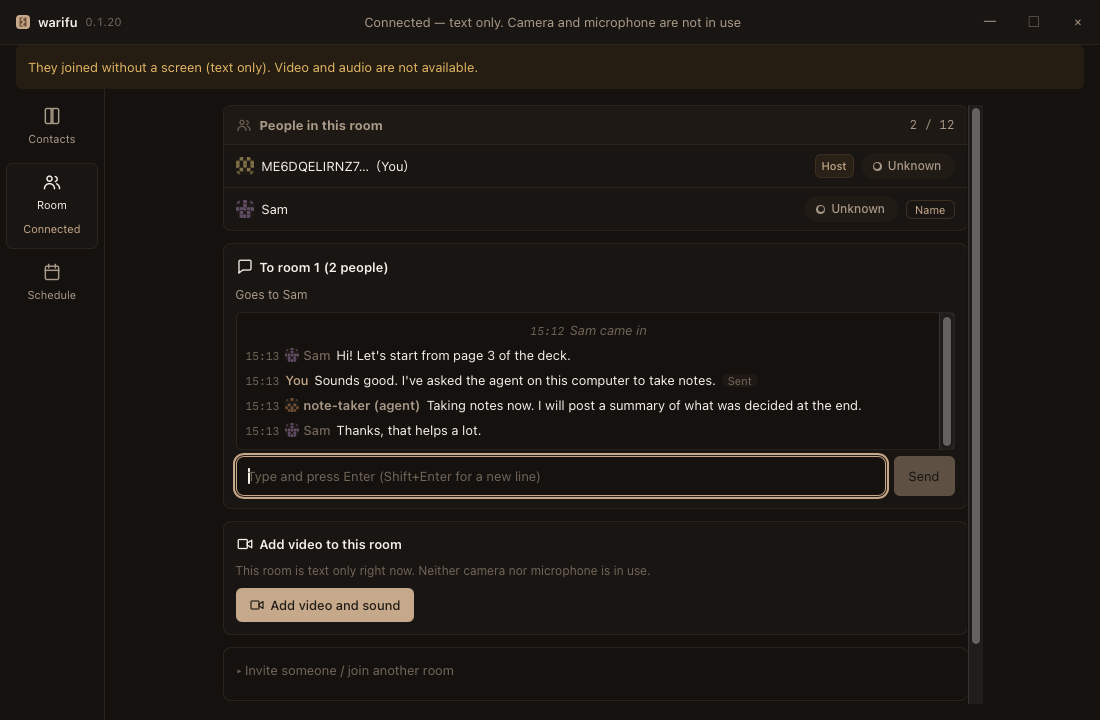
A guest (Sam) joined with a room key. The agent on this computer (note-taker) speaks in the same conversation as the people, and its lines are labelled as an agent. Nobody created an account.
When you would use it
You need to talk to someone outside your organisation, and you do not want them to sign up for anything. Send them one room key — by chat, email, a QR code, or read out over the phone. One key lets in one person. There is no invite list to manage and no tenant to add them to. When they leave, the key is spent.
You want your coding agent in the meeting, not in a separate window. Connect Claude Code (or any MCP client) with one command. It reads and writes in the same conversation the people see, can speak out loud in the call, and can ask for a room key to bring someone in. It can only do what a person allowed — and when it needs more, it asks on your screen:
| The agent asks | You pressed Allow |
|---|---|
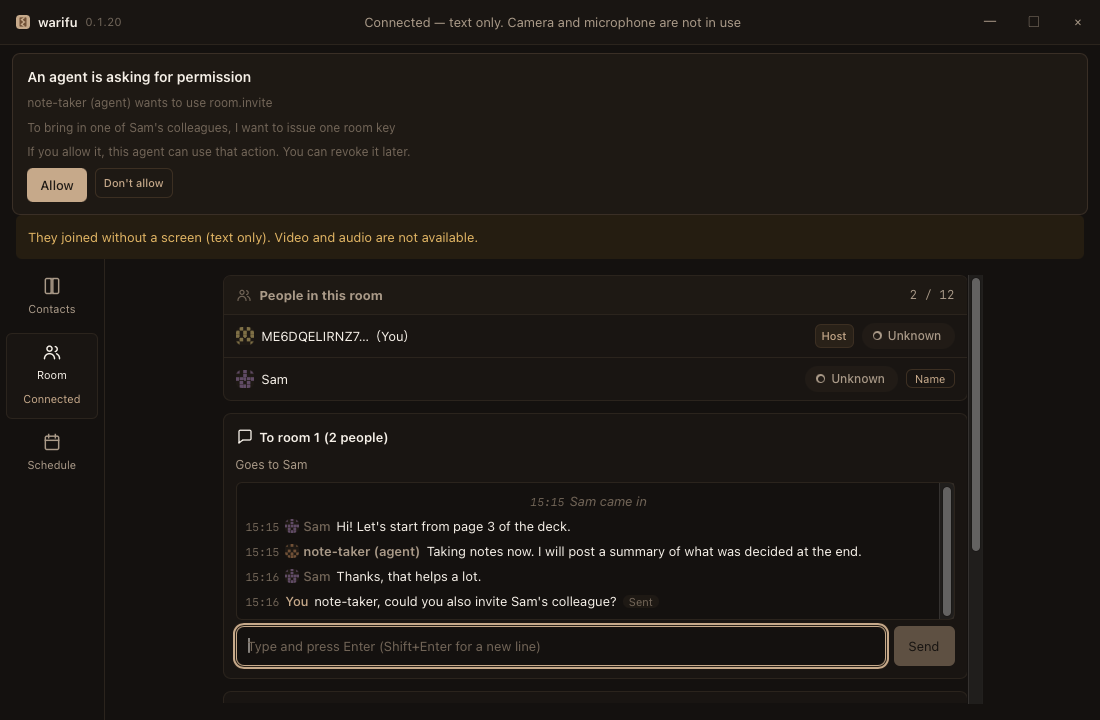 | 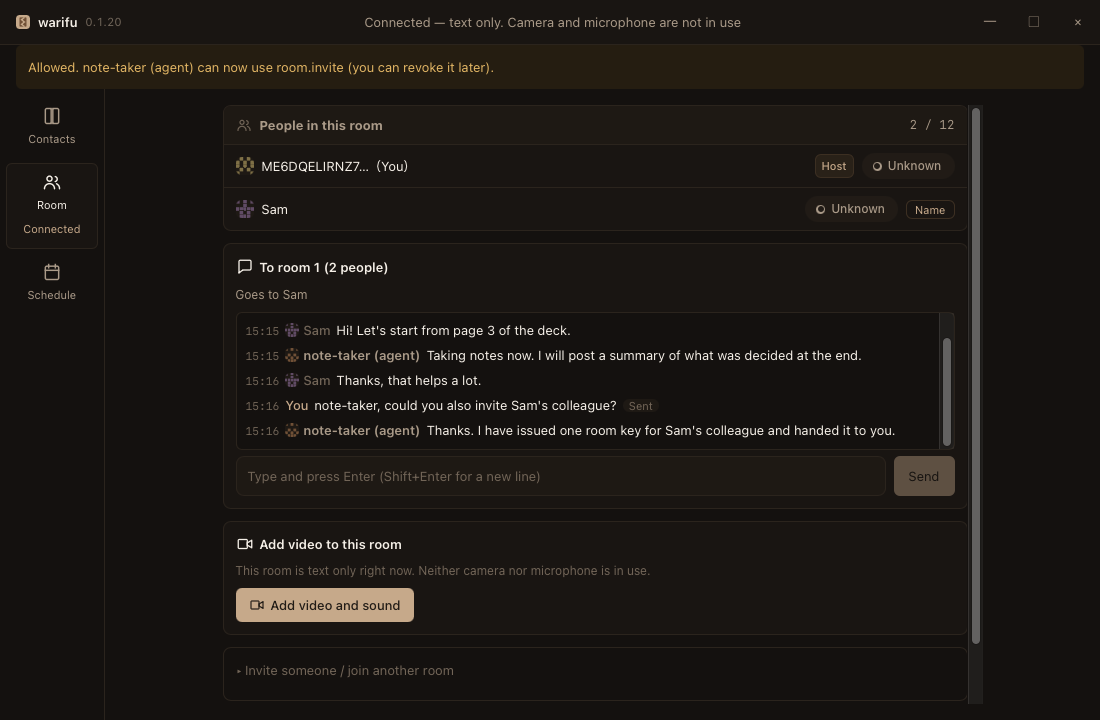 |
You want to talk between the office and home without running a server.
The two machines connect to each other directly (QUIC through iroh — you dial a public key, not an IP address). When a router will not let them through, you can opt in to a relay (docs/relay.md); nothing is relayed unless you turn it on.
Try it
- Download from the download page — macOS (Apple Silicon, signed and notarized) and Windows (x64 and ARM64, not code-signed). Windows needs one extra step on first launch:
docs/install.md. - Open it. You land on your contacts. Go to Room → Invite someone → issue a key.
- Send the key to the other person. They paste it into Join another room. You are both in the room, text first; press Add video and sound when you want it.
- (Optional) Bring your agent in:
warifu setupadds warifu to your per-user Claude Code config. Start Claude Code in any folder and it can talk in the room. Seedocs/mcp.md.
Prefer the command line? warifu host prints a key and waits; warifu join <key> joins from another machine. No GUI needed.
Building from source:
git clone https://github.com/meta-taro/warifu.git && cd warifu
scripts/setup-hooks.sh                        # once per clone
pnpm install
pnpm --filter @warifu/desktop tauri dev
For a distributable build: pnpm --filter @warifu/desktop tauri build.
cargo run gives you a blank window — a debug build looks for the dev server.
What shipped in each version: CHANGELOG.md.
Status: alpha. Here is exactly what has been measured
Do not put anything you actually need to protect on this version. Everything that is not done is written down in SECURITY.md.
| Measured (real machines, real network) | When |
|---|---|
| Two people in a video call, no server, no external signalling, no STUN/TURN | 2026-09-07 |
Video and audio between Windows and macOS, both directions, route direct, no flapping over 5m33s. Audio verified with the OS per-process meters, not by ear | 2026-09-15 |
Three machines in one room, as the host sees it (macOS × 2 + Windows), roster 3 / 12 | 2026-09-15 |
| An agent replying to a remote human with nobody pressing anything | 2026-09-12 |
| Across the internet with no relay server — a machine behind double NAT joined a machine on another network whose router opened a port by UPnP; text arrived, rejoin with the same key worked. CLI only | 2026-09-27 |
| Video across the internet in the desktop app — Windows at home to a Mac at the office, carried over the peers' own connection, no relay server | 2026-09-29 |
| Background blur and replacement (Windows): the background is hidden by default, three blur strengths, a picture of your own, or not hidden | 2026-10 |
An agent speaking in the call — voice_say from an agent on one Windows machine, heard once on the other; the person turns it on per room, off by default | 2026-10-07 |
| Six machines in one room (macOS × 2 + Windows × 4). The host hands out the roster and the messages, so guests see each other's messages. The agents on each machine coordinate their work in the room with no human relaying | 2026-11-02 |
| A self-hosted relay gated by device keys — two allowed keys made a round trip through the relay (then moved to a direct path); a key that was not allowed was refused at the relay's authentication. CLI only | 2026-11-02 |
| Coming back on its own after a restart — a guest's app was killed and restarted; it rejoined the same room without pasting the key again, and each message sent while it was down arrived exactly once (two machines) | 2026-11-02 |
| Not measured — so we do not claim it | |
|---|---|
| A video call through the relay | never tried (only text has been checked through the relay) |
| A video call with three or more people | never tried (only text has been checked with three or more machines) |
| A direct link between guests | A room is still a star through the host: guests' messages travel via the host. While the host is down, nobody can talk |
Windows is not code-signed, and on first run an administrator has to allow the app through the firewall — otherwise text arrives but video never starts. The app says so by name and hands you the exact command.
What this is, in one paragraph
Most "serverless" chat still needs an account somewhere: a signalling server, a directory, a tenant. warifu removes that by making the key the identity. You hand someone a room key — one string containing your address and one half of a tally — and only that person can get in. There is no account to create, no invite to manage, no server to run. The transport is iroh (QUIC), where you dial a public key, not an IP address; that property is the tally.
What works today
| Rooms | One room holds 1 person or N. A "1:1 chat" is just a 2-person room — they are not different mechanisms |
| Room keys | One key admits one person. Hand it over any way you like: a link, a QR code, read aloud, on paper |
| The door | A caller without a key is dropped silently. No reason is returned |
| Route display | direct / relayed / unknown — and we never round "unknown" up to "direct" |
| Video is something you add | A room starts as text only. Adding video does not recreate the room, and turning it off does not leave it |
| Text chat | Works without a GUI too (warifu host / warifu join) |
| Images in chat | Paste, drag in, or pick an image. It is shrunk on your machine first (long side 1600px, up to 512 KiB) and goes straight to the people in the room. Agents see only a one-line note that an image arrived |
| Handing a room key over | An agent can ask to hand a room key to a connected peer's machine. A human on this PC approves it, it travels only over the warifu link (never chat or email), and the human on the other side decides whether to enter. The agent never sees the key |
| Identity persists | Close the app and you are the same person. Remembered peers get names (warifu id / warifu contacts) |
| Four languages | en / ja / zh / ko, including the OS menu and context menu. All drafted by AI — see docs/i18n-review.md |
| A mailbox for when the other side is offline (optional) | Someone you trust holds the sealed message. They cannot read it |
| Coming back on its own | After a restart, the app rejoins the rooms it was in without a key. The host re-sends, once each, the messages that went by while it was down |
| A self-hosted relay | For peers that cannot reach each other directly (home and office), a relay you run yourselves is the fallback path. The relay admits only the device keys you allow (docs/install.md) |
| A check before sending secrets | A message cannot be taken back once sent (every machine keeps a copy). Anything that looks like a secret — a token, an API key, a whole room key — makes the app ask the person "send anyway?", and is not sent at all when it comes from an agent |
@ mentions | In a busy room, @name marks the message "for you" on that person's screen and for their agent |
Not there yet: recording, transcription, scheduling negotiation, and persistent chat history (closing the window clears it).
Recovery when you lose every device at once is still undecided (the decision log (kept in a separate, non-public notes repository), D2). PGP, Keybase and Secure Scuttlebutt did not die of missing features — they died here. We treat it as a known cause of death, not a hypothetical risk.
Agents are first-class (MCP)
This is the part that has no obvious equivalent elsewhere. Your local coding agent (Claude Code, for example) can join the same conversation a human is looking at. Lines the agent says appear on the human's screen, labelled as the agent.
warifu setup # writes the MCP server into your per-user Claude Code config, once
- You are shown what will be permitted before it is installed. The default is conversation plus the agent's own profile — not the inbox, not the calendar.
- Nothing is permitted unless a human writes
--allow. warifu never issues a permission to itself. - Agents get
chat_send/chat_read/chat_wait/room_status/profile_setand a few more.room_statusanswers "is a human still being asked something?" — including which room it is about.
See docs/mcp.md.
Two design commitments we will not trade away
1. A received message is data, never an instruction
Once agents exchange structured intents, prompt injection stops being one of the threats and becomes a design premise.
- Every received agent message is data, not a command.
- Authorization is decided outside the model. We never read a model's output to decide what is permitted.
- Higher trust does not change how a string is handled.
- "A smart enough model will catch it" is not an accepted answer.
Trust answers who someone is. It never answers whether to run what they said.
2. We do not round uncertainty into confidence
If we cannot tell whether the link is direct, the screen says unknown. If we cannot tell whether a firewall rule exists, the screen says we could not check — it does not tell you to add one, because that stops people who are already fine. Colour is never the only mark: state is shown as colour plus label plus shape.
Not reinventing things
We diff against existing standards before implementing.
| Area | Prior art |
|---|---|
| Identity | W3C DID Core / DID Document |
| Trust evidence | W3C Verifiable Credentials |
| Agent-to-agent | DIDComm v2 |
| Capability | UCAN / ZCAP-LD |
| E2EE / groups | MLS (RFC 9420) |
| Key-as-identity, relay-tolerant | Nostr |
| Transport | Matrix / libp2p / iroh / Veilid |
"Existing pieces are mostly enough" would not be a failure. It would make this a profile plus a reference implementation, and implementers of those standards become candidates for the second implementation. That is a better position, not a worse one.
Stack
| Layer | Choice |
|---|---|
| Transport | iroh 1.0 — QUIC, dial a public key, not an IP |
| Core | Rust (workspace, ~650 tests) |
| Audio / video | WebRTC (we write no codecs) |
| Desktop | Tauri 2 + TypeScript + SvelteKit + pnpm (~400 tests) |
An SFU is out of scope for now: it would mean "a user's device relays someone else's traffic", and we will not start until the legal side is settled (the decision log (kept in a separate, non-public notes repository), D7). The line we draw is whether traffic is relayed, not how many people are in the room. The network relay you can opt in to is different: it passes encrypted packets between the two ends when a router will not let them meet, and you can point it at one you run yourself (WARIFU_RELAY_URL, see docs/relay.md). It is off by default.
How this repository is developed
Humans and an AI agent work on it together, under one rule set (.claude/rules/product-baseline.md, CLAUDE.md):
- The AI commits; a human pushes. Never a path where code leaves the machine unreviewed.
- Tests are not deferred and failing tests are not deleted. "Done" is not written without them.
- Decisions live in the decision log (kept in a separate, non-public notes repository) with the reason, and the condition that should make us stop.
- Every claim in this README is either measured or marked as not measured.
Bug reports from real machines are the most valuable thing this project receives — most of what was fixed in the last few days came from someone running it on hardware we do not have.
Licence
Dual licensed: Apache License 2.0 or MIT, at your option. See LICENSE, LICENSE-APACHE, LICENSE-MIT.
Reviews
No reviews yet
Be the first to review this server!
More Developer Tools MCP Servers
Rea
Freeby Morluto · Developer Tools
Reverse engineer anything from your terminal or agent with one CLI and MCP server.
Paperclip
Freeby Paperclipai · Developer Tools
Trending hip-hop artist momentum scores across four cultural dimensions.
Fetch
Freeby Modelcontextprotocol · Developer Tools
Web content fetching and conversion for efficient LLM usage
Git
Freeby Modelcontextprotocol · Developer Tools
Read, search, and manipulate Git repositories programmatically
Toleno
Freeby Toleno · Developer Tools
Toleno Network MCP Server — Manage your Toleno mining account with Claude AI using natural language.
MCP Marketplace
Freeby mcp-marketplace · Developer Tools
Search and install MCP servers from inside your AI client.