
Server data from the Official MCP Registry
Embedded/IoT mentor: picks the board and toolchain, estimates cost and battery life.
About
Embedded/IoT mentor: picks the board and toolchain, estimates cost and battery life.
Security Report
The MCP server is well-structured with appropriate security practices for its stated purpose as an embedded/IoT mentoring tool. The code properly handles subprocess execution with typed arguments (preventing shell injection), validates user inputs, and keeps credentials in environment variables. Reference files are read from disk without traversal vulnerabilities, and the server implements proper error handling. Permissions align with the developer tools category baseline. Supply chain analysis found 5 known vulnerabilities in dependencies (0 critical, 5 high severity).
7 files analyzed · 9 issues found
Security scores are indicators to help you make informed decisions, not guarantees. Always review permissions before connecting any MCP server.
Permissions Required
This plugin requests these system permissions. Most are normal for its category.
What You'll Need
Set these up before or after installing:
Environment variable: HOST
Environment variable: PORT
How to Install
Add this to your MCP configuration file:
{
  "mcpServers": {
    "io-github-mh-mansouri-embedded-iot-mentor": {
      "env": {
        "HOST": "your-host-here",
        "PORT": "your-port-here"
      },
      "args": [
        "-y",
        "embedded-iot-mentor-vscode"
      ],
      "command": "npx"
    }
  }
}Documentation
View on GitHubFrom the project's GitHub README.
Embedded / IoT Mentor — a Claude Skill


A skill for Claude that acts as an experienced embedded-systems mentor: it picks the microcontroller, board, and toolchain for your project, estimates what it will cost and how long it will take, and hands you a build plan that stops at a working breadboard instead of a production line you didn't ask for.
Most embedded advice fails in one of two directions — a parts list with no plan, or a production roadmap for someone who hasn't blinked an LED yet. This skill asks what you've actually built before, then answers at that level.
Try it
| Where | One click |
|---|---|
| Claude | Download embedded-iot-mentor.skill and open it |
| VS Code (Copilot Chat) | Copy vscode-copilot/'s prompt in — nothing to install |
| Your own code |  then call the REST API — routes then call the REST API — routes |
| Any other AI chat | Copy universal-prompt.md into the first message — no install, works in ChatGPT, Gemini, Copilot, and others |
Prefer a page over a chat? docs/index.html is a static overview with the
same "Try it" links and demo — live at
mh-mansouri.github.io/embedded-iot-mentor,
or open the file locally, no server needed.
Everything below is the longer way round: build it yourself, change it, or read why it answers the way it does.
Demo
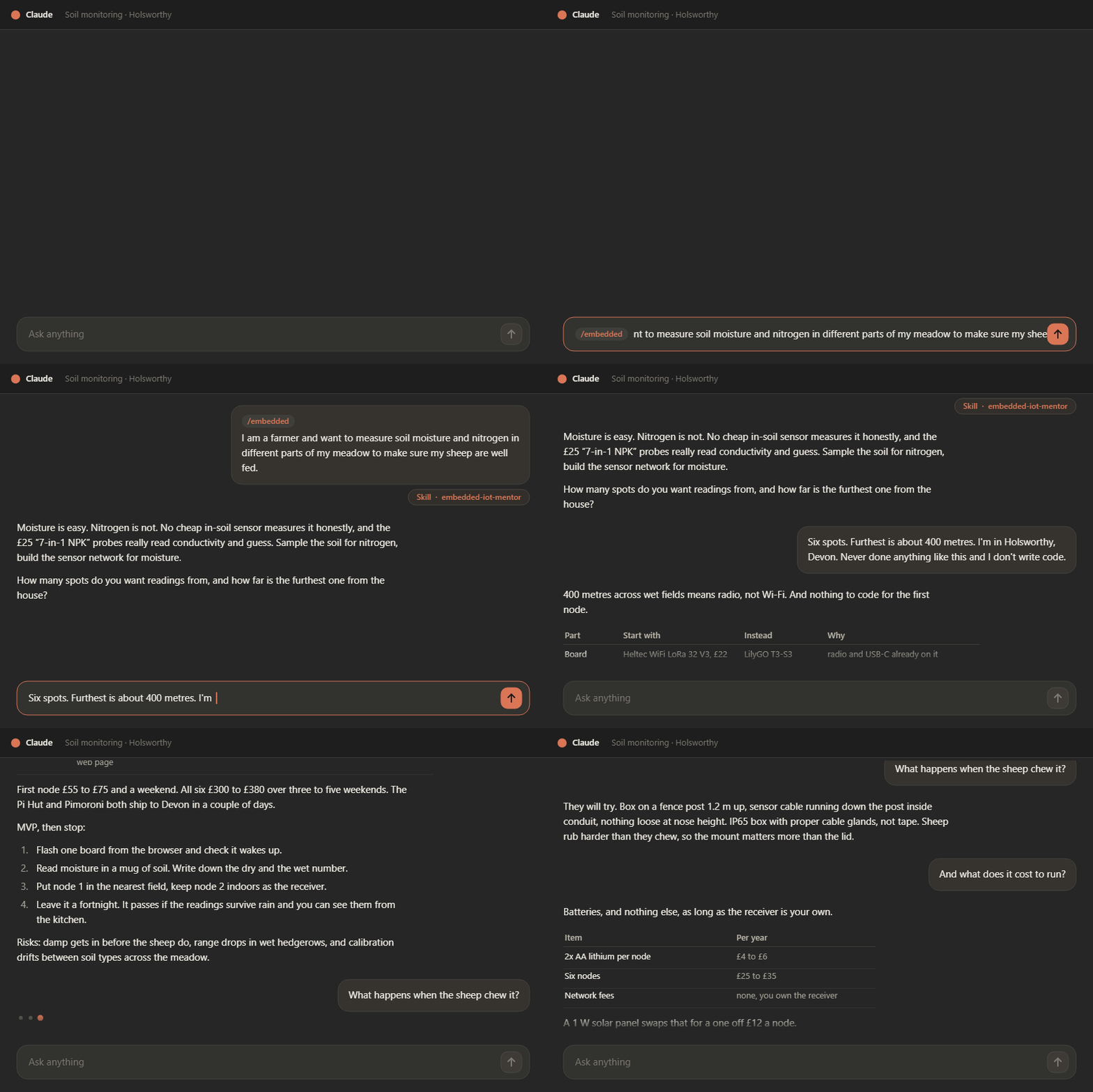
A sheep farmer in Devon, with no coding experience, requests six sensing points, and the furthest sensing point is around 400 m away from the house. All of those are below the minimum cost for such a project. Worth watching for what the skill doesn't suggest: It opens by refusing half the request - no cheap probe measures soil nitrogen honestly - then lets three constraints do the choosing. The 400 meters away from home picks radio over Wi-Fi, "I don't write code" picks ready-made firmware over a toolchain, and a wet meadow picks the enclosure. The board is the last thing decided, not the first. The full transcript is Scenario D.
What it does
- Picks a platform — ESP32, Pico, STM32, nRF52 — and says plainly why that one, plus one or two alternatives and when each would win instead.
- Separates the hardware path from the firmware path, so you know what to buy and what to install without conflating them.
- Checks whether you need to write firmware at all. If ESPHome, Meshtastic or Tasmota already does the job, that's the answer — writing code is a cost, not a deliverable.
- Takes the reading all the way to a person — Home Assistant, a page the device serves itself, a hosted dashboard, or just an alert. "On my phone" in the kitchen and "on my phone" from work are two different builds, and it says so before you pick one.
- Estimates time and cost as ranges, and flags what actually drives them — including what the thing costs to run, once it's six nodes eating batteries in a field.
- Says what a sensor really measures. Cheap "NPK" probes read conductivity and guess; you get told that before you buy six of them, not after.
- Plans to MVP and stops there. Engineering prototype, pre-production, and production phases exist, but you only get them when you ask.
- Names the risks — power budget, part availability, no debug path, certification, the learning curve on whatever it just recommended.
- Rejects its own suggestions against a fixed bar: no maintained library, single-supplier part, a package you can't solder, no serial console — it drops the candidate and picks again.
Why it exists
The failure modes it's built to catch:
- A beginner pointed at an STM32 with an ST-Link because a forum said it was "more professional" — three evenings lost to toolchain setup before the first LED.
- A battery project designed around a dev board whose regulator idles at 20 mA, so the "two month" runtime is really four days. The board was never the problem; nobody costed the sleep current.
- A first PCB ordered with 0402 passives and a QFN, hand-assembled with a soldering iron, and dead on arrival with no test points to find out why.
- Six sensors deployed in a field in indoor boxes, sealed with tape instead of cable glands, condensing on their own PCBs by the second week.
Install
Option A — one file. Download embedded-iot-mentor.skill from the
latest release (or
straight from the repository), then in claude.ai:
-
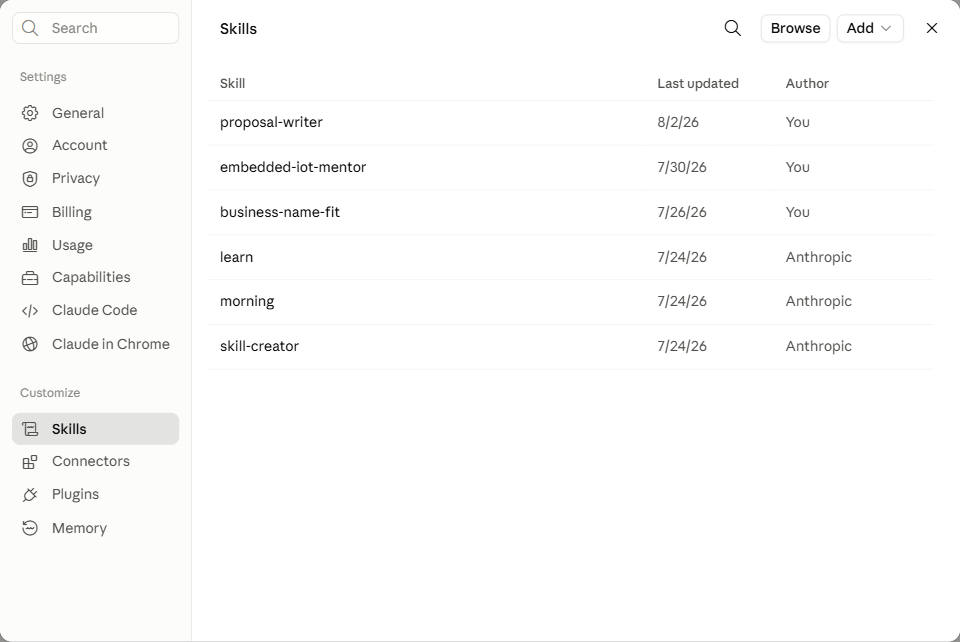
Click your name in the bottom-left corner, choose Settings, then open the Skills page under Customize:
-
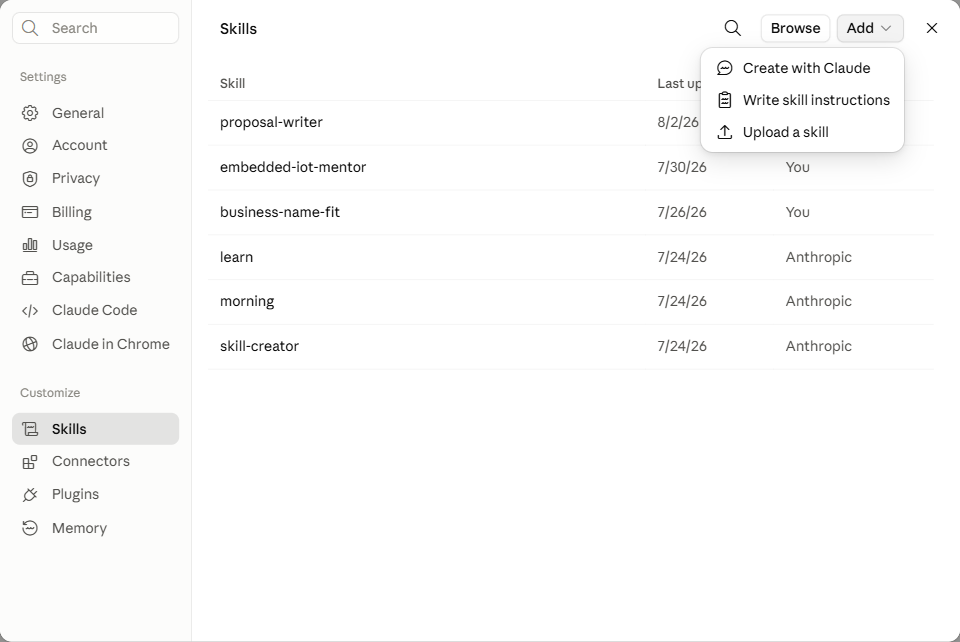
Click Add, then Upload a skill:
-
Drag the downloaded
embedded-iot-mentor.skillfile onto the upload box (or click it to browse):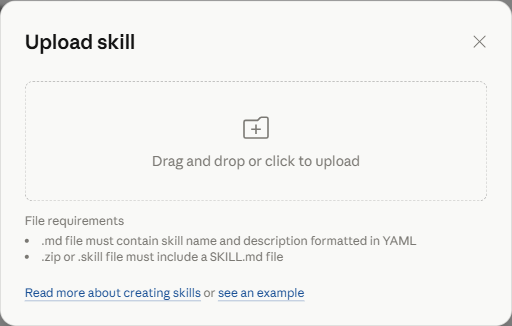
(Skill saving must be enabled for your account or organization.)
Option B — Claude Code. Unpack it into your skills directory:
python package_skill.py --install                                     # for your user
python package_skill.py --install --skills-dir <repo>/.claude/skills  # for one project
Or install a bundle you already have, with no copy of this repo:
python package_skill.py --install-from embedded-iot-mentor.skill
Or by hand — a .skill is just a zip:
mkdir -p ~/.claude/skills && unzip embedded-iot-mentor.skill -d ~/.claude/skills/
# Windows: Expand-Archive refuses any extension but .zip, so rename a copy first
New-Item -ItemType Directory -Force "$HOME\.claude\skills" | Out-Null
Copy-Item embedded-iot-mentor.skill "$env:TEMP\embedded-iot-mentor.zip"
Expand-Archive "$env:TEMP\embedded-iot-mentor.zip" -DestinationPath "$HOME\.claude\skills" -Force
Claude Code picks it up on the next session — /skills lists it, and Claude also loads it on
its own when a conversation matches the description.
Use it
Just describe the project. For example:
I want to log soil moisture in a greenhouse and see it on my phone. I've done a couple of Arduino sketches. Budget maybe €100, and I'd like it running in a month.
or
Which board for a battery sensor that has to last a year on a coin cell? I've shipped firmware before, so don't dumb it down.
or
I have an ESP32 and a BME280 sitting in a drawer. What's worth building with them?
or, the one in the demo above:
I am a farmer and want to measure soil moisture and nitrogen in different parts of my meadow to make sure my sheep are well fed.
It will ask a couple of short questions if the goal, experience level, power source, environment, or timeline are still unclear — then answer in tables rather than essays. A whole project plan is meant to fit on one screen; if you want the reasoning behind a pick, ask for it.
Elsewhere: VS Code and the REST API
The mentor is judgement written down, not a Claude feature, so it ports. Every port keeps the behaviour that matters — MVP first, hardware and firmware kept apart, ready-made firmware ahead of code to be written, the reject bar, and the hand-off on safety-critical, vehicle, and privacy questions.
| Route | What you do | Worth it when |
|---|---|---|
vscode-copilot/ | Copy one file to .github/copilot-instructions.md, or paste it into Copilot Chat | Always start here in VS Code — nothing to install |
api/ | Deploy the REST API — one click on Render — and call it from your own code | The caller is a script or a service, not a person in a chat window |
What the two carry differs. The Copilot port is judgement only — no reference files, no scripts, so a real battery runtime or a BOM total is still the skill's job. The REST API reads both straight out of the skill folder, so it can never fall behind a change made here.
Good to know
- Prices and stock go stale. Estimates are ranges, not quotes. Check LCSC, Digi-Key, or your local supplier before ordering.
- It cannot verify part availability in your country, and that is the most common reason a good plan stalls.
- It stops at MVP by design. Ask explicitly for the later phases.
- Not for safety-critical work. It will help you to a prototype for medical, automotive, or safety systems, then tell you plainly where hobbyist advice ends.
Layout
The skill itself lives in embedded-iot-mentor/. Everything at the repository root is
packaging and project metadata that the skill never reads.
| Path | What it is |
|---|---|
embedded-iot-mentor/SKILL.md | The instructions Claude follows. Most changes go here. |
embedded-iot-mentor/references/ | Detail read on a trigger: MCU selection, connectivity, where the data is seen, cost estimation, PCB checklist, power/battery, field deployment, OTA, EMC, safety boundary, learning resources. |
embedded-iot-mentor/scripts/ | Small deterministic helpers, run only when a concrete number is asked for. |
embedded-iot-mentor/examples/ | Worked scenarios showing the shape a reply should take when a request doesn't fit the standard mould. |
embedded-iot-mentor.skill | Generated. A zip of the folder above — don't edit by hand. |
package_skill.py | Builds, verifies, and installs the bundle. |
embedded-iot-mentor-demo.gif | The recording shown at the top. Not bundled — the packer only takes the skill folder. |
universal-prompt.md | The same mentor as a copy-paste prompt, for any AI chat that isn't Claude. |
assets/install-steps/ | Screenshots for the Claude Skill upload walkthrough in Install, above. |
docs/index.html | Static landing page for GitHub Pages — the "Try it" links and the demo, no chat needed. |
create_skill_demo_gif.py | Generates a mock-up demo GIF (assets/skill-demo-mockup.gif) from a scripted scenario, for when a real recording isn't available. |
scripts/check_links.py | Checks that every README, landing-page, CONTRIBUTING.md, and distribution link still resolves. Run by check-links.yml on push, PR, and weekly. |
vscode-copilot/ | The Copilot port — the paste-in prompt and example queries. |
api/ | The REST API — reads the reference library from the skill folder and shells out to its scripts. |
api/instructions.md | The mentor's rules condensed to a self-contained prompt, for POST /chat and GET /instructions. Mirror a behaviour change here if you make one in SKILL.md. |
render.yaml | Blueprint behind the one-click deploy of the API. Has to sit at the root for Render to find it. |
.github/DISTRIBUTION.md | Where the project is listed and how to list it — the steps that need a login rather than a workflow. |
Keeping the skill in its own folder matters: the spec requires a skill's name to match its
folder name, so building it straight from the repository root would break the moment someone
downloaded the repo as a ZIP and got embedded-iot-mentor-main/.
Build
python package_skill.py          # -> ./embedded-iot-mentor.skill
python package_skill.py --check  # validate source + bundle, build nothing
A .skill file is a zip archive holding the skill folder — the format is defined by the
Agent Skills specification. The packer bundles
everything under embedded-iot-mentor/, so a new reference file is picked up automatically
with no build-script edit. Text files are stored with LF and zip timestamps are pinned, so
the bundle is byte-identical whoever builds it.
--check is the gate, and CI runs it on every push and pull request. It fails when:
- the frontmatter breaks a spec constraint (
namepattern/length, folder match,descriptionlength); SKILL.mdpoints at areferences/…orscripts/…file that doesn't exist;- the committed
.skilldoesn't match the source folder.
That last one matters because the bundle is committed: edit the skill, forget to rebuild, and the download would ship a different version than the source folder.
Scripts
python embedded-iot-mentor/scripts/cost_estimator.py 1 4.50 "ESP32 DevKit" 10 0.12 "10k resistor"
python embedded-iot-mentor/scripts/footprint_hint.py 0603
python embedded-iot-mentor/scripts/sleep_budget.py --capacity 2000 --active-ma 80 \
    --active-ms 250 --sleep-ua 15 --interval-s 600
sleep_budget.py takes duty-cycle inputs rather than an average current, because the
average is the number nobody knows up front. Same firmware, same battery, sleep current
changed from 15 µA to a dev board's 8 mA regulator: 3.8 years becomes 8.3 days.
More skills like this
- Project Planning & Journaling — scopes a project before any code is written, then keeps a living, resumable documentation journal with a weekly routine review.
- Business Name Fit — picks or checks a business/brand name that's authentic to your origin and lands well in the markets you're selling into.
Contributing
Improvements are welcome — especially hands-on knowledge about parts, suppliers, and what actually goes wrong on a bench. See CONTRIBUTING.md.
License
Released under the MIT License — free to use, share, and build on.
Reviews
No reviews yet
Be the first to review this server!
More Developer Tools MCP Servers
Paperclip
Freeby Paperclipai · Developer Tools
Trending hip-hop artist momentum scores across four cultural dimensions.
Netdata
Freeby Netdata · Developer Tools
Real-time infrastructure monitoring with metrics, logs, alerts, and ML-based anomaly detection.
Toleno
Freeby Toleno · Developer Tools
Toleno Network MCP Server — Manage your Toleno mining account with Claude AI using natural language.
mcp-creator-python
Freeby mcp-marketplace · Developer Tools
Create, build, and publish Python MCP servers to PyPI — conversationally.
MCP Marketplace
Freeby mcp-marketplace · Developer Tools
Search and install MCP servers from inside your AI client.
MarkItDown
Freeby Microsoft · Content & Media
Convert files (PDF, Word, Excel, images, audio) to Markdown for LLM consumption