
Server data from the Official MCP Registry
Autonomous coding pipeline: frontier models plan and review, a local model implements, gated by TDD.
About
Autonomous coding pipeline: frontier models plan and review, a local model implements, gated by TDD.
Security Report
Valid MCP server (1 strong, 1 medium validity signals). No known CVEs in dependencies. Imported from the Official MCP Registry.
7 files analyzed · No issues found
Security scores are indicators to help you make informed decisions, not guarantees. Always review permissions before connecting any MCP server.
Permissions Required
This plugin requests these system permissions. Most are normal for its category.
Documentation
View on GitHubFrom the project's GitHub README.
Fagan


Spend tokens on judgment, not typing.
Frontier models cost money per token and are excellent at judgment. Local models run free and are adequate at typing. This pipeline splits software engineering along exactly that line: a frontier model decomposes the work, plans it, reviews the diff, and adjudicates anything risky — while a local model writes the implementation at no marginal cost.
What makes the cheap half trustworthy is inspection. In Michael Fagan's 1976 IBM study, formal inspection found 82% of the defects in the released product — 38 per KLOC, against 8 per KLOC for unit testing. Quality lives in the gate, not in the author. So this project spends its budget on gates: TDD enforced before implementation, an independent review pass, acceptance-oracle grading, a risk-tiered overlord that stops for a human on anything irreversible, and a merge gate that re-runs the suite against the rebased branch before anything lands.
The goal is narrow and specific: enterprise-grade engineering discipline — decomposition, TDD, code review, dependency-ordered delivery — on a $20/month budget.
For detailed reference material, see REFERENCE.md.
Before you start: read Reliability & limitations below. This is an autonomous coding pipeline with real, documented failure modes — it is not a hands-off "describe a feature, get a PR" tool yet.
Platform support
Developed and run day-to-day on macOS. The core (MCP server, dashboard, Claude-backend dispatch/review, the full test suite) is plain Python and CI tests it on Ubuntu across Python 3.12–3.14 on every push. Two pieces are macOS-only:
launchd/*.plist— the scheduler/MLX-supervisor/usage-poller are packaged as launchd jobs on macOS. On Linux, render the systemd equivalent withscripts/generate_systemd_units.sh(see Scheduler below) instead of hand-rolling init files, or run the entry points directly in a foreground terminal/tmuxsession.- MLX (
PIPELINE_LOCAL_PROVIDER=mlx) — Apple Silicon only. Local dispatch works fine on Linux via Ollama or LM Studio instead (PIPELINE_LOCAL_PROVIDER=ollama/lmstudio).
Windows is untested.
Quickstart
One-line install
curl -fsSL https://raw.githubusercontent.com/motock/fagan/master/scripts/remote-install.sh | bash
This clones the repo to ~/.fagan (override the location with
FAGAN_INSTALL_DIR, and the source URL with FAGAN_REPO_URL) and runs
scripts/install.sh inside it -- equivalent to the manual clone-and-run
steps below, minus the typing. Re-running it later updates the existing
checkout (git pull --ff-only) instead of re-cloning.
Piping a remote script into bash means trusting whatever that URL serves
at fetch time. If you'd rather read it first:
curl -fsSL https://raw.githubusercontent.com/motock/fagan/master/scripts/remote-install.sh -o remote-install.sh
less remote-install.sh   # or open it in an editor
bash remote-install.sh
Either way, cd into the install directory it reports (~/.fagan by
default) and continue from step 2 below. Prefer a manual clone? Use the
steps below instead.
This gets the MCP server registered and a first plan running end-to-end.
A first run needs no local model at all: with nothing configured, dispatch
and review fall back to the claude backend, which shells out to the Claude
Code CLI. That fallback is the starting configuration, not the intended one
— the cost split described above only happens once you deliberately route
the implementation role to a local model, which is why the shipped registry
ships no roles block of its own: see Provider selection & authorization
below for how to make that choice when you're ready.
# 1. Clone and install the Python environment
git clone https://github.com/motock/fagan.git
cd fagan
scripts/install.sh          # creates .venv, installs requirements.txt

# 2. Register the MCP server with Claude Code (adjust the path to where you cloned it)
claude mcp add -s user pipeline "$(pwd)/.venv/bin/python3" "$(pwd)/app/pipeline_mcp_server.py"

# 3. Copy the persona subagents and decision policy into place
#    (cp -n skips any file you already have — e.g. a customized code-reviewer.md —
#    instead of silently overwriting it; diff before removing -n if you do want the update)
mkdir -p ~/.claude/agents
cp -n agents/*.md ~/.claude/agents/
cp -n overlord-policy.md ~/.claude/overlord-policy.md

# 4. Restart Claude Code (or start a new session) so it picks up the MCP server
scripts/install.sh creates the .venv, installs requirements.txt and
requirements-dashboard.txt (the dashboard's fastapi/uvicorn deps, installed
on every run; a --dev install uses requirements-dev.txt, which already
includes the dashboard deps), and reports on the tools the pipeline shells out
to — required: git, gh, and the claude CLI; optional: ollama and
docker — with graceful-degradation messaging, and is safe to re-run. It does not register the MCP server, set environment
variables, or install the persona subagents — steps 2–4 above cover those. With
nothing but the claude backend configured, ollama/docker being absent is
expected, not an error.
From a Claude Code session in the project you want the pipeline to work on:
- Ask the
product-analystsubagent to turn a goal into epics/stories, or hand-write a plan per the schema. mcp__pipeline__save_plan(oringest_plan) with that plan and arepo_rootpointing at the target project — not this pipeline repo.mcp__pipeline__list_ready_storiesto see what's unblocked, thenmcp__pipeline__dispatch_storyto claim and start one.- Watch progress with the dashboard:
scripts/dashboard.sh start, then openhttp://localhost:8000. - For unattended operation, run the scheduler so ready stories advance
without you calling
advance_pipelineby hand:.venv/bin/python3 -m pipeline.scheduler_daemon(foreground, or under launchd/systemd/tmux — see Scheduler below).
Start with PIPELINE_AUTONOMY=dry-run (plans and logs only, nothing is
dispatched or merged) until you've watched one plan run and trust the gates —
see Autonomy levels.
Only using the claude backend? The PIPELINE_LOCAL_* and
PIPELINE_BACKEND_*=ollama/lmstudio/mlx variables, and Ollama/MLX/LM Studio
setup, only matter if you opt a role into local-model dispatch — but provider
selection itself is still a required setup step (the shipped registry routes
nothing; see Provider selection & authorization below), and even the
claude path needs two credentials before the first dispatch: gh auth login
(the pipeline opens and merges PRs through the GitHub CLI) and the Claude Code
CLI's own login. See
Minimal configuration for the handful of
variables actually worth setting on day one, versus the ~100 that exist purely
for tuning.
Provider selection & authorization
Provider selection is a required setup step. The shipped
model_registry.json deliberately declares which models exist per provider
but ships no roles routing: this project decouples from any single
provider, so the operator chooses. There are two supported ways to select a
provider per role, checked in this order by resolve_role:
- Plan role config — a plan's per-role
provider/modelbeats everything below. - A
rolesblock in a registry file — the single source of truth for role routing; see below. PIPELINE_BACKEND_<ROLE>environment variables — consulted only when the registry has no entry for the role (the empty-state path, so a fresh clone still boots); e.g.PIPELINE_BACKEND_DISPATCH=ollamaopts the dispatch role into Ollama.- The caller's own fallback — for dispatch/review this is the
claudebackend.
For an interactive alternative to editing registry JSON by hand, run the
picker: .venv/bin/python scripts/choose_providers.py. It walks through all
nine roles one at a time, showing each role's current provider/model and where
that setting came from, and lets you switch it by typing an option number —
each of the nine roles is configured independently, and every change is
validated against the registry before it is written. It is safe to re-run any
time: re-running just re-reads the current routing, and pressing Enter keeps a
role's existing setting.
The same two registry files work for both selection styles:
PIPELINE_MODEL_REGISTRY_PATHpoints the pipeline at any registry JSON you like.model_registry.local.json(repo root) is the convention for a personal registry: it is gitignored, so your per-role routing stays out of the repo. PointPIPELINE_MODEL_REGISTRY_PATHat it, or copy it overmodel_registry.jsonlocally if you prefer not to set the variable.
A roles block names a provider and a friendly model name per role; the
friendly name must exist under that provider's models in the same file, and
the concrete tag is resolved from there. A typo raises an error rather than
silently falling back.
Authorization matrix. Selecting a provider also selects which credentials
you must establish first — scripts/install_checks.py probes these and
reports unauthorized (remedy: a login, not an install) where it can:
| Provider / tool | Credential needed | How to establish it |
|---|---|---|
git / gh | GitHub auth (the pipeline opens and merges PRs through gh) | gh auth login |
claude backend | Claude Code CLI's own login | claude auth login (check: claude auth status) |
any :cloud ollama tag | An ollama.com account, signed into the local daemon | ollama signin |
litellm backend | Per-vendor API keys | See docs/specs/LITELLM_PROVIDER.md |
| on-device ollama / lmstudio / mlx tag | Nothing extra | — |
On the :cloud rows: those calls are proxied through https://ollama.com by
the local ollama daemon, which sends its own credential — the pipeline sends
no credential of its own. :cloud tags are the only ollama tags that need
a sign-in; purely on-device tags need nothing beyond the daemon running.
Getting-started walkthrough
The walkthrough works with whatever dispatch provider you have configured —
PIPELINE_BACKEND_DISPATCH (set it explicitly, or add a roles block to a
local registry — the shipped registry routes nothing; see Provider selection
& authorization above). With claude configured, dispatch and review shell
out to the Claude Code CLI; with a local provider such as ollama configured,
they run on that local model instead.
- Install — one command:
scripts/install.sh(see the quickstart above for what it does and does not do). - Register the MCP server and personas — quickstart steps 2–3 above
(
claude mcp add ...plus copyingagents/*.mdand the overlord policy), then restart Claude Code. - Start the dashboard —
scripts/dashboard.sh start, then openhttp://localhost:8000and pick your target project in the workspace picker. - Decompose a tiny goal — ask the
product-analystsubagent (or the dashboard's decompose action) to turn a one-liner goal into epics/stories, thenmcp__pipeline__save_planthe result with itsrepo_rootfield pointing at your target project — not this pipeline repo. - Dispatch the first ready story —
mcp__pipeline__list_ready_stories, thenmcp__pipeline__dispatch_storyon the first one, and watch the story advance across the kanban board in the dashboard. - Watch it merge — with
PIPELINE_AUTONOMY=gated(the default), a risk-lowstory that passes review merges unattended. Start withPIPELINE_AUTONOMY=dry-runfirst, per the quickstart advice above. - Prefer the scripted path? —
.venv/bin/python scripts/smoke_getting_started.pyruns the same flow end-to-end without the dashboard, in a scratchPLAN_DIRthat never touches your real plans. The smoke is provider-neutral: it runs on your configured dispatch provider (PIPELINE_BACKEND_DISPATCH, defaultclaude) and announces the resolved provider, model and source up front, so you always know which backend it validated. Exit codes:0PASS (the story reachedtests_passed),1the resolved provider isclaudeand theclaudeCLI is missing, exit 2 means the configured provider is empty or unrecognised — a configuration error, not a refusal of a local provider —3the bounded poll timed out,4the story failed. Honest caveat: PASS depends on the configured model actually completing the story, so a failure on a weak local model reflects that model, not a broken pipeline.
For what can still go wrong, see Reliability & limitations.
Companion MCP server (overlord + acceptance-oracle only)
Not ready to adopt the whole orchestrator? pipeline/companion_server.py is a
second, smaller MCP server (pipeline-companion) exposing two ideas that
stand on their own without adopting the rest of the pipeline:
escalate_decision (the overlord decision path) and the acceptance-oracle
helpers classify_oracle_outcome / acceptance_digests. It imports the real pipeline.overlord and
pipeline.oracle_gate modules rather than duplicating them, so it stays in
sync with the main server. Add it alongside the main server as a second
mcpServers entry:
{
  "mcpServers": {
    "pipeline": {
      "command": ".venv/bin/python3",
      "args": ["app/pipeline_mcp_server.py"]
    },
    "pipeline-companion": {
      "command": ".venv/bin/python3",
      "args": ["-m", "pipeline.companion_server"]
    }
  }
}
The adoptable specs this server exports live in docs/specs/:
OVERLORD_POLICY_SPEC.md (the overlord decision path),
ACCEPTANCE_ORACLE_PATTERN.md (the acceptance-oracle grading pattern), and
DOCKER_SANDBOX.md (the opt-in Docker sandboxing behavior).
Running standalone (dashboard + scheduler, no MCP server)
The dashboard exposes the same operations as the MCP tools — save/ingest a plan,
decompose a goal, dispatch a story, advance, review, approve merge — so the
pipeline can run without registering an MCP server at all. That parity lives at
the HTTP API, not in the UI: the dashboard UI directly surfaces chat (including
drafting a plan), browsing plans, stories, journals and logs, the workspace
picker, the worktree-patch review/apply flow, role configuration, and ingesting a
saved plan. Dispatch, advance, review and approve-merge have UI-less API routes
(/api/plans/{plan_name}/stories/{story_key}/dispatch and friends) available for
scripting, and for the standalone flow the scheduler is the intended driver:
draft and ingest a plan from the dashboard, then let the scheduler dispatch,
advance, review and merge ready stories on its own. The
supported path is one command:
scripts/standalone-setup.sh up
up provisions a scratch data dir (default ~/pipeline-standalone), writes
the shared operator env file with absolute paths, starts the dashboard and the
scheduler through their existing helper scripts, and then refuses to report
success until GET /api/health answers with an empty config_mismatch and
the intended plan_dir. Main options: --data-dir DIR (default
~/pipeline-standalone), --target-repo DIR (default: a scratch repo under
the data dir), --port PORT (default 8001), --autonomy MODE (default
dry-run), plus --repo-root and --force. down stops both processes and
leaves the scratch data in place; status prints the resolved paths and both
processes' state.
Both long-running processes read the same operator env file:
scripts/dashboard.sh and scripts/scheduler.sh both source
.pipeline.env (gitignored; see .pipeline.env.example) first, then
.dashboard.env (gitignored; see .dashboard.env.example) second, so
existing dashboard-only installs keep their current last-write precedence —
.dashboard.env still works and simply overrides .pipeline.env where they
overlap.
Because the dashboard and the scheduler are separate processes, PLAN_DIR
must match between the two: the scheduler writes a config fingerprint to
<plan_dir>/.scheduler_health.json, and /api/health reports
config_mismatch listing the fields where the dashboard's resolved config
differs from that fingerprint. A non-empty config_mismatch means the UI and
the scheduler are working different plan stores — check that both were
started with the same PLAN_DIR (the standalone script writes one env file
for exactly this reason, and fails hard on a non-empty config_mismatch).
The normal prerequisites still apply in standalone mode: gh auth login for
the PR/merge path (the pipeline opens and merges PRs through the GitHub CLI),
and provider authorization for whichever backend is configured — see
Provider selection & authorization above.
Components at a glance
| Piece | Location | Role |
|---|---|---|
| Persona subagents | ~/.claude/agents/*.md | The SDLC roles agents play |
| Decision policy | ~/.claude/overlord-policy.md | How the overlord decides |
| Pipeline MCP server | app/pipeline_mcp_server.py (launch shim) → pipeline/ package | All pipeline tools + orchestration; pipeline/server.py is the entry module, split across pipeline/*.py (dispatch, review, ci, advance, store, etc.) |
| Backend seam | app/backend.py | Per-role driver routing (claude / ollama / lmstudio / mlx / local); single-shot, review, dispatch, resource gate |
| Local agent loop | scripts/local_agent.py | Native-tool-calling write loop for local dispatch (subprocess) |
| Monitoring dashboard | app/dashboard.py, static/ | FastAPI status/lifecycle viewer; in standalone mode (see "Running standalone" below) it also drives save/ingest/dispatch/review/merge directly |
| Install / deps | scripts/install.sh, requirements*.txt | venv + dependency setup |
| Tests | tests/unit/ (10,500+ tests) | pytest, run via the venv |
| Plans / manifests / logs | ~/.claude/plans/ | Plan, manifest, decisions, notifications |
| Worktrees | ~/.claude/worktrees/ | Isolated per-story branches |
| Issue tracker | Plane (external, optional) | Mirror of story state; skipped entirely when unconfigured (manifest is the source of truth) |
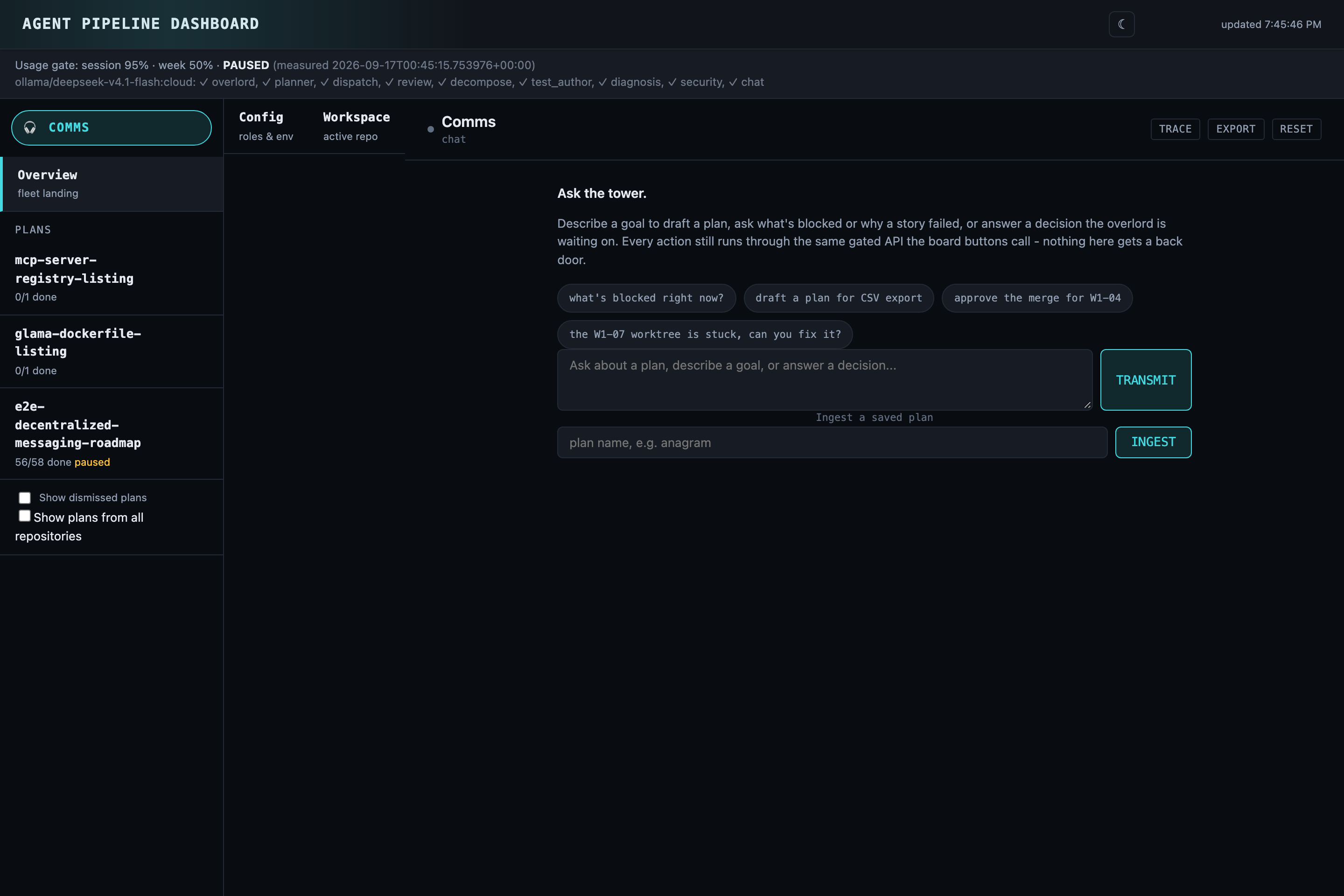
The dashboard's Comms view — ask what's blocked, draft a plan, or approve a merge, all routed through the same gated API the kanban board's own buttons call. More screenshots (the live kanban board and the workspace picker) are in docs/DEMO.md.
Architecture
 ┌───────────────────────────────────────────────────────────┐
 │ Orchestrator loop (cron / /loop skill)                     │
 │ advance_pipeline(plan) — one idempotent tick               │
 └───────────────────────────┬───────────────────────────────┘
                              │ ready stories (deps satisfied)
                              ▼
 ┌───────────────┐  resolve backend +    ┌───────────────────────────────┐
 │ Plan/Manifest │  persona/model        │ Dispatch                      │
 │ (JSON, Plane) │──────────────────────►│  claude -p  OR  local loop    │
 └───────────────┘                       │  (tech-lead plans for local → │
                                          │   .agent_plan.md)             │
                                          └───────────────┬───────────────┘
                                                           ▼
                                          ┌───────────────────────────────┐
                                          │ Headless story agent, TDD-    │
                                          │ first, in an isolated git     │
                                          │ worktree                      │
                                          └───────────────┬───────────────┘
                                    local fail → escalate  │ tests +
                                    to claude (`auto`)     │ acceptance oracle
                                                           ▼
                                          ┌───────────────────────────────┐
                                          │ code-reviewer: VERDICT,       │
                                          │ opens a PR                    │
                                          └───────────────┬───────────────┘
                                                           ▼
      low    → decide silently            ┌───────────────────────────────┐
      medium → decide, notify the user    │ Overlord adjudicates risk     │──► decisions log
      high   → park, wait for a human     │ (blocked decisions, merge,    │    (audit trail)
                                           │  scope disputes)              │
                                           └───────────────┬───────────────┘
                                                            ▼ approved
                                           ┌───────────────────────────────┐
                                           │ Merge gate: rebase on master, │
                                           │ force-push, poll CI, re-run   │
                                           │ the suite on the rebased      │
                                           │ branch                        │
                                           └───────────────┬───────────────┘
                                                            ▼
                                                         master
Personas (~/.claude/agents/)
Each persona is a Claude Code subagent: a markdown file with YAML frontmatter
(name, description, model, and optionally memory: user) and a
system-prompt body. The pipeline reads the body and dispatches a headless agent
with it as the role.
memory: user injects the user-memory directory into the system prompt on
every Claude call — high-leverage context but expensive in tokens. The
reviewer personas (code-reviewer, security-engineer) deliberately omit
it: their job is a mechanical check (run tests, read diff, emit VERDICT),
the CLAUDE.md rules they need are in the persona body, and skipping the
~132 KB memory injection shaves ~30-40% off every review call's input tokens.
The dispatch and overlord personas keep it because they benefit from project
context and are lower-volume.
| Persona | Default model | Responsibility |
|---|---|---|
product-analyst | opus | Decompose a goal into epics/stories with acceptance criteria, dependencies, and per-story persona/model/risk |
solution-architect | opus | General system design, tech selection, API design (delegates mobile to mobile-architect) |
software-engineer | sonnet | Default TDD implementer for non-mobile work |
security-engineer | opus | Threat modeling and security review (OWASP, Secure by Design) |
devops-release-engineer | sonnet | Build/CI, branch & worktree hygiene, releases |
code-reviewer | sonnet | Reviews a branch, emits a VERDICT, opens a PR |
tech-writer | haiku | Docs for externally visible changes |
overlord | opus | The decision authority (see below) |
Existing mobile specialists (mobile-architect, mobile-engineer,
ux-mobile-principal, qa-test-engineer) are unchanged and used for mobile work.
To change a persona's behavior or default model, edit its .md file. The
frontmatter model: line is the fallback model when a story does not specify one.
The overlord and the decision policy
The overlord (~/.claude/agents/overlord.md) rules on the user's behalf when
a story agent is blocked, two personas disagree, or a gate needs adjudication. It
follows ~/.claude/overlord-policy.md (plus an optional per-repo
<repo>/.overlord-policy.md override).
Decision tiers:
- Routine / reversible → decide silently (naming, internal structure, a library within the approved stack, refactors).
- Notify-async (
risk: medium) → decide, proceed, flag the user (new dependency, schema change, additive API change). - Park-and-ping (
risk: high) → do not act unattended; hold for human review and notify. Anything irreversible, security/auth, money, production config, or breaking changes. Always parked regardless of autonomy level.
The overlord returns a structured ruling (RULING / TIER / RISK /
RATIONALE / NOTIFY_USER) that is parsed and written to the plan's decisions
log as an audit record.
Reference
See REFERENCE.md for the full MCP tools reference, the plan/story JSON schema, per-role provider/model configuration, guided decomposition and TDD-split details, every PIPELINE_*/LOCAL_AGENT_* environment variable, the end-to-end workflow, safety controls, the usage gate, and development/testing instructions.
For a worked end-to-end example of the pipeline developing this repository itself — the install command, the real pull requests it produced, and an honest account of what it can't do yet — see docs/DEMO.md.
For how a release is cut, see docs/RELEASING.md.
Prerequisites
- Python 3.10+ and the project venv. CI tests 3.12–3.14 on Ubuntu and macOS on every push; 3.10/3.11 aren't part of the CI matrix, so treat them as likely-fine but unverified.
- git on PATH.
- GitHub CLI (
gh). - Claude Code CLI (
claude).
Scheduler
The advance-scheduler runs as a long-lived daemon rather than a periodic
launchd tick. launchd's role is limited to crash-restarting it via KeepAlive.
Environment Variables
- PIPELINE_SCHEDULER_INTERVAL_S – default reconcile sweep interval (default 60 seconds).
- PIPELINE_SCHEDULER_HEALTH_PATH – optional path where the daemon writes its health JSON each iteration.
Rendering the launchd files for your machine
The committed launchd/*.plist files and launchd/pipeline-logs.newsyslog.conf
are a reference copy: they carry the maintainer's own absolute paths (a
/Users/<name>/... home directory, a specific model cache path) and will not
work unedited on another machine. On a fresh install, regenerate them yourself
with scripts/generate_launchd_plists.sh (install.sh does not run this for
you) — it fills the templates in launchd/
(launchd/com.fagan.pipeline.*.plist.template) from three flags:
--repo-root— the pipeline checkout the rendered files should point at (default: the repo that contains the script).--out-dir— where the rendered files are written (default:<repo-root>/launchd).--mlx-model-path— the local MLX model directory baked into the mlx-supervisor plist. As an alternative to the flag you can set theMLX_MODEL_PATHenvironment variable; the flag wins when both are given. The script fails closed — it exits with an error — when neither is supplied.
The same script also renders launchd/pipeline-logs.newsyslog.conf from
launchd/pipeline-logs.newsyslog.conf.template, substituting only the repo root.
scripts/generate_launchd_plists.sh \
  --repo-root "$HOME/.claude/mcp-servers/pipeline" \
  --out-dir "$HOME/.claude/mcp-servers/pipeline/launchd" \
  --mlx-model-path "$HOME/.cache/qwen2.5_coder_14b_manual"
These launchd files are macOS-only - see Platform support.
Rendering the systemd units for Linux
scripts/generate_systemd_units.sh renders the equivalent systemd user-unit
and logrotate files from systemd/*.template, the same way
scripts/generate_launchd_plists.sh does for launchd – minus MLX, which is
Apple Silicon-only:
scripts/generate_systemd_units.sh \
  --repo-root "$HOME/fagan" \
  --out-dir "$HOME/fagan/systemd"
Install as per-user systemd units (no root required):
mkdir -p ~/.config/systemd/user
cp systemd/com.fagan.pipeline.advance-scheduler.service ~/.config/systemd/user/
cp systemd/com.fagan.pipeline.usage-poller.service ~/.config/systemd/user/
cp systemd/com.fagan.pipeline.usage-poller.timer ~/.config/systemd/user/
systemctl --user daemon-reload
systemctl --user enable --now com.fagan.pipeline.advance-scheduler.service
systemctl --user enable --now com.fagan.pipeline.usage-poller.timer
  # Optional: let these run even when you are not logged in
loginctl enable-linger "$USER"
Log rotation (needs root, one-time):
sudo cp systemd/pipeline-logs.logrotate.conf /etc/logrotate.d/com.fagan.pipeline
Reliability & limitations
This pipeline runs real autonomous coding loops, and they fail in specific, documented ways — read this before pointing it at anything you care about.
- Local (non-Claude) model dispatch is the weak point. It works well for
small, mechanically-scoped stories (one concern, ≤2 production files) and
degrades sharply on anything bigger: large-file edits, multi-function
stories, and anchored inserts into long existing functions reliably cause
step-cap timeouts, stalls, or file corruption from stale line-number edits.
docs/plans/*.mdandretros/*.mdin this repo are the actual incident record this finding comes from, not a marketing claim — read a few before trusting local dispatch on anything non-trivial.PIPELINE_BACKEND_DISPATCH=autoexists specifically to escalate a struggling local attempt to Claude rather than let it loop. - The "$20/month" framing is the design goal the gates are built around,
not a benchmarked result yet. The one full model-comparison run on
record (
tests/benchmark/FINDINGS.md) was contaminated mid-run by rate limits and credit exhaustion, so there is no clean apples-to-apples success-rate/cost comparison across backends published yet. The cleanest number there is narrow —gpt-oss:20bon-device, 2 T1 tasks, 2/2 success with the independent oracle passing on the merged code, one trial each — and is directional, not a quality comparison. Read that file for exactly what is and isn't known before citing a number from it. - A green test suite is not proof of a correct or complete change. An
executor (local or Claude) converges to the minimum diff that turns its own
tests green, and can write a self-consistently wrong test that encodes the
same bug as its implementation. See
.claude/rules/code-review.md's "Merge-gate and AI-review lessons" section — every lesson there came from a real merged regression, not a hypothetical. - A story marked
doneis not proof its title's full scope shipped. A "migrate everything" or "remove all X" story can pass review and merge having only done part of the job, because review grades the story's own tests, not the title's claim. See.claude/rules/agent-dispatch-story-sizing.md. - The overlord's
park-and-pingtier is a real safety floor, not a suggestion — high-risk decisions (irreversible actions, auth/security, money, production config, breaking changes) always stop for a human, regardless of autonomy level. Start any new deployment atPIPELINE_AUTONOMY=dry-runand read the decisions log before trustinggatedorfull. - This is a single-maintainer research project, not a maintained product with an SLA. The test suite and CI are real gates, but expect rough edges, and expect the failure-mode catalog to keep growing as new ones are found.
If you hit a new failure mode, it's worth documenting (see retros/ for the
existing format) rather than working around it silently — the whole value of
this project's design is that failure modes get named and fed back into how
stories are sized and reviewed.
License
Licensed under the Apache License, Version 2.0 — see LICENSE and NOTICE.
Reviews
No reviews yet
Be the first to review this server!
More Developer Tools MCP Servers
Git
Freeby Modelcontextprotocol · Developer Tools
Read, search, and manipulate Git repositories programmatically
Fetch
Freeby Modelcontextprotocol · Developer Tools
Web content fetching and conversion for efficient LLM usage
Paperclip
Freeby Paperclipai · Developer Tools
Trending hip-hop artist momentum scores across four cultural dimensions.
Toleno
Freeby Toleno · Developer Tools
Toleno Network MCP Server — Manage your Toleno mining account with Claude AI using natural language.
mcp-creator-python
Freeby mcp-marketplace · Developer Tools
Create, build, and publish Python MCP servers to PyPI — conversationally.
MCP Marketplace
Freeby mcp-marketplace · Developer Tools
Search and install MCP servers from inside your AI client.