
Native PDF renderer for AI markdown. Cover, TOC, page-numbered footer. Fonts embedded, zero config.
About
Native PDF renderer for AI markdown. Cover, TOC, page-numbered footer. Fonts embedded, zero config.
Security Report
Valid MCP server (3 strong, 3 medium validity signals). No known CVEs in dependencies. Package registry verified. Imported from the Official MCP Registry. Trust signals: 3 highly-trusted packages.
9 files analyzed · 1 issue found
Security scores are indicators to help you make informed decisions, not guarantees. Always review permissions before connecting any MCP server.
Permissions Required
This plugin requests these system permissions. Most are normal for its category.
How to Install
Add this to your MCP configuration file:
{
  "mcpServers": {
    "io-github-mrslbt-pdf-it": {
      "args": [
        "-y",
        "pdf-it-mcp"
      ],
      "command": "npx"
    }
  }
}Documentation
View on GitHubFrom the project's GitHub README.
pdf-it




A Model Context Protocol (MCP) server and Claude Code skill that turns markdown into PDFs that look like they were made on purpose. Cover page, table of contents, code blocks that hold across page breaks, page-numbered footer. One command from your Claude session to a file you can send to a client.
Fonts ship inside the package, so every PDF looks the same on every machine. Nothing to install, nothing to configure.

Why this exists
Every Claude Code research session ends the same way: a wall of useful markdown and no clean way to turn it into a PDF a person would actually want to read.
Chrome print: takes 30 seconds, output looks like a Word doc. Manual HTML conversion: 10 minutes per document. Pandoc: works but defaults look like a 2008 academic paper. None of it produces an artifact you would send to a client.
pdf-it is one command. The output is designed by default.
Install
npm install -g pdf-it-mcp
Or run on demand with npx pdf-it-mcp.
Requirements
- Node.js 20 or newer
- Nothing else to install. The renderer and fonts ship inside the package.
Configure
Claude Desktop
Edit claude_desktop_config.json:
{
  "mcpServers": {
    "pdf-it": {
      "command": "npx",
      "args": ["-y", "pdf-it-mcp"]
    }
  }
}
Claude Code
claude mcp add pdf-it -- npx -y pdf-it-mcp
Cursor
Add to ~/.cursor/mcp.json with the same shape as Claude Desktop.
Cline / Continue / Zed / Goose
Standard MCP config. Same npx -y pdf-it-mcp command.
Use
In any Claude session connected to the server, ask:
Save this as a PDF
Or any of these phrasings: export as PDF, make a PDF report from this, turn this into a PDF, /pdf. The skill picks up the request and routes it through pdf-it. The output lands in ~/Documents/pdf-it/ by default.
Tools
| Tool | Description |
|---|---|
generate_pdf | Convert markdown into a PDF. Accepts a template (research-report or plain), optional title and author for the cover, and an optional output path. |
list_templates | Return the list of available templates with descriptions. |
generate_pdf parameters
| Parameter | Required | Description |
|---|---|---|
content | yes | Markdown string to convert |
title | no | Shown on the cover and in the page footer |
author | no | Shown on the cover above the date |
output_path | no | Absolute path for the output. Defaults to ~/Documents/pdf-it/{slug}-{timestamp}.pdf |
template | no | research-report (default) or plain |
Templates
| Name | Description |
|---|---|
research-report | Cover page with title, author, and date. Auto-generated table of contents from H1 and H2 headings. Body with proper hierarchy. Footer with title and page number. Best for research, summaries, design docs, reports. |
plain | No cover, no TOC. Dense body content only. Best for short notes and quick exports. |
Skill
This package ships with a Claude Code skill at SKILL.md. Trigger phrases the skill responds to:
save this as PDFexport as PDFmake a PDF report from thisturn this into a PDFgenerate a PDF/pdf
See SKILL.md for the full skill spec.
Output
By default PDFs are written to ~/Documents/pdf-it/{slug}-{timestamp}.pdf. Pass output_path to override.
Design
Three families ship inside the package:
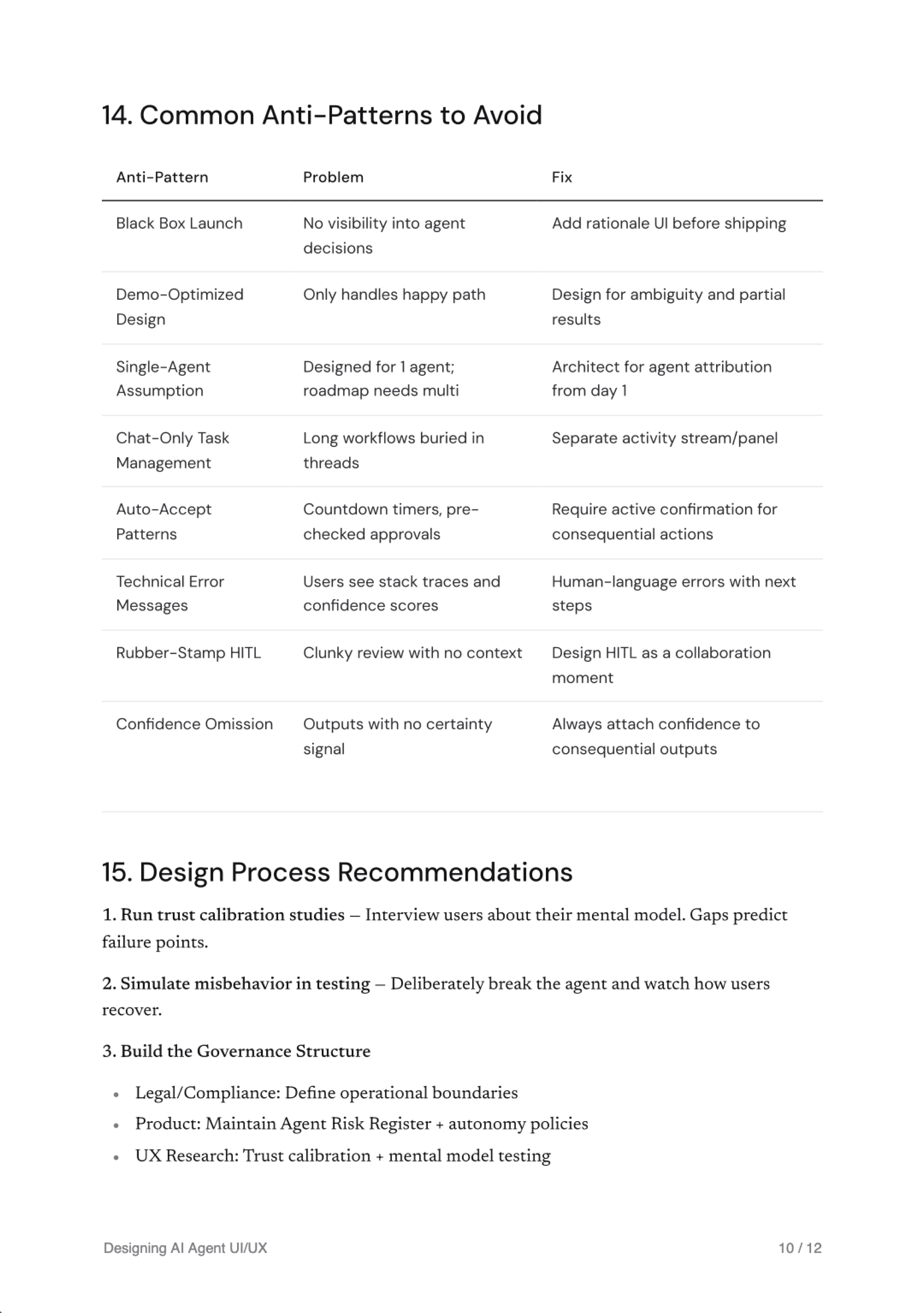
- Newsreader for the cover title (display 60, light) and body H1 (display 32). High-contrast serif that holds editorial weight at large sizes.
- DM Sans for H2, H3, table type, and the TOC heading. Quieter sub-hierarchy.
- JetBrains Mono for page numbers, metadata, code, and figure captions.
Pure white paper, near-black ink (#111113), secondary ink for date and table cells (#2B2B2E), muted gray for page numbers and date (#7A7A7E), hairline borders (#E6E6E6). No accent colors. Code blocks render without syntax highlighting on purpose: color choices in PDFs age badly.
Every value lives in src/templates/design-tokens.ts as the single source of truth. If you want a different design language, fork the components. They live in src/templates/components/ and are plain React-PDF components with a small surface area.
How it works
- Parse: remark converts your markdown into an AST.
- Compose: the AST becomes typed React components (Cover, TOC, and body primitives like H1/H2/H3, Paragraph, CodeBlock, Blockquote, Table, lists, and charts).
- Render:
@react-pdf/rendererrasterizes the React tree into a deterministic PDF with embedded fonts and TOC anchors. - Output: the PDF lands in
~/Documents/pdf-it/{slug}-{timestamp}.pdfwith title/author metadata embedded.
Total time: typically sub-second for a 5-page document, 1-2 seconds for a 30-page document.
Recognition
Listed on npm, Glama, and LobeHub.
Disclaimer
This is an unofficial, community-built tool. It is not affiliated with, endorsed by, or sponsored by Anthropic PBC. Claude and Claude Code are trademarks of Anthropic PBC.
pdf-it runs locally and ships its own renderer (@react-pdf/renderer) and fonts. Use at your own risk. The author accepts no liability for issues arising from misuse, prompt injection, bugs, or rendering failures.
License
MIT. See LICENSE.
Reviews
No reviews yet
Be the first to review this server!
More Developer Tools MCP Servers
Paperclip
Freeby Paperclipai · Developer Tools
Trending hip-hop artist momentum scores across four cultural dimensions.
Fetch
Freeby Modelcontextprotocol · Developer Tools
Web content fetching and conversion for efficient LLM usage
Git
Freeby Modelcontextprotocol · Developer Tools
Read, search, and manipulate Git repositories programmatically
Toleno
Freeby Toleno · Developer Tools
Toleno Network MCP Server — Manage your Toleno mining account with Claude AI using natural language.
MCP Marketplace
Freeby mcp-marketplace · Developer Tools
Search and install MCP servers from inside your AI client.
mcp-creator-python
Freeby mcp-marketplace · Developer Tools
Create, build, and publish Python MCP servers to PyPI — conversationally.