
Server data from the Official MCP Registry
Make broadcast graphics for NoaCG Studio and play them out live on CasparCG, OBS, vMix or OGraf.
About
Make broadcast graphics for NoaCG Studio and play them out live on CasparCG, OBS, vMix or OGraf.
Security Report
Valid MCP server (2 strong, 1 medium validity signals). No known CVEs in dependencies. ⚠️ Package registry links to a different repository than scanned source. Imported from the Official MCP Registry. 1 finding(s) downgraded by scanner intelligence.
9 files analyzed · 1 issue found
Security scores are indicators to help you make informed decisions, not guarantees. Always review permissions before connecting any MCP server.
Permissions Required
This plugin requests these system permissions. Most are normal for its category.
What You'll Need
Set these up before or after installing:
Environment variable: NOACG_URL
Environment variable: NOACG_AGENT_KEY
How to Install
Add this to your MCP configuration file:
{
  "mcpServers": {
    "io-github-noacg-noacg": {
      "env": {
        "NOACG_URL": "your-noacg-url-here",
        "NOACG_AGENT_KEY": "your-noacg-agent-key-here"
      },
      "args": [
        "-y",
        "@noacg/cli"
      ],
      "command": "npx"
    }
  }
}Documentation
View on GitHubFrom the project's GitHub README.
NoaCG Studio
NoaCG Studio makes live broadcast graphics for shows and streams: lower thirds, scoreboards, tickers, title cards and more. Make them from a template, from your own SVG, or with your AI coding agent. Then play them from a browser source, run them through NoaCG Playout and NoaCG Bridge to CasparCG, or export them as HTML templates.
It is free and open source, and it runs in your browser. You need no account to make and export graphics. NoaCG is in beta.
noacg.studio (the app) · Docs · Downloads (NoaCG Bridge and the NoaCG CLI)
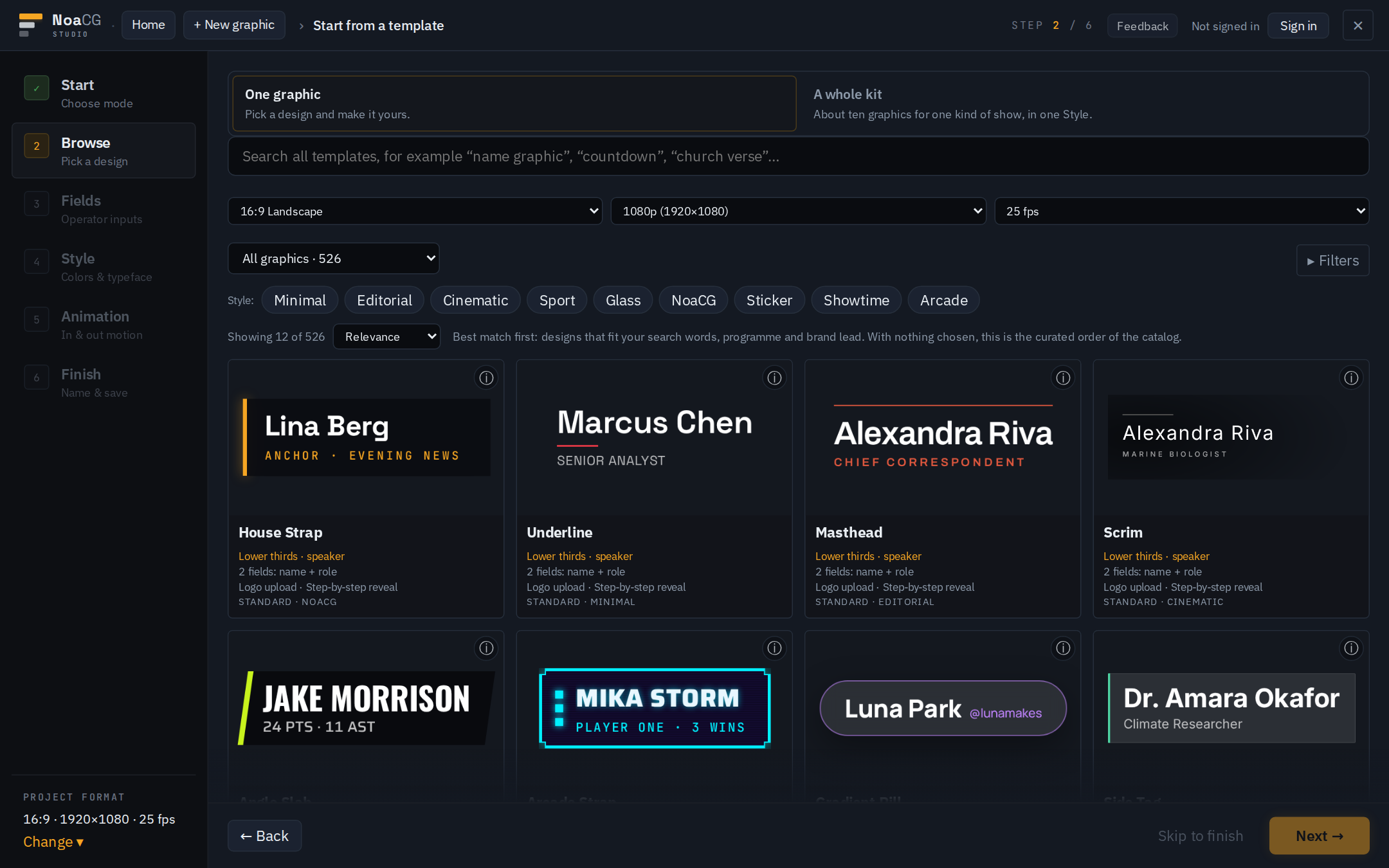
1. Make a graphic
- From a template. Pick a design from the library, one graphic or a whole kit, and set its text, colours, logo and motion.
- From your own SVG. Draw it in Illustrator or any tool that saves SVG, name the layers and
keep text as text. Text layers become fields the operator edits. No AI is involved. PNG, JPEG,
.htmland.zipfiles import too. Prepare your file. - With your AI coding agent. Ask Claude Code or Codex for a graphic "for NoaCG". The agent builds it, and the NoaCG CLI checks it in a live playout test and saves it to your library. Saving needs a free account. Set up your agent.
2. Play it or export it
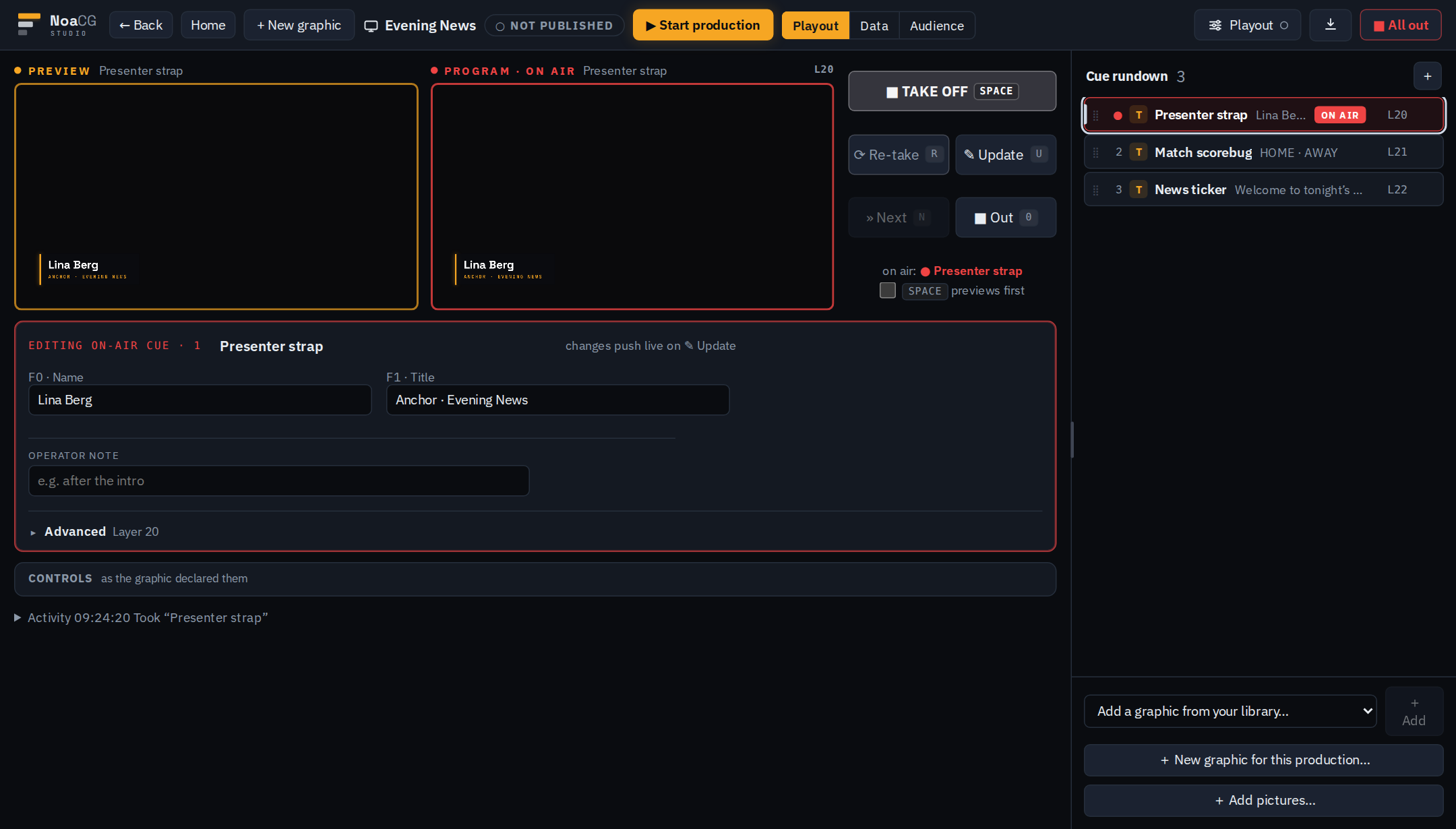
NoaCG Playout is the operator page: a cue rundown, preview and program monitors, and Take, Update and Out on the keyboard. You can change names and scores while a graphic is on air.
- CasparCG with NoaCG Bridge. NoaCG Bridge is a small Windows program on the playout machine. It connects NoaCG Playout to your CasparCG server and cues the server's clips from the same rundown. This is the main production setup.
- OBS and browser sources. Load a production's output URL as a browser source and the graphics play straight from NoaCG. Publishing an output URL needs a free account.
- Export. Download graphics as HTML templates for OGraf, CasparCG, SPX Graphics, H2R Graphics, LiveOS, OBS and vMix. They carry their own fonts and images and keep working without NoaCG. The vMix, SPX Graphics and LiveOS packages are not yet tested on those systems.
Every graphic also exports as an EBU OGraf package, validated on export. Playing OGraf packages made in other tools is not built yet. Also in beta: making a graphic with AI in the browser, and a workspace for rendered video.
Free and open source
Everything in the studio is free, and there is no paid edition. The source is open under AGPL-3.0 and this repository is the whole product, so you can host it yourself. You need a free account only for what the hosted service runs for you, such as publishing an output URL, saving from the CLI or running AI.
The NoaCG CLI and NoaCG Bridge
The NoaCG CLI and MCP server is published to npm as
@noacg/cli. It makes a graphic package (one folder
that is an EBU OGraf graphic and a SPX/CasparCG template), checks it against the same gate the
studio uses, takes screenshots, and saves it to your NoaCG library with a scoped agent key
(noacg login).
npx @noacg/cli scaffold --type scoreboard --design neutral --name "Football scoreboard" --out ./football-scoreboard
npx @noacg/cli validate ./football-scoreboard --screenshots ./shots
npx @noacg/cli save ./football-scoreboard
In Claude Code, the plugin adds the noacg-graphic skill and the /noacg:graphic command. Type
this in a Claude Code session (2.1.275 or later):
/plugin install noacg --marketplace NoaCG/NoaCG-Studio
Codex and the optional MCP plugin: cli/plugin/README.md and
cli/plugin-mcp/README.md. The full account:
docs/AGENT_CLI.md.
NoaCG Bridge is the same CLI's noacg bridge command. The Windows download on
noacg.studio/downloads packs it with Node, so the playout
machine needs nothing installed. How it works: docs/BRIDGE.md.
Run it yourself
npm install
npm run dev
The dev server puts the landing page at / and the studio at /app. The port is per checkout:
node scripts/dev-port.mjs prints it (5174 in a plain clone, see
docs/DEV_PORTS.md).
npm run build is the CI gate: the repository's checks, typecheck, lint and a production build
into dist/.
With an empty .env the studio runs on your machine with no accounts: you can make, preview and
export graphics. Accounts, sync, published output URLs and AI are optional services, each switched
on by the variables in .env.example.
Documentation
User guides are at noacg.studio/docs. For working on the code:
| Doc | What it covers |
|---|---|
AGENTS.md | The project contract |
docs/ARCHITECTURE.md | Layers, allowed import edges, the repository map |
docs/GOALS.md | Direction and the current state of each outcome |
docs/SPX_TEMPLATE_FORMAT.md | The SPX template contract |
docs/OGRAF.md | The EBU OGraf export |
docs/STATE_MACHINE_SCHEMA.md | What a graphic is: states, transitions, controls |
docs/CLOUD_PLAYOUT.md | Productions, the output page and playout |
docs/README.md | The map of everything else in docs/ |
License
AGPL-3.0, see LICENSE. Graphics you make and export are yours, with no licence obligations attached. The copyleft applies to NoaCG Studio itself: if you offer a modified version of the app as a network service, publish your changes under the same licence.
The bundled fonts are under the SIL Open Font License (src/assets/OFL.txt, copied into every
export). GSAP and the Lottie player are bundled too, so an export never fetches anything from a
CDN.
The cli/ package is Apache-2.0, so it can be installed into anyone's toolchain. It is a
client for any NoaCG deployment; docs/AGENT_CLI.md gives the reasoning.
Reviews
No reviews yet
Be the first to review this server!
More Developer Tools MCP Servers
Git
Freeby Modelcontextprotocol · Developer Tools
Read, search, and manipulate Git repositories programmatically
Fetch
Freeby Modelcontextprotocol · Developer Tools
Web content fetching and conversion for efficient LLM usage
Worldmonitor
Freeby Koala73 · Developer Tools
Live markets, conflicts, country risk, chokepoints, energy, and China decision signals. 86 tools.
Toleno
Freeby Toleno · Developer Tools
Toleno Network MCP Server — Manage your Toleno mining account with Claude AI using natural language.
mcp-creator-python
Freeby mcp-marketplace · Developer Tools
Create, build, and publish Python MCP servers to PyPI — conversationally.
MCP Marketplace
Freeby mcp-marketplace · Developer Tools
Search and install MCP servers from inside your AI client.