
Server data from the Official MCP Registry
Search, extract, crawl, map, research, scrape 16 platforms, browser automation, proxy — one API key.
About
Search, extract, crawl, map, research, scrape 16 platforms, browser automation, proxy — one API key.
Remote endpoints: streamable-http: https://mcp.novada.com/mcp
Security Report
Novada MCP is a feature-rich web scraping and data extraction server with proper authentication via API keys and reasonable permission scoping for its stated purpose. However, the server has broad network access (HTTP/browser automation across arbitrary URLs), relies on hosted infrastructure for certain operations, and includes some areas where error handling and input validation could be strengthened. The codebase demonstrates good security awareness (write-gated confirmations, auth disclosure in docs) but the scope and criticality of operations warrant closer scrutiny of network isolation and credential handling in production deployments. Supply chain analysis found 7 known vulnerabilities in dependencies (1 critical, 0 high severity). Package verification found 1 issue.
4 files analyzed · 16 issues found
Security scores are indicators to help you make informed decisions, not guarantees. Always review permissions before connecting any MCP server.
Permissions Required
This plugin requests these system permissions. Most are normal for its category.
What You'll Need
Set these up before or after installing:
Environment variable: NOVADA_API_KEY
How to Install & Connect
Available as Local & Remote
This plugin can run on your machine or connect to a hosted endpoint. during install.
Documentation
View on GitHubFrom the project's GitHub README.
Novada MCP
One MCP server for the entire live web. Search, extract, scrape, crawl, proxy, browser automation, and AI-powered research — behind a single hosted connection, or one local install if you'd rather run it yourself.




Quickstart · Get your key · How to choose a tool · Why Novada · Repository layout · Links
✅ Works with any MCP client — Claude, Cursor, Windsurf, VS Code, or npx locally | 🎯 15 typed per-platform scrapers — Amazon, Google, LinkedIn, TikTok, … each a closed operation enum, so an agent can't call an invalid op |
| 🎁 $10 free credits — no credit card needed — up to 1,000 calls/month | ⚡ Hosted-first, zero install — point at one URL, or self-host in one command |
Quickstart
Novada is hosted-first — there's nothing to install. Point your client at the hosted URL and you're done.
Security note: the hosted URL contains your API key in the
?apikey=parameter — treat it like a password. Never share it, never post it publicly, and never configure it as a shared or organization-level connector. Header-capable clients: preferAuthorization: Bearer <key>instead — it keeps the key out of URLs and access logs.
claude.ai (web)
- Go to Settings → Connectors → Add custom connector.
- Name it
Novada. - Paste the URL (contains your key — see security note above):
https://mcp.novada.com/mcp?apikey=YOUR_KEY - Click Add.
Claude Code
claude mcp add --transport http novada "https://mcp.novada.com/mcp?apikey=YOUR_KEY"
Full per-client install (Cursor/Windsurf/VS Code + local self-host) → npm-package/README.md.
Try it
novada_setup()                                          — validates your key, shows balance
novada_search({query: "Claude MCP tutorials"})          — web search
novada_extract({url: "https://example.com"})            — read any URL
novada_research({question: "how do MCP servers work?"}) — parallel multi-source research
Get your key
- Sign up at novada.com — no credit card required.
- Copy your API key from novada.com.
- You start with $10 in free credits, capped at 1,000 calls/month. Check what's left any time with
novada_account({section: "balance"})ornovada_setup().
How to choose a tool
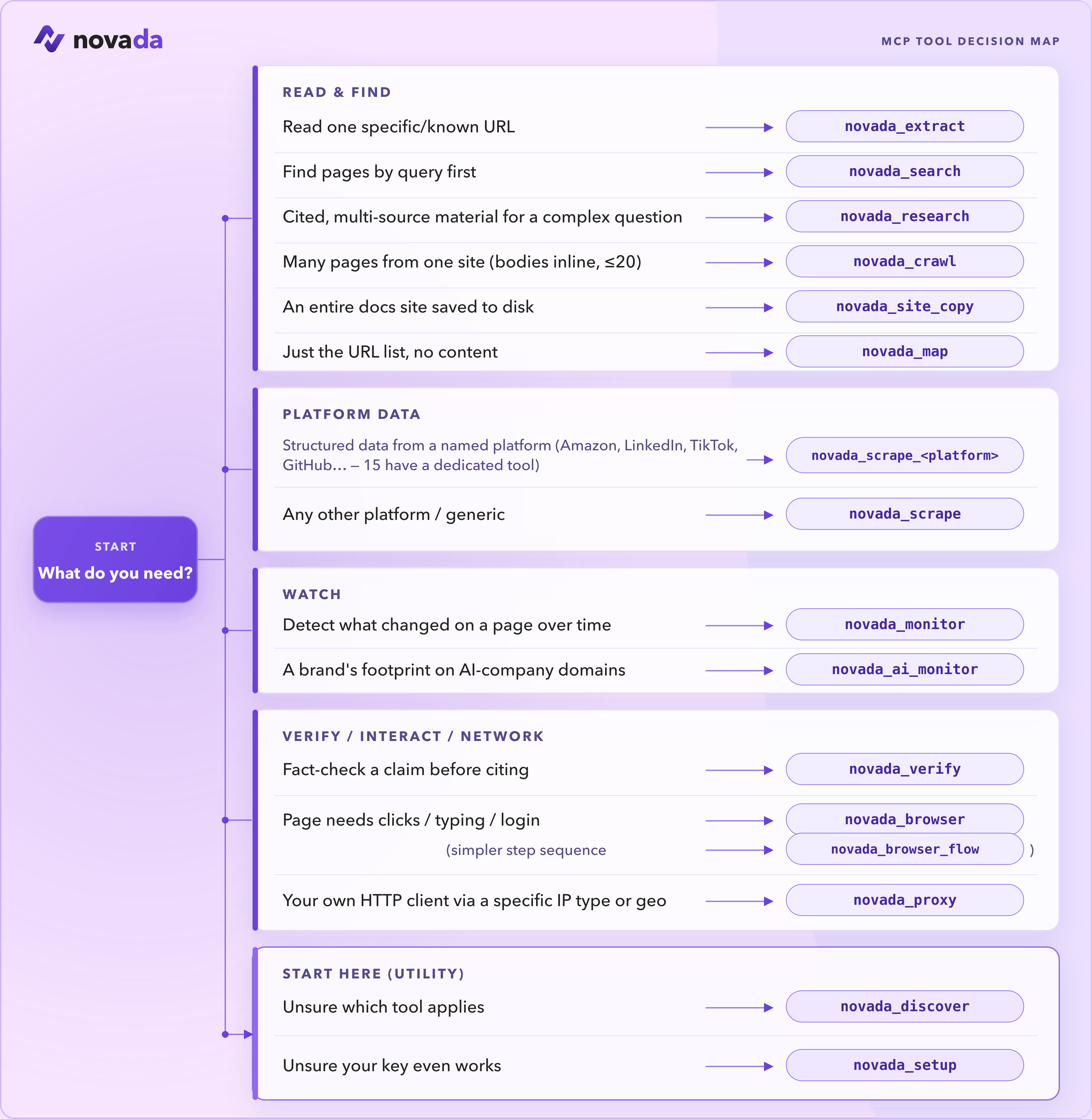
These are the tools you reach for most:
| Tool | Use it when |
|---|---|
novada_setup | First run — validate your key and see your balance. Start here. |
novada_search | Find pages by query (google / duckduckgo / yandex; time, domain, geo filters). |
novada_extract | Read one known URL — or up to 10 in parallel — through anti-bot pages. |
novada_research | Answer a complex question — parallel multi-source search + extraction in one call. |
novada_scrape | Structured records from 16 platforms (Amazon, LinkedIn, TikTok, …). Plus 15 typed per-platform tools — novada_scrape_amazon, _google, _linkedin, … — each a closed operation enum. |
novada_crawl | Pull content from a bounded set of related pages (≤20) on one site. |
novada_map | Discover what URLs exist on a site before fetching. |
novada_browser | Interact with a page — click, type, screenshot, run JS. |
novada_proxy | Route your own HTTP client through a specific IP type / country / session. |
Not sure? Call novada_discover and it returns the full catalog with each tool's status.
📚 Full reference — all 38 tools →
38 tools across 6 categories. Self-host (npx novada-mcp) exposes all 38. The hosted default surface (mcp.novada.com) exposes 30 — the same registry minus 8 tools that don't apply to a stateless serverless endpoint: novada_browser_flow (needs a persistent browser session), novada_site_copy (writes files to disk), novada_ip_whitelist / novada_static_ip_mgmt / novada_capture_apikey (write-gated account ops), novada_session_stats / novada_search_feedback (per-process in-memory state), and novada_verify — it is core-derived, not a hand-curated subset. Call novada_discover on your connection to see exactly what's available on it.
Where does it run?
| Tool | Local (npx novada-mcp) | Hosted (mcp.novada.com) |
|---|---|---|
novada_search | ✅ | ✅ |
novada_extract | ✅ | ✅ |
novada_crawl | ✅ | ✅ |
novada_research | ✅ | ✅ |
novada_map | ✅ | ✅ |
novada_site_copy | ✅ | ❌ writes to local disk |
novada_search_feedback | ✅ | ❌ per-process in-memory state |
novada_scrape | ✅ | ✅ |
novada_scrape_amazon … _perplexity (15 platform tools) | ✅ | ✅ |
novada_ai_monitor | ✅ | ✅ |
novada_monitor | ✅ | ✅ |
novada_verify | ✅ | ❌ not on novada_discover's hosted listing |
novada_proxy | ✅ | ✅ |
novada_browser | ✅ | ✅ |
novada_browser_flow | ✅ | ❌ needs a persistent browser session |
novada_account | ✅ | ✅ |
novada_proxy_account_create | ✅ | ❌ write-gated account op |
novada_proxy_account_list | ✅ | ✅ |
novada_ip_whitelist | ✅ | ❌ write-gated account op |
novada_capture_apikey | ✅ | ❌ write-gated account op |
novada_static_ip_mgmt | ✅ | ❌ write-gated account op |
novada_discover | ✅ | ✅ |
novada_setup | ✅ | ✅ |
novada_session_stats | ✅ | ❌ per-process in-memory state |
Full per-tool reference (same column) → docs/TOOLS.md.
Why Novada
- 15 dedicated per-platform scrapers.
novada_scrape_amazon,_google,_bing,_duckduckgo,_yandex,_youtube,_instagram,_facebook,_tiktok,_x,_walmart,_shein,_linkedin,_github,_perplexity— each exposes a closed, typedoperationenum scoped to that platform instead of the genericnovada_scrape's openplatform+operationstring pair, so an agent can't guess an invalid operation for the wrong platform. - Honest tool surface. Every listed
operationis verified-working — operations we can't currently deliver are marked and excluded, not left in to fail on you mid-task. - Contract-tested self-report. Tool descriptions are tested against actual behavior, not just written and forgotten — what a tool claims to return is checked against what it actually returns.
- Drift-guarded tool registry.
npm-package/src/tools/registry.tsis the single source of truth for the tool catalog; a test asserts the registered tools, the wired tools, and thenovada_discoveroutput can never diverge. confirm:truewrite-gate. Every mutating tool (proxy sub-account creation, IP whitelist changes, static IP purchases, capture-key resets) requires an explicit two-step confirmation — no silent writes.- Callable onboarding.
novada_discoverandnovada_setupare tools your agent can call itself to find the right tool or validate a key, without ever reading this README.
vs Firecrawl / Tavily (measured, not marketing):
- 4.9× more compact. An identical 5-result search query returned 2,761 bytes from Novada vs 13,421 bytes from Firecrawl — less agent token cost per answer.
- Keyless to start.
npx -y novada-mcpcold-starts with no key;novada_setupwalks you to one only when a tool needs it. - Named anti-bot failures. On an unresolvable target, Novada's response names the exact blocker (e.g.
anti_bot:kasada) instead of a generic error, so an agent can branch on it.
Repository layout
This is a monorepo with two artifacts:
npm-package/— thenovada-mcpnpm package. Local stdio MCP server (npx novada-mcp); source of truth for all tool logic.hosted-server/— what runs athttps://mcp.novada.com. An HTTP wrapper (auth, quota, rate-limit) on Vercel around the npm package's built output.
Full architecture map (entrances, dispatch core, where-does-X-live) → ARCHITECTURE.md; contributor routing → CONTRIBUTING.
Links
- Website: novada.com
- Get an API key: novada.com
- Sign up (free): novada.com
- npm: npmjs.com/package/novada-mcp
- GitHub: github.com/NovadaLabs/novada-mcp
- Issues: github.com/NovadaLabs/novada-mcp/issues
License
MIT
Reviews
No reviews yet
Be the first to review this server!
More Developer Tools MCP Servers
Git
Freeby Modelcontextprotocol · Developer Tools
Read, search, and manipulate Git repositories programmatically
Fetch
Freeby Modelcontextprotocol · Developer Tools
Web content fetching and conversion for efficient LLM usage
Paperclip
Freeby Paperclipai · Developer Tools
Trending hip-hop artist momentum scores across four cultural dimensions.
Toleno
Freeby Toleno · Developer Tools
Toleno Network MCP Server — Manage your Toleno mining account with Claude AI using natural language.
mcp-creator-python
Freeby mcp-marketplace · Developer Tools
Create, build, and publish Python MCP servers to PyPI — conversationally.
MCP Marketplace
Freeby mcp-marketplace · Developer Tools
Search and install MCP servers from inside your AI client.