
Server data from the Official MCP Registry
Read-only IBKR MCP: account, positions, brief, regime, stress, reporting, Edge, and risk.
About
Read-only IBKR MCP: account, positions, brief, regime, stress, reporting, Edge, and risk.
Security Report
Valid MCP server (0 strong, 2 medium validity signals). No known CVEs in dependencies. Imported from the Official MCP Registry.
9 files analyzed · No issues found
Security scores are indicators to help you make informed decisions, not guarantees. Always review permissions before connecting any MCP server.
Permissions Required
This plugin requests these system permissions. Most are normal for its category.
How to Install
Install command not verified. See the repository for install instructions.
View repositoryDocumentation
View on GitHubFrom the project's GitHub README.
Canary


A risk desk for your Interactive Brokers account. It reads your account for you and your AI agent, checks it against your limits, and, in the trading build, places the trades you authorise.
Canary runs beside your IB Gateway or TWS and nothing runs on a server of mine. It tells you what needs attention today. It runs twenty discipline checks against limits you set and names the ones your positions breach. It shows exposure by underlying. Canary Edge shows what the price did 1, 5 and 20 sessions after your past stock and ETF trades, from your broker statements, where a decision repeated often enough to count. The same readings come as text, as JSON, in a paired phone app, and as MCP tools for Claude Desktop, Claude Code, Cursor or Zed.
It comes in two builds. The standard binary reads; it has no compiled order path. The trading binary, a separate download, also executes orders, and only the ones you authorised: a transaction you confirmed, or a close or reduction the daemon runs under a bucket you listed in your written policy, a list that ships empty. Every order is pinned to one account, client ID and mode, consumes a preview token for that exact draft, is journaled with its origin before it is sent, and passes the risk policy's order limits, the mandate gate and the freeze. An agent trades only through the gated CLI. The MCP server has no order or preview tool in any build. Canary never decides a trade on its own.
Documentation · Install · First session · Agentic trading · Canary Edge · MCP tools · Safety · Privacy
Start
You need IB Gateway 10.37+ or TWS with API socket access enabled, an IBKR Pro account, and macOS or Linux on arm64 or amd64. Paper and live both work. There is no Windows build; use WSL.
Terminal, and every MCP host. One signed binary in ~/.local/bin:
curl -fsSL https://raw.githubusercontent.com/osauer/canary/main/install.sh | sh
canary status    # show which Gateway and account Canary reached
canary brief     # review what changed and what needs attention
The install guide shows how to inspect the script first and covers every other installation path.
Claude Desktop. Download the MCP Bundle,
canary.mcpb,
open it with Claude Desktop, then quit and relaunch Claude. The
walkthrough
covers the first connection.
Any other MCP host. Install the binary as above, then point the host at its
absolute path; which canary prints it.
{
  "mcpServers": {
    "canary": {
      "command": "/ABSOLUTE/PATH/TO/canary",
      "args": ["mcp"]
    }
  }
}
A first question that works in any host:
What needs attention today, and which data is missing or stale?
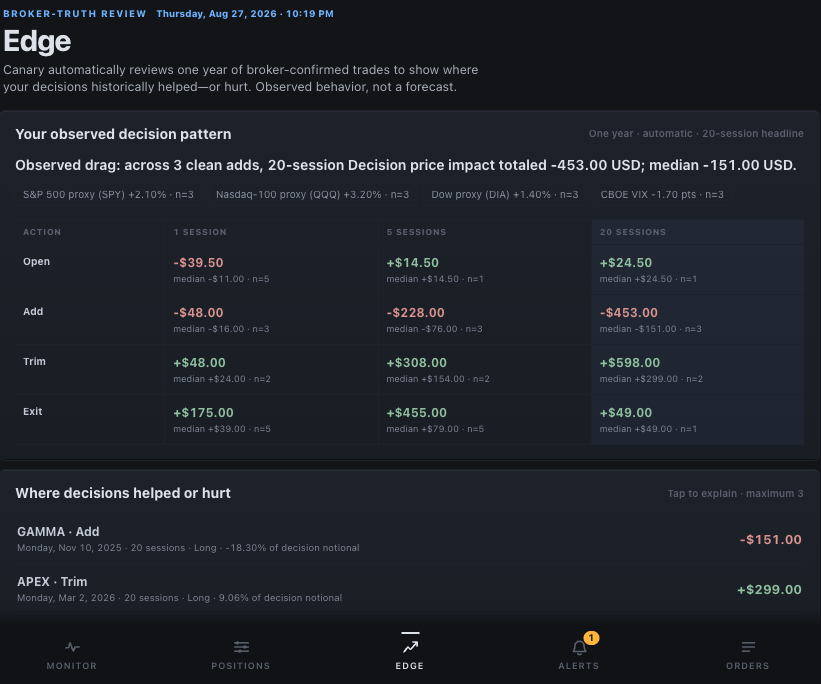
Canary Edge in the paired app, rendered from synthetic data: what the price did after past decisions, and how much evidence supports each row.
Ways in
| You want to… | Start with | What you get |
|---|---|---|
| Ask an agent about the account | The MCP Bundle, or canary mcp from any local framework that can launch a stdio MCP server | Read-only tools; the MCP server has no order or preview tool |
| Work in a terminal or script | canary brief, canary positions --by underlying, and --json | Every reading as text or JSON, from the same source as the app and the MCP tools |
| Check the desk from a phone | canary app, then canary app pair | A paired web app on your phone; local by default, remote access optional |
| Read Canary from your own Go program | github.com/osauer/canary/v3, the daemon client, at your release's tag (how) | The daemon's read methods over its local socket; its one submit method is served by a trading daemon only |
| Build directly on the TWS protocol | github.com/osauer/canary/v3/pkg/ibkr | A low-level transport; it carries no policy, authorisation or journal, those stay in your program |
MCP hosts
Ask plain questions rather than naming tools. The host guide covers Claude Code, Cursor, Zed, continuously running agents, logs, and connection checks. The generated MCP reference lists every tool and its schema.
Terminal and paired app
Every data command supports --json:
canary account
canary positions --by underlying
canary edge
canary rules
canary regime --explain
canary stress --details
Run canary status first for connection problems and canary data health for
missing or stale data. canary --help and the
CLI reference list every command and flag.
For the paired app, run canary app on the machine that owns the Gateway or
TWS session, then run canary app pair and scan the QR code. The
app guide covers pairing, remote access, and push
notifications.
Experimental: moomoo and Futu through OpenD
Canary can also read a Futu or moomoo account through OpenD, Futu's local gateway, while OpenD is running and logged in. This support is experimental. Reading balances and holdings, order and fill history, and converting to the base currency have been tested only against a stand-in for OpenD written for Canary's tests, so check what Canary shows against your broker. Canary cannot place, change or cancel orders through OpenD: it refuses the request and sends nothing to your broker.
Add this to ~/.config/ibkr/config.toml:
[broker]
kind = "opend"
With one real account on your login, Canary uses it. With several, it picks none:
canary status lists them, and you set account under [opend] to its id.
A simulated account is never picked: to use one, set account to its id.
With this setting, Canary shows account balances and stock and ETF positions, and
quotes for the Hong Kong and US markets where your OpenD login has the quote rights;
no other market's quotes have been read. A holding in a market without a quote right
shows the price OpenD reports with the holding, not a market quote. Options, futures and anything else in the account appear in a separate
list at the value OpenD reports, unconverted and not checked by Canary. Canary's exposure
figures and checks against your limits do not count them, so those figures do not
cover your whole account.
Holdings outside the account's base currency are converted at a rate worked out
from OpenD's own account totals, not a quoted rate; where that is not possible they
are not measured, and the checks against your limits report that they cannot judge
them. The regime,
portfolio stress and the market overview answer in part, tested only against that
stand-in: OpenD has no VIX term
structure, USD/JPY or gamma, so the regime's headline always reads "Market state
undefined — data incomplete". Many features are not available, among them daily
P&L, Edge, statement reporting, the market tape and technical analysis; canary status lists most of them. Canary with moomoo and Futu
has the details.
Each daemon serves one broker. To run OpenD beside IBKR, start a second daemon
with its own XDG_CONFIG_HOME, XDG_STATE_HOME, XDG_CACHE_HOME,
XDG_RUNTIME_DIR and CANARY_SOCKET. The
configuration reference lists every key.
Go wire-protocol library

pkg/ibkr is a clean-room Go library for the TWS wire protocol. It transports
broker requests only. Its API reference is on
pkg.go.dev, and its
statement coverage is updated on each push to main as a
line-by-line report.
The module path is github.com/osauer/canary/v3, and every release tag from
v3.38.0 on is a Go module version. To use the daemon client or pkg/ibkr from
your own Go program, get the module at the release your daemon runs, for
example:
go get github.com/osauer/canary/v3@v3.38.0
go get github.com/osauer/canary/v3@latest gives the newest release. Take the
client from the same release as the daemon: the daemon refuses a request with
a field it does not know, so a newer client can be refused. The /v2 path
ends at v2.8.5 (August 2026) and receives no further releases.
For the canary binary, use the installer: it installs a signed build.
Start with the package documentation and the wire protocol page.
Safety and privacy
The standard binary has no compiled order path, and the installer, updater and MCP Bundle never install the trading binary. The trading binary executes what you authorised and nothing else. The daemon checks every order at preview, at admission and at the final send: account, client ID and mode pins, the preview token for that draft, the journal entry written before the send, the risk policy's order limits, the mandate gate and the freeze. Gated orders has the detail.
Canary has no telemetry and does not send account IDs, balances, quantities, or P/L to the maintainer. PRIVACY.md is the data map. SECURITY.md covers the threat model and signed releases.
Documentation and legal
Canary is an independent third-party client for Interactive Brokers' publicly
documented TWS API. It is not built, endorsed, sponsored, or supported by
Interactive Brokers Group, Inc. or its affiliates. pkg/ibkr redistributes no
Interactive Brokers code, libraries, jars, or market data. Canary's OpenD client
is likewise independent and is not built, endorsed, sponsored, or supported by
Futu or its affiliates; pkg/futu includes protocol definitions from Futu's
public client under the Apache License 2.0, as
its notice sets out. Nothing here is
investment advice.
Canary is a private project of Oliver Sauer.
MIT. See LICENSE.
Reviews
No reviews yet
Be the first to review this server!
More Developer Tools MCP Servers
Rea
Freeby Morluto · Developer Tools
Reverse engineer anything from your terminal or agent with one CLI and MCP server.
Paperclip
Freeby Paperclipai · Developer Tools
Trending hip-hop artist momentum scores across four cultural dimensions.
Scrapling
Freeby D4Vinci · Developer Tools
Web scraping with stealth HTTP, real browsers, and Cloudflare bypass. CSS selectors supported.
Toleno
Freeby Toleno · Developer Tools
Toleno Network MCP Server — Manage your Toleno mining account with Claude AI using natural language.
MCP Marketplace
Freeby mcp-marketplace · Developer Tools
Search and install MCP servers from inside your AI client.
mcp-creator-python
Freeby mcp-marketplace · Developer Tools
Create, build, and publish Python MCP servers to PyPI — conversationally.