
Create polished, professional PDFs from a single prompt. Documentation, reports, charts, and more.
About
Create polished, professional PDFs from a single prompt. Documentation, reports, charts, and more.
Security Report
Valid MCP server (2 strong, 3 medium validity signals). 8 known CVEs in dependencies (1 critical, 5 high severity) Package registry verified. Imported from the Official MCP Registry.
8 files analyzed · 9 issues found
Security scores are indicators to help you make informed decisions, not guarantees. Always review permissions before connecting any MCP server.
Permissions Required
This plugin requests these system permissions. Most are normal for its category.
Unverified package source
We couldn't verify that the installable package matches the reviewed source code. Proceed with caution.
What You'll Need
Set these up before or after installing:
Environment variable: PDFCROWD_USERNAME
Environment variable: PDFCROWD_API_KEY
How to Install
Add this to your MCP configuration file:
{
  "mcpServers": {
    "io-github-pdfcrowd-pdfcrowd-mcp-pdf-export": {
      "env": {
        "PDFCROWD_API_KEY": "your-pdfcrowd-api-key-here",
        "PDFCROWD_USERNAME": "your-pdfcrowd-username-here"
      },
      "args": [
        "-y",
        "pdfcrowd-mcp-pdf-export"
      ],
      "command": "npx"
    }
  }
}Documentation
View on GitHubFrom the project's GitHub README.




PDF Export for AI Agents
Well-designed PDFs from a single prompt. Describe what you need, get a professional document.
Powered by PDFCrowd. Learn more →
Example
Analyze this project and create a comprehensive architecture overview PDF.
Include component diagrams and data flow. Save to architecture-overview.pdf
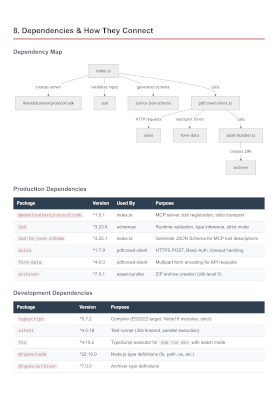
Configuration
Prerequisites: Node.js 18 or later.
Claude Code
Option A — Install as a plugin (Recommended):
/plugin marketplace add pdfcrowd/pdfcrowd-mcp-pdf-export
/plugin install pdfcrowd-export-pdf@pdfcrowd
Option B — Register the MCP server:
claude mcp add --scope user pdfcrowd-export-pdf -- npx -y pdfcrowd-mcp-pdf-export
Or add the equivalent JSON to ~/.claude.json (user scope) or .mcp.json (project scope):
{
  "mcpServers": {
    "pdfcrowd-export-pdf": {
      "command": "npx",
      "args": ["-y", "pdfcrowd-mcp-pdf-export"]
    }
  }
}
Codex CLI
codex mcp add pdfcrowd-export-pdf -- npx -y pdfcrowd-mcp-pdf-export
Or add manually to ~/.codex/config.toml:
[mcp_servers.pdfcrowd-export-pdf]
command = "npx"
args = ["-y", "pdfcrowd-mcp-pdf-export"]
Gemini CLI
gemini mcp add -s user pdfcrowd-export-pdf npx -y pdfcrowd-mcp-pdf-export
Or add manually to ~/.gemini/settings.json:
{
  "mcpServers": {
    "pdfcrowd-export-pdf": {
      "command": "npx",
      "args": ["-y", "pdfcrowd-mcp-pdf-export"]
    }
  }
}
Notes
- Restart your CLI after configuration to load the server
Personal Credentials
Get started right away — no credentials or signup needed. Output includes a watermark. For watermark-free PDFs, sign up for personal credentials.
Personal credentials can be set in:
- Config file
~/.pdfcrowd-mcp:PDFCROWD_USERNAME=your_username PDFCROWD_API_KEY=your_api_key - Environment variables
PDFCROWD_USERNAMEandPDFCROWD_API_KEY.
Privacy
Your source code never leaves your machine — only the rendered document is sent to PDFCrowd for PDF conversion.
License
Reviews
No reviews yet
Be the first to review this server!
More Developer Tools MCP Servers
Git
Freeby Modelcontextprotocol · Developer Tools
Read, search, and manipulate Git repositories programmatically
Fetch
Freeby Modelcontextprotocol · Developer Tools
Web content fetching and conversion for efficient LLM usage
Toleno
Freeby Toleno · Developer Tools
Toleno Network MCP Server — Manage your Toleno mining account with Claude AI using natural language.
mcp-creator-python
Freeby mcp-marketplace · Developer Tools
Create, build, and publish Python MCP servers to PyPI — conversationally.
MCP Marketplace
Freeby mcp-marketplace · Developer Tools
Search and install MCP servers from inside your AI client.
MarkItDown
Freeby Microsoft · Content & Media
Convert files (PDF, Word, Excel, images, audio) to Markdown for LLM consumption