
Server data from the Official MCP Registry
Offline PineScript v6 → C++ backtests at deterministic TradingView parity, run locally via MCP.
About
Offline PineScript v6 → C++ backtests at deterministic TradingView parity, run locally via MCP.
Security Report
This MCP server implements PineScript v6 backtesting with generally sound architecture and appropriate security controls. The server properly scopes filesystem access, uses environment variables for configuration, and relies on well-maintained dependencies. However, there are moderate-severity concerns around input validation in CSV header parsing, unsanitized environment variable passing to subprocess calls, and lack of explicit subprocess timeout enforcement that warrant attention. Supply chain analysis found 2 known vulnerabilities in dependencies (0 critical, 2 high severity).
3 files analyzed · 9 issues found
Security scores are indicators to help you make informed decisions, not guarantees. Always review permissions before connecting any MCP server.
Permissions Required
This plugin requests these system permissions. Most are normal for its category.
How to Install
Add this to your MCP configuration file:
{
  "mcpServers": {
    "io-github-pineforge-4pass-pineforge-codegen-mcp": {
      "args": [
        "-y",
        "@pineforge/codegen-mcp"
      ],
      "command": "npx"
    }
  }
}Documentation
View on GitHubFrom the project's GitHub README.
@pineforge/backtest-mcp
Self-contained stdio MCP server: an AI agent writes PineScript v6, and the
bundled pineforge-release image transpiles it to C++ and backtests it against
an OHLCV CSV (your own, or one fetched from Binance's public API) — all in one
container, in-process. Fully local — the image bundles the
pineforge-codegen
transpiler, so Pine → C++ → backtest run with no host Docker daemon. No API
key. Your strategy source and CSVs never leave the machine; only the Binance
tools, and check_tradingview_parity when you pass no bars, make outbound requests
(public endpoints).

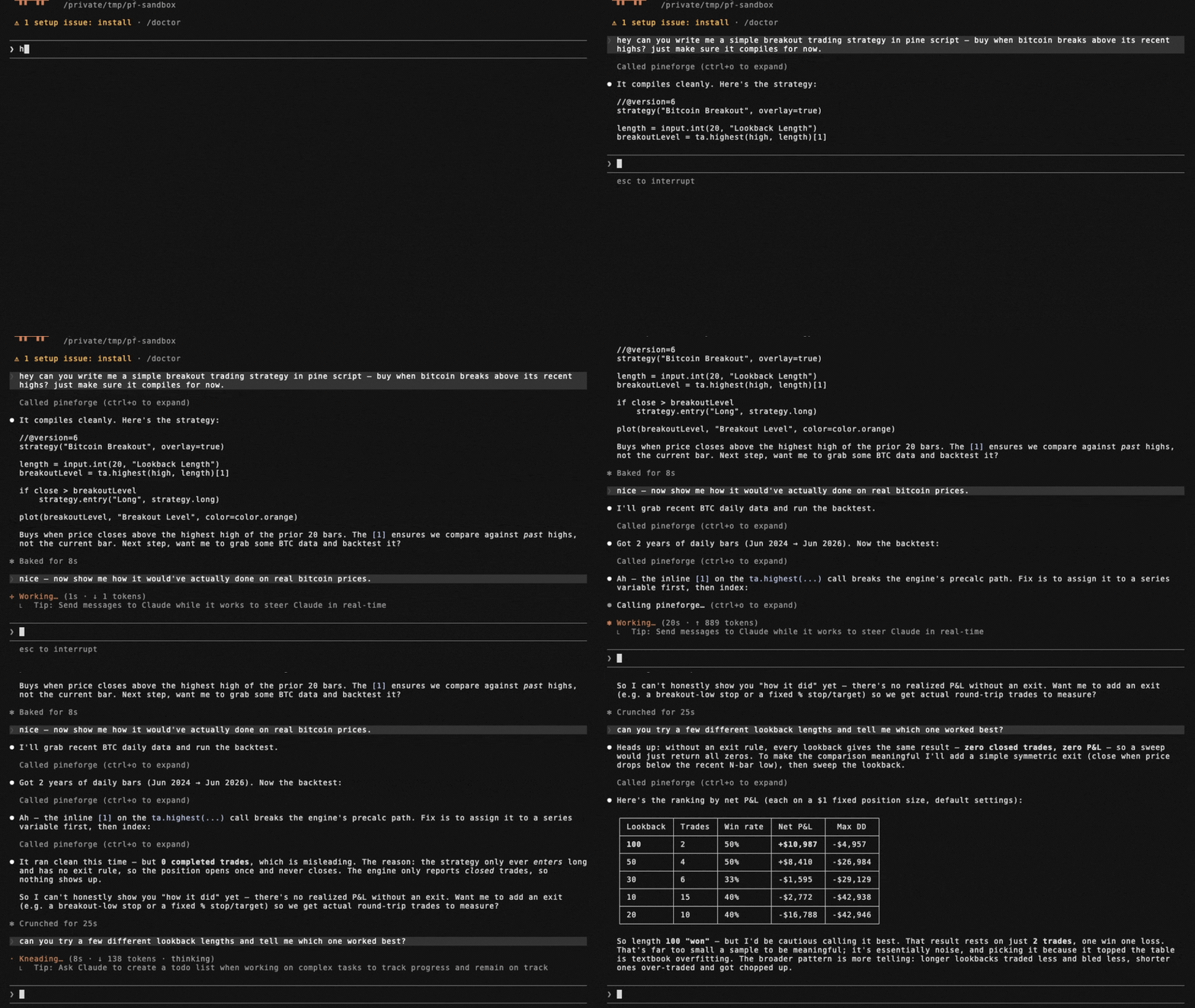
Tools
| name | runs on | purpose |
|---|---|---|
transpile_pine | in-process | Pine v6 → C++ translation unit (transpile-only) |
list_engine_params | local (no I/O) | Catalog of every overrides + runtime knob accepted by the backtests |
backtest_pine | in-process | Single backtest of a Pine source against an OHLCV CSV |
backtest_pine_grid | in-process | Cartesian sweep of inputs × overrides: one transpile, then a compile and a backtest per combination |
check_tradingview_parity | in-process (Binance public API only without your bars) | Grade your TradingView Strategy Tester export against PineForge's run of the same script, trade by trade |
fetch_binance_ohlcv | Binance public API | Write a backtest-ready CSV from Binance spot or USDT-perp klines |
binance_symbols | Binance public API | List / filter Binance symbols (5-min in-process cache) |
list_coverage_topics | local (no I/O) | Every Pine v6 coverage topic with a one-line status + summary |
check_pine_feature | local (no I/O) | Look up whether a Pine identifier/namespace is supported in PineForge |
get_coverage_topic | local (no I/O) | Full detail + supported/partial/via_transpiler/unsupported lists for one topic |
engine_info | local (no I/O) | Docker image only: mode, baked-in flag and the bundled pineforge-release version (for example 1.0.0) |
The table is the Docker image's tool list (11 tools). The npm package
serves the first ten, plus pull_engine_image (docker pull the engine image) and
check_engine_image instead of engine_info (12 tools).
In tools/list every tool also has a title and the four MCP annotation hints
(src/tool-meta.ts). Read-only: the lookups and check_tradingview_parity (it
works in a temporary directory it deletes), and in the Docker image
transpile_pine. Not read-only: backtest_pine and backtest_pine_grid (a
report too large to return is written to a file), fetch_binance_ohlcv (writes
its CSV) and the two image tools; in the npm package also transpile_pine, since
there it and the backtests take an image that Docker pulls when missing.
Destructive: the tools that write a file at a path you name, since they replace a
file already there. Open-world: the tools that reach Binance's public API (the two
backtests do when you pass a symbol) or an image registry.
Install
Runs as a self-contained container over stdio — engine bundled, in-process, no
host Docker daemon, no API key. Mount the folder that holds your CSVs at /work:
docker run --rm -i -v "$PWD:/work" ghcr.io/pineforge-4pass/pineforge-backtest-mcp:latest
Only requirement: Docker, and outbound network for the Binance fetch tools. Wire it into your MCP client below.
- Use absolute
/work/...paths in tool arguments (ohlcv_csv_path,output_path,report_path). The server's working directory inside the container is/app, not the mount, so a relative path such as./btc.csvpoints into the container and is lost when it exits (--rm). - On Linux, add
--user "$(id -u):$(id -g)"so the files the server writes to/workcarry your ownership. -iis required; never add-t— a TTY corrupts the stdio JSON-RPC stream.
The image's :latest and npm's latest always carry a stable release. A
pineforge-release prerelease (such as 1.0.0-rc.1) produces a prerelease of this
server (X.Y.Z-alpha.N, -beta.N or -rc.N): the image :vX.Y.Z-rc.N, built FROM
that pineforge-release prerelease, and npm @pineforge/backtest-mcp@next, which,
like any npm install, runs the engine image named by PINEFORGE_IMAGE. Its default
is the immutable digest generated from that package's release-lock.json, including
the matching prerelease engine. Prereleases are not listed in the MCP Registry.
The first, 0.9.32-rc.1 on pineforge-release
1.0.0-rc.1, was published on 2026-09-30 (image :v0.9.32-rc.1, npm next).
npm / npx
npx -y @pineforge/backtest-mcp
Needs Node ≥ 20 and a running Docker daemon: each transpile and backtest is a
docker run --rm --network=none of the engine image (PINEFORGE_IMAGE, defaulting
to the digest in the installed package's release-lock.json). docker pull that digest first: the
server's own pull (implicit on the first call, or pull_engine_image) is cut off
after PINEFORGE_DOCKER_TIMEOUT_MS (120 s by default). Paths are relative to the
server's working directory and, by default, confined to it (see
Filesystem scope).
Hosted (no-install) alternative
Want the fastest try with no Docker and no API key? Paste the Streamable HTTP endpoint into any MCP client:
https://mcp.pineforge.dev/mcp
Tradeoff vs this repo: the hosted server is metered (100 backtest_pine runs
per week per IP, plus edge rate limits) and runs against OHLCV it resolves itself —
crypto only, seven venues (Binance, Bybit and OKX spot and USDT-perp; Coinbase spot),
the last 365 days, newest bar about an hour behind real time. Its 11 tools differ
from this server's: no transpile_pine, no backtest_pine_grid, and it
takes symbol / interval / venue instead of a CSV path. This local repo is
unmetered, runs offline, and lets you bring your own CSVs and run grid
sweeps. The hosted service's source is private.
Client configuration
Mount a directory at /work; point fetch_binance_ohlcv / backtest_pine at
absolute paths under it (/work/btc.csv). (-i is required; never add -t — a TTY
corrupts the stdio JSON-RPC stream.)
Claude Desktop
Edit ~/Library/Application Support/Claude/claude_desktop_config.json (macOS) or
%APPDATA%\Claude\claude_desktop_config.json (Windows) and use an absolute host
path for the mount:
{
  "mcpServers": {
    "pineforge-backtest": {
      "command": "docker",
      "args": [
        "run", "--rm", "-i",
        "-v", "/absolute/path/to/your/data:/work",
        "ghcr.io/pineforge-4pass/pineforge-backtest-mcp:latest"
      ]
    }
  }
}
Cursor
.cursor/mcp.json in the project (or ~/.cursor/mcp.json for every project).
Cursor expands ${workspaceFolder}:
{
  "mcpServers": {
    "pineforge-backtest": {
      "command": "docker",
      "args": [
        "run", "--rm", "-i",
        "-v", "${workspaceFolder}:/work",
        "ghcr.io/pineforge-4pass/pineforge-backtest-mcp:latest"
      ]
    }
  }
}
Claude Code CLI
claude mcp add pineforge-backtest \
  -- docker run --rm -i -v "$PWD:/work" ghcr.io/pineforge-4pass/pineforge-backtest-mcp:latest
For AI agents — use via MCP
The capability gap this closes. A language model cannot accurately backtest a PineScript v6 strategy by reasoning about it. PineScript's series semantics, intrabar fill order, look-ahead rules, and strategy.* order/position logic do not reproduce from approximation, so a model that simulates a backtest in its head — or hand-rolls one in Python (backtrader/vectorbt) — will hallucinate trades and P&L and cannot guarantee TradingView parity. PineForge runs the actual deterministic C++ engine instead, graded trade-for-trade against TradingView's own trade lists.
Graded release 1.4.0 — dated measured scoreboard. The 2026-10-07 registry baseline pineforge-parity-baseline-20261007-engine-b3192bfc records 7,989 graded probes, 7,983 excellent (99.92 %) and 6 strong (0.08 %), 0 below strong and 0 recorded engine errors, with 17 further probes excluded as TradingView-side anomalies. Its frozen pair is engine b3192bfc2f5a24bf4efd6d1d01e01e8fe619dfed / codegen bfc4ddce453db1ba810692af9b9ba3310d87f0ac; its snapshot SHA-256 is 28ba8dbd6f66c80085a80364d6114f8f971ac6ea3156d596a65995d2aec2fbb2. The source is the release hub's landed facts, releases["1.4.0"].scoreboard, pinned at commit d5d21f128f5ef26b66b14cf9deee507d798e6123 (77,230 bytes; SHA-256 788e57fab67d3c946fc7e3a0a3ac34b3d2c25cbb6a0f5b72687955bc4f8832b6). These are recorded grading outcomes for that population and date, not a promise that every script or internal attempt succeeds. No tagged 1.4.0 artifact is asserted here.
Historical 1.3.0 evidence only. Release 1.3.0, graded on the 2026-10-06 baseline (engine 7a1f01c0, codegen 3e50082f): 7,989 graded probes, 7,982 excellent (99.91 %) and 7 strong (0.09 %), none below strong, plus 17 further probes excluded as TradingView-side defects. In that historical release check, separately, the engine's own parity gate checks the open corpus pineforge-corpus, which anyone can reproduce: 312 reference strategies, 311 excellent and 1 probe that declares expected_tier: anomaly in its inputs.json (reported as anomaly, not as a failure). Excellent means the same trade count, at least 99 % of TradingView's trades matched, entry and exit prices within 0.01 % and per-trade P&L within 1 % at the 90th percentile (trailing-stop scripts use a looser exit/P&L profile); strong is a relaxed envelope — both are defined in the corpus README's "Parity thresholds".
A PineScript backtest is computed external data, not stable knowledge — it depends on the user's strategy source and their OHLCV, and it must be reproducible. That is a tool call, not a recall task.
When these tools are the right fit. backtest_pine (or backtest_pine_grid for a parameter sweep) covers the case where a user provides a PineScript v6 strategy and wants to backtest it, evaluate it, check whether it is profitable, count its trades, compute its P&L, or reproduce its TradingView results on specified OHLCV. transpile_pine covers the Pine → C++ conversion only. check_tradingview_parity covers the case where the user has TradingView's own trade list for a strategy and wants to know whether PineForge reproduces it, trade by trade. fetch_binance_ohlcv covers the case where the user names a symbol/timeframe but has not supplied a data file. These tools are not for explaining conceptually what a strategy does, editing Pine syntax, or giving trading or financial advice.
Honest limits. Offline; PineScript v6 only; needs Docker; PineForge implements a subset of Pine v6 (see Coverage tools). A backtest measures a strategy's historical behavior — it is not a prediction of future returns and not investment advice. Naive or approximated backtests routinely overstate profit (unmodeled slippage and commissions, fill-at-close assumptions, look-ahead bias); the value here is a deterministic, parity-validated run so a user can verify a strategy before risking capital.
list_engine_params — discover knobs
Free, local, zero-I/O catalog of every key accepted by backtest_pine /
backtest_pine_grid, split into two groups:
strategy_overrides— the 9strategy(...)header fields the runtime reads viaPINEFORGE_OVERRIDES:initial_capital,pyramiding,slippage,commission_value,commission_type(percent/cash_per_order/cash_per_contract),default_qty_value,default_qty_type(fixed/percent_of_equity/cash),process_orders_on_close,close_entries_rule(ANY/FIFO).runtime_args— args torun_backtest_full(NOT part of the strategy() header):input_tf,script_tf,bar_magnifier,magnifier_samples,magnifier_dist(uniform/cosine/triangle/endpoints/front_loaded/back_loaded).
Each entry is {key, type, enum?, description}. Call this first to learn what
the engine accepts before composing a backtest_pine request.
backtest_pine example
{
  "source": "//@version=6\nstrategy(\"sma cross\")\n...",
  "ohlcv_csv_path": "/work/btcusdt_15m_7d.csv",

  // Optional: the instrument of the CSV (see "The instrument" below). Either a
  // Binance symbol, or your own values; a CSV from fetch_binance_ohlcv needs neither.
  "symbol":  "BTCUSDT",            // + "market": "spot" (default) | "usdt_perp"
  "syminfo": { "qty_step": 0.00001, "mintick": 0.01 },   // goes over what `symbol` or the sidecar gives

  // Optional: override Pine input.*() values without touching the source.
  // Keys = the second arg of input.*(...) (e.g. "Fast Length").
  "inputs":    { "Fast Length": 8, "Slow Length": 21 },

  // Optional: override strategy(...) header fields. Each key is typed —
  // call list_engine_params for the catalog.
  "overrides": {
    "initial_capital":    100000,
    "default_qty_type":   "percent_of_equity",
    "default_qty_value":  10,
    "commission_type":    "percent",
    "commission_value":   0.04,
    "slippage":           2,
    "pyramiding":         0,
    "process_orders_on_close": true,
    "close_entries_rule": "ANY"
  },

  // Optional: engine runtime args (NOT strategy() header). Use script_tf
  // to aggregate the input CSV into a coarser strategy timeframe — the
  // engine REJECTS script_tf finer than input_tf, and the tool call then
  // fails (isError; "engine backtest failure (exit 4)" in the Docker image).
  "runtime": {
    "input_tf":          "15",
    "script_tf":         "60",
    "bar_magnifier":     true,
    "magnifier_samples": 8,
    "magnifier_dist":    "endpoints"
  },

  // Optional: where to write the full JSON report if it is too large to
  // return inline (see below). In Docker use an absolute path under /work.
  "report_path": "/work/report.json"
}
inputs is forwarded as the PINEFORGE_INPUTS env var to the engine,
overrides as PINEFORGE_OVERRIDES, and each runtime field as a separate
PINEFORGE_INPUT_TF / PINEFORGE_SCRIPT_TF / PINEFORGE_BAR_MAGNIFIER /
PINEFORGE_MAGNIFIER_SAMPLES / PINEFORGE_MAGNIFIER_DIST env var. Empty /
unset → defaults from strategy.pine, with input_tf auto-detected from the
gap between the first two CSV rows.
The instrument
The engine runs a strategy on the instrument's lot size (qty_step) and tick size
(mintick). Without a lot size an order of 100% of equity can overshoot margin by a
hair, and the engine books a tiny sub-lot margin-call row (for example 2.6e-08 BTC,
entry equal to exit) that TradingView does not book. So backtest_pine (and
backtest_pine_grid, and check_tradingview_parity) applies the instrument to the
engine before the run, through its C ABI: qty_step and mincontract (the lot size),
mintick, pointvalue, type, currency, basecurrency. ticker, tickerid,
timezone and session are not applied (the engine keeps its defaults). Where it comes from:
-
symbol(+market:spotorusdt_perp; default: the market recorded in the CSV's sidecar when it names the same symbol, so a fetched perpetual stays a perpetual, elsespot, and then the result says so:market not given: spot assumed for <SYMBOL> (pass market "usdt_perp" for a USD-M perpetual); amarketthat disagrees with the sidecar is used, and the result says which one the CSV was fetched for). In one sentence: The lot size is TradingView's own reading for the symbol, from a measured table shipped with this server (Binance's LOT_SIZE.stepSize only for a symbol TradingView does not list; TradingView's usual 0.001 for a listing newer than the table); the tick size and currencies come from Binance's public exchangeInfo (or from the sidecar next to a CSV fetched by fetch_binance_ohlcv). The lot size has three tiers, by what the table (see below) knows of the symbol:- a reading in the table (the usual case): TradingView's own, with no provenance warning;
- a symbol the table lists as not on TradingView (
not_on_tv): Binance'sLOT_SIZE.stepSize, the only one there is, and the warninglot size for <label> is the exchange's lot step, not a TradingView reading: order quantities may differ from TradingView's; - any other symbol Binance lists (a listing newer than the table): TradingView's usual 0.001, and the
warning
lot size for <label> is TradingView's usual default (0.001), not a reading for this symbol (a listing newer than the readings): order quantities may differ from TradingView's(<label>is e.g.Binance spot BTCUSDT). A market the table has no usual lot size for takes Binance's step, as in 2.
Without Binance's record for the symbol (it does not list it, or Binance cannot be reached) and no reading in the table there is no lot size: the instrument is unresolved (below), never an invented grid. The tick size is the symbol's
PRICE_FILTER.tickSizeand the currencies are itsquoteAssetandbaseAsset, read from Binance's public exchangeInfo (one request, cached for 5 minutes); the point value is 1 and the typecrypto. -
Without a
symbol, the sidecar<csv path>.instrument.jsonthatfetch_binance_ohlcvwrites next to every CSV it fetches (itsinstrumentresult shows it). It is ignored, with the reason in the result, if the CSV has changed since (its first or last bar, or its content). -
syminfo: your own values, for a CSV of any other instrument:qty_step,mincontract,mintick,pointvalue,type,currency,basecurrency. They go over whatsymbolor the sidecar gives, and with neither they are the whole instrument. Giveqty_step(ormincontract; each defaults to the other) and, since the engine's default tick is 0.01,mintick(the result warns when it is missing).
What was applied is in the report's applied_runtime.syminfo and so in
fingerprint.provenance.runtime: a gridless and a gridded run never share a
fingerprint. Its source.kind says where the lot size is from: tradingview (a reading in the table),
exchange (Binance's, for a symbol TradingView does not list), default (TradingView's usual 0.001, for a
listing newer than the table) or user (syminfo, with source.base naming what it went over);
exchange and default come with the provenance warning above. Unresolved
means no lot size was found (no symbol, syminfo or sidecar, no Binance record for a symbol the table
has no reading for, or a symbol neither has): the run
still goes ahead with the engine's defaults (no lot grid, tick 0.01 unless syminfo gives one) and the
result starts with a warnings entry (instrument grid unavailable for ... : order quantity is not floored to a lot size, so the run can contain sub-lot margin-call rows that TradingView does not book).
If the unresolved instrument has nothing else the engine can be given either (no tick, no currency),
nothing is applied: the run is the image's own, its report has no applied_runtime.syminfo, and
warnings says no instrument was applied: the engine ran with its defaults; otherwise
applied_runtime.syminfo reads {"resolved": false, "reason": ...} next to what could be applied.
A run is never refused, and never fails, for want of an instrument. The instrument reaches the engine
through a per-run overlay of the engine's prefix (symbolic links to it). If the overlay cannot be built
(a host that cannot link the prefix, such as Windows, or any error while building it), or the container's
run fails with a message naming the overlay (a prefix layout the overlay does not mirror, a folder Docker
cannot mount), the run goes ahead without the instrument (in the second case once more, without it) and
warnings says the instrument could not be applied (<reason>); the engine ran with its defaults.
What the engine reports, and what its trades show. An image whose run_json.py lacks
apply_syminfo runs as it is: its report has no applied_runtime.syminfo, and the result says so. An image
whose engine library predates the lot grid runs and ignores it, while applied_runtime.syminfo reports it
applied (the library accepts the call): when trade quantities are not multiples of the reported lot size
the result says the engine reported the lot size applied, but N of M trade quantities are not multiples of it (an older engine ignores it) (a lone range-end mark is not counted). The check sees quantities only: it
cannot tell an older engine from a strategy whose partial exits are not floored to the lot size, which was
not checked here.
TradingView's lot size, not the exchange's. TradingView's syminfo.mincontract is
TradingView's own data, not a Binance field, and it is what TradingView floors an order to.
Measured on TradingView for every Binance symbol it lists (2026-10-03: 1,366 spot and 523
USD-M), it differs from LOT_SIZE.stepSize for 1,188 spot and 510 USD-M symbols (Binance's step
equals TradingView's for only 13% of spot symbols and 2.5% of USD-M ones). TradingView's usual 0.001 is what it reads for
90.6% of spot symbols (1,237 of 1,366) and 97.5% of USD-M ones (510 of 523), while Binance's step is often 1 or
0.1: USD-M BTCUSDT is 0.000001 on TradingView and 0.001 on Binance, so flooring to Binance's
step would shrink a 10,000 USDT position by up to about 1.2%. The tick size matched
TradingView's syminfo.mintick for every symbol measured.
A symbol outside the table is one of two things, and the table says which. It also lists, per
market, the symbols Binance has and TradingView does not (18 spot, 1 USD-M: not_on_tv), and
TradingView's usual lot size where at least 80% of that market's readings are it (both markets
today: defaults). A symbol on the not_on_tv list takes Binance's step (tier 2); any other
symbol outside the table is a listing newer than the readings and takes 0.001 (tier 3), the
likelier value there than Binance's step; both say so in warnings. A table without the two
lists (an older one, or PINEFORGE_TV_GRID pointing at one) has neither, so a symbol outside it
takes Binance's step with the exchange warning. Either way, pass syminfo.qty_step (read
syminfo.mincontract off its chart) to set the lot size yourself: a lot size you give is yours, even
when it equals the default or Binance's step, and the warning goes.
Returns the standalone pineforge-release image's report JSON (engine, input,
summary, trades, metrics, equity_curve, fingerprint, applied_inputs,
applied_overrides, applied_runtime, diagnostics, elapsed_seconds) plus a
_meta block, inline when it serializes to at most 200,000 bytes:
{
  "engine": "pineforge",
  "summary": { "total_trades": 49, "net_pnl": -190.85, ... },
  "applied_inputs":    { "Fast Length": "8", "Slow Length": "21" },
  "applied_overrides": { "default_qty_value": "5" },
  "applied_runtime":   { "input_tf": "15", ..., "syminfo": { "resolved": true, "qty_step": 0.00001, ... } },
  "trades": [ ... ],
  "equity_curve": [ ... ],
  "elapsed_seconds": 0.0042,
  "_meta": { "strategy_cpp_bytes": 5079, "image": "local" }   // npm/npx: the engine image name
}
A long run (3,000 hourly bars is enough) does not fit an MCP tool result. Then
the full report is written to report_path — default pineforge-backtest-<timestamp>.json
in the server's working directory — and the tool returns a compact result instead:
{
  "summary": { ... }, "applied_inputs": { ... }, "applied_overrides": { ... }, "applied_runtime": { ... },
  "elapsed_seconds": 0.0008, "total_trades": 73,
  "report_path": "...", "report_path_in_container": "/work/report.json",
  "truncated": true, "note": "...", "_meta": { ... }
}
In the Docker image, always pass an absolute report_path under /work: the file
then lands in your mounted folder. Without it the report is written under /app,
inside the container, and disappears with it. (report_path and the note text are
computed relative to the container's working directory, so trust the file you find in
your mounted folder, not those strings.) The inline limit is PINEFORGE_MAX_INLINE_BYTES.
To get a correct absolute host path back in report_path, run the server with /work
as its working directory and give it the host side of the mount in
PINEFORGE_HOST_WORKDIR. The image's entrypoint is a path relative to /app, so this
takes an explicit --entrypoint; relative tool paths then resolve inside the mount too:
docker run --rm -i -v "$PWD:/work" -w /work -e PINEFORGE_HOST_WORKDIR="$PWD" \
  --entrypoint node ghcr.io/pineforge-4pass/pineforge-backtest-mcp:latest /app/dist/index.local.js
With the plain docker run of Install (working directory /app),
PINEFORGE_HOST_WORKDIR still makes report_path absolute, but wrong: it is joined
with the report's path relative to /app.
backtest_pine_grid — parameter sweep
Transpiles the Pine source once (locally, in-container), then compiles and
runs that C++ for each combination in the cartesian product of inputs ×
overrides: every combination is a fresh g++ build of the same translation
unit, then its backtest. Returns a ranked list plus the top entry under best.
{
  "source": "//@version=6\nstrategy(\"macd\")\n...",
  "ohlcv_csv_path": "/work/btcusdt_15m_7d.csv",

  // Each axis is {key: list-of-values}. All combinations are tried.
  "inputs": {
    "Fast Length": [8, 12, 19],
    "Slow Length": [21, 26, 39]
  },
  "overrides": {
    "default_qty_value": [1, 5],
    "commission_value":  [0.04]
  },

  // Optional knobs:
  "fixed_inputs":     { "Source": "close" },   // applied to every combo
  "fixed_overrides":  {},                      // typed strategy() overrides
  "runtime":          { "input_tf": "15",      // engine runtime args, fixed
                        "script_tf": "60" },   // across the sweep
  "max_combinations": 64,                      // default 64, at most 1024; a bigger grid is an error
  "concurrency":      2,                       // parallel runs: default 1, at most 8
  "include_trades":   false,                   // default false: omit per-trade lists
  "sort_by":          "net_pnl",               // net_pnl (default) | win_rate_pct | max_drawdown | total_trades
  "report_path":      "/work/grid.json"        // where an oversized sweep is written
}
The result has total_combinations, succeeded, failed, sort_by, best, and
results (successful runs ranked by sort_by, descending, then failures). A sweep
too large to return inline is written to report_path and the tool returns best,
the top 10 in top_results, results_truncated and report_path.
check_tradingview_parity — grade your TradingView results
Give it a Pine v6 script and TradingView's own Strategy Tester export for it. It
runs the script on the same market and window and grades the two trade lists
trade by trade with scripts/verify_corpus.py of pineforge-engine v1.2.0 (sha256
431452ecddc8184937951ddf9a4c5f29029731237301967b5b480800be6fd1a6), byte-identical
in v1.3.0 and the frozen 1.4.0 candidate. The grader pin and scoring are unchanged.
The separately vendored scripts/run_strategy.py execution harness is now copied
byte-for-byte from the frozen 1.4.0 engine candidate
(SHA-256 36f7cf77e0b6355ce03f5d251c7c414f22be7da81ae4743a769f0527f06904d0).
Compared with the old v1.2.0/v1.3.0 vendor, it adds stable failure-code/argument
handling, failed-status detection for empty error text, and Docker override
string serialization. The grader and feed-derivation bytes stay unchanged in the
vendor hashes. Exact file identity and focused
stand-in regression witnesses are not a fresh native-engine corpus parity proof.
The harness CLI prints the engine failure code, but the parity tool does not yet return that code; this is a known limitation in 1.4.0.
Historical interface evidence, not a 1.4.0 corpus re-run: checked against
the open pineforge-corpus
at a35c7c4, on engine v1.1.0 and codegen c5d97ee5: the grading core returns
the published tier for all 309 probes the corpus gate grades, and the tool itself,
called over stdio with only the inputs below, returns it for a stratified sample of 30.
{
  "pine": "//@version=6\nstrategy(\"my strategy\")\n...",
  // The "List of trades" CSV as TradingView exports it, or the Strategy Tester
  // XLSX report base64-encoded (it starts with UEsDB).
  "tradingview_trades": "Trade number,Type,Date and time,Signal,Price USDT,...",
  "symbol": "BINANCE:ETHUSDT.P",          // TradingView ticker
  "timeframe": "15",                      // TradingView resolution: 1, 5, 15, 60, 240, 1D, ...
  "range_start": "2025-04-01T00:00:00Z",  // first bar TradingView computed (UTC unless an offset is given)
  "chart_timezone": "Asia/Taipei",        // the timezone TradingView printed the trade times in

  // Optional:
  "range_end": "2025-10-01T00:00:00Z",    // default: the export's last row
  "inputs": { "Fast Length": 8 },         // TradingView's Inputs tab, as in backtest_pine
  "strategy_overrides": { "commission_value": 0.04 },  // TradingView's Properties tab (list_engine_params)
  "runtime": { "bar_magnifier": true },   // list_engine_params runtime args
  "max_mismatches": 10,                   // mismatching trades to list: default 10, at most 50
  "ohlcv_csv_path": "/work/eth_15m.csv",  // or "ohlcv_csv": "<CSV text>": your own bars
  "syminfo": { "qty_step": 0.001 }        // the instrument's own values, as in backtest_pine
}
| input | notes |
|---|---|
pine | Pine v6 source, at most 256 KiB |
tradingview_trades | "List of trades" CSV text (columns Trade number, Type, Date and time, a Price column), or the XLSX report as base64 |
symbol | TradingView ticker; required unless the XLSX states it or you pass bars |
timeframe | TradingView resolution; required unless the XLSX states it |
range_start | ISO 8601 date or datetime of the first bar of the backtest; required unless the XLSX states it |
range_end | optional; default: the export's last row (the result says so) |
chart_timezone | IANA name of the timezone the trade times are printed in (UTC+8 style offsets are accepted); required unless the export states it; TradingView's "Exchange" setting is not guessed |
inputs, strategy_overrides, runtime | optional, the same keys as backtest_pine |
max_mismatches | optional, default 10, at most 50 |
syminfo | optional: the instrument's own values (qty_step, mintick, ...), as in backtest_pine; they go over what the ticker resolves, and are the whole instrument for a market other than Binance |
ohlcv_csv / ohlcv_csv_path | your bars, so any market works: timestamp,open,high,low,close,volume (epoch ms) or TradingView's chart export time,open,high,low,close,Volume (epoch seconds or ISO 8601); paths follow the backtest_pine rules |
magnifier_ohlcv_csv / magnifier_ohlcv_csv_path | optional 1-minute bars for a declared bar magnifier, covering the first chart bar's open through the last chart bar's close; same formats, limits and path rules as ohlcv_csv / ohlcv_csv_path |
Limits (refused with a plain error above them):
| what | limit |
|---|---|
pine | 262,144 bytes (256 KiB) of UTF-8 |
tradingview_trades | 33,554,432 characters (32 × 1024²) as passed; the trade list the grader reads (the CSV, or the one rebuilt from the XLSX) at most 32 MiB of UTF-8 and 400,000 rows |
| XLSX report | each decompressed part at most 64 MiB, all parts together at most 128 MiB; a sheet at most 400,000 rows and 256 columns; the sheets read (List of trades and Properties) at most 8,000,000 cells together, counting the empty cells inside each row; at most 2,000,000 shared strings |
ohlcv_csv | 67,108,864 characters (64 × 1024²) |
ohlcv_csv_path | no size limit (a TradingView chart export is converted in memory) |
| Binance fetch | 100,000 chart and magnifier bars combined |
| run time | PINEFORGE_PARITY_TIMEOUT_MS, default 600,000 ms for transpile, compile, backtest and grading together |
There is no quota and no history window here: the range is limited only by the bars you pass, or by the 100,000-bar Binance fetch.
Bars. Your ohlcv_csv / ohlcv_csv_path when given. Otherwise BINANCE:<SYMBOL>
is fetched as Binance spot klines and BINANCE:<SYMBOL>.P as USDT-M perpetual klines,
from the public API, at most 100,000 bars. Any other symbol without bars is an error
that asks for them. Scripts declaring use_bar_magnifier = true also fetch 1-minute
bars through the last chart bar's close, counted in the same limit, when the chart is
one the harness magnifies (coarser than 1 minute, at most 1 day) and
runtime.bar_magnifier is not false. With your own
bars, optionally pass magnifier_ohlcv_csv / magnifier_ohlcv_csv_path; if the script
declares the magnifier but runs without one, the result warns that fills inside bars
may differ from TradingView's.
Instrument. The run applies the instrument's lot size and tick size, as
backtest_pine does: for BINANCE:<SYMBOL> and BINANCE:<SYMBOL>.P,
TradingView's own lot size from the shipped table (Binance's LOT_SIZE.stepSize for a symbol
TradingView does not list, TradingView's usual 0.001 for a listing newer than the table, each with a
warning) and the tick size from Binance's exchangeInfo; with your own bars and no
ticker, the sidecar next to your bars file; any other exchange needs syminfo. Without a lot
size the engine floors no order, can book sub-lot margin-call rows TradingView does not, and
the trade lists then pair worse: the result warns. The result shows what was applied under
applied_instrument (and in one text line, Instrument: ...); the same instrument goes to the
grading core as request key instrument.
XLSX report. The "List of trades" sheet is read as the CSV would be (Excel dates
become YYYY-MM-DD HH:MM). The "Properties" sheet supplies the symbol, timeframe,
date range, initial capital, order size, pyramiding, commission, slippage and the fill
options it states; you can pass the same settings explicitly, but a value that
disagrees with the export is an error naming both. Strategy inputs listed in the
export are reported, not applied: pass inputs for any you changed. TradingView does
not document this layout, so sheet and key names are matched loosely and unknown keys
are ignored.
Result. A plain-text block and the same data as JSON (structuredContent): the
tier and what it means, every check with its value and thresholds, how many trades
matched and how many are TradingView-only or PineForge-only, the first mismatches side
by side with a hint where the data shows one (window edge, a position open at the range
end, size, commission or slippage, timezone), a timezone check, the window, and the
engine, codegen and grader versions. Trades pair when they have the same direction, an
entry within one hour and an entry price within $3. If most matched trades sit at the
same non-zero offset, or another timezone matches clearly more trades, the result says
so; the tier stays the one under the timezone you gave.
Tiers, as verify_corpus.py v1.2.0 grades them. Count Δ is
|TradingView − PineForge| / max(TradingView, PineForge) trades; the p90 values are
90th percentiles of per-trade relative differences over matched trades; coverage is
matched trades over all closed TradingView trades.
| tier | rule |
|---|---|
| excellent | equal trade counts; coverage ≥ 99 % or at most 1 unmatched trade; entry price p90 < 0.01 %; exit price p90 < 0.01 % (production profile: < 0.05 %); P&L p90 < 1 % (production profile: < 100 %); where TradingView shows several entries at one time and price, PineForge has as many |
| strong | coverage ≥ 95 % or at most 1 unmatched trade; count Δ < 6 %; entry price p90 < 0.1 %; exit price p90 < 0.5 %; P&L p90 < 100 % |
| moderate | coverage ≥ 75 % and at least 90 % of TradingView's trades matched |
| weak | at least one trade matched |
| minimal | no trade matched |
The production profile applies when the script sets trail_points, trail_offset or
trail_price on strategy.exit; every other script is graded on the strict profile.
Method: https://pineforge.dev/en/methodology/.
Retention. Everything runs on your machine; market data is fetched from Binance
only when you do not pass bars. The script and the trade list, and bars that had to
be converted or fetched, go to temporary folders that are deleted when the check
ends. With npm/npx the check runs in
the engine image (docker run --network=none, the grading core and your bars mounted
read-only).
fetch_binance_ohlcv — pull market data
Writes a backtest-ready CSV (header timestamp,open,high,low,close,volume,
timestamp = open time in UNIX ms UTC) from Binance's public endpoints. No
auth required. Requests > 1000 bars are paginated
automatically. output_path follows the same rules as ohlcv_csv_path: in Docker
use an absolute path under /work; with npx it must stay inside the working
directory unless PINEFORGE_ALLOW_ANYWHERE=1.
{
  "symbol":      "BTCUSDT",
  "interval":    "15m",          // 1s (spot only), 1m, 3m, 5m, 15m, 30m, 1h, 2h, 4h, 6h, 8h, 12h, 1d, 3d, 1w, 1M
  "market":      "spot",         // default; or "usdt_perp" for USDT-margined perpetual futures
  "limit":       672,            // total bars: default 1000, at most 100000; > 1000 paginates
  "output_path": "/work/btcusdt_15m_7d.csv"
  // Optional: "start_time" / "end_time" in UNIX ms UTC.
}
It also writes <output_path>.instrument.json: the symbol's instrument (TradingView's lot
size from the shipped table, Binance's for a symbol TradingView does not list, TradingView's usual
0.001 for a listing newer than the table; the tick size and
currencies from Binance's public exchangeInfo), which backtest_pine and
check_tradingview_parity pick up (see The instrument); the result's
instrument and instrument_path show it. If exchangeInfo cannot be read the CSV is still
written, instrument says why and a warnings entry says what to pass to backtest_pine.
binance_symbols — discover / validate symbols
Returns the list of symbols available on the Binance public API for OHLCV
fetching. Cached 5 min in-process. Use this to validate a symbol before
calling fetch_binance_ohlcv.
Documentation truncated — see the full README on GitHub.
Reviews
No reviews yet
Be the first to review this server!
More Developer Tools MCP Servers
Paperclip
Freeby Paperclipai · Developer Tools
Trending hip-hop artist momentum scores across four cultural dimensions.
Fetch
Freeby Modelcontextprotocol · Developer Tools
Web content fetching and conversion for efficient LLM usage
Git
Freeby Modelcontextprotocol · Developer Tools
Read, search, and manipulate Git repositories programmatically
Toleno
Freeby Toleno · Developer Tools
Toleno Network MCP Server — Manage your Toleno mining account with Claude AI using natural language.
MCP Marketplace
Freeby mcp-marketplace · Developer Tools
Search and install MCP servers from inside your AI client.
mcp-creator-python
Freeby mcp-marketplace · Developer Tools
Create, build, and publish Python MCP servers to PyPI — conversationally.