
Server data from the Official MCP Registry
The full Prufa QA agent over MCP: audits, flows, monitors, gremlin chaos, discovery.
About
The full Prufa QA agent over MCP: audits, flows, monitors, gremlin chaos, discovery.
Security Report
The prufa-mcp server is a well-structured MCP implementation for QA automation with proper authentication design, clean credential handling, and appropriate permissions for its purpose. The codebase demonstrates good security practices including env-var-based token management, config file support with secure fallbacks, and comprehensive test coverage of auth flows. Minor code quality observations exist but do not raise security concerns. Supply chain analysis found 3 known vulnerabilities in dependencies (0 critical, 3 high severity). Package verification found 1 issue.
5 files analyzed · 7 issues found
Security scores are indicators to help you make informed decisions, not guarantees. Always review permissions before connecting any MCP server.
Permissions Required
This plugin requests these system permissions. Most are normal for its category.
What You'll Need
Set these up before or after installing:
Environment variable: PRUFA_API_TOKEN
How to Install
Add this to your MCP configuration file:
{
  "mcpServers": {
    "io-github-prufa-dev-prufa-mcp": {
      "env": {
        "PRUFA_API_TOKEN": "your-prufa-api-token-here"
      },
      "args": [
        "prufa-mcp"
      ],
      "command": "uvx"
    }
  }
}Documentation
View on GitHubFrom the project's GitHub README.
prufa-mcp — the QA agent for your vibe-coded app
Vibe-coded apps ship faster than anyone can review them. In June 2026 we audited 49 fresh Show HN launches — 38 had a critical bug on day one: a broken signup, a silent console error, analytics that never fired, a consent banner that did nothing.
Prufa is the agent that catches those before your users do. Point it at a URL and it audits the things humans skip when they're moving fast — broken flows, JS console errors, missing tracking, consent violations, security headers, mobile tap targets, accessibility — and hands back machine-verified findings, graded A–F. This repo is the open-source MCP server that wires that audit straight into your coding agent.
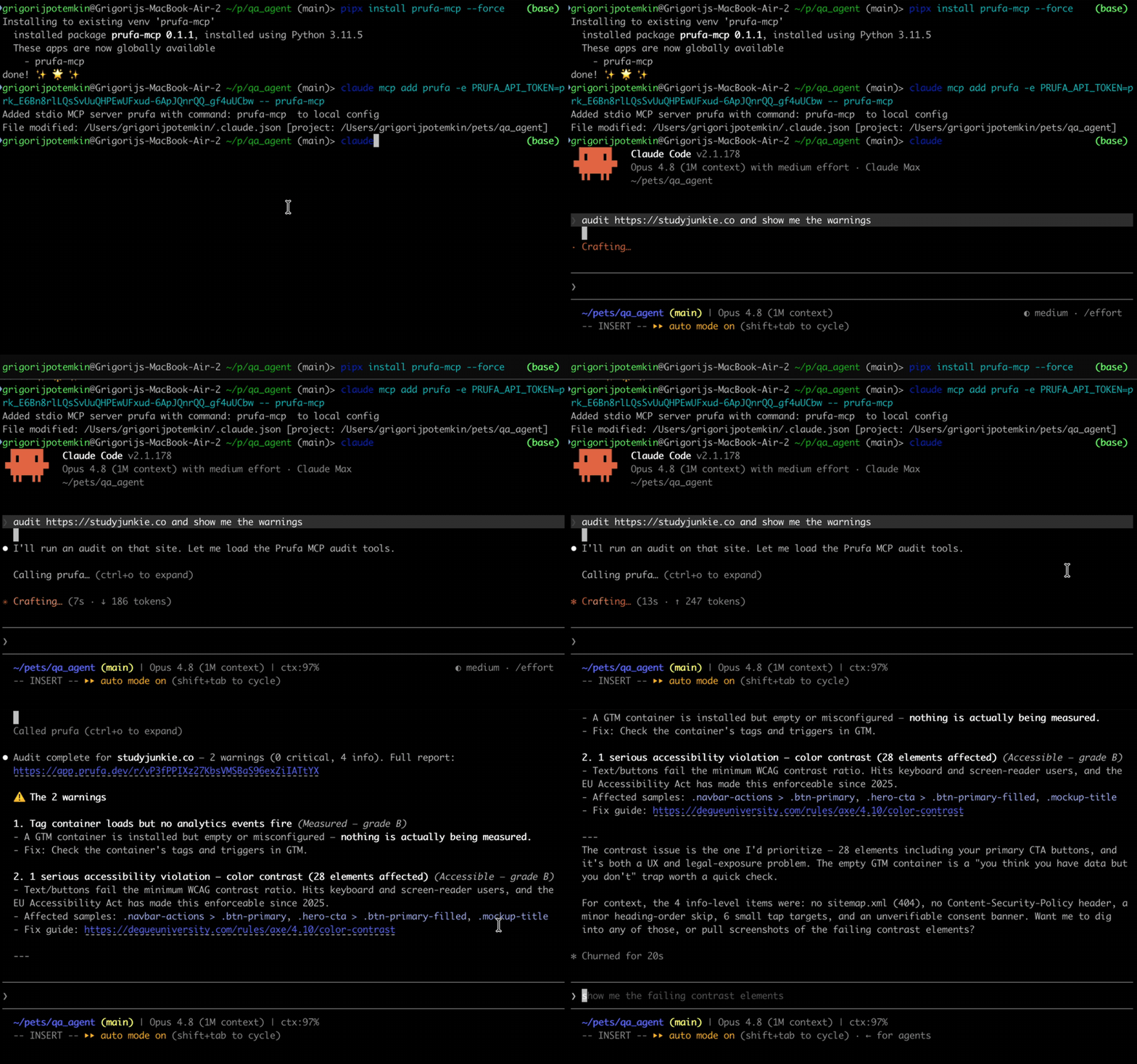
30-second demo
What an audit gives you
Ask your agent to audit https://yourapp.com and prufa_run_audit returns one
JSON report. Findings are grouped into graded sections, each finding carries a
severity, the impact (why it matters), and a fix hint. Real output,
trimmed:
{
  "url": "https://yourapp.com",
  "headline": "2 warnings found",
  "counts": { "critical": 0, "warning": 2, "info": 5 },
  "sections": [
    { "label": "Works",     "grade": "C", "counts": { "warning": 2, "info": 1 } },
    { "label": "Fast",      "grade": "A" },
    { "label": "Found",     "grade": "A" },
    { "label": "Compliant", "grade": "A" }
  ],
  "check_results": [
    {
      "check_id": "ux",
      "findings": [{
        "severity": "warning",
        "title": "2 javascript console error(s) during page load",
        "impact": "Errors at load time often mean broken features visitors never report.",
        "evidence": { "count": 2, "sample": [
          "Access to XMLHttpRequest at 'https://api.fontshare.com/...' blocked by CORS policy",
          "Failed to load resource: net::ERR_FAILED"
        ]}
      }]
    },
    {
      "check_id": "mobile",
      "findings": [{
        "severity": "warning",
        "title": "13 tap target(s) smaller than 24px",
        "impact": "Fingers are not cursors — undersized buttons mean mis-taps on exactly the elements you want pressed.",
        "fix_hint": "Give interactive elements at least 24x24px of hit area (WCAG 2.5.8)."
      }]
    },
    {
      "check_id": "security",
      "findings": [{
        "severity": "info",
        "title": "no Content-Security-Policy header",
        "impact": "Without a CSP, one injected script owns the page — and every third-party tag you load is trusted completely.",
        "fix_hint": "Start with a report-only CSP and tighten from real violation reports."
      }]
    }
  ],
  "report_url": "/r/G82RpzTi_zn-o71_XoMLCprP7uvCQP87"
}
report_url is a shareable HTML version of the same report. The full payload
also includes tracking, consent, seo/aeo, a11y, forms, and detected
user flows — see the OSS surface below.
Install
The package is on PyPI. Install it
globally with pipx (recommended — isolated venv, exposes the prufa-mcp
binary on your PATH) or into a project venv with pip:
# Recommended — global install, isolated venv
pipx install prufa-mcp

# Or, into your project venv
pip install prufa-mcp

# Pin a specific version with ==, e.g. pipx install prufa-mcp==0.1.3

# Verify the binary is on PATH
which prufa-mcp
# Should print something like: /Users/you/.local/bin/prufa-mcp
You also need a free Prufa API key. The first audit is free, no card required.
- Sign in at prufa.dev (Google OAuth)
- Create an API key from the dashboard
Wire into your agent
The MCP server runs as a stdio subprocess, spawned by your agent on first use.
The cleanest way to register it is claude mcp add (Claude Code's built-in
command — it writes the config to ~/.claude.json correctly, which the
~/.claude/mcp.json path does NOT).
Claude Code (recommended path)
# Get the absolute path of the binary (use whatever `which prufa-mcp` returned)
PRUFA_BIN=$(which prufa-mcp)

# Add the MCP server. The token stays out of your shell history.
read -s -p "Prufa API token: " PRUFA_TOKEN && echo
claude mcp add \
  --scope user \
  --env "PRUFA_API_TOKEN=$PRUFA_TOKEN" \
  prufa \
  -- "$PRUFA_BIN"
Restart Claude Code (config is read at startup), then verify:
/mcp
You should see prufa listed as Connected, with prufa_run_audit and
prufa_get_report as available tools.
Cursor / Cline / Continue (hand-edit .mcp.json)
In your project root or in ~/.config/Claude/ etc.:
{
  "mcpServers": {
    "prufa": {
      "command": "/Users/you/.local/bin/prufa-mcp",
      "env": {
        "PRUFA_API_TOKEN": "your-prufa-api-key"
      }
    }
  }
}
Restart the host app. The command path must be the absolute binary path
(not ~, not $()) — those don't expand in MCP config.
Prefer config files to env vars? Drop your token in
~/.config/prufa/mcp.jsoninstead — see ADVANCED.md.
Use it
In your agent:
> audit https://my-vibe-coded-app.com and show me the criticals
> run prufa on my staging deploy
> fetch the report for the audit I just ran
prufa_run_audit with wait=true (the default) blocks until the audit
completes and returns the JSON report directly — typically 25–60s for a public
page. If you set wait=false, the call returns immediately with the queued
state plus a share_token you can poll with prufa_get_report.
What you get — the full agent surface
prufa-mcp exposes the whole product over MCP (44 tools). Point your agent
at Prufa and it can audit pages, drive multi-step flows, watch for regressions,
run chaos tests, run full-auto discovery, and manage the workspace + billing —
no dashboard round-trip. Free/anonymous tools need no card; Pro tools return the
API's 402 with a checkout link when you're not on a plan (the tool is visible,
the paywall is server-side).
Audit & reports
| Tool | What it does |
|---|---|
prufa_run_audit(url, wait=true) | One-shot public-page audit; blocks and returns findings JSON. |
prufa_get_report(run_id?, share_token?) | Fetch a report by UUID or /r/ slug. |
prufa_get_run(run_id) | Poll a run's status. |
prufa_list_runs(limit) | Recent runs in the workspace. |
prufa_get_finding(run_id, finding_key?) | Persisted findings, machine-readable. |
prufa_list_alerts() | Alert ledger (newest first, incl. suppressions). |
Workspace, usage & conversion
| Tool | What it does |
|---|---|
prufa_setup_workspace(owner_email, name?) | Create a free, no-card agent_temp workspace (7-day trial) and return an API token once. If a token is already set, returns the real workspace + trial state. |
prufa_get_workspace() | Current workspace + inlined usage + a trial block. |
prufa_get_usage() | Usage object + trial/upsell blocks — call before metered actions. |
prufa_workspace_settings(...) | Usage webhook, auto-recharge, email/Slack switches. |
prufa_set_notifications(cells) | The 9-event × {email, slack} routing matrix. |
Billing (returns a URL for the human to open — never takes a card)
| Tool | What it does |
|---|---|
prufa_upgrade_plan(tier) | Stripe checkout URL for a paid plan (starter/pro/team). |
prufa_buy_credits(credits) | Stripe checkout URL for a one-time credit pack. |
prufa_billing_portal() | Stripe customer portal URL (card, invoices, cancel). |
Flows (describe a journey → reviewable spec → run)
| Tool | What it does |
|---|---|
prufa_create_flow(url, test_case, name?) | Compile a plain-text test case to a draft spec. |
prufa_confirm_flow(flow_id, spec?) | Approve a draft — only confirmed flows run. |
prufa_run_flow(flow_id, credentials?) | Execute a confirmed flow. |
prufa_set_flow_credentials(flow_id, credentials) | Store {{VAR}} values (write-only). |
prufa_edit_flow(flow_id, spec) | Edit the spec (returns it to draft). |
prufa_get_flow · prufa_list_flows · prufa_delete_flow | Read · list · remove. |
Monitors (watch a URL or flow on a schedule)
| Tool | What it does |
|---|---|
prufa_start_monitor(url, cadence?, flow_id?) | 1-click monitor; returns a deploy-hook secret once. |
prufa_trigger_monitor(monitor_id) | Run now (rate-capped). |
prufa_pause_monitor · prufa_resume_monitor · prufa_get_monitor · prufa_list_monitors · prufa_delete_monitor | Lifecycle. |
prufa_rotate_monitor_webhook(monitor_id) | Rotate the deploy-hook secret. |
prufa_list_monitor_deliveries(monitor_id) | Deploy-hook delivery log + CI snippets. |
Gremlin (chaos QA)
| Tool | What it does |
|---|---|
prufa_run_gremlin(url, persona?, direction?, credentials?) | Imitate a difficult user; detectors verify what breaks. Mutations dry-run unless authorized; payments never execute. |
prufa_rerun_gremlin(run_id) | Re-run a past gremlin with the same intent + saved login. |
prufa_authorize_domain(host, allow_mutation?) | Allow real (non-payment) writes on a host you own. |
prufa_list_gremlin_domains() | List mutation authorizations. |
prufa_gremlin_saved_logins() | Reuse a prior login (owning workspace only — sensitive). |
prufa_promote_gremlin_path(share_token, path_index) | Turn a reproduced bug path into a draft flow. |
Discovery (full-auto — crawl, infer flows, draft them)
| Tool | What it does |
|---|---|
prufa_register_discovery_domain(domain) | Register a domain, get the DNS TXT record to publish. |
prufa_verify_discovery_domain(domain_id) | Verify the DNS proof. |
prufa_list_discovery_domains · prufa_revoke_discovery_domain | Manage authorized domains. |
prufa_run_discovery(url) | Crawl a verified site and draft its meaningful flows. |
prufa_get_discovery(discovery_id) | Run status + the flows it surfaced. |
Plus prufa_health_check() (probe the server/API).
The free trial, and when to upgrade
prufa_setup_workspace mints a free agent_temp workspace: no card, a 7-day
trial, and an included credit budget. Monitors, discovery, and full-length
gremlin runs work during the trial, then need a paid plan.
The MCP makes this legible to your agent: prufa_get_usage, prufa_setup_workspace,
and every metered result carry a trial block (days + credits remaining) and,
when you're low on credits or near the trial's end, an upsell block with a
message_for_human your agent can relay plus the exact tool to call
(prufa_upgrade_plan / prufa_buy_credits). When a Pro tool is called off-plan,
the 402 passes through with a checkout_url — no silent failures, no surprise
charges.
Examples
Three runnable scripts in examples/:
examples/nextjs-app/— audit a deployed Next.js appexamples/vite-spa/— audit a Vite SPA (focuses on client-side routing audits)examples/stripe-checkout/— audit a Stripe-checkout page (payment-flow verification)
Each is a copy-pasteable demo:
export PRUFA_API_TOKEN=...
python examples/nextjs-app/audit.py https://your-nextjs-app.com
GitHub Action
Fail a PR when Prufa finds a critical regression:
# .github/workflows/prufa-scan.yml
name: Prufa scan
on: [pull_request]
jobs:
  audit:
    runs-on: ubuntu-latest
    steps:
      - uses: actions/checkout@v4
      - uses: actions/setup-python@v5
        with:
          python-version: "3.11"
      - run: pip install prufa-mcp
      - name: Run audit
        env:
          PRUFA_API_TOKEN: ${{ secrets.PRUFA_API_TOKEN }}
        run: |
          python -c "
          import asyncio, sys
          from prufa_mcp.audit import run_audit
          report = asyncio.run(run_audit(url='${{ secrets.STAGING_URL }}', wait=True))
          print(report.get('headline', 'audit complete'))
          criticals = report.get('counts', {}).get('critical', 0)
          if criticals:
              print(f'::error::Prufa found {criticals} critical finding(s)', file=sys.stderr)
              sys.exit(1)
          "
See examples/prufa-scan.yml for the full template.
License
Apache-2.0. See LICENSE. Contributions welcome — see CONTRIBUTING.md.
Reviews
No reviews yet
Be the first to review this server!
More Developer Tools MCP Servers
Paperclip
Freeby Paperclipai · Developer Tools
Trending hip-hop artist momentum scores across four cultural dimensions.
Netdata
Freeby Netdata · Developer Tools
Real-time infrastructure monitoring with metrics, logs, alerts, and ML-based anomaly detection.
Toleno
Freeby Toleno · Developer Tools
Toleno Network MCP Server — Manage your Toleno mining account with Claude AI using natural language.
mcp-creator-python
Freeby mcp-marketplace · Developer Tools
Create, build, and publish Python MCP servers to PyPI — conversationally.
MCP Marketplace
Freeby mcp-marketplace · Developer Tools
Search and install MCP servers from inside your AI client.
MarkItDown
Freeby Microsoft · Content & Media
Convert files (PDF, Word, Excel, images, audio) to Markdown for LLM consumption