
Server data from the Official MCP Registry
Persistent memory for MCP-compatible agents: memory bank, fact cortex, dreams, graph.
About
Persistent memory for MCP-compatible agents: memory bank, fact cortex, dreams, graph.
Security Report
Pseudolife-MCP is a well-architected persistent memory server for coding agents with proper authentication and reasonable permissions. The codebase demonstrates good security practices with HTTP/token-based auth, clear separation of concerns, and appropriate access controls. Minor findings include broad exception handling and some informational code quality notes, but no critical vulnerabilities or data exfiltration patterns detected. Supply chain analysis found 15 known vulnerabilities in dependencies (1 critical, 7 high severity). Package verification found 1 issue.
3 files analyzed · 20 issues found
Security scores are indicators to help you make informed decisions, not guarantees. Always review permissions before connecting any MCP server.
Permissions Required
This plugin requests these system permissions. Most are normal for its category.
How to Install
Add this to your MCP configuration file:
{
  "mcpServers": {
    "io-github-pseudogiant-xr-pseudolife-mcp": {
      "args": [
        "pseudolife-mcp"
      ],
      "command": "uvx"
    }
  }
}Documentation
View on GitHubFrom the project's GitHub README.
Pseudolife-MCP




简体中文 · 日本語 · 한국어 · Português (BR) · Español
Persistent long-term memory for Claude Code, Codex, and other MCP clients.
An MCP server that gives coding agents a long-term memory that persists across sessions — surviving context compactions and fresh tasks. Your coding agent is the intelligence; this server is its memory on disk.
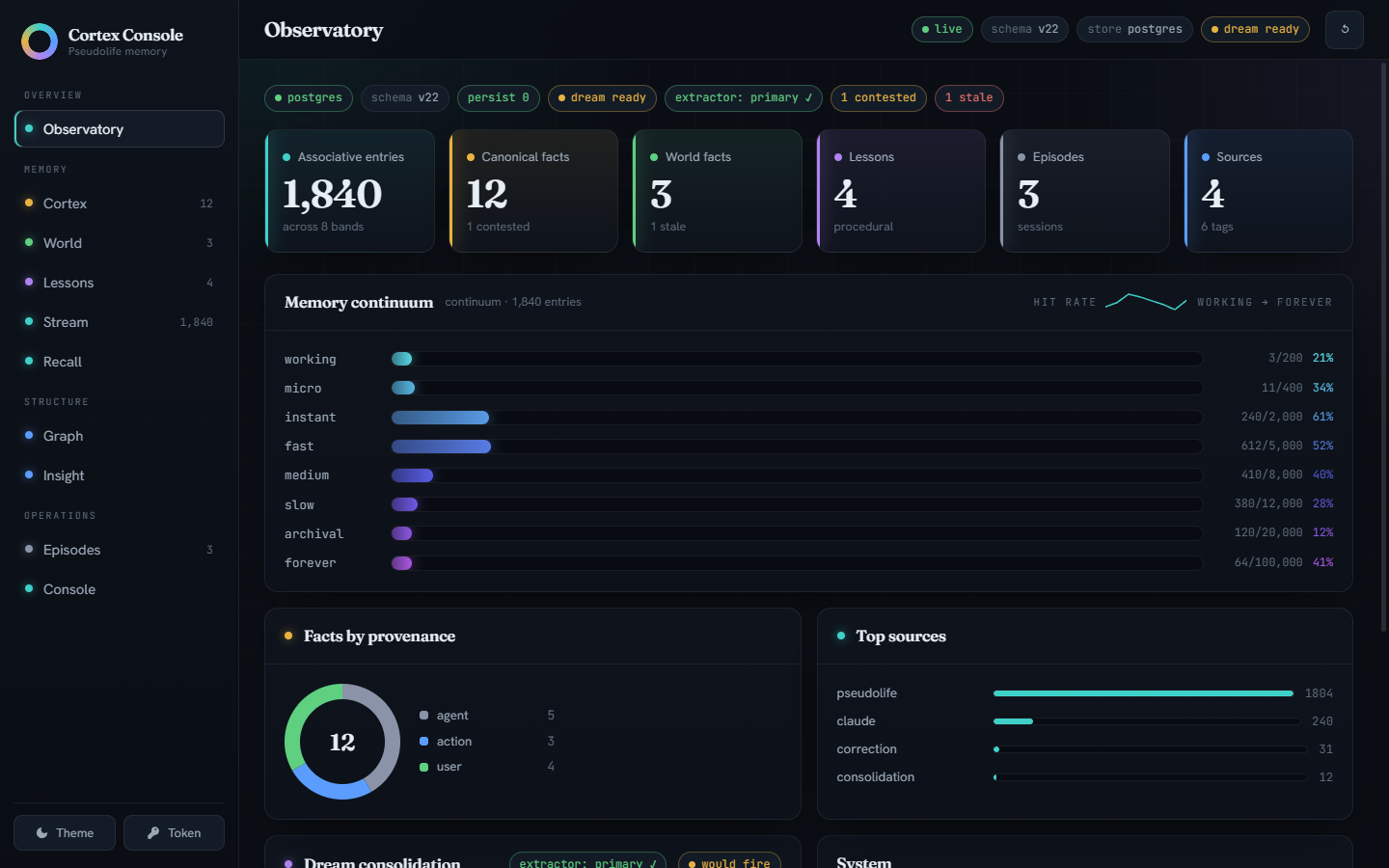
What you get:
- Associative memory that ages like memory should — an 8-band
continuum from
workingtoforever, ranked by hybrid dense-plus-lexical similarity, with contradiction detection and supersession. - Canonical facts, not vibes — one current value per
entity.attributeslot (or a member set, for slots that hold many concurrent values); corrections supersede rather than silently overwrite, and the full version history survives. - Dreams — a bundled extractor (or Claude Sonnet via your Max plan) consolidates the memory stream into facts and a knowledge graph while you're not looking.
- Lessons from its own work — successes, dead-ends, and your corrections become do/avoid guidance surfaced at the start of every session.
- A web console to watch it think — the Cortex Console above, plus cited world facts, session episodes, and document RAG.
Quickstart
Requires Docker and Claude Code, Codex, or both. One command from clone to first memory (Claude remains the compatibility default):
git clone https://github.com/Pseudogiant-xr/Pseudolife-MCP.git
cd Pseudolife-MCP
ops/install.sh          # Linux / macOS
ops\install.ps1         # Windows (pwsh 7+)
# Codex: add --client codex / -Client codex
# Both:  add --client both  / -Client both
The installer runs the preflight (one exact fix line per missing prerequisite), asks which dream extractor should consolidate memories —
- sonnet-only — the lightest install: Claude Sonnet via a CLI shim
(needs a logged-in Max-plan
claudeCLI); the sidecar image is never built or pulled (~9 GB lighter; dreams pause while the shim is down); - sonnet-fallback — Sonnet primary, the bundled sidecar as automatic fallback (Max-plan CLI plus the ~9 GB image);
- sidecar — the bundled local CPU model; no Claude plan needed, works for everyone (~9 GB image) —
then brings the stack up, installs the selected clients' session hooks,
registers the MCP transport (the stdio shim by default, direct HTTP via
--transport http), and health-checks the daemon. The session-hook briefing
delivers the memory-loop guidance every session, and the server also
advertises the core loop through MCP instructions — so no standing-file
edit is needed or offered. --instructions append additionally writes the
block from examples/CLAUDE.memory.md into ~/.claude/CLAUDE.md /
~/.codex/AGENTS.md (useful for subagent visibility or hook-less setups).
Idempotent — re-run any time; --extractor <mode> switches extractor
setups. Non-interactive example:
ops/install.sh --extractor sidecar --client codex.
Linux (Docker Engine): your user must be in the docker group —
sudo usermod -aG docker $USER, then log out/in (the preflight checks this).
ops/preflight.sh --client codex    # or ops\preflight.ps1 -Client codex
docker volume create pseudolife-mcp-bank
docker volume create pseudolife-mcp-state
docker compose -f ops/docker-compose.yml up -d --build   # first build, once

# Verify, then wire the transport into one or both clients.
curl http://127.0.0.1:8765/health

# Stdio shim (the installer's default — per-session episode identity):
pip install pseudolife-mcp
claude mcp add --scope user pseudolife-memory -- pseudolife-mcp
codex mcp add pseudolife-memory -- pseudolife-mcp

# ...or direct HTTP (no pip package needed; fine for single-session setups):
claude mcp add --transport http --scope user pseudolife-memory http://127.0.0.1:8765/mcp
codex mcp add pseudolife-memory --url http://127.0.0.1:8765/mcp

# Reinforce the protocol-level memory loop with a global standing instruction:
cat examples/CLAUDE.memory.md >> ~/.claude/CLAUDE.md
cat examples/CLAUDE.memory.md >> ~/.codex/AGENTS.md
# (PowerShell: Add-Content "$env:USERPROFILE\.claude\CLAUDE.md" (Get-Content examples\CLAUDE.memory.md -Raw))
Optional knobs live in ops/.env (cp ops/.env.example ops/.env — the
install/update scripts scaffold it too; every value is commented, a missing
file runs entirely on defaults).
Then in either coding agent: "remember that my staging box is
haze-02" → the agent calls memory_store; next session, "which box is
staging?" → memory_search finds it. Browse everything at the Cortex
Console: http://127.0.0.1:8765/ui/.
What this is
A memory engine exposed over MCP. There's no chat UI and no LLM doing the thinking — your coding agent is the intelligence; these are tools it calls to store and recall what matters. (Models are bundled as plumbing: baked embedding weights for retrieval, and the optional CPU extractor sidecar that consolidates memories into facts while you sleep.)
It layers several complementary stores: the associative continuum (an
8-tier embedding store, working → forever, ranked by cosine similarity fused
with a BM25 lexical pool (on by default), with contradiction detection and
supersession); the cortex (slot-keyed canonical facts — one current
value per entity.attribute, or a member set for set-valued slots — with
provenance tiers and contender parking instead of silent overwrites); a typed knowledge graph over those facts
with a closed relation vocabulary and on-read inference; the world
cortex (durable cited facts about external reality, age-decayed trust);
procedural lessons learned from the agent's own work; and a ChromaDB
reference bank for document RAG. The canonical layers in depth:
the memory model; the graph and multi-hop
recall: retrieval.
State lives in Postgres (the durable source of truth) behind a single long-lived daemon; every session attaches through a thin stdio shim (installer default — per-session identity) or directly over HTTP (single-session setups). The result: Claude can pick up where it left off, correct itself when facts change, and reason over relationships — without you re-explaining context each session.
Documentation
This README is the front door — install, wiring, and the basic loop. The deep material lives in the user guide:
| Page | What's in it |
|---|---|
| Configuration | Env vars, tuned defaults, toolset tiers, stdio shim, LAN sharing, data layout, backups, schema history |
| Retrieval | Reranker, BM25 hybrid, abstention floors, ranking-trace debugging, memory_recall, the knowledge graph |
| Dreaming | Extractor tiers, the bundled sidecar, upgrading the extractor, Sonnet-fallback, cadence, deep dream, consolidation |
| Episodes & sessions | Daemon-owned session episodes, the briefing hook, nested sub-episodes, tags |
| The memory model | Cortex slots, provenance contenders, world cortex, lessons, temporal/HLC stamps |
| Benchmarks | LongMemEval results; why extraction quality dominates |
Plus evals/README.md (full benchmark methodology) and
CONTRIBUTING.
Tools exposed
The surface was consolidated 2026-07-02 (55 → 32 tools; now 35 with
memory_toolset and the set-slot pair): lifecycle families became verb-dispatched tools
(memory_dream, memory_forget, memory_graph_review), and
dump/introspection views moved to the Cortex Console (REST) — the manifest
is agent context every session, so it stays lean.
| Tool | Purpose |
|---|---|
memory_store(text, source?, tags?, origin?, episode?) | Remember one durable fact / decision / observation (canonical facts reach the cortex via the dream pass or memory_fact_set) |
memory_search(query, top_k?, filters..., rerank?, bm25?, explain?, verbose?) | Associative retrieval; canonical cortex facts surface ahead of recall hits, each dated (asserted_at / last_confirmed / human age, plus stale when it has rotted); explain=True attaches a ranking trace |
memory_recent(n?, sources?, episodes?, tags?, verbose?) | Newest stores, timestamp-ordered (debug + session catch-up) |
memory_supersede(old_text, new_text) | Explicit correction — mark a memory obsolete, keep it as history |
memory_forget(scope, ...) | Hard-delete from one store: memory (by text/substring/source/episode/tag), fact, world, or lesson (by entity/attribute) |
memory_stats() | Per-band sizes, hit rates, totals |
memory_get(entry_id) / memory_reinforce(entry_id) | Dereference a memory id to its full episode (+ consolidated_into); reinforce it after finding it useful |
memory_fact_get(entity, attribute) | The one CURRENT canonical value at a slot (+ parked contenders); on an empty slot returns ranked candidates (same-entity, then similar slots); aged/contested facts carry a ready-made correct_with call (as do memory_search / memory_world_search hits) |
memory_fact_set(entity, attribute, value, origin?, confidence?, episode?, freshness_class?) | Assert a canonical fact deliberately (insert / confirm / supersede / contest); freshness_class (auto default) says how fast the slot rots — auto infers it from the entity's kind |
memory_fact_resolve(entity, attribute, accept) | Settle a contested slot — adopt (true) or discard (false) the contender |
memory_set_add(entity, attribute, member) / memory_set_remove(entity, attribute, member) | Add/confirm or retract one member of a set-valued slot (many concurrent values, e.g. tags — not one NOW value); a scalar there converts to a set one-way on first memory_set_add, except a number-led aggregate scalar ("32", "$1,500"), which is protected — the add parks as a contender instead. Read with memory_fact_get, which returns {kind: "set", members, removed} for these slots |
memory_history(entity, attribute?) | With attribute: version timeline at a slot, with writer/temporal stamps. Without: the entity's causal chain — dated fact/entry/edge/lesson events ("what led to X") |
memory_world_set(entity, attribute, value, source_url?, ...) | Assert a cited WORLD fact (external knowledge; age-decayed trust by freshness class) |
memory_world_search(query, top_k?, verbose?) | Search world facts — each carries effective_confidence, a stale flag, and its citation |
memory_outcome(task, outcome, about?, detail?, polarity?, episode?) | Record a procedural outcome signal (success/failure/correction); the dream distils signals into lessons |
memory_lesson_search(query, top_k?, verbose?) | Recall learned lessons for the task at hand — heed polarity - dead-ends; re_verify flags lessons whose subject facts changed since |
memory_dream(action, limit?, cursor?, apply?, snippets?) | Drive the dream: status / pull / commit / run (server-side extractor) / deep (full-corpus graph consolidation; dry-run unless apply, which snapshots the graph tables first; snippets=false omits candidate evidence; responses carry evidence-enriched merge_proposals for near-duplicate triage) |
memory_graph_review(action, proposal_id?, proposals?, scope?, src?, dst?) | Work the review queue: list / propose / dismiss_pair / dismiss_slot_pair / accept_link / reject_link / accept_merge / accept_junk / reject_entity (merge/entity decisions are audit-stamped decided_by=agent over MCP, human via Console) |
memory_session_title(title) | Name THIS session's auto-opened episode (default titles are generic) |
memory_episode_start(title, hint?) / memory_episode_end() | Open/close a nested sub-episode for a substantial task; entries stored while open carry its id |
memory_episode_summary(id) | Stats + tag/source distribution + recent entries within an episode |
memory_consolidation_candidates(query?, episode?, ...) | Cluster near-duplicate memories ripe for consolidation |
memory_consolidate(replaces, new_text, source?, tags?) | Atomic supersede + store — replace a cluster with one canonical note |
memory_graph_relate(src, relation, dst, ...) | Assert a typed edge (closed relation vocabulary; re-assertion bumps confidence) |
memory_graph_unrelate(src, relation, dst) | Retract an edge (superseded, kept for audit) |
memory_alias(entity, alias) | Bind an alternative name — lookups resolve aliases first |
memory_graph(entity, depth?, include_facts?, to?, relation_filter?) | Entity neighborhood (≤3 hops) with derived transitive/inverse edges and per-edge EXTRACTED/INFERRED/AMBIGUOUS provenance tags; to returns the shortest path between two entities |
memory_recall(query, hops?, top_k?, verbose?) | Multi-hop retrieval for relational questions; low_confidence: true → fall back to memory_search |
memory_relation_define(name, description, ...) | Grow the closed relation vocabulary (deliberate, rare act) |
document_ingest(path, source?) | Index a file (txt/md/pdf) in the reference bank |
document_search(query, top_k?) | RAG search over the reference bank only |
memory_toolset(action) | Check or change this session's visibility tier: status / expand / collapse |
Each tool returns plain JSON. See pseudolife_memory/mcp_server.py for
docstrings — those are what Claude reads to decide when to call which tool.
The five recall-path tools return compact entries by default (result
payloads are agent context on every retrieval); pass verbose=true for full
metadata. Full-table dumps and topology views live in the Cortex Console
(/api/*) and the pseudolife-mcp briefing CLI.
Toolset tiers. Three visibility tiers — minimal (9 tools), core
(22, the shipped default), full (35) — filtered per session at
tools/list; a session steps its own tier up or down with memory_toolset
before calling a hidden tool. Defaults, per-client mapping, and weak-model
deployments:
Configuration — toolset tiers.
Architecture
One memory daemon owns the bank and serves MCP over streamable HTTP
at /mcp; every Claude Code session (and any LAN agent) attaches to it.
Postgres 16 + pgvector (in Docker) is the durable source of truth —
the in-memory MIRAS bands are a write-through cache hydrated at startup
(a small weights.pt persists only band counters — there are no MLP weights).
The daemon runs either containerized (recommended — portable, no host Python) or as a host process. Claude Code attaches through a thin torch-free stdio shim (the installer default — per-session identity, needed for concurrent sessions) or directly over HTTP (simpler for a single session):
Claude session A ─┐  stdio shim (installer default) or HTTP
Claude session B ─┼───────────────────► pseudolife-mcp daemon ─► Postgres (Docker)
LAN agent ────────┘  or stdio shim         (single writer)        pgvector
                     (per session)         host proc OR Docker
This kills two v0.1 hazards by construction: a single writer means
concurrent sessions can't clobber each other, and entries are transactional
so a crash can't wipe the bank. On top of the associative bands sit the
canonical layers — cortex, world facts, lessons, temporal/HLC stamps
(the memory model) — joined to a typed
knowledge graph walkable via memory_graph and multi-hop memory_recall
(retrieval & the graph).
Install — containerized (recommended, any OS)
The whole stack — Postgres and the memory daemon — runs in Docker.
No host Python, no torch install, no version skew; the daemon image bakes
in CPU-only torch and the embedding weights — Qwen/Qwen3-Embedding-0.6B
(the default retrieval backbone since schema v25) plus all-MiniLM-L6-v2
(kept baked for the ONNX-parity test path) — so it runs identically on
Windows / macOS / Linux. Requires only Docker; built once: ~5.0 GB daemon
image (measured 2026-07-29 on the deployed build) + ~0.6 GB Postgres + ~9 GB
extractor sidecar (skip the sidecar entirely with the installer's
sonnet-only mode). The ~12.6 GB and ~10.4 GB figures published before
2026-07-29 are retired: both were inflated by a CUDA torch build that a
dependency-resolution bug pulled into the image (see the CHANGELOG); the
daemon has always been CPU-only.
git clone https://github.com/Pseudogiant-xr/Pseudolife-MCP.git
cd Pseudolife-MCP

# 1. One-time: create the two persistent volumes (bank + daemon state).
docker volume create pseudolife-mcp-bank
docker volume create pseudolife-mcp-state

# 2. Build + start all three services (Postgres, extractor, then the daemon).
docker compose -f ops/docker-compose.yml up -d --build
Upgrading from a pre-rename install (volumes
ops_pseudolife_pgdata/ops_pseudolife_data)? Don't rename those volumes — keep pointing at them by creatingops/.envwithPSEUDOLIFE_BANK_VOLUME=ops_pseudolife_pgdataandPSEUDOLIFE_STATE_VOLUME=ops_pseudolife_databeforeup. See the compose header.
Windows: Docker Desktop's WSL2 VM claims up to ~50% of host RAM by default; the stack needs ~6–7 GB under dream load with the default sidecar (~2 GB in
sonnet-onlymode — the Qwen3 embedding backbone is the bulk of it) — cap the VM viaops/wslconfig.example(see Troubleshooting).
The daemon serves MCP at http://127.0.0.1:8765/mcp and restarts with
Docker — no logon task needed. First build downloads the model into the
image (once); every container start after that is offline and fast. Wire
Claude Code in via the stdio shim (installer default) or directly over
HTTP (both below). Where the data actually lives, and
how to back it up:
Configuration — data layout.
Host-process install (Windows, for GPU / dev): run Postgres in Docker
but the daemon on host Python — for hacking on the daemon or running the
embedder on a local GPU. Steps, the pseudolife-mcp CLI modes, and the
logon autostart task:
Configuration — host-process install.
Updating
After a git pull (or local code change), redeploy the daemon only — safely,
without touching Postgres or the extractor:
.\ops\update.ps1 # Windows
./ops/update.sh # Linux / macOS
It backs up the bank (pg_dump + a state-volume tar), tags a rollback
image (when a previous one exists — it says so loudly when there isn't),
rebuilds + recreates only the daemon, and waits for /health.
It never runs down -v. (Host-process install: just restart the daemon —
pip install -e . is editable.) Build cache is pruned automatically after
every healthy deploy; see
Docker disk retention for the
weekly Scheduled Task and the manual .vhdx compact. Never run
docker system prune --volumes, which deletes volumes.
Upgrading an existing bank to 0.11.0 (schema v25) needs one manual step. The default embedding backbone changed to
Qwen/Qwen3-Embedding-0.6Band every embedding column moved fromvector(384)tovector(1024)— not an additive migration. The daemon refuses to start against an older-dimensioned bank (/healthreportsstatus: "degraded"withinit_refusal) rather than half-migrating it. Back up, stop the daemon, then re-embed offline:python ops/migrate_embeddings.py # dry run (default — writes nothing) python ops/migrate_embeddings.py --apply --backup-verified # commitFull procedure, including the health check that confirms it took: the v25 migration runbook.
Wire into your coding agent
Plugin (hooks + commands). With the daemon running, two commands inside
Claude Code wire the session hooks (briefing + episode identity), the
memory-loop instructions, and the /dream + /memory-status commands:
/plugin marketplace add Pseudogiant-xr/Pseudolife-MCP
/plugin install pseudolife-memory@pseudolife-mcp
The plugin replaces the settings.json hook and the CLAUDE.md block below
— the same standing instructions arrive as session context from the daemon.
It deliberately does not bundle the MCP server: Claude Code loads a
plugin server alongside any user-registered one with no deduplication, which
doubled every session's tool namespace next to the installer's registration
— so the transport is registered exactly once, by ops/install.* (stdio
shim by default — per-session episode identity) or the one-liner below.
Details, non-default ports/tokens, and migration:
plugin/README.md.
Manual transport registration. The installer's default (shim mode) registers a thin stdio shim — one shim process per session, so every session carries its own tier-1 identity. The same wiring by hand:
pip install pseudolife-mcp
claude mcp add --scope user pseudolife-memory -- pseudolife-mcp
Direct HTTP works too — the daemon serves MCP over HTTP natively (no shim, no host command, nothing OS-specific; concurrent sessions then share one episode identity, so it fits single-session setups best):
claude mcp add --transport http --scope user pseudolife-memory http://127.0.0.1:8765/mcp
(--scope user registers it for every project; drop it to register for the
current project only.) Or write the equivalent JSON yourself — into
~/.claude.json under the top-level mcpServers key for user scope, or into
a .mcp.json at a project root for project scope:
{
  "mcpServers": {
    "pseudolife-memory": {
      "type": "http",
      "url": "http://127.0.0.1:8765/mcp"
    }
  }
}
Codex — the installer's default (shim mode) wires the same stdio shim, so a Codex session gets its own tier-1 identity instead of inheriting a concurrent Claude session's episode:
pip install pseudolife-mcp
codex mcp add pseudolife-memory -- pseudolife-mcp
The HTTP one-liner works too (no pip package needed):
codex mcp add pseudolife-memory --url http://127.0.0.1:8765/mcp
Or add the equivalent user-level entry to ~/.codex/config.toml:
[mcp_servers.pseudolife-memory]
url = "http://127.0.0.1:8765/mcp"
If you ran the daemon with a PSEUDOLIFE_MCP_TOKEN, add a headers key:
"headers": { "Authorization": "Bearer <your-token>" }.
Verify: run claude mcp list or codex mcp list (the server should report
connected), then ask the agent to "store a memory that this install works" and check it
appears in the Stream tab of the Console at http://127.0.0.1:8765/ui/.
Preferring stdio (this is what the installer wires by default, for per-session identity)? A thin torch-free shim proxies stdio to the daemon: stdio shim · LAN sharing · backups & restore rehearsal.
Recommended agent setup (CLAUDE.md / AGENTS.md)
The server's value depends entirely on the agent using it well — this step
is what makes the memory loop actually fire. The MCP server advertises the
core loop through protocol-level instructions, and the session hook (one
command, below) delivers the full block every session — plugin users and
hook users need nothing more. If you want it in a standing file instead —
or additionally, for subagent visibility (subagents read CLAUDE.md but not
hook output) — append it to Claude's global ~/.claude/CLAUDE.md, Codex's
global ~/.codex/AGENTS.md, or a per-project CLAUDE.md / AGENTS.md:
cat examples/CLAUDE.memory.md >> ~/.claude/CLAUDE.md
cat examples/CLAUDE.memory.md >> ~/.codex/AGENTS.md
Add-Content "$env:USERPROFILE\.claude\CLAUDE.md" (Get-Content examples\CLAUDE.memory.md -Raw)
Add-Content "$env:USERPROFILE\.codex\AGENTS.md" (Get-Content examples\CLAUDE.memory.md -Raw)
The block (examples/CLAUDE.memory.md) teaches
the loop: RECALL at the start (memory_search / memory_lesson_search /
memory_fact_get / memory_world_search), CAPTURE as you go
(memory_store with an honest origin, memory_fact_set for canonical
facts, memory_world_set for cited external facts, source="status" for
verbose logs so they stay out of the dream), REFLECT at the end
(memory_outcome — the dream distils these signals into the lessons
surfaced at your next session start).
One command — ops\install-hook.ps1 -Client codex (Windows, PowerShell 7) or
ops/install-hook.sh --client codex (Linux/macOS) — installs the
SessionStart briefing hook for the selected client (what your memory is
unsure about + lessons from past work + verified world facts + where we left
off, injected at every session start). It backs up ~/.claude/settings.json
or ~/.codex/hooks.json and is idempotent. The manual hook JSON,
the briefing budget flags, and how session episodes open/close/resume
without any hooks: Episodes & sessions.
Usage patterns
At session start — loads what you've worked on before, persistent across compactions:
memory_search("project context for X")
During work — store real decisions; skip fleeting chatter (the shipped store gate is permissive, so deliberate, durable claims only):
memory_store("Decided to use stdio transport for the MCP because no port conflicts", source="pseudolife")
When corrected — marks the old fact superseded and stores the correction; both surface in future retrieval, the new one ranked higher:
memory_supersede(
  "Provider interface uses synchronous calls",
  "Provider interface uses async calls — sync version was the v0.7 prototype only"
)
Hygiene — hard-delete (at least one filter is required for scope
memory, preventing accidental wholesale deletion); for "keep the history
but mark it wrong" use memory_supersede instead:
memory_forget(scope="memory", source="test-noise")
memory_forget(scope="fact", entity="test-entity")
Discovering what's in the bank: open the Cortex Console — sources, tags, episodes, and full-table views all live there. Going deeper: reranking, BM25, abstention, and trace debugging · episodes + tags · canonical facts, contenders, world facts, lessons · the consolidation workflow.
Dreaming — consolidating memories into facts
A dream distils the recent associative stream into canonical cortex
facts while you're not looking: pull unconsolidated memories → extract
(entity, attribute, value) → advance a cursor so nothing is reprocessed.
Extraction is pluggable:
| Tier | How it runs | Needs | Quality |
|---|---|---|---|
| 0 — baseline | memory_dream(action="run") (regex floor) — headless, on-box, free | nothing | weak |
| 1 — agent-driven | the agent itself is the gateway: the /dream command | the agent you already run | highest |
| 2 — shipped default | daemon auto-sweep → the bundled CPU sidecar, or any OpenAI-compatible endpoint | nothing (sidecar) | high; free if local |
The stack ships tier 2 preconfigured (the bespoke Gemma 4 E4B extractor fine-tune in a llama.cpp sidecar, internal-only). The sweep cadence, pointing dreams at a bigger local model or at Claude Sonnet with automatic sidecar fallback, the full-corpus deep dream graph pass, and the privacy/cost trade-offs: Dreaming.
Benchmarks
Measured end to end on the current shipped stack — fresh local-ceiling extraction under the v25 embedding backbone, BM25-on turn retrieval, reproducible serving (3 byte-identical replicates — std 0.0000) — on the knowledge-update subset of LongMemEval (oracle variant):
| arm | accuracy | context tokens/question |
|---|---|---|
| naive RAG (top-6 turns) | 0.859 | ~1237 |
| cortex facts only | 0.667 | ~259 |
| hybrid (facts + top-3 turns) | 0.833 | ~920 |
| commit-gated cascade | 0.936 | ~702 |
The cascade is a serving policy, not a fourth pipeline: answer from
the consolidated facts when that channel commits, fall back to raw-turn
RAG when it abstains. It beats naive RAG by ~8 points while reading ~57%
of the context, and the margin survives the full ~50-session haystacks —
0.462 vs 0.346, a pre-registered paired test at p = 0.011
(details). Read honestly: with the v25
retriever, raw-turn selection improved enough that the concatenation
hybrid no longer beats naive RAG on this slice — sequencing the channels
is what restores the fact spine's edge. The fact spine alone reaches
0.667 on ~21% of RAG's token budget. Setup, caveats, and the evidence
that extraction quality is the dominant factor:
Benchmarks; full methodology:
evals/README.md.
Retrieval itself was re-measured on the same corpus before the v25 backbone
swap (150 questions, 74,183 haystack turns, 299 gold turns; pure recall — no
reader, no judge): Qwen/Qwen3-Embedding-0.6B reaches R@10 0.809 against
bge-base-en-v1.5's 0.742 and the previously-shipped all-MiniLM-L6-v2's
0.572, and beats bge-base head-to-head +32/−12 at k=10 (p=0.004).
Artifacts: embedder-recall-shootout-20260727.json,
embedder-recall-qwen-vs-bge-20260728.json.
Cortex Console (web UI)
An operator dashboard served by the daemon itself — point a browser at
http://127.0.0.1:8765/ui/ (the /health and /mcp endpoints are
unchanged; the console is additive). It's a read-mostly instrument panel for
seeing and steering the memory a human otherwise can't observe:
Observatory (health, per-layer counts, the 8-band continuum, dream
gauges), Cortex (canonical facts with provenance, version-history
timelines, inline Accept/Discard for contested slots), World / Lessons /
Episodes, Stream (live search with rerank/BM25 toggles and a
ranking-trace debugger), Graph (interactive force-directed visualiser, with a review drawer that
can Accept/Reject merges or — for a source file and its own bare concept,
band.py ↔ band — record an implements edge instead of forcing
merge-or-dismiss), and Console (every safe config.yaml scalar with live-vs-restart
badges, diff-preview, and atomic save).
Auth mirrors /mcp: /ui (static shell) and /health are open; /api/*
requires the same PSEUDOLIFE_MCP_TOKEN bearer when one is set (the console
prompts for it and stores it locally). No build step, no CDN, fully offline —
vanilla ES modules + vendored OFL fonts served straight from the daemon.
Developing the UI? A fixture-backed dev server (no Postgres, no torch)
renders the real frontend against canned data:
python -m pseudolife_memory.web.devserver → http://127.0.0.1:8770/ui/.
Capabilities at a glance
| Capability | Status |
|---|---|
| Transport | Streamable-HTTP MCP daemon (/mcp); stdio shim is the installer default (per-session identity) — HTTP remains for single-session setups |
| Storage | Postgres 16 + pgvector (source of truth); ChromaDB for the reference bank |
| Associative continuum | 8-tier MIRAS bands; hybrid dense + BM25 ranking (BM25 on by default); contradiction detection and supersession, including a deterministic slot-identity path that fires regardless of embedding similarity |
| Canonical-fact cortex | Single-writer: LLM dream pass + memory_fact_* (regex auto-promote opt-in, default off) |
| Set-valued slots | memory_set_add / memory_set_remove for many-current-value slots; one-way scalar→set conversion, aggregate scalars guarded (park as contender) |
| Provenance contenders | Tier-rank guard user > action > agent; memory_fact_resolve |
| Fact currency | Every cortex fact is dated (asserted_at / age); freshness_class (evergreen / slow / volatile) decays effective_confidence and flags stale. Left auto, the class is inferred from the entity's kind (schema v24 entity_kinds) — only system entities can rot; artifacts and concepts stay evergreen |
| Knowledge graph | Typed entities/edges, closed relation vocab, on-read closure (Postgres + NetworkX, no AGE/Cypher) |
| World cortex | memory_world_* — cited external facts + age-decayed freshness (manual ingest) |
| Procedural memory | memory_outcome (signals) → dream-synthesised lessons via memory_lesson_search; prefers/avoids graph edges; single-writer |
| Sense of time + multi-writer | Per-write stamp (tx/valid time, HLC ordering, writer/session); memory_history; relative age on reads; write_mode seam (snapshot live, occ Phase-2) |
| Episodes + tags | Session episodes daemon-owned, keyed by a resolved five-tier session identity; hook/shim eager-open or lazy-open + idle reaper + prune-empty + resume-after-reap; nested sub-episodes with subtree-expanded recall; multi-valued tags=[...] |
| Session briefing | SessionStart hook injects unsure-graph + lessons + verified world facts + last-session recap (pseudolife-mcp briefing) |
| Consolidation | memory_consolidation_candidates + memory_consolidate |
| Optional components | Cross-encoder reranker (rerank=True, ~80 MB); ONNX embedding backend (pip install .[onnx] — ~3x faster CPU encode, bit-identical, auto-enabled when installed; the default Qwen3-Embedding-0.6B has no ONNX export and falls back to torch, so this currently only speeds up MiniLM-family models); NLI contradiction scorer (pip install .[nli], ~278 MB) |
| Web console | Cortex Console at /ui/ — health/stats, fact review + history, graph visualiser, search/trace, config editor (read-mostly, token-gated like /mcp) |
| Schema version | v26 (Postgres meta version) — additive ADD COLUMN IF NOT EXISTS migrations on daemon start, except v25: the vector(384)→vector(1024) move is not additive, so the daemon refuses to start against an older-dimensioned bank until you run ops/migrate_embeddings.py; legacy file-mode .pt banks auto-migrate into Postgres; full version history |
Troubleshooting
Start with curl http://127.0.0.1:8765/health — it reports the schema
version, storage backend, auth state, and persist_errors (non-zero means
writes are failing to reach Postgres; check docker logs pseudolife-mcp-daemon).
- First build is slow / big. The daemon image (~5.0 GB, several minutes to build) bakes in CPU torch and the embedding weights (Qwen3-Embedding-0.6B plus MiniLM); the extractor sidecar adds a ~5.3 GB model download on its first build. Every start after that is offline and fast — if a rebuild is re-downloading models, the Docker layer cache was pruned.
- Daemon unreachable after
wsl --shutdown(Windows): the host port forward is gone —docker restart pseudolife-mcp-daemonre-establishes it. - Docker eating RAM (Windows): the WSL2 VM (
Vmmem) claims up to ~50% of host memory by default. Copyops/wslconfig.exampleto%USERPROFILE%\.wslconfig, tunememory=, thenwsl --shutdown. - Port already in use: the stack binds
127.0.0.1:8765(daemon) and127.0.0.1:5433(Postgres). Change the host side inops/docker-compose.ymlif either collides. - Console shows "offline" / Unauthorized: "offline" means the daemon
isn't reachable (see above); a 401 prompt means it runs with
PSEUDOLIFE_MCP_TOKEN— paste that token into the Console's Token dialog. - The coding agent doesn't see the tools:
claude mcp listorcodex mcp listshould showpseudolife-memory✓ connected. If not, re-check the URL (http://127.0.0.1:8765/mcp— the/mcppath matters) and the bearer header when a token is set. The daemon preloads the embedder on a warmup thread at start (~5–10 s); a very early first call can race it and take a few seconds.
Uninstall
Deletion is deliberate at every step:
# 1. Optional: take a final backup first (ops/backup.ps1 or ops/backup.sh).
# 2. Stop and remove the containers (volumes survive this).
docker compose -f ops/docker-compose.yml down
# 3. Remove the MCP registration.
claude mcp remove pseudolife-memory
codex mcp remove pseudolife-memory
# 4. Only when you're sure: delete the data volumes (THIS is the memory).
docker volume rm pseudolife-mcp-bank pseudolife-mcp-state
Host-process installs: also unregister the logon task
(Unregister-ScheduledTask -TaskName "Pseudolife-MCP Daemon") and remove
the SessionStart briefing hook from ~/.claude/settings.json and/or
~/.codex/hooks.json (a timestamped .bak-* sits next to each edited file).
Testing
pip install -e .[dev], then pytest tests/. The suite covers every
layer, from the MemoryService surface to the Cortex Console REST API;
model-heavy pieces are stubbed so it stays fast and offline. The PG-backed
suites each target a throwaway per-run pseudolife_memory_test_<pid>
database on the bundled dev container (never your real bank; concurrent
runs can't collide), dropped on exit, and skip cleanly without Postgres.
Full dev setup: CONTRIBUTING.
What's not built yet
- Reflection via MCP sampling — would let the dream borrow Claude itself as the extractor; Claude Code doesn't yet support it.
- Cross-machine sync — memory lives on one PC's disk; syncing via rclone / syncthing is left as an exercise.
- Automated world-knowledge ingestion — populating the world cortex
from the live web needs a web-fetch tool the standalone server doesn't
ship; an agent with web access can automate the fetch+cite step today
via
memory_world_set.
License
Reviews
No reviews yet
Be the first to review this server!
More Developer Tools MCP Servers
Fetch
Freeby Modelcontextprotocol · Developer Tools
Web content fetching and conversion for efficient LLM usage
Git
Freeby Modelcontextprotocol · Developer Tools
Read, search, and manipulate Git repositories programmatically
Toleno
Freeby Toleno · Developer Tools
Toleno Network MCP Server — Manage your Toleno mining account with Claude AI using natural language.
mcp-creator-python
Freeby mcp-marketplace · Developer Tools
Create, build, and publish Python MCP servers to PyPI — conversationally.
MarkItDown
Freeby Microsoft · Content & Media
Convert files (PDF, Word, Excel, images, audio) to Markdown for LLM consumption
MCP Marketplace
Freeby mcp-marketplace · Developer Tools
Search and install MCP servers from inside your AI client.