
Server data from the Official MCP Registry
Keeps an AI coding agent on its plan across context compression, with a live local dashboard.
About
Keeps an AI coding agent on its plan across context compression, with a live local dashboard.
Security Report
Valid MCP server (2 strong, 2 medium validity signals). No known CVEs in dependencies. Package registry verified. Imported from the Official MCP Registry.
6 files analyzed · 1 issue found
Security scores are indicators to help you make informed decisions, not guarantees. Always review permissions before connecting any MCP server.
Permissions Required
This plugin requests these system permissions. Most are normal for its category.
How to Install
Add this to your MCP configuration file:
{
  "mcpServers": {
    "io-github-racstan-progressor-mcp": {
      "args": [
        "-y",
        "progressor-mcp"
      ],
      "command": "npx"
    }
  }
}Documentation
View on GitHubFrom the project's GitHub README.
Progressor



See what your AI is building, step by step, in a page that updates by itself.
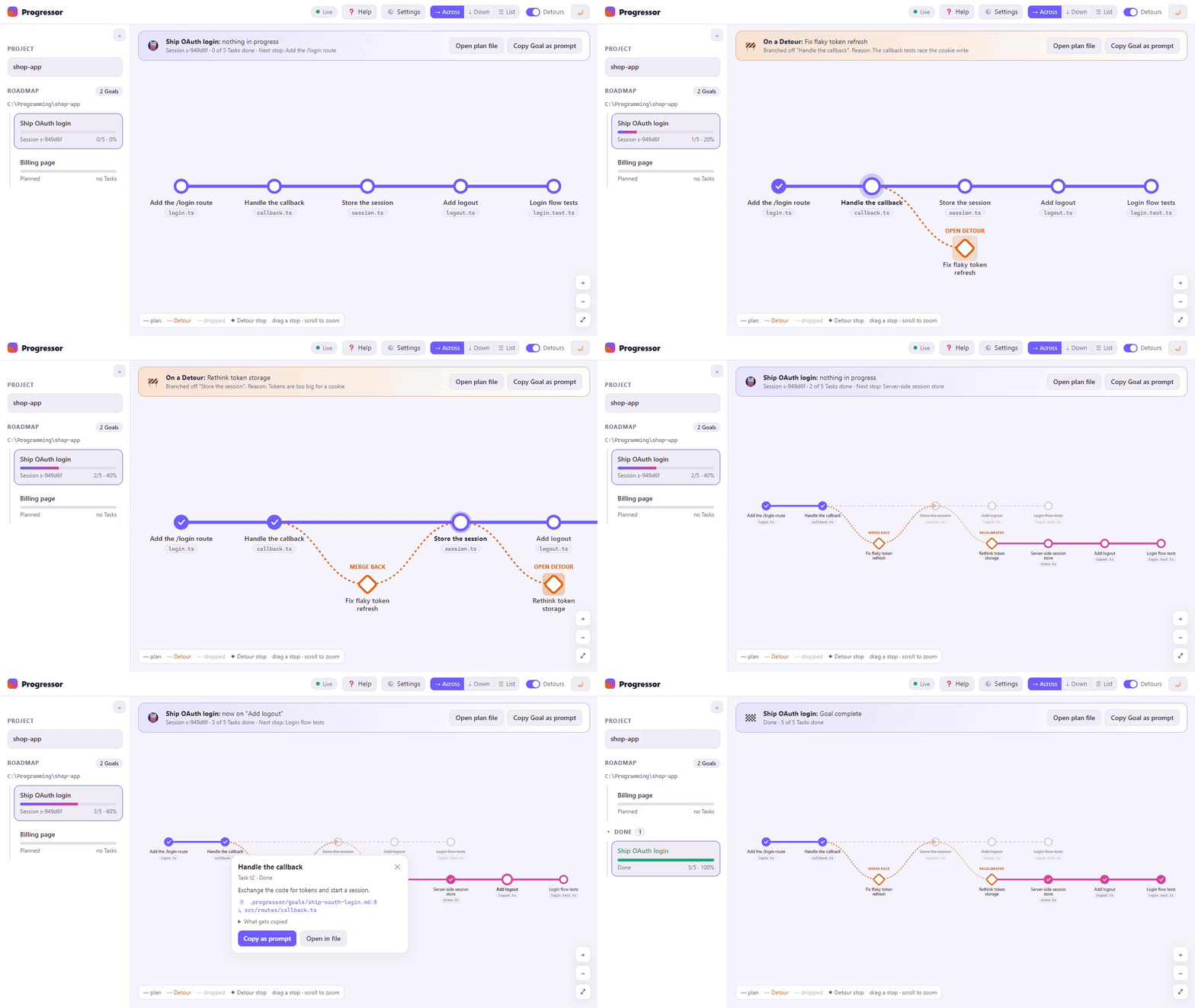
You tell your AI coding assistant what you want. Progressor makes it plan the work as a goal with steps, keep that plan up to date as it works, and say so when it has to step off the plan. You watch it all on a dashboard in your browser: what the AI is doing now, how far along it is, and whether it has stopped. The AI manages everything; you don't have to.
It works with any app that supports MCP (the standard way AI apps add tools): Claude Code, Claude Desktop, VS Code with Copilot, Cursor, Windsurf, Codex and others.
Set it up
You need Node.js 22 or later. Then paste this into your AI's chat, in the project you're working on:
Set up Progressor (https://github.com/racstan/progressor-mcp) for this project:
1. Run `node --version`. If it is older than 22, stop and tell me how to install Node.
2. Run `npm install -g progressor-mcp`.
3. If you are Claude Code, run `progressor-mcp init --yes` in this folder. Otherwise, add
   the "progressor" MCP server to this app's settings as the guide for this app shows
   (https://github.com/racstan/progressor-mcp/blob/main/docs/apps.md), then run
   `progressor-mcp init --yes --no-server` in this folder.
4. Tell me to restart the app, and to approve the "progressor" server if it asks.
   After the restart, call get_status and tell me in plain words that Progressor is
   ready, with the dashboard link.
Your AI does the rest. To have Progressor in every project without setting each one up, add it once to your app's settings for all projects (how, for each app). If you'd rather do it yourself, Getting started walks through it, and Setup for your app has the exact settings for each app.
Then just talk to your AI
Tell it what you want to build, as you would anyway: "Add a login page with Google sign-in." It plans the work as a goal, shows you the steps, and starts. You don't need to learn any commands. If you ever want to nudge it, these work in most apps' / menu:
- /progressor:next: carry on where the work was left
- /progressor:status: where things stand, in a few lines
- /progressor:plan: plan something new together
Watch it work
Open http://localhost:4747 while your AI's app is open (your AI gives you the link). You'll see:
- What the AI is doing: AI working · step 3 of 7 · last update 2 min ago, or AI stopped when its chat has closed.
- The plan as a map: each step is a stop on a line, ticked off as it's done. When the AI steps off the plan to deal with something, a side trip branches off, with the reason.
- Your goals: everything planned for the project, with how far along each one is.
One dashboard for all your projects. You don't need a Progressor per project to see them all. As long as one AI chat is running Progressor, in any project and any app, the same page shows every project you've used it in. Switch between them at the top of the sidebar, or pick 🗂 All projects to see them side by side. Each project's plan stays in its own folder, so chats in different projects, even in different apps, never get in each other's way.
The page only shows; you change the plan by talking to your AI. More in the dashboard guide.
If something goes wrong
Most problems can be fixed by asking your AI. Troubleshooting lists the common ones, each with a line you can paste to your AI. Still stuck? Report a problem, or use ❓ Help on the dashboard, which fills in your version and system for you.
Docs
- Getting started: setting up, step by step
- Setup for your app: Claude Code, Claude Desktop, VS Code, Cursor, Windsurf, Codex and others
- Using Progressor: goals, steps, side trips, and what to say to your AI
- The dashboard: everything on the page
- Questions and Troubleshooting
- Updating and removing
- Reference: commands, the AI's tools, settings and the file format, for the technically curious
- Contributing: working on Progressor itself
Feedback
Progressor is young, and what you run into shapes what comes next. Share an idea or feedback, even a sentence helps, or see the open issues.
Support
Progressor is free and open source. If it helps you, you can buy me a coffee; the link is also in the dashboard's ⚙️ Settings.
License
Copyright (C) 2026 Rachit Asthana
Progressor is free software: you can redistribute it and/or modify it under the terms of the GNU General Public License as published by the Free Software Foundation, either version 3 of the License, or (at your option) any later version. It is distributed in the hope that it will be useful, but WITHOUT ANY WARRANTY; without even the implied warranty of MERCHANTABILITY or FITNESS FOR A PARTICULAR PURPOSE. See LICENSE for the full text.
Reviews
No reviews yet
Be the first to review this server!
More Developer Tools MCP Servers
Rea
Freeby Morluto · Developer Tools
Reverse engineer anything from your terminal or agent with one CLI and MCP server.
Paperclip
Freeby Paperclipai · Developer Tools
Trending hip-hop artist momentum scores across four cultural dimensions.
Git
Freeby Modelcontextprotocol · Developer Tools
Read, search, and manipulate Git repositories programmatically
Toleno
Freeby Toleno · Developer Tools
Toleno Network MCP Server — Manage your Toleno mining account with Claude AI using natural language.
MCP Marketplace
Freeby mcp-marketplace · Developer Tools
Search and install MCP servers from inside your AI client.
mcp-creator-python
Freeby mcp-marketplace · Developer Tools
Create, build, and publish Python MCP servers to PyPI — conversationally.