
Server data from the Official MCP Registry
Local-first temporal knowledge graph with six read-only MCP tools and human-reviewed writes.
About
Local-first temporal knowledge graph with six read-only MCP tools and human-reviewed writes.
Security Report
Valid MCP server (1 strong, 2 medium validity signals). 2 known CVEs in dependencies Imported from the Official MCP Registry. 1 finding(s) downgraded by scanner intelligence.
5 files analyzed · 3 issues found
Security scores are indicators to help you make informed decisions, not guarantees. Always review permissions before connecting any MCP server.
Permissions Required
This plugin requests these system permissions. Most are normal for its category.
How to Install
Add this to your MCP configuration file:
{
  "mcpServers": {
    "io-github-renezander030-graphiti-local": {
      "args": [
        "graphiti-local"
      ],
      "command": "uvx"
    }
  }
}Documentation
View on GitHubFrom the project's GitHub README.

Graphiti Local
Local memory for your agents. You approve what they learn.
Retrieve project decisions through six read-only MCP tools or the kg CLI.
Proposed updates stay in a separate queue until a human approves and applies them.
Ollama handles local inference; embedded LadybugDB stores the graph. No Docker or
cloud API key is needed for the local setup.
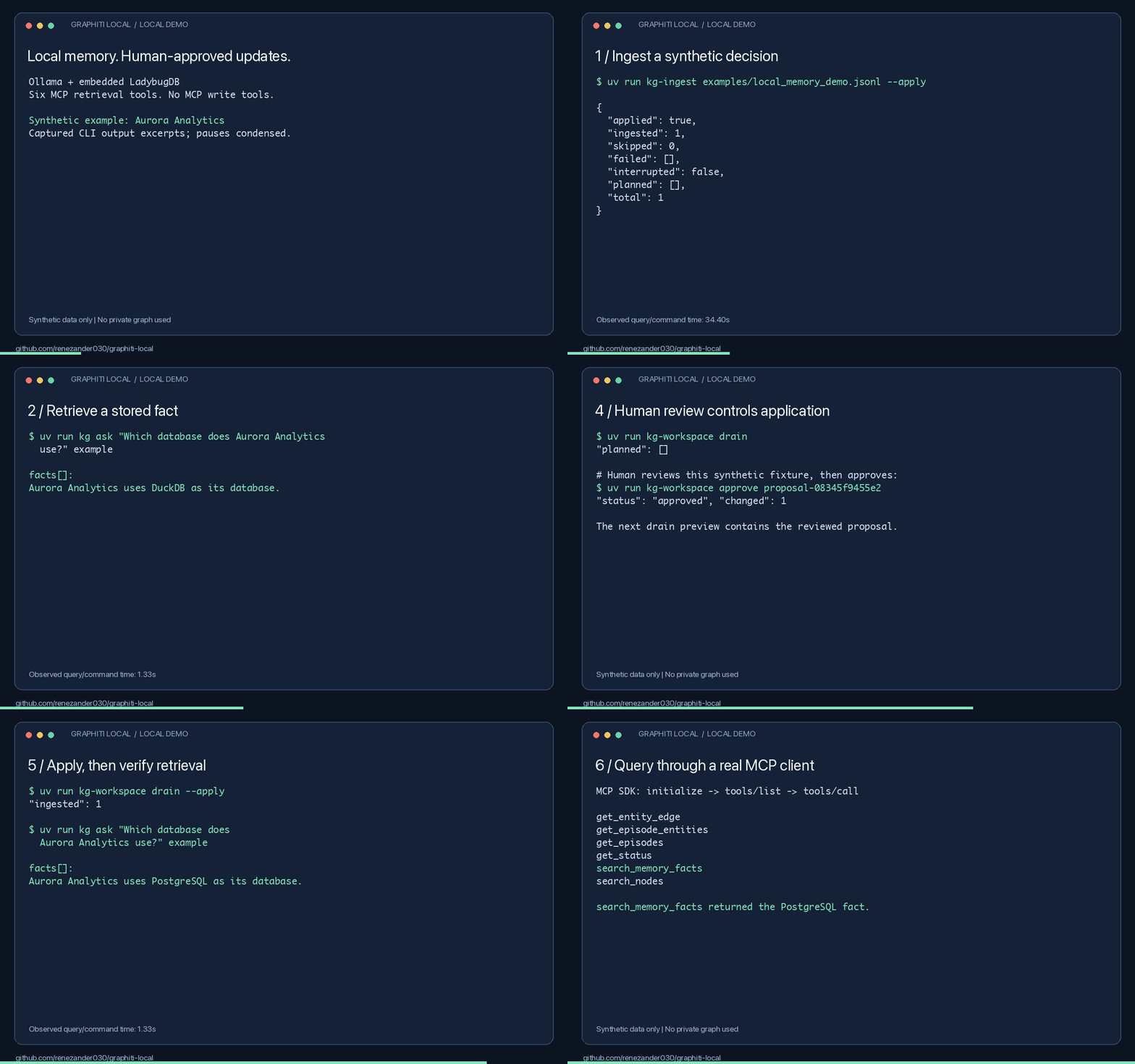
Captured output excerpts with pauses condensed. Measured results and limitations.
Try it in one command
uvx --from git+https://github.com/renezander030/graphiti-local kg-demo
Answers a question against a small synthetic graph shipped with the package. No Ollama, no model downloads, no database setup: retrieval runs on keywords alone, so nothing contacts a model. Ask your own question by passing it as an argument.
This is the read path only. Building a graph from your own text needs extraction, which needs a model, and that is the full setup below.
Try it locally
Install uv and Ollama, then start Ollama. Setup downloads need internet access. Run these commands in bash or zsh:
git clone https://github.com/renezander030/graphiti-local.git
cd graphiti-local
uv sync --frozen
ollama pull qwen2.5:7b
ollama pull nomic-embed-text
export GRAPHITI_LOCAL_CONFIG="$PWD/config/ollama.example.yaml"
export KG_WORKSPACE_DIR="$PWD/workspace/local-demo"
export KG_LADYBUG_PATH="$KG_WORKSPACE_DIR/graph.ladybug"
uv run --frozen kg-ladybug-setup --database "$KG_LADYBUG_PATH" --apply
uv run --frozen kg doctor
uv run --frozen kg-ingest examples/local_memory_demo.jsonl --apply
uv run --frozen kg ask "Which database does Aurora Analytics use?" example
The synthetic example returns DuckDB. Follow the complete walkthrough to propose PostgreSQL, review and apply that update, and retrieve it from an MCP client. Model extraction can be wrong; inspect the returned facts and validity timestamps.
To review extraction before it touches the configured graph, run
kg-ingest INPUT --review-output review.jsonl, inspect the snapshot, then use the
printed restore command to promote those exact records. Searches return current facts
by default; kg ask --history is the explicit historical view.
Multiple users on Ladybug
Give each user a group, and each group its own Ladybug file:
graph:
  groups: [alice, bob]
database:
  provider: ladybug
  ladybug:
    layout: per-group          # default: single, one file for every group
    directory: ./workspace/groups
server:
  transport: streamable-http
  auth:
    tokens:
      - {name: alice, token: "${ALICE_TOKEN}", groups: [alice]}
      - {name: bob, token: "${BOB_TOKEN}", groups: [bob]}
Each file is named by the SHA-256 of its group, so no group id can point outside the
directory. Reads, kg ask and the drain open only the file of the group they address;
a token granted alice never opens Bob's file. A read names one group, or the token's
single group is used. For a tenant boundary inside one database server, use FalkorDB
or Neo4j.
Is it a fit?
Use it for local agent memory with explicit human review. Skip it if you need agents to write through MCP or want a hosted service without local setup. FalkorDB and Neo4j are also supported.
- Setup and MCP configuration
- Commands, ingestion, backups, and deployment
- Privacy · Security · Container discovery
- Report a successful or blocked setup
If this helps your workflow, star the repository and share your setup result.
Maintained by René Zander, who builds context layers for AI agents on temporal knowledge graphs.
Independent community project built on Graphiti, not affiliated with or endorsed by Zep. Apache-2.0.
Reviews
No reviews yet
Be the first to review this server!
More Developer Tools MCP Servers
Git
Freeby Modelcontextprotocol · Developer Tools
Read, search, and manipulate Git repositories programmatically
Fetch
Freeby Modelcontextprotocol · Developer Tools
Web content fetching and conversion for efficient LLM usage
Paperclip
Freeby Paperclipai · Developer Tools
Trending hip-hop artist momentum scores across four cultural dimensions.
Toleno
Freeby Toleno · Developer Tools
Toleno Network MCP Server — Manage your Toleno mining account with Claude AI using natural language.
mcp-creator-python
Freeby mcp-marketplace · Developer Tools
Create, build, and publish Python MCP servers to PyPI — conversationally.
MCP Marketplace
Freeby mcp-marketplace · Developer Tools
Search and install MCP servers from inside your AI client.