
Server data from the Official MCP Registry
Turn grounded AI answers into trusted comparisons, plans, timelines, and decision views.
About
Turn grounded AI answers into trusted comparisons, plans, timelines, and decision views.
Remote endpoints: streamable-http: https://fify-chatgpt.renfei1992.chatgpt.site/api/mcp
Security Report
Valid MCP server (1 strong, 1 medium validity signals). No known CVEs in dependencies. Imported from the Official MCP Registry.
2 tools verified · Open access · No issues found
Security scores are indicators to help you make informed decisions, not guarantees. Always review permissions before connecting any MCP server.
Permissions Found in Source Code
Found by scanning the linked source code. This listing connects to a hosted endpoint, so none of this runs on your machine: it describes what the server software does where it is hosted.
How to Connect
Remote Plugin
No local installation needed. Your AI client connects to the remote endpoint directly.
Add this to your MCP configuration to connect:
{
  "mcpServers": {
    "io-github-renfei-design-fify": {
      "url": "https://fify-chatgpt.renfei1992.chatgpt.site/api/mcp"
    }
  }
}Documentation
View on GitHubFrom the project's GitHub README.
Fify plugin marketplace
Fify turns grounded AI answers into trusted interactive comparisons, plans, checklists, timelines, and decision views. It preserves the complete plain-language answer as an authoritative fallback and performs no consequential actions.
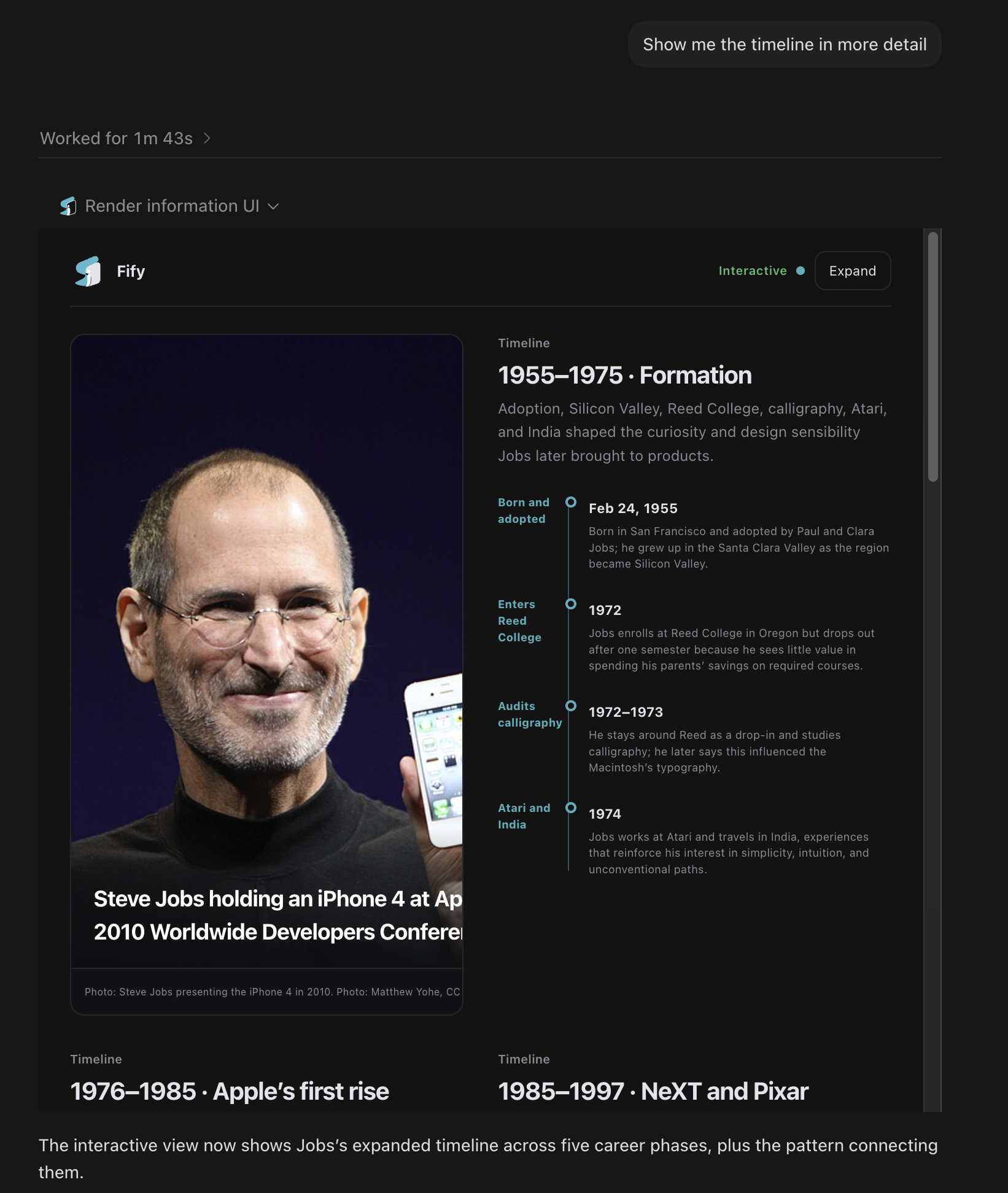
This repository is a Git-backed marketplace for Codex. The plugin is self-contained: it requires Node.js 20 or newer, performs no separate npm or pnpm install, asks users for no Fify account or end-user API key, and runs a bundled deterministic information-view compiler locally.
Install in Codex
codex plugin marketplace add renfei-design/fify-plugin
codex plugin add fify@fify
Start a new Codex task after installation, then ask normally or tag @Fify:
- Compare these options by cost and risk.
- Make this rollout plan a checklist I can work through.
- Show these milestones as a timeline.
The repository is the marketplace. No package installation, Fify account, or end-user API key is required.
Use with ChatGPT
This Git marketplace cannot be added directly as a user-defined ChatGPT marketplace. You can still use Fify in ChatGPT through a developer-mode MCP connection:
- Open Settings → Security and login and enable Developer mode.
- Open the ChatGPT Plugins page and select the plus button.
- Name the connection Fify and use the public MCP endpoint below.
- Review the discovered read-only tool, create the connection, and add it to a new chat.
https://fify-chatgpt.renfei1992.chatgpt.site/api/mcp
Developer mode availability depends on the user's account and workspace policy. Public discovery across ChatGPT and Codex requires publication to OpenAI's universal plugin directory. This repository is the Codex distribution source and the hosted endpoint is the direct ChatGPT connection source; neither makes Fify automatically discoverable in ChatGPT. See OpenAI's connection guide and plugin packaging guide.
Use from another MCP client
Fify also exposes a public Streamable HTTP MCP endpoint for compatible clients:
https://fify-chatgpt.renfei1992.chatgpt.site/api/mcp
The tool always returns a complete plain-language fallback. The inline interactive view requires a host that supports the MCP Apps UI extension.
See MARKETPLACE_LISTING.md for verified listing metadata, capabilities, limitations, and submission copy.
What is included
- A Codex plugin manifest and Fify information-UI skill.
- A bundled local MCP server with
render_information_ui. - Product screenshots, activation evals, and reviewer cases.
- Validation and end-to-end protocol smoke tests.
- Official MCP Registry metadata for the public remote endpoint.
The local compiler does not research or verify facts. Codex supplies the grounded answer and sources, and Fify validates and renders that material. The bundled server limits each host identity to 20 successful renders per UTC day and two concurrent renders.
Verify locally
npm run check
See BUILD_PROVENANCE.md for the public bundle boundary and SECURITY.md for reporting guidance.
License
Apache-2.0. Bundled dependency notices are in THIRD_PARTY_NOTICES.md.
Reviews
No reviews yet
Be the first to review this server!
More Developer Tools MCP Servers
Git
Freeby Modelcontextprotocol · Developer Tools
Read, search, and manipulate Git repositories programmatically
Fetch
Freeby Modelcontextprotocol · Developer Tools
Web content fetching and conversion for efficient LLM usage
Worldmonitor
Freeby Koala73 · Developer Tools
Live markets, conflicts, country risk, chokepoints, energy, and China decision signals. 90 tools.
Paperclip
Freeby Paperclipai · Developer Tools
Trending hip-hop artist momentum scores across four cultural dimensions.
Toleno
Freeby Toleno · Developer Tools
Toleno Network MCP Server — Manage your Toleno mining account with Claude AI using natural language.
mcp-creator-python
Freeby mcp-marketplace · Developer Tools
Create, build, and publish Python MCP servers to PyPI — conversationally.