
Server data from the Official MCP Registry
Find out which MCP servers you actually use: local, read-only audit of Claude Code transcripts.
About
Find out which MCP servers you actually use: local, read-only audit of Claude Code transcripts.
Security Report
Valid MCP server (3 strong, 2 medium validity signals). No known CVEs in dependencies. Package registry verified. Imported from the Official MCP Registry.
11 files analyzed · 1 issue found
Security scores are indicators to help you make informed decisions, not guarantees. Always review permissions before connecting any MCP server.
Permissions Required
This plugin requests these system permissions. Most are normal for its category.
How to Install
Add this to your MCP configuration file:
{
  "mcpServers": {
    "io-github-rixtayz-mcp-usage": {
      "args": [
        "-y",
        "@rixtay/mcp-usage"
      ],
      "command": "npx"
    }
  }
}Documentation
View on GitHubFrom the project's GitHub README.
mcp-usage



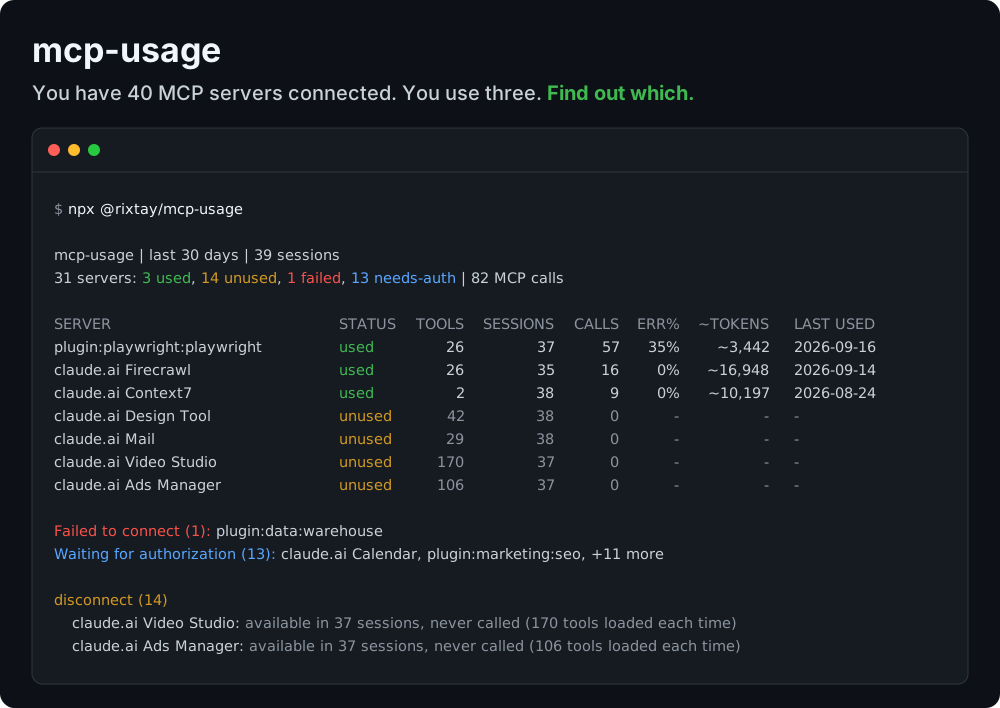
A small, focused MCP server and CLI that reads your local Claude Code transcripts and tells you, for every MCP server you have connected, whether it is actually used, sits idle in every session, fails to connect, or has been waiting for authorization for weeks — and what to disconnect.
Built for one job: answer "which of my MCP servers should I keep?" — locally, read-only, without ever exposing a word of your conversations.
Tools
Four tools, all read-only:
| Tool | What it does |
|---|---|
usage_summary | One row per server: status, tools exposed, sessions, calls, error rate, estimated result tokens, last use |
unused_servers | Servers that were connected but never called, failed to connect, or are waiting for authorization |
server_details | One server in full, with per-tool calls, errors and result size (accepts the id or the label, case-insensitive) |
recommendations | A prioritized action list: disconnect, fix or remove, authorize or remove, investigate errors, heavy results |
Design choices:
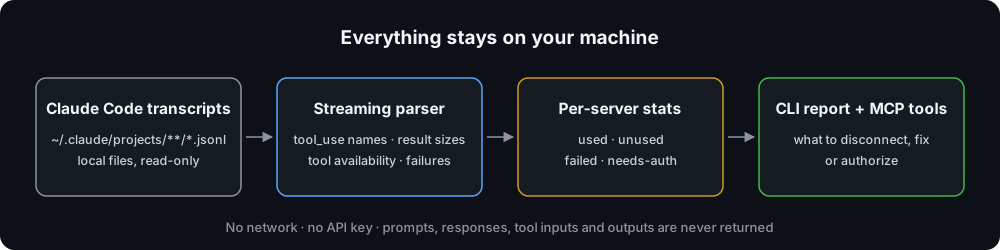
- Exact, not guessed. Claude Code already records, in every session, which MCP tools were available and which servers failed or needed auth. "Available but never used" is a set difference over your own logs, not a heuristic.
- Private by construction. No network code at all. The output holds server names, tool names, counts, byte totals and timestamps — never prompts, responses, tool inputs, tool outputs, file paths or error messages. The test fixtures plant
SECRET_*markers everywhere private content lives in a real transcript, and the tests assert none of them reach the library, the CLI or the MCP output. - Fast on big histories. Transcripts are streamed line by line and lines that cannot matter are skipped before
JSON.parse: ~360 MB of history (including a 90 MB session) scans in about 3 seconds. - Hygiene, not billing. Cost analyzers (ccusage, agent-cost-mcp, …) tell you how many tokens and dollars you spent. This tells you which servers earn their place.
- Every tool ships a strict input schema and MCP annotations (
readOnlyHint,idempotentHint) so hosts can auto-approve them.
Requirements
- Node.js 22 or newer.
- Claude Code (CLI, desktop app or IDE extension) with some session history on this machine. Nothing else: no account, no API key, no configuration.
1. Run the report
No install needed, npx fetches the package from npm (@rixtay/mcp-usage, the installed command is mcp-usage):
npx -y @rixtay/mcp-usage
Or from a clone:
git clone https://github.com/Rixtayz/mcp-usage.git
cd mcp-usage
npm install && npm run build
node dist/bin/cli.js
| Option | Purpose |
|---|---|
--since <days> | Look back this many days (default 30) |
--project <path> | Only scan projects whose path contains this text |
--min-sessions <n> | Sessions before an unused server is flagged (default 5) |
--dir <path> | Claude config directory (default: $CLAUDE_CONFIG_DIR or ~/.claude) |
--json | Print the full report as JSON, including per-tool stats |
Text output truncates long lists; --json always contains everything.
2. Connect to Claude Code
claude mcp add --scope user --transport stdio mcp-usage -- npx -y @rixtay/mcp-usage serve
3. Connect to Claude Desktop / Cowork / any MCP client
mcp-usage is listed in the official MCP Registry as io.github.Rixtayz/mcp-usage, so clients that browse the registry can install it by name. Otherwise, configure it by hand:
Edit ~/Library/Application Support/Claude/claude_desktop_config.json on macOS (or %APPDATA%\Claude\claude_desktop_config.json on Windows), reachable through Settings → Developer → Edit Config.
{
  "mcpServers": {
    "mcp-usage": {
      "command": "npx",
      "args": ["-y", "@rixtay/mcp-usage", "serve"]
    }
  }
}
If the host cannot find npx (it may not inherit your shell PATH), use absolute paths instead: "command": "/absolute/path/to/node", "args": ["/absolute/path/to/mcp-usage/dist/bin/cli.js", "serve"].
The server reads Claude Code's transcripts wherever it runs, so it only makes sense in local sessions, on the machine where you use Claude Code.
4. Example prompts
- "Which of my MCP servers should I disconnect?"
- "Which servers have been waiting for authorization the longest?"
- "Playwright seems flaky. Which of its tools fail the most?"
- "Did I use anything other than Context7 in the last 7 days?"
Typical flow: recommendations → the assistant proposes a cleanup list, you confirm → server_details on anything surprising → you disconnect the servers yourself. The tools never touch your MCP configuration.
What it reports
Each server gets one status:
| Status | Meaning |
|---|---|
used | Called at least once in the window |
unused | Its tools were available, but nothing ever called them |
failed | Never exposed a tool; Claude Code reported a connection failure |
needs-auth | Never exposed a tool; waiting for authorization |
Recommendations, in priority order:
| Action | Rule |
|---|---|
disconnect | Unused, and available in ≥ 5 sessions (--min-sessions) |
fix-or-remove | Failed to connect in ≥ 3 sessions |
authorize-or-remove | Waiting for authorization in ≥ 3 sessions |
investigate-errors | ≥ 5 calls and ≥ 30 % of them failed |
heavy-results | Results average ≥ 10,000 estimated tokens per call |
Development
npm test          # vitest: name parsing, streaming parser, aggregation, rules, CLI, MCP tools over an in-memory transport
npm run typecheck
npm run inspect   # MCP Inspector against the built server
Layout:
src/bin/cli.ts             entry point: `mcp-usage` prints the report, `mcp-usage serve` serves stdio
src/cli.ts                 argument parsing and output
src/server.ts              builds the McpServer and registers the four tools
src/analyze.ts             options → report; the one function both shells call
src/parser.ts              streaming JSONL reader → typed events
src/aggregate.ts           events → per-server stats
src/recommend.ts           stats → prioritized recommendations
src/report.ts              text table rendering
src/scan.ts                transcript discovery (--since, --project)
src/adapters/claude-code.ts  the only client-specific code, behind a small ClientAdapter interface
src/names.ts               `mcp__<server>__<tool>` parsing and server id mangling
Stack: @modelcontextprotocol/sdk v1, zod v4, nothing else at runtime. Design notes: docs/DESIGN.md.
Things worth knowing
- The transcript format is not a public API. It is parsed defensively — every field optional, unknown records ignored, malformed lines counted and skipped — but a future Claude Code release can still break it. Tested against Claude Code 2.1.233 – 2.1.274.
- Token figures are estimates: result bytes ÷ 4, text only. Transcripts record no per-result token count, and image results are not counted.
- Tool names are split on the first
__after themcp__prefix. Server ids can contain underscores, hyphens, dots or be a bare UUID, and tool names can contain__themselves, so a naivesplit("__")miscounts. - The same connector can appear under two names — a readable one in the CLI, a UUID in the desktop app. They are not merged.
- Servers bundled with the Claude desktop app (
ccd_*) are reported but never flagged for disconnection: you cannot remove them. - Claude Code deletes old transcripts, so a long
--sincewindow only sees what is still on disk. - Claude Code only, for now. Adapters for other clients are welcome.
Contributing
Bug reports, fixes and adapters for other MCP clients are welcome: see CONTRIBUTING.md. If Claude Code updates and the report suddenly looks wrong, open a bug with your Claude Code version. Found a way the tool could leak transcript content? Please report it privately, as described in SECURITY.md.
Release history: CHANGELOG.md.
License
MIT
Reviews
No reviews yet
Be the first to review this server!
More Developer Tools MCP Servers
Fetch
Freeby Modelcontextprotocol · Developer Tools
Web content fetching and conversion for efficient LLM usage
Git
Freeby Modelcontextprotocol · Developer Tools
Read, search, and manipulate Git repositories programmatically
Paperclip
Freeby Paperclipai · Developer Tools
Trending hip-hop artist momentum scores across four cultural dimensions.
Toleno
Freeby Toleno · Developer Tools
Toleno Network MCP Server — Manage your Toleno mining account with Claude AI using natural language.
mcp-creator-python
Freeby mcp-marketplace · Developer Tools
Create, build, and publish Python MCP servers to PyPI — conversationally.
MCP Marketplace
Freeby mcp-marketplace · Developer Tools
Search and install MCP servers from inside your AI client.