
Orchestrate multiple Claude Code agents in parallel from a single chat interface.
About
ClaudeArmy is an MCP server that lets Claude spawn and manage multiple Claude Code agents working autonomously across different project directories — all from a single chat interface. Dispatch solo agents for focused tasks, or activate team mode to have a lead agent automatically decompose complex work and coordinate specialized sub-agents running in parallel. Monitor progress, inspect agent teams, retrieve full output, and cancel agents on demand — without leaving your conversation.
Security Report
Valid MCP server (2 strong, 4 medium validity signals). No known CVEs in dependencies. Package registry verified. Imported from the Official MCP Registry.
3 files analyzed · 1 issue found
Security scores are indicators to help you make informed decisions, not guarantees. Always review permissions before connecting any MCP server.
Permissions Required
This plugin requests these system permissions. Most are normal for its category.
How to Install
Add this to your MCP configuration file:
{
  "mcpServers": {
    "io-github-robbhimself-1337-claude-army": {
      "args": [
        "-y",
        "claude-army"
      ],
      "command": "npx"
    }
  }
}Getting Started
Once installed, try these example prompts and explore these capabilities:
- 1"Refactor the authentication module in ~/my-project to use JWT tokens"
- 2"Run a read-only audit of ~/my-project and summarize the architecture"
- 3"Refactor ~/project-a and add test coverage to ~/project-b at the same time"
- 4"How are the agents doing?"
- 5"Show me the full output from the last agent"
- 6Tool: dispatch_task — Deploy a Claude Code agent to a project directory. Use mode: "team" for complex tasks that benefit from parallel sub-agents
- 7Tool: check_tasks — Monitor all running and completed agents with live status
- 8Tool: get_agent_team — Get a detailed tree view of a lead agent and all its sub-agents
- 9Tool: get_task_output — Retrieve the full output and progress timeline from any agent
Documentation
View on GitHubFrom the project's GitHub README.
🪖 ClaudeArmy


An MCP server that lets Claude orchestrate multiple Claude Code agents working autonomously across different projects.
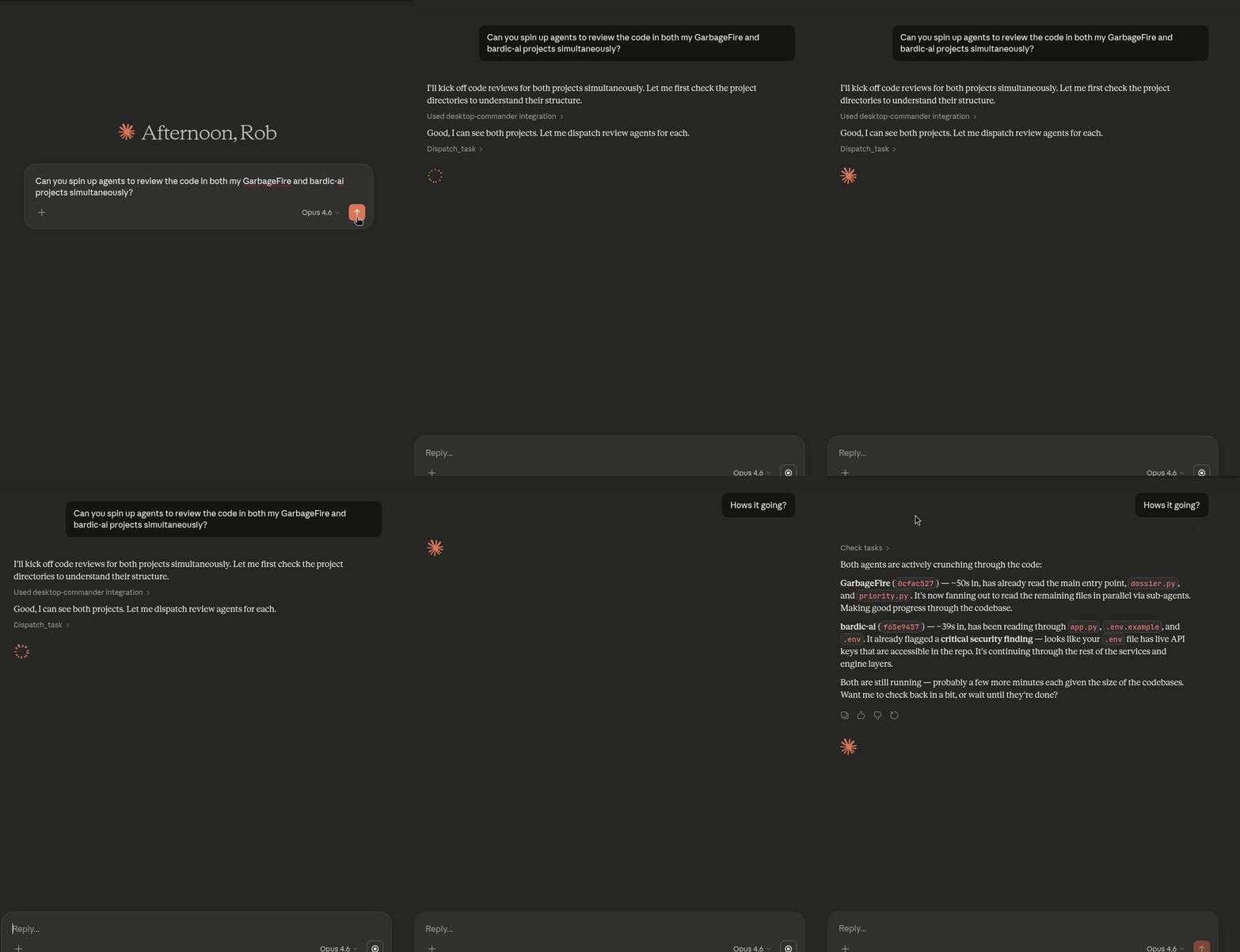
What It Does
ClaudeArmy gives Claude (in the chat interface) the ability to spawn background Claude Code processes that work independently on coding tasks. Think of it as a chain of command:
- You → give strategic direction
- Claude (chat) → breaks it down and dispatches agents
- Claude Code agents → execute autonomously, spawning their own sub-agents as needed
This means you can kick off work across multiple projects simultaneously, keep chatting normally, and check in on progress whenever you want.
Tools
| Tool | Description |
|---|---|
dispatch_task | Deploy a Claude Code agent to a project directory. Supports mode: "team" for multi-agent coordination |
check_tasks | Monitor status of all running/completed agents |
get_task_output | Retrieve what an agent did and its full output |
get_agent_team | Detailed view of a lead agent and all its sub-agents |
cancel_task | Stop a running agent gracefully |
purge_tasks | Clean up completed/failed tasks |
Setup
-
Clone this repo
-
npm install -
Add to your Claude Desktop config:
- Linux:
~/.config/Claude/claude_desktop_config.json - macOS:
~/Library/Application Support/Claude/claude_desktop_config.json - Windows:
%APPDATA%\Claude\claude_desktop_config.json
- Linux:
"claude-army": {
  "command": "node",
  "args": ["/path/to/claude-army/src/index.js"]
}
Windows note: Use forward slashes in the path value (e.g.
"C:/Users/you/claude-army/src/index.js").
- Restart Claude Desktop
Usage Examples
Single project task:
"Refactor GarbageFire's app.py into modular components"
Multi-project parallel work:
"Refactor GarbageFire to be more modular, and add a Salesforce adapter to my Reporting Tool"
Claude will dispatch separate agents to each project directory and let them work autonomously.
Check progress:
"How are the agents doing?"
Agent Teams
Use mode: "team" on dispatch_task to have the lead agent automatically decompose work and spawn specialized sub-agents that run in parallel.
How it works:
- The lead agent analyzes the task and breaks it into focused subtasks
- Each subtask is delegated to a sub-agent via Claude Code's
Tasktool - Sub-agents work in parallel, each with a well-defined scope
- The lead agent synthesizes results once all sub-agents complete
Monitoring teams:
check_tasksshows a sub-agent summary (e.g. "3 sub-agents: 1 running, 2 completed")get_agent_teamgives a detailed tree view of the lead agent and every sub-agent, including status, runtime, and output previews
Configuration
Edit the constants at the top of src/index.js:
CLAUDE_BINARY- Path to your Claude Code binaryMAX_CONCURRENT_TASKS- Max simultaneous agents (default: 5)
Requirements
- Claude Code installed and authenticated
- Node.js 18+
- Claude Desktop or any MCP-compatible client
Changelog
v0.4.1
- Bump
@modelcontextprotocol/sdkto ^1.26.0, resolving 3 high severity supply chain vulnerabilities - Add
repositoryfield to package.json
v0.4.0
- Agent team support: track sub-agents spawned via Claude Code Task tool
- New
get_agent_teamtool: tree view of lead + all sub-agents check_tasksnow shows sub-agent summary for team operationsdispatch_taskgainsmodeparameter:solo(default) orteam- Cross-platform: fixed Windows binary (
claude.cmd) and signal handling - Error messages now show platform-appropriate diagnostic commands
- README: added setup paths for Linux, macOS, and Windows
v0.3.0
- Fixed stream-json parsing to correctly handle assistant message content arrays
- Staleness indicator:
check_tasksnow shows time since last agent activity - Better error surfacing: actionable messages for CLI not found, permission denied, and mid-run failures
- Fixed output duplication in
get_task_output - Demo GIF added to README
v0.2.0
- Real-time progress tracking via Claude Code's stream-json output
check_tasksnow shows recent agent activity (file reads, edits, bash commands) instead of just runtimeget_task_outputincludes a full progress timeline with timestamps- Structured event parsing for tool use, assistant messages, and results
v0.1.0
- Initial release
- Core tools: dispatch_task, check_tasks, get_task_output, cancel_task, purge_tasks
- Fire-and-forget architecture with background process management
- Max 5 concurrent agents
- stdio transport for MCP communication
License
MIT
Reviews
No reviews yet
Be the first to review this server!
More Developer Tools MCP Servers
Git
Freeby Modelcontextprotocol · Developer Tools
Read, search, and manipulate Git repositories programmatically
Fetch
Freeby Modelcontextprotocol · Developer Tools
Web content fetching and conversion for efficient LLM usage
Worldmonitor
Freeby Koala73 · Developer Tools
Live markets, conflicts, country risk, chokepoints, energy, and China decision signals. 90 tools.
Paperclip
Freeby Paperclipai · Developer Tools
Trending hip-hop artist momentum scores across four cultural dimensions.
Toleno
Freeby Toleno · Developer Tools
Toleno Network MCP Server — Manage your Toleno mining account with Claude AI using natural language.
mcp-creator-python
Freeby mcp-marketplace · Developer Tools
Create, build, and publish Python MCP servers to PyPI — conversationally.