
Server data from the Official MCP Registry
Self-hosted OAM memory with cited recall over your existing deployment
About
Self-hosted OAM memory with cited recall over your existing deployment
Security Report
The OAM client code is consistent with its stated purpose as a memory client for a self-hosted OAM deployment. It reads credentials from environment variables, enforces HTTPS or loopback-only endpoints, disables redirects, and wraps recalled memory as untrusted evidence. The main concerns are the DSH plugin automatically retaining all user messages and the OpenClaw setup script enabling conversation access and disabling another memory plugin without explicit confirmation; the remainder of the server code was truncated and could not be fully verified. Supply chain analysis found 7 known vulnerabilities in dependencies (1 critical, 3 high severity). Package verification found 1 issue.
10 files analyzed · 13 issues found
Security scores are indicators to help you make informed decisions, not guarantees. Always review permissions before connecting any MCP server.
Permissions Required
This plugin requests these system permissions. Most are normal for its category.
What You'll Need
Set these up before or after installing:
Environment variable: OAM_BASE_URL
Environment variable: OAM_USER_ID
Environment variable: OAM_USER_API_KEY
How to Install
Add this to your MCP configuration file:
{
  "mcpServers": {
    "oam-mcp": {
      "command": "npx",
      "args": [
        "-y",
        "@rocke-dong/oam-mcp@0.0.1"
      ],
      "env": {
        "OAM_USER_ID": "your-oam-user-id-here",
        "OAM_BASE_URL": "your-oam-base-url-here",
        "OAM_USER_API_KEY": "your-oam-user-api-key-here"
      }
    }
  }
}
Some servers take additional arguments. See the repository for details.
Documentation
View on GitHubFrom the project's GitHub README.
Open Agent Memory
English (canonical) | 简体中文 | 日本語
Fully open memory. Built together. Made for everyday agents.
Open Agent Memory (OAM) is a fully open source memory engine for AI agents. Remember preferences, find earlier decisions and retrieve supporting sources in a new session. OAM turns eligible conversations into facts and Insights, keeps documents as separate Resources, and builds a User Profile only when explicitly refreshed.
Built for the community: the complete memory system is Apache-2.0 licensed, so we can run it, inspect it, improve it and use it together. Build with us or share your experience.
93.2% on LME-500 with MiniMax M3.1 Flash native-adaptive answers and DeepSeek Flash judging. On BEAM-10M, OAM scored 61.56% versus Hindsight’s 52.16% (+9.40 percentage points) using recorded DeepSeek Flash settings. Results and comparison details.
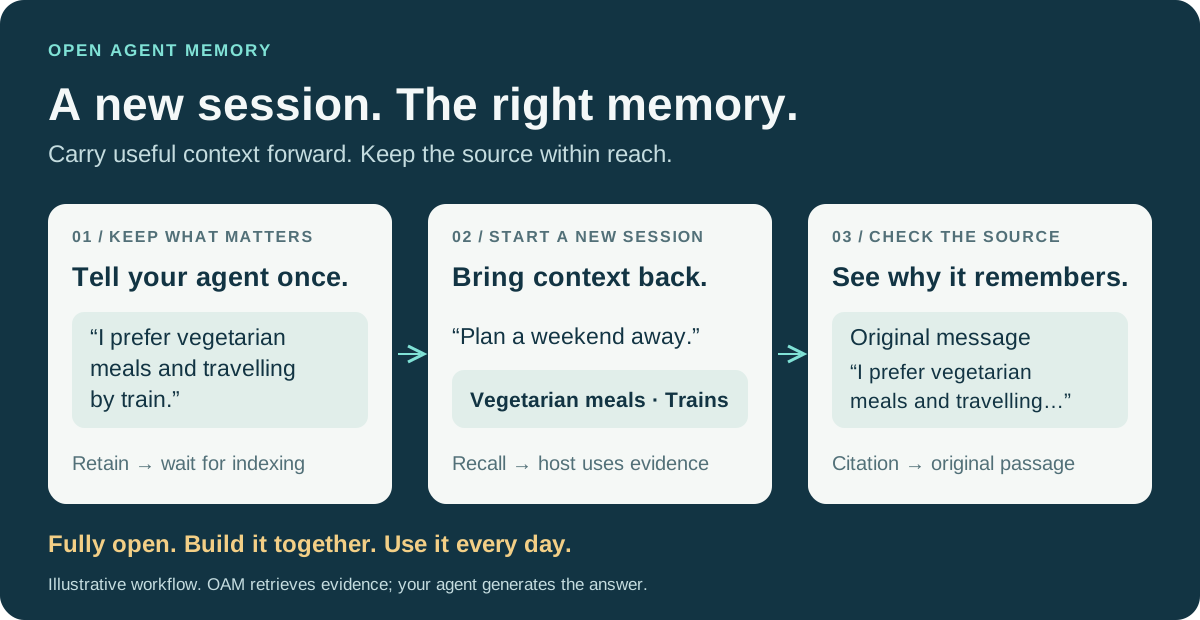
Illustrative scenario, not measured model output. Your agent uses OAM's cited context to compose its answer.
Get your first cited memory → Deployment, a user key, retain → readiness → recall, and a fresh MCP session in one guide.
What Is Open Agent Memory?
“Open” means the complete memory system: indexing, retrieval, Profiles, user controls and native multi-node operation are available for developers to inspect, run, modify and improve. The aim is a memory engine the community can build and use together. Contributions can be code, reproducible bug reports, documentation, examples or feedback from your own agent.
Integrate through the HTTP API, the local MCP server, or the OpenClaw and DeepSeek Harness plugins. The bundled Memory Inspector lets users browse memory, follow its sources, search Resources and manage what is retained.
Why Open Agent Memory?
- Fully open source, with native multi-node deployment. Run stateless API replicas and durable workers across nodes over shared PostgreSQL/pgvector. Coordination, recovery and deployment code are included.
- Recall with evidence. Retrieve facts and Insights together with supporting original passages and citations, so the agent can reason from the source.
- Search conversations and documents together. HTML, PDF and image Resources remain separate from learned personal memory while sharing one retrieval path.
- Personalize when you choose. Build a stored User Profile from eligible memory and explicit Profile Data on request; unchanged inputs reuse it without generation.
- Inspect and control memory. Browse sources in the Inspector, remove an individual Memory Unit or Insight, and manage document Resources through the same authorized API.
- Control your data and models. Self-host your memory in PostgreSQL/pgvector and configure your own model endpoints.
See the acceptance requirements, release notes and verification and published release for verified behavior, deployment limits and artifacts.
Get Started
Start here: from a fresh deployment to your first cited recall. Configure PostgreSQL and your model endpoints, initialize OAM, create a user and verify the retained source before connecting your agent. The guide uses the published v0.0.3 image for Linux AMD64 or ARM64 and links to the Docker Compose guide.
| Your agent or application | First prerequisite | Integration route |
|---|---|---|
| Custom application | Complete Start here | HTTP API and copyable HTTP example |
| Claude Code or Cursor | Complete Start here | MCP server and client configuration, Node.js 22+ |
| OpenClaw | Complete Start here | OpenClaw plugin |
| DeepSeek Harness (DSH) | Complete Start here | DSH plugin |
Use your own user-scoped key and keep client configuration private.
Inspect the evidence
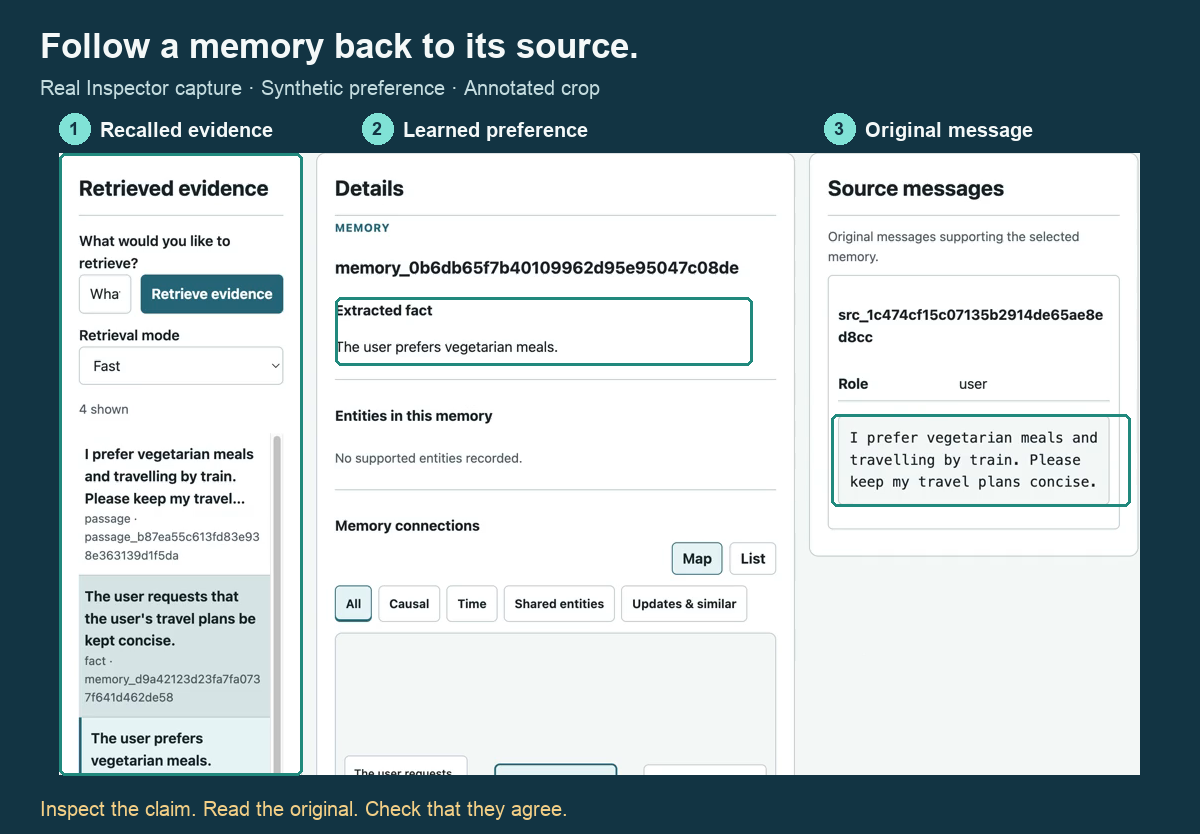
Real Inspector UI with synthetic demonstration data; annotations highlight where to inspect memory and its source. This is a demonstration, not a benchmark result.
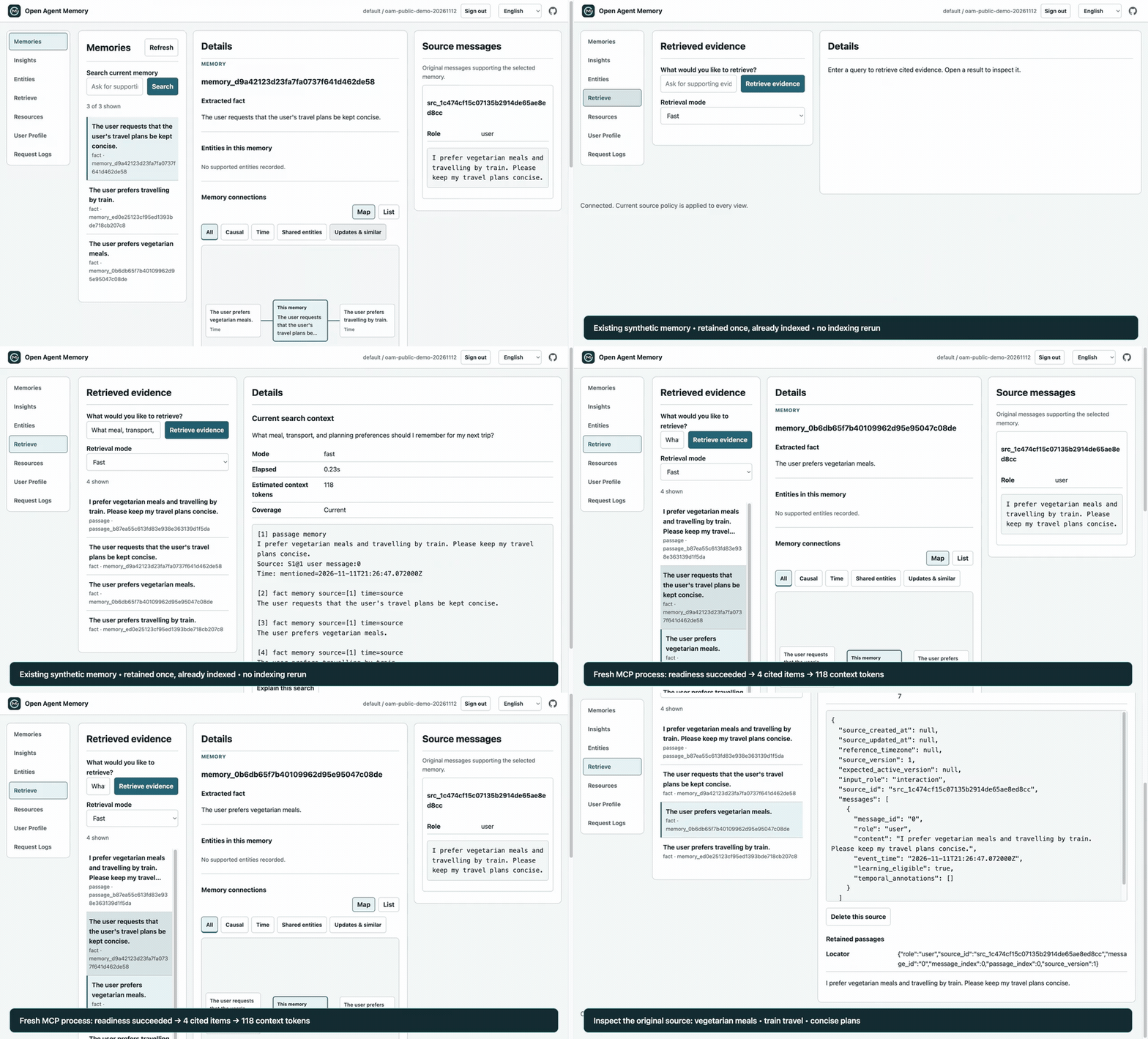
Watch the 71-second demo: an existing synthetic memory, readiness and recall from a fresh MCP process, then the original source in Memory Inspector. The recording runs at 2× speed and reuses the completed index.
Performance & Accuracy
OAM is built for useful memory in everyday agent work. It reaches 93.2% (466/500) on all 500 LongMemEval S questions with MiniMax M3.1 Flash native-adaptive answers and DeepSeek Flash high-effort judging.
The LME evaluation uses fast recall with L1 memory and 11,481.10 average answer-context tokens. This is a fixed-reference judge acceptance score for the recorded pipeline, not a fresh measurement of the v0.0.3 image. See benchmark results and evidence.
BEAM-10M: 61.56% versus Hindsight’s saved-context replay at 52.16%, a difference of 9.40 percentage points. These saved measurements cover 200 selected answers with DeepSeek Flash judging and are separate from the current max-effort answer profile. Hindsight's engine was not rerun. OAM used 17.43% more answer context. See the comparison methodology and per-question evidence.
BEAM-10M tested 10 complete, untruncated conversation histories, with 20 questions per history. The linked reports record each run's model bindings, evaluated revisions and limitations.
These recorded evaluations measure retrieval, answering and judging with L1 memory; L2 Insights, User Profiles and document Resources were not scored.
See benchmark results and reproduction for the evaluation methodology, model settings, context counters, evaluated revisions, limitations and every question's saved evidence.
Product Model
- L0 Source evidence: retained eligible conversations with roles, times, source identities, and learning eligibility.
- L1 Learned memory: source-linked facts, preferences, experiences, events, and constraints extracted from interactions eligible for long-term memory.
- L2 Insights: persisted synthesis over related eligible L1 records with transitive L0 support and one descriptive subtype:
preferences,patterns,projects,relationships,experiencesorgeneral_insights; subtype does not alter ranking. - L3 User Profile: one explicitly refreshed, read-only document built from Profile Data and eligible Learned Memory; unchanged inputs reuse it with zero generation calls.
- Profile Data: explicitly supplied structured basic information or preferences, mapped to exact User Profile inputs and excluded from ordinary recall.
- Resources: retained text/HTML/PDF/image originals, detailed passages, locators, and abstracts that remain searchable evidence and never automatically become L1–L3.
In api_key mode, one credential-derived tenant and one key-bound user_id identify a personal memory collection. An administrator creates it with POST /v1/users and receives that user's first key once; the host uses the user key for POST /v1/retain interactions, POST /v1/users/{user_id}/resources document originals, POST /v1/users/{user_id}/profile-data structured user inputs, and POST /v1/recall. The administrator key cannot read or write personal content directly. Local dev mode admits requests without a key and makes no privacy claim; trusted mode uses gateway-asserted tenant/user headers, with a root key required on nonlocal requests. Interactions need no caller-managed source/message IDs. Documents use a stable document_id with explicit replace or text-only append; OAM allocates revisions. The HTTP API documents mode selection, JSON and multipart examples, user-key rotation, retry keys and operation readiness.
Recall uses one limit on the complete rendered context: search.fast.context_max_tokens: 18000 and search.normal.context_max_tokens: 32768. Chunks are included by default; include.chunks: false omits full original bodies while retaining eligible learned text, required supporting facts and citations. Relevance determines admission across learned evidence and originals, including originals with no extracted facts. Complete evidence groups must fit without clipping; shared source chunks are counted once. If the only eligible L1 fact and its complete support exceed the total, return that bundle alone only when no higher-ranked root has been admitted, stop filling and report the overshoot. Insights have no such exception. context_tokens counts the complete returned text, including citations and metadata, with the local o200k_base tokenizer. It is not provider usage; hosts count their final composed model input separately.
Architecture
OAM uses Python, FastAPI, explicit SQL through psycopg, and PostgreSQL with pgvector. API processes are stateless; PostgreSQL owns accepted originals, authorization, source lifecycle, operations, worker claims, leases, fences, and application-replica recovery. Each service uses one configured VLM through OpenAI Chat, OpenAI Responses or Anthropic Messages, with per-role reasoning effort and separate embedding and optional reranker models. There are no provider, model, endpoint, or credential defaults.
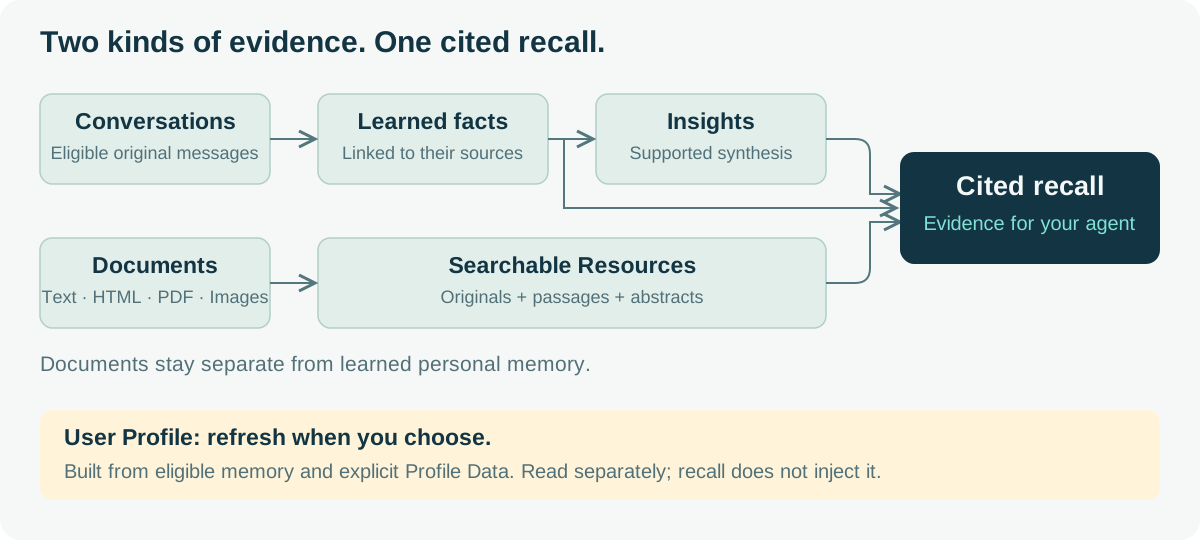
Conversations become source-backed facts and Insights; documents stay in a separate Resource path. Both feed cited fast/normal recall. User Profile refresh is explicit: unchanged inputs reuse the stored Profile with zero generation calls; changed inputs create a durable operation.
See architecture, HTTP API, configuration guide, operations, the Memory web UI guide, acceptance, and the historical Steps 1–4 foundation evidence.
Development Setup
Python 3.12–3.14 and uv are required.
uv sync --locked
uv run pytest -q
uv run ruff check .
uv run ruff format --check .
uv run oam preflight --config configs/oam.yaml --json
The canonical configuration defines one shared models.vlm, plus a separate models.embedding. Select openai_chat, openai_responses, or anthropic_messages as the generation protocol, and configure the model, endpoint and credential through private environment variables. models.reasoning_effort enables each role with none, low, high or max; YAML null disables that role. The VLM reasoning mode determines which settings are sent. Preflight exercises enabled text and vision roles with the selected protocol; actual model capabilities depend on the endpoint. See model configuration for protocol paths and reasoning options. Default tests never read private .env or contact external providers.
Run the API with its embedded durable worker using the operator configuration:
uv run oam api --config configs/oam.yaml --host 127.0.0.1
The default worker.embedded_enabled: true requires the API, queue and worker-content DSNs. For separate worker processes, set worker.embedded_enabled: false in the operator YAML and run oam api and oam worker with that file. Each runner uses the canonical worker.max_tasks limit, currently ten task slots; deployment tooling controls process count. Shared PostgreSQL admission bounds generation, embeddings and HTTP traffic independently of replica count; see operations.
GET /health/live, GET /health/ready, GET /v1/capabilities, /openapi.json, and /ui/ are available. Readiness returns 200 when the bounded database/schema, enabled-model configuration, admission and applicable worker checks succeed, or 503 with a reason. It makes no model calls and does not certify model quality or release readiness. Configure distinct API, queue and worker-content DSNs plus extraction, Insight, embedding and abstract model roles before using the core; delegated search also needs an optional planner binding. On a fresh database, oam migrate selects rootless local dev when no root secret or handoff destination is supplied; set OAM_ROOT_API_KEY or OAM_BOOTSTRAP_OUTPUT to initialize a keyed deployment. See operations. Batch search and optional one-call delegated search use the existing recall path; Resource/source controls, recorded debug, export validation and the browser Inspector are documented in the HTTP API. The stored User Profile uses /profile; document Resources use /resources, and structured Profile Data uses /profile-data; User Profile generation requires its configured model role.
Release Boundary
v0.0.3 updates the LME-500 results and evidence links, renames graph expansion configuration to entity_semantic_graph, and improves public setup documentation. See the release record for verification and publication status. Integration package versions are unchanged.
v0.0.3 includes all L0–L3 layers, separate Resource ingestion, fast/normal joint recall, source lifecycle, explain/diff/recorded replay, portable export, Memory Inspector, multi-API/multi-worker recovery, conformance evidence, and a public multi-architecture image. Fast and normal are the supported recall modes. The Python SDK, supplier importers, full User Profile Studio, hosted service, database HA, and multi-region operation are later work.
The Docker/Compose guide uses one non-root API/worker image, bundled Inspector assets and PostgreSQL/pgvector. The replica example simulates two APIs and two workers locally; it does not establish physical multi-host resilience. OpenClaw and DSH install from npm, with OpenClaw also available on ClawHub and versioned plugin tarballs retained for reproducibility. Public release and image availability are separate from local candidate verification.
Roadmap
v0.0.2 adds administrator user listing, stable Insight titles, direct user-original recall eligibility and the MCP integration. See the release notes for changes and upgrade steps. The following work is planned; scope may change with validated user feedback, and no release dates are committed.
| Release | Planned work |
|---|---|
| v0.1.0 | Improve general retrieval quality and rerun retrieval, answering and judging against the existing completed LME-500 and BEAM-10M indexes, without repeating ingestion, extraction or indexing. The LME-500 target is at least 473/500 (94.6%). |
The OpenClaw plugin remains independently versioned at 0.0.2; MCP and DSH remain at 0.0.1. The tokenizer optimization already shipped in the v0.0.1 source tag and is retained without reindexing. Further work includes smoother onboarding, reducing unnecessary indexing and answer-context tokens, evaluating keyword-ranking approaches, and defining shared Resource ownership and OIDC/LDAP support. These are proposed improvements, not delivered capabilities.
Share setup and retrieval feedback in Discussions. The current release's supported behavior and limits remain documented above and in the release notes and verification.
Acknowledgments
We thank the contributors to Hindsight, OpenViking, Mem0, MemOS, TencentDB Agent Memory and gbrain for their open-source work, which informed OAM. We also thank the authors and contributors of LongMemEval and BEAM for the benchmarks used in our evaluations. See the full acknowledgments and third-party notices for project, benchmark and license credits.
License
Apache License 2.0. See LICENSE and THIRD_PARTY.md.
Reviews
No reviews yet
Be the first to review this server!
More Developer Tools MCP Servers
Rea
Freeby Morluto · Developer Tools
Reverse engineer anything from your terminal or agent with one CLI and MCP server.
Paperclip
Freeby Paperclipai · Developer Tools
Trending hip-hop artist momentum scores across four cultural dimensions.
Scrapling
Freeby D4Vinci · Developer Tools
Web scraping with stealth HTTP, real browsers, and Cloudflare bypass. CSS selectors supported.
Git
Freeby Modelcontextprotocol · Developer Tools
Read, search, and manipulate Git repositories programmatically
Toleno
Freeby Toleno · Developer Tools
Toleno Network MCP Server — Manage your Toleno mining account with Claude AI using natural language.
MCP Marketplace
Freeby mcp-marketplace · Developer Tools
Search and install MCP servers from inside your AI client.