
Server data from the Official MCP Registry
KISTI ScienceON OpenAPI literature search & metadata collection (MCP server + CLI)
About
KISTI ScienceON OpenAPI literature search & metadata collection (MCP server + CLI)
Security Report
Well-designed MCP server for academic literature search with proper credential handling, comprehensive error management, and appropriate permissions for its purpose. Credentials are properly isolated from code and logs, HTTP endpoints include appropriate security warnings, and network calls are well-protected. Minor code quality observations noted but do not materially impact security posture. Supply chain analysis found 9 known vulnerabilities in dependencies (0 critical, 5 high severity).
5 files analyzed · 13 issues found
Security scores are indicators to help you make informed decisions, not guarantees. Always review permissions before connecting any MCP server.
Permissions Required
This plugin requests these system permissions. Most are normal for its category.
What You'll Need
Set these up before or after installing:
Environment variable: SCIENCEON_AUTH_KEY
Environment variable: SCIENCEON_CLIENT_ID
Environment variable: SCIENCEON_MAC_ADDRESS
Environment variable: SCIENCEON_ACCOUNT_ID
Environment variable: SCIENCEON_OS_TRUST
How to Install
Add this to your MCP configuration file:
{
  "mcpServers": {
    "io-github-rubatoyd-scienceon-mcp": {
      "env": {
        "SCIENCEON_AUTH_KEY": "your-scienceon-auth-key-here",
        "SCIENCEON_OS_TRUST": "your-scienceon-os-trust-here",
        "SCIENCEON_CLIENT_ID": "your-scienceon-client-id-here",
        "SCIENCEON_ACCOUNT_ID": "your-scienceon-account-id-here",
        "SCIENCEON_MAC_ADDRESS": "your-scienceon-mac-address-here"
      },
      "args": [
        "scienceon-mcp"
      ],
      "command": "uvx"
    }
  }
}Documentation
View on GitHubFrom the project's GitHub README.
scienceON-mcp



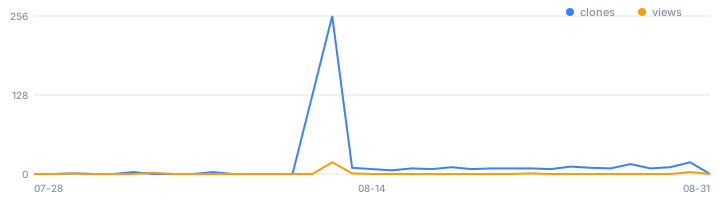
📈 사용량 — 최근 14일 조회 0회(고유 0) · 클론 0회(고유 0) · 릴리스 자산 누적 다운로드 —
2026-09-24 자동 갱신 · 전체 이력은
docs/usage.csv. GitHub 트래픽 통계는 14일 창만 제공하므로 이 저장소가 매일 찍어 누적한다.
KISTI ScienceON OpenAPI 문헌 검색·메타데이터 수집기 — MCP 서버 + CLI. 자기 ScienceON API 키만 발급받으면 Claude(또는 CLI)에서 국내외 논문·보고서 서지 메타데이터를 검색·수집할 수 있다.
An MCP server + CLI for KISTI ScienceON OpenAPI. Bring your own API key and let Claude search & collect academic literature metadata in any project.
기능
- 검색 — 논문(ARTI)·보고서(REPORT) 등 서지 메타데이터. 다중쿼리 합집합 · 와일드카드(
*) · 연도범위 ·contains/lang후처리 필터 - 상세 — 제어번호(CN)로 초록·서지 전체
- 다중그룹 수집 — 그룹마다 다른 검색 전략을 걸어 한 코퍼스로 합침
- 내보내기 — xlsx · csv · json · sqlite
- 두 가지 사용법 — Claude 에서 도구 호출(MCP) · 터미널 배치(CLI), 같은 코어 공유
지원 티켓: ARTI 논문 · REPORT 보고서 · ATT 동향 · RESEARCHER 연구자 · ORGAN 연구기관
(계정 구독 범위에 따름)
API 키 발급
- ScienceON 회원가입·로그인
- API Gateway → 인증키 발급 신청 → 승인 후
인증키·Client ID발급 - 인증키관리에서 신청 MAC 주소 등록, IP관리에서 호출 PC 의 공인 IP 등록
- 사용할 서비스 콘텐츠(티켓) 체크
자격증명은 MCP 설정의 env 블록 또는 .env(.env.example 복사)로 전달한다. 코드·커밋·로그에는
넣지 않는다.
설치
Claude Desktop
.mcpb 원클릭 — 릴리스에서 받아
더블클릭/드래그 → 설치 창에서 인증키·Client ID·MAC 입력.
| 자산 | 특징 |
|---|---|
scienceon-mcp-win-x64.mcpb / …-macos-arm64.mcpb / …-linux-x64.mcpb | 자체완결 — Python·uv 불필요 |
scienceon-mcp.mcpb | 경량. 실행에 uv 필요 |
수동 config — claude_desktop_config.json:
{
  "mcpServers": {
    "scienceon": {
      "command": "uvx",
      "args": ["--from", "git+https://github.com/rubatoyd/scienceON-mcp", "scienceon-mcp"],
      "env": {
        "SCIENCEON_AUTH_KEY": "발급_32자리_인증키",
        "SCIENCEON_CLIENT_ID": "발급_client_id",
        "SCIENCEON_MAC_ADDRESS": "AA-BB-CC-DD-EE-FF"
      }
    }
  }
}
Claude Code
claude mcp add scienceon -- uvx --from "git+https://github.com/rubatoyd/scienceON-mcp" scienceon-mcp
첫 실행 시 빌드(수 초), 이후 캐시. 최신 반영은 uvx --refresh ….
다른 MCP 클라이언트
표준 stdio MCP 서버이므로 MCP 를 지원하는 에이전트면 그대로 붙는다 — Cursor · Windsurf · Cline ·
Zed · VS Code Copilot(agent mode) · OpenAI Agents SDK · 자체 클라이언트 등. 위 command/args/env
3요소를 각 클라이언트 설정에 옮기면 된다.
전송 방식
scienceon-mcp                                # stdio (기본)
scienceon-mcp --transport streamable-http    # http://127.0.0.1:8000/mcp
scienceon-mcp --transport sse --port 9000    # http://127.0.0.1:9000/sse
환경변수: SCIENCEON_MCP_TRANSPORT · SCIENCEON_MCP_HOST · SCIENCEON_MCP_PORT.
MCP 도구
| 도구 | 하는 일 |
|---|---|
scienceON_status | 연결/토큰 점검 (+공인 IP — E4006 진단용) |
scienceON_search | 문헌 검색 — 다중쿼리 · 와일드카드 · 연도범위 · contains · lang |
scienceON_detail | 제어번호(CN)로 초록·서지 전체 |
scienceON_export | 대량 수집 → xlsx/csv/json/sqlite 저장 |
scienceON_collect_groups | 다중 검색그룹을 한 코퍼스로 합쳐 수집 |
다중그룹 수집
단일 검색어로는 만들 수 없는 코퍼스가 있다. 변별력 있는 단어는 전체(BI)로 그대로 검색하고,
색인이 안 되는 토큰은 제목(TI) 와일드카드 + contains 후처리로 정밀화하는 식으로 그룹마다 다른
전략을 걸어 합집합을 만든다.
[
  { "field": "BI", "terms": ["경계선지능", "경계선 지능"] },
  { "field": "TI", "terms": ["느린*"], "contains": ["느린학습자", "느린 학습자"] }
]
그룹 키: field(BI/TI/AB/AU/KW) · terms · contains · lang · max.
save: false 로 부르면 저장 없이 결과를 미리 볼 수 있다(응답에는 앞 100건만).
알아둘 제한
수집량이 max_records 와 정확히 일치하면 거의 항상 절단된 것이다. 수집 도구는 total 과
플래그를 함께 반환하므로 절단 여부를 확인할 수 있다. 절단된 결과를 완전한 코퍼스로 오인하면
후속 분석이 통째로 무효가 된다.
ScienceON 이 보고하는 total 은 실제로 받을 수 있는 건수보다 클 수 있다. 그래서 두 상황을
다른 플래그로 구분한다.
| 플래그 | 뜻 | 대처 |
|---|---|---|
truncated | max_records 상한에 걸렸다 | 상한을 올려 재수집하면 늘어난다 |
total_mismatch | 끝까지 페이징했는데 total 에 못 미쳤다 | 상한을 올려도 늘지 않는다. 회수량을 확정 수치로 쓴다 |
meta.union_upper_bound 는 실행한 검색축들의 total 합, 즉 합집합의 상한이다(중복 미보정).
다중 페이지 질의는 호출마다 결과가 미세하게 달라진다. 단일 페이지 질의는 안정적이다.
total 에 못 미치고 상한도 아니면 한 번 더 훑어 합집합을 취한다(meta.sweeps 가 1보다 크면
보정된 것).
보정이 걸린 축은 전체를 재페이징하므로 그만큼 요청이 늘어난다. 대규모 수집에서 부담되면
scienceON_search · scienceON_export · scienceON_collect_groups 의 retry_incomplete=0
으로 끈다 — 대신 결손이 남고 total_mismatch 로만 표시된다.
출력 파일명은 정규화된다. name 을 지정하지 않으면 검색어가 그대로 파일명이 되므로,
경로 구분자·..·윈도 금지문자는 제거되고 결과는 항상 out_dir 안에만 저장된다.
한글 파일명은 그대로 보존된다.
서버측 파이프 OR(|)는 쓰지 않는다. 공백이 든 용어에서 토큰이 분리돼 과대매칭되므로,
용어별 개별 검색 후 CN 합집합을 취한다.
Claude 앱 안에서 검색해 설치할 수는 없다. 공식 MCP 레지스트리 등재와 Claude Desktop 인앱 커넥터 디렉터리는 별개이고 자동 동기화되지 않는다.
도구 설명이 한국어다. 한국어를 다루는 모델이어야 도구 선택이 정확하다.
mcp SDK 는 1.x 로 고정된다(mcp>=1.2.0,<2). 2.0 에서 mcp.server.fastmcp 가 제거되어
상한이 없으면 기동에 실패한다.
CLI
uv run scienceon status
uv run scienceon search --target ARTI --query "인공지능" --year 2015~2024 --rows 100
uv run scienceon collect --config config/search.example.yaml
로컬 개발은 clone 후 uv sync. 클라우드 동기화 폴더(OneDrive 등)라면 venv 를 폴더 밖에 두기를
권한다(UV_PROJECT_ENVIRONMENT).
문서
- docs/SCIENCEON_API_GUIDE.md — API 호출 규격
- docs/COLLECTION_WORKFLOW.md — 반복 수집 SOP
- docs/PROMPTS.md — Claude 구동용 프롬프트 템플릿
- docs/ROADMAP.md — 기능 구현 계획
보안 / 네트워크
- 자격증명은
.env또는 MCPenv블록으로만 전달한다..env와 토큰 캐시는 gitignore 대상이다. - 교육망·사내망 SSL 인터셉션 환경에서는
truststore로 OS 신뢰저장소를 사용해 통과한다 (TLS 검증을 끄지 않는다). 정식 의존성이라.mcpb설치본에도 적용된다. 비활성은SCIENCEON_OS_TRUST=0. - 자격증명 오류·타임아웃 등 어떤 예외도 도구 밖으로 새지 않는다(항상
{"error": …}형태로 반환). - HTTP 전송에는 인증이 없다. 기본 바인드는 루프백(
127.0.0.1)이다.--host 0.0.0.0으로 외부에 열면 자격증명을 가진 서버가 그대로 노출되므로 신뢰된 망에서만 쓴다. - 호출은 throttle(기본 0.5s)·지수 백오프를 건다. 429 가 나면 throttle 을 올린다.
관련 프로젝트
- ansua79/scienceon-mcp — KISTI 개발자의 ScienceON MCP. ScienceON 전 API(논문·특허·보고서·동향·연구자·기관·기술트렌드·뉴스 등 17개 도구)를 폭넓게 노출하고 GUI 설치기도 제공한다. 폭넓은 탐색이 목적이면 이 도구를 권한다.
- rubatoyd/KCI_openAPI — 한국연구재단 KCI 수집기(자매 프로젝트).
본 프로젝트는 연구용 자료수집·코퍼스 구축에 특화되어 있다 — 다중쿼리 합집합 · 와일드카드 · 후처리 필터 · 다중그룹 수집 · 대량 내보내기 · config 재현 수집.
라이선스
MIT © Yeondong Yang. 본 프로젝트는 KISTI 의 비공식 클라이언트이며 제휴 관계가 없다. ScienceON 데이터 이용은 KISTI 약관·트래픽 정책을 따른다.
Reviews
No reviews yet
Be the first to review this server!
More Developer Tools MCP Servers
Git
Freeby Modelcontextprotocol · Developer Tools
Read, search, and manipulate Git repositories programmatically
Fetch
Freeby Modelcontextprotocol · Developer Tools
Web content fetching and conversion for efficient LLM usage
Paperclip
Freeby Paperclipai · Developer Tools
Trending hip-hop artist momentum scores across four cultural dimensions.
Toleno
Freeby Toleno · Developer Tools
Toleno Network MCP Server — Manage your Toleno mining account with Claude AI using natural language.
mcp-creator-python
Freeby mcp-marketplace · Developer Tools
Create, build, and publish Python MCP servers to PyPI — conversationally.
MCP Marketplace
Freeby mcp-marketplace · Developer Tools
Search and install MCP servers from inside your AI client.