
Server data from the Official MCP Registry
Share coding-agent sessions with your team: /share in one agent, /pickup in another.
About
Share coding-agent sessions with your team: /share in one agent, /pickup in another.
Security Report
Valid MCP server (1 strong, 1 medium validity signals). 2 known CVEs in dependencies (1 critical, 0 high severity) ⚠️ Package registry links to a different repository than scanned source. Imported from the Official MCP Registry. 1 finding(s) downgraded by scanner intelligence.
16 files analyzed · 3 issues found
Security scores are indicators to help you make informed decisions, not guarantees. Always review permissions before connecting any MCP server.
Permissions Required
This plugin requests these system permissions. Most are normal for its category.
What You'll Need
Set these up before or after installing:
Environment variable: RELAY_SERVER
Environment variable: RELAY_TOKEN
How to Install
Add this to your MCP configuration file:
{
  "mcpServers": {
    "io-github-ryrahul-session-relay": {
      "env": {
        "RELAY_TOKEN": "your-relay-token-here",
        "RELAY_SERVER": "your-relay-server-here"
      },
      "args": [
        "-y",
        "session-relay"
      ],
      "command": "npx"
    }
  }
}Documentation
View on GitHubFrom the project's GitHub README.
Session Relay
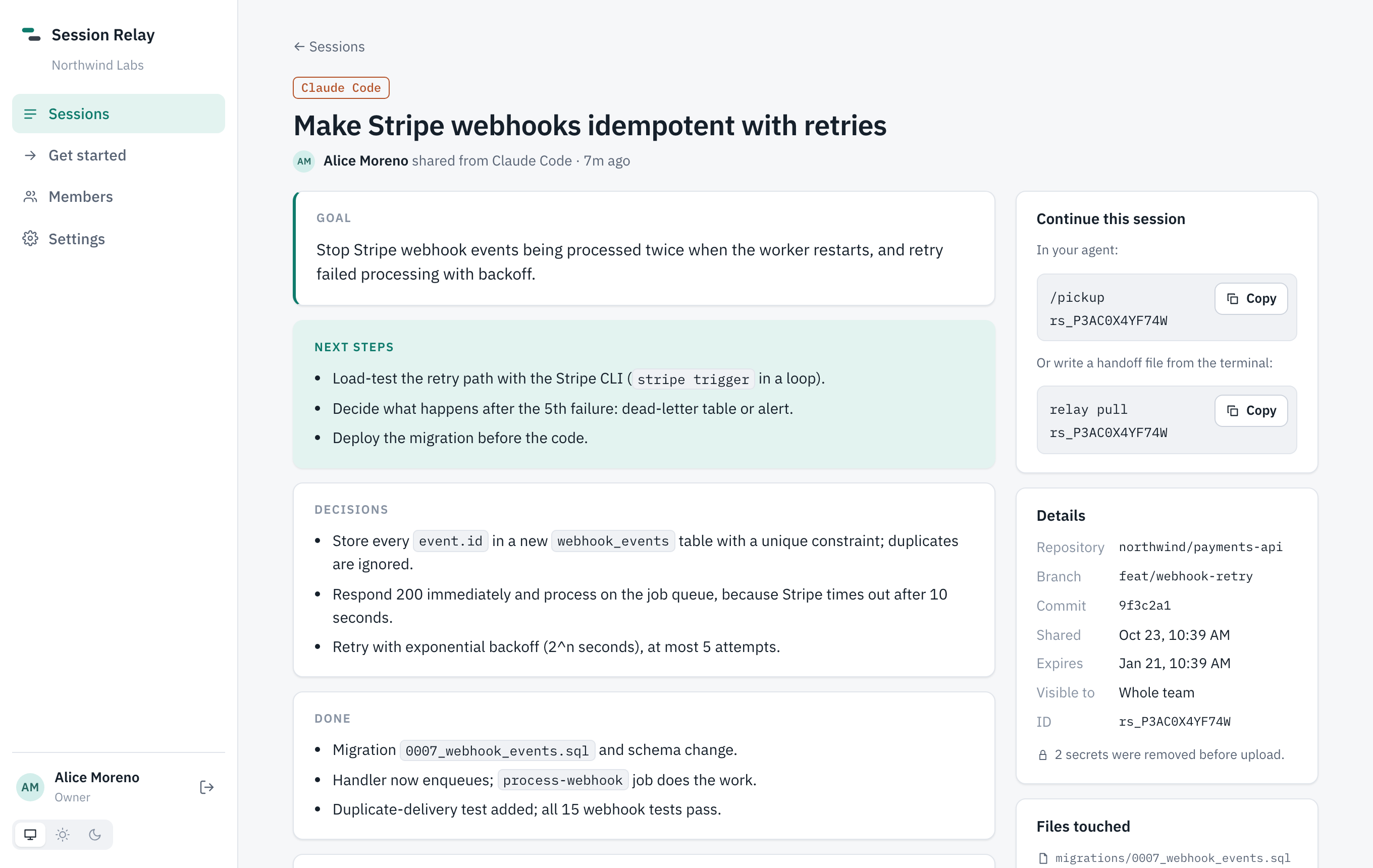
Pick up where your teammate left off. Share coding-agent sessions across Claude Code, Codex, OpenCode, Gemini CLI, Copilot CLI, Cursor and ZCode. Your teammate continues in whichever tool they use, with the goal, decisions, next steps and recent conversation.
You (Claude Code):      /share
Teammate (OpenCode):    /pickup your webhook retry work
Why
Handing off agent work means copy-pasting chat logs, or the next person starting from zero. With Session Relay:
/share: the agent writes a handoff (goal, decisions, done, next steps, open questions) and shares it with the recent conversation and the files touched./pickup: the next person's agent finds it, reads it, checks the code and continues, in any of the supported agents.- Handoff chains: work picked up and shared again is linked, so every session shows who started it and who continued it.
- Work live together (
/live): when two people work at the same time, see who's on what and which files they touch, and send messages that reach each other's agent between steps. Agents show messages to you first, unless you let them act on their own. - Handoffs for someone: share "for Akshat" and it's first in their
/pickup. Edit a share any time (next steps, title, who it's for). - Auto-share drafts (opt-in): every Claude Code, Gemini CLI and Copilot CLI session is saved as a private draft when it ends; publish it when it's ready.
- Share without your prompts:
/share without my promptsorrelay config prompts hidekeeps what you typed on your laptop; teammates still get the agent's work and the summary. - Diff snapshots: attach your uncommitted changes to a share; the next person
git applys them. - Handoff templates: admins decide what a handoff must include per repo ("Tests run", "Migration notes") in a guided editor with ready-made sections and a preview;
/sharefollows it. - Comments: teammates leave notes on a session; the agent that picks it up reads them.
- Linked to PRs and files: shares carry the branch's pull request; find every session that touched a file with
file:src/billing.ts. - Web app: browse, search and read everything your team has shared (All, For me, Shared by me, My drafts), plus an Activity digest, team Stats and Settings in simple tabs. Light and dark, works on phones.
- Export and audit: download any session as Markdown or JSON; admins see an audit log of everything.
- Easy onboarding: invite links, and
relay loginsigns in through the browser. - Search everything: titles, summaries and full transcripts; filter by file, branch, agent, person.
- Private by default: nothing is uploaded unless you share it, secrets are removed on your laptop first (test your own patterns in Settings → Privacy), and shares can be limited to specific people.
All of it: Features.
Hosting
| Self-hosted · available now | One docker compose up on your own server → Self-hosting guide. Or on your own Cloudflare account with no server to run → Deploy to Cloudflare. Your data stays with you. |
| Cloud · coming soon | We run it for you: sign in with GitHub, invite your team, no server. → Roadmap |
The CLI is on npm: session-relay.
Quick start
Run the server (once per team):
git clone https://github.com/Ryrahul/session-relay.git && cd session-relay
cp deploy/.env.example deploy/.env          # set POSTGRES_PASSWORD, PUBLIC_URL, DOMAIN
docker compose -f deploy/docker-compose.yml --env-file deploy/.env up -d --build
docker compose -f deploy/docker-compose.yml --env-file deploy/.env logs server | grep -A2 "setup code"
Open your server's URL, enter the setup code, and create your organization. You're the owner.
Connect each laptop:
npm install -g session-relay
relay login --server https://relay.your-team.com    # approve in the browser
relay setup        # adds /share, /pickup and /live to every agent you have installed
Full walkthrough: Getting started.
Docs
Online at https://relay.rahulweb.online. Sources are in docs/.
- Getting started: laptop setup, sharing, picking up
- Features: everything it does, in one list
- Self-hosting: Docker, HTTPS, backups, upgrades
- Deploy to Cloudflare: Workers, Hyperdrive, R2, no server
- Agents: how each agent connects, manual setup, MCP tools
- Working live:
/live, messages between sessions, overlap warnings - CLI reference
- Security & privacy: what's uploaded, redaction, permissions
- FAQ
- Roadmap
How it works
 Claude Code ─┐
 Codex       ─┤                         ┌─ web app (browse, search, read, edit)
 OpenCode    ─┤                         │
 Gemini CLI  ─┼─ relay CLI / relay mcp ─┼─ Relay server (Hono + Postgres)
 Copilot CLI ─┤   read · redact · share │
 Cursor      ─┤                         └─ your team's agents via MCP
 ZCode       ─┘
| Package | |
|---|---|
packages/cli | relay CLI and MCP server: adapters for each agent, redaction, share building |
packages/server | API: orgs, members, invites, tokens, sessions, search, retention, audit. Runs on Node (Docker) or Cloudflare Workers |
packages/web | Web app (React), served by the server or Workers Static Assets |
packages/shared | Session format and API types |
Development
npm install
npm run dev:all             # Postgres in Docker + API on :8787 + web on :5173
npm run bootstrap:dev -- --org Dev --email you@example.com --name You
npm test                    # unit tests
npm run test:integration    # API against a throwaway Postgres
npm run test:e2e -- <repo>  # full stack, real agent sessions from <repo>, MCP client
Work on feature/* branches with PRs to main. Releases go main → deploy; see deploy-pipeline.md.
License
AGPL-3.0. You can use, modify and self-host Session Relay freely; if you run a modified version as a service for others, you must publish your changes under the same license.
Reviews
No reviews yet
Be the first to review this server!
More Developer Tools MCP Servers
Rea
Freeby Morluto · Developer Tools
Reverse engineer anything from your terminal or agent with one CLI and MCP server.
Paperclip
Freeby Paperclipai · Developer Tools
Trending hip-hop artist momentum scores across four cultural dimensions.
Git
Freeby Modelcontextprotocol · Developer Tools
Read, search, and manipulate Git repositories programmatically
Toleno
Freeby Toleno · Developer Tools
Toleno Network MCP Server — Manage your Toleno mining account with Claude AI using natural language.
MCP Marketplace
Freeby mcp-marketplace · Developer Tools
Search and install MCP servers from inside your AI client.
mcp-creator-python
Freeby mcp-marketplace · Developer Tools
Create, build, and publish Python MCP servers to PyPI — conversationally.