
Server data from the Official MCP Registry
Live suggestions for what to say next in job interviews, client calls, and meetings.
About
Live suggestions for what to say next in job interviews, client calls, and meetings.
Remote endpoints: streamable-http: https://magicinterview.app/mcp
Security Report
Valid MCP server (1 strong, 0 medium validity signals). No known CVEs in dependencies. Imported from the Official MCP Registry.
Endpoint verified · Requires authentication · 1 issue found
Security scores are indicators to help you make informed decisions, not guarantees. Always review permissions before connecting any MCP server.
Permissions Required
This plugin requests these system permissions. Most are normal for its category.
How to Connect
Remote Plugin
No local installation needed. Your AI client connects to the remote endpoint directly.
Add this to your MCP configuration to connect:
{
  "mcpServers": {
    "io-github-samihalawa-magicinterview": {
      "url": "https://magicinterview.app/mcp"
    }
  }
}Documentation
View on GitHubFrom the project's GitHub README.
MagicInterview — know what to say next, live

Know what to say next, even when the question catches you off guard. MagicInterview listens to your interview or meeting and shows suggested responses as the conversation happens. Add your CV and the job description, or bring a client brief and notes. Read a suggestion, adapt it, and keep the conversation moving.
Live help when the conversation matters
Interviewing for your next job? Add your CV and the job description. Get live suggestions that connect your experience to the role when the interviewer asks a question.
Finally meeting that potential client? Bring your client brief, offer, and past notes. Get help answering questions, responding to objections, and explaining the value of your offer as the call unfolds.
Keep your next answer in view. Open MagicInterview on your phone beside your computer, or use it on the same computer as your call. Start listening in MagicInterview and follow the suggestions as the conversation happens.
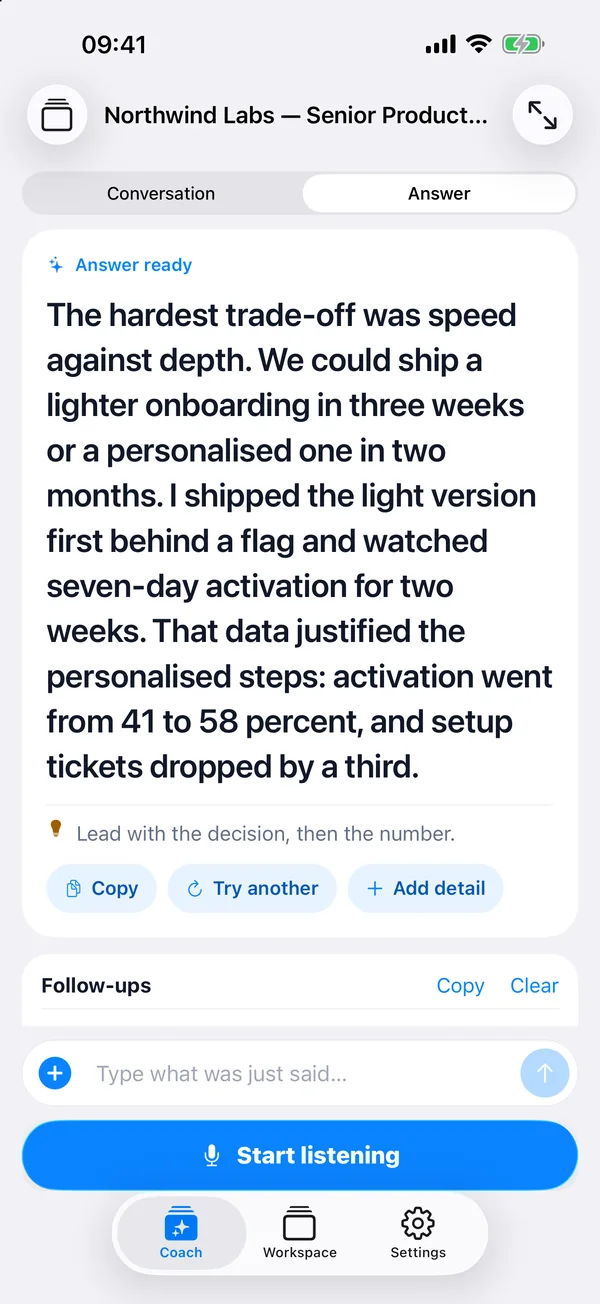
What the plugin connects
This plugin connects your AI assistant to your MagicInterview workspace so it can:
- Find, create, and update projects and conversations, then open the exact meeting in MagicInterview.
- Add relevant CVs, job descriptions, client briefs, and documents to your conversations.
- Keep shared project sources consistent across related meetings while preserving individual notes and history.
- Help set up today's professional meetings in time order. When your assistant has calendar or CRM access, it can use that context too.
- Request coaching and retrieve saved debug logs to investigate a session problem.
Your assistant sets up the context and opens the right conversation. Start listening in the MagicInterview app when you are ready for live suggestions.
Use the web app on your computer or phone, or the Android app. On iPhone, add MagicInterview to your Home Screen for quick access.
Connect through your assistant
Install the plugin and sign in to your MagicInterview account when your AI assistant asks to connect. Authentication uses the standard OAuth flow; no API key needs to be copied into the plugin.
Technical MCP endpoint
For clients configured manually, the remote Streamable HTTP endpoint is:
https://magicinterview.app/mcp
Suggested prompts
- I have a job interview. Use my CV and the job description to set up live help, then open that MagicInterview conversation.
- I have a meeting with a potential client. Use our brief and past notes to set up live suggestions for the call.
- Prepare today's meetings from my available calendar context and give me MagicInterview links I can open on my phone.
Troubleshooting for connected users
If something goes wrong, ask your assistant to check the affected MagicInterview conversation and any saved debug information available in your workspace.
Links
License
MIT
Reviews
No reviews yet
Be the first to review this server!
More Developer Tools MCP Servers
Fetch
Freeby Modelcontextprotocol · Developer Tools
Web content fetching and conversion for efficient LLM usage
Git
Freeby Modelcontextprotocol · Developer Tools
Read, search, and manipulate Git repositories programmatically
Paperclip
Freeby Paperclipai · Developer Tools
Trending hip-hop artist momentum scores across four cultural dimensions.
Toleno
Freeby Toleno · Developer Tools
Toleno Network MCP Server — Manage your Toleno mining account with Claude AI using natural language.
mcp-creator-python
Freeby mcp-marketplace · Developer Tools
Create, build, and publish Python MCP servers to PyPI — conversationally.
MCP Marketplace
Freeby mcp-marketplace · Developer Tools
Search and install MCP servers from inside your AI client.