
Server data from the Official MCP Registry
Stdio MCP bridge for SandBase Harness agents, sessions, turns, artifacts, and cancellation.
About
Stdio MCP bridge for SandBase Harness agents, sessions, turns, artifacts, and cancellation.
Security Report
SandBase Harness is a well-structured AI agent runtime with generally sound security practices. Authentication is implemented appropriately with optional API key support, and sensitive credentials are handled with encryption for secrets. However, there are moderate concerns around secret redaction consistency, potential unencrypted credential storage in certain flows, and insufficient input validation in some areas. The server's broad permissions (shell_exec, file_read/write, network_http, process_spawn) are justified by its purpose as a sandboxed execution environment, but users should be aware of the infrastructure trust model required. Supply chain analysis found 14 known vulnerabilities in dependencies (0 critical, 3 high severity).
3 files analyzed · 22 issues found
Security scores are indicators to help you make informed decisions, not guarantees. Always review permissions before connecting any MCP server.
Permissions Required
This plugin requests these system permissions. Most are normal for its category.
What You'll Need
Set these up before or after installing:
Environment variable: MANAGED_AGENTS_URL
Environment variable: MANAGED_AGENTS_API_KEY
How to Install
Add this to your MCP configuration file:
{
  "mcpServers": {
    "io-github-sandbaseai-sandbase-harness": {
      "env": {
        "MANAGED_AGENTS_URL": "your-managed-agents-url-here",
        "MANAGED_AGENTS_API_KEY": "your-managed-agents-api-key-here"
      },
      "args": [
        "-y",
        "managed-agents"
      ],
      "command": "npx"
    }
  }
}Documentation
View on GitHubFrom the project's GitHub README.
SandBase Harness







AI-readable project metadata: llms.txt · installation guide
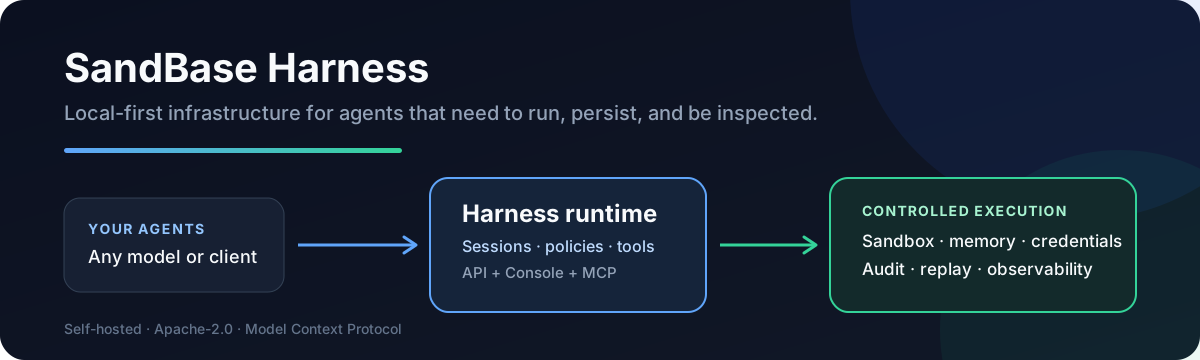
A local-first runtime for AI agents. Sessions, sandboxed tools, memory, credentials, audit trails, and a built-in Console — all running on your machine or in your own infrastructure.
Building with DeepSeek Harness? The independent DeepSeek Harness Handbook provides source-backed runtime guides, multilingual troubleshooting, and a regularly updated Agent-first resource map.
Quick Start
Requirements: Node.js 22+, npm 10+, and a model provider API key (OpenAI, Anthropic, MiniMax, or any OpenAI-compatible endpoint). Docker is optional and only needed for Docker-backed sandboxes.
git clone --branch v0.3.8 --depth 1 https://github.com/sandbaseai/sandbase-harness.git
cd sandbase-harness
npm ci
npm run build
mkdir ../my-agents && cd ../my-agents
node ../sandbase-harness/dist/index.js init
node ../sandbase-harness/dist/index.js start
init writes a workspace into the directory you run it from: an agent, a skills
folder, and config.yaml, whose provider reference is the ${OPENAI_API_KEY}
environment variable. start serves the API and the Console on
http://127.0.0.1:3000.
Two steps finish the setup, both on Settings > Setup at http://127.0.0.1:3000/dashboard:
- The provider. Paste your API key into the provider form and save. The page
then reports that the saved configuration is not active yet, so restart the
runtime — stop it with Ctrl+C and run the
startcommand again, or use the restart button. A saved setting only takes effect at startup. If your provider is not in the list, choose the OpenAI-compatible vendor and set its base URL. - The model. In the Agent models panel, set the model ID your provider
actually serves —
deepseek-chatfor DeepSeek, for example. An agent carries its own model ID, so thegpt-4othatinitwrites is not valid for every provider, and a wrong ID fails the turn withmodel_not_found.
Send the first message from the Console: open Sessions, create a session for the agent, and type into the composer. From a terminal it is one command:
node ../sandbase-harness/dist/index.js chat agent_assistant --message "hello" --tool-approval allow
chat sends that one message and exits once the turn settles; without
--message it keeps the session open and streams until you interrupt it.
--tool-approval allow
preauthorizes the tool calls the agent may make, which the init template
otherwise parks for approval and waits for a person to answer; see CLI.
The unscoped managed-agents name on npm is not this project. Until an
official scoped package is announced in this repository, install only from the
tagged GitHub source release shown above. Do not run npx managed-agents or
npm install managed-agents.
Try it in Codespaces

The included development container installs dependencies and builds the runtime. When the terminal is ready, start the server on the forwarded port:
node dist/index.js start --host 0.0.0.0
Open the forwarded SandBase Harness Console port, then configure a model in Settings > Setup. Codespaces usage may be billed by GitHub; the local quick start above remains free and keeps all runtime data on your machine.
Use the Official SDK
The runtime answers its own /v1 API on that same port, and an official
Anthropic TypeScript SDK client drives it unchanged: point the client's
baseURL at the runtime, give it the runtime API key, and the quickstart in
examples/official-sdk runs a whole turn —
message, tool call, tool result, final reply — against it. That example is
executed on every pull request by
tests/conformance/official-sdk-quickstart.test.ts, so the compatibility it
describes is compatibility that is tested rather than claimed.
The same surface is specified in docs/api.md, and this repository's own TypeScript SDK is documented under SDK below.
Documentation
- Machine-readable project metadata
- Agent / MCP installation guide
- Agent Plugin marketplace manifest
- Agent Plugins Directory listing — source-indexed plugin page; the directory does not execute plugin code or provide a security endorsement.
- Installation
- Usage Guide
- API Reference
- Skills
- Deployment
- Architecture
- Contributing
- Citation metadata
- Changelog
Portable Agent Plugin
Copilot CLI, VS Code, and other Agent Plugins 1.0 clients can install the same OCI-backed MCP bridge directly from this repository. Start the Harness API and Docker first, then expose its URL to the plugin process:
export MANAGED_AGENTS_URL=http://host.docker.internal:3000
# Optional when the runtime requires authentication:
export MANAGED_AGENTS_API_KEY=your-runtime-key

copilot plugin install sandbaseai/sandbase-harness:agent-plugin
The plugin passes these environment variables through to the pinned
ghcr.io/sandbaseai/sandbase-harness-mcp:0.3.8 image. It does not store a key
in plugin.json, mcp.json, or the installed plugin files. On Linux, the
plugin's Docker command maps host.docker.internal through host-gateway.
For development from the latest main branch:
git clone https://github.com/sandbaseai/sandbase-harness.git
cd sandbase-harness && npm ci && npm run build
cd .. && mkdir my-agents-dev && cd my-agents-dev
node ../sandbase-harness/dist/index.js init
node ../sandbase-harness/dist/index.js start
MCP Bridge Container
The six-tool MCP bridge is published as a multi-architecture OCI image. Start the Harness API, then add this stdio command to an MCP client:
Container package: GitHub Container Registry
docker pull ghcr.io/sandbaseai/sandbase-harness-mcp:0.3.8
docker run --rm -i \
  -e MANAGED_AGENTS_URL=http://host.docker.internal:3000 \
  ghcr.io/sandbaseai/sandbase-harness-mcp:0.3.8
For an authenticated remote runtime, also pass MANAGED_AGENTS_API_KEY. The
container image contains only the MCP bridge; agent sessions and sandbox work
remain in the connected Harness runtime. Every release image is built from the
matching Git tag for linux/amd64 and linux/arm64, includes OCI source and
MCP ownership metadata, and receives a GitHub build-provenance attestation.
Why
Agent SDKs handle the model loop. Production agents need more: persistent
sessions, tool governance, sandbox boundaries, credential handling, memory,
auditability, and a UI for humans to inspect what happened. managed-agents
is that runtime layer — not a visual workflow builder and not another model SDK.
Choose SandBase Harness when you need more than a model loop:
| Need | What Harness provides |
|---|---|
| Run generated code safely | Local, Docker, Kubernetes, and self-hosted worker sandboxes |
| Inspect long-running agents | Persistent sessions, resumable event streams, audit, and replay |
| Control tool access | MCP toolsets, credential vaults, permission policies, and approvals |
| Operate any model | OpenAI, Anthropic, MiniMax, and OpenAI-compatible providers, including DeepSeek V4 |
| Keep infrastructure yours | Local-first SQLite and file storage with no required hosted control plane |
Features
- Claude Managed Agents-style
/v1API and local Console - SQLite-backed agents, sessions, environments, credential vaults, memory stores, files, skills, and API keys — SQLite metadata by default
- local file/skill bytes stored in the workspace state directory
- Resumable Server-Sent Events for session replay and debugging
- One active model provider boundary configured through Settings V2
- Sandbox backends: local process, Docker (per-session containers), Kubernetes (kubectl exec/cp), self-hosted worker queue
- Settings V2: one workspace model vendor, loop engine, storage, memory, sandbox — with validation, form/JSON modes, and restart flow
- MCP toolsets, permission policies, built-in tools, and skill packages
- DeepSeek Harness bridge over MCP stdio for agents, sessions, streamed turns, artifacts, and cancellation
- TypeScript SDK at
managed-agents/sdk - Release gate:
npm run release:check
Screenshots
| Console overview | Settings | API reference |
|---|---|---|
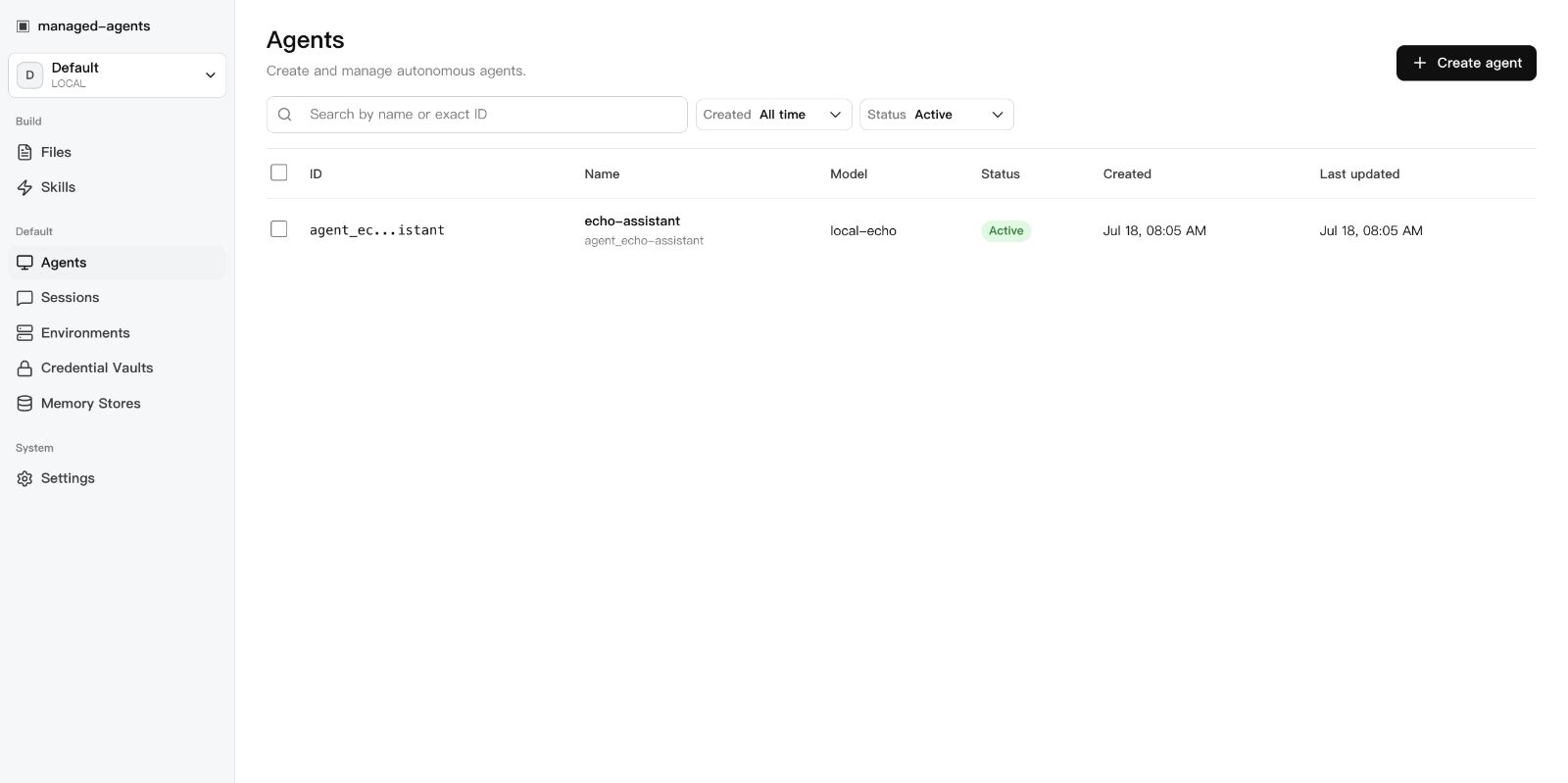 | 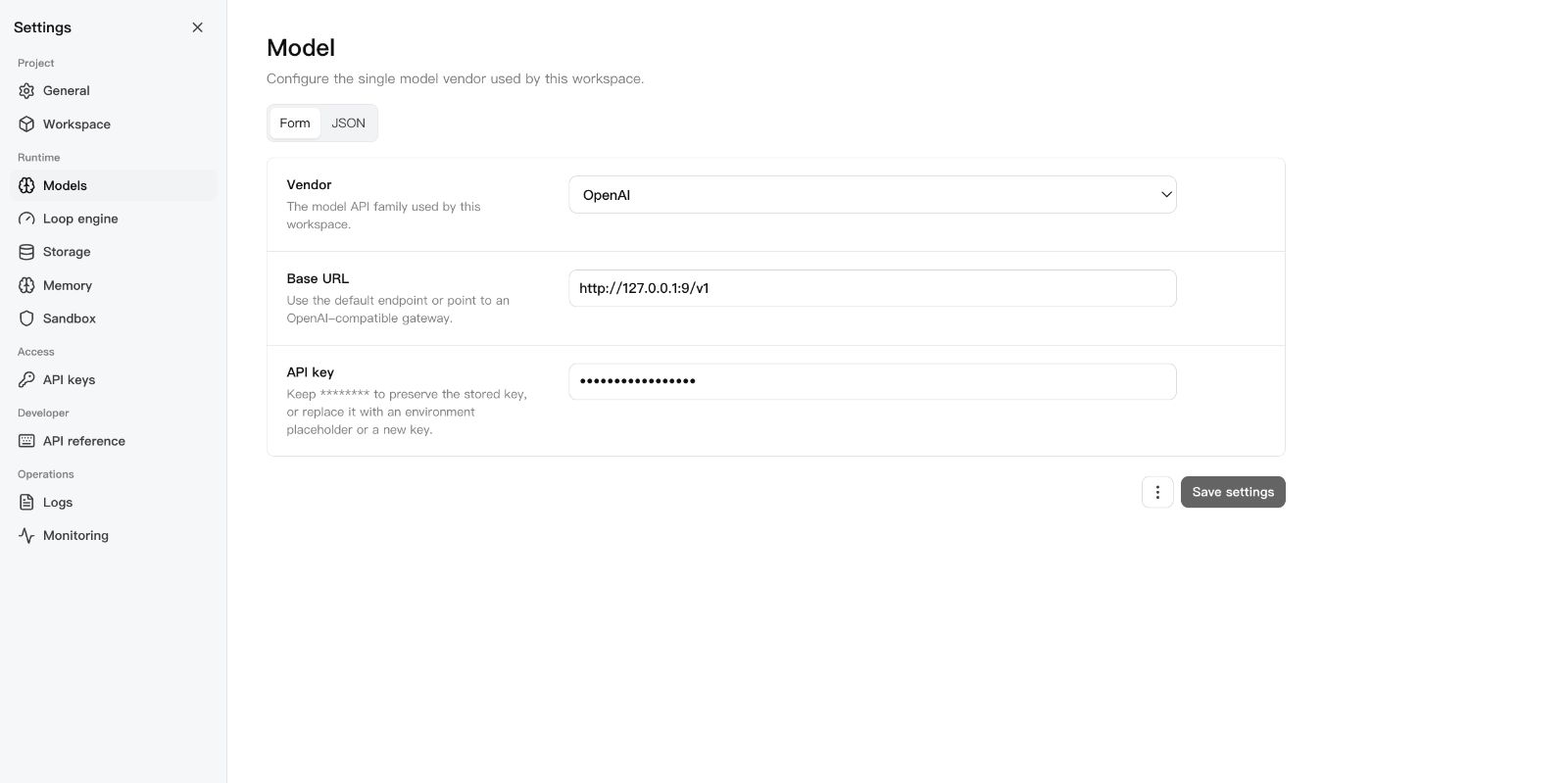 | 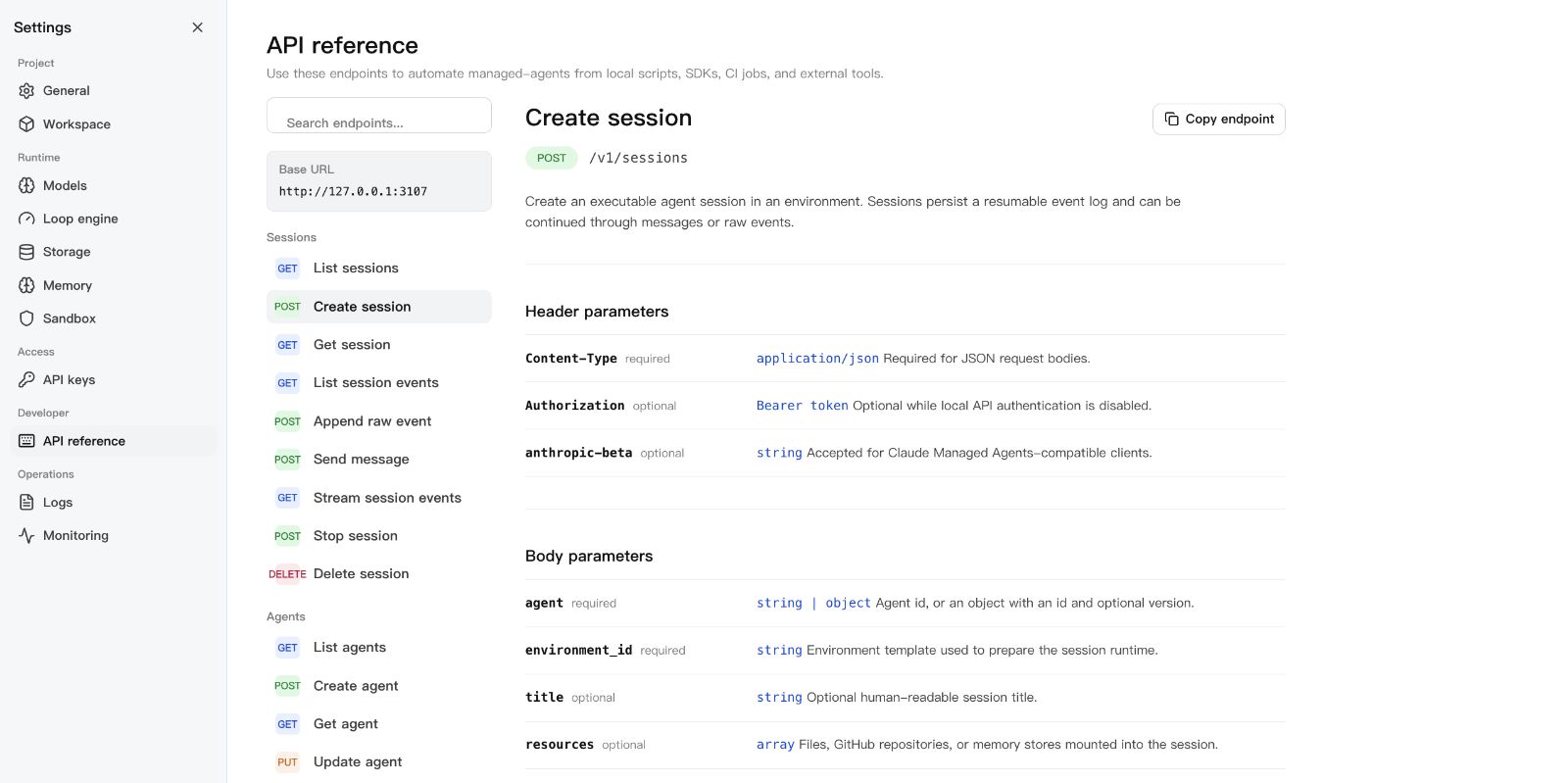 |
Start with a use case
See the Showcase for three practical paths: an auditable coding agent, DeepSeek Harness as an interactive front end, and controlled code execution across Local, Docker, Kubernetes, and self-hosted sandboxes.
For client-specific setup, see the installation guide, including the pinned Cline CLI command and the Docker MCP Bridge configuration.
Community use-case discussions:
- Memory migration between Codex, Claude Code, and DSH
- Sandbox and filesystem protection for third-party plugins
DeepSeek Harness
Run this project as a DSH plugin instead of treating dsh-plugin as discovery
metadata only. Install the bundle into a DSH profile, start managed-agents,
then boot that profile:
export MANAGED_AGENTS_URL=http://127.0.0.1:3000
# Preferred: install a local source checkout after `npm run build`.
dsh plugin --profile web add -w ../sandbase-harness
# Git URL fallback. Keep HTTPS; do not convert the spec to SSH.
# dsh plugin --profile web add git+https://github.com/sandbaseai/sandbase-harness.git
dsh web
If Plugin Hub reports already installed: managed-agents after a partial or
repeated install, update the Hub first, then remove only the displayed
managed-agents plugin entry and retry from the tagged HTTPS Git source:
dsh plugin --profile web update dsh-plugin
dsh plugin --profile web remove managed-agents
dsh plugin --profile web add git+https://github.com/sandbaseai/sandbase-harness.git
This is a Plugin Hub duplicate-install path, not an npm installation path. If the installed view shows a different target identifier, remove that exact identifier instead. Keep the profile directory and its evidence until the runtime starts successfully; see the reported recovery issue.
The profile installs the verified source checkout directly; it does not resolve
the unrelated unscoped npm package. A git-hosted install runs prepare only
when dist/ is missing. Keep the HTTPS git spec; converting it to SSH fails on
Windows hosts without GitHub SSH access.
A git-hosted install needs one extra step for pnpm's build allowlist. The
first dsh plugin --profile web add fails with
ERR_PNPM_GIT_DEP_PREPARE_NOT_ALLOWED and prints the exact key. Add that key
under allowBuilds: in the profile's pnpm-workspace.yaml, then re-run the
same add command; a plain package name does not match a git-hosted
resolution:
allowBuilds:
  "managed-agents@https://codeload.github.com/sandbaseai/sandbase-harness/tar.gz/<commit>": true
The second run builds dist/ through prepare, creates the
managed-agents / managed-agents-mcp bins, and joins the bundle layer. The
patch starts the bundled MCP entry over
stdio. DSH can then list agents,
create and run sessions, inspect results and artifacts, and stop work through
native mcp__sandbase__* tools. See
examples/deepseek-harness for the full
tool list and authenticated-runtime configuration.
For a walkthrough that starts with DSH and adds this runtime as a real third-party plugin, read the DeepSeek Harness developer guide. The Chinese edition is available as well; both articles are maintained against the pinned SandBase Harness v0.3.8 integration.
Pair the plugin with SandBase Skills to give the same DSH project a portable, source-verifiable research workflow:
npx --yes github:sandbaseai/sandbase-skills add multi-source-search
dsh web
This installs the complete Skill into .dsh/skills/multi-source-search, DSH's
project-scoped discovery directory. It runs from GitHub source and needs no
SandBase account when DSH already provides web/search tools.
For a complete, reproducible workflow that combines the evidence ledger with sandboxed execution, credentials, audit, and replay, read Build an Auditable Research Agent.
New to DSH profiles, plugin composition, tool policy, or session semantics? The independent DeepSeek Harness Handbook provides source-backed quickstarts, architecture maps, and troubleshooting for the runtime layers used by this integration. Read its SandBase Harness bridge guide for the DSH-specific contract, then start with the local-browser Install Doctor for installation evidence, or use the Failure Router to identify the first broken runtime boundary.
Workspace Layout
my-agents/
├── agents/                  # Seed agent definitions (YAML)
│   └── assistant.yaml
├── skills/                  # Seed skill packages
│   └── example-skill/
│       └── SKILL.md
└── .managed-agents/         # Runtime state (gitignored)
    ├── config.yaml          # Workspace configuration
    ├── data.db              # SQLite metadata
    ├── logs/runtime.log
    ├── files/               # Uploaded file bytes
    ├── skills/              # Uploaded skill packages
    ├── snapshots/           # Session workspace snapshots
    └── sandbox/             # Local session sandboxes
Configuration
.managed-agents/config.yaml:
model:
  provider: openai
  api_key: ${OPENAI_API_KEY}

storage:
  metadata: { provider: sqlite, options: {} }
  artifacts: { provider: local, options: { base_path: files } }
Agents pick concrete model IDs (gpt-4o, claude-sonnet-4-20250514,
openai/gpt-5.5). The workspace config only says how to reach the model
service.
${OPENAI_API_KEY} is read from the environment the runtime was started with. If
it is not set, the first turn fails with a message naming that variable and sends
no request: set it before starting the runtime, or paste a literal key under
Settings > Setup, which also lists every agent's model so the ID can be set
without editing these files.
For DeepSeek V4 Pro/Flash configuration, including maximum reasoning effort, see DeepSeek V4.
For first-class MiniMax configuration, regional endpoints, and the supported MiniMax-M3 and MiniMax-M2.7 model IDs, see MiniMax.
CLI
managed-agents init
managed-agents start [--host 127.0.0.1] [--port 3000]
managed-agents list
managed-agents reload
managed-agents chat <agent-id> --message "hello" [--tool-approval ask|allow|deny]
managed-agents template list | install <name> | create <name>
A turn whose tool needs approval parks instead of failing, and chat asks before
running it, then lets the runtime continue the same turn. --tool-approval allow
decides every such call in advance, which is what a script or a CI job uses, and
deny refuses them. With no terminal to prompt, the default ask answers nothing
and exits non-zero with the calls that are waiting named, so a script states its
policy rather than inheriting one. A custom tool is the exception: only your own
client can produce its result, and chat says so and exits non-zero. See
usage.
API Examples
Create an agent:
curl -X POST http://127.0.0.1:3000/v1/agents \
  -H "Content-Type: application/json" \
  -d '{
    "name": "Incident commander",
    "model": "gpt-4o",
    "system": "You are an on-call incident commander.",
    "tools": [{ "type": "agent_toolset_20260401" }]
  }'
Create an environment (local sandbox):
curl -X POST http://127.0.0.1:3000/v1/environments \
  -H "Content-Type: application/json" \
  -d '{
    "name": "Default local",
    "config": { "hosting_type": "local", "sandbox_provider": "local" }
  }'
Create a Docker-isolated environment:
curl -X POST http://127.0.0.1:3000/v1/environments \
  -H "Content-Type: application/json" \
  -d '{
    "name": "Docker sandbox",
    "config": {
      "sandbox_provider": "docker",
      "image": "node:22-slim",
      "resources": { "memory": "1g", "cpu": 1 }
    }
  }'
Start a session:
curl -X POST http://127.0.0.1:3000/v1/sessions \
  -H "Content-Type: application/json" \
  -d '{
    "agent": "agent_...",
    "environment_id": "env_...",
    "title": "Triage SENTRY-123"
  }'
Send a message:
curl -X POST http://127.0.0.1:3000/v1/sessions/SESSION_ID/messages \
  -H "Content-Type: application/json" \
  -d '{ "content": "Investigate the alert." }'
Resume the event stream:
curl -N http://127.0.0.1:3000/v1/sessions/SESSION_ID/events/stream \
  -H "Last-Event-ID: 42"
A stream opened without a cursor carries live events only; read the event log
first (GET /v1/sessions/SESSION_ID/events) and resume from the last seq you
saw.
SDK
import { ManagedAgentsClient } from 'managed-agents/sdk';

const client = new ManagedAgentsClient({
  baseUrl: 'http://127.0.0.1:3000',
});

const session = await client.sessions.create({
  agent: 'agent_...',
  environment_id: 'env_...',
});

for await (const event of client.sessions.chat(session.id, 'Hello')) {
  if (event.type === 'agent.message_chunk') {
    process.stdout.write(event.delta ?? '');
  }
}
The /v1 API follows Claude Managed Agents resource shapes, so you can also
point the Anthropic SDK at the local runtime:
import Anthropic from '@anthropic-ai/sdk';

const client = new Anthropic({
  apiKey: process.env.MANAGED_AGENTS_API_KEY ?? 'local-dev-key',
  baseURL: 'http://127.0.0.1:3000',
});

const session = await client.beta.sessions.create({
  agent: 'agent_...',
  environment_id: 'env_...',
});
Authentication
Open by default. Authentication activates when at least one API key exists:
# Static key via environment
export MANAGED_AGENTS_API_KEY=sk-local-example

# Or create a managed key
curl -X POST http://127.0.0.1:3000/v1/api-keys \
  -H "Content-Type: application/json" \
  -d '{ "name": "Local Console" }'
Clients send Authorization: Bearer <key>.
Agent Definition
Agents are YAML files in agents/:
name: Incident commander
description: Triages alerts and coordinates response.
model: gpt-4o
system: |-
  You are an on-call incident commander.
mcp_servers:
  - name: sentry
    type: url
    url: https://mcp.sentry.dev/mcp
tools:
  - type: agent_toolset_20260401
    default_config:
      permission_policy: { type: always_ask }
    configs:
      - name: bash
        permission_policy: { type: always_ask }
  - type: mcp_toolset
    mcp_server_name: sentry
skills:
  - type: custom
    skill_id: skill_...
metadata:
  template: incident-commander
Development
npm ci
npm run typecheck    # src + tests + Console
npm test             # vitest
npm run build        # runtime + console + SDK
npm run release:check  # full local release gate
release:check runs typecheck, tests, both builds, npm pack --dry-run, CLI
init smoke, and examples/basic startup smoke.
Star and share
If this runtime solves a real agent-infrastructure problem for you, star the repository so other builders can find it.
Ecosystem directories, community guides, and related projects are in docs/ecosystem.md.
License
Reviews
No reviews yet
Be the first to review this server!
More Developer Tools MCP Servers
Fetch
Freeby Modelcontextprotocol · Developer Tools
Web content fetching and conversion for efficient LLM usage
Git
Freeby Modelcontextprotocol · Developer Tools
Read, search, and manipulate Git repositories programmatically
Worldmonitor
Freeby Koala73 · Developer Tools
Live markets, conflicts, country risk, chokepoints, energy, and China decision signals. 86 tools.
Toleno
Freeby Toleno · Developer Tools
Toleno Network MCP Server — Manage your Toleno mining account with Claude AI using natural language.
mcp-creator-python
Freeby mcp-marketplace · Developer Tools
Create, build, and publish Python MCP servers to PyPI — conversationally.
MCP Marketplace
Freeby mcp-marketplace · Developer Tools
Search and install MCP servers from inside your AI client.