
Server data from the Official MCP Registry
Score and improve your AI coding agent setup. Local-only, open source.
About
Score and improve your AI coding agent setup. Local-only, open source.
Security Report
Valid MCP server (2 strong, 3 medium validity signals). No known CVEs in dependencies. Package registry verified. Imported from the Official MCP Registry.
15 files analyzed · 1 issue found
Security scores are indicators to help you make informed decisions, not guarantees. Always review permissions before connecting any MCP server.
Permissions Required
This plugin requests these system permissions. Most are normal for its category.
How to Install
Add this to your MCP configuration file:
{
  "mcpServers": {
    "io-github-saxenakapil-setup-doctor": {
      "args": [
        "-y",
        "setup-doctor"
      ],
      "command": "npx"
    }
  }
}Documentation
View on GitHubFrom the project's GitHub README.
setup-doctor
Audits how AI coding agents are configured in your project and at the user level, scores the result from 0 to 100, and tells you exactly what to fix. It also summarizes your local usage into a shareable card.

The badge above is this repository's own score, produced by running setup-doctor against itself.
Features
- Doctor audits instruction files, skills, subagents, MCP servers, plugins, settings and hooks. It runs 30 rules across 6 categories and reports a score, a band (Excellent, Good, Needs work, or Poor), and a specific fix for every finding.
- Wrapped summarizes your local session logs (sessions, active days, tokens, an estimated cost, streaks, and a persona label) and writes a shareable card as SVG, with optional PNG.
- Badge writes a static or live score badge for your README.
- HTML report produces a single self-contained file with no network requests.
- MCP server exposes Doctor and Wrapped as read-only tools for any MCP client.
Quick start
No install is needed. Run it from the root of a project:
npx setup-doctor
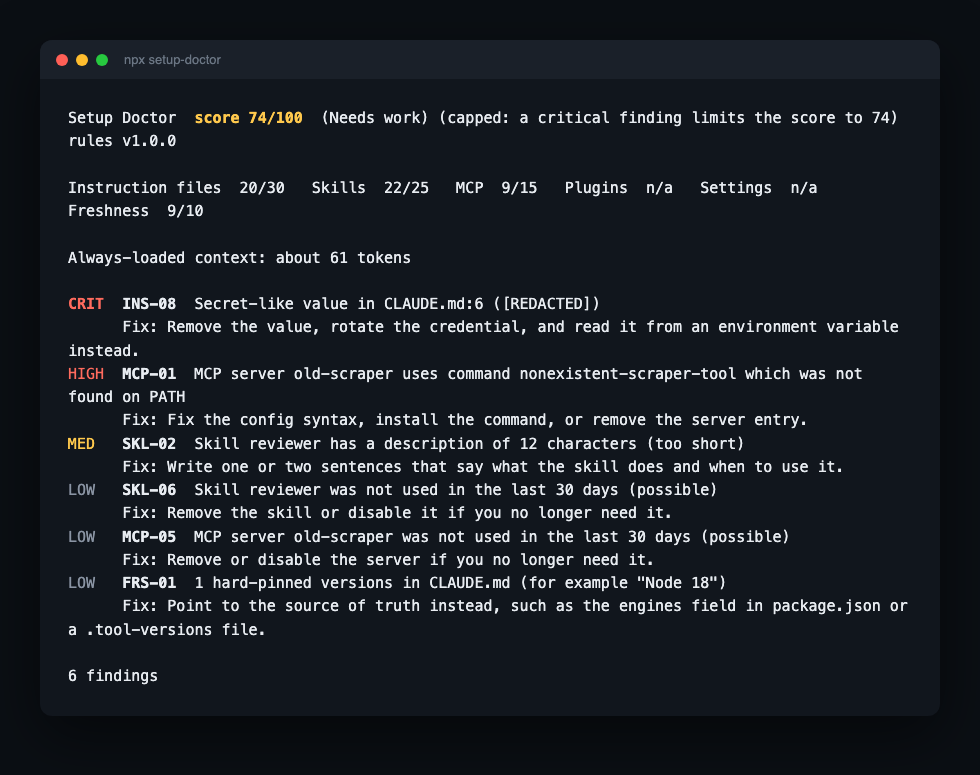
The default command audits the project and prints a report:
Setup Doctor  score 85/100  (Good)   rules v1.2.0

Instruction files  29/30   Skills  n/a   MCP  n/a   Plugins  n/a   Settings  5/10   Freshness  n/a

Always-loaded context: about 0 tokens

HIGH  SET-02  Hook PreToolUse in .claude/settings.json points to scripts/missing.sh which is missing or not executable
      Fix: Correct the path, make the script executable, or remove the hook.
LOW   INS-01  No instruction file found for claude
      Fix: Create CLAUDE.md (or the agent's equivalent) with build and test commands, code style rules and a short project layout.

2 findings
Absolute paths in the finding messages are shortened here for readability.
Read the getting started guide for how to interpret the score and each finding.
Commands
| Command | Purpose |
|---|---|
setup-doctor [doctor] [path] | Audit the setup and print the score. This is the default command. |
setup-doctor wrapped | Summarize local usage and write a shareable card. |
setup-doctor badge | Write a README badge file. |
setup-doctor rules | List every rule with its category, severity and enabled state. |
setup-doctor explain <RULE_ID> | Explain what a rule checks and how to fix it. |
setup-doctor diff <before.json> <after.json> | Explain how the score changed between two saved reports. |
setup-doctor mcp | Start an MCP server over stdio. |
Run setup-doctor --help for every flag, or see the command reference.
Supported agents
| Agent | Doctor | Wrapped |
|---|---|---|
| Claude Code | Full (all 30 rules) | Yes |
| Codex | Instructions and MCP rules | Yes |
| GitHub Copilot CLI | Instructions, skills, MCP, settings and hooks | Yes |
| Cursor | Instructions, MCP and project skills | Yes, requires Node 22.5 or later |
Other agents (.windsurfrules, .clinerules) | Instruction rules only | No |
Categories that do not apply to an agent (for example, plugins for Codex) are excluded from its score rather than counted as failures. Details are in agents.
Installation
| Method | Command or location |
|---|---|
| npm (no install) | npx setup-doctor |
| Homebrew | brew install saxenakapil/setup-doctor/setup-doctor |
| Claude Code plugin | Available in the Anthropic plugin directory. Exposes /setup-doctor:doctor and /setup-doctor:wrapped. |
| Cursor skills | Copy skills-cursor/ into your project's .cursor/skills/. See Cursor skills. |
| MCP client | Listed in the official MCP Registry as io.github.saxenakapil/setup-doctor. See MCP server. |
| GitHub Action | saxenakapil/setup-doctor-action@v1. See CI integration. |
| pre-commit | Add this repository as a hook source. See CI integration. |
Common options
| Option | Commands | Description |
|---|---|---|
--agent claude|codex|cursor|copilot|all | doctor, badge, wrapped | Which agent to read. Doctor and badge auto-detect by default. Wrapped defaults to claude. |
--scope project|global|all | doctor, badge | Which locations to check. |
--format terminal|json|html | doctor | Output format. |
--ci --fail-under <n> | doctor | Exit with code 1 if the score is below n. |
--ci --compare | doctor | Compare with the last recorded run and exit with code 1 on a drop. |
--fix, --dry-run | doctor | Preview or apply safe, mechanical fixes. See fix mode. |
--period 7d|30d|ytd|all|YYYY-MM-DD:YYYY-MM-DD | wrapped | Time window. Defaults to 30d. |
--anonymize, --show-projects, --no-cost | wrapped | Privacy and cost controls. See Wrapped. |
--config <path> | doctor, badge, rules, wrapped | Use a configuration file other than <project>/.setupdoctorrc. See configuration. |
Full flag reference: doctor, wrapped.
Badge
Add your score to the README:
npx setup-doctor badge
This writes setup-doctor-badge.svg and prints a Markdown snippet with your current score. To keep the badge current automatically, publish a shields.io endpoint file from CI. See CI integration.
Privacy and safety
- No network access at runtime. There is no telemetry and no update check. An automated check in CI enforces this (
scripts/check-no-network.mjs). - Audits never change your agent configuration. Only
doctor --fixedits configuration files, and it shows a diff, requires confirmation, and writes a backup first.badge,wrappedand--outwrite new output files only. - Secrets are never printed. Findings report the rule and location. Values appear as
[REDACTED]. - Shareable outputs contain aggregate numbers only. The Wrapped card and the badge never include prompts, file paths, usernames or repository names. Local reports (HTML and JSON) can contain file paths, so review them before sharing.
- Session logs are read for metadata only. Timestamps, model names, token counts and tool names are read. Message text is discarded line by line.
- No account, API key or login is required.
Documentation
- Getting started: your first run and how to read the output
- Doctor: every audit option, output formats, exit codes
- Wrapped: periods, privacy controls, the card, and output formats
- Fix mode: previewing and applying fixes, backups, and what is fixable
- Configuration:
.setupdoctorrc, disabling rules, thresholds, and ignore patterns - Agents: what each agent reads and how shared files are scored
- CI integration: GitHub Actions, score history, PR comments, badges, pre-commit
- MCP server: using Doctor and Wrapped from an MCP client
- Cursor skills: installing the Doctor and Wrapped skills in Cursor
- Troubleshooting: common problems and fixes
Reference documents:
- Rules: specification of the v1 rules
- Themes: visual theme design tokens
- Decision log: assumptions, deviations and decisions made during development
Contributing
Issues and pull requests are welcome. Before opening a pull request, run the full check:
npm install
npm run check        # typecheck, tests, privacy guard, version sync, em dash guard
npm run build        # bundles src/bin.ts to dist/bin.js
Each rule lives in its own file under src/rules/ and has a trigger fixture and a clean fixture under test/fixtures/. Rules are pure functions of the normalized model: file system access happens only in adapters under src/adapters/.
License
MIT. See LICENSE. Bundled font licenses (SIL Open Font License 1.1) are in src/data/fonts/LICENSES.md.
Reviews
No reviews yet
Be the first to review this server!
More Developer Tools MCP Servers
Git
Freeby Modelcontextprotocol · Developer Tools
Read, search, and manipulate Git repositories programmatically
Fetch
Freeby Modelcontextprotocol · Developer Tools
Web content fetching and conversion for efficient LLM usage
Worldmonitor
Freeby Koala73 · Developer Tools
Live markets, conflicts, country risk, chokepoints, energy, and China decision signals. 86 tools.
Paperclip
Freeby Paperclipai · Developer Tools
Trending hip-hop artist momentum scores across four cultural dimensions.
Toleno
Freeby Toleno · Developer Tools
Toleno Network MCP Server — Manage your Toleno mining account with Claude AI using natural language.
mcp-creator-python
Freeby mcp-marketplace · Developer Tools
Create, build, and publish Python MCP servers to PyPI — conversationally.