
Server data from the Official MCP Registry
MCP server for OpenGraph.io API - fetch OG data, screenshots, scrape, and generate images
About
MCP server for OpenGraph.io API - fetch OG data, screenshots, scrape, and generate images
Security Report
Valid MCP server (3 strong, 3 medium validity signals). 2 known CVEs in dependencies (0 critical, 1 high severity) Package registry verified. Imported from the Official MCP Registry.
5 files analyzed · 3 issues found
Security scores are indicators to help you make informed decisions, not guarantees. Always review permissions before connecting any MCP server.
Permissions Required
This plugin requests these system permissions. Most are normal for its category.
How to Install
Add this to your MCP configuration file:
{
  "mcpServers": {
    "io-github-securecoders-opengraph-io-mcp": {
      "args": [
        "-y",
        "opengraph-io-mcp"
      ],
      "command": "npx"
    }
  }
}Documentation
View on GitHubFrom the project's GitHub README.
OpenGraph MCP Server (og-mcp)
og‑mcp is a Model‑Context‑Protocol (MCP) server that makes every OpenGraph.io ( https://opengraph.io ) API endpoint available to AI agents (e.g. Anthropic Claude, Cursor, LangGraph) through the standard MCP interface.
Why? If you already use OpenGraph.io to unfurl links, scrape HTML, extract article text, or capture screenshots, you can now give the same capabilities to your autonomous agents without exposing raw API keys.
Global Installation
You can install this package globally via npm:
npm install -g opengraph-io-mcp
Quick Install
CLI Installer (Recommended)
The easiest way to configure OpenGraph MCP for any supported client:
# Interactive mode - guides you through setup
npx opengraph-io-mcp-install

# Direct mode - specify client and app ID
npx opengraph-io-mcp-install --client cursor --app-id YOUR_APP_ID
Supported clients: cursor, claude-desktop, windsurf, vscode, zed, jetbrains
Claude Desktop Extension
For Claude Desktop users, you can also download the .mcpb extension for one-click installation from the Releases page.
Authentication
The hosted MCP server supports two authentication methods:
Option 1 — OAuth 2.1 (recommended for hosted deployments)
OAuth lets you authorize access through your OpenGraph.io dashboard without copying API keys into config files. The MCP client handles the entire browser login flow automatically.
Supported by: MCP clients that implement the Authorization Code + PKCE flow (Cursor, Claude Desktop 0.10+, VS Code with the MCP extension).
When the client connects with no credentials, the server returns 401 with a WWW-Authenticate header pointing to:
GET /.well-known/oauth-protected-resource
→ { "authorization_servers": ["https://dashboard-api.opengraph.io"] }
The client then fetches the authorization server metadata and starts the PKCE flow, redirecting your browser to https://dashboard.opengraph.io/oauth/consent where you log in and choose which API key to authorize.
No client-side config needed — the client discovers everything automatically.
Option 2 — x-app-id header (legacy / local dev)
Pass your App ID as an HTTP header. Suitable for local dev, CI, or clients that do not support OAuth.
Replace YOUR_OPENGRAPH_APP_ID with your OpenGraph.io App ID.
Client Configuration
All configurations below use the hosted HTTPS transport. OAuth is the recommended approach for shared/production use; the x-app-id header config is provided as a fallback.
OAuth (no static config needed)
For clients that support OAuth discovery, simply point at the hosted URL with no headers — the server will request authorization automatically:
{
  "mcpServers": {
    "opengraph": {
      "url": "https://mcp.opengraph.io/mcp"
    }
  }
}
x-app-id fallback
If your client does not support OAuth, or you prefer static config:
Claude Desktop
Config location:
- macOS:
~/Library/Application Support/Claude/claude_desktop_config.json - Windows:
%APPDATA%\Claude\claude_desktop_config.json
{
  "mcpServers": {
    "opengraph": {
      "url": "https://mcp.opengraph.io/mcp",
      "headers": {
        "x-app-id": "YOUR_OPENGRAPH_APP_ID"
      }
    }
  }
}
Claude Code
One-command installation:
claude mcp add --transport http --header "x-app-id: YOUR_OPENGRAPH_APP_ID" opengraph https://mcp.opengraph.io/mcp
Cursor
Config location: ~/.cursor/mcp.json
{
  "mcpServers": {
    "opengraph": {
      "url": "https://mcp.opengraph.io/mcp",
      "headers": {
        "x-app-id": "YOUR_OPENGRAPH_APP_ID"
      }
    }
  }
}
VS Code
Config location: .vscode/mcp.json (in your project directory)
VS Code supports input prompts for secure credential handling:
{
  "inputs": [
    {
      "type": "promptString",
      "id": "opengraph-app-id",
      "description": "OpenGraph App ID",
      "password": true
    }
  ],
  "servers": {
    "opengraph": {
      "type": "http",
      "url": "https://mcp.opengraph.io/mcp",
      "headers": {
        "x-app-id": "${input:opengraph-app-id}"
      }
    }
  }
}
Windsurf
Config location: ~/.codeium/windsurf/mcp_config.json
{
  "mcpServers": {
    "opengraph": {
      "url": "https://mcp.opengraph.io/mcp",
      "headers": {
        "x-app-id": "YOUR_OPENGRAPH_APP_ID"
      }
    }
  }
}
JetBrains AI Assistant
Add to your JetBrains AI Assistant MCP configuration:
{
  "mcpServers": {
    "opengraph": {
      "url": "https://mcp.opengraph.io/mcp",
      "headers": {
        "x-app-id": "YOUR_OPENGRAPH_APP_ID"
      }
    }
  }
}
Zed
Config location: ~/.config/zed/settings.json
Note: Zed uses context_servers instead of mcpServers:
{
  "context_servers": {
    "opengraph": {
      "transport": "http",
      "url": "https://mcp.opengraph.io/mcp",
      "headers": {
        "x-app-id": "YOUR_OPENGRAPH_APP_ID"
      }
    }
  }
}
Available Tools
Two authentication tiers: Data and Image Generation tools work with either OAuth or a simple
x-app-idAPI key — including the stdio transport and the Claude Desktop extension. Site Audit and Link Preview tools require OAuth (hosted HTTPS transport only), since they bill against your organization's Site Audit plan rather than a single API key.
OpenGraph.io Data Tools
All scraping/metadata tools default to the v3 API which enables auto_render, auto_proxy, and retry by default for higher success rates on complex pages. The query and extract tools use v1.1 (see notes).
| Tool Name | API Endpoint | Description | Documentation |
|---|---|---|---|
| Get OG Data | /api/3.0/site/<URL> | Fetch Open Graph metadata, HTML-inferred tags, and hybrid social preview data. Supports use_ai, ai_sanitize, load-more, proxy/retry, and all v3 smart defaults. | Docs |
| Get OG Scrape Data | /api/3.0/scrape/<URL> | Scrape raw HTML with full v3 rendering options including scroll-to-bottom, load-more clicks, and AI sanitization. | Docs |
| Get OG Screenshot | /api/3.0/screenshot/<URL> | Capture a screenshot. Supports full_page, dark_mode, capture_delay, navigationTimeout, hideSelectors, and custom viewport dimensions. | Docs |
| Get OG Query | /api/1.1/query/<URL> | Ask a natural-language question about a page's content. Uses v1.1 (100–200 credits/request) until billing path is updated for v3. | Docs |
| Get OG Extract | /api/1.1/extract/<URL> | Extract specific HTML elements (h1, p, a, img, etc.) by tag name. Stays on v1.1 — no v3 GET route exists for this endpoint. | Docs |
| Get OG Markdown | /api/3.0/markdown/<URL> | Convert any URL's HTML to clean Markdown. Strips nav/ads by default (only_main_content: true) and supports include_tags/exclude_tags selectors. For long pages, pass query with chunking to get back only the relevant passages, ranked, rather than the whole document. include_links/include_images/include_headings return structured link, image, and outline data. Returns page metadata, character and token usage, and — with ai_sanitize — a prompt-injection safety report. | Docs |
Language detection: All tools send accept_lang: auto by default, which mirrors the request's Accept-Language header. Pass an explicit BCP 47 tag (e.g. en-US, fr) to override.
Site Audit & Link Preview Tools
Requires OAuth 2.1 (see Authentication) and an active Site Audit plan. These tools are only available over the hosted HTTPS transport — they are not available via the x-app-id header or the stdio/Claude Desktop extension, since they need your organization identity, not just an API key.
| Tool Name | Description |
|---|---|
| Discover Site URLs | Crawl a domain (sitemap + link discovery) and return every page found, grouped by depth, along with your remaining monthly audit quota. |
| Start Site Audit | Kick off an async, multi-page SEO/social audit. Pass an explicit urls[] list (from discovery, a sitemap, or a codebase route scan) or let the backend crawl the domain itself. Returns an auditId immediately. |
| Get Site Audit Status | Poll an in-progress audit (QUEUED → CRAWLING → SCORING → COMPLETE). |
| Get Site Audit Report | Retrieve the full report once complete: overall score (0–100), an AI-generated executive summary, prioritized fixes, per-page scores, and Open Graph coverage rates. |
| Preview Page Audit | Instant, synchronous single-URL quality check with score + issues. Does not consume audit quota. |
| Get Link Preview | Instant, synchronous check of how a URL will render when shared — returns Facebook, Twitter/X, LinkedIn, and Google preview cards plus a quality score and fix list. Does not consume audit quota. |
| Delete Site Audit | Permanently delete an audit and all of its results. Cannot be undone. |
Monitoring & History Tools
Recurring audits, trend tracking, and change reporting. OAuth required; setMonitoringSchedule additionally requires the Site Audit scheduling entitlement.
| Tool Name | Description |
|---|---|
| List Websites | Every site the organization has audited, with current score and trend against the previous run, critical issue and regression counts, known page count, and next scheduled run. Pass a websiteId for one in detail. |
| List Site Audits | Past audits, newest first, filterable by domain, status, date range, or website. |
| Get Site Audit Changes | What changed since the previous run — new, fixed, and regressed issues, pages added or removed, and the score delta — plus prioritized issue groups. A regressed issue is one previously verified as fixed that has come back; this is tracked across runs by durable issue identity, not by diffing two lists. |
| Get Monitoring Schedule | A website's recurring-audit settings: frequency, anchored day and time, paused state, next run. |
| Set Monitoring Schedule | Enable, change, or remove recurring audits. Commits ongoing page-quota spend and can trigger alert email. enabled: false deletes the configuration — use paused: true to keep it. Alert recipients are dashboard-only. |
| Get Connection Context | Which organization this connection acts for, and which Site Audit features its plan allows. The organization is chosen during authorization and is what every tool defaults to. |
Fix List Tools
Turn an audit into work a developer can action. OAuth required.
| Tool Name | Description |
|---|---|
| List Fix Items | Proposed metadata changes and notes saved against an audit, grouped by page, each with an ID. |
| Save Fix Items | Record proposed changes for one page. Overwrites existing items for the same page and field. A blank or unchanged proposedValue is rejected — it means "remove" upstream, so use Delete Fix Item deliberately. |
| Delete Fix Item | Permanently remove one entry. Fix items are hand-authored and are not regenerated by re-auditing. |
| Export Fix Items CSV | The fix list as CSV text for handoff. PDF export is available in the dashboard only. |
| Email Site Audit Report | Email the report with PDF attachments to the authenticated account's own address. Sends real email on every call and is not idempotent; the recipient cannot be chosen. |
Image Generation Tools
| Tool Name | Description |
|---|---|
| Generate Image | Create professional images: illustrations, diagrams (Mermaid/D2/Vega), icons, social cards, or QR codes |
| Iterate Image | Refine, modify, or create variations of existing generated images |
| Inspect Image Session | Retrieve session metadata and asset history for image generation sessions |
| Export Image Asset | Export generated image assets as inline base64, with optional disk write when running locally |
Image Generation
The og-mcp server includes powerful AI-driven image generation capabilities, perfect for creating social media cards, architecture diagrams, icons, and more.
Generate Image
Create images from natural language prompts or diagram code.
Supported Image Types (kind):
illustration- General-purpose AI-generated imagesdiagram- Technical diagrams from Mermaid, D2, or Vega syntaxicon- App icons and logossocial-card- OG images optimized for social sharingqr-code- QR codes with optional styling
Preset Aspect Ratios:
- Social:
og-image,twitter-card,twitter-post,linkedin-post,facebook-post,instagram-square,instagram-portrait,instagram-story,youtube-thumbnail - Standard:
wide,square,portrait - Icons:
icon-small,icon-medium,icon-large
Style Presets:
github-dark, github-light, notion, vercel, linear, stripe, neon-cyber, pastel, minimal-mono, corporate, startup, documentation, technical
Diagram Templates:
auth-flow, oauth2-flow, crud-api, microservices, ci-cd, gitflow, database-schema, state-machine, user-journey, cloud-architecture, system-context
Example Usage:
// Generate a social card
generateImage({
  prompt: "A modern tech startup hero image with abstract geometric shapes",
  kind: "social-card",
  aspectRatio: "og-image",
  stylePreset: "vercel",
  brandColors: ["#0070F3", "#000000"]
})

// Generate a diagram from Mermaid syntax
generateImage({
  prompt: "graph TD; A[User] --> B[API]; B --> C[Database]",
  kind: "diagram",
  diagramSyntax: "mermaid",
  stylePreset: "github-dark"
})
Iterate Image
Refine or modify an existing generated image.
Use cases:
- Edit specific parts: "change the background to blue"
- Apply style changes: "make it more minimalist"
- Fix issues: "remove the text", "make the icon larger"
- Crop to specific coordinates
Example:
iterateImage({
  sessionId: "uuid-from-generate",
  assetId: "uuid-from-generate",
  prompt: "Change the primary color to #0033A0 and add a subtle drop shadow"
})
Inspect Image Session
Review session details and find asset IDs for iteration.
Returns:
- Session metadata (creation time, name, status)
- List of all assets with prompts, toolchains, and status
- Parent-child relationships showing iteration history
Example:
inspectImageSession({
  sessionId: "uuid-from-generate"
})
Export Image Asset
Export a generated image asset by session and asset ID. Returns the image inline as base64 along with metadata (format, dimensions, size).
When running locally (stdio transport), you can optionally provide a destinationPath to save the image to disk. On hosted/HTTP transport, the path is ignored and the image is returned inline only.
Examples:
// Inline only (works everywhere)
exportImageAsset({
  sessionId: "uuid-from-generate",
  assetId: "uuid-from-generate"
})

// Save to disk (stdio/local only)
exportImageAsset({
  sessionId: "uuid-from-generate",
  assetId: "uuid-from-generate",
  destinationPath: "/Users/me/project/images/hero.png"
})
Guided Workflows (Prompts)
In addition to tools, the server exposes named prompts — pre-built, multi-step workflows that MCP clients can surface directly to users (e.g. as slash commands) or that agents can invoke by name for a more reliable result than freeform tool-calling.
| Prompt Name | What it does |
|---|---|
analyze-webpage | Fetches a page's metadata and readable content in parallel, then summarizes or answers a specific question about it. |
extract-structured-data | Extracts named fields (title, price, SKU, etc.) from a page using CSS selectors — ideal for ecommerce, job listings, and articles. |
get-page-content | Converts a URL to clean readable text/Markdown, stripping boilerplate — ready to read or pass to another model. |
run-site-audit | Full site-audit workflow: asks the user their preferred scope (whole site / core pages / specific section / codebase scan), discovers URLs if needed, starts the audit, polls status, and returns a readable report. Requires OAuth. |
create-branded-diagram | Guided workflow for creating diagrams (flowchart, sequence, architecture, ER, state) that match your brand identity. |
iterate-and-refine | Best practices for iterating on a previously generated image to reach the desired result. |
create-asset-set | Generates a visually consistent set of icons, social cards, diagrams, or illustrations. |
quick-icon | Quickly generates a single icon with sensible defaults. |
How it works
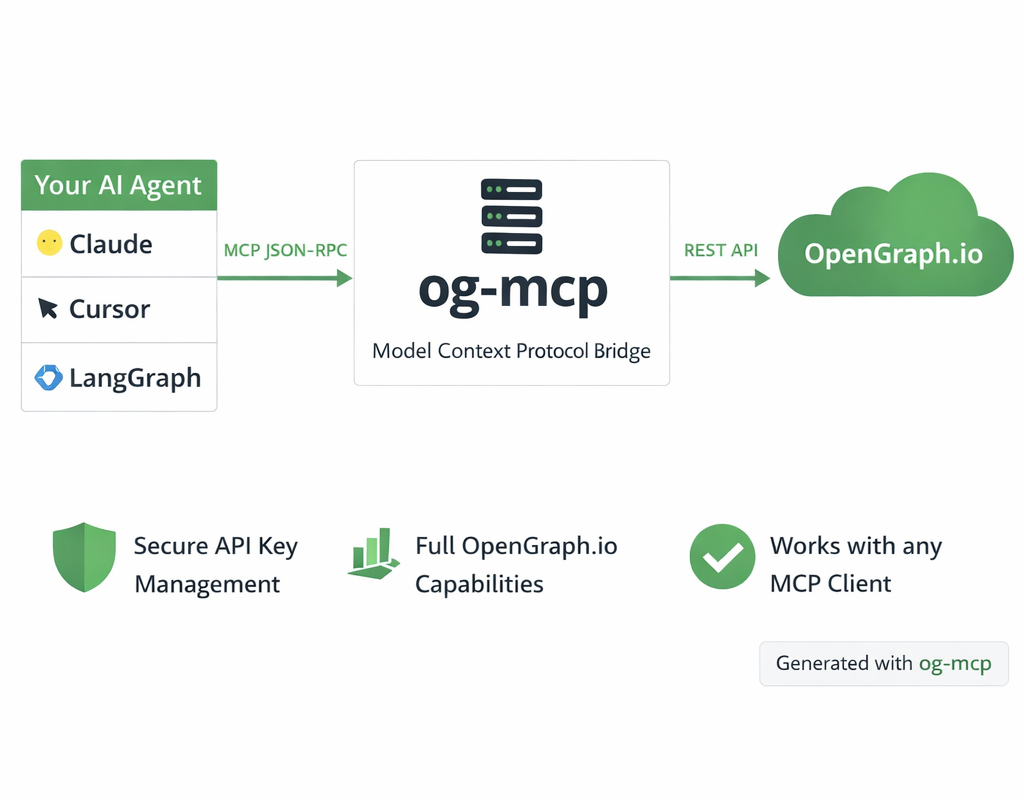 Diagram generated with og-mcp's image generation tools
The og-mcp server acts as a bridge between AI clients (like Claude or other LLMs) and the OpenGraph.io API:
- AI client makes a tool call to one of the available MCP functions
- og-mcp server receives the request and formats it for the OpenGraph.io API
- OpenGraph.io processes the request and returns data
- og-mcp transforms the response into a format suitable for the AI client
- AI client receives the structured data ready for use
This abstraction prevents exposing API keys directly to the AI while providing full access to OpenGraph.io capabilities.
Setup and Running
- Clone this repository
- Install dependencies:
npm install - Build the TypeScript code:
npm run build - Start the server:
npm start
The server will run on port 3010 by default (configurable via PORT environment variable).
Configuration
OAuth 2.1 (hosted HTTP server)
When running the Streamable HTTP server (npm start), set these env vars:
# Required: URL of the apifur-api JWKS endpoint
OAUTH_JWKS_URL=https://dashboard-api.opengraph.io/oauth/jwks.json

# Optional: Issuer string to validate in bearer tokens (defaults to OAUTH_ISSUER)
OAUTH_ISSUER=https://dashboard-api.opengraph.io

# Optional: Expected audience claim (default: https://mcp.opengraph.io/mcp)
OAUTH_AUDIENCE=https://mcp.opengraph.io/mcp

# Optional: Override the canonical MCP resource URL returned in 401 headers
MCP_RESOURCE_URL=https://mcp.opengraph.io/mcp
When OAUTH_JWKS_URL is not set, bearer-token verification is disabled and only the x-app-id fallback is active.
x-app-id fallback / local dev
Omit the OAuth env vars and use a static App ID instead:
OPENGRAPH_APP_ID=your_app_id_here
# or
APP_ID=your_app_id_here
This also works as the fallback for any HTTP request that includes an x-app-id header.
Stdio transport
For command-line usage pass the App ID directly:
opengraph-io-mcp --app-id YOUR_APP_ID
Transport Options
Stdio Transport (Recommended)
For command-line usage and npm global installation, the server can be run with stdio transport:
npm run start:stdio
You can pass the OpenGraph API key directly via command-line argument:
npm run start:stdio -- --app-id YOUR_APP_ID
When installed globally:
opengraph-io-mcp --app-id YOUR_APP_ID
This mode allows the server to be invoked directly by other applications that use MCP.
Streamable HTTP Transport
This method runs a web server that can be accessed over HTTP:
npm start
The legacy SSE transport (/sse + /message) has been removed. It had no authentication and
shared a single connection across every client.
Troubleshooting
- If tools aren't showing up, check that the server is running and the URL is correctly configured in Cursor
- Check the server logs for any connection or authorization issues
- Verify that Claude has been instructed to use the specific tools by name
Reviews
No reviews yet
Be the first to review this server!
More Developer Tools MCP Servers
Rea
Freeby Morluto · Developer Tools
Reverse engineer anything from your terminal or agent with one CLI and MCP server.
Fetch
Freeby Modelcontextprotocol · Developer Tools
Web content fetching and conversion for efficient LLM usage
Git
Freeby Modelcontextprotocol · Developer Tools
Read, search, and manipulate Git repositories programmatically
Toleno
Freeby Toleno · Developer Tools
Toleno Network MCP Server — Manage your Toleno mining account with Claude AI using natural language.
mcp-creator-python
Freeby mcp-marketplace · Developer Tools
Create, build, and publish Python MCP servers to PyPI — conversationally.
MCP Marketplace
Freeby mcp-marketplace · Developer Tools
Search and install MCP servers from inside your AI client.