
Server data from the Official MCP Registry
Design HTML email templates with AI: render to HTML and open them in a visual editor
About
Design HTML email templates with AI: render to HTML and open them in a visual editor
Security Report
Valid MCP server (3 strong, 3 medium validity signals). No known CVEs in dependencies. ⚠️ Package registry links to a different repository than scanned source. Imported from the Official MCP Registry. 1 finding(s) downgraded by scanner intelligence.
9 files analyzed · 1 issue found
Security scores are indicators to help you make informed decisions, not guarantees. Always review permissions before connecting any MCP server.
Permissions Required
This plugin requests these system permissions. Most are normal for its category.
What You'll Need
Set these up before or after installing:
Environment variable: EASY_EMAIL_BUILDER_EDITOR_URL
How to Install
Add this to your MCP configuration file:
{
  "mcpServers": {
    "io-github-shahkarkhan440-easy-email-builder": {
      "env": {
        "EASY_EMAIL_BUILDER_EDITOR_URL": "your-easy-email-builder-editor-url-here"
      },
      "args": [
        "-y",
        "easy-email-builder-mcp"
      ],
      "command": "npx"
    }
  }
}Documentation
View on GitHubFrom the project's GitHub README.
Easy Email Builder
A drag-and-drop email template editor for React.
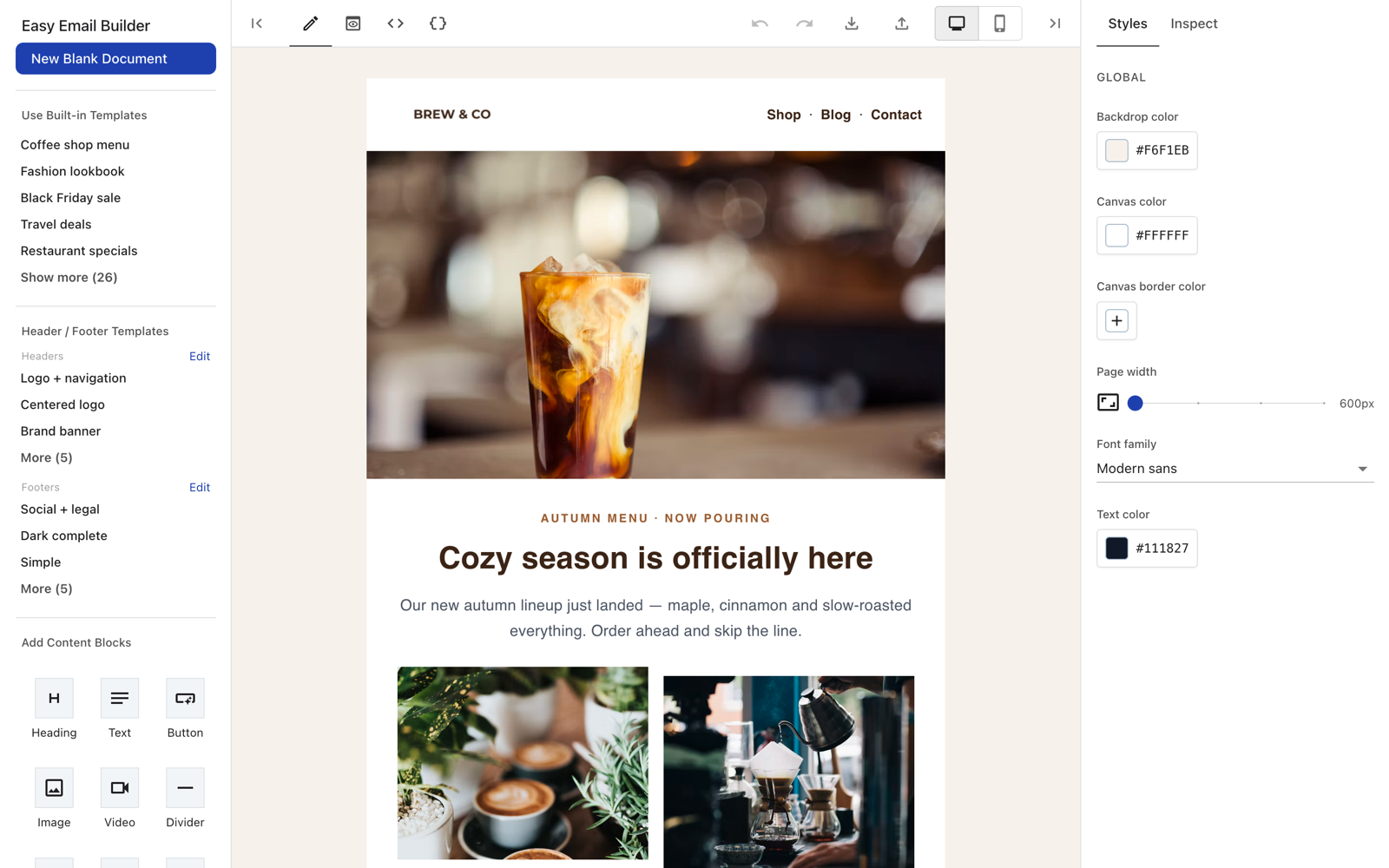
- Visual editor with text, image, button, video, socials, columns and more
- Export to HTML and JSON
- Locked header and footer with ready-made templates
- 31 starter email templates
- Image and video upload hooks
- MCP server: design emails with Claude, Cursor, Codex and other AI agents
Use with AI agents (MCP)
Add Easy Email Builder to your favorite AI agent as an MCP server, then ask it to design an email. It returns the email HTML and a link that opens the result in the visual editor.
Claude Desktop: download the one-click extension easy-email-builder.mcpb, double-click it and click Install.
Claude Code
claude mcp add easy-email-builder --scope user -- npx -y easy-email-builder-mcp
OpenAI Codex
codex mcp add easy-email-builder -- npx -y easy-email-builder-mcp
VS Code (GitHub Copilot)
code --add-mcp '{"name":"easy-email-builder","command":"npx","args":["-y","easy-email-builder-mcp"]}'
Gemini CLI
gemini mcp add easy-email-builder npx -y easy-email-builder-mcp
Cursor, Windsurf, Cline and other MCP clients: add to the client's MCP config:
{
  "mcpServers": {
    "easy-email-builder": {
      "command": "npx",
      "args": ["-y", "easy-email-builder-mcp"]
    }
  }
}
Config file locations and troubleshooting: see the MCP server README.
Install
npm install easy-email-builder
Peer dependencies (React 18 and MUI 5):
npm install react@18 react-dom@18 @mui/material@5 @mui/icons-material@5 @emotion/react @emotion/styled react-syntax-highlighter
Usage
Give the editor a container with a fixed height:
import { EmailBuilder } from 'easy-email-builder';

export default function App() {
  return (
    <div style={{ height: '100vh' }}>
      <EmailBuilder
        onChange={(json, html) => console.log(json, html)}
        imageUploadHandler={async (file) => {
          // upload the file and return its URL
          return 'https://example.com/image.png';
        }}
      />
    </div>
  );
}
Main props
| Prop | Description |
|---|---|
initialDocument | Starting template JSON |
onChange(json, html) | Called on every edit |
imageUploadHandler(file) | Upload an image, return its URL |
videoUploadHandler(file) | Upload a video, return its URL |
initialName / onNameChange | Template name |
showJsonFeatures | Show the JSON tab, import and export (default true) |
editingSlot | 'header' or 'footer': open the editor locked to that region only; its HTML output contains just that region |
theme | Custom MUI theme |
Use a ref to read the current template:
const ref = useRef<EmailBuilderRef>(null);
ref.current?.getData((json, html) => save(json, html));
An HTML-only code editor is also available:
import { HtmlEditor } from 'easy-email-builder/html-editor';
Development
pnpm install
pnpm dev        # preview app (docs/)
pnpm build:lib  # build the library to dist/
License
MIT. Author: shahkar khan.
Reviews
No reviews yet
Be the first to review this server!
More Developer Tools MCP Servers
Fetch
Freeby Modelcontextprotocol · Developer Tools
Web content fetching and conversion for efficient LLM usage
Git
Freeby Modelcontextprotocol · Developer Tools
Read, search, and manipulate Git repositories programmatically
Worldmonitor
Freeby Koala73 · Developer Tools
Live markets, conflicts, country risk, chokepoints, energy, and China decision signals. 93 tools.
Toleno
Freeby Toleno · Developer Tools
Toleno Network MCP Server — Manage your Toleno mining account with Claude AI using natural language.
MCP Marketplace
Freeby mcp-marketplace · Developer Tools
Search and install MCP servers from inside your AI client.
mcp-creator-python
Freeby mcp-marketplace · Developer Tools
Create, build, and publish Python MCP servers to PyPI — conversationally.