
Server data from the Official MCP Registry
Renders dashboards, forms and tables inline in the chat as Angular Material components (MCP App).
About
Renders dashboards, forms and tables inline in the chat as Angular Material components (MCP App).
Remote endpoints: streamable-http: https://ngx-json-render.vercel.app/mcp
Security Report
This is an Angular renderer library and workspace for AI-generated JSON UI specs, with a Material catalog and a prototype MCP App; the provided code is a README, package manifests, and streaming tests with no network exfiltration, shell execution, or hardcoded secrets visible. The only broad permission is network_http for streaming to a model API, which is expected for developer tooling, and the demo's user-supplied API key is held in sessionStorage and sent directly to the provider. The code shown is truncated, so the full source of the streaming and MCP modules was not reviewed. Supply chain analysis found 16 known vulnerabilities in dependencies (0 critical, 9 high severity).
5 files analyzed · 18 issues found
Security scores are indicators to help you make informed decisions, not guarantees. Always review permissions before connecting any MCP server.
Permissions Required
This plugin requests these system permissions. Most are normal for its category.
How to Install & Connect
Available as Local & Remote
This plugin can run on your machine or connect to a hosted endpoint. during install.
Documentation
View on GitHubFrom the project's GitHub README.
ngx-json-render (workspace)



Angular renderer for json-render: stream AI-generated JSON specs into real Angular components — signals, standalone components, zoneless (checked in CI: no Zone.js, no NgZone, every suite explicitly zoneless).
→ Package documentation: projects/ngx-json-render/README.md
→ Compared with Hashbrown, the other generative-UI library for Angular: ngx-json-render or Hashbrown?
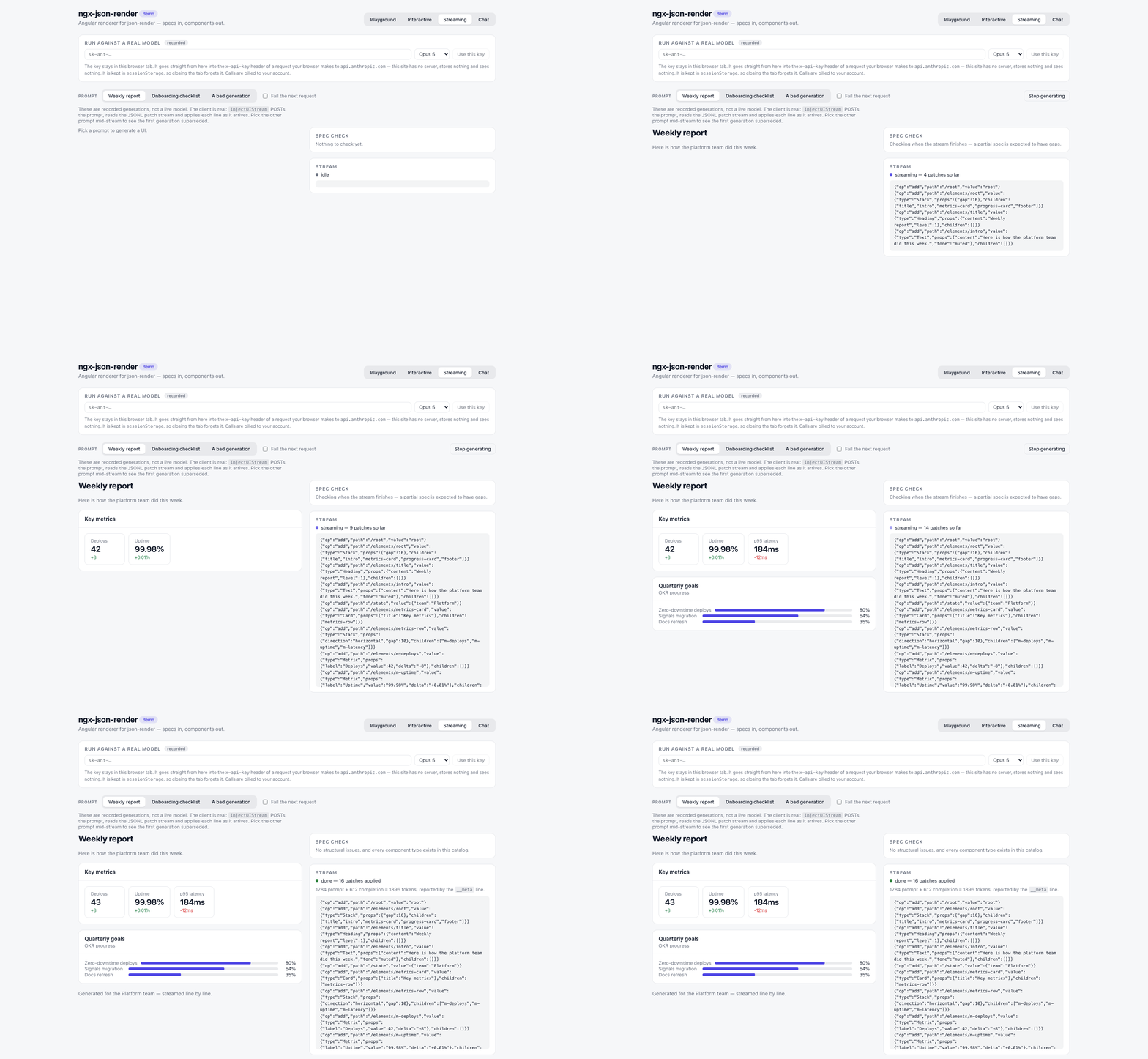
→ Live demo: https://shteynu.github.io/ngx-json-render/ — four tabs: a playground that renders a spec you edit by hand against either catalog and shows the system prompt a model would receive; an interactive spec (bindings, repeat, confirm, watch); a SpecStream rendering progressively, which you can stop mid-generation and inspect half-built; and a chat where prose and UI patches arrive in the same reply. The last two replay a recording by default and call a real model if you paste in your own key — or 
Agent skills
One skill per published package for AI coding agents — the same idea as
json-render's own skills/ directory. The skills CLI
installs them into Claude Code, Cursor, Codex and the other agents it
supports, and the agent then writes catalogs, components and streaming code
against the real API instead of guessing from the package name:
npx skills add shteynu/ngx-json-render --skill ngx-json-render --skill ngx-json-render-material
Sources: skills/ngx-json-render/SKILL.md
and skills/ngx-json-render-material/SKILL.md.
An agent reads the skill instead of the README, so a change to a package's
public API or its README is not done until the matching skill says the same.
CI compiles every TypeScript snippet in both skills against the built
packages (npm run check:skills), so a skill cannot silently fall behind.
Workspace layout
projects/ngx-json-render— the renderer (published asngx-json-render).projects/ngx-json-render-material— a ready-made Angular Material catalog of 28 components (published asngx-json-render-material), so a spec can be generated and rendered without writing a catalog first.skills— agent skills, one per published package (see below).projects/mcp-app— prototype: the Material catalog as an MCP App, rendered inline in Claude, ChatGPT, VS Code or Cursor. It uses upstream's@json-render/mcpfor the server side and adds the Angular view (injectJsonRenderAppfromngx-json-render/mcp, the counterpart of its ReactuseJsonRenderApp);npm run build:mcp-app.projects/demo— demo app, four tabs: a playground (edit a spec live, switch catalogs, readcatalog.prompt()), an interactive spec (state bindings, repeat, confirm, watch), a SpecStream oninjectUIStreamwith a stop button, and a chat oninjectChatUIwhere prose and patches share one stream. The two streaming tabs swap only their transport between a recorded generation and a live model, so what you watch is the real client either way; the key is held insessionStorageand goes straight from the browser to the provider.
Develop
npm ci
npm start            # build the library, then serve the demo at http://localhost:4200
npm test             # vitest: renderer + Material catalog + demo
npm run build        # build renderer + Material catalog + demo
The demo consumes both built packages (dist/ngx-json-render and dist/ngx-json-render-material, which its playground renders) via tsconfig path mappings — npm start and npm test build them first, so a fresh clone needs no other step. This also makes the repo boot unmodified on StackBlitz, which always runs npm install && npm start. Keep npm run watch:lib running alongside if you're editing the library itself.
Releasing
Releases are automated via npm trusted publishing (OIDC — no tokens, provenance included). The two packages version independently, each on its own tag prefix.
The renderer, in release.yml — bump version in projects/ngx-json-render/package.json, commit, then
git tag v0.x.y && git push origin main v0.x.y
The Material catalog, in release-material.yml — bump version in projects/ngx-json-render-material/package.json, commit, then
git tag material-v0.x.y && git push origin main material-v0.x.y
Each workflow verifies the tag matches the package version, builds, runs that project's tests, publishes to npm, and creates the GitHub release.
Both workflows can also be started by hand, for a machine that cannot push
tags: Actions → Release (or Release Material catalog) → Run
workflow on the branch holding the version bump, normally main. The
workflow then derives the tag from the manifest (v<version> or
material-v<version>), creates it on the commit it runs on, and continues
exactly as a tag push would; a tag that already exists on another commit
fails the run instead of publishing, so a forgotten bump cannot ship twice.
One-time setup on npmjs.com, per package — configuring one does not cover the
other, and a package with no connection gets no credentials at all in Actions and
fails with ENEEDAUTH. Under package Settings → Trusted Publisher → GitHub
Actions:
| Field | Value |
|---|---|
| Organization or user | shteynu |
| Repository | ngx-json-render |
| Workflow filename | release.yml for the renderer, release-material.yml for the catalog — filename only, no path |
| Environment name | leave empty — neither workflow declares an environment:, and a name here would have to match one |
| Allowed actions | tick Allow npm publish; the form will not save without at least one, and npm stage publish is not what these workflows run |
Manual fallback (requires 2FA OTP). It publishes without the provenance
attestation the workflows attach, so reach for it only when Actions is
unavailable. Pass --registry explicitly: npm reads project config from the
current directory only, so the registry line in this repo's .npmrc does
not apply once you cd into dist/, and the publish silently targets
whatever your global ~/.npmrc points at.
npm run build:lib && cp LICENSE dist/ngx-json-render/ && cd dist/ngx-json-render && npm publish --registry https://registry.npmjs.org/
Same for the Material catalog:
npm run build:material && cp LICENSE dist/ngx-json-render-material/ && cd dist/ngx-json-render-material && npm publish --registry https://registry.npmjs.org/
The demo is deployed to GitHub Pages by ci.yml on every push to main.
Status & upstream
There is no first-party Angular renderer in the json-render monorepo, and none on npm: 28 other @json-render/* packages sit at 0.20.0, but no @json-render/angular (checked 2026-08-29). Community PR #244 has been open since March 2026 without a maintainer decision; #310 came later and was closed by its own author on 2026-08-03. This library mirrors the baseline renderer contract (React = Vue = Solid = Svelte) and is structured so its src/lib can be adapted into a packages/angular PR upstream.
License
Apache-2.0 — matching the upstream json-render project.
Reviews
No reviews yet
Be the first to review this server!
More Developer Tools MCP Servers
Git
Freeby Modelcontextprotocol · Developer Tools
Read, search, and manipulate Git repositories programmatically
Fetch
Freeby Modelcontextprotocol · Developer Tools
Web content fetching and conversion for efficient LLM usage
Worldmonitor
Freeby Koala73 · Developer Tools
Live markets, conflicts, country risk, chokepoints, energy, and China decision signals. 90 tools.
Paperclip
Freeby Paperclipai · Developer Tools
Trending hip-hop artist momentum scores across four cultural dimensions.
Toleno
Freeby Toleno · Developer Tools
Toleno Network MCP Server — Manage your Toleno mining account with Claude AI using natural language.
mcp-creator-python
Freeby mcp-marketplace · Developer Tools
Create, build, and publish Python MCP servers to PyPI — conversationally.