
Server data from the Official MCP Registry
Safe PostgreSQL migrations: schema drift, lock analysis, safe rewrites, data checksums. Read-only.
About
Safe PostgreSQL migrations: schema drift, lock analysis, safe rewrites, data checksums. Read-only.
Security Report
Valid MCP server (2 strong, 3 medium validity signals). No known CVEs in dependencies. Package registry verified. Imported from the Official MCP Registry.
3 files analyzed · 1 issue found
Security scores are indicators to help you make informed decisions, not guarantees. Always review permissions before connecting any MCP server.
What You'll Need
Set these up before or after installing:
Environment variable: SOURCE_DATABASE_URL
Environment variable: TARGET_DATABASE_URL
Environment variable: PGVOUCH_LLM
How to Install
Add this to your MCP configuration file:
{
  "mcpServers": {
    "io-github-shubh-sgr-pgvouch": {
      "env": {
        "PGVOUCH_LLM": "your-pgvouch-llm-here",
        "SOURCE_DATABASE_URL": "your-source-database-url-here",
        "TARGET_DATABASE_URL": "your-target-database-url-here"
      },
      "args": [
        "-y",
        "pgvouch"
      ],
      "command": "npx"
    }
  }
}Documentation
View on GitHubFrom the project's GitHub README.
PgVouch
An MCP server + CLI that lets AI assistants safely inspect, plan and prove PostgreSQL migrations. The LLM proposes; deterministic code decides.


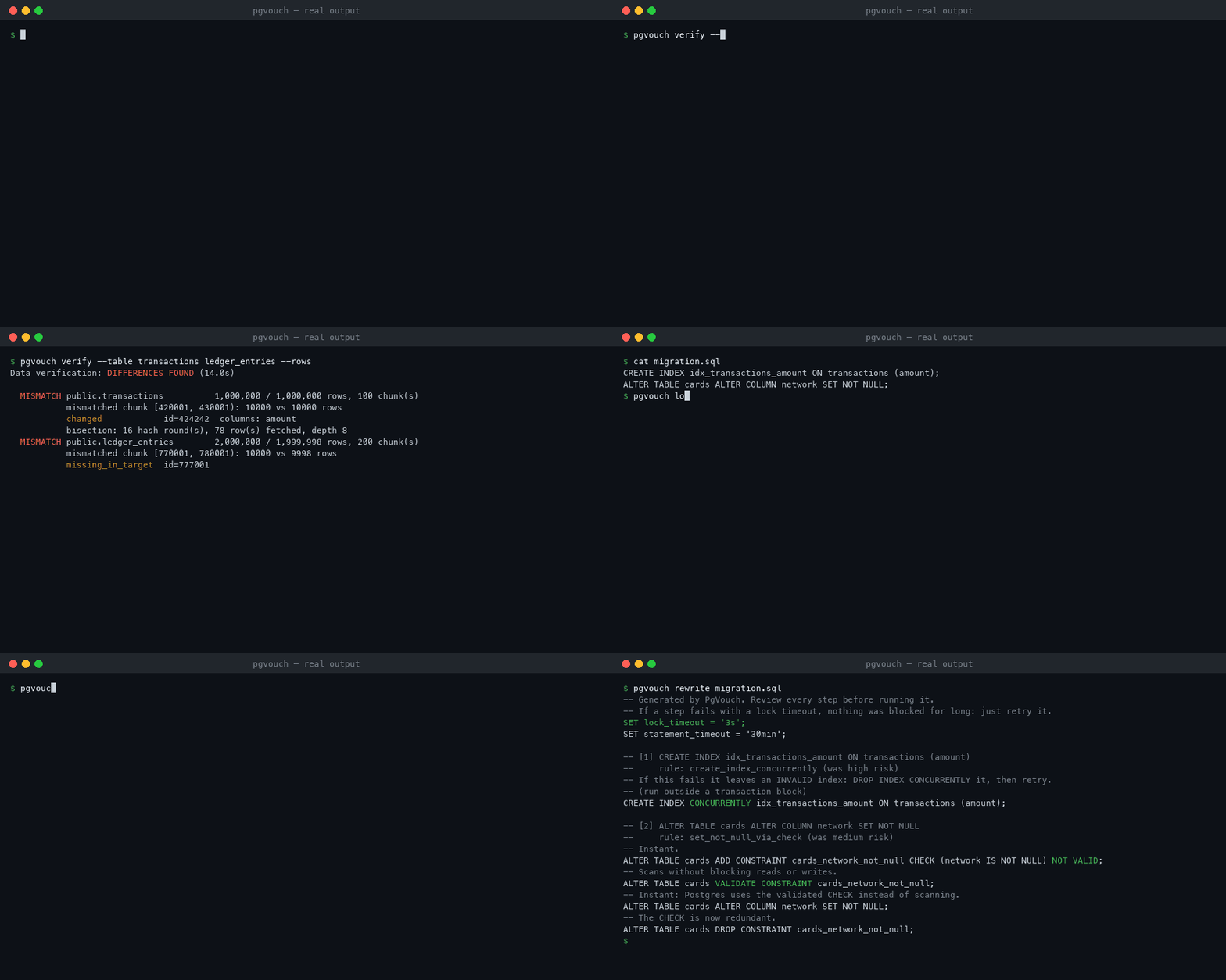
Real output against the seeded demo databases (1M transactions, 2M ledger entries) with the target broken as in step 2 below. Typing is real-time; command run times are shortened (the verify run took 14.0 s).
The problem
Writing ALTER TABLE is the easy part of a database migration. The hard parts are:
- What differs? Schemas drift between environments (hotfixes, failed migrations, manual changes).
- What will it lock?
CREATE INDEXon a busy table blocks every write until it finishes. A "1 ms"ALTER TABLEcan still cause an outage by waiting in the lock queue. - Is the data really the same? "Row counts match" is not proof.
- Which rows are wrong? When proof fails, you need the exact rows, not "something in this 2M-row table".
AI assistants now write migrations, but they hallucinate objects, ignore locks and can't prove anything. PgVouch gives them (and you) read-only tools that answer those four questions, and it wraps every AI suggestion in deterministic checks.
Results (measured, not estimated)
All numbers come from npm run eval against the seeded Docker databases. The full tables are in evals/.
| What | Result |
|---|---|
| Drift detection over 32 seeded scenarios (tables, views, functions, triggers, enums, extensions, RLS) | 100% precision, 100% recall (34 true positives, 0 false positives, 0 missed) |
| Exact differing rows found by checksum bisection | 100% of seeded row changes, 0 false rows |
| Rows fetched to find them | 311 rows instead of 6,079,997 (the rows in the mismatched tables, both sides) |
Lock mode predicted vs lock actually taken (read from pg_locks) | 36/36 statements, on PostgreSQL 13, 14, 15, 16 and 17 |
Table rewrite predicted vs actual rewrite (pg_class.relfilenode changed) | 35/35 statements |
| Sequence left behind its data after a copy (next INSERT would hit a duplicate key) | found 1/1, 0 false alarms in 10 checks |
| Rules-only migration plans that pass a shadow run on a real schema copy | 27/27 |
| LLM plans (local llama3.2, 3B), 17 drift scenarios of the first 21-scenario suite, validator-only acceptance (v0.1.0) | 5.9% valid on first try, 17.6% after one retry, 82.4% fell back to the rules plan; 0/3 accepted LLM plans passed the shadow run |
Application stall during the migration, measured on the 1M-row table with a probe query every ~10 ms (evals/results-rewrite.md):
| Migration | Original: max stall | PgVouch rewrite: max stall | Rewrite total time |
|---|---|---|---|
CREATE INDEX | 1.58 s | 47 ms | 2.1 s |
ADD FOREIGN KEY (2M rows) | 1.01 s | 49 ms | 1.2 s |
ADD CHECK | 440 ms | 63 ms | 0.85 s |
SET NOT NULL | 625 ms | 31 ms | 0.68 s |
ADD COLUMN ... NOT NULL DEFAULT gen_random_uuid() | 10.94 s | 964 ms | 108.7 s (batched backfill) |
ALTER COLUMN merchant_id TYPE bigint | 6.51 s | 93 ms | 28.0 s (includes re-creating its foreign key; +3 manual steps) |
What the LLM numbers show: a small local model is not reliable at migration planning. That's why PgVouch never trusts it. The validator rejected 14/17 plans (unparseable SQL, hallucinated or duplicate objects, blocking DDL). The 3 it accepted were safe but incomplete, and only the shadow run caught that (e.g. a missing index and a sequence left out when re-creating a dropped table). Deterministic rules plans passed all 17 (27/27 with the scenarios added later). Details: evals/results-llm.md.
What changed because of it: those numbers were measured when the validator alone decided. Now an LLM plan is accepted only if it passes the validator and a shadow run whose result matches the source exactly; a shadow failure is sent back to the LLM for one retry, then PgVouch falls back to the rules plan. So the 3 incomplete plans above would now be rejected. The LLM eval has not been re-run with the new pipeline yet, so there is no new number here.
The trade-off is visible: the rewrites that need a backfill take much longer in total, but the application keeps running. These are single runs on a laptop (Apple M1, 8 cores, Docker Desktop). Expect the absolute numbers to vary; the gap is the point.
How it works
flowchart LR
  A["AI assistant<br/>(Claude Code, Cursor)"] -- "MCP (JSON-RPC, stdio)" --> S
  U["You (terminal)"] -- CLI --> S
  subgraph S["PgVouch core"]
    I["F1 introspect<br/>pg_catalog"] --> D["F2 diff<br/>(pure function)"]
    D --> P["F7 planner<br/>LLM + guardrail validator"]
    L["F5 lock analyzer<br/>(Postgres parser)"] --> R["F6 safe rewrites"]
    R --> P
    P --> SH["F10 shadow run<br/>(throwaway container)"]
    V["F3 chunked checksums"] --> B["F4 bisection"]
    P --> RC["F12 receipt<br/>(SHA-256)"]
  end
  S -- "read-only SQL" --> SRC[("source DB")]
  S -- "read-only SQL" --> TGT[("target DB")]
  P -. "structured facts only, no rows" .-> LLM["Ollama (local)<br/>or Gemini"]
Golden rule: the LLM never touches a database and never decides pass/fail. It proposes; the parser, the rules and the shadow run decide.
| # | Feature | How |
|---|---|---|
| F1 | Schema introspection | pg_catalog (not information_schema, which hides index methods, partial-index predicates and NOT VALID) |
| F2 | Drift detection | A pure diffSchemas(source, target) over tables, columns, indexes, constraints, sequences, views, functions, triggers (including disabled ones), enum types, extensions and row-level security: deterministic and sorted, with severity rules, and it never guesses renames |
| F3 | Data verification | md5(string_agg(md5(row::text) ORDER BY pk)) per primary-key chunk, inside a REPEATABLE READ snapshot with normalized session settings. Text keys are ordered byte-wise (COLLATE "C"), so servers with different collations agree. Also checks that every identity/serial sequence on the target is ahead of its data. On a target still being replicated to, --recheck looks at the differences again after a delay and reports only those that never catch up |
| F4 | Checksum bisection | Merkle-style: split the mismatched chunk at its median key and recurse only into halves whose hashes differ |
| F5 | Lock analyzer | libpg-query (Postgres' own parser, WASM) → rule table → risk from reltuples |
| F6 | Safe rewrites | CONCURRENTLY, NOT VALID + VALIDATE, UNIQUE ... USING INDEX, expand/contract, batched DO loops with COMMIT per batch |
| F7 | Guarded LLM planner | zod-checked JSON → validator (parses, allow-list, objects exist, no unsafe DDL) → shadow run (the result must match the source) → one retry with the errors → rules-only fallback |
| F8 | MCP server | 7 read-only tools over stdio |
| F9 | Eval suite | 32 drift/data scenarios, 36 lock statements with ground truth from Postgres, and a stall benchmark under load |
| F10 | Shadow runs | Copies the target's schema into a disposable container, applies the plan, and diffs the result against the source |
| F11 | Reversibility | Tags each step reversible / reversible-with-backfill / data-lossy and generates rollback SQL |
| F12 | Receipts | JSON of drift + verification + plan + shadow, with a SHA-256 over canonical (sorted-key) JSON |
| F13 | Lock-queue preflight | "Safe to run right now?": the locks each statement needs vs. live pg_locks + pg_stat_activity, using Postgres' full 8×8 lock conflict table |
| F14 | PR review action | pgvouch review --format markdown + a GitHub Action: lock analysis and safe rewrites of changed migrations as a job summary and one PR comment |
Get started
There are two ways to use PgVouch:
| Option A: npm package | Option B: clone the repo | |
|---|---|---|
| Best for | Your own databases, CI, or an AI assistant | Trying every feature on seeded demo databases, or contributing |
| Needs | Node 22 (or 20.12+) | Node 22 (or 20.12+) and Docker |
| Commands run as | pgvouch <command> (or npx pgvouch <command>) | npm run cli -- <command> |
Option A: use the npm package
1. Try it now, no database needed. Point it at any migration file:
npx pgvouch locks my_migration.sql --offline     # the locks each statement takes, and the risk
npx pgvouch rewrite my_migration.sql --offline   # a safe, non-blocking version of the same migration
No migration file handy? Create one: echo "CREATE INDEX idx_amount ON transactions (amount);" > my_migration.sql
2. Install it (optional: npx pgvouch <command> works without installing):
npm install -g pgvouch
pgvouch --help
3. Point it at your databases. Create a read-only role on each database (the SQL is here), then put a .env file in the folder you run PgVouch from:
SOURCE_DATABASE_URL=postgres://pgvouch_ro:PASSWORD@staging-host:5432/your_db
TARGET_DATABASE_URL=postgres://pgvouch_ro:PASSWORD@prod-host:5432/your_db
PGVOUCH_LLM=none   # rules-only plans; set it to ollama to let a local LLM propose plans
Variables already set in your environment take precedence over .env. Then check that both connections are read-only:
pgvouch doctor # must say read_only=true and write privileges: none
4. Run it:
pgvouch diff                                      # schema drift (exit code 1 if any)
pgvouch verify --rows                             # checksums + exact differing rows
pgvouch verify --rows --recheck 3                 # target still being replicated to: ignore rows in flight
pgvouch locks my_migration.sql                    # lock impact per statement, with real table sizes
pgvouch preflight my_migration.sql                # would it have to wait for locks RIGHT NOW?
pgvouch rewrite my_migration.sql                  # safe multi-step script
pgvouch review --format markdown migrations/*.sql # PR-comment report (offline, used by the GitHub Action)
pgvouch plan --no-llm                             # rules-only plan that makes target match source
pgvouch plan                                      # LLM plan (Ollama) behind guardrails
pgvouch shadow                                    # plan, then prove it on a throwaway container (needs Docker)
pgvouch receipt --shadow                          # hashed audit record
pgvouch receipt-verify pgvouch-receipt.json
locks --fail-on high exits with code 1, so it can gate a CI pipeline on risky migrations.
preflight answers a different question: not "what will this lock?" but "is anyone holding or waiting for a conflicting lock right now?". It lists the sessions it would queue behind (pid, user, application, state, transaction age; never their query text), and flags that CREATE INDEX CONCURRENTLY waits for every older transaction in the database. It exits with code 1 if the migration would wait. PgVouch never terminates sessions.
5. Also: use it from an AI assistant (npx -y pgvouch mcp), or review every migration pull request with the GitHub Action (step 4 there).
Option B: clone the repo (demo databases included)
The repo includes two seeded Postgres databases, so you can try every feature without touching a real database. Requirements: Node 22 (or 20.12+) and Docker.
git clone https://github.com/Shubh-Sgr/pgvouch.git && cd pgvouch
npm install
cp .env.example .env
npm run db:up          # two Postgres 16 containers, seeded: ~3 min on first start
npm run cli -- doctor  # confirms both connections are read-only
| Container | Port | Contents |
|---|---|---|
source-db | 5433 | Fintech schema, 10 tables: 1M transactions, 2M ledger_entries, composite-PK and no-PK tables |
target-db | 5434 | Identical copy. Eval scenarios create drift in scratch copies of it. |
Then follow Step-by-step: test every feature below: you break the target on purpose and watch each feature find and fix it.
Commands from a clone
Every command from Option A works here as npm run cli -- <command>. These use the example migration in the repo:
npm run cli -- diff                                   # schema drift (exit code 1 if any)
npm run cli -- verify --rows                          # checksums + exact differing rows
npm run cli -- verify --rows --recheck 3              # target still being replicated to: ignore rows in flight
npm run cli -- locks examples/risky-migration.sql     # lock impact per statement
npm run cli -- preflight examples/risky-migration.sql # would it have to wait for locks RIGHT NOW?
npm run cli -- rewrite examples/risky-migration.sql   # safe multi-step script
npm run cli -- review --format markdown examples/*.sql # PR-comment report (offline, used by the GitHub Action)
npm run cli -- plan --no-llm                          # rules-only plan
npm run cli -- plan                                   # LLM plan (Ollama) behind guardrails
npm run cli -- shadow                                 # plan, then prove it on a throwaway container
npm run cli -- receipt --shadow                       # hashed audit record
npm run cli -- receipt-verify pgvouch-receipt.json
Running on an 8 GB laptop
PgVouch was built and measured on an 8 GB MacBook Air (M1). It stays responsive if you:
- Give Docker Desktop 3 GB of memory (Settings → Resources). The two databases are capped at 768 MB each in
docker-compose.yml, and shadow containers at 256 MB. - Run one heavy thing at a time:
db:up, integration tests, and evals each create or scan millions of rows. PGVOUCH_LLM=noneis the default, so nothing is ever sent to a model unless you turn it on. When you use the LLM planner, Ollama unloads the model 30 s after the last request.- Skip
npm run eval -- --llm ...(~1 hour on a 3B model) unless you want those numbers; the default eval doesn't call an LLM. - Want an even lighter setup? Seed fewer rows:
npm run db:down && SEED_TRANSACTIONS=100000 npm run db:up(seconds instead of ~3 min). CI uses 20,000. The published eval numbers andnpm run evalneed the default 1,000,000.
Step-by-step: test every feature
This walkthrough uses the two demo databases from Option B. You break the target on purpose, then watch each feature find and fix it.
Run the commands one at a time from the pgvouch folder. Want it automatic? npm run demo runs steps 1–9 with pauses and repairs the target at the end.
macOS: if a command fails with
Operation not permitted/EPERM uv_cwd, give your terminal access to the folder: System Settings → Privacy & Security → Files and Folders → (your terminal) → Documents.
1. Baseline: everything matches
npm run cli -- diff      # "No schema drift: source and target match."
npm run cli -- verify    # "IDENTICAL": 10 tables, ~3.1M rows compared by hash
2. Break the target (this plays "someone made a mistake"; PgVouch itself can't write)
docker exec pgvouch-target-db-1 psql -U postgres -d fintech -c "DROP INDEX transactions_account_created_idx"
docker exec pgvouch-target-db-1 psql -U postgres -d fintech -c "ALTER TABLE ledger_entries DROP CONSTRAINT ledger_entries_transaction_id_fkey"
docker exec pgvouch-target-db-1 psql -U postgres -d fintech -c "ALTER TABLE customers ADD COLUMN legacy_code int"
docker exec pgvouch-target-db-1 psql -U postgres -d fintech -c "UPDATE transactions SET amount = amount + 1 WHERE id = 424242"
docker exec pgvouch-target-db-1 psql -U postgres -d fintech -c "DELETE FROM ledger_entries WHERE id IN (777001, 777002)"
3. Schema drift (F1 + F2)
npm run cli -- diff
Expect 3 items: the missing index (low), the missing foreign key (high), the extra legacy_code column (medium). Exit code 1.
4. Exact differing rows (F3 + F4)
npm run cli -- verify --table transactions ledger_entries --rows
Expect changed id=424242 columns: amount, missing_in_target id=777001 and id=777002, and a bisection: line showing ~150 rows fetched out of 3M.
5. Lock impact of a migration (F5)
npm run cli -- locks examples/risky-migration.sql
npm run cli -- locks examples/risky-migration.sql --fail-on high; echo "exit code: $?"   # 1 = a CI pipeline would stop here
Each statement shows its lock (e.g. SHARE ... blocks writes), whether it scans or rewrites the table, and a risk level, plus a warning that lock_timeout is missing.
5b. Is it safe to run right now? (F13)
Open a second terminal and leave a transaction open, like a forgotten session would:
docker exec -it pgvouch-target-db-1 psql -U postgres -d fintech
# then, inside psql:  BEGIN; SELECT count(*) FROM accounts;   (don't COMMIT yet)
Back in the first terminal:
npm run cli -- preflight examples/risky-migration.sql
Expect WOULD WAIT behind 1 session(s): ALTER TABLE accounts ADD COLUMN needs ACCESS EXCLUSIVE, and the open session holds ACCESS SHARE on accounts (shown with state=idle in transaction and its age). The other statements are OK: the FK needs SHARE ROW EXCLUSIVE, which doesn't conflict with a reader. Type COMMIT; in psql and run it again: SAFE NOW.
6. Safe rewrite of the same migration (F6)
npm run cli -- rewrite examples/risky-migration.sql
Expect SET lock_timeout first. CREATE INDEX becomes CONCURRENTLY, the FK gets NOT VALID then VALIDATE, and the new NOT NULL column gets a batched backfill loop.
7. Plan the fix (F7 + F11)
npm run cli -- plan --no-llm   # rules-only: each step has risk, reversibility and rollback SQL
npm run cli -- plan            # optional, ~2 min: the LLM plans (needs Ollama + Docker); watch the validator and the shadow run reject bad plans
The data-lossy DROP COLUMN legacy_code step is commented out unless you pass --allow-data-loss.
8. Prove the plan on a throwaway copy (F10)
npm run cli -- shadow --no-llm
Expect Shadow run: PASS, every step applied, and the shadow matches the source schema.
9. Tamper-evident receipt (F12)
npm run cli -- receipt --no-llm --out receipt.json
npm run cli -- receipt-verify receipt.json   # "OK: receipt intact"
Edit any value in receipt.json and run receipt-verify again: it reports MODIFIED.
A receipt lists differing rows by primary key and changed columns only, so it can be attached to a ticket without copying personal data. --include-values adds the row values.
10. From an AI assistant (F8): follow Use it from an AI assistant (MCP) below, then ask "Use pgvouch to find schema drift and the differing rows in ledger_entries."
11. Reset
npm run db:down && npm run db:up # fresh, identical databases again (~3 min)
Automated tests: npm test (unit, no database) and npm run test:integration (needs the databases).
Use it from an AI assistant (MCP)
MCP (Model Context Protocol) is the standard way AI assistants call external tools. PgVouch runs as a local MCP server: the assistant (Claude Code, Cursor, …) starts it as a child process and talks to it over stdin/stdout. You then ask questions in plain English, and the assistant decides which PgVouch tools to call.
PgVouch is listed in the official MCP Registry as io.github.Shubh-Sgr/pgvouch, so clients and directories that read the registry can find it. Either way it runs on your machine: the registry only describes how to start it.
Step 1: make sure the databases are up
npm run db:up          # in the repo; or use your own databases (see "Use it on your own databases")
npm run cli -- doctor  # both connections must say read_only=true
Step 2: register the server
Pick one option. npx -y pgvouch mcp downloads and starts the published package, so you don't need a clone for this step.
Claude Code (terminal or desktop app). One command, run in any terminal where the claude CLI is installed:
claude mcp add pgvouch \
  -e SOURCE_DATABASE_URL=postgres://pgvouch_ro:pgvouch_ro_local@localhost:5433/fintech \
  -e TARGET_DATABASE_URL=postgres://pgvouch_ro:pgvouch_ro_local@localhost:5434/fintech \
  -e PGVOUCH_LLM=none \
  -- npx -y pgvouch mcp
Add --scope project to store it in the project's .mcp.json (shared with your team through git) instead of only for you. To run your local clone instead (after npm run build), replace npx -y pgvouch mcp with node /absolute/path/to/pgvouch/dist/cli/index.js mcp.
Or a config file. Works for Claude Code (.mcp.json in your project root) and Cursor (.cursor/mcp.json in the project, or ~/.cursor/mcp.json for all projects). Copy examples/mcp.json there.
Or Docker, no Node needed. Use examples/mcp-docker.json. Inside a container localhost is the container itself, so the URLs use host.docker.internal to reach databases on your machine. Build the image once from the repo folder: docker build -t pgvouch .
PGVOUCH_LLM=none means plan_migration returns the deterministic rules-only plan. Set ollama to let a local model propose plans. They still have to pass the validator and a shadow run, which needs Docker on the machine running the server. Without Docker, the plan falls back to the rules plan, and the reason is included in the output.
Step 3: check it's connected
- Claude Code: run
claude mcp list(it should showpgvouch ... ✓ Connected), or type/mcpinside a session. Start a new session after adding a server. - Cursor: Settings → MCP.
pgvouchshould show a green dot and 7 tools. Restart Cursor after editing the file.
Step 4: ask
| Ask the assistant | Tool it calls |
|---|---|
| "Has the target database drifted from source? Group the differences by severity." | detect_drift |
| "Is the data in source and target identical?" | verify_data |
"Which exact rows differ in ledger_entries?" | find_differing_rows (keys and changed columns only) |
| "Show me the actual values of those rows." | find_differing_rows with includeValues: true |
"What will ALTER TABLE transactions ALTER COLUMN merchant_id TYPE bigint lock, and for how long?" | analyze_locks |
"Is it safe to run ALTER TABLE accounts ADD COLUMN note text right now?" | check_lock_queue |
| "Rewrite this migration so it doesn't block production: …" | suggest_safe_rewrite |
| "Plan a safe migration that makes target match source." | plan_migration |
A typical agentic flow: "Check target for drift, explain the risky items, and give me a safe migration plan". The assistant calls detect_drift, then plan_migration, and may run analyze_locks on the result.
Safety: all 7 tools are read-only (annotated readOnlyHint: true). None of them can write to your databases; plans come back as SQL for you to review and run yourself. The one side effect: with an LLM configured, plan_migration starts a short-lived local Postgres container for the shadow run and removes it afterwards. Connection strings come from the config above, never from the conversation. Row values are only returned when explicitly asked for.
Troubleshooting
| Symptom | Fix |
|---|---|
| Server shows "failed" / not connected | Start it yourself with the same settings: SOURCE_DATABASE_URL=... TARGET_DATABASE_URL=... npx -y pgvouch mcp. It should print pgvouch MCP server ... ready on stdio (then Ctrl-C). A config error names the missing variable. (The server doesn't read .env; the variables must come from the MCP config.) |
Cannot find module .../dist/cli/index.js (local clone) | Run npm run build, and check the path is absolute. |
Tools fail with ECONNREFUSED / Connection terminated | The databases aren't running or are still seeding. Run npm run db:up and wait for Healthy. |
| Docker variant can't reach the databases | Use host.docker.internal instead of localhost in the URLs. |
EPERM / "Operation not permitted" on macOS | Give the app that launches the server (your terminal / Cursor) access to the folder: System Settings → Privacy & Security → Files and Folders. |
Remove it again with claude mcp remove pgvouch, or by deleting the entry from the JSON file.
Use it on your own databases
The demo data is only for trying it out. To use PgVouch for real:
1. Choose the pair of databases. Which features make sense depends on the pair:
| Situation | Source → Target | Use |
|---|---|---|
| Staging vs production (the data is supposed to differ) | staging → prod | diff, plan, shadow (schema only) |
| Moving a database (cloud move, version upgrade, blue/green) | old → new | diff and verify --rows (the data should be identical); add --recheck 3 while replication is still running |
| Replica / CDC pipeline check | primary → replica | verify --rows --recheck 3 |
| Reviewing a migration before it runs | (the database it will run on) | locks, rewrite |
2. Create a read-only role on each database (as an admin):
CREATE ROLE pgvouch_ro LOGIN PASSWORD 'choose-a-strong-password';
ALTER ROLE pgvouch_ro SET default_transaction_read_only = on;
GRANT CONNECT ON DATABASE your_db TO pgvouch_ro;
GRANT USAGE ON SCHEMA public TO pgvouch_ro;
GRANT SELECT ON ALL TABLES IN SCHEMA public TO pgvouch_ro;
-- Optional, for `preflight`: see other sessions' states and transaction ages.
-- It also lets the role read their query text; PgVouch never returns or stores it.
GRANT pg_read_all_stats TO pgvouch_ro;
3. Point PgVouch at them in .env (never commit this file):
SOURCE_DATABASE_URL=postgres://pgvouch_ro:PASSWORD@staging-host:5432/your_db
TARGET_DATABASE_URL=postgres://pgvouch_ro:PASSWORD@prod-host:5432/your_db
PGVOUCH_LLM=none
Then, from that folder, pgvouch doctor (or npm run cli -- doctor in a clone) must say read_only=true and write privileges: none before you run anything else. For huge tables, run verify against a read replica.
4. Gate migrations in CI. No database is needed with --offline:
npx pgvouch locks migrations/0042_add_index.sql --offline --fail-on high
Or review every migration pull request with the GitHub Action. It analyzes the migration files a PR adds or changes (offline: no database, no secrets), writes the lock analysis and the suggested safe rewrite to the job summary, and posts one PR comment that it updates on later pushes:
# .github/workflows/migration-review.yml
name: Migration review
on:
  pull_request:            # never pull_request_target: PR code must not get a write token
    paths: ["migrations/**/*.sql"]
permissions:
  contents: read
  pull-requests: write     # only for the comment; fork PRs get read-only and just the summary
jobs:
  review:
    runs-on: ubuntu-latest
    steps:
      - uses: actions/checkout@v7
      - uses: Shubh-Sgr/pgvouch@v0.4.4 # or pin the release's commit SHA
        with:
          paths: migrations/**/*.sql     # one glob per line
          fail-on: high                  # optional: fail the check at this risk
Or run the same report locally: pgvouch review --format markdown migrations/*.sql. Untrusted text from the PR (file names, identifiers) is escaped, SQL goes inside a code fence longer than any backtick run in it, and the comment is capped below GitHub's size limit. This repo runs the action on itself for PRs that touch examples/**/*.sql (migration-review.yml).
5. Or run it with Docker (no Node install): build once with docker build -t pgvouch ., then docker run -i --rm --env-file .env pgvouch diff. Any CLI command works in place of diff; with no command it starts the MCP server. shadow needs a Docker daemon, so run it from the CLI instead.
Safety model
What PgVouch can touch. Useful for a security review, and for reading supply-chain scanner reports (such as Socket's "network access" or "shell access"):
| What | When | |
|---|---|---|
| Network | The source and target databases you configure | Every command that needs a database |
Ollama (OLLAMA_URL, local by default) or the Gemini API | Only with PGVOUCH_LLM=ollama or gemini (off by default) | |
A throwaway Postgres container on 127.0.0.1 | shadow, and LLM plans (which must pass a shadow run) | |
| Processes | docker, started with execFile (arguments passed directly, no shell) | Same as above. Nothing else is ever executed |
| Files | Reads ./.env and the migration or receipt files you name; writes only the --out / receipt file you ask for | CLI only. The MCP server reads and writes no files |
There is no telemetry and no install script (preinstall / postinstall), in PgVouch or in any of its dependencies. Since 0.4.1, versions are published from GitHub Actions with npm provenance, so each one on npm links to the commit and workflow run that built it. CI can only stage a version: it goes live after a maintainer approves it with 2FA. Scanners also report eval and network use inside dependencies of the official MCP SDK (ajv compiles JSON schemas to functions; express and hono serve its HTTP transport, which PgVouch doesn't use: it talks over stdio).
- Read-only, three layers: the
pgvouch_rorole has onlySELECT, the role defaults todefault_transaction_read_only, and every connection setsdefault_transaction_read_only=on,statement_timeoutandlock_timeoutin its startup packet. That holds even if you hand it a superuser URL; there's an integration test for exactly that. - Never loads a table into memory: hashes are computed inside Postgres, and only 32-character digests cross the network. Bisection fetches at most 50 rows per side per leaf.
- Parameterized queries for every value. Identifiers come only from the catalog, and they are quoted.
- Connection strings come only from the environment, never from tool input.
- No row data is sent to the LLM. The prompt contains the drift report and table shapes only. That blocks prompt injection through database contents, and your data never leaves the machine with Ollama.
- Shadow runs write only to a container PgVouch creates on
127.0.0.1with a random password, and removes afterwards (also on Ctrl-C). Plan SQL is treated as untrusted: it runs as a non-superuser role that owns the copied schema, sopg_read_file()orCOPY ... PROGRAMfail with "permission denied". Each statement has a client-side timeout the plan can't lift, and the container is capped at 256 MB, 1 CPU and 256 processes. - LLM plans are proven, not trusted: a plan is accepted only after the validator and a shadow run both pass (
PGVOUCH_SHADOW_VERIFY=offskips the shadow run, and the output then warns that the plan is not proven complete). If the shadow can't run (e.g. no Docker), the LLM plan is not accepted. Error messages sent back to the LLM come from a schema-only database, so they can't contain row data.
Design decisions
- Rules, not the LLM, for safety-critical transformations. A rewrite that is right "most of the time" is not good enough for production data. The LLM's job is ordering and explaining, and it is optional.
- Ground truth from Postgres. The lock eval reads real locks from
pg_locksand real rewrites fromrelfilenode, instead of comparing against a table I wrote myself. - Hash of hashes. Using
md5per row, thenmd5of their concatenation, bounds the aggregate at 32 bytes per row, whatever the table width. - Chunk boundaries from real keys (
row_number() % chunk_size), so sparse, UUID and composite keys all chunk evenly. The first and last chunks are unbounded, so rows that exist only on the target are still caught. - Pure diff function. It is trivial to unit-test and is reused by the CLI, the MCP server, the planner, the shadow run and the evals.
- One service layer (src/service.ts) behind both the CLI and MCP, so they can't disagree.
- The shadow run found real bugs: the type-change rewrite first dropped the column's
DEFAULT/NOT NULL(fixed in commitcc4f55b), and later left the column's foreign keys and indexes on the old column after the swap. Both are fixed, with regression tests and eval scenarios.
Limitations (honest list)
- PostgreSQL only. CI runs the integration tests and the lock-accuracy eval on 13, 14, 15, 16 and 17; the published eval numbers are measured on 16.
- Drift detection covers tables, columns, indexes, constraints, sequences, views, functions/procedures, triggers, enum types, extensions and row-level security. Not yet: grants and privileges, column collations, comments, publications/subscriptions, foreign servers, and table storage options.
- Some object drift needs a human: installing or upgrading an extension (it needs a privileged role), a changed materialized view (re-create and refresh), an enum with extra or reordered labels (Postgres can't remove or reorder labels in place), and a view whose columns changed (
CREATE OR REPLACE VIEWcan't drop or retype columns; the shadow run reports it). - Text primary keys are compared byte-wise (
COLLATE "C") so that servers with different collations agree. Range scans on such keys can't use the primary-key index, so verifying a very large table with a text key is slower than one with an integer or uuid key. - With row-level security on, a role without
BYPASSRLSonly sees the rows its policies allow;verifythen says so in a note on that table. planandshadowwork on thepublicschema.diff --schemaandverify --schemacover other schemas, but drift there isn't planned yet.- Renames are reported as drop + add, with an advisory
possible_renamehint. PgVouch never auto-renames. - Tables without a primary key: a mismatch is detected, but the rows can't be localized.
- Verification compares two snapshots, so on a live target rows still in flight differ.
verify --recheck Nlooks at those differences again (every--recheck-delayseconds, default 5) and keeps only the ones that never catch up. It rechecks only what the first check found, so new writes don't keep a table failing. A row that changes on the source at every check can still be reported; it is marked "source still changing". For a final cutover sign-off, a short write freeze is still the strongest proof. - Logical replication doesn't copy sequence values, so on a logical replica
verifyreports them as behind until you set them at cutover. That is correct: it's the step people forget. - The lock analyzer knows about 30 statement shapes. Anything else is flagged "not in the rule table", never silently rated safe.
- Automatic batched backfills need a single integer primary key; otherwise the backfill step becomes a manual template.
- Shadow runs copy the schema only, so they prove the resulting structure, not timing under production load (the lock analyzer covers that).
- The demo databases listen on
127.0.0.1only. On Linux, shadow containers reach the host through the Docker bridge, not loopback, so shadow runs against the demo databases need them published on the bridge too:npm run db:down && DB_BIND=172.17.0.1 npm run db:up(CI uses0.0.0.0on its throwaway runner). macOS and Windows (Docker Desktop) work as-is. - Expand/contract for type changes still needs human steps: deploying dual-writes and switching reads. Indexes, foreign keys, CHECK and UNIQUE constraints on the column are copied to the new column automatically. A primary key, exclusion constraints and foreign keys from other tables that reference the column are left as a manual step.
- The eval scenarios were written by me. They cover known cases, including tricky ones (volatile defaults, composite keys, partial indexes, session-setting traps), and they're all public in evals/scenarios.
- The Gemini adapter is implemented but was not exercised in the evals (no API key used).
Roadmap
- MySQL support.
- Replication-aware verification: compare both sides at a known LSN.
- Signed receipts (Ed25519) in addition to the SHA-256 integrity hash.
- Hosted demo on free tiers (Neon branches for shadow runs).
Development
npm test                  # 198 unit tests, no database needed
npm run test:integration  # needs `npm run db:up` and Docker (shadow runs)
npm run eval              # all evals → evals/results*.md
npm run eval -- --only scenarios --llm llama3.2   # include LLM plans (needs Ollama)
src/
  introspect/  F1   diff/     F2   verify/   F3 + F4   locks/  F5   rewrite/  F6
  plan/        F7   llm/      Ollama + Gemini           mcp/    F8   shadow/   F10
  reversibility/ F11  receipt/ F12   cli/   service.ts (shared by CLI + MCP)
evals/         F9   scenarios/, locks/, lib/, results*.md
docker/        docker-compose.yml + deterministic seed + read-only role
Contributing
PgVouch is open source and contributions are welcome: bug reports, new lock rules, new eval scenarios and docs. See CONTRIBUTING.md for setup and ground rules, and SECURITY.md to report vulnerabilities privately. This project follows a Code of Conduct.
License
Apache License 2.0 © 2026 Shubham Sagar. Free to use, modify and distribute, including commercially; keep the LICENSE and NOTICE files with any copy. It also grants a patent license from every contributor.
Reviews
No reviews yet
Be the first to review this server!
More Developer Tools MCP Servers
Git
Freeby Modelcontextprotocol · Developer Tools
Read, search, and manipulate Git repositories programmatically
Fetch
Freeby Modelcontextprotocol · Developer Tools
Web content fetching and conversion for efficient LLM usage
Worldmonitor
Freeby Koala73 · Developer Tools
Live markets, conflicts, country risk, chokepoints, energy, and China decision signals. 86 tools.
Toleno
Freeby Toleno · Developer Tools
Toleno Network MCP Server — Manage your Toleno mining account with Claude AI using natural language.
mcp-creator-python
Freeby mcp-marketplace · Developer Tools
Create, build, and publish Python MCP servers to PyPI — conversationally.
MCP Marketplace
Freeby mcp-marketplace · Developer Tools
Search and install MCP servers from inside your AI client.