
Server data from the Official MCP Registry
145+ tools across 8 databases: MySQL, PostgreSQL, Redshift, MongoDB, Redis, Kafka, and more
About
145+ tools across 8 databases: MySQL, PostgreSQL, Redshift, MongoDB, Redis, Kafka, and more
Security Report
The db-gateway MCP server provides legitimate database access functionality with reasonable architecture, but contains several security concerns that warrant attention. Critical issues include SQL injection vulnerabilities in unparameterized queries (COPY/UNLOAD commands, getSchema, and other methods), unsafe string interpolation in dynamic query construction, and lack of input validation on user-supplied parameters. The permissions are appropriate for the stated purpose (database access across 8 engines), but the implementation has exploitable code paths that could allow attackers to execute arbitrary SQL or read arbitrary table definitions. Supply chain analysis found 4 known vulnerabilities in dependencies (0 critical, 3 high severity). Package verification found 1 issue.
4 files analyzed · 17 issues found
Security scores are indicators to help you make informed decisions, not guarantees. Always review permissions before connecting any MCP server.
Permissions Required
This plugin requests these system permissions. Most are normal for its category.
What You'll Need
Set these up before or after installing:
Environment variable: DBS
Environment variable: READ_ONLY
Environment variable: MYSQL
Environment variable: POSTGRESQL
Environment variable: REDSHIFT
Environment variable: MONGODB
Environment variable: REDIS
Environment variable: ELASTICSEARCH
Environment variable: KAFKA
Environment variable: DYNAMODB_REGION
Environment variable: DYNAMODB_ACCESS_KEY_ID
Environment variable: DYNAMODB_SECRET_ACCESS_KEY
How to Install
Add this to your MCP configuration file:
{
  "mcpServers": {
    "io-github-sijunkim-db-gateway": {
      "env": {
        "DBS": "your-dbs-here",
        "KAFKA": "your-kafka-here",
        "MYSQL": "your-mysql-here",
        "REDIS": "your-redis-here",
        "MONGODB": "your-mongodb-here",
        "REDSHIFT": "your-redshift-here",
        "READ_ONLY": "your-read-only-here",
        "POSTGRESQL": "your-postgresql-here",
        "ELASTICSEARCH": "your-elasticsearch-here",
        "DYNAMODB_REGION": "your-dynamodb-region-here",
        "DYNAMODB_ACCESS_KEY_ID": "your-dynamodb-access-key-id-here",
        "DYNAMODB_SECRET_ACCESS_KEY": "your-dynamodb-secret-access-key-here"
      },
      "args": [
        "-y",
        "db-gateway"
      ],
      "command": "npx"
    }
  }
}Documentation
View on GitHubFrom the project's GitHub README.
DB Gateway MCP Server




English | 한국어
An MCP server that gives AI agents direct access to your databases — 145+ tools across 8 engines.
The point is that the agent reads your schema itself instead of you pasting DDL into a prompt:
You: "Find users who signed up last month and never placed an order"

  1. mysql_get_all_schemas          → reads every table definition
  2. mysql_get_table_relationships  → finds the users ↔ orders foreign key
  3. mysql_execute_query            → runs the LEFT JOIN
Why db-gateway?
Most database MCP servers cover one engine, or a handful of relational ones. If your stack is MySQL for the app, Redshift for analytics, Redis for cache, and Kafka for events, that means four servers with four different config styles.
This is one server, one config block:
| Engines | Tools | |
|---|---|---|
| Relational | MySQL, PostgreSQL, Redshift | 59 |
| NoSQL | MongoDB, Redis, DynamoDB | 48 |
| Search | Elasticsearch | 19 |
| Streaming | Kafka | 19 |
DBS decides which of them are enabled — only those tools get registered, so a MySQL-only setup stays a MySQL-only tool list.
See It Work
Every screenshot below is one real session against a development MySQL database holding 249 rows — unedited output, not mock data. The agent calls a single tool, mysql_execute_query, and never sees a host, port, or password: those stay in the client config, and the agent only ever names the alias.
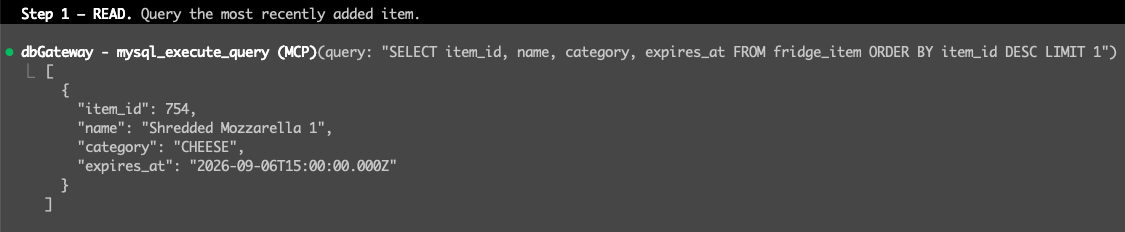

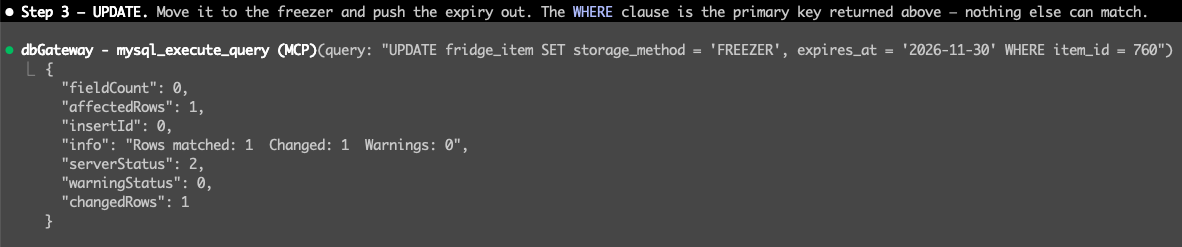
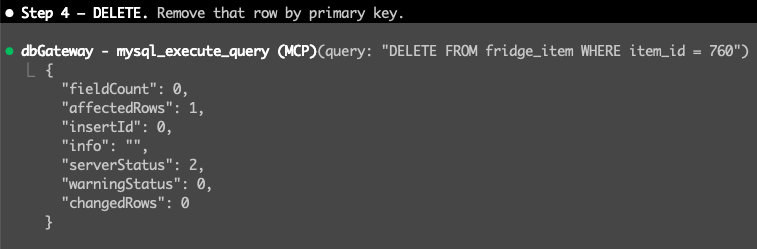
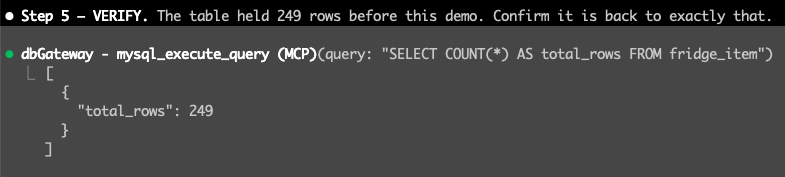
Point the same server at production with READ_ONLY=true and steps 2 through 4 simply do not exist — the write tools are never registered, so the agent cannot see them to call them.
Quick Start
Requires Node.js 18+. Register it with your MCP client — no install step:
{
  "mcpServers": {
    "db-gateway": {
      "command": "npx",
      "args": ["-y", "db-gateway"],
      "env": {
        "DBS": "mysql,redis",
        "MYSQL": "mysql://<user>:<password>@<host>:3306/<database>?alias=dev&default=true",
        "REDIS": "redis://:@<host>:6379/0?alias=dev&default=true"
      }
    }
  }
}
DBS decides which engines are enabled — only those tools get registered.
Connection strings
One string per engine. Semicolons separate multiple instances.
| Variable | Format |
|---|---|
MYSQL | mysql://<user>:<password>@<host>:<port>/<db>?alias=name |
POSTGRESQL | postgresql://<user>:<password>@<host>:<port>/<db>?alias=name&ssl=true |
REDIS | redis://:<password>@<host>:<port>/<db-index>?alias=name |
MONGODB | mongodb://<user>:<password>@<host>:<port>/<db>?alias=name |
REDSHIFT | redshift://<user>:<password>@<host>:<port>/<db>?alias=name&ssl=true |
ELASTICSEARCH | elasticsearch://<user>:<password>@<host>:<port>?alias=name, or http(s)://<host>:<port>?alias=name |
KAFKA | kafka://<user>:<password>@<broker>:<port>,<broker2>:<port>?alias=name&mechanism=plain |
aliasis required. It is how tools address a specific instance — omit it and that engine fails to connect.
Several instances of the same engine — separate their connection strings with a semicolon. The agent picks one by passing an alias argument to any tool; default=true marks the one used when no alias is given:
MYSQL="mysql://<user>:<password>@<dev-host>:3306/<db>?alias=dev&default=true;mysql://<user>:<password>@<prod-host>:3306/<db>?alias=prod"
DynamoDB is the exception — it takes DYNAMODB_REGION, DYNAMODB_ACCESS_KEY_ID, and DYNAMODB_SECRET_ACCESS_KEY instead. See .env.example for every option.
Read-Only Mode
READ_ONLY=true hides write tools from the tool list entirely and restricts *_execute_query to SELECT-style statements.
Register production as a second MCP server with this flag on. The agent then cannot modify production data — the write tools do not exist as far as it can see.
"db-gateway-prod": {
  "command": "npx",
  "args": ["-y", "db-gateway"],
  "env": { "READ_ONLY": "true", "DBS": "mysql", "MYSQL": "..." }
}
Documentation
- Tool Reference — all 145+ tools, by engine
- Connection Management — pooling, health checks, and why
connectionLimitmultiplies per session - Deployment — SSE mode, Nginx, PM2, sharing one gateway across a team
License
MIT
Reviews
No reviews yet
Be the first to review this server!
More Developer Tools MCP Servers
Rea
Freeby Morluto · Developer Tools
Reverse engineer anything from your terminal or agent with one CLI and MCP server.
Paperclip
Freeby Paperclipai · Developer Tools
Trending hip-hop artist momentum scores across four cultural dimensions.
Git
Freeby Modelcontextprotocol · Developer Tools
Read, search, and manipulate Git repositories programmatically
Toleno
Freeby Toleno · Developer Tools
Toleno Network MCP Server — Manage your Toleno mining account with Claude AI using natural language.
MCP Marketplace
Freeby mcp-marketplace · Developer Tools
Search and install MCP servers from inside your AI client.
mcp-creator-python
Freeby mcp-marketplace · Developer Tools
Create, build, and publish Python MCP servers to PyPI — conversationally.