
Server data from the Official MCP Registry
Personal journal kept as Markdown files: search, On This Day, append to today, Day One import.
About
Personal journal kept as Markdown files: search, On This Day, append to today, Day One import.
Security Report
This is a local, stdio-based Markdown journal with an MCP server that exposes its operations through a thin wrapper over a core store. The code shown has no hardcoded secrets, no shell execution, and no visible data exfiltration, and the local-only auth model fits its purpose. The main concerns are an agent-accessible permanent delete tool, an unverified third-party IP geolocation call described in the README, and a small percent-decoding bug, so the score stays in the good range rather than higher. Supply chain analysis found 5 known vulnerabilities in dependencies (0 critical, 1 high severity).
12 files analyzed · 10 issues found
Security scores are indicators to help you make informed decisions, not guarantees. Always review permissions before connecting any MCP server.
Permissions Required
This plugin requests these system permissions. Most are normal for its category.
How to Install
Add this to your MCP configuration file:
{
  "mcpServers": {
    "io-github-sjh9714-journal": {
      "args": [
        "-y",
        "journal-desktop"
      ],
      "command": "npx"
    }
  }
}Documentation
View on GitHubFrom the project's GitHub README.
Journal
A journal that is just a folder of Markdown files, with an app that feels like Day One and an MCP server so your agent can read and write it.
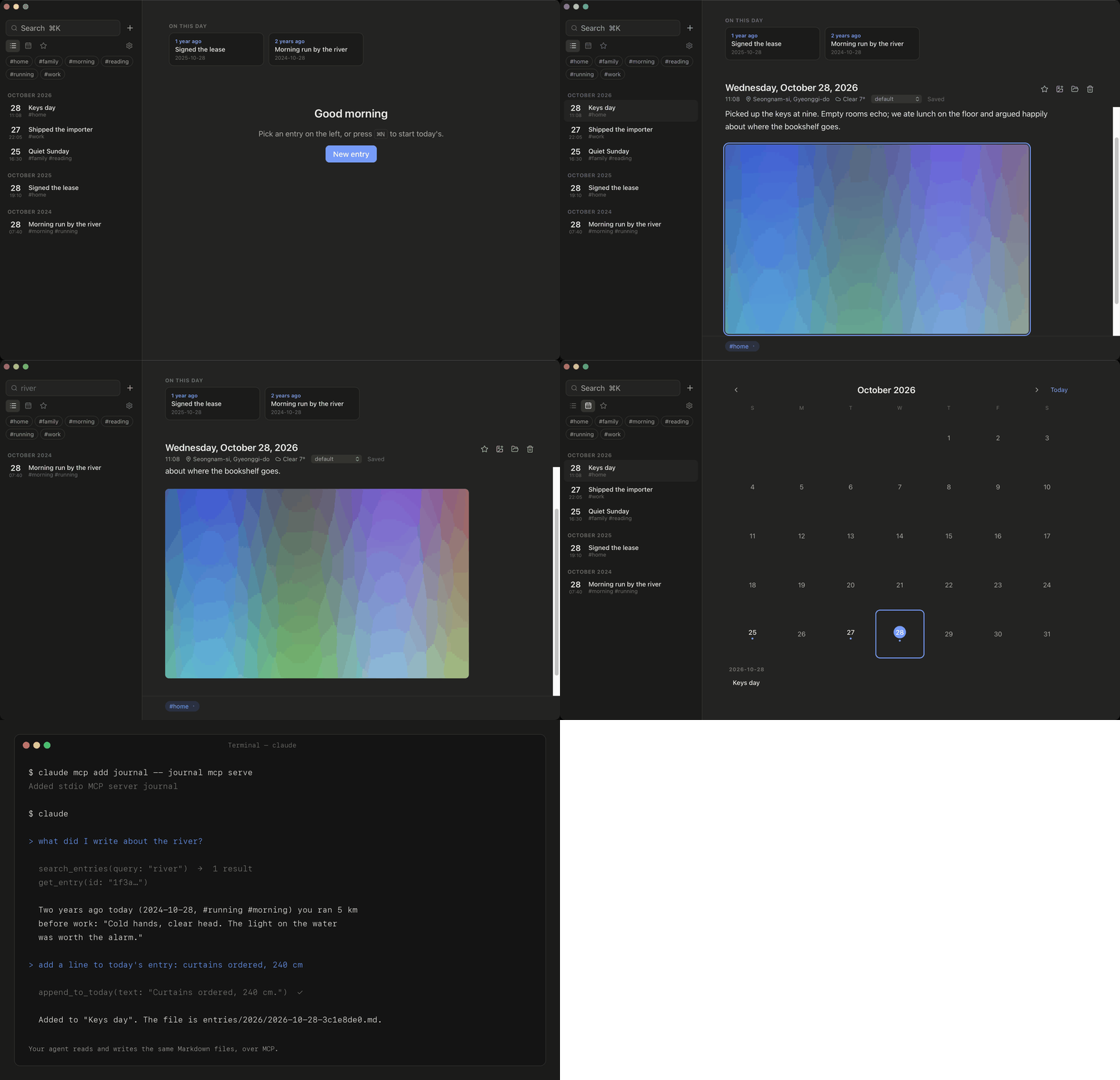
- Your files. One
.mdper entry with YAML frontmatter; photos in a content-addressed folder. Sync with iCloud Drive, Dropbox, Syncthing, git. Open with any editor. Seedocs/format.md. - Day One import. Export → JSON in Day One, import the zip. Entries, photos, tags, location, weather and stars come across. Re-importing never duplicates.
- On This Day, full-text search (FTS5, works for Korean/Japanese/CJK), tags, multiple journals, calendar view, dark mode, streak and word counts.
- Templates (
templates/*.md, three included), a daily reminder, a passcode lock, and a trash that keeps deleted entries for 30 days. - Agents.
journal mcp serveexposes 11 tools over MCP; the CLI does the same from a shell. Seedocs/mcp.md. - No account, no server, no telemetry. Optional location/weather uses the OS location service when available, otherwise a city-level guess from your network connection (ipapi.co), then Open-Meteo (keyless). One toggle turns it off.
Install
Desktop app: download the build for macOS, Windows or Linux from Releases. The macOS builds are signed and notarized.
CLI (also the MCP server):
brew install --cask sjh9714/tap/journal   # macOS; or grab a binary from Releases
journal init                       # creates ~/Journal (or follows the desktop app's folder)
journal add "First entry" -t life
journal list
journal search first
journal on-this-day
journal add --template gratitude   # see `journal templates`
journal delete <id>                # to the trash; `journal trash restore <id>` undoes it
journal stats
Let your agent in
claude mcp add journal -- journal mcp serve
Claude Desktop: download journal-0.1.0.mcpb from Releases and open it.
Then: "add a line to today's journal about the deploy", "what did I write
about the move last year?", "summarise my week". --read-only if you only
want it to read.
Import from Day One
Day One → Export → JSON. Then in the app: Settings → Import Day One export, or:
journal import dayone ~/Downloads/Export.zip
On your phone
There is no mobile app yet. Because entries are plain Markdown files, keep
the journal folder in iCloud Drive (or Dropbox, Syncthing) and open it with
any Markdown editor on the phone. On iPhone, Obsidian
(free) works well: create a vault, choose "Existing folder", pick the journal
folder in iCloud Drive, and new entries follow the format in
docs/format.md. iA Writer and 1Writer also open the
folder directly. The desktop app picks the edits up the next time it is
focused.
Build from source
cargo test --workspace
cd apps/desktop && npm install && npm run tauri build
Status
Desktop app (macOS, Windows, Linux), CLI, MCP, Day One import, templates, reminder, lock, trash. Not yet: mobile, built-in sync service, PDF export, encryption at rest, edit history (keep the folder in git for that).
MIT. "Day One" is a trademark of Automattic; this project only reads its export format.
Reviews
No reviews yet
Be the first to review this server!
More Developer Tools MCP Servers
Rea
Freeby Morluto · Developer Tools
Reverse engineer anything from your terminal or agent with one CLI and MCP server.
Paperclip
Freeby Paperclipai · Developer Tools
Trending hip-hop artist momentum scores across four cultural dimensions.
Toleno
Freeby Toleno · Developer Tools
Toleno Network MCP Server — Manage your Toleno mining account with Claude AI using natural language.
MCP Marketplace
Freeby mcp-marketplace · Developer Tools
Search and install MCP servers from inside your AI client.
mcp-creator-python
Freeby mcp-marketplace · Developer Tools
Create, build, and publish Python MCP servers to PyPI — conversationally.
by Lharries · Communication
Read, search, and send WhatsApp messages through your AI assistant