
Server data from the Official MCP Registry
Deterministic Minecraft pixel-art engine: textures, animation sheets, and pack validation.
About
Deterministic Minecraft pixel-art engine: textures, animation sheets, and pack validation.
Security Report
Valid MCP server (1 strong, 1 medium validity signals). No known CVEs in dependencies. Package registry verified. Imported from the Official MCP Registry. Trust signals: 3 highly-trusted packages.
4 files analyzed · 1 issue found
Security scores are indicators to help you make informed decisions, not guarantees. Always review permissions before connecting any MCP server.
Permissions Required
This plugin requests these system permissions. Most are normal for its category.
How to Install
Add this to your MCP configuration file:
{
  "mcpServers": {
    "io-github-smile-minecraft-mc-asset": {
      "args": [
        "-y",
        "mc-asset"
      ],
      "command": "npx"
    }
  }
}Documentation
View on GitHubFrom the project's GitHub README.
mc-asset



A pixel-native 2D asset engine and deterministic CLI/MCP toolchain for Minecraft Java Edition resource packs, built for human creators and AI coding agents.
Language models can't place pixels by eye, so mc-asset turns texture work into text and commands. Draw a sprite as a character grid, pixelize reference art, generate tiling textures, pack animation sheets, and validate a whole resource pack, from a shell or over MCP. The same input and seed always produce the same bytes.

Six 16×16 items, each written as a text grid and rendered by mc-asset render (shown ×6), drawn to the vanilla style rules in the minecraft-pixel-art skill. The grids are in docs/assets/showcase/items/.
Contents
- Highlights
- Showcase
- Installation
- For AI agents
- Quickstart
- Practical Recipes
- MCP Server
- Command Reference
- Batch Operations (
--operations) - Architecture & Reliability Guarantees
- Development
- License
Highlights
- Text in, texture out. Sprites are character grids (
.grid) or editable multi-layer sources (.mcpx) that build to PNG. Seedocs/mcpx-format.md. - Reproducible bytes. No unseeded randomness and integer-only color blending, so PNG and
.mcpxoutput is identical run to run and between Bun and Node. - One engine, two front ends. The CLI and the stdio MCP server call the same core, so an agent gets exactly what a shell script gets.
- Output you can parse.
--jsonreturns one{ success, result, error }envelope with a stable error code, and logs never mix into data on stdout. - No surprise writes. Every output path is explicit, existing files need
--force, and each file lands through a temp file and an atomic rename.
Showcase
Every image below is produced by mc-asset itself, with fixed seeds for the procedural sources, so the whole set is reproducible. The commands live in docs/assets/showcase/README.md.
| Pixelize | Quantize |
|---|---|
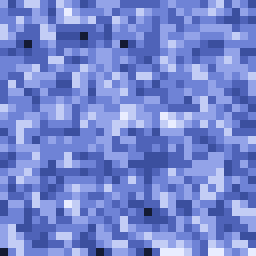 → → 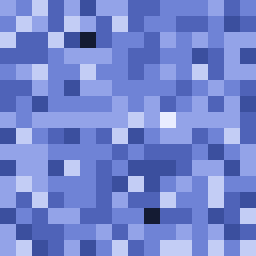 |  → →  |
| A detailed reference image (128px, shown ×2) reduced to 16px (shown ×16): the grain coarsens and shapes snap to a tidy pixel grid. | A 64-color gradient reduced to 8 colors (both ×4): the color count drops and the result settles into clear steps. |
Material variants — the sword from the top of this page fanned out into all seven built-in materials (copper, crystal, gold, iron, oxidized_copper, stone, wood, shown ×5). Its palette gives each color a role, so the blade and guard take the new ramp while the darkest outline, the white glint, the wooden grip, and the guard's gem keep their colors:

Procedural patterns — every generate pattern as a 16px swatch from a fixed seed (shown ×4):
noise | clustered-noise | stripes | checker | gradient |
|---|---|---|---|---|
 |  |  |  |  |
brick | spots | veins | cracks | grain |
 |  |  |  |  |
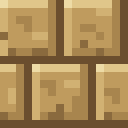
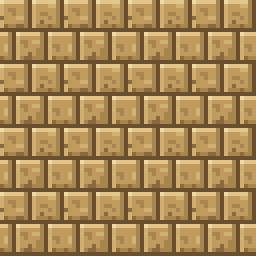
Seamless tiling — a 16px brick block face (left, ×8) and a 4×4 wall of it (right, ×4); the mortar lines continue across every edge:
Animation sheet — four frames of a glowing ore block packed into one vertical strip (×4), the layout Minecraft reads with an .mcmeta animation:

Installation
Via npm (recommended)
Run the server straight from the registry — no local install needed:
npx -y mc-asset mcp
Install the CLI globally to get the mc-asset command on your PATH:
npm install -g mc-asset
mc-asset --version
Via Homebrew (macOS / Linux)
brew tap smile-minecraft/tap
brew install smile-minecraft/tap/mc-asset
mc-asset --version
Via Bun or Node.js (From Source)
git clone https://github.com/smile-minecraft/mc-asset.git
cd mc-asset
bun install --frozen-lockfile
bun run build
./bin/mc-asset.js --version
Prerequisites: tested with Node.js 22 and Bun 1.3. bun run build needs Bun and ./bin/mc-asset.js needs Node.js; with Bun alone, run bun ./bin/mc-asset.js.
For AI agents
llms.txt— a compact index of the repository for agents.llms-full.txt— the same material as a single file: install, the twenty-one MCP tools, batch operations, the error model, and the limits.docs/cli-surface.md— the frozen CLI commands, the batch operations specification, and the exit-code registry.docs/mcpx-format.md— the editable multi-layer.mcpxand.gridgrammar and specification.docs/mcp-guide.md— registration, one verbatim capture per MCP tool, and the error model.docs/mcp-surface.md— the frozen MCP surface: tool names, inputs, and the read/write contract.AGENTS.md— the rules for changing this repository.
Agent skills
The repository ships two Agent Skills in skills/, installable with the skills CLI:
npx skills add smile-minecraft/mc-asset
mc-asset— the draw → render → preview → measure → validate loop with this tool, the CLI/MCP command map, and how palette roles drive recoloring.minecraft-pixel-art— the vanilla style rules for items, blocks, GUI sprites, and animations: palettes and hue-shifted ramps, material outlines, top-left light, tiling, and an anti-pattern review checklist.
Add --skill mc-asset or --skill minecraft-pixel-art to install only one.
Quickstart
From a Text Grid to a Validated Texture
Draw a 16×16 gem as a character grid, one character per pixel:
mkdir -p /tmp/mc-asset-demo
cat << 'EOF' > /tmp/mc-asset-demo/gem.grid
[palette]
. = transparent
o = #0E1846FF
s = #1E3A8CFF
D = #2448A8FF
m = #3569D0FF
l = #5A92EEFF
t = #7FB2F6FF
T = #A9D2FFFF
W = #FFFFFFFF

[grid]
................
................
......sssss.....
.....sTTTTTo....
....sTTWWTTto...
...sTTWWTTttto..
..slllTTTtttmmo.
..slllllmmmmmDo.
..slllllmmmmmDo.
..slllllmmmmDDo.
...olllmmmmDDo..
....ollmmmDDo...
.....olmmmDo....
......ommDo.....
.......ooo......
................
EOF
Render the grid into a PNG texture and save the editable .mcpx source:
mc-asset render /tmp/mc-asset-demo/gem.grid \
  --output /tmp/mc-asset-demo/gem.png \
  --source /tmp/mc-asset-demo/gem.mcpx
# ok render profile=generic applied=0 output=/tmp/mc-asset-demo/gem.png source=/tmp/mc-asset-demo/gem.mcpx
The rendered gem.png, shown ×8:

Check its colors and alpha:
mc-asset analyze /tmp/mc-asset-demo/gem.png
# dimensions: 16x16
# colors: 9
# alpha: predicted cutout (opaque=119 transparent=137 partial=0)
# dominant: #00000000 x137 (0.5352), #3569D0FF x28 (0.1094), #5A92EEFF x24 (0.0938), #0E1846FF x18 (0.0703), #A9D2FFFF x16 (0.0625), #1E3A8CFF x12 (0.0469), #2448A8FF x10 (0.0391), #7FB2F6FF x7 (0.0273)
# profile: predicted profile generic has no Minecraft-specific restrictions.
# palette: colorCount=9 alphaLevels=2 transparent=137 partial=0
# pixel-art: 16x16 aspect=1:1 isolated=0 semiTransparent=0 tileFriendly=true
# recommended: quantize.colors=16 cleanup=none resize=nearest
Validate it as a Minecraft item texture:
mc-asset validate /tmp/mc-asset-demo/gem.png --profile minecraft:item
# verdict: pass
# dimensions: 16x16
# colors: 9
# alpha: predicted cutout (opaque=119 transparent=137 partial=0)
# profile: predicted profile minecraft:item prefers the items atlas without mipmaps.
Practical Recipes
Recipe 1: Downsampling Reference Art (pixelize)
Turn a high-resolution reference image into a 16×16 item texture. The same image and preset always give the same pixels:
mc-asset pixelize reference.png \
  --size 16 \
  --preset item \
  --profile minecraft:item \
  --output item_texture.png
--preset itemsets a 16-color budget and turns on the crop, background, subject, edge, and cluster stages.- The other presets are
block,gui,particle, andgeneric.
Recipe 2: Procedural Textures & Seam Tiling (generate & tile)
Generate a stone texture from a fixed seed, then check whether it tiles:
mc-asset generate noise \
  --size 16 \
  --palette stone \
  --seed 42 \
  --output stone.png

# Seam scores: horizontal, vertical, corner (lower is smoother)
mc-asset tile stone.png
# ok tile profile=generic seam=h:0.065196 v:0.096051 c:0.003604 repeat=0.908038

# Match the opposite edges and preview a 4x4 repeat
mc-asset tile stone.png \
  --edge-match both \
  --preview 4x4 \
  --output stone_preview.png
Recipe 3: Palette Quantization & Artifact Cleanup (quantize & cleanup)
Cut a sprite down to 8 colors, then remove the stray pixels left behind:
mc-asset quantize sprite.png --colors 8 --output quantized.png

mc-asset cleanup quantized.png \
  --fix isolated,noise \
  --allow-render-pass-change \
  --output clean.png
These fix classes can change alpha, and with it the render pass the texture needs, so cleanup refuses them without --allow-render-pass-change.
Recipe 4: Material Variants (variant & recolor)
Fan one source out into several material tiers, or recolor it to a single material:
mc-asset variant sword.mcpx \
  --materials iron,copper,gold \
  --output-dir ./dist_variants \
  --mkdir
# Writes sword_iron.png, sword_iron.mcpx, sword_copper.png, etc.

mc-asset recolor sword.mcpx --material gold --output sword_gold.png
Recipe 5: Animated Sprite Sheets (animate)
Pack a folder of frames into a vertical sheet, then check it against its .mcmeta:
mc-asset animate pack \
  --frames-dir ./textures/fire_frames \
  --layout vertical \
  --output ./textures/fire.png

mc-asset validate ./textures/fire.png --mcmeta ./textures/fire.png.mcmeta
Recipe 6: Full Resource Pack Validation (validate-pack)
Scan a whole resource pack for missing textures, bad namespaces, orphaned textures, broken model references, and reference cycles. --minecraft-version picks the pack format to check against:
mc-asset validate-pack ./MyResourcePack \
  --minecraft-version 26.3 \
  --json
Recipe 7: Batch Edits with Visual Feedback (build & apply_asset_operations)
Edit the Quickstart gem in one batch: a 4×4 gold square framed by a 6×6 black outline. The CLI applies the batch and writes a PNG:
cat << 'EOF' > /tmp/mc-asset-demo/ops.json
[
  { "type": "fillRect", "rect": { "x": 6, "y": 6, "width": 4, "height": 4 }, "color": "#FFD700FF" },
  { "type": "drawRect", "rect": { "x": 5, "y": 5, "width": 6, "height": 6 }, "color": "#000000FF" }
]
EOF

mc-asset build /tmp/mc-asset-demo/gem.mcpx \
  --operations /tmp/mc-asset-demo/ops.json \
  --output /tmp/mc-asset-demo/gem_modified.png
# ok build profile=generic applied=2 output=/tmp/mc-asset-demo/gem_modified.png
Before and after the batch (both ×8):
→ 
Over MCP, apply_asset_operations runs the same batch and can send back a picture of what changed:
{
  "sourcePath": "/tmp/mc-asset-demo/gem.mcpx",
  "operations": [
    { "type": "fillRect", "rect": { "x": 6, "y": 6, "width": 4, "height": 4 }, "color": "#FFD700FF" },
    { "type": "drawRect", "rect": { "x": 5, "y": 5, "width": 6, "height": 6 }, "color": "#000000FF" }
  ],
  "outputPngPath": "/tmp/mc-asset-demo/gem_feedback.png",
  "feedback": { "image": "changed", "scale": 8, "diff": "summary" }
}
With feedback, the result keeps its usual fields and adds a PNG image block cropped to the changed area and upscaled by scale (1–16), plus a diff summary (raw, composited, structural, outsideSelectionUnchanged). An edit with no visible change returns noVisibleChange instead of an image. The agent sees its edit without pulling the whole canvas. The output path differs from the CLI run because MCP tools never overwrite an existing file.
Recipe 8: Nine-Slice GUI Scaling (gui-scale)
Resize a GUI frame without smearing its border. With nine_slice, the corners copy 1:1 and the edges and center tile (or stretch, with stretch_inner: true). The 16×16 dialog.png declares a 4px border in dialog.png.mcmeta:
{ "gui": { "scaling": { "type": "nine_slice", "width": 16, "height": 16, "border": 4 } } }
mc-asset gui-scale ./textures/gui/dialog.png \
  --mcmeta ./textures/gui/dialog.png.mcmeta \
  --size 48x32 \
  --output ./textures/gui/dialog_large.png
# ok gui-scale profile=generic size=48x32 scaling=nine_slice output=./textures/gui/dialog_large.png
gui-scale never picks up a sibling .mcmeta on its own; without --mcmeta it stretches the whole sprite.
| Source, 16×16 | nine_slice, 48×32 | No --mcmeta (stretch), 48×32 |
|---|---|---|
 |  |  |
All three are shown ×4. With the mcmeta the cut corners and the 2px bevels copy 1:1 and keep their width; the plain stretch thickens the bevels unevenly and smears the corners.
MCP Server
mc-asset mcp starts a stdio MCP server on the same core as the CLI, so a tool call and the matching command return the same result. It exposes 21 tools.
Exposed MCP Tools
| Tool | Capability |
|---|---|
analyze_asset | Read-only inspection: dimensions, palette distribution, alpha classification, pixel-art heuristics. |
pixelize_asset | Converts raster inputs (PNG, JPEG, WebP) into pixel art; returns PNG bytes or .mcpx source. |
render_pixel_asset | Compiles inline ASCII grid strings or .grid files with optional batch operations. |
apply_asset_operations | Applies atomic batch pixel/layer/region mutations to .mcpx text. |
recolor_asset | Remaps texture palettes to built-in material ramps (iron, gold, stone, etc.). |
create_variants | Fans out a source asset into per-material variants in an output directory. |
validate_asset | Checks single texture and .mcmeta conformance against Minecraft requirements. |
import_asset | Decodes raster inputs (PNG, JPEG, WebP) into the pixel canvas with an optional batch. |
build_asset | Builds .mcpx sources into PNG bytes or re-serialized source with an optional batch. |
transform_asset | Applies one geometry operation (flip, rotate, crop, pad, resize, translate) to a raster or .mcpx input. |
scale_gui_asset | Scales a GUI sprite with the mcmeta stretch/tile/nine_slice mapping; PNG only. |
quantize_asset | Reduces distinct colors to a target count. |
cleanup_asset | Detects or fixes pixel defects (isolated, noise, cluster, fringe, outlier, hole, aa). |
palette_asset | Read-only palette extract / inspect reports (unique colors, distribution, roles, contrast). |
material_asset | Read-only list / show reports over the built-in material set. |
tile_asset | Seam, edge-repetition, and brightness analysis with an optional tiled preview PNG. |
generate_asset | Deterministic procedural texture generation (pattern, size, palette, seed). |
preview_asset | ascii / palette-map reports, scale and nine-slice guide PNGs. |
animate_asset | Animation pack / unpack / reorder / resize / validate / preview over frame sets. |
validate_pack_asset | Read-only whole-pack scan: namespaces, models, textures, atlases, version targeting. |
inspect_asset | Read-only structure (layers, regions, color usage, overlaps) or view (composited PNG image block plus metadata); takes inputPath. |
inspect_asset has two modes: structure reports layers, regions, color usage, and overlaps; view returns the composited canvas as a PNG image block, with optional crop and scale (1–16). A view wider than 1024px is refused with a crop hint instead of being downscaled. apply_asset_operations takes an optional feedback object (Recipe 7); without it the result is unchanged. docs/mcp-guide.md has one captured call per tool.
Configuration
Every client runs the same stdio command, npx -y mc-asset mcp. Config file locations change between client versions, so check the client's own docs if one below has moved.
Claude Code
claude mcp add mc-asset -- npx -y mc-asset mcp
Claude Desktop
Add to ~/Library/Application Support/Claude/claude_desktop_config.json:
{
  "mcpServers": {
    "mc-asset": {
      "command": "npx",
      "args": ["-y", "mc-asset", "mcp"]
    }
  }
}
Cursor
Add to .cursor/mcp.json:
{
  "mcpServers": {
    "mc-asset": {
      "command": "npx",
      "args": ["-y", "mc-asset", "mcp"]
    }
  }
}
OpenCode
Add to opencode.json or opencode.jsonc:
{
  "mcp": {
    "mc-asset": {
      "type": "local",
      "command": ["npx", "-y", "mc-asset", "mcp"],
      "enabled": true
    }
  }
}
Command Reference
| Category | Command | Description |
|---|---|---|
| Intake & Build | import <image> | Decodes PNG, JPEG, or WebP to PNG and/or .mcpx. |
render <grid> | Compiles ASCII grid (.grid) to PNG and/or .mcpx. | |
build [source] | Builds .mcpx source file or stdin (--stdin) to PNG. | |
| Transform & Geometry | transform <input> | Spatial operations: --flip, --rotate, --crop, --pad, --resize, --translate. |
| Color & Cleanup | quantize <input> | Color reduction to target count (--colors <N>). |
cleanup <input> | Artifact removal (--fix isolated,noise,outlier). | |
palette extract | Extracts palette from image. | |
palette inspect | Detailed palette analysis and role mapping. | |
material list | Lists built-in Minecraft materials. | |
material show | Shows color ramps for a material. | |
recolor <source> | Remaps .mcpx colors using a material ramp. | |
variant <source> | Generates multiple material variants into --output-dir. | |
| Generation & Tiles | generate <pattern> | Deterministic procedural texture generation (--seed <int>). |
tile <input> | Seam measurement and automatic tile correction. | |
preview <input> | Visual previews: --ascii, --palette-map, --scale <N>, --nine-slice. | |
gui-scale <input> | Scales a GUI sprite to --size <N|WxH> with the mcmeta stretch/tile/nine_slice mapping. | |
| Animation | animate pack | Packs frame directory into sprite sheet. |
animate unpack | Unpacks sprite sheet into frame directory. | |
animate reorder | Re-sequences animation frames. | |
animate resize | Rescales animation frames. | |
animate validate | Validates frame counts and layout against .mcmeta. | |
animate preview | ASCII or diagnostic preview of animation sequence. | |
| Validation | analyze <image> | Read-only metric analysis (colors, alpha, dimensions). |
inspect <input> | Read-only structure report or composited view (--mode structure|view, --crop, --scale). | |
validate <asset> | Validates single asset texture and optional .mcmeta. | |
validate-pack <path> | Validates entire resource pack root directory. | |
| Agent Interface | mcp | Starts the stdio MCP server. |
Batch Operations (--operations)
The import, render, and build commands support batch pixel edits via --operations <path> or --operations - (stdin).
[
  { "type": "setPixel", "x": 0, "y": 0, "color": "#FF0000FF" },
  { "type": "drawLine", "from": [0, 0], "to": [15, 15], "color": "#00FF00FF" },
  { "type": "fillRect", "rect": { "x": 2, "y": 2, "width": 4, "height": 4 }, "color": "#FFFF00FF" },
  { "type": "floodFill", "x": 5, "y": 5, "color": "#0000FFFF" },
  { "type": "clearPixel", "x": 0, "y": 0 }
]
- Atomicity: Execution is all-or-nothing. If an operation fails (e.g. out of bounds), all preceding operations in the batch roll back.
- Color Values: Accepts
transparent,#RRGGBB, or#RRGGBBAA. - Vocabulary: 25 typed variants, including 9 pixel operations (
setPixel,clearPixel,drawLine,drawRect,fillRect,floodFill,ellipse,polygonFill,strokeMask) plus layer, region,stampRect, andregionFromSelectionoperations. The full per-type table lives indocs/cli-surface.md. - Shapes:
ellipsefills or outlines the ellipse inside arect;polygonFilltakes up to 4096 integer[x, y]points (more isRESOURCE_LIMIT_EXCEEDED; a self-intersecting ring isSELF_INTERSECTING_POLYGON; no holes);strokeMaskoutlines asourceselection on one layer. - Selection: Pixel operations accept an optional
selectionexpression; an empty match refuses the write withEMPTY_SELECTIONand rolls the batch back.
Architecture & Reliability Guarantees
                  ┌─────────────────────────────────┐
                  │          mc-asset Core          │
                  │  PixelCanvas • IO • Algorithms  │
                  └───────────────┬─────────────────┘
                                  │
                 ┌────────────────┴────────────────┐
                 │                                 │
     ┌───────────▼───────────┐         ┌───────────▼───────────┐
     │     CLI Interface     │         │   Native MCP Server   │
     │  (Terminal & Scripts) │         │  (Stdio Agent Bridge) │
     └───────────────────────┘         └───────────────────────┘
Determinism Model
- Byte-Identical PNG Encoding: Uses fixed deflate levels and filter strategies (
src/io/png.ts) with pure integer color blending. Output files do not embed timestamps or host metadata. - Seed-Driven PRNG: Procedural generation relies exclusively on an integer xorshift32 PRNG initialized via
--seed. - Cross-Runtime Consistency: Output bytes produced under Bun match bytes produced under Node.js byte for byte for the commands covered by the
scripts/compare-runtime.mjsmatrix.
File & Channel Safety
- Atomic Writes: Every output file is written to a unique temporary file (
.tmp-<pid>-<counter>-<randomhex>-<original name>) in the target directory and committed via atomic rename. - Collision Protection: Paths are resolved to absolute normalized paths folded with Unicode NFC and case-folding. Aliasing the input without
--in-placeor defining duplicate output targets fails before any bytes land on disk. - Channel Isolation:
- Without
--stdout: Human logs route to stdout. With--json, a structured{ success, result, error }envelope routes to stdout and logs route to stderr. - With
--stdout: Raw artifact bytes exclusively own stdout. Envelope and logs route to stderr.
- Without
Standardized Exit Codes
| Exit Code | Category | Meaning |
|---|---|---|
| 0 | Success | Operation completed successfully. |
| 1 | Internal Error | Unhandled engine failure (INTERNAL_ERROR). |
| 2 | Invalid Invocation | Syntax error, conflicting options, missing parameters (INVALID_ARGUMENT). |
| 3 | Validation Failure | Engine succeeded, but asset or pack failed validation (VALIDATION_FAILED). |
| 4 | Filesystem Error | Output exists without --force, missing directory without --mkdir, or an unreadable input. |
| 5 | Unsupported / Limit | Unsupported file type, or a size or resource limit exceeded. |
Development
# Run test suite
bun test

# Run TypeScript type check
bun run test:typecheck

# Run linter
bun run lint

# Build standalone distribution bundles
bun run build

# Verify cross-runtime byte parity (Bun vs Node)
node scripts/compare-runtime.mjs

# Check doc links, anchors, and stray release versions
bun run check:docs
License
MIT © 2026 Smile Minecraft Project
Reviews
No reviews yet
Be the first to review this server!
More Developer Tools MCP Servers
Git
Freeby Modelcontextprotocol · Developer Tools
Read, search, and manipulate Git repositories programmatically
Fetch
Freeby Modelcontextprotocol · Developer Tools
Web content fetching and conversion for efficient LLM usage
Paperclip
Freeby Paperclipai · Developer Tools
Trending hip-hop artist momentum scores across four cultural dimensions.
Toleno
Freeby Toleno · Developer Tools
Toleno Network MCP Server — Manage your Toleno mining account with Claude AI using natural language.
mcp-creator-python
Freeby mcp-marketplace · Developer Tools
Create, build, and publish Python MCP servers to PyPI — conversationally.
MCP Marketplace
Freeby mcp-marketplace · Developer Tools
Search and install MCP servers from inside your AI client.