
Server data from the Official MCP Registry
USB HID mouse control and voice dictation for Windows x64. Requires compatible uMouse hardware.
About
USB HID mouse control and voice dictation for Windows x64. Requires compatible uMouse hardware.
Security Report
The visible code shows no malicious patterns, and the Rust voice UI validates IPC input well. The score is held down by sensitive capabilities: microphone audio is streamed to a third-party cloud ASR by default in the legacy ZIP, a trial cloud credential is shipped in the package, and the input-status tool reads live keyboard state. Much of the server (tool handlers, the sdk-bridge, the native host, and the typer) is truncated, so its auth and input handling could not be fully verified. Supply chain analysis found 5 known vulnerabilities in dependencies (0 critical, 3 high severity).
7 files analyzed · 12 issues found
Security scores are indicators to help you make informed decisions, not guarantees. Always review permissions before connecting any MCP server.
Permissions Required
This plugin requests these system permissions. Most are normal for its category.
How to Install
Add this to your MCP configuration file:
{
  "mcpServers": {
    "io-github-sonicloudtech-mouse-mcp": {
      "args": [
        "-y",
        "umouse-mcp"
      ],
      "command": "npx"
    }
  }
}Documentation
View on GitHubFrom the project's GitHub README.
uMouse MCP — Hardware Mouse Control for AI Agents
English | 简体中文





Give AI agents a real hardware mouse. uMouse MCP is a Model Context Protocol (MCP) server for USB HID mouse control and voice dictation on Windows. Mouse movement, clicks, scrolling and dragging use a compatible uMouse device; voice input supports pluggable speech recognition providers.
Requires compatible uMouse hardware and firmware, Windows x64, and a separately installed Node.js runtime (use Node.js 22 x64). An ordinary USB mouse is not sufficient. The MIT license covers the server code; native SDK binaries have separate terms. See License.
Download · Quick start · Reference demos · Documentation · Get hardware / support · uMouse SDK
Download
| Package | Download | Requirements |
|---|---|---|
| MCPB · Windows x64 · v0.1.1 | Download MCPB · Release notes and SHA-256 | MCPB-compatible client; compatible uMouse hardware; x64 Node.js 22+ |
| Windows x64 · v0.1.0 | Download ZIP · Release notes and SHA-256 | Compatible uMouse device and firmware; Node.js installed separately |
All releases · Gitee release mirror
MCPB installation: import the .mcpb into a client that supports MCPB Node extensions. Version 0.1.1 wraps the legacy 0.1.0 runtime, includes no cloud credentials, and defaults speech recognition to disabled; windows-speech is the optional local provider. Data defaults to ~/.umouse-mcp-mcpb. See the bilingual MCPB guide. Published in the official MCP Registry as io.github.SonicloudTech/mouse-mcp; metadata in server.json, publication and validation.
The ZIP includes production Node dependencies, native SDK DLLs, the voice preview UI and VC runtime libraries. No npm install or compilation is required to use the release; Node.js itself is not bundled.
Release and source are different installation paths: the v0.1.0 installer registers the legacy stdio entry, mcp/dist/index.js. The shared-v2 tools, native host and acceptance lab described below belong to the source implementation. This ZIP is not a complete shared-v2 bundle: it does not contain that native host or the acceptance lab. Use the installed server's tool list and the README shipped inside the ZIP for release-specific behavior.
Quick start
The following steps use the original ZIP. For MCPB, use the import instructions above, then perform the status/device checks in step 5.
- Install Node.js 22 x64 and confirm
node --versionworks. Connect a compatible uMouse USB receiver/device and power on the mouse. For a device or firmware compatibility check, see Hardware & support. - Download the ZIP above and extract it. Open the
umouse-mcp-os-win-x64folder; keep it in a permanent location because client configuration points to this folder. - Double-click
install-agents.cmdto register ZCode at user scope, or run one command for your chosen client from the extracted folder:
| Client | PowerShell command |
|---|---|
| ZCode | node mcp/scripts/install-agents.mjs zcode |
| Claude Desktop | node mcp/scripts/install-agents.mjs claude |
| Cursor | node mcp/scripts/install-agents.mjs cursor |
The installer adds or updates the umouse entry in the selected client's configuration. It also copies the bundled trial ASR configuration into the local data directory if no configuration already exists. Replace trial credentials with your own for production use.
- Open a new ZCode session, fully quit and reopen Claude Desktop, or reload the Cursor window, as appropriate.
- Ask your agent to call
umouse_status,umouse_get_capabilities, andumouse_list_devices. Check SDK health, the device list, and the reported capabilities. A returnedsdkVersiononly confirms SDK access; it does not prove that hardware control works. Confirm the visible result of any requested mouse action before relying on it.
For a client that accepts the mcpServers JSON format, add this entry manually, replacing the path with your extracted folder. Other clients may require a different configuration format.
{
  "mcpServers": {
    "umouse": {
      "command": "node",
      "args": ["C:\\path\\to\\umouse-mcp-os-win-x64\\mcp\\dist\\index.js"]
    }
  }
}
Manual configuration does not run the installer's ASR setup. Configure a speech provider separately if you need voice dictation; see Voice dictation.
For source development, npm ci, npm run build, and npm test install dependencies, build TypeScript, and run the default tests. They do not produce a complete shared-v2 native bundle. A complete public shared-v2 packaging workflow is not yet provided. The shared-v2 development and maintenance notes (Chinese) and native host build notes (Chinese) are references for that separate development path.
Reference demos
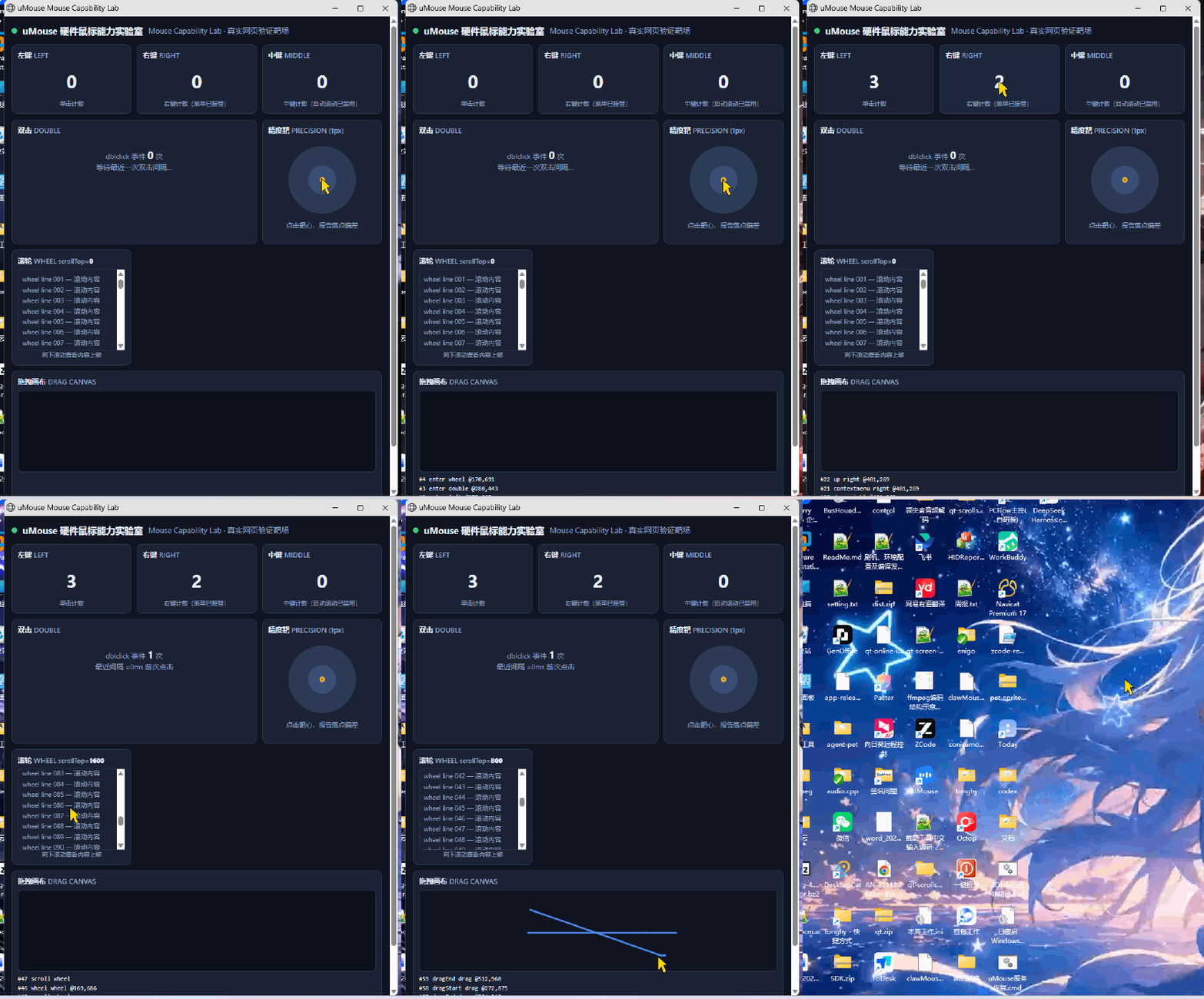
The mouse lab recording demonstrates the shared-v2 source implementation, not the legacy ZIP installation.
Hardware mouse driving a real browser lab page (gold arrow = system cursor overlaid on the recording) — counters, wheel and hit feedback all come from real browser events:
Voice typing: speak, and it lands in any window
Hold the device voice key, speak, release — the recognized text is typed into whatever window currently has focus. Both clips recorded live at 1080p:
Agent client (terminal) — spoken command typed in and executed:
mcp/acceptance/demo/voice-typing-agent.mp4
WeChat — spoken message typed into the input box and sent:
mcp/acceptance/demo/voice-typing-wechat.mp4
Shared-v2 capabilities (source implementation)
Model → MCP host → shared daemon (
:47192) → C++ native host → USB HID0xF0/0xF1→ uMouse device → Windows input pipeline
- Hardware actions:
umouse_mouse_action— move / click / scroll / drag in desktop physical-pixel coordinates, multi-monitor with negative coords, optionalprecision: standard | high. - Task exclusivity:
umouse_controlbegin → actions → end; only one task drives the mouse and keyboard at a time; dead connections are cleaned up automatically. - Read-only sensors:
umouse_input_status— cursor position, live key state, foreground window identity; read-only, never intercepts. - Voice dictation: mic capture → VAD segmentation → pluggable ASR provider → preview / final transcript; an independent lane that never preempts mouse control (see below).
- Shared daemon: one instance per machine (port 47192), shared across ZCode / Codex / Claude hosts, reclaimed when idle.
Voice dictation: pluggable ASR providers
ASR here is not a black box tied to one vendor — it is a tiny interface contract: implement begin / writePcm / finishInput / cancel and emit preview / segmentFinal / warning / terminal (exactly once), and you have a valid provider. Swapping recognition services means swapping one factory function; mcp/src/sinicloud-asr.ts is a complete reference implementation.
Provider (UMSDK_ASR_PROVIDER) | Notes |
|---|---|
sinicloud (default for the legacy ZIP/source on Windows) | Sonicloud open-platform streaming ASR: pure TypeScript, no DLL dependency; streams 16k/16bit/mono PCM, interim previews, low-balance warnings without dropping the stream |
windows-speech | Built-in Windows recognizer; offline, audio never leaves the machine |
whisper-cpp | Self-hosted whisper-cli + ggml model (paths configurable), offline CPU transcription |
http | Custom transcription endpoint: multipart WAV in, {"text"} out |
disabled | Dictation off; a missing provider degrades gracefully to asr_unavailable |
Credentials travel only through configuration and are hot-read per session — swap keys without a restart: by default a JSON file at <data-dir>/sinicloud_asr.json (appId / apiKey / apiSecret / userId / lanid / streamUrl / tokenUrl); environment variables UMSDK_ASR_APP_ID / UMSDK_ASR_API_KEY / UMSDK_ASR_API_SECRET / … override the file. Never hardcoded, never printed, never logged, never committed. The legacy v0.1.0 ZIP ships a trial credential for the open platform; replace it with your own key for production use. The v0.1.1 MCPB contains no cloud credentials and accepts only disabled (default) or windows-speech. See mcp/SHARED-V2.md for the full source provider matrix.
Shared-v2 adaptive positioning
Windows pointer ballistics ("Enhance pointer precision") make the protocol-dots → pixels gain vary with amplitude. umouse-mcp ships an 11-step ballistic gain curve: read-only seeded from local pointer settings on first use of a device, learned online frame-by-frame within [0.125, 10], decaying back to the seed after 60 s idle — no tuning when you change machines or devices; a stale seed costs 1–2 extra frames. Design and measurements: mcp/sdk-host/POSITIONING.md.
| Metric | standard | high |
|---|---|---|
| Stop tolerance | residual ≤ 4 px | residual ≤ 1 px |
| Measured (reference rig) | median 356 ms / 2 frames | max 1 px, mean 0.67 px |
| Failure mode | identical; high at worst degrades to ≤ 4 px best-effort, residuals reported as-is |
Shared-v2 reference acceptance
After preparing a complete shared-v2 build, follow the acceptance setup guide. The lab is in this repository, not the v0.1.0 ZIP.
32 cases verify effects in closed loop on a real browser page: left / right / middle click counts, double-click interval, wheel scrollTop, drag linearity, 1 px bullseye hits.
cd mcp/acceptance
$env:UMCFG = "C:\path\to\client.json"
$env:UMBUNDLE = "C:\path\to\shared-v2-bundle"
node run-matrix.mjs
# Writes acceptance-report.json; the documented reference run passed 32/32 cases.
Shared-v2 security and verification
- Locked screen / UAC / secure desktop: key actions are rejected with
button_feedback_input_desktop_unavailable— that is a safety property, not a bug. effectConfirmedis alwaysfalse: transport success ≠ application effect; the acceptance lab's page evidence is the ground truth.- ASR credentials enter only via local config file and environment variables — never committed, printed or logged;
recoverrequires a human carrying--hardware-reset-confirmed.
Documentation
| Doc | Contents |
|---|---|
| mcp/SHARED-V2.md | Shared-v2 install, upgrade, maintenance and recovery |
| mcp/acceptance/MOUSE-CAPABILITY-TESTS.md | The 32-case catalog (copy-paste MCP calls and pass criteria) |
| mcp/sdk-host/POSITIONING.md | Ballistic positioning: history, algorithm, cross-device matrix |
| mcp/README.md | Full MCP tool reference (Chinese) |
Hardware & support
Need a compatible device, evaluation unit or firmware check? Contact xu_heng_yu@sinicloud.com with your target platform, device model, firmware version and intended use case.
Maintained by SonicloudTech (Anhui SoniCloud Intelligent Technology Co., Ltd.) — AI input hardware and the speech open platform.
- Website: https://sinicloud.com/
- Speech open platform: https://open.sinicloud.com/ — powers the default ASR provider; sign up for a trial quota
- Business & technical contact: xu_heng_yu@sinicloud.com — OEM / distribution / custom firmware / co-development; include the target platform, expected volume, device model, firmware version and intended use case
Related project: uMouse SDK
Integrating smart-mouse hardware into your own application? uMouse SDK provides a C ABI for USB HID/BLE device connections, key events and audio. Start with the English SDK README, integration guide, or SDK downloads. The SDK has its own platform and licensing matrix; those platform options do not extend this MCP server beyond Windows x64. Use the native SDK DLLs bundled with each MCP release rather than substituting a standalone SDK package.
Roadmap
- Cross-machine adaptive gain curves (v0.4)
- Pluggable ASR providers: sinicloud streaming, fully configurable credentials
- Firmware-executed 1–2 count micro-correction frames
- Wheel ACK and scroll-amount closed loop
- Absolute positioning mode
License
The MCP server code is released under the MIT license. The native SDK ships as closed-source DLLs with a public header (include/umouse_sdk.h).
Reviews
No reviews yet
Be the first to review this server!
More Developer Tools MCP Servers
Rea
Freeby Morluto · Developer Tools
Reverse engineer anything from your terminal or agent with one CLI and MCP server.
Paperclip
Freeby Paperclipai · Developer Tools
Trending hip-hop artist momentum scores across four cultural dimensions.
Git
Freeby Modelcontextprotocol · Developer Tools
Read, search, and manipulate Git repositories programmatically
Fetch
Freeby Modelcontextprotocol · Developer Tools
Web content fetching and conversion for efficient LLM usage
Toleno
Freeby Toleno · Developer Tools
Toleno Network MCP Server — Manage your Toleno mining account with Claude AI using natural language.
MCP Marketplace
Freeby mcp-marketplace · Developer Tools
Search and install MCP servers from inside your AI client.