
Server data from the Official MCP Registry
Licensed soundtracks and sound effects matched to your video. Commercial use OK.
About
Licensed soundtracks and sound effects matched to your video. Commercial use OK.
Security Report
Valid MCP server (1 strong, 2 medium validity signals). No known CVEs in dependencies. Package registry verified. Imported from the Official MCP Registry.
4 files analyzed · 1 issue found
Security scores are indicators to help you make informed decisions, not guarantees. Always review permissions before connecting any MCP server.
Permissions Required
This plugin requests these system permissions. Most are normal for its category.
What You'll Need
Set these up before or after installing:
Environment variable: SONILO_API_KEY
Environment variable: SONILO_API_URL
Environment variable: SONILO_MCP_BASE_PATH
Environment variable: TIME_OUT_SECONDS
How to Install
Add this to your MCP configuration file:
{
  "mcpServers": {
    "io-github-sonilo-ai-sonilo-mcp": {
      "env": {
        "SONILO_API_KEY": "your-sonilo-api-key-here",
        "SONILO_API_URL": "your-sonilo-api-url-here",
        "TIME_OUT_SECONDS": "your-time-out-seconds-here",
        "SONILO_MCP_BASE_PATH": "your-sonilo-mcp-base-path-here"
      },
      "args": [
        "sonilo-mcp"
      ],
      "command": "uvx"
    }
  }
}Documentation
View on GitHubFrom the project's GitHub README.
Sonilo MCP Server
An MCP (Model Context Protocol) server that exposes Sonilo's licensed music and sound-effects API to MCP-compatible clients (Claude Code, Claude Desktop, Codex).
The flagship tool is video_to_music: hand it your finished video and it composes an original soundtrack matched to the cut — the music follows the pacing, emotion, and edits because the model saw them. Length matches the video automatically. Every track is licensed and safe for commercial use (terms apply). text_to_music is also available for fixed-length tracks with no video to match.
For sound design, video_to_sfx watches your video and generates matching sound effects, returned as a standalone audio file. text_to_sfx generates a standalone effect from a description.
▶ Example result — an AI-generated trailer with its soundtrack composed by video_to_music from the assembled cut. For recipes covering any AI-video pipeline (stitch → grade → add music → mux), see the Sonilo video-to-music cookbook.
Quickstart with Claude Code
Sign in once with the CLI, then add the server with no secret in the config:
npm install -g sonilo-cli && sonilo login
claude mcp add sonilo -- uvx sonilo-mcp
Or hold an API key yourself — get one from the Sonilo dashboard:
claude mcp add sonilo --env SONILO_API_KEY=sk-... -- uvx sonilo-mcp
Then start a session and ask, e.g. "Make background music that matches this video: ~/Desktop/promo.mp4."
Why Sonilo
- Video-to-music — give it a video and Sonilo composes a full-length score matched to its pacing, motion, and emotion. Transitions and beat drops align to your cut points, and the track matches the video's duration exactly — no prompts or manual syncing required.
- Text-to-music — generate tracks from a text description (genre, mood, tempo, instrumentation), at an exact duration (5–360s) or none at all, in which case Sonilo picks a length that suits the prompt.
- Video-to-SFX — Sonilo watches the video and generates sound effects for what it sees. You get the SFX as a standalone audio file. Optional
segmentslet you script effects to specific time ranges ([{start, end, prompt}]). - Text-to-SFX — generate a standalone sound effect from a description (0.5–180s), in
wav,mp3,aac, orflac. - Proofread before dubbing —
proofreadtranscribes a video and translates the transcript into editable.srtfiles, one per language plus the source-language transcript. Read and correct the wording, then hand the files todubbingassubtitlesso the dub speaks exactly the approved text — nothing is voiced until you have signed off on it. - Fully licensed, commercial-safe — music licensed via Shutterstock; every generated track is cleared for commercial use on social, brand content, and advertising, with no Content ID worries.
- Video-to-sound — generate music and sound effects for the same clip in one call, mixed into a single balanced soundtrack. Get back the mixed audio, or a new video with it muxed in.
- Multiple variants per call —
text_to_music,video_to_music,video_to_video_music,video_to_sound, andvideo_to_video_soundacceptvariants_num(1–10, default 1): generate several distinct creative directions in one request instead of re-rolling one at a time. Cost scales linearly with N, and N > 1 is never covered by the free trial. - Instrument stems —
text_to_musicandvideo_to_musicacceptstems=true: get the generated track additionally split into drums, bass, vocals and other, at no extra charge. Separation adds a few minutes; onvideo_to_musicit splits the generated music, never the video's own audio. - Pay as you go — billed only for the seconds of music you generate. Self-serve accounts start with free runs on every endpoint, no card required: 2 each on text-to-music, text-to-sfx, audio-ducking and proofread, and 1 each on video-to-music, video-to-sfx, video-to-video-music, video-to-video-sfx, video-to-sound and video-to-video-sound. After that, calls bill at the normal rate.
dubbinggets one free run, a 15-second preview: the first single-language call withoutsubtitlesdubs only the first 15 seconds of the video. After that it billsvideo duration × number of languages(see Free trial below).
Audio Playback Dependencies
The play_audio tool requires PortAudio at runtime (for sounddevice). On macOS/Linux, install via:
- macOS:
brew install portaudio - Debian/Ubuntu:
sudo apt-get install libportaudio2
uvx sonilo-mcp and pip install will pull the Python bindings, but the system PortAudio library must be installed separately. The other tools (text_to_music, video_to_music, text_to_sfx, video_to_sfx, audio_ducking, get_sfx_task, get_account_services, get_usage) work without PortAudio.
Quickstart with Claude Desktop
-
Authenticate, either way round:
- Sign in with the CLI —
npm install -g sonilo-cli && sonilo login— and leave"env": {}below. Nothing secret goes in the config file. - Or get an API key from the Sonilo dashboard and put it in
"env".
- Sign in with the CLI —
-
Install the
uvpackage manager (providesuvx):curl -LsSf https://astral.sh/uv/install.sh | shSee the uv repo for other install methods.
-
Go to Claude > Settings > Developer > Edit Config > claude_desktop_config.json to include the following:
{
  "mcpServers": {
    "sonilo": {
      "command": "uvx",
      "args": ["sonilo-mcp"],
      "env": {}
    }
  }
}
That is the whole config when you have signed in with
sonilo login. To hold a key instead, or to change the defaults:"env": { "SONILO_API_KEY": "sk-...", "SONILO_API_URL": "https://api.sonilo.com", "TIME_OUT_SECONDS": "600" } -
Restart Claude Desktop. You should see the Sonilo tools available in the tool menu.
Quickstart with Codex
Signed in with the CLI (npm install -g sonilo-cli && sonilo login), the whole
setup is one command:
codex mcp add sonilo -- uvx sonilo-mcp
Or, holding a key yourself:
codex mcp add sonilo --env SONILO_API_KEY=sk-... -- uvx sonilo-mcp
To configure it by hand instead:
-
Get your API key from the Sonilo dashboard — or skip this step if you signed in with
sonilo login. -
Install the
uvpackage manager (providesuvx):curl -LsSf https://astral.sh/uv/install.sh | sh -
**Go to Codex > Settings > MCP servers to fill out the following:
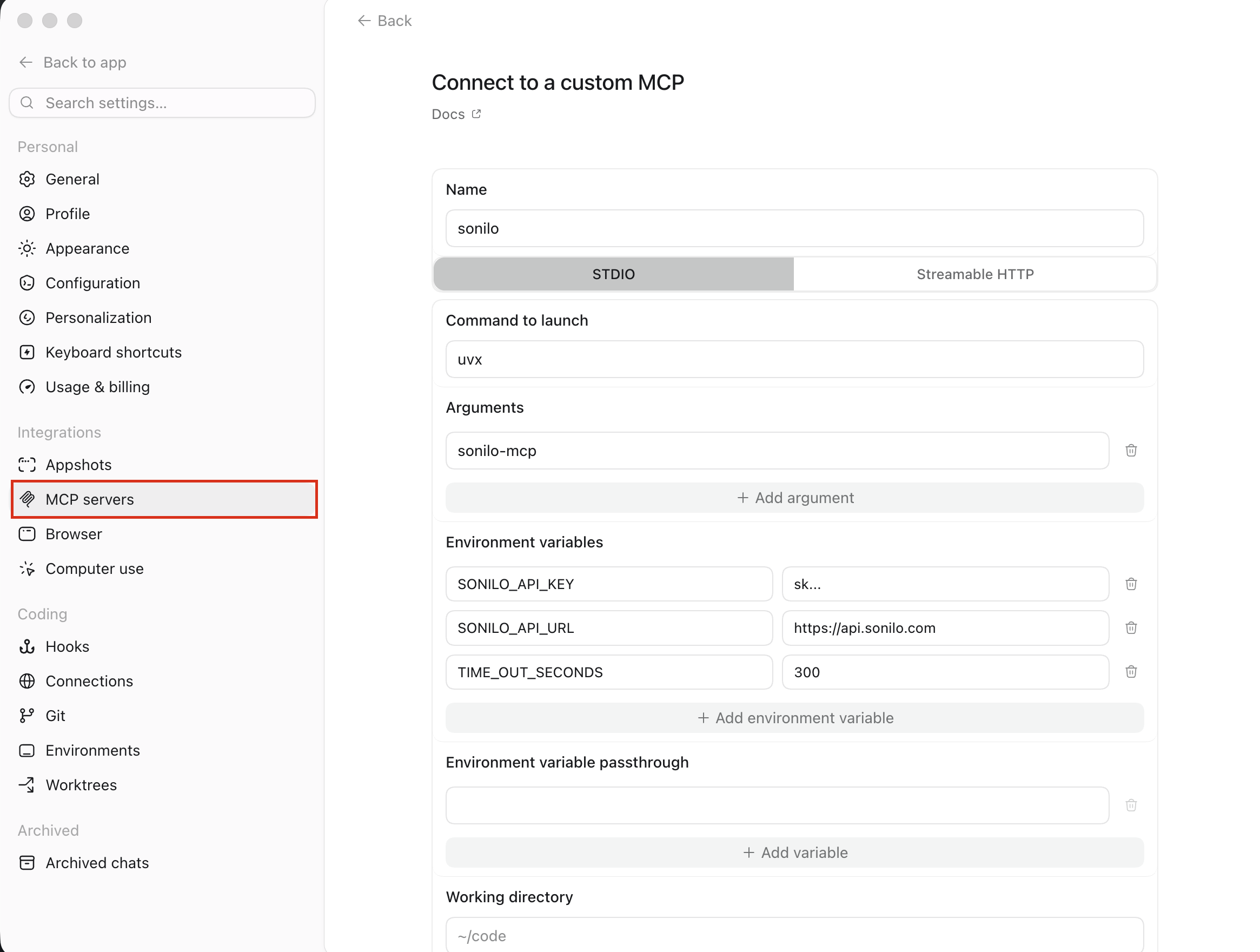
Or you can add the server** to ~/.codex/config.toml:
[mcp_servers.sonilo]
command = "uvx"
args = ["sonilo-mcp"]

# Omit this whole block when you have signed in with `sonilo login`.
[mcp_servers.sonilo.env]
SONILO_API_KEY = "sk-..."
SONILO_API_URL = "https://api.sonilo.com"
TIME_OUT_SECONDS = "600"
- Restart Codex (or start a new session), then run
/mcpto confirmsonilois connected and its tools are listed.
Example usage
Once the server is connected, just ask your assistant in natural language. For example:
- "Make background music that matches this video:
~/Desktop/promo.mp4." - "Compose music for
https://example.com/clip.mp4with a calm, ambient style." - "I stitched my AI-generated clips into
~/Desktop/trailer.mp4— add a soundtrack that matches the cut." - "Use Sonilo mcp to generate 30 seconds of upbeat lo-fi hip-hop for a study playlist and save it to my Desktop."
- "Use Sonilo to write an epic orchestral cinematic track, about 60 seconds long."
- "What Sonilo services and limits does my account have?"
- "Show my Sonilo usage for the last 7 days."
- "Play the track you just generated."
The assistant will call the matching tool (text_to_music, video_to_music, text_to_sfx, video_to_sfx, audio_ducking, get_sfx_task, get_account_services, get_usage, or play_audio) and save generated audio to your configured output directory.
Configuration
Authentication
The server takes its key from SONILO_API_KEY if that is set, and otherwise
from the credential written by sonilo login
(~/.config/sonilo/credentials.json, or $XDG_CONFIG_HOME/sonilo/). The
environment variable wins on purpose, so any config that already sets it keeps
resolving to the same account after an upgrade.
The credential is looked up by the server's own SONILO_API_URL, so a staging
server never picks up a production sign-in. This server only ever reads the
file: run sonilo login again to renew it (keys from a sign-in expire after 90
days) and sonilo logout to revoke it.
Environment Variables
| Variable | Default | Description |
|---|---|---|
SONILO_API_KEY | (from sonilo login) | Bearer token. Required only if you have not signed in with the CLI. |
SONILO_API_URL | https://api.sonilo.com | Public API base URL. |
SONILO_MCP_BASE_PATH | ~/Desktop | Default output directory and base for relative input paths. Also the confinement boundary (see below). |
SONILO_MCP_ALLOW_ANY_PATH | false | Set to true to let tools read/write files outside SONILO_MCP_BASE_PATH. |
TIME_OUT_SECONDS | 600 | Generation timeout, in seconds. Aligned with the backend's read timeout. |
File access & confinement
By default, the file tools (video_to_music input, play_audio, and any
output_directory) are confined to SONILO_MCP_BASE_PATH. Paths that
resolve outside it (after symlink resolution) are rejected. This limits the
blast radius if a client is tricked into reading or exfiltrating arbitrary
files. To opt out — e.g. to read a video from elsewhere on disk — set
SONILO_MCP_ALLOW_ANY_PATH=true.
Tools
| Tool | Description | Cost |
|---|---|---|
text_to_music(prompt, duration?, output_format?, variants_num?, stems?, output_directory?) | Generate music from a text prompt. variants_num (1–10, default 1) generates that many distinct variants in one request, each with its own title; N > 1 forces the backend's async mode automatically and is never covered by the free trial. stems (default false) also saves the track split into four separate instrument tracks — drums, bass, vocals and other — at no extra charge; it adds a few minutes (the call waits up to 40 min) and forces the backend's async mode automatically. A stems_error note in the result means only the free separation failed or was skipped — the music itself is fine. | ✅ |
video_to_music(video_path? | video_url?, prompt?, preserve_speech?, variants_num?, prompt_influence?, stems?, output_directory?) | Generate music matched to a video. Max duration 360s (6 min); subject to the account's upload-size cap (typically 300 MB). preserve_speech (default false) keeps the source speech in the result — you also get a vocals speech stem and a ready-to-use mux; when set, the call runs the backend's async generation mode internally instead of streaming. variants_num (1–10, default 1) works the same as text_to_music's. prompt_influence (0–1, API default 0.5) sets how strongly the generated music follows the prompt; omit it unless you want stricter or looser prompt adherence. Free, and works in both the streaming and async modes. stems (default false) works the same as text_to_music's — it splits the generated music, never the video's own audio. | ✅ |
text_to_sfx(prompt, duration?, audio_format?, output_directory?) | Generate a sound effect from text. Duration 0.5–180s, optional — omit it for Sonilo's own default length; formats wav/mp3/aac/flac (default aac). | ✅ |
video_to_sfx(video_path? | video_url?, prompt?, segments?, audio_format?, output_directory?) | Generate SFX for a video; saves the generated SFX audio. Max video duration 480s (8 min). | ✅ |
video_to_video_music(video_path? | video_url?, prompt?, segments?, keep_original_sound?, ducking?, preserve_speech?, variants_num?, prompt_influence?, output_directory?) | Generate music for a video and return a new .mp4 with it muxed in. By default the result's audio is the generated music alone — the source's own audio is removed. Pass keep_original_sound=true to keep the whole source track with the music statically mixed under it, adding ducking=true to dip the music under the voice instead; or preserve_speech=true to keep only the isolated speech. keep_original_sound supersedes preserve_speech. Input must carry H.264/HEVC/VP9/AV1 (mp4, mov, m4v, webm); animated gif and VP8 webm are rejected. Max video duration 360s (6 min). variants_num (1–10, default 1) saves one .mp4 per variant. prompt_influence (0–1, API default 0.5) sets how strongly the generated music follows the prompt; omit it unless you want stricter or looser prompt adherence. Free. | ✅ |
video_to_video_sfx(video_path? | video_url?, prompt?, segments?, output_directory?) | Generate SFX for a video and return a new .mp4 with them muxed in. Max video duration 480s (8 min). | ✅ |
video_to_sound(video_path? | video_url?, music_prompt?, sfx_prompt?, segments?, preserve_speech?, ducking?, output_format?, variants_num?, output_directory?) | Generate music and SFX for a video in one call and save the mixed audio track. One charge instead of two, with the two layers balanced by the backend. ducking (default false) brings the source video's own speech into the mix and dips the music under it — leave it off and the result is the generated music and effects alone, with no music_processed stem. output_format (wav default, m4a, or mp3 at 320 kbps) sets the combined track's container; the music and SFX stems keep their native formats. Max video duration 480s (8 min). variants_num (1–10, default 1) saves one mixed track per variant. | ✅ |
video_to_video_sound(video_path? | video_url?, music_prompt?, sfx_prompt?, segments?, keep_original_sound?, preserve_speech?, ducking?, variants_num?, output_directory?) | Like video_to_sound, but returns a new .mp4 with the mixed soundtrack muxed in. By default the result's audio is the generated music and effects alone — the source's own audio is removed, so the result also carries no music_processed stem. Pass keep_original_sound=true to keep the whole source track (statically mixed; add ducking=true to duck it under the mix instead), or preserve_speech=true for the isolated speech only. keep_original_sound is accepted only here, not by video_to_sound. Max video duration 480s (8 min). variants_num (1–10, default 1) saves one .mp4 per variant. | ✅ |
dubbing(video_path? | video_url?, languages?, ducking?, lipsync?, subtitles?, export_srt?, output_directory?) | Dub a video into other languages and save one dubbed .mp4 per language. languages is a list of codes (en, zh_cn, ja, ko, pt, pt_br, es, es_419, de, fr, it, ru, th, ar, tr, vi, id, ta, ml, kn, gu, pa_in, sd_in, hi); omit it for the default ["zh_cn", "es", "fr"]. pt_br is Brazilian Portuguese and es_419 Latin American Spanish; plain pt and es stay unqualified, as does ar. pa_in and sd_in are Punjabi and Sindhi as spoken in India, the only variants available; hi is Hindi. video_url must be https — the dubbing pipeline fetches the source itself. lipsync defaults to true: the speaker's mouth is re-rendered to match the dubbed speech. Set lipsync=false to leave the picture completely untouched instead — the video comes back at its original resolution and frame rate rather than re-rendered, and only the audio is replaced, so the mouths keep moving to the original language; useful for footage with no on-camera speaker. subtitles is one script per target language — {"es": "/path/es.srt", "fr": "https://.../fr.vtt"}, a local .srt/.vtt path or an https URL — carrying the lines to be spoken in that language, used instead of the pipeline's own translation; the keys must match the languages being dubbed. export_srt (needs subtitles) also returns a re-timed .srt per language, aligned to the delivered audio with the lines kept verbatim. Max video duration 300s (5 min). Billed per language. The first single-language call without subtitles is a free 15-second preview (see Free trial below). | ✅ |
proofread(video_path? | video_url?, languages?, source_language?, output_directory?) | Transcribe a video and translate its script into the target languages, saving one editable .srt per language plus the source-language transcript. Nothing is dubbed and nothing is spoken — this is the step before dubbing: correct the wording, then pass the files to dubbing as subtitles. languages takes the same codes as dubbing; omit it, or pass [], for the source-language transcript alone. source_language is an optional hint for transcription — without it the language is detected, and the detected code is reported either way. video_url must be https, and the video must have an audio track. Max video duration 300s (5 min). Billed per language (a transcript-only request counts as one), with a 10-second billing floor. | ✅ |
analyze_video(video_path? | video_url?, prompt?, variants_num?, mode?) | Analyze a video and return a creative brief — a time-aligned segments plan plus one ready-to-use generation prompt per variation. mode defaults to both, which adds a sound-design brief (sfx_segments plus a single sfx_prompt) next to the music one; music or sfx returns just that one brief, at the same price. Generates nothing and writes no file: the brief comes back inline as JSON, to feed straight into video_to_music, video_to_sfx, video_to_sound or their video-to-video counterparts. Use it when you do not yet know what the video should sound like. Max video duration 480s (8 min); variants_num is 1–5 (default 1) and is billed per brief, with a 10-second billing floor. | ✅ |
audio_ducking(voice_path? | voice_url?, music_path? | music_url?, output_directory?) | Duck a music bed under a voice track. The voice input may be a video — the ducked mix is muxed back into a new .mp4. Each input max 360s (6 min); subject to the account's upload-size cap. | ✅ |
get_sfx_task(task_id, output_directory?) | Check an SFX, audio-ducking, video-to-video, video-to-sound, dubbing, proofread, video-analysis, or async video-to-music task and return its result — recovery for timed-out text_to_sfx, video_to_sfx, audio_ducking, video_to_video_music, video_to_video_sfx, video_to_sound, video_to_video_sound, dubbing, proofread, analyze_video, and video_to_music(preserve_speech=true) calls. An analyze_video task has no file to download, so its brief comes back inline; a proofread task saves its .srt files the same way a direct call would; everything else is saved to disk. | ❌ |
get_account_services() | List available services, limits, and the free-trial allowance left per service. | ❌ |
get_usage(days=30) | Show usage summary + per-day breakdown. | ❌ |
play_audio(input_file_path) | Play a local audio file. | ❌ |
Tools marked ✅ make API calls that incur charges on your Sonilo account.
Free trial: self-serve accounts start with a few free runs per service — no card required.
get_account_services()reports what is left astrial[service] = {granted, used, remaining}; check it before calling a ✅ tool so you can warn the user instead of failing on them. When a service'sremaininghits0, calls to it fail withtrial_exhausteduntil a payment method is added. Dubbing's single free run is a 15-second preview: the first single-language call without subtitles translates only the first 15 seconds of the video, free, and the result carriestrial_previewwith what the full video would cost;proofreadhas 2 free runs, and like dubbing it bills per language. Accounts without a free-trial allowance simply have notrialkey.
Optional: if
ffprobe(part of FFmpeg) is installed,video_to_musicchecks a video's duration locally and rejects anything over 360s before uploading.video_to_sfxperforms the same local check with its 480s cap.audio_duckingdoes the same for both of its inputs against its 360s cap. Without it, the same limits are still enforced by the backend.
Sound effects and ducking run as tasks
The music tools stream their result and finish in one call — with one exception: video_to_music(preserve_speech=true) submits a task and polls it internally instead, because keeping the source speech is only available in the backend's async mode. You still get the saved file paths back from a single call; you just don't see the task, and — like the SFX tools — it uses the same get_sfx_task recovery path if the call times out. The SFX tools submit a task, then poll it until it completes — text_to_sfx and video_to_sfx do this for you and return the saved file paths, so you normally never see the task. audio_ducking uses the same submit-then-poll flow and the same get_sfx_task recovery path.
If a call times out, the generation keeps running (and is already charged). The error message carries the task id, and get_sfx_task("<id>") retrieves the result once it's ready. The task id is also printed to stderr the moment a task is submitted, so it survives even a cancelled call. get_sfx_task is safe to call repeatedly: if the file is already on disk it reports that instead of downloading a second copy.
Output Format
Music is saved as .m4a (AAC in MP4 container). File names use the title returned by the backend (slugified), or a sonilo-<timestamp>.m4a fallback. When multiple parallel streams are returned, a -<index> suffix is appended.
video_to_music(preserve_speech=true) saves up to three kinds of file, each labeled in the returned text: the generated music audio (same naming as above, based on prompt or falling back to music-<first 8 chars of the task id>), the preserved speech stem as <base>-vocals.<ext>, and the mux — speech and music already mixed together, the ready-to-use combined result — as <base>-mux.<ext> (or <base>-mux-<index>.<ext> for multiple streams). The speech stem and mux extensions come from the backend's reported content_type (typically .m4a).
Sound effects are saved in the requested audio_format — wav, mp3, flac, or aac (the default, written as .m4a); video_to_sfx saves audio only, not the source video.
Combined sound (video_to_sound / video_to_video_sound) is saved as a single file: a .wav for video_to_sound, a .mp4 for video_to_video_sound. The name comes from music_prompt, falling back to sfx_prompt and then to sound-<first 8 chars of the task id> / v2v-sound-<first 8 chars of the task id>. The separate music and SFX stems stay on the backend — only the mixed result is downloaded.
Multiple variants (variants_num > 1 on text_to_music, video_to_music, video_to_video_music, video_to_sound, video_to_video_sound) save one file per variant instead of one, suffixed -0, -1, … in request order (e.g. <base>-0.m4a, <base>-1.m4a). For the music tools, each variant is its own creative direction and the returned text names it when the backend provides a title. Cost scales linearly with variants_num, and any value above 1 is billed in full even on a free-trial account. A timed-out multi-variant call recovers all of its variants through get_sfx_task, the same as a single-variant one.
Stems (stems=true on text_to_music / video_to_music) save four extra files per generated stream — <base>-stems-drums.<ext>, -stems-bass, -stems-vocals, -stems-other (with the variant index folded in as <base>-stems-<index>-<name>.<ext> when variants_num > 1) — alongside the untouched full track. Separation is free and best-effort: it typically adds 2–6 minutes (the call waits up to 40), and when it fails or is skipped the result carries a stems_error note instead of (or alongside a partial set of) stem files, while the music itself is unaffected and fully delivered.
Dubbing (dubbing) is saved as one .mp4 per requested language, named dubbing-<first 8 chars of the task id>.<language>.mp4 — there is no prompt to name the files after. With export_srt, each language's re-timed script lands beside its video as dubbing-<first 8 chars of the task id>.<language>.srt, reported with that language's export status and alignment loss (plus its issue codes and report link when the export was blocked). Every dubbed .mp4 is downloaded before the first .srt, and a script that was blocked or could not be downloaded is reported as a note, not a failure — a missing subtitle never costs you a video. Asking for four languages writes four files and costs four times as much as one. Dubbing polls for at least two hours regardless of TIME_OUT_SECONDS, matching the backend's own ceiling for the job.
Proofread (proofread) is saved as one .srt per language in the result, named proofread-<first 8 chars of the task id>.<language>.srt — there is no prompt to name the files after. The set always includes the detected source language on top of every requested target, so even a request with no languages writes one file. After the files, the returned text reports the detected source_language and the cue_count of the source script, then one note per non-blocking warning (e.g. a cue whose text runs too fast to read) — a warning never blocks a file, and a language whose .srt could not be downloaded is a note carrying the task id, not a failure. Edit the files, then pass them to dubbing as subtitles so the dub speaks the approved wording; dubbing's subtitle keys must match the languages being dubbed, so leave out the source-language file unless that language is itself a target.
File names come from the prompt (slugified, truncated to 80 characters). When there is no prompt to name a file after — video_to_sfx without one, or an SFX/ducking file recovered via get_sfx_task — the name is sfx-<first 8 chars of the task id> instead. A video_to_music(preserve_speech=true) task recovered via get_sfx_task is named music-<first 8 chars of the task id> instead (get_sfx_task detects the music envelope shape and saves audio/vocals/mux the same way as a direct video_to_music call). Existing files are never overwritten: a -1, -2, … suffix is added instead.
Ducking results are saved as a single file: a .wav, or a .mp4 when the voice input was a video (the ducked mix is muxed back into it). The file name is the voice input's name plus -ducked (e.g. interview.mp4 → interview-ducked.mp4), falling back to ducked-<first 8 chars of the task id> when there is no usable name. A ducking result recovered via get_sfx_task is named sfx-<first 8 chars of the task id> instead, since that tool has no voice file name to work from.
Common Errors
| Message | What to do |
|---|---|
SONILO_API_KEY not set and no stored credential found | Run sonilo login, or set SONILO_API_KEY in the server's config. |
Invalid SONILO_API_KEY | Verify the key at https://platform.sonilo.com/dashboard/api-keys. If you signed in with the CLI, the key may have expired (90 days) or been revoked — run sonilo login again. |
Insufficient minutes / Credit limit exceeded | Top up at https://platform.sonilo.com/dashboard/billing. |
You've used your N free trial calls for <service> | That service's free trial is spent. Add a payment method at https://platform.sonilo.com/dashboard/billing — retrying can't help. get_account_services shows what is left on the other services. |
Rate limit exceeded: your account allows N requests per minute | Calls are going out too fast. The counter runs on a fixed 60-second window and rejected calls count toward it too, so wait the window out instead of retrying inside it. get_account_services reports your rpm_limit; email info@sonilo.com to raise it. |
Too many concurrent generations: N of N in progress | Every generation slot is busy. Waiting alone does not free one — a running generation has to finish first. get_account_services reports your concurrency_limit; email info@sonilo.com to raise it. |
Generation timed out (music, text_to_music/video_to_music without preserve_speech) | Raise TIME_OUT_SECONDS. Check get_usage to confirm whether the backend completed and charged. |
Timed out … waiting for task <id> (SFX, ducking, or video_to_music(preserve_speech=true)) | The generation is still running. Call get_sfx_task("<id>") to retrieve the result — nothing is lost, including for a timed-out preserve_speech music task (get_sfx_task recognizes its result shape and saves audio/vocals/mux the same way video_to_music itself would). |
Task not found | The task id doesn't exist, or belongs to a purely streaming generation (text_to_music, or video_to_music without preserve_speech), which isn't pollable. Check the id. |
Reviews
No reviews yet
Be the first to review this server!
More Developer Tools MCP Servers
Fetch
Freeby Modelcontextprotocol · Developer Tools
Web content fetching and conversion for efficient LLM usage
Git
Freeby Modelcontextprotocol · Developer Tools
Read, search, and manipulate Git repositories programmatically
Worldmonitor
Freeby Koala73 · Developer Tools
Live markets, conflicts, country risk, chokepoints, energy, and China decision signals. 93 tools.
Toleno
Freeby Toleno · Developer Tools
Toleno Network MCP Server — Manage your Toleno mining account with Claude AI using natural language.
MCP Marketplace
Freeby mcp-marketplace · Developer Tools
Search and install MCP servers from inside your AI client.
mcp-creator-python
Freeby mcp-marketplace · Developer Tools
Create, build, and publish Python MCP servers to PyPI — conversationally.