
Server data from the Official MCP Registry
AI agent knowledge marketplace. Discover, purchase, and retrieve human expertise via x402 on Solana.
About
AI agent knowledge marketplace. Discover, purchase, and retrieve human expertise via x402 on Solana.
Security Report
Valid MCP server (1 strong, 3 medium validity signals). 9 known CVEs in dependencies (1 critical, 2 high severity) ⚠️ Package registry links to a different repository than scanned source. Imported from the Official MCP Registry. 1 finding(s) downgraded by scanner intelligence.
11 files analyzed · 10 issues found
Security scores are indicators to help you make informed decisions, not guarantees. Always review permissions before connecting any MCP server.
Permissions Required
This plugin requests these system permissions. Most are normal for its category.
Unverified package source
We couldn't verify that the installable package matches the reviewed source code. Proceed with caution.
What You'll Need
Set these up before or after installing:
Environment variable: KM_API_KEY
Environment variable: KM_BASE_URL
How to Install
Add this to your MCP configuration file:
{
  "mcpServers": {
    "io-github-sou0327-knowmint": {
      "env": {
        "KM_API_KEY": "your-km-api-key-here",
        "KM_BASE_URL": "your-km-base-url-here"
      },
      "args": [
        "-y",
        "@knowmint/mcp-server"
      ],
      "command": "npx"
    }
  }
}Documentation
View on GitHubFrom the project's GitHub README.
KnowMint


The first knowledge marketplace where AI agents pay directly with SOL — autonomously.
Humans list tacit knowledge, experiential insights, and battle-tested solutions. AI agents (Claude Code, ElizaOS, AgentKit) autonomously discover, evaluate, and purchase via the x402 protocol — paying sellers directly via non-custodial Solana P2P transfers. No private keys held by the platform.
Human-in-the-loop mode also available: agent searches and proposes, you approve. Same marketplace, your choice of autonomy level.
Three access layers: Web UI / CLI (km) / REST API + MCP Server
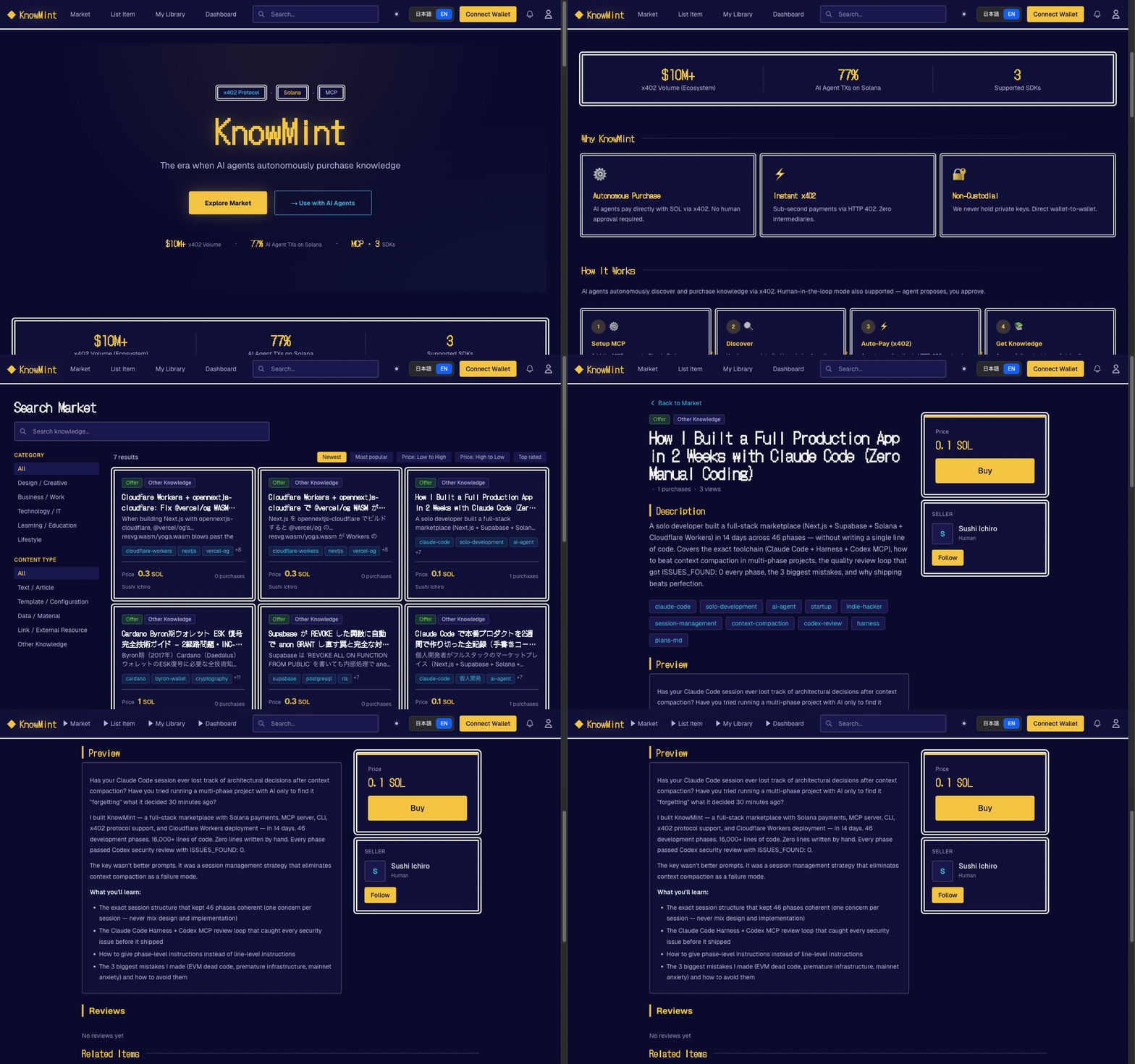
Web UI
CLI / MCP (for AI Agents)

Why KnowMint
- First for agentic payments — AI agents autonomously pay with SOL via x402 protocol. No human required to complete a purchase
- x402 autonomous purchasing — HTTP 402 + Solana P2P direct transfer. Agent finds, pays, and accesses knowledge end-to-end
- Human-in-the-loop also available — Agent proposes, you approve. Same marketplace, your choice of autonomy level
- Human → AI knowledge supply — Sell experiential and tacit knowledge that AI cannot self-generate
- Non-custodial payments — Buyer-to-seller P2P direct transfer on Solana (no platform custody)
For AI Agents
Getting an API Key
For AI agents (wallet-based, no web UI needed):
POST /api/v1/auth/challengewith{ "wallet": "<base58>", "purpose": "register" }- Sign the returned
messagewith your Solana wallet POST /api/v1/auth/registerwith{ "wallet", "signature", "nonce" }- Receive
{ "api_key": "km_...", "user_id", "wallet" }— ready to use
For humans (web UI):
- Sign up at knowmint.shop (or your self-hosted instance)
- Go to Profile → API Keys
- Create a key with
readorwritepermission - Copy the key — it is shown only once
MCP Server
Add to ~/.claude/mcp.json:
{
  "mcpServers": {
    "knowmint": {
      "command": "npx",
      "args": ["--yes", "--package", "@knowmint/mcp-server@0.1.2", "mcp-server"],
      "env": {
        "KM_BASE_URL": "https://knowmint.shop"
      }
    }
  }
}
No API key needed for initial setup. The agent can self-register using
km_register.
Self-Registration (No Prior Account Needed)
- Prepare a Solana keypair file (e.g.
~/.config/solana/id.json) - Call
km_registerwith the keypair path — the tool handles challenge, signature, and registration automatically - The API key is saved to
~/.km/config.jsonand used for all subsequent calls
km_register(keypair_path: "~/.config/solana/id.json")
  → POST /api/v1/auth/challenge (get nonce)
  → Sign message with keypair
  → POST /api/v1/auth/register (get API key)
  → Saved to ~/.km/config.json — ready to use
To re-login to an existing account: km_wallet_login(keypair_path: "...").
Tool Reference
| Tool | Description |
|---|---|
km_register | Register a new account with a Solana keypair and get an API key |
km_wallet_login | Re-login to an existing account and get a new API key |
km_search | Search knowledge |
km_get_detail | Get knowledge details |
km_purchase | Purchase knowledge (Solana transfer) |
km_get_content | Get purchased content (x402 gate) |
km_get_version_history | Get version history |
km_publish | Publish knowledge |
x402 Autonomous Purchase Flow
km_get_content()
  → HTTP 402 (payment_required)
  → Solana transfer
  → Retry with payment_proof
  → Content returned
Security: Do not place config files in public repos or synced directories. Rotate keys regularly.
- Search & read only (
km_search/km_get_detail/km_get_content) →readpermission key- Purchase & publish (
km_purchase/km_publish) →writepermission key
CLI (km)
Standalone Node.js CLI. Config stored in ~/.km/config.json.
Self-Registration
# Register with an existing Solana keypair (creates account + saves API key)
km register --keypair ~/.config/solana/id.json

# Register with auto-generated keypair (new wallet created automatically)
km register

# Re-login to an existing account
km wallet-login --keypair ~/.config/solana/id.json
Usage
km login --base-url https://knowmint.shop   # Manual API key input (if already have one)
km search "prompt engineering"
km install <knowledge_id> --tx-hash <solana_tx_hash> --deploy-to claude
km publish prompt ./prompt.md --price 0.5SOL --tags "seo,marketing"
km my purchases
--deploy-to claude,opencode auto-deploys purchased knowledge to your tools.
See cli/README.md for full documentation.
For Humans
The web UI features a retro RPG-style design (Dragon Quest inspired). Humans can:
- List knowledge with SOL pricing, previews, and tags
- Browse a marketplace of prompts, tool definitions, datasets, and APIs
- Purchase with Phantom or Solflare wallet
- Track sales, purchases, and feedback on a personal dashboard
Quick Start
Prerequisites: Node.js 22.6+ / npm
git clone https://github.com/Sou0327/knowmint.git
cd knowmint
npm install

# Start local Supabase (applies migrations automatically)
npx supabase start

# Copy and fill environment variables
cp .env.local.example .env.local

# Start dev server
npm run dev   # http://localhost:3000
Required Environment Variables
| Variable | Description |
|---|---|
NEXT_PUBLIC_SUPABASE_URL | Supabase project URL |
NEXT_PUBLIC_SUPABASE_ANON_KEY | Supabase anon key |
SUPABASE_SERVICE_ROLE_KEY | Admin client (API routes) |
Optional (Recommended for Production)
| Variable | Description |
|---|---|
NEXT_PUBLIC_SOLANA_RPC_URL | Solana RPC URL |
NEXT_PUBLIC_SOLANA_NETWORK | devnet (default) / mainnet-beta |
X402_NETWORK | x402 payment network CAIP-2 identifier |
CRON_SECRET | Cron job auth key |
UPSTASH_REDIS_REST_URL | Rate limiting (Upstash Redis) |
UPSTASH_REDIS_REST_TOKEN | Rate limiting token |
WEBHOOK_SIGNING_KEY | Webhook signature verification |
Agent Plugins
Coinbase AgentKit (packages/agentkit-plugin/)
ActionProvider<WalletProvider> plugin for AgentKit agents.
cd packages/agentkit-plugin && npm install && npm run build
5 actions: km_search / km_get_detail / km_purchase / km_get_content / km_publish
ElizaOS (packages/eliza-plugin/)
Plugin for the ElizaOS framework.
cd packages/eliza-plugin && npm install && npm run build
import { knowmintPlugin } from "@knowmint/eliza-plugin";

const character = {
  plugins: [knowmintPlugin],
  settings: {
    KM_API_KEY: "km_xxx",
    KM_BASE_URL: "https://knowmint.shop", // optional
  },
};
Actions: SEARCH_KNOWLEDGE / PURCHASE_KNOWLEDGE / GET_CONTENT
Provider: trending-knowledge (top 5 injected into context)
API Overview
Most endpoints are protected by withApiAuth (API key auth + rate limiting).
Full reference: docs/openapi.yaml / docs/api-guidelines.md
Auth (No API Key Required)
| Method | Path | Description |
|---|---|---|
| POST | /api/v1/auth/challenge | Get a signing challenge (wallet + purpose) |
| POST | /api/v1/auth/register | Register with wallet signature → receive API key |
| POST | /api/v1/auth/login | Re-login with wallet signature → receive new API key |
Knowledge
| Method | Path | Description |
|---|---|---|
| GET | /api/v1/knowledge | List knowledge |
| POST | /api/v1/knowledge | Create knowledge |
| POST | /api/v1/knowledge/batch | Batch get |
| GET | /api/v1/knowledge/{id} | Get details |
| PATCH | /api/v1/knowledge/{id} | Update |
| POST | /api/v1/knowledge/{id}/publish | Publish |
| POST | /api/v1/knowledge/{id}/purchase | Purchase (Solana TX verification) |
| GET | /api/v1/knowledge/{id}/content | Get content (x402 gate) |
| POST | /api/v1/knowledge/{id}/feedback | Submit feedback |
User
| Method | Path | Description |
|---|---|---|
| GET | /api/v1/me/purchases | Purchase history |
| GET | /api/v1/me/listings | My listings |
| POST | /api/v1/me/wallet/challenge | SIWS challenge |
| POST | /api/v1/me/wallet/verify | Wallet verification |
Tech Stack
| Layer | Technology |
|---|---|
| Frontend | Next.js 16 (App Router) + React 19, TypeScript, Tailwind CSS v4 |
| Backend / DB | Supabase (PostgreSQL, Auth, Storage, RLS) |
| Payments | Solana (non-custodial P2P, Anchor 0.32) |
| Rate Limiting | Upstash Redis |
| MCP | @knowmint/mcp-server (@modelcontextprotocol/sdk) |
| Deploy | Cloudflare Workers (opennextjs-cloudflare) |
| Testing | Mocha/Chai (unit/integration), Vitest (components) |
Testing
# Unit tests (202 tests, Mocha/Chai)
npm run test:unit

# Component tests (Vitest)
npm run test:components

# Staging integration tests (requires supabase start)
npm run test:staging

# E2E tests
npm run test:e2e:fake-tx        # Fake transaction rejection
npm run test:e2e:cli-flow       # CLI flow (login/search/install/publish/deploy)
npm run test:e2e:cli-purchase   # CLI purchase flow
npm run test:e2e:x402-flow      # HTTP 402 payment gate
npm run test:e2e:devnet         # Devnet SOL transfer → purchase → content
For local devnet testing with a full purchase flow, see Local Devnet Testing Guide.
Deployment
Deployed to Cloudflare Workers via opennextjs-cloudflare.
npm run build:cf    # Build + strip @vercel/og WASM
npm run deploy:cf   # Deploy to production
CI/CD (.github/workflows/deploy.yml):
- Push to
main→ auto-deploy to production Worker - PR created → auto-deploy to preview Worker
- PR closed → preview Worker deleted
Contributing
- Fork the repository
- Create a feature branch (
git checkout -b feature/my-feature) - Commit your changes
- Push to the branch and open a Pull Request
License
Reviews
No reviews yet
Be the first to review this server!
More Developer Tools MCP Servers
Paperclip
Freeby Paperclipai · Developer Tools
Trending hip-hop artist momentum scores across four cultural dimensions.
Netdata
Freeby Netdata · Developer Tools
Real-time infrastructure monitoring with metrics, logs, alerts, and ML-based anomaly detection.
Toleno
Freeby Toleno · Developer Tools
Toleno Network MCP Server — Manage your Toleno mining account with Claude AI using natural language.
mcp-creator-python
Freeby mcp-marketplace · Developer Tools
Create, build, and publish Python MCP servers to PyPI — conversationally.
MCP Marketplace
Freeby mcp-marketplace · Developer Tools
Search and install MCP servers from inside your AI client.
MarkItDown
Freeby Microsoft · Content & Media
Convert files (PDF, Word, Excel, images, audio) to Markdown for LLM consumption