
Server data from the Official MCP Registry
Query Spanlens LLM observability from Cursor, Claude Desktop, or Continue via MCP.
About
Query Spanlens LLM observability from Cursor, Claude Desktop, or Continue via MCP.
Security Report
Valid MCP server (1 strong, 1 medium validity signals). 1 known CVE in dependencies ⚠️ Package registry links to a different repository than scanned source. Imported from the Official MCP Registry. 1 finding(s) downgraded by scanner intelligence.
11 files analyzed · 2 issues found
Security scores are indicators to help you make informed decisions, not guarantees. Always review permissions before connecting any MCP server.
What You'll Need
Set these up before or after installing:
Environment variable: SPANLENS_API_KEY
Environment variable: SPANLENS_BASE_URL
How to Install
Add this to your MCP configuration file:
{
  "mcpServers": {
    "io-github-spanlens-mcp-server": {
      "env": {
        "SPANLENS_API_KEY": "your-spanlens-api-key-here",
        "SPANLENS_BASE_URL": "your-spanlens-base-url-here"
      },
      "args": [
        "-y",
        "@spanlens/mcp-server"
      ],
      "command": "npx"
    }
  }
}Documentation
View on GitHubFrom the project's GitHub README.
Spanlens



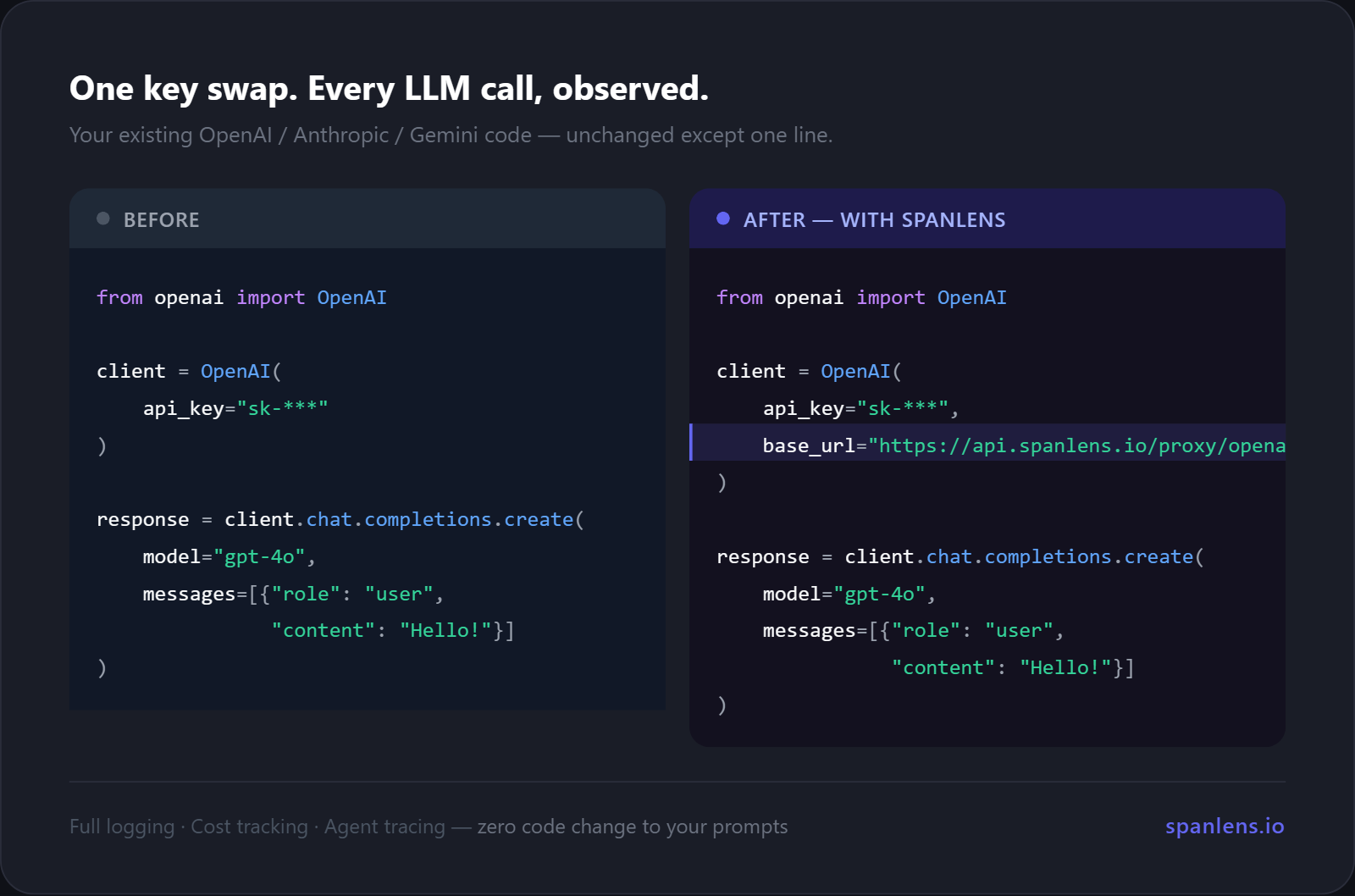
Open-source LLM observability you can turn on in one line. Point your OpenAI, Anthropic, or Gemini client at Spanlens and every call is logged with cost, tokens, latency, and full agent traces. No SDK rewrite, no platform migration. Eleven providers supported, plus native Vercel AI SDK, LangChain, and LlamaIndex integrations, and you can query it all from Cursor or Claude Desktop through the bundled MCP server. Self-hostable in one Docker command. MIT.
Why it exists. I shipped an LLM app on OpenAI and Gemini and hit a wall. The provider dashboards showed total spend and nothing else. I could not tell which feature burned the most tokens, which model was cheapest per task, or what each endpoint actually cost. Spanlens is the layer I wanted. It turns on in one line, stays off the critical path, and is open source so you can self-host the exact code we run.
⭐ If Spanlens is useful to you, please star the repo. It takes a second, and it is the single biggest thing that helps other developers find the project.
Hosted: spanlens.io · npm:
@spanlens/sdk· PyPI:spanlens· CLI:@spanlens/cli· MCP:@spanlens/mcp-server· Status: status.spanlens.io · Changelog: spanlens.io/changelog
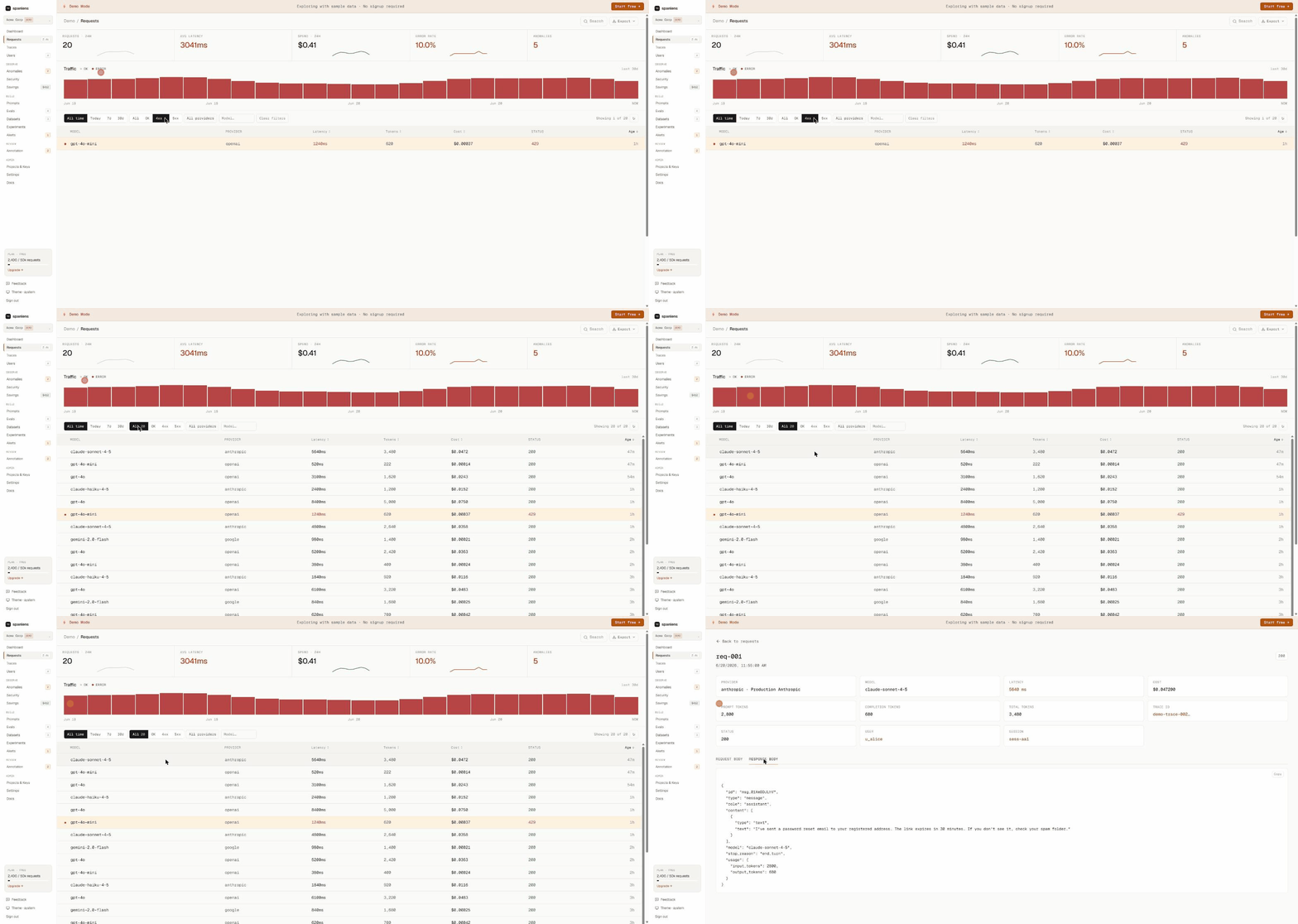
Live demo (no signup): spanlens.io/demo/requests
Why Spanlens?
- Helicone was acquired and its roadmap is uncertain.
- Langfuse is powerful but complex to set up and expensive to scale.
- Spanlens ships the 20% of features that cover 80% of real production needs. You get request log, cost tracking, agent tracing, anomaly detection, PII scanning, and prompt versioning with a clean UI, a two-minute setup, and pricing that doesn't punish growth.
| Spanlens | Langfuse Pro | Helicone | |
|---|---|---|---|
| Open source | ✅ MIT | ✅ MIT | ✅ MIT |
| Self-hostable | ✅ Docker one-liner | ✅ | ✅ |
| Free tier | 50K req/mo | 50K events/mo | 10K req/mo |
| Team plan (1M req/mo) | $149/mo | $271/mo | ~$200/mo |
| Agent tracing | ✅ | ✅ | ⚠️ limited |
| LLM-as-judge evals | ✅ | ✅ | ❌ |
| PII + injection scan | ✅ | ❌ | ❌ |
| Model recommendations | ✅ | ❌ | ❌ |
| Prompt A/B experiments | ✅ | ✅ | ❌ |
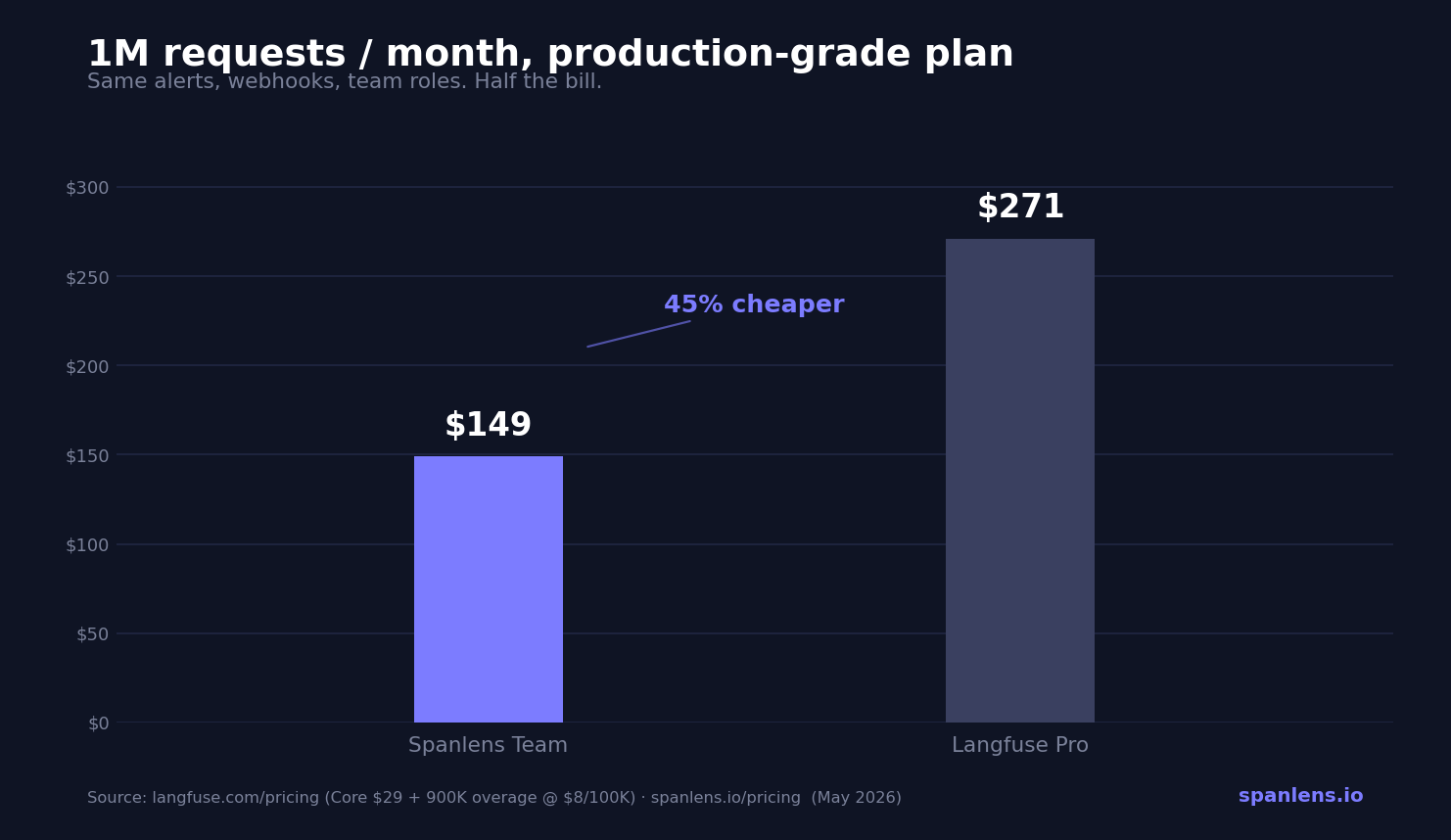
Predictable bills, no quota cliff. Free hits a hard 429 at 50K requests so a runaway loop in dev can't cost you money. Paid plans use a soft limit with authorized overage (Pro: +$8 / 100K, Team: +$5 / 100K) up to a hard cap you control, so a traffic spike charges you fairly instead of dropping requests.
Seats: Free 1 · Pro 3 · Team 10 · Enterprise unlimited. A seat is a member or a pending invitation, and there is no per-seat fee. Self-hosted instances have no seat limit. Unlimited projects on every paid tier.
⭐ Like where this is going? A star helps more developers find a lightweight, open alternative in a space full of heavy, acquired tools.
⚡ Quick start in 30 seconds
TypeScript / JavaScript (Next.js)
npx @spanlens/cli init
The wizard:
- Installs
@spanlens/sdkwith your package manager (npm / pnpm / yarn / bun) - Writes
SPANLENS_API_KEYto.env.local - Rewrites every
new OpenAI({ apiKey, baseURL })intocreateOpenAI()
Paste your Spanlens API key once, confirm two prompts, done. Your LLM calls are now flowing through the Spanlens proxy and visible in www.spanlens.io/requests.
Manual TypeScript setup
import { createOpenAI } from '@spanlens/sdk/openai'
const openai = createOpenAI()  // reads SPANLENS_API_KEY, uses Spanlens proxy baseURL
Python
pip install "spanlens[openai]"
from spanlens.integrations.openai import create_openai

client = create_openai()  # reads SPANLENS_API_KEY from env
res = client.chat.completions.create(
    model="gpt-4o-mini",
    messages=[{"role": "user", "content": "Hello"}],
)
For agent tracing in Python (multi-step, async, tool calls) see the Python SDK README.
Framework integrations
Already using an orchestration framework? Plug Spanlens in as a callback. No code rewrites.
Vercel AI SDK (Next.js / edge friendly)
import { SpanlensClient } from '@spanlens/sdk'
import { createSpanlensTracker } from '@spanlens/sdk/vercel-ai'

const client = new SpanlensClient({ apiKey: process.env.SPANLENS_API_KEY! })

// generateText / generateObject have no onFinish, so pass the awaited result to end()
const tracker = createSpanlensTracker({ client, modelName: 'gpt-4o' })
const result = await generateText({
  model: openai('gpt-4o'),
  messages,
  onStepFinish: tracker.onStepFinish,
}).catch(async (err) => {
  await tracker.onError(err)   // ends the span as an error
  throw err
})
await tracker.end(result)      // records the run's total usage

// streamText / streamObject close the span from their callbacks
const streamTracker = createSpanlensTracker({ client, modelName: 'gpt-4o' })
const stream = streamText({
  model: openai('gpt-4o'),
  messages,
  onStepFinish: streamTracker.onStepFinish,
  onFinish: streamTracker.onFinish,
  onError: streamTracker.onError,
})
The tracker never waits on Spanlens, because each update is sent in the background. In a serverless handler, await client.flush() before returning so nothing is lost when the function freezes.
LangChain JS / LangGraph
import { createSpanlensCallbackHandler } from '@spanlens/sdk/langchain'

const handler = createSpanlensCallbackHandler({ client })
await chain.invoke({ input }, { callbacks: [handler] })   // LangChain
await graph.invoke({ input }, { callbacks: [handler] })   // LangGraph
LlamaIndex TS
import { Settings } from 'llamaindex'
import { registerSpanlensCallbacks } from '@spanlens/sdk/llamaindex'

const unregister = registerSpanlensCallbacks(Settings, { client })
// ... run queries ... unregister() on shutdown
Python: LangChain: from spanlens.integrations.langchain import SpanlensCallbackHandler. Same BaseCallbackHandler contract, works with chains, LCEL, and LangGraph.
More integrations: AWS Bedrock, CrewAI, Flowise, Instructor, LlamaIndex, OpenAI Assistants, MCP server. Full setup walkthroughs at spanlens.io/docs/integrations.
Ollama (local LLMs): Ollama runs on your machine, so it does not go through the hosted proxy. Get a ready client with createOllama() and wrap each call with observeOllama() so the span is logged and tagged as Ollama.
import { SpanlensClient } from '@spanlens/sdk'
import { createOllama, observeOllama } from '@spanlens/sdk/ollama'

const spanlens = new SpanlensClient({ apiKey: process.env.SPANLENS_API_KEY! })
const ollama = createOllama() // points at http://localhost:11434/v1

const trace = spanlens.startTrace({ name: 'chat' })
const res = await observeOllama(trace, 'chat', (headers) =>
  ollama.chat.completions.create(
    { model: 'llama3.1', messages: [{ role: 'user', content: 'Hello' }] },
    { headers },
  ),
)
await trace.end({ status: 'completed' })
What you see
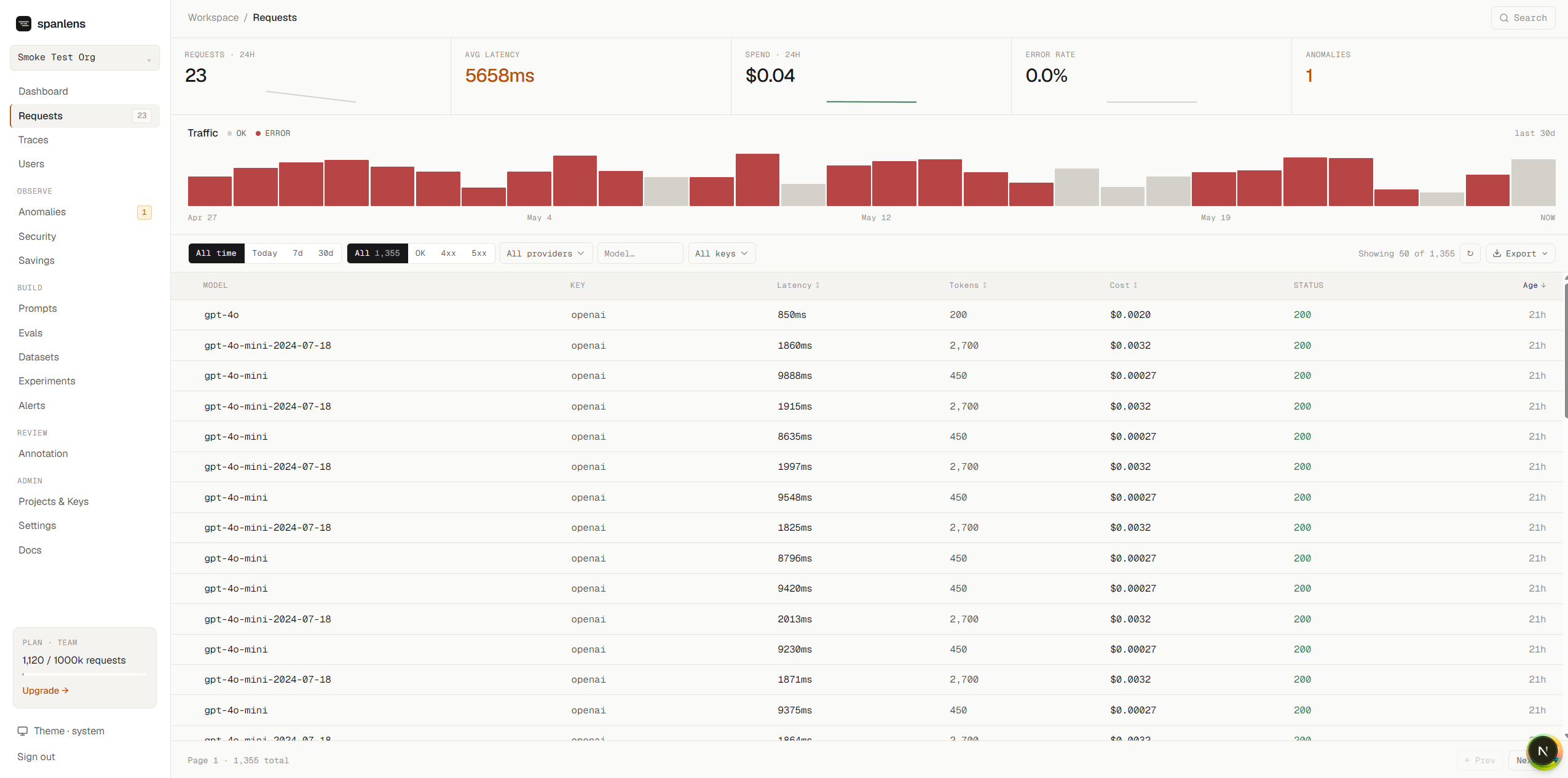
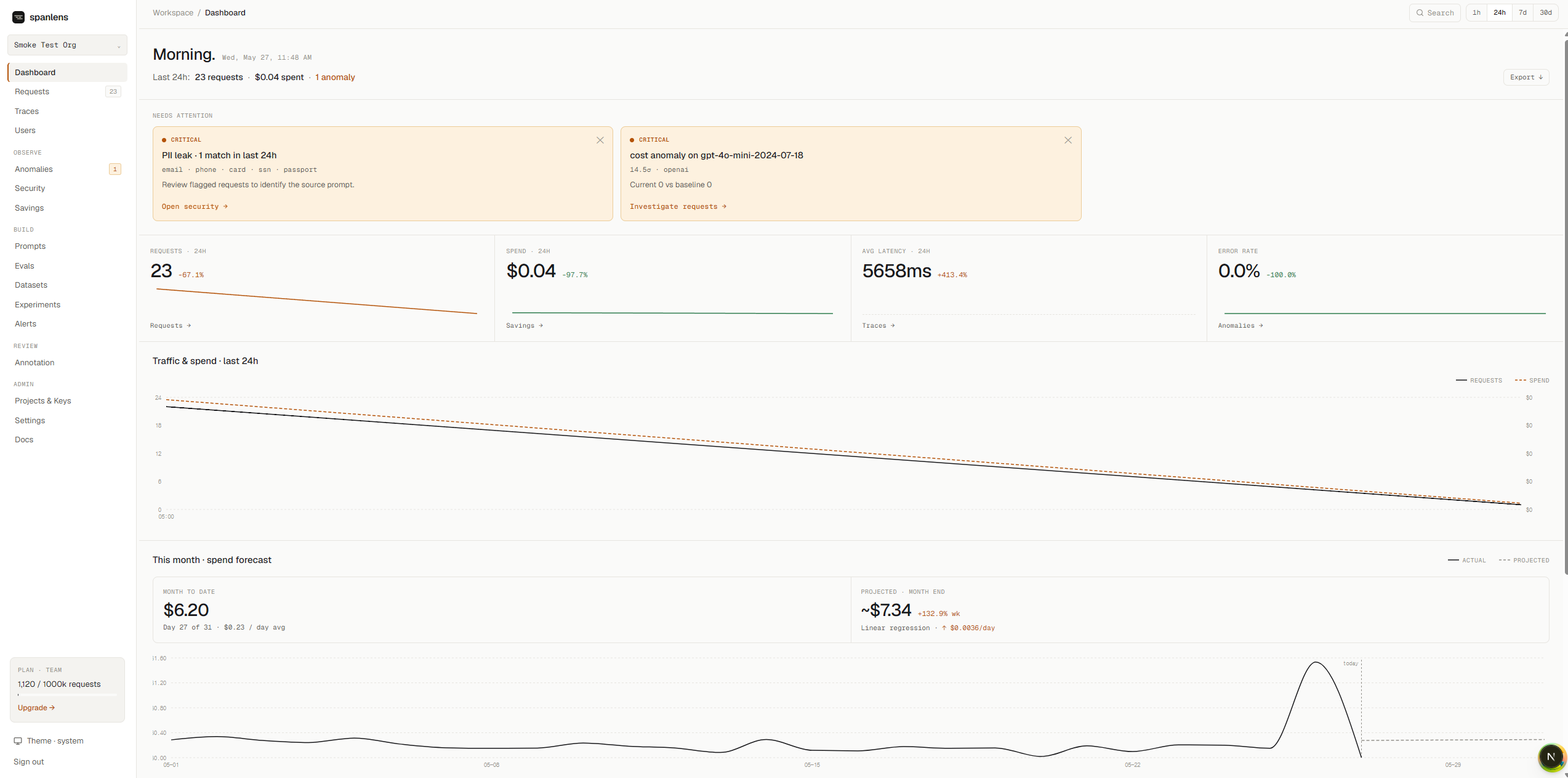
Every request logged with model, provider, latency, tokens, cost, and full prompt + response body. Filter, search, export. Streaming responses reconstructed automatically.
What you get
| Feature | Description |
|---|---|
| Request log | Every LLM call logged with model, tokens, cost, latency, and full request/response body (streaming reconstructed too) |
| Agent tracing | Multi-step workflows as Gantt waterfall span trees with Critical Path highlighted (the longest dependency chain across a fan-out, not just the slowest single span), plus a node-and-edge graph topology view for LangChain / LangGraph callback traces |
| Cost tracking | Per-request cost breakdown with daily rollups and budget alerts. Prompt-cache tokens (cache_read / cache_creation on Anthropic, prompt_tokens_details.cached_tokens on OpenAI) are parsed separately and billed at the discounted rate so you can see actual cache savings, not just sticker price |
| Per-end-user analytics | Tag calls with x-spanlens-user (SDK: withUser() / with_user()) and the /users page shows per-user cost, tokens, errors, models, last seen |
| Anomaly detection | 3σ deviations in latency, cost, or error rate vs. your 7-day baseline, with root-cause hints (token delta, HTTP status breakdown) |
| Alerts | Threshold rules on budget, error rate, and p95 latency. Delivered via Email (Resend), Slack, or Discord webhooks. Evaluated on a 15-minute cron with at-least-once delivery |
| PII + prompt-injection scan | Regex-based detection on request and response bodies; optional per-project blocking (422) for injections; instant alert emails to workspace owner |
| Savings (model recommendations) | The /savings dashboard surfaces calls that match a cheaper model's profile ("Your gpt-4o calls look like classification. Try gpt-4o-mini") with estimated monthly savings. A month-to-date prompt-caching savings card shows the USD you did not pay thanks to discounted cache-read tokens |
| Response caching | Opt in per request with x-spanlens-cache: true (or a TTL in seconds, capped at 24h; SDK: withCache()). An exact-match hit on the same request body returns the stored response without calling the provider, logs the row at zero cost, and is scoped per API key so nothing leaks across keys. Non-streaming, 200-only |
| Email digests & health alerts | A weekly workspace digest (requests, cost with week-over-week change, top models, anomalies) lands every Monday, and a data-silence alert emails admins when a workspace that was sending traffic suddenly goes quiet for 24 hours, so a broken key or dropped env var is caught before it becomes silent churn |
| Prompt versioning + A/B | Register prompt templates, run traffic-split experiments, compare versions side by side on latency / cost / error rate, reported with Welch's t-test on latency and cost plus a z-test on error rate, so you get statistical significance rather than just averages |
| Prompts Playground | Execute any prompt version with variable injection directly in the dashboard to see real cost and response before shipping |
| Datasets | Reusable (input, expected_output) test sets you can rerun against any prompt version or model. Upload CSV / JSONL files directly from the dashboard or POST programmatically. Powers offline evals and regression checks |
| Evals & Experiments | Build LLM-as-judge evaluators (judge with OpenAI, Anthropic, or Gemini, whichever is cheapest or best for the criterion) with rubric anchors and confidence intervals on pass rates. Supports pairwise A vs B mode for head-to-head prompt comparison, agent trajectory mode for scoring whole traces (not just final text), and judge-result caching keyed by (evaluator, response) to skip duplicate LLM calls on re-runs. Human annotation is queued for sampling, with Pearson r (numeric) or Cohen's κ (categorical) measuring judge-human agreement |
| OpenAPI 3.0 spec + Swagger UI | Machine-readable spec at GET /api/v1/openapi.json and interactive explorer at GET /api/v1/docs. A drift test enforces that every router stays documented |
| Saved filters | Pin frequently used request-log queries (model, status, cost range, tags) and share them across the workspace |
| Outbound webhooks | Subscribe to request.created / trace.completed / alert.triggered events. Payloads are HMAC-signed via X-Spanlens-Signature: sha256=… so receivers can verify origin |
| OpenTelemetry / OTLP ingest | POST /v1/traces accepts OTLP/HTTP JSON exports using the gen_ai.* semantic conventions, so you can drop in any OTel SDK without writing Spanlens-specific code |
| Provider-key security | Weekly digest emails for stale (unused 90d+) provider keys + daily GitGuardian leak scan against your active keys, with per-key scan history |
| Privacy controls | Per-request x-spanlens-log-body: full | meta | none header lets customers shrink what Spanlens stores (drop bodies, drop end-user IDs) without dropping the request itself |
| Data export | CSV or JSON download for requests, traces, anomalies, and flagged security events (GET /api/v1/exports/{requests,traces,anomalies,security}?format=csv). Streamed server-side for 100K+ row pulls so big exports don't OOM |
Team & workspaces
Spanlens is multi-user out of the box. Invite teammates, hand out roles, and spin up a separate workspace per client.
- Roles are
admin(members + billing),editor(data + settings), andviewer(read-only). The last admin is protected against demotion / removal. - Seats follow the plan and count members plus pending invitations. A full workspace answers new invitations with
402and the upgrade path; the check runs again when someone accepts, and a lower limit never removes existing members. - Email invitations have a 7-day expiry with sha256-hashed tokens. Sent via Resend when
RESEND_API_KEYis set; falls back to console-logging the accept URL for local dev. - The pending-invitation banner surfaces unaccepted invites at the top of the dashboard, even if the recipient never opened the email. Accept joins and auto-switches the active workspace; Decline removes the row.
- Multi-workspace lets you switch between workspaces from the sidebar (
sb-wscookie + hard reload so middleware re-resolves scope). Useful for consultants juggling multiple clients or one team running prod / staging as separate workspaces. - Two-step onboarding sends new signups to
/onboarding: name your workspace, answer two optional survey questions, done. Invitees get a short-circuited variant where Accept skips workspace creation entirely. - The audit log (Settings → Audit log) records every membership / role / invitation event with actor + timestamp.
Monorepo structure
Spanlens/
├── apps/
│   ├── web/             Next.js 16 dashboard (www.spanlens.io)
│   └── server/          Hono LLM proxy + REST API (api.spanlens.io)
├── packages/
│   ├── sdk/             @spanlens/sdk:  TypeScript / JavaScript SDK
│   ├── sdk-python/      spanlens (PyPI): Python SDK
│   ├── cli/             @spanlens/cli:  npx wizard for 1-command setup
│   └── mcp-server/      @spanlens/mcp-server: MCP server for Cursor / Claude Desktop / Continue
└── supabase/
    ├── migrations/      Postgres schema (orgs, projects, keys, prompts, requests; RLS-gated)
    └── seeds/           model_prices.sql etc.
Where the data lives
Everything is in Supabase Postgres. Organizations, projects, members, API and provider keys, prompts, datasets, alerts, billing, and the audit log are ordinary RLS-gated tables.
The requests table (one row per LLM call) is partitioned by month on created_at, so expiring old logs drops a partition instead of running a bulk DELETE. Reads go through apps/server/src/lib/requests-query.ts, which injects the organization_id filter and the per-plan retention window (free=14d / pro=90d / team=365d). If a log write fails, the row is parked as JSON in a requests_fallback queue and a cron replays it every 5 minutes. Replay is idempotent (ON CONFLICT (created_at, id) DO NOTHING), so a retry cannot double-count a request against your quota.
Projects, unified keys, and headers
- A workspace can hold multiple projects (e.g.
dev/staging/prod, or one per app). Each project gets its own quota slice, provider keys, and prompt namespace. - Unified API keys give you one
sl_live_*key per project that is provider-agnostic. Spanlens infers the provider from the request path (/proxy/openai/*,/proxy/anthropic/*,/proxy/gemini/*,/proxy/mistral/*,/proxy/openrouter/*,/proxy/groq/*,/proxy/deepseek/*,/proxy/xai/*,/proxy/cohere/*,/proxy/azure/*), so you only need one Spanlens key even if you call multiple model vendors. X-Spanlens-*headers (set automatically by the SDK helperswithUser(),withSession(),withPromptVersion(),withLogBody()): tag a request with end-user / session IDs, link it to a prompt-version experiment, or limit how much body Spanlens stores. Full list in/docs/proxy.- Streaming safety ensures proxy responses are gracefully closed at 290s with a
truncated=trueflag in the log, so long streams never silently disappear.
Local development
Prerequisites: Node 20+, pnpm 10.33.0+, Docker (for local Supabase), Vercel CLI optional.
# 1. Clone + install
git clone https://github.com/spanlens/Spanlens.git
cd Spanlens
pnpm install

# 2. Start local Supabase (requires Docker)
supabase start
supabase db push        # apply Postgres migrations
supabase gen types --lang typescript --local > supabase/types.ts

# 3. Env vars (see apps/server/.env.example)
cp apps/server/.env.example apps/server/.env

# 4. Run everything (web on :3000, server on :3001)
pnpm dev
Running tests + lint
pnpm typecheck          # TS across all packages
pnpm lint               # ESLint
pnpm test               # Vitest: server + sdk + cli suites
pnpm build              # production build smoke test
See CLAUDE.md for architecture rules and Known Gotchas (streaming, RLS, Paddle billing, Vercel Edge runtime, npm publish).
Self-hosting
The easiest way to self-host is with the included docker-compose.yml. Two containers, the dashboard (web) and the proxy/API server, both pulled pre-built from GHCR. Your Supabase project is the only other piece, and it can be Supabase Cloud or your own self-hosted Supabase.
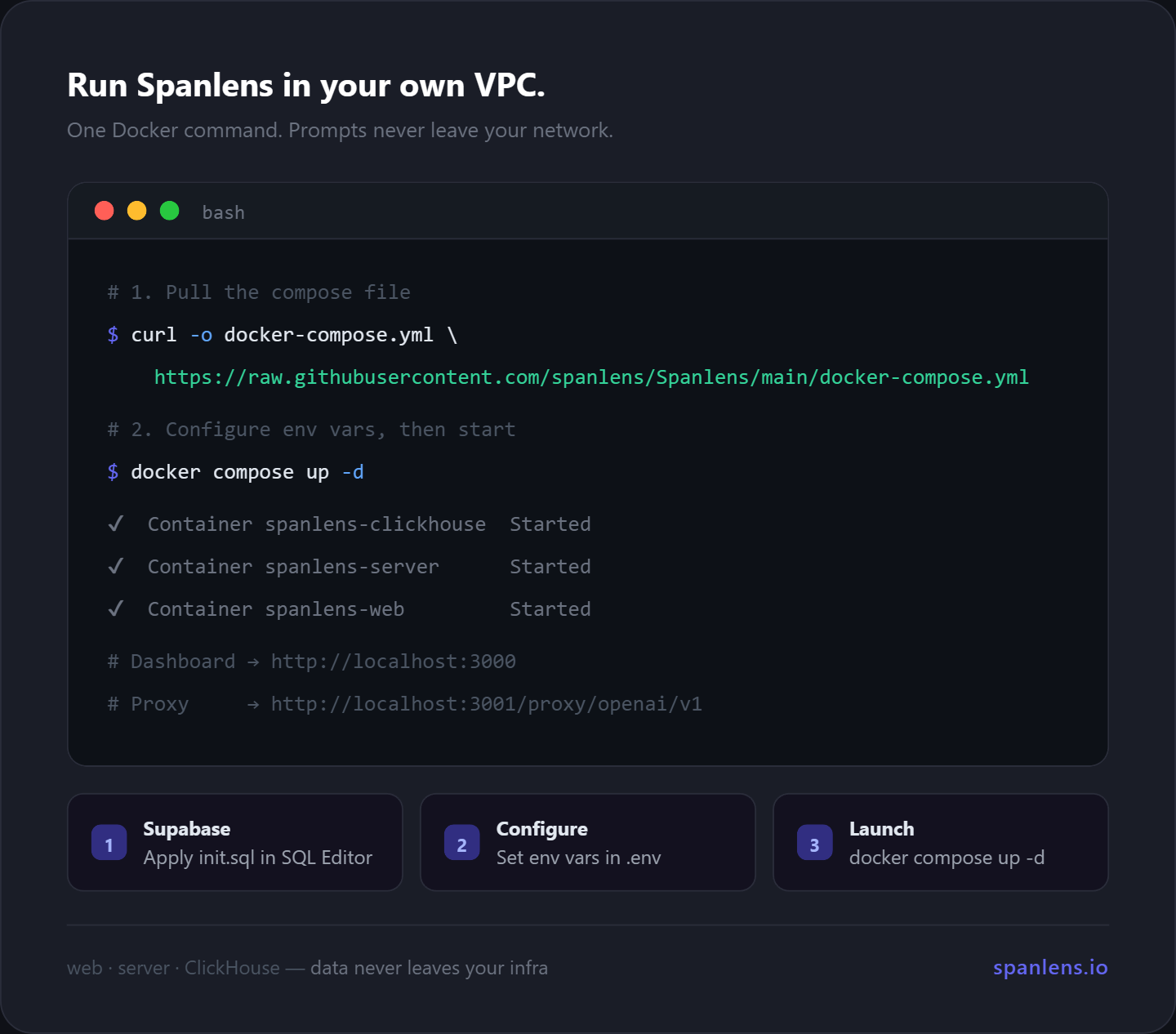
1. Apply the Supabase schema (one-time)
Open your Supabase project → SQL Editor → New query, paste the contents of supabase/init.sql, and click Run. That's it. No CLI needed.
Alternative (psql):
psql "postgresql://postgres:<password>@db.<ref>.supabase.co:5432/postgres" \
  -f supabase/init.sql
2. Create a .env file
# Supabase (cloud or self-hosted)
NEXT_PUBLIC_SUPABASE_URL=https://xxxx.supabase.co
NEXT_PUBLIC_SUPABASE_ANON_KEY=eyJ...
SUPABASE_URL=https://xxxx.supabase.co
SUPABASE_ANON_KEY=eyJ...
SUPABASE_SERVICE_ROLE_KEY=eyJ...

# Encryption key (generate with: openssl rand -base64 32)
ENCRYPTION_KEY=<32-byte base64>

# Random secret for cron endpoint
CRON_SECRET=<random string>

# Pooled Postgres connection for the `requests` table (required).
# Supabase Dashboard: Connect > Direct > Transaction pooler, with
# "Use IPv4 connection" switched on. Port 6543, not 5432.
# The dedicated pooler shown by default is IPv6-only, so anything without
# outbound IPv6 (Vercel functions included) fails at DNS. Copy the host from
# that dialog rather than assembling it: the shared pooler hostname carries a
# numbered prefix that the region does not tell you.
# This is a full database credential, so keep it out of logs.
SUPABASE_DB_POOLER_URL=postgresql://postgres.<ref>:<password>@<pooler-host>:6543/postgres

# Optional (for invite emails)
# WEB_URL=https://your-domain.com
# RESEND_API_KEY=re_...
# RESEND_FROM=Spanlens <no-reply@your-domain.com>

# Optional (Paddle billing, only if you sell paid plans on your instance)
# PADDLE_API_KEY=...
# PADDLE_NOTIFICATION_SECRET=...
# PADDLE_ENVIRONMENT=sandbox  # or production
3. Start
docker compose up -d
- Dashboard:
http://localhost:3000 - API / proxy:
http://localhost:3001 - Health:
GET /health(liveness) andGET /health/deep(database pool, fallback queue depth, cron freshness)
Upgrading from an older release? Request logs live in Postgres now. Re-apply
supabase/init.sqlso therequeststable exists, addSUPABASE_DB_POOLER_URLto your.env, then drop the ClickHouse container and its fourCLICKHOUSE_*variables. Rows already in ClickHouse are not copied across, so export anything you still need before tearing it down.
The web container passes NEXT_PUBLIC_* vars as build arguments (Next.js bakes them into the client bundle), so they must be present before docker compose build.
Server-only (no dashboard)
If you only need the proxy/API and run the dashboard separately:
docker pull ghcr.io/spanlens/spanlens-server:latest
docker run -p 3001:3001 \
  -e SUPABASE_URL=... \
  -e SUPABASE_ANON_KEY=... \
  -e SUPABASE_SERVICE_ROLE_KEY=... \
  -e SUPABASE_DB_POOLER_URL=... \
  -e ENCRYPTION_KEY=... \
  ghcr.io/spanlens/spanlens-server:latest
Point your SDK at your self-hosted URL
const openai = createOpenAI({
  baseURL: 'https://your-spanlens.example.com/proxy/openai/v1',
})
Your Spanlens instance talks to your Supabase. We never see your data.
Background jobs (Vercel Cron / your scheduler)
The hosted instance ships with the following cron tasks (see apps/server/vercel.json). On self-host, point any scheduler at the same paths with the CRON_SECRET bearer:
| Path | Schedule | Purpose |
|---|---|---|
/cron/evaluate-alerts | every 15m | Evaluate threshold + anomaly alerts, fire notifications |
/cron/snapshot-anomalies | daily 01:00 | Materialize daily anomaly baselines |
/cron/replay-fallback | every 5m | Replay the requests_fallback queue into the requests table |
/cron/stale-key-reminders | weekly Mon 09:00 | Email digest of idle provider keys |
/cron/leak-detect-keys | daily 04:00 | GitGuardian scan of active provider keys |
/cron/recommend-savings-alerts | daily 09:00 | Email model-swap savings opportunities |
/cron/check-past-due-downgrades | daily 10:00 | D-3 / D-1 warnings + auto-downgrade past-due subs |
/cron/execute-pending-deletions | every 6h | Hard-delete accounts past their 30-day soft-delete grace |
/cron/run-background-migrations | every 5m | Drain background-migration queue (data backfills) |
/cron/detect-missing-model-prices | hourly | Catch new model IDs in the request log that have no row in model_prices |
/cron/self-monitor | hourly :31 | Spanlens dogfoods itself: heartbeat eval into the internal workspace |
/cron/detect-orphan-spans | hourly :17 | Flag spans whose parent trace never arrived |
/cron/prune-judge-cache | daily 03:00 | TTL-evict stale (evaluator, response) judge cache entries |
/cron/purge-proxy-cache | daily 03:15 | Reclaim expired proxy_response_cache rows for keys that went quiet |
/cron/weekly-digest | weekly Mon 09:00 | Email each workspace a weekly summary (requests, cost trend, top models, anomalies) |
/cron/detect-data-silence | every 6h | Alert admins when a previously-active workspace stops sending data for 24h |
/cron/keep-warm | every 5m | Lightweight ping that keeps the Vercel function warm (skip on always-on platforms like Fly.io / Railway) |
Contributing
PRs and issues welcome. See CONTRIBUTING.md for the project layout, local-dev setup, coding conventions, and what we look for in a PR. Commit messages follow Conventional Commits and the PR template walks through the safety checklist.
Security issues: please email support@spanlens.io instead of opening a public issue. See SECURITY.md.
License
MIT. Use, fork, self-host, or build on top freely. The hosted service at spanlens.io is the recommended way to run Spanlens, but you can always pull the Docker image and run it yourself (see docs/self-host).
Reviews
No reviews yet
Be the first to review this server!
More Developer Tools MCP Servers
Rea
Freeby Morluto · Developer Tools
Reverse engineer anything from your terminal or agent with one CLI and MCP server.
Paperclip
Freeby Paperclipai · Developer Tools
Trending hip-hop artist momentum scores across four cultural dimensions.
Git
Freeby Modelcontextprotocol · Developer Tools
Read, search, and manipulate Git repositories programmatically
Fetch
Freeby Modelcontextprotocol · Developer Tools
Web content fetching and conversion for efficient LLM usage
Toleno
Freeby Toleno · Developer Tools
Toleno Network MCP Server — Manage your Toleno mining account with Claude AI using natural language.
MCP Marketplace
Freeby mcp-marketplace · Developer Tools
Search and install MCP servers from inside your AI client.