
Server data from the Official MCP Registry
High-performance knowledge graph MCP server for AI coding agents with semantic search.
About
High-performance knowledge graph MCP server for AI coding agents with semantic search.
Security Report
Valid MCP server (1 strong, 1 medium validity signals). 5 known CVEs in dependencies Package registry verified. Imported from the Official MCP Registry.
9 files analyzed · 6 issues found
Security scores are indicators to help you make informed decisions, not guarantees. Always review permissions before connecting any MCP server.
How to Install
Add this to your MCP configuration file:
{
  "mcpServers": {
    "io-github-spuentesp-lain": {
      "args": [
        "-y",
        "@spuentesp/lain-mcp"
      ],
      "command": "npx"
    }
  }
}Documentation
View on GitHubFrom the project's GitHub README.
Lain
A code graph for coding agents. Lain maps callers, dependencies, symbols, and Git co-changes, then exposes them through the Model Context Protocol (MCP). Before an agent edits a function, it can inspect what depends on it and how the rest of the code reaches it.
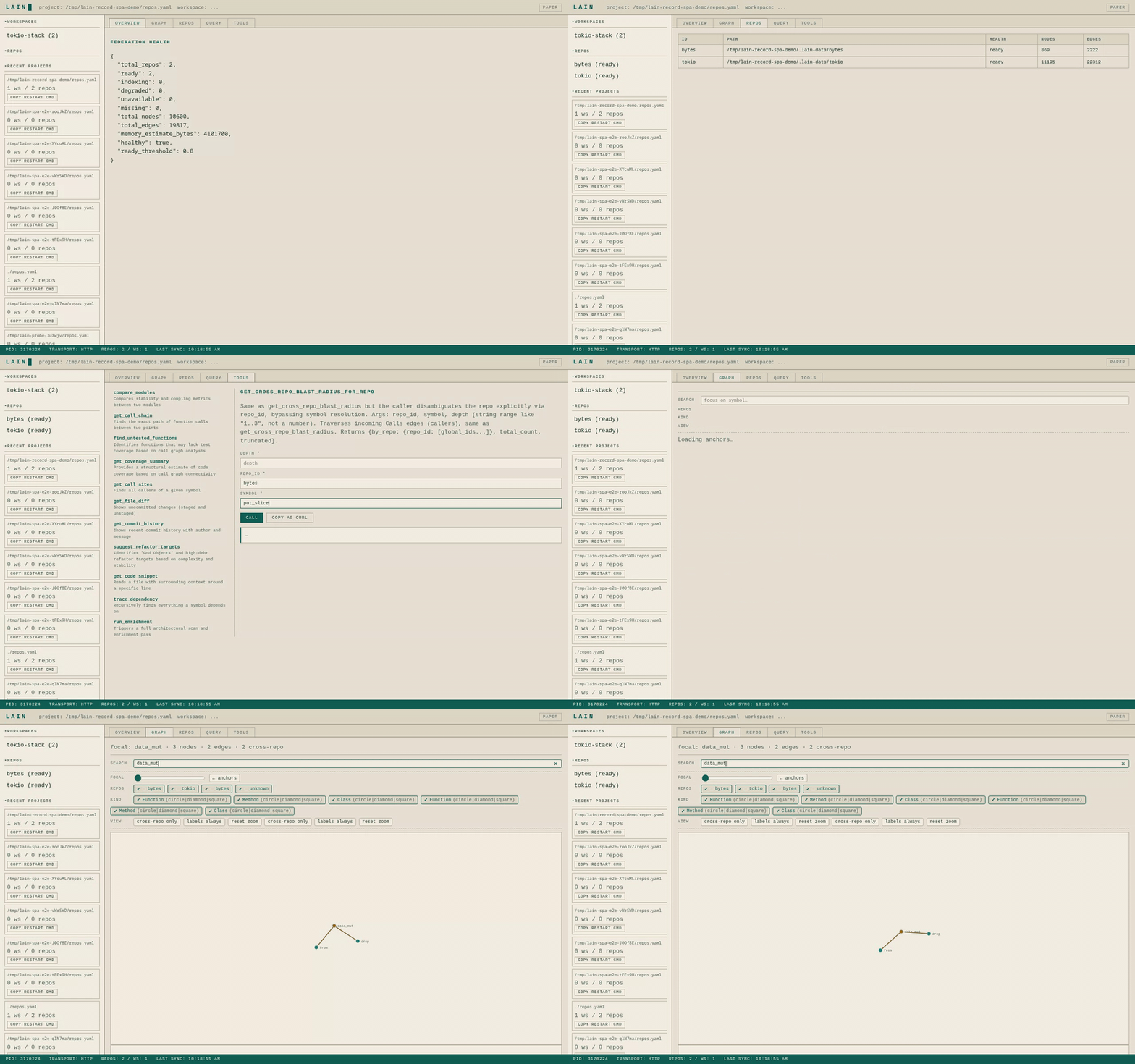
The demo traces a symbol across the bytes and tokio repositories. Agents
query the same graph through MCP; the browser shows what Lain indexed and where
an answer came from.
Ask your agent:
If I change validate_token, what breaks?
Show me the call chain from entry to helper_a.
Which files usually change with auth.rs?
Is another agent already editing this code?
Lain answers with symbol names and source paths from a local index. The index
stays on disk between runs and can cover more than one repository. It follows
commits, not uncommitted edits: after committing, a re-index pass (lain reindex or a fresh session) brings it current — and answers that may miss
recent work say so instead of going quiet. Semantic search is optional; graph
queries work without an embedding model.
Install
Using the release installer:
curl -fsSL https://raw.githubusercontent.com/spuentesp/lain/main/install.sh | bash
source ~/.zshrc   # or ~/.bashrc
lain --version
Or from npm (macOS, Linux, and x64 Windows):
npm install -g @spuentesp/lain-mcp
lain --version
Two npm notes:
npm install -gfails withEEXISTwhen an unrelatedlainfile already sits in npm's global bin directory — for example an older manual copy in~/.local/binwhen your npm prefix is~/.local. The npm error itself cannot tell the file is unrelated; move or remove it, or install under a different prefix:npm install -g --prefix ~/.local/lain-npm @spuentesp/lain-mcp(then add~/.local/lain-npm/binto yourPATH).- If npm install scripts were disabled (
--ignore-scripts, a locked-down CI), the platform binary is not fetched during install. The firstlainrun downloads and verifies it, so that first run needs network access; once cached, lain works offline.
Rust 1.89 or newer is only needed when building from source. The quickstart covers non-interactive installation and the optional local embedding model.
Connect an agent
Run one setup command from the repository you want Lain to index:
lain setup --agent claude-code
lain setup --agent codex
lain setup --agent cursor
lain setup --agent vscode
lain setup --agent continue
Use lain setup --agent generic for another MCP host. Each adapter
writes the client's own configuration — claude mcp add for Claude
Code, ~/.codex/config.toml for Codex, ~/.cursor/mcp.json for
Cursor, .vscode/mcp.json (or the user-scoped mcp.json) for VS
Code, a block file under the repository's .continue/mcpServers/ for
Continue. generic writes this project-level .mcp.json:
{
  "mcpServers": {
    "lain": {
      "command": "/home/you/.local/lain/lain",
      "args": ["mcp"]
    }
  }
}
command is always the absolute path of the lain binary that ran
setup — not the bare name — so the agent runs the same binary no matter
which PATH it inherits. That path depends on the install: the release
installer puts the binary at ~/.local/lain/lain, while the npm
package registers the verified cache binary it launches
(~/.cache/lain/<version>/<target>/lain on Linux,
~/Library/Caches/lain/… on macOS, %LOCALAPPDATA%\lain\Cache\… on
Windows). Setup finishes by starting exactly that command once and
verifying the MCP handshake.
On a terminal, lain setup without --agent asks which client to
configure (Enter picks Claude Code), and without --lsp asks which
optional language servers to install (Enter installs none).
Non-interactive runs default to generic and no language servers, so
scripts should pass --agent and --lsp explicitly.
Restart the agent after setup. Lain walks up from the agent's working
directory to find .git, builds .lain/graph.bin, and serves the
repository over stdio. No repos.yaml is needed for one repository.
Languages
Parsers for Rust, Python, TypeScript, JavaScript, Go, Java, C, C++, C#, Ruby,
Swift, Kotlin, Scala and PHP are built into the binary, as are the <script>
blocks of Vue and Svelte components. Every one gets definitions and a call
graph with nothing else installed.
Language servers are optional and only add precision. lain setup lists the
languages it found and asks which servers to install; pressing Enter installs
none. Non-interactive runs install none unless you name them:
lain setup --lsp python,go      # just these
lain setup --lsp detected       # every missing one for this repository
lain setup --lsp none
First query
Ask the connected agent:
Use Lain to show the blast radius of validate_token.
Or call the same tool from a terminal:
lain oneshot get_blast_radius validate_token
Use a symbol from your repository in place of validate_token. If the graph
isn't ready or an answer looks stale, run lain doctor.
Multiple repositories
lain repos add bytes https://github.com/tokio-rs/bytes.git
lain repos add tokio https://github.com/tokio-rs/tokio.git
lain workspaces create tokio-stack --members bytes,tokio
lain server --config ./repos.yaml --transport http --port 9999
Open http://localhost:9999 for the Command Center. The server listens on
localhost only; set LAIN_BIND_ADDR=0.0.0.0 (with LAIN_API_KEYS=key1,…)
to expose it on the network. Federation adds
organization-wide search and cross-repository blast-radius queries. The
federation guide covers configuration, source types, and
failure states. After a federation schema upgrade, run lain reindex to
rebuild the on-disk graph from the sources.
Check the graph
From a source checkout:
scripts/demo.sh --quick
The script creates a small repository with a known call graph, starts a real Lain server, and compares the answers with that graph. It exits non-zero when a check fails. A full run also records timings against this repository.
What Lain provides
| Need | Tool or feature |
|---|---|
| See callers before changing a symbol | get_blast_radius, assess_change |
| Trace how two functions connect | get_call_chain |
| Find architectural entry points | find_anchors, list_entry_points |
| Search by name or meaning | find_symbol, search_code |
| Follow a symbol across repositories | get_cross_repo_blast_radius, search_org |
| Keep agents from editing the same code blindly | intents, presence, and advisory file claims |
Static analysis can't prove every dynamic call through a message bus, dependency
injection container, or reflective router. explain_dispatch combines static
callers with convention matches, runtime traces, and Git co-change evidence; an
empty result becomes insufficient_evidence, not a claim that the edit is safe.
Documentation
| Start here | Covers |
|---|---|
| Quickstart | Installation, first query, and first aid |
| User manual | CLI reference, tuning, operation, and troubleshooting |
| Tool guide | MCP tools, arguments, outputs, and limits |
| Skill bundle | Agent-loadable skills and role recipes |
| Federation | Multi-repository configuration and queries |
| Multiplayer | Agent presence, intents, claims, and hooks |
| Architecture | Graph construction and design choices |
| Documentation index | Every maintained document |
Project status




License
MIT — Copyright (c) 2026 spuentesp
Reviews
No reviews yet
Be the first to review this server!
More Developer Tools MCP Servers
Fetch
Freeby Modelcontextprotocol · Developer Tools
Web content fetching and conversion for efficient LLM usage
Git
Freeby Modelcontextprotocol · Developer Tools
Read, search, and manipulate Git repositories programmatically
Worldmonitor
Freeby Koala73 · Developer Tools
Live markets, conflicts, country risk, chokepoints, energy, and China decision signals. 93 tools.
Toleno
Freeby Toleno · Developer Tools
Toleno Network MCP Server — Manage your Toleno mining account with Claude AI using natural language.
MCP Marketplace
Freeby mcp-marketplace · Developer Tools
Search and install MCP servers from inside your AI client.
mcp-creator-python
Freeby mcp-marketplace · Developer Tools
Create, build, and publish Python MCP servers to PyPI — conversationally.