
Server data from the Official MCP Registry
Live snapshots from ~29,000 public cameras across 11 countries — traffic, weather, webcams
About
Live snapshots from ~29,000 public cameras across 11 countries — traffic, weather, webcams
Security Report
Valid MCP server (2 strong, 4 medium validity signals). 2 known CVEs in dependencies Package registry verified. Imported from the Official MCP Registry.
4 files analyzed · 3 issues found
Security scores are indicators to help you make informed decisions, not guarantees. Always review permissions before connecting any MCP server.
Permissions Required
This plugin requests these system permissions. Most are normal for its category.
How to Install
Add this to your MCP configuration file:
{
  "mcpServers": {
    "io-github-stuchapin909-open-eagle-eye": {
      "args": [
        "-y",
        "openeagleeye"
      ],
      "command": "npx"
    }
  }
}Documentation
View on GitHubFrom the project's GitHub README.
Open Eagle Eye


MCP server that gives AI agents instant access to public camera feeds worldwide. One HTTP GET, sub-second captures, no browser automation, no stream decoding.
Why
Most camera APIs require authentication, serve video streams, or hide images behind JavaScript rendering. Open Eagle Eye only indexes cameras that return a JPEG or PNG on a plain HTTP GET — the simplest possible integration. Agents don't need to render pages or decode video. They just fetch an image.
The registry is self-healing. A GitHub Action runs nightly, checks every camera, retries failures before removing them, and uses vision AI to catch cameras that return error pages instead of live feeds. Dead cameras get flagged automatically.
Quick start
{
  "mcpServers": {
    "openeagleeye": {
      "command": "npx",
      "args": ["-y", "openeagleeye"]
    }
  }
}
Or install globally:
npm install -g openeagleeye
openeagleeye
On first run, the server fetches the latest camera registry from GitHub and caches it locally in ~/.openeagleeye/. Subsequent starts refresh the cache automatically.
How it works
A valid camera URL is any endpoint that returns a JPEG or PNG on a plain HTTP GET. Most city traffic cameras, weather stations, and park cams expose exactly this. The server fetches the image, saves it to disk, and returns the file path.
MCP Tools
| Tool | Description |
|---|---|
get_snapshot | Fetch a live image from a camera — saves to disk, returns file path |
list_cameras | Browse the registry with filters (city, location, category) |
search_cameras | Search by name, location, or category |
add_local_camera | Add a camera to your local collection |
list_local | Show your locally-added cameras |
remove_local | Delete a locally-added camera |
submit_local | Share local cameras upstream via GitHub issue |
report_camera | Report a broken or low-quality camera |
check_config | Show API key configuration status |
Upstream vs local cameras
The registry has two layers:
- Upstream — the global registry fetched from GitHub on every server start. These are the ~32,000 validated public cameras.
- Local — cameras you add yourself via
add_local_camera. They persist in~/.openeagleeye/local-cameras.json, survive restarts, and appear inlist_cameras/search_cameraswithsource: "local". Share them upstream anytime withsubmit_local.
Filtering
Every camera has a city field. Use list_cameras with city: "Sydney" to get a short, focused list instead of dumping all cameras into context.
Output format
Every tool returns structured JSON. Snapshots save to disk and return the file path — the MCP server runs as a local subprocess, so the agent has filesystem access.
Snapshot response:
{
  "success": true,
  "file_path": "/home/user/.openeagleeye/snapshots/a1b2c3d4e5f6a7b8.jpg",
  "size_bytes": 14579,
  "content_type": "image/jpeg",
  "camera": {
    "id": "nyc-bb-21-north-rdwy-at-above-south-st",
    "name": "BB-21 North Rdwy @ Above South St",
    "city": "New York",
    "location": "Manhattan, New York, USA",
    "coordinates": { "lat": 40.708, "lng": -73.999 }
  }
}
Registry
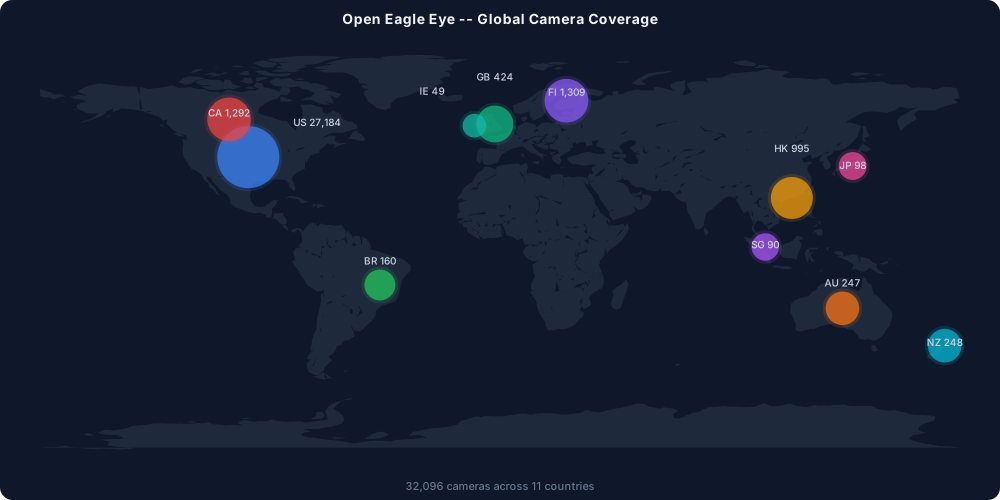
~32,000 cameras across eleven countries (32,096 verified):
| Country | Count | Sources |
|---|---|---|
| US | 27,184 | NYC DOT, NY 511, WSDOT, Caltrans CWWP2, CDOT CoTrip, VDOT 511, FDOT FL511, NCDOT, PennDOT 511PA, Arizona ADOT, Oregon ODOT, Nevada NDOT, Utah UDOT, Wisconsin WisDOT, New England 511, Louisiana LADOTD, Alaska DOT&PF, Missouri MoDOT |
| FI | 1,309 | Digitraffic weather cameras (Fintraffic) |
| CA | 1,292 | Ontario MTO, Alberta 511 |
| HK | 995 | Hong Kong Transport Department |
| GB | 424 | London TfL JamCams |
| NZ | 248 | NZTA nationwide highways |
| AU | 247 | Queensland DOT traffic + flood cameras |
| BR | 160 | CET São Paulo urban traffic |
| JP | 98 | NEXCO East expressways |
| SG | 90 | Singapore LTA |
| IE | 49 | TII motorway cams (M50 Dublin) |
Every camera has country, city, location, timezone, and coordinates (lat/lng).
Self-healing
A GitHub Action runs nightly at 3 AM UTC:
- Checks cameras not validated in the last 7 days, plus any flagged as suspect
- First failure marks as suspect, second consecutive failure removes and opens a GitHub issue
- Vision AI (GPT-4o-mini via GitHub Models) catches cameras returning error pages
- Suspect cameras that recover are cleared automatically
Security
- SSRF protection — blocks private IPs, cloud metadata endpoints, non-HTTP protocols, and DNS rebinding
- Content-type whitelist — only
image/jpegandimage/pngaccepted - Magic byte detection — validates JPEG/PNG by file header when CDN returns wrong content-type
- Push/PR cap — max 500 cameras per push to prevent DoS via oversized PRs
- Random filenames — snapshots use random hex filenames, no camera ID in the path
API Keys (optional)
Most cameras work out of the box. Some require a free API key. If a snapshot fails with a key error, the response tells you where to sign up and how to configure it.
Create ~/.openeagleeye/config.json:
{
  "api_keys": {
    "PROVIDER_API_KEY": "your-key-here"
  }
}
Use check_config to see which cameras need keys and whether yours are set.
Adding cameras
- Find a direct-image URL (must return
image/jpegorimage/pngon plain GET) add_local_camerawith the URL, city, location, timezone, and optional coordinatesget_snapshotto test itsubmit_localto share upstream — requires theghCLI (gh auth login)
Local cameras work immediately and don't need upstream approval to be useful.
Good sources: city DOTs, weather stations, ski resorts, national parks, ports, airports.
File layout
All runtime data lives in ~/.openeagleeye/:
~/.openeagleeye/
  cameras.json          # Upstream registry (fetched from GitHub on boot)
  local-cameras.json    # Your locally-added cameras
  .registry-state.json  # Validation state (active/suspect/offline)
  snapshots/            # Downloaded camera images
  config.json           # API keys
Contributing
Pull requests welcome. See CONTRIBUTING.md for guidelines on adding camera sources.
Why this exists
See WHY.md for the reasoning behind the project's design decisions, how it compares to other camera services, and why agent-native and self-healing matter.
Privacy & security
See SECURITY.md for answers to common questions about surveillance, data collection, private cameras, and the security architecture.
License
MIT
Reviews
No reviews yet
Be the first to review this server!
More Developer Tools MCP Servers
Git
Freeby Modelcontextprotocol · Developer Tools
Read, search, and manipulate Git repositories programmatically
Fetch
Freeby Modelcontextprotocol · Developer Tools
Web content fetching and conversion for efficient LLM usage
Paperclip
Freeby Paperclipai · Developer Tools
Trending hip-hop artist momentum scores across four cultural dimensions.
Toleno
Freeby Toleno · Developer Tools
Toleno Network MCP Server — Manage your Toleno mining account with Claude AI using natural language.
mcp-creator-python
Freeby mcp-marketplace · Developer Tools
Create, build, and publish Python MCP servers to PyPI — conversationally.
MCP Marketplace
Freeby mcp-marketplace · Developer Tools
Search and install MCP servers from inside your AI client.