
Server data from the Official MCP Registry
Self-hosted Polar health analytics with a built-in MCP server: sleep, HRV, workouts, baselines.
About
Self-hosted Polar health analytics with a built-in MCP server: sleep, HRV, workouts, baselines.
Security Report
Valid MCP server (2 strong, 1 medium validity signals). No known CVEs in dependencies. Imported from the Official MCP Registry.
4 files analyzed · No issues found
Security scores are indicators to help you make informed decisions, not guarantees. Always review permissions before connecting any MCP server.
What You'll Need
Set these up before or after installing:
Environment variable: DATABASE_URL
Environment variable: POLAR_CLIENT_ID
Environment variable: POLAR_CLIENT_SECRET
Environment variable: BASE_URL
Documentation
View on GitHubFrom the project's GitHub README.
polar-flow-server
Self-hosted health analytics for Polar devices — own your data, analyze it against your own baselines, and let your AI assistant read it.




Full Documentation · MCP Server · Integration Guide · API Reference
What This Does
Your watch knows more about you than you do — and Polar's API only lets you see the last 28-30 days of it. This server syncs everything, keeps it forever, and turns it into answers:
- Syncs all 13 Polar API endpoints automatically — sleep, HRV, activity, workouts, SpO2, ECG, skin temperature, the lot
- Stores everything in PostgreSQL. Your data, your server, no cloud between you and it
- Computes personal baselines (rolling averages, IQR anomaly bounds) so "is this normal?" means normal for you
- Ships a built-in MCP server with OAuth sign-in — ask Claude "should I train hard today?" and it answers from your overnight HRV vs your baseline
- Admin dashboard (HTMX), REST API, per-user API keys, multi-user ready
Ask Your AI About Your Body (MCP)
A built-in Model Context Protocol server — protocol revision 2026-07-28, streamable HTTP — runs inside the main server at /mcp. Ten curated tools cover the one-shot health assessment, sleep, recovery, activity, workouts, seven biosensing streams, personal baselines, patterns/anomalies, and sync control.
In clients that render MCP Apps (claude.ai, Claude Desktop, VS Code), asking "how am I doing?" draws an actual card in the conversation:
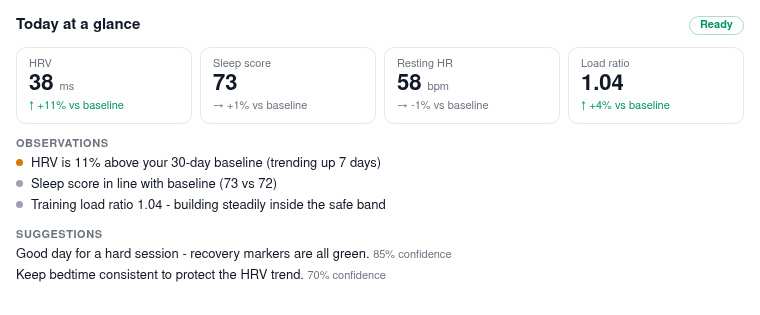
Connecting is a sign-in, not a paste. With BASE_URL set, the server is its own OAuth 2.1 authorization server: add https://your-server/mcp as a custom connector in Claude Desktop or claude.ai, click Connect, log in on your server, approve the consent screen. Tokens are user-scoped, expire hourly, refresh automatically, and every connected app is revocable from Settings. API keys still work for headless clients:
claude mcp add polar-health https://your-server.example.com/mcp \
  --transport http \
  --header "X-API-Key: pfk_your_key_here"
Full setup in the MCP docs.
Architecture
Polar API → polar-flow SDK → Sync Service → PostgreSQL
                                                  ↓
                                           Admin Dashboard (HTMX)
                                                  ↓
                                             REST API
Stack:
- Litestar (async web framework)
- SQLAlchemy 2.0 (async ORM)
- PostgreSQL
- HTMX + Tailwind (admin UI)
- polar-flow SDK v1.5.0
Don't fancy running a server? A hosted version is in the works — join the waitlist. Self-hosting stays free forever.
Quick Start
Option 1: Docker (Recommended)
# Pull and run
curl -O https://raw.githubusercontent.com/StuMason/polar-flow-server/main/docker-compose.prod.yml
docker-compose -f docker-compose.prod.yml up -d

# That's it. Open http://localhost:8000/admin
Option 2: From Source
git clone https://github.com/StuMason/polar-flow-server.git
cd polar-flow-server
docker-compose up -d
Setup
- Open http://localhost:8000/admin
- Get Polar credentials from admin.polaraccesslink.com (set redirect URI to
http://localhost:8000/admin/oauth/callback) - Enter credentials and click "Connect with Polar"
- Hit "Sync Now" to pull your data
The server syncs data every hour automatically.
Dashboard
The admin panel at /admin/dashboard is organised into tabs (with a
floating tab bar on mobile):
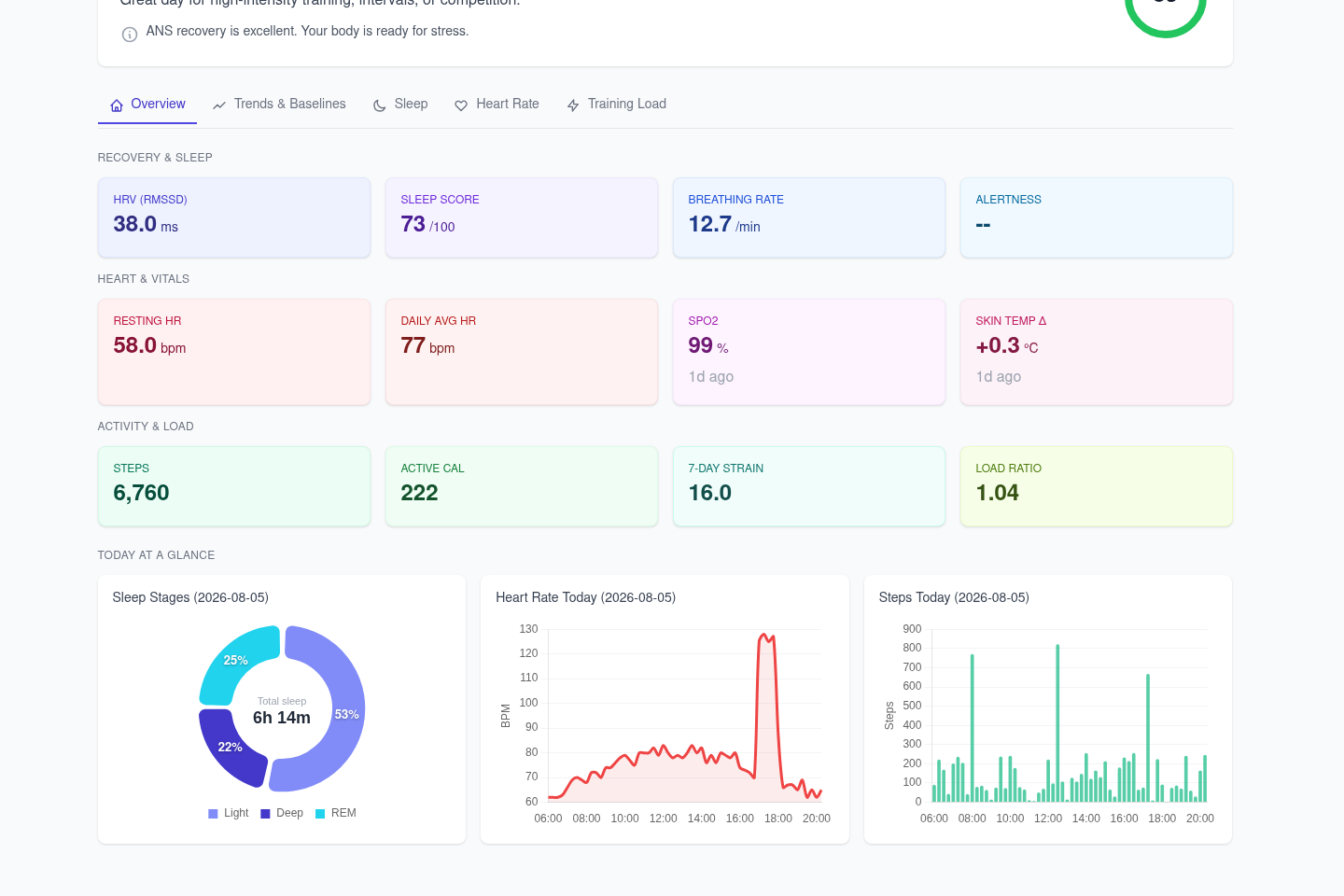
- Overview - stat tiles (HRV, resting HR, SpO2, skin temp, steps, strain, sleep score, alertness...), Today's Readiness recommendations, and "Today at a Glance" mini-charts (sleep stages, heart rate, steps)
- Trends & Baselines - personal baselines and detected patterns
- Sleep - sleep score and stage-duration charts
- Heart Rate - daily HR, HRV and ANS charge charts, biosensing panel
- Training Load - activity and cardio load charts
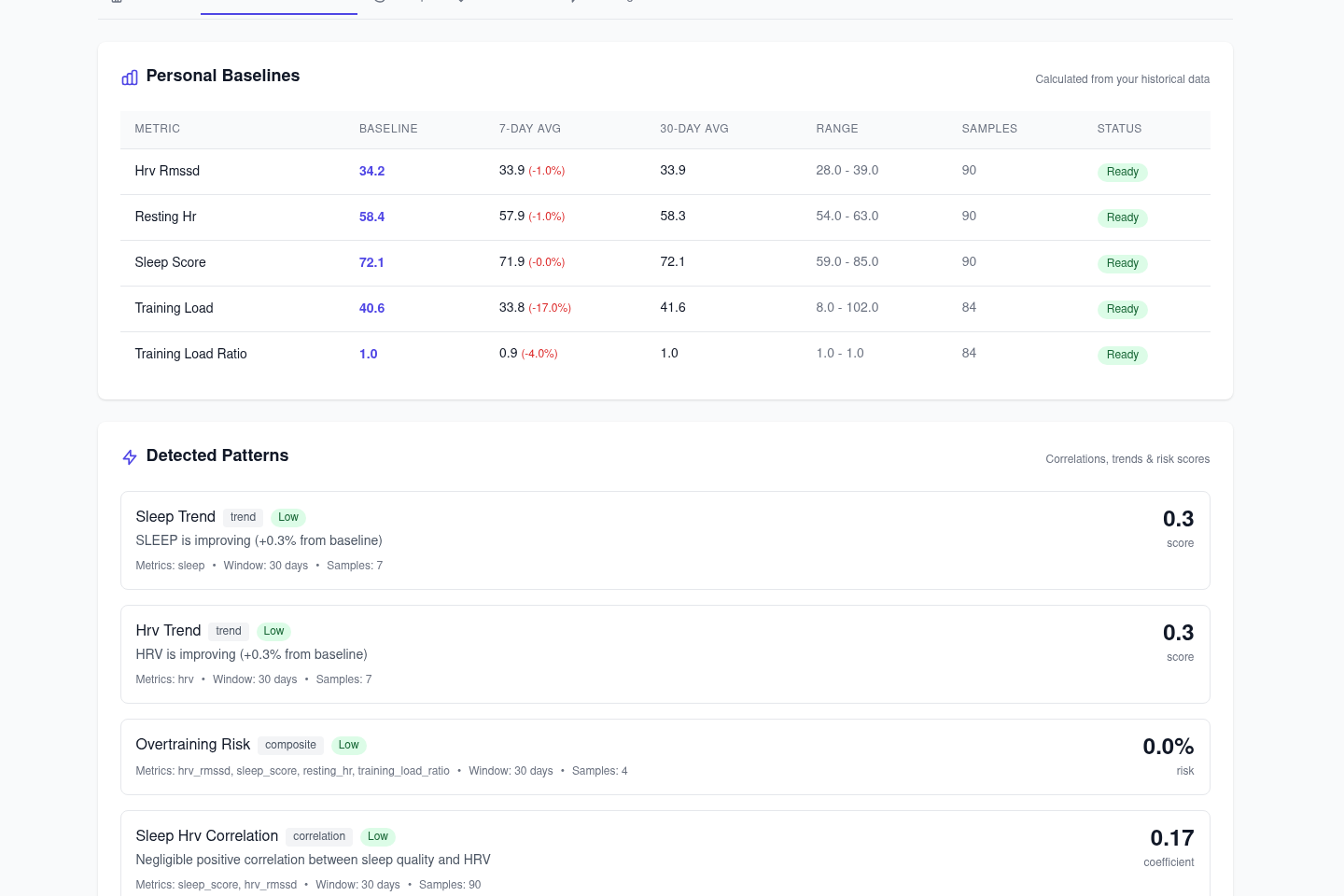
Charts have a selectable 7/14/30-day range and CSV export. API keys are managed from the settings page, with rate limit tracking. All frontend assets are vendored - the dashboard works offline and on a LAN with no CDNs.
Data Synced (13 Endpoints)
| Endpoint | Data |
|---|---|
| Sleep | Score, stages (light/deep/REM), duration |
| Nightly Recharge | HRV, ANS charge, recovery status |
| Daily Activity | Steps, distance, calories, active time |
| Exercises | Sport, duration, HR zones, training load |
| Cardio Load | Strain, tolerance, load ratio, status |
| SleepWise Alertness | Hourly alertness predictions |
| SleepWise Bedtime | Optimal sleep timing recommendations |
| Activity Samples | Minute-by-minute step data |
| Continuous HR | All-day heart rate (5-min intervals) |
| SpO2 | Blood oxygen tests (compatible devices) |
| ECG | Electrocardiogram tests (compatible devices) |
| Body Temperature | Continuous body temperature |
| Skin Temperature | Nightly skin temperature with baseline deviation |
Configuration
Required Environment Variables
| Variable | Description | Required |
|---|---|---|
DATABASE_URL | PostgreSQL connection string | Yes |
ENCRYPTION_KEY | 32-byte Fernet key for token encryption | Yes (production) |
Generate an encryption key:
python -c "from cryptography.fernet import Fernet; print(Fernet.generate_key().decode())"
Optional Environment Variables
| Variable | Description | Default |
|---|---|---|
DEPLOYMENT_MODE | self_hosted or saas | self_hosted |
SYNC_INTERVAL_HOURS | Auto-sync frequency | 1 |
SYNC_ON_STARTUP | Sync when server starts | false |
SYNC_DAYS_LOOKBACK | Days of history to sync | 28 |
LOG_LEVEL | Logging verbosity | INFO |
API_KEY | Master API key (bypasses rate limits) | None |
API Authentication
API endpoints require authentication. Health data should never be publicly accessible.
Authentication Methods
- Per-User API Keys (recommended) - Create from the admin dashboard or via OAuth flow
- Master API Key - Set
API_KEYenv var for full access (bypasses rate limits)
Using API Keys
# With per-user API key (includes rate limit headers)
curl -H "X-API-Key: pfk_your_api_key_here" \
  http://localhost:8000/api/v1/users/{user_id}/sleep?days=7

# Response headers include:
# X-RateLimit-Limit: 1000
# X-RateLimit-Remaining: 999
# X-RateLimit-Reset: 1704067200
Rate Limiting
- Default: 1000 requests per hour per API key
- Rate limits reset hourly
- Master API key (
API_KEYenv var) bypasses rate limiting - Rate limit info returned in response headers
OAuth Integration (SaaS / Multi-User)
For applications that need to integrate with polar-flow-server (e.g., Laravel, mobile apps, web frontends).
This allows any Polar user to connect their account to your application.
OAuth Flow
┌─────────────────┐     ┌─────────────────────┐     ┌─────────────────┐
│  Your App       │────▶│  polar-flow-server  │────▶│  Polar Flow     │
│  (Laravel etc)  │     │                     │     │  (OAuth)        │
│                 │◀────│                     │◀────│                 │
└─────────────────┘     └─────────────────────┘     └─────────────────┘
Step 1: Redirect user to start OAuth
GET /oauth/start?callback_url=https://yourapp.com/callback&client_id=your-app-name
| Parameter | Required | Description |
|---|---|---|
callback_url | Yes | Where to redirect after OAuth (your app's callback endpoint) |
client_id | No | Identifier for your app (validated during exchange) |
Step 2: User authorizes on Polar
User is redirected to Polar, logs in with their credentials, and authorizes your app.
Step 3: User redirected to your callback
https://yourapp.com/callback?code=TEMP_CODE_HERE
Step 4: Exchange temp code for API key (server-to-server)
POST /oauth/exchange
Content-Type: application/json

{
  "code": "TEMP_CODE_HERE",
  "client_id": "your-app-name"
}
Response:
{
  "api_key": "pfk_abc123...",
  "polar_user_id": "12345678",
  "expires_at": null
}
Step 5: Store and use the API key
Store api_key and polar_user_id for this user. Use the API key for all data requests:
curl -H "X-API-Key: pfk_abc123..." \
  "https://your-polar-server.com/api/v1/users/12345678/sleep?days=7"
Polar Admin Setup
In admin.polaraccesslink.com, set your app's redirect URI to:
https://your-polar-server.com/oauth/callback
Key Management
# Get key info
GET /api/v1/users/{user_id}/api-key/info
X-API-Key: pfk_...

# Regenerate key (invalidates old key)
POST /api/v1/users/{user_id}/api-key/regenerate
X-API-Key: pfk_...

# Revoke key
POST /api/v1/users/{user_id}/api-key/revoke
X-API-Key: pfk_...
API Endpoints
# Health check (no auth required)
curl http://localhost:8000/health

# Get sleep data (last 7 days)
curl -H "X-API-Key: pfk_..." \
  "http://localhost:8000/api/v1/users/{user_id}/sleep?days=7"

# Get activity data
curl -H "X-API-Key: pfk_..." \
  "http://localhost:8000/api/v1/users/{user_id}/activity?days=7"

# Get nightly recharge (HRV)
curl -H "X-API-Key: pfk_..." \
  "http://localhost:8000/api/v1/users/{user_id}/recharge?days=7"

# Get exercises
curl -H "X-API-Key: pfk_..." \
  "http://localhost:8000/api/v1/users/{user_id}/exercises?days=30"

# Export summary
curl -H "X-API-Key: pfk_..." \
  "http://localhost:8000/api/v1/users/{user_id}/export/summary?days=30"
Development
# Install dependencies
uv sync --all-extras

# Start PostgreSQL
docker-compose up -d postgres

# Run server with hot reload
uv run uvicorn polar_flow_server.app:app --reload

# Run tests
uv run pytest

# Type check
uv run mypy src/polar_flow_server

# Lint
uv run ruff check src/
Production Deployment
Deploy anywhere that runs Docker:
# Download and run
curl -O https://raw.githubusercontent.com/StuMason/polar-flow-server/main/docker-compose.prod.yml
docker-compose -f docker-compose.prod.yml up -d
Coolify, Railway, Render, etc. - Point at the GitHub repo, it builds from the Dockerfile.
Required for production:
- Set
ENCRYPTION_KEYenvironment variable (tokens won't persist across restarts otherwise) - Set
DATABASE_URLto your PostgreSQL instance
Database migrations run automatically on startup.
Multi-Tenancy
The server supports multiple users out of the box:
- Every table includes
user_idcolumn - All queries scoped by
user_id - Per-user API keys ensure users can only access their own data
- Self-hosted: typically one user
- Multi-user: many users, same codebase
Built With
- polar-flow - Python SDK for Polar AccessLink API
- Litestar - Async web framework
- SQLAlchemy - Async ORM
- HTMX - Admin UI interactions
- Tailwind CSS - Styling
License
MIT
Reviews
No reviews yet
Be the first to review this server!
More Developer Tools MCP Servers
Fetch
Freeby Modelcontextprotocol · Developer Tools
Web content fetching and conversion for efficient LLM usage
Paperclip
Freeby Paperclipai · Developer Tools
Trending hip-hop artist momentum scores across four cultural dimensions.
Netdata
Freeby Netdata · Developer Tools
Real-time infrastructure monitoring with metrics, logs, alerts, and ML-based anomaly detection.
Toleno
Freeby Toleno · Developer Tools
Toleno Network MCP Server — Manage your Toleno mining account with Claude AI using natural language.
mcp-creator-python
Freeby mcp-marketplace · Developer Tools
Create, build, and publish Python MCP servers to PyPI — conversationally.
MCP Marketplace
Freeby mcp-marketplace · Developer Tools
Search and install MCP servers from inside your AI client.