
Server data from the Official MCP Registry
Read-only Postgres/Supabase RLS audit with a rolled-back probe that proves who can read which rows.
About
Read-only Postgres/Supabase RLS audit with a rolled-back probe that proves who can read which rows.
Security Report
RLS Doctor is a read-only Postgres catalog auditor that queries pg_catalog, uses read-only probe transactions that always roll back, and exposes read-only MCP tools with no evident exfiltration, shell execution, or hardcoded credentials in the provided material. Its permissions (network_http-style database connectivity, env_vars for DATABASE_URL, file_read for schema files) match its purpose, and the only notable flags are documentation-level caveats that do not affect the score; the provided code excerpt is truncated, so the source of src/ was not directly reviewed. Supply chain analysis found 2 known vulnerabilities in dependencies (0 critical, 1 high severity). Package verification found 1 issue.
3 files analyzed · 6 issues found
Security scores are indicators to help you make informed decisions, not guarantees. Always review permissions before connecting any MCP server.
Permissions Required
This plugin requests these system permissions. Most are normal for its category.
How to Install
Add this to your MCP configuration file:
{
  "mcpServers": {
    "io-github-subhajitlucky-rls-doctor": {
      "args": [
        "-y",
        "rls-doctor"
      ],
      "command": "npx"
    }
  }
}Documentation
View on GitHubFrom the project's GitHub README.
RLS Doctor



Don't trust your RLS. Prove it.
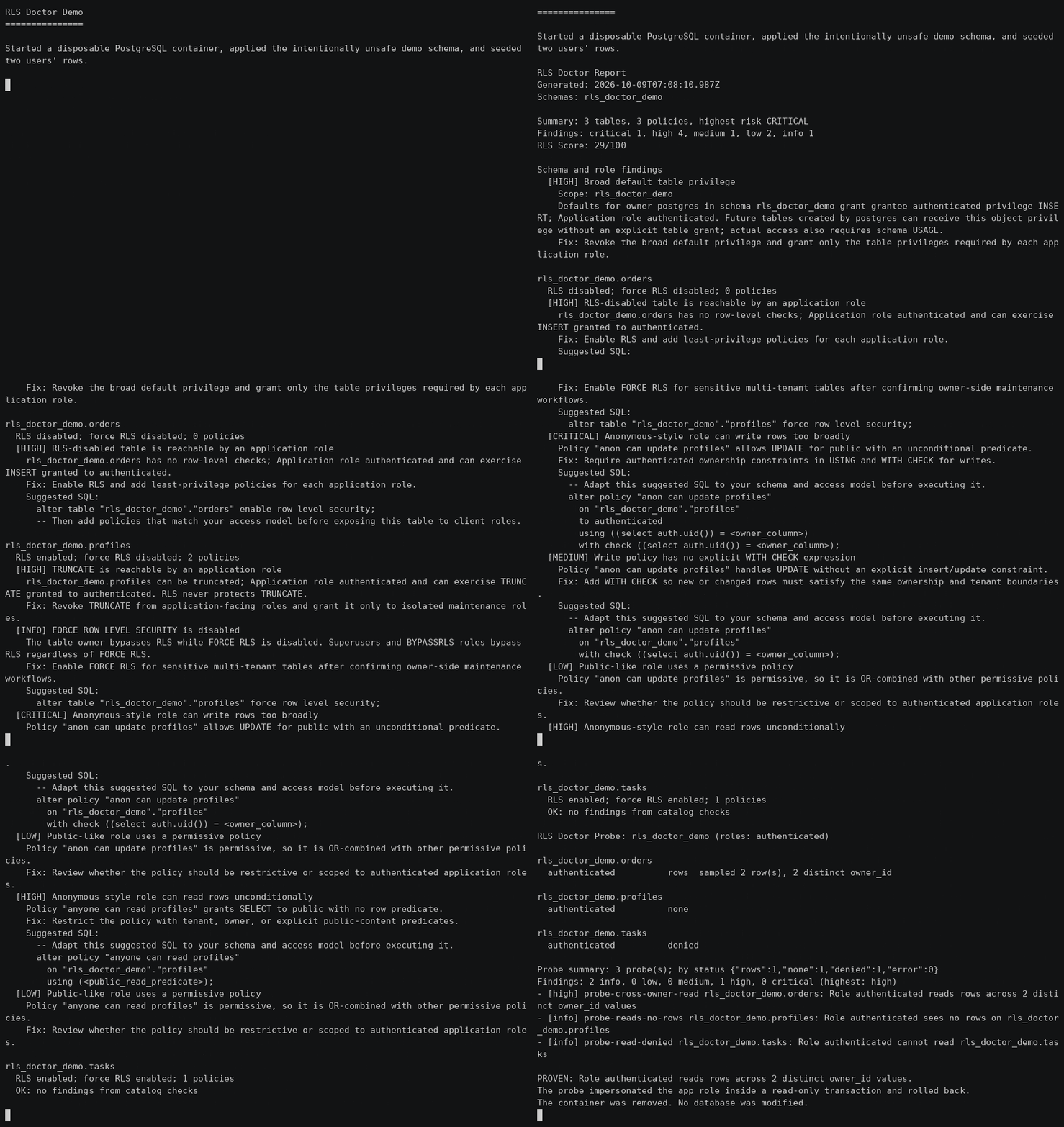
Can user A read user B's rows? Row Level Security is one of Postgres's strongest isolation tools, and one of the easiest to leave half-configured. You enable RLS, add a policy, and move on — but policies OR-combine, WITH CHECK silently falls back to USING, table owners bypass RLS entirely, and TRUNCATE is never protected at all.
rls-doctor reads your catalog and tells you what's actually reachable. And with probe, it stops analyzing and just shows you, impersonating your app roles in a transaction it always rolls back.
npx rls-doctor check    # reads DATABASE_URL or SUPABASE_DB_URL
npx rls-doctor demo     # no database needed: disposable Postgres, proven leak
RLS Doctor Report
Generated: 2026-07-12T00:00:00.000Z
Schemas: public

Summary: 1 tables, 0 policies, highest risk HIGH
Findings: critical 0, high 1, medium 0, low 0, info 0
RLS Score: 90/100

public.orders
  RLS disabled; force RLS disabled; 0 policies
  [HIGH] RLS-disabled table is reachable by an application role
    public.orders has no row-level checks; Application role authenticated and
    can exercise SELECT granted to authenticated.
    Fix: Enable RLS and add least-privilege policies for each application role.
    Suggested SQL:
      alter table "public"."orders" enable row level security;
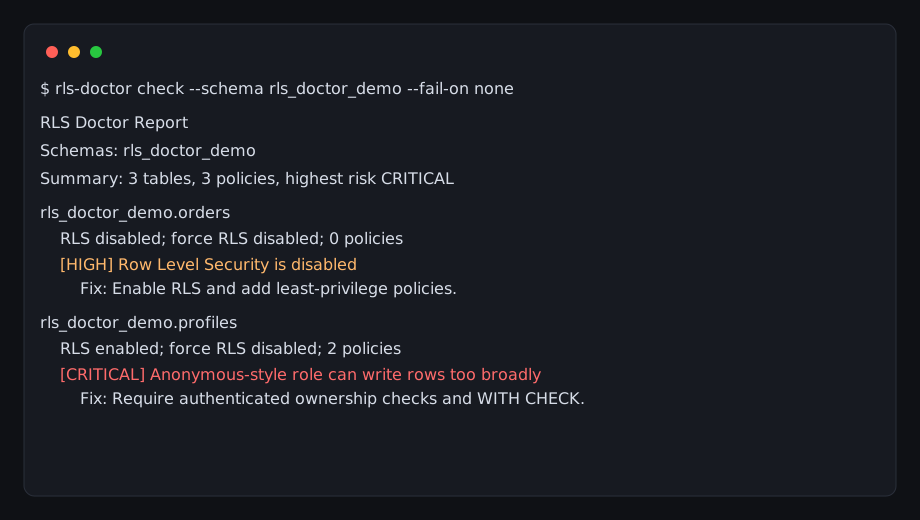
Prove a cross-tenant leak instead of guessing
Most RLS review is reading policies and hoping. probe is behavioral:
rls-doctor probe --connection "$DATABASE_URL" --schema public \
  --app-roles authenticated --subjects \
  00000000-0000-0000-0000-000000000001 \
  00000000-0000-0000-0000-000000000002
It sets request.jwt.claims inside the transaction, so auth.uid() resolves to each real Supabase user, then counts whose rows that identity can read.
- [high] probe-cross-owner-read rls_doctor_demo.orders:
  Role authenticated reads rows across 2 distinct owner_id values
- [high] probe-cross-subject-read rls_doctor_demo.orders:
  Role authenticated reads rows belonging to other users
It never mutates anything. probe opens begin ... read only and always rolls back — safe against a production read replica.
Install
npx rls-doctor check              # no install
npm install -g rls-doctor         # global
Requires Node.js 20 or later. Prefer DATABASE_URL or SUPABASE_DB_URL with read-only audit credentials — passing a secret via --connection exposes it in shell history and process listings.
Commands
| Command | What it does |
|---|---|
check | Audit one or more schemas |
explain <table> | Full detail on a single table |
probe | Impersonate app roles and prove actual row access |
shadow | Replay migrations in a disposable Postgres and compare static vs live |
prove | Prove isolation claims offline: proofs, witnesses, or undecided |
fix | Generate a repair and verify it in shadow before writing it |
demo | Spin up a disposable Postgres and prove a cross-tenant leak |
mcp | Serve read-only MCP tools over stdio |
rls-doctor check --schema public --fail-on high
rls-doctor explain public.profiles
rls-doctor probe --app-roles authenticated --owner-columns tenant_id
check options
-c, --connection <url>       Postgres connection string
-s, --schema <schema...>     Schemas to audit. Default: public
--json                       Machine-readable JSON
--format <format>            text, json, or sarif. Default: text
--fail-on <severity>         info, low, medium, high, critical, none. Default: high
--baseline <path>            Compare with a prior JSON report; only new findings fail
--update-baseline            Write the current report to --baseline and exit 0
--schema-file <path>         Audit a SQL schema or migration file offline; no database
--receipt <path>             Write a portable coverage receipt (digest-verified)
--receipt-key <path>         Sign the receipt with an Ed25519 private key (PEM)
--score                      Print only the RLS Score
--badge                      Print a shields.io badge URL for the RLS Score
--statement-timeout <ms>     Catalog query timeout. Default: 10000
--app-roles <role...>        Extra roles to treat as reachable application identities
On generic Postgres (not Supabase), pass your real roles so grants and memberships through them are analyzed at the same severity as authenticated:
rls-doctor check --connection "$DATABASE_URL" --app-roles app_user web_user --fail-on high
probe options
--app-roles <role...>        Roles to impersonate (required)
--subjects <uuid...>         Supabase user ids to simulate via request.jwt.claims
--owner-columns <col...>     Owner/tenant columns to compare
                             (default: owner_id user_id tenant_id account_id)
--sample-limit <n>           Rows sampled per table (default: 1000)
Probe findings: probe-cross-owner-read and probe-cross-subject-read (High), probe-role-unavailable (Medium), probe-error (Low), plus informational probe-reads-rows, probe-subject-reads-own-rows, probe-reads-no-rows, and probe-read-denied.
What it catches
| Check | Severity | Why it matters |
|---|---|---|
| Public-like unconditional write | Critical | A public/anon policy with an unconditional predicate for INSERT, UPDATE, DELETE, or ALL |
Reachable TRUNCATE | High | RLS never protects TRUNCATE |
| RLS disabled and reachable | High | An app-facing role has row access plus schema USAGE, or can SET ROLE to a superuser, with no row checks |
| Public-like unconditional read | High | public/anon policy with unconditional USING for SELECT/ALL |
Application path to SUPERUSER/BYPASSRLS | High | These attributes bypass RLS even with FORCE enabled |
| Broad default table privilege | High writes / Medium reads | Future tables created by that owner inherit the privilege |
Omitted WITH CHECK | Medium | The write constraint silently falls back to USING |
| RLS enabled with no policies | Medium | Non-owner roles are default-denied; app access breaks |
| Multiple permissive policies | Medium | Policies for the same role/command are OR-combined |
| RLS disabled, not currently reachable | Medium | A later grant can expose the table |
FORCE RLS disabled | Info | The table owner bypasses RLS |
Checks follow PostgreSQL command semantics: SELECT evaluates USING; INSERT evaluates WITH CHECK; DELETE evaluates USING; UPDATE evaluates both. When an UPDATE or ALL policy omits WITH CHECK, Postgres falls back to its USING expression — and rls-doctor analyzes that effective check. ALL is evaluated as each applicable command.
It follows direct, inherited, and SET ROLE membership paths (including PostgreSQL 16 per-membership options; 15 is normalized), and reports current access separately from default privileges affecting future tables.
Ecosystem study
We statically audited the migrations of 60 public Supabase projects: 63% contain at least one high or critical RLS pattern (median score 38/100), with coverage limitations reported honestly in 57% of them. Aggregate, anonymized, reproducible — read the report and the disclosure policy.
GitHub Action
Findings land in the Security tab.
permissions:
  contents: read
  security-events: write

steps:
  - uses: actions/checkout@v5
  - uses: subhajitlucky/rls-doctor@v0.3.1
    with:
      connection: ${{ secrets.READONLY_DATABASE_URL }}
      schema: public
      format: sarif
      upload: "true"
      fail-on: high
      app-roles: authenticated app_user
SARIF results carry logicalLocations (schema.table) and stable partialFingerprints, so code scanning tracks findings across runs even though tables aren't files.
Or run it in CI without the Action
name: RLS Audit
on:
  pull_request:
    branches: [main]

jobs:
  rls-audit:
    runs-on: ubuntu-latest
    steps:
      - uses: actions/checkout@v5
      - uses: actions/setup-node@v5
        with:
          node-version: 22.x
      - run: npx rls-doctor check --schema public --json --fail-on high
        env:
          DATABASE_URL: ${{ secrets.READONLY_DATABASE_URL }}
Full guide: docs/guides/github-actions.md
Baselines
Adopt on an existing database without failing on day one:
rls-doctor check --schema public --baseline rls-baseline.json --update-baseline
rls-doctor check --schema public --baseline rls-baseline.json --fail-on high
Fingerprints derive from finding id, schema, table, and detail — so a changed predicate or privilege correctly re-reports as new. JSON reports include baseline: { new, unchanged, resolved }.
RLS Score
Every report carries a deterministic score: 100 minus severity penalties —
critical 25, high 10, medium 4, low 1, info 0 — clamped to 0–100. Bands:
green ≥ 80, yellow ≥ 50, red < 50. The score never replaces the report:
inspect the findings before calling a database safe.
rls-doctor check --score    # RLS Score: 34/100
rls-doctor check --badge    # https://img.shields.io/badge/RLS%20Score-34%2F100-red
--score and --badge print only the score or badge; exit codes still follow
--fail-on. JSON reports always include the score object with its
findingPenalty breakdown.
Audit migrations without a database
check --schema-file reconstructs table, policy, RLS, grant, role, and
default-privilege state from a SQL file — no connection, no credentials.
Unsupported statements become coverage limitations instead of guessed
findings, and the RLS Score carries the offline coverage penalty.
rls-doctor check --schema-file supabase/migrations/0001_init.sql --fail-on high
Supported: CREATE SCHEMA/TABLE/ROLE/USER/POLICY, ALTER TABLE RLS and
FORCE ROW LEVEL SECURITY, GRANT/REVOKE on tables, schemas, and roles,
ALTER DEFAULT PRIVILEGES, DROP of the same, and unconditional role
creation inside DO blocks.
Shadow verification
shadow replays your migration files in a disposable PostgreSQL container,
runs the real catalog audit — and probe when seed data is provided — then
compares the offline analysis with the database's actual state:
rls-doctor shadow --schema-file supabase/migrations/*.sql --seed seed.sql --fail-on high
- Prints how many findings matched between static and live analysis, and lists any disagreement in either direction — a parser-coverage fact, never a guessed finding.
- The container is always removed; the audited database is never touched.
--receiptwrites a receipt markedscope=shadowandenvironment: shadow (disposable world).
Formal proof mode
prove decides row-isolation claims from a schema file within a small,
sound fragment — no database needed:
rls-doctor prove --schema-file supabase/migrations/0001_init.sql --table orders
For each table, command, and role it returns one of:
- proved — every row the policies admit satisfies
owner_col = auth.uid()(or the policies admit no rows at all) - witness — the policies can admit rows outside the ownership boundary,
with the reason stated (
using (true), RLS disabled, mismatched columns) - undecided — outside the decidable fragment (NOT, subqueries, casts, function calls); listed with the reason, never guessed
Exit 1 when any witness exists. --proof <path> writes a canonical JSON
artifact with a SHA-256 digest over the claims. See
docs/proofs.md.
Proof-carrying repairs
fix generates a canonical repair for an exposed table and verifies it in
shadow before writing anything:
rls-doctor fix --schema-file supabase/migrations/0001_init.sql \
  --table public.orders --patch fix-orders.sql --receipt fix-orders.json
The patch is written only if verification proves it resolves the target
witnesses and introduces no new medium+ findings — statically always, and
against a live disposable PostgreSQL when Docker is available. The receipt
binds the finding fingerprints to the exact patch hash and the before/after
verdicts. The tool never applies the patch; a human or authorized agent does,
then reruns check and prove. See docs/repairs.md.
Exit behavior
0— no finding meets the configured threshold1— a finding meets or exceeds--fail-on, or Commander usage/option-parsing error2— caught runtime failure: missing credentials, connection/catalog error, invalid action value, requested table not found
--fail-on none always disables finding-based failure. A clean report uses highestSeverity: "none", so --fail-on info still exits 0 when there are no findings.
Coverage receipts
Every audit can emit a portable coverage receipt — what was checked, what was not, the deterministic score, and finding fingerprints — with a SHA-256 digest over the canonical body and an optional Ed25519 signature:
rls-doctor check --receipt receipt.json
rls-doctor check --schema-file m.sql --receipt receipt.json --receipt-key key.pem
rls-doctor verify-receipt receipt.json   # exit 0 valid, 2 tampered
Receipts never contain policy expressions, connection strings, or credentials. See docs/receipts.md.
MCP server
claude mcp add rls-doctor --scope user -- npx -y rls-doctor@0.5.8 mcp
Read-only tools, each annotated readOnlyHint: true, destructiveHint: false,
idempotentHint: true: describe_capabilities (tool contract, approval rules,
coverage limits), check_rls, probe_access, explain_table,
prove_isolation (offline proofs from SQL files), propose_repair
(statically verified repair proposals; never writes files). Failures return
structured JSON shaped as { error: { code, message, nextAction } }. Setup
for Codex CLI, Gemini CLI, and generic stdio clients is in
docs/agents.md.
Exit codes
0: the command completed and no finding met the--fail-onthreshold.1: the command completed and a finding met the threshold.2: invalid input or an operational failure (connection, parse, IO). Never treat exit2as clean.
Commands document extra codes where they apply (for example
verify-receipt exits 2 on a tampered receipt).
Agent skill
npx skills add subhajitlucky/rls-doctor
Teaches compatible coding agents when to run the audit, how to use read-only database credentials, and how to avoid leaking connection strings.
Supabase
rls-doctor audits catalog-visible PostgreSQL RLS, grants, and role paths. It does not audit hosted Supabase management settings, views, or functions — review Data API configuration separately. See docs/guides/supabase-rls-patterns.md for unsafe vs. safer policy examples.
Try it in seconds
npx rls-doctor demo starts a disposable PostgreSQL container, applies an
intentionally unsafe schema, runs check and probe, proves a cross-tenant
read, and removes the container. No configuration, no credentials, nothing
written — and when Docker is unavailable it falls back to a recorded run.
demo/ also holds disposable fixtures — unsafe-schema.sql (intentionally risky policies) and safe-schema.sql (a safer reference shape).
npm run demo # prints local demo steps
Never run demo fixtures against production.
Architecture
CLI command
  -> catalog loader
  -> audit analyzer
  -> text / JSON reporters
  -> shell exit code
Deeper notes: docs/architecture.md
Safety and scope
rls-doctor only queries Postgres catalogs. It sanitizes connection credentials from its own errors. Probe transactions are read-only and always rolled back.
It's a focused catalog audit, not a proof or compliance product. It does not:
- prove arbitrary SQL predicate correctness or simulate
can-style checks - audit views, functions, or hosted Supabase management configuration
- automatically execute suggested SQL — suggestions are review templates
- make a compliance claim
It's a security review aid, not a replacement for application-level authorization tests, grant reviews, or a full production security audit.
Dogfooding
CI checks the safe reference schema with RLS Doctor itself, offline:
rls-doctor check --schema-file demo/safe-schema.sql --fail-on high
The safe fixture must stay clean at high severity. The unsafe fixture is
expected to fail — it powers demo and the test suite.
Development
npm ci && npm run ci
npm run test:integration starts its own disposable Postgres container, opts into destructive fixtures, runs check/explain, and removes the container. Invoking scripts/run-integration.js directly refuses to run unless RLS_DOCTOR_ALLOW_DESTRUCTIVE_TESTS=1 is set — use that guard only with a disposable database.
Roadmap
- Markdown report output
- Policy diffing between branches
- Optional SQL migration suggestions
License
MIT
Reviews
No reviews yet
Be the first to review this server!
More Developer Tools MCP Servers
Fetch
Freeby Modelcontextprotocol · Developer Tools
Web content fetching and conversion for efficient LLM usage
Git
Freeby Modelcontextprotocol · Developer Tools
Read, search, and manipulate Git repositories programmatically
Worldmonitor
Freeby Koala73 · Developer Tools
Live markets, conflicts, country risk, chokepoints, energy, and China decision signals. 93 tools.
Toleno
Freeby Toleno · Developer Tools
Toleno Network MCP Server — Manage your Toleno mining account with Claude AI using natural language.
MCP Marketplace
Freeby mcp-marketplace · Developer Tools
Search and install MCP servers from inside your AI client.
mcp-creator-python
Freeby mcp-marketplace · Developer Tools
Create, build, and publish Python MCP servers to PyPI — conversationally.