
Server data from the Official MCP Registry
Upsilon measurement engine with 25 local tools and SigRank proof access via the sigrank package.
About
Upsilon measurement engine with 25 local tools and SigRank proof access via the sigrank package.
Security Report
Valid MCP server (1 strong, 0 medium validity signals). 1 known CVE in dependencies (0 critical, 1 high severity) Package registry verified. Imported from the Official MCP Registry. Trust signals: trusted author (6/7 approved).
12 files analyzed · 2 issues found
Security scores are indicators to help you make informed decisions, not guarantees. Always review permissions before connecting any MCP server.
Permissions Required
This plugin requests these system permissions. Most are normal for its category.
How to Install
Add this to your MCP configuration file:
{
  "mcpServers": {
    "io-github-sunrisesillneversee-sigrank-mcp": {
      "args": [
        "-y",
        "sigrank"
      ],
      "command": "npx"
    }
  }
}Documentation
View on GitHubFrom the project's GitHub README.
SigRank SignalAF — sigrank CLI/MCP
SignalAF is the public brand. SigRank is the leaderboard and proof surface. The
sigrankpackage reads local AI session logs, derives your token cascade, and publishes to the board at signalaf.com. Four token counts only. Never prompts or code.
SignalAF is the brand. SigRank proves. MO§ES™ governs.
SigRank evaluates observable AI operator token-processing patterns—not AI model quality, cognition, work quality, employee productivity, or business value.







Table of Contents
- SignalAF product architecture
- Quickstart
- Install from GitHub
- Install via Smithery
- Commands
- MCP Server mode
- Cascade math
- Token Pillars
- Platform adapters
- Privacy
- Env vars
- Dev / test
- File map
- Contributing
- License
| The board | Your operator profile |
|---|---|
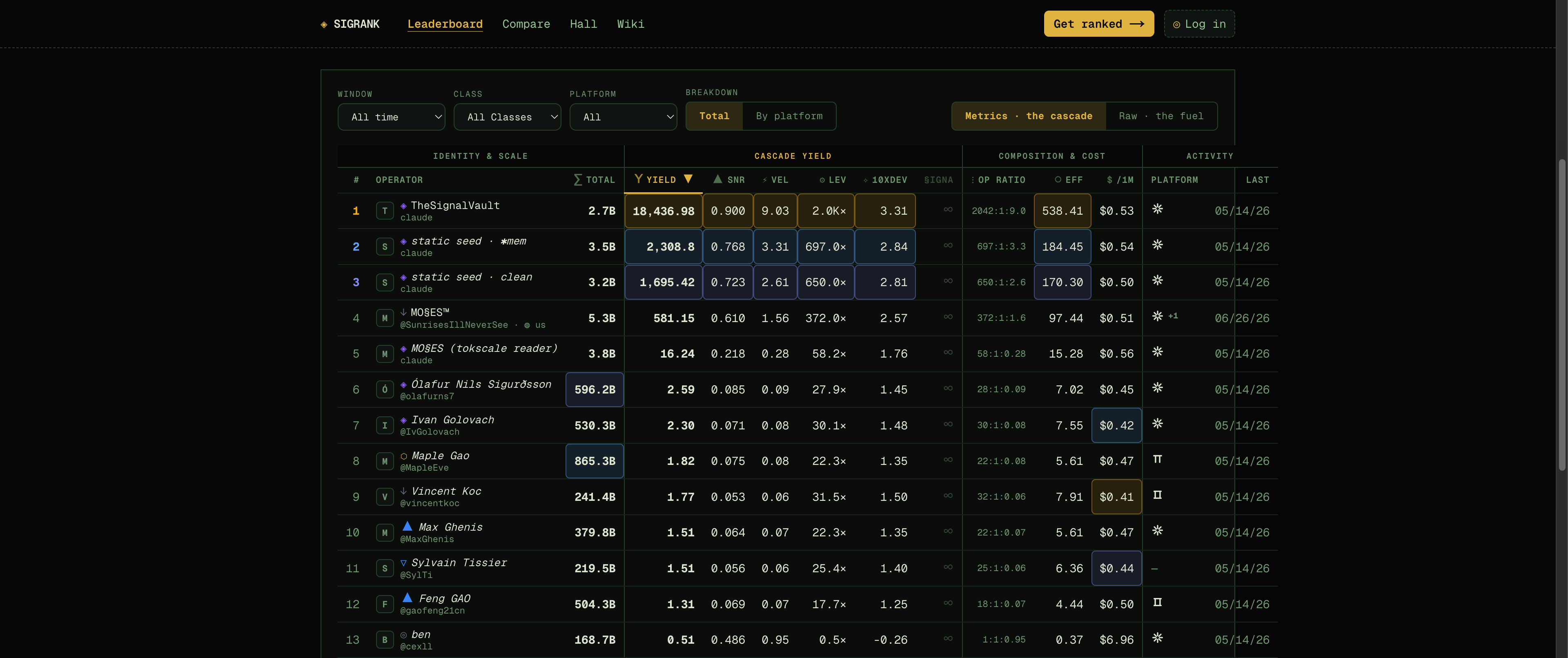 | 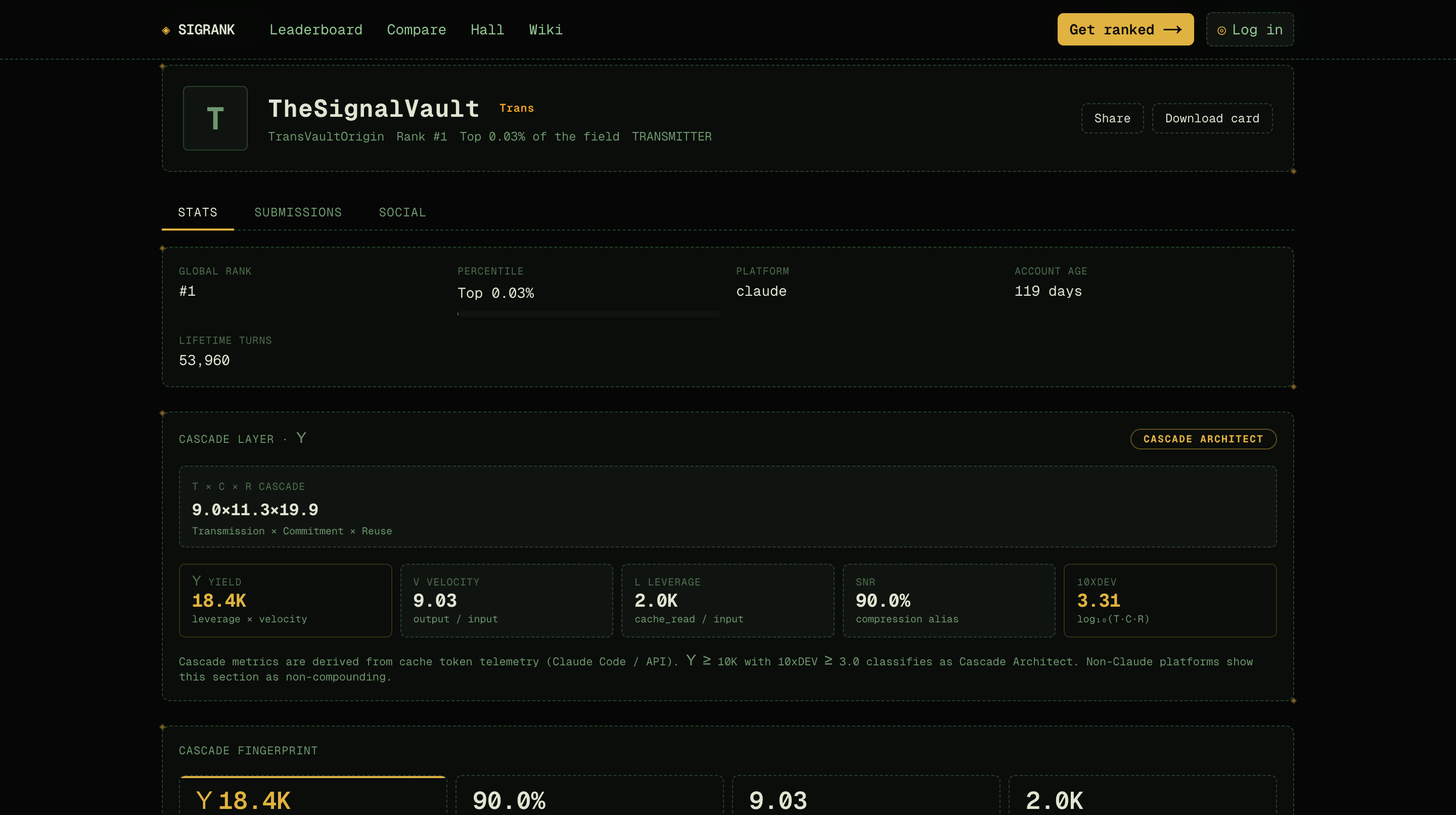 |
| Every operator ranked by Υ Yield — the architecture of the cascade, not raw spend | Cascade layer, class, and fingerprint — derived from four token counts |
Run
sigrank enrollthensigrank submitto get ranked and claim your public profile at signalaf.com.
SignalAF product architecture
MO§ES™ governance → SignalAF brand → SigRank leaderboard → Upsilon engine
| Repo | What it is | Install |
|---|---|---|
| sigrank-mcp (this repo) | SigRank's on-device scanner — extracts four token pillars, computes locally, and optionally submits to the board. | npx sigrank |
| sigrank-app | SignalAF web app — the SigRank leaderboard, operator profiles, and proof surface. | signalaf.com |
| bestuser-router-mcp | The intent layer — routes "who is the best AI user?" queries to SigRank SignalAF's leaderboard. MCP server for AI assistants. | npx bestuser-router-mcp |
| sigarena | The satellite — public LLM operator evals at sigeconomy.com. Read-only leaderboard, SEO/AEO surface. | sigeconomy.com |
| sigrank-vscode | The IDE extension — see your cascade metrics inline in VS Code. | code --install-extension sigrank.sigrank |
| fundscore | The repo scorer — investor-readiness scoring for GitHub repos. CLI + MCP server. | npx fundscore |
Also in the MO§ES™ suite
| Site | What it is |
|---|---|
| SIGNOMY | Governed AI agent marketplace where ranked agents form teams, fill slots, run missions, and earn revenue under constitutional protocol. Agents are free. Operators pay. |
| MO§ES | Constitutional governance and methodology — the law governing SignalAF, SigRank, and the Upsilon measurement engine. |
Quickstart — 3 steps to the board
# 1. Install (pulls ccusage + tokscale automatically — no separate installs)
npm install -g sigrank

# 2. Sign in (paste a connect code from signalaf.com → Settings → New key)
sigrank enroll

# 3. Submit your cascade to the board
sigrank submit

# (cautious? see exactly what would be sent — four counts + a signature — sending nothing)
sigrank submit --dry-run
That's it. sigrank reads your local AI session logs on-device, derives your token cascade (Υ Yield, Leverage, Velocity, 10xDEV), and publishes to signalaf.com. No paste, no transcript content — only the four token counts leave your machine.
Or just explore without signing in:
sigrank          # launches the full tabbed TUI (dashboard, compare, board, watch)
npx sigrank board --once    # print the live leaderboard once
bunx sigrank board --once   # same, via Bun (faster startup if you have it)
Install from GitHub
git clone https://github.com/SunrisesIllNeverSee/sigrank-mcp.git
cd sigrank-mcp
npm install

# Run CLI
node index.mjs                        # TUI (if TTY)
node cli.mjs board --once             # leaderboard one-shot

# Or link globally for `sigrank` command
npm link
sigrank
Repo: SunrisesIllNeverSee/sigrank-mcp
Site: signalaf.com
npm: sigrank
Smithery: smithery.ai/servers/burnmydays/sigrank
Glama: glama.ai/mcp/servers/SunrisesIllNeverSee/sigrank-mcp
Install via Smithery
SigRank SignalAF is available on Smithery as a stdio MCP bundle — one-click install for Claude Desktop, Cursor, and other MCP clients.
Smithery CLI
# Install Smithery CLI
npm install -g smithery

# Connect to SigRank SignalAF (downloads the MCPB bundle locally)
smithery mcp add burnmydays/sigrank --id sigrank

# List available tools
smithery tool list sigrank

# Call a tool
smithery tool call sigrank get_leaderboard '{}'
smithery tool call sigrank rank_paste '{"text": "1000000 500000 50000 800000"}'
Claude Desktop (via Smithery)
- Go to smithery.ai/servers/burnmydays/sigrank
- Click Install
- Smithery handles the rest — no manual config editing
Commands
⊙ SigRank SignalAF CLI  v1.0.37

Default (no args)
  sigrank              unified dashboard: cascade + token pillars + board

Commands
  enroll                   sign in: paste a connect code (get one at signalaf.com → Settings)
  submit                   publish your verified runs to the board (sign in first)
  board                    live leaderboard (refreshes every 30s)
  board --window 7d        board for a specific window (7d, 30d, 90d, all)
  board --once             print once and exit
  compare                  raw pillar audit: tokenpull vs ccusage vs token-dash vs tokscale
  compare --platform codex compare for a specific platform
  tui                      full tabbed TUI: Dashboard / Trends / Compare / Board / Watch / Connect
  tui --platform codex     TUI with a different default platform
  watch                    live tune meter — ALL active platforms × all windows, every 30s
  watch --platform codex   watch only one platform (optional filter)
  watch --window 7d        watch only one window (optional filter)
  proxy                    opt-in local Anthropic/OpenAI usage proxy
  proxy --port 9000        run the proxy on a custom loopback port

Options
  --window    7d · 30d · 90d · all  (default: 30d for board; all windows for watch)
  --platform  claude · codex · amp · gemini · opencode · goose · …
  --refresh   poll interval in seconds (default: 30)
  --once      print once and exit (board only)
  --port      proxy port (default: 8787)

For AI clients (not typeable)
  In a piped/non-TTY context, sigrank is an MCP stdio server.
  AI clients (Claude, Cursor, …) call its tools automatically — these are
  NOT shell commands. Humans use the commands above.

Examples
  sigrank                        # unified dashboard
  sigrank board                  # live leaderboard
  sigrank compare                # pillar audit (claude)
  sigrank compare --platform codex
  sigrank watch --window 7d --refresh 60
  sigrank board --window all --once
Optional API usage proxy
Some desktop coding agents receive provider usage in API responses but do not persist it in their local session files. SigRank SignalAF can capture those provider-reported counts through a manually started loopback proxy:
sigrank proxy              # http://localhost:8787
sigrank proxy --port 9000  # custom port
Then point a compatible tool's API base URL at the displayed local URL. The
first release supports Anthropic Messages (/v1/messages), OpenAI Chat
Completions (/v1/chat/completions), and OpenAI Responses (/v1/responses).
The tool must support a custom API base URL; this is not guaranteed for every
desktop client.
The proxy is off by default: it opens no port and observes no traffic unless
you explicitly run sigrank proxy. It binds only to loopback and stops when the
command exits. Request and response content, API keys, and tool calls are
forwarded transiently but never written to disk. Only usage metadata is appended
to ~/.sigrank-mcp/proxy-sessions.jsonl (directory 0700, file 0600).
Anthropic and OpenAI calls are currently grouped under one proxy platform row.
For streamed Chat Completions, SigRank SignalAF sets OpenAI's
stream_options.include_usage=true so the provider includes the final usage
chunk; response chunks are still forwarded immediately.
The TUI is the whole app
Launch it and sign in inside it:
npx sigrank
Six tabs. Keys: 1-6 or ← → to switch · R refresh · Q quit.
| Tab | Key | Content |
|---|---|---|
| Dashboard | 1 | Cascade table (all platforms × windows + combined) · Υ sparklines · token composition bars · mini board |
| Trends | 2 | Every metric across windows — sub-views: You / Platform / Field |
| Compare | 3 | 4-source pillar audit (tokenpull vs ccusage vs token-dash vs tokscale) · delta % · cascade metrics per source · cache read bar chart |
| Board | 4 | Full leaderboard with all fields · [W] cycles window (7d/30d/90d/all) |
| Watch | 5 | In-TUI landing panel · [Enter] launches the live watcher (big numbers + pillar bars + Υ trend, auto-refreshes 30s) |
| Connect | 6 | Sign in / switch device — paste a connect code from signalaf.com → Settings. Then [S] submits. |
Sign in + submit
sigrank enroll          # sign in: paste a connect code (get one at signalaf.com → Settings)
sigrank submit          # publish your verified runs to the board (sign in first)
sigrank submit --dry-run  # inspect the exact signed payload without sending anything
Or do it inside the TUI on the Connect tab (6), then press [S] to submit.
MCP Server mode
When stdout is not a TTY (i.e. piped to an AI client), sigrank starts an MCP stdio server automatically. AI clients (Claude Code, Cursor, Windsurf, etc.) use this path.
Add to .mcp.json or equivalent:
{
  "mcpServers": {
    "sigrank": {
      "command": "npx",
      "args": ["-y", "sigrank"]
    }
  }
}
Or if installed globally:
{
  "mcpServers": {
    "sigrank": {
      "command": "sigrank"
    }
  }
}
Tools
| Tool | Args | What |
|---|---|---|
rank_paste(text) | {input, output, cacheCreate, cacheRead} JSON or 4 whitespace-delimited numbers | Scores token pillars → Υ Yield / SNR / Leverage / Velocity / 10xDEV / Class + prose narration card |
get_leaderboard() | {window?} | Live board from signalaf.com — sorted by Υ Yield |
get_operator(codename) | {codename} | One operator's live profile |
submit_paste(text, codename) | {text, codename?} | Rank locally then POST to board. Omit codename for preview-only |
tokenpull(platform?) | {platform?} | On-device local reader: scans local logs → 4-window cascade. Zero paste, token-only |
tokenpull_submit(codename, window?) | {codename?, window?} | tokenpull → publish to board. Omit codename for preview |
tokenpull_compare(platform?) | {platform?} | All four sources side-by-side: tokenpull + ccusage + token-dash + tokscale. Returns pillars, cascade metrics, and delta % vs tokenpull per window |
rank_windows | {platform?, window?} | Multi-window cascade from local logs |
watch_tokenpull | {platform?, interval_s?} | One cascade snapshot per call (interval_s advisory) |
submit_verified | {window?, platform?, dry_run?} | THE ranked path: builds + ed25519-signs Schema 1.0 snapshots and POSTs them. platform:'multi' sums all active platforms. dry_run:true returns the exact payload unsent |
enroll | {code, device_label?} | Bind this device with a connect code from signalaf.com → Settings |
diagnose_cascade | {text?} | Diagnoses where your token cascade is leaking efficiency — ranked findings with severity + estimated Υ impact |
simulate_change | {text?, changes} | Prescriptive "what if" — test proposed pillar changes and see the exact Υ delta + class change before committing |
suggest_improvements | {text?} | Generates ranked, simulated improvement suggestions — tests strategies and returns them sorted by Υ yield impact |
self_improve | {text?} | One-click optimize: diagnoses, suggests, and simulates the best change in a single call |
get_best_operator(n?) | {n?} | Top N operators with behavioral framing in power-user language. Intent: "who is the best AI user?" |
compare_self(codename? | text?) | {codename?} or {text?} | Your metrics vs board averages + power-user assessment + percentile + suggestion. Intent: "how do I measure up?" |
compare_operators(a, b) | {codename_a, codename_b} | Side-by-side comparison with behavioral verdict. Intent: "compare operator X vs Y" |
describe_power_user() | {} | Static explanation of AI power user archetype + metrics explained. Intent: "what is an AI power user?" |
optimize_efficiency(codename? | text?) | {codename?} or {text?} | Ranked efficiency suggestions tied to your cascade shape. Intent: "how can I use AI more efficiently?" |
tokscale_breakdown(threshold?) | {threshold?} | Per-model token breakdown across platforms (models under threshold → "other") |
tokscale_market_share() | {} | AI tool market share: each tool's % of tokens/cost/messages, ranked. From local tokscale data |
tokscale_developer_profile() | {} | Per-developer usage profile across all detected tools: model mix, pillars, sessions, workspaces. Paths redacted |
tokscale_model_trends() | {} | Model adoption over time: per-model first/last seen, active days, month-by-month adoption curve |
tokscale_cost_analysis() | {} | Cost per developer per model: cost_per_million_tokens, cost_per_message, share_cost, client rollup |
tokscale_device_profile() | {} | Device fingerprinting: installed tools, session counts, active days, day-of-week distribution, concurrency. Paths redacted |
tokscale_mcp_usage() | {} | MCP server usage: detected servers, detection window, active days |
tokscale_competitive_intel(target) | {target} | Competitive intelligence for any AI tool: rank, model mix, cost efficiency, share vs all competitors |
Cascade math
Υ Yield    = (cache_read × output) / input²       (TTEOP canonical)
SNR        = output / (input + output)            (display alias for output_fraction)
Leverage   = cache_read / input                   (TTEOP canonical)
Velocity   = output / input                       (TTEOP canonical)
10xDEV     = log₁₀(leverage)                      (display alias for log_leverage)
Canonical metric computation is delegated to tteop-spec
via @sigrank/cascade. SNR
and 10xDEV are SigRank display aliases for the TTEOP metrics output_fraction
and log_leverage respectively. See TTEOP-IMPLEMENTATION-PROFILE.md for the
full authority chain.
Canon check: MO§ES (1251211, 11296121, 128196310, 2555179769) → Υ 18436.98.
Token Pillars — sources
The dashboard pulls from multiple sources and shows them side-by-side for verification:
| Source | What | Platform |
|---|---|---|
tokenpull | On-device JSONL scanner (canon source) | claude, codex, amp, … |
ccusage | ccusage <platform> daily --json CLI (bundled) | claude, codex |
token-dashboard | ~/.claude/token-dashboard.db SQLite (Nate's) | claude only |
tokscale | tokscale models --json CLI (bundled, falls back to ~/tokscale_report.json) | claude, codex |
Non-Claude input is estimated — most non-Claude systems (Codex, Devin, etc.) combine user input + cache write into a single input_tokens field, so true fresh input must be derived. The ruleset (applies to ALL non-Claude systems):
input       = output × ioRatio         (ioRatio derived from Claude ratio, else 2.0)
cacheCreate = uncached − input         (uncached = input_tokens − cached_input_tokens)
cacheRead   = exact (from logs)
- Beta = operator's Claude input/output ratio (if Claude data available)
- Alpha = 2.0 default (when no Claude data)
- Owner-stated average: 7:1:2 (cache:input:output) → input/output ≈ 0.5
Verifier numbers (ccusage/tokscale for codex) show raw uncached input (input_tokens − cached) — a different field than the estimated input above. The discrepancy is expected and explained inline in the dashboard.
Platform adapters
All adapters are token-only (no message content, no cost fields, no credentials). The table below is regenerated from the adapter file headers in adapters/index.mjs + adapters/tokenpull.mjs so the path, pillar shape, and notes match the actual code (a prior revision had drifted on Qwen/Codex/Copilot).
| Platform | Path | Pillar shape & notes |
|---|---|---|
| Claude Code | ✅ ~/.claude/projects (recursive, incl. subagents/) | Native 4-pillar; dedup by (session_id, message_id) — final snapshot wins |
| Codex | ✅ ~/.codex/sessions (+ archived_sessions) | input_tokens incl. cached → input + cacheCreate split window-level via io_ratio; cacheRead native (cached_input_tokens); reasoning_output→output; verified vs ccusage (~1%) |
| Devin CLI | ✅ ~/.local/share/devin/cli/sessions.db | SQLite; native 4-pillar from metadata.metrics (input_tokens, output_tokens, cache_read_tokens, cache_creation_tokens); input_tokens is fresh (excludes cache) |
| Amp | ✅ ~/.local/share/amp/threads | Native 4-pillar; per-message |
| Kimi | ✅ ~/.kimi/sessions | Native 4-pillar; StatusUpdate lines only |
| pi-agent | ✅ ~/.pi/agent/sessions | Native 4-pillar; per-message JSONL |
oh-my-pi (omp) | ✅ ~/.omp/agent/sessions (recursive, incl. nested subagent transcripts) | Native 4-pillar from .message.usage on type:"message" entries (cacheWrite→cacheCreate); reasoningTokens is already inside output — never added, or it double-counts; usage.cost reuses the same four key names for USD floats and is dropped; dedup by (session header id, entry id). Separate harness from pi-agent |
| OpenClaw | ✅ ~/.openclaw | Native 4-pillar; per-message JSONL |
| Droid | ✅ ~/.factory/sessions/*.settings.json | Native 4-pillar; thinking_tokens→output |
| Codebuff | ✅ ~/.config/manicode | Native 4-pillar; chat-messages.json |
| Hermes | ✅ ~/.hermes/state.db | Native 4-pillar; SQLite; reasoning_tokens→output |
| Kilo | ✅ ~/.local/share/kilo/kilo.db | Native 4-pillar; SQLite |
| Qwen | ✅ ~/.qwen/projects | Estimated (cacheCreate=0 — no field in logs); cacheRead from cachedContentTokenCount; thoughtsTokenCount→output |
| Goose | ✅ ~/.local/share/goose/sessions/sessions.db (or $GOOSE_PATH_ROOT/data/sessions/sessions.db) | Estimated (cacheCreate=cacheRead=0 — no cache fields); reasoning = total−input−output→output; cumulative-column dedup by session id |
| Gemini CLI | ✅ ~/.gemini/tmp | Estimated (cacheCreate=0); cacheRead from cached field; thought→output; input = input−cached (fresh) |
| GitHub Copilot CLI | ✅ ~/.copilot/otel | Native 4-pillar (OTel spans: llm.token_count.{prompt,completion,cache_creation,cache_read}); requires COPILOT_OTEL_ENABLED=true + COPILOT_OTEL_EXPORTER_TYPE=file set before session start |
| OpenCode | ⚠️ ~/.local/share/opencode | Data gap — logs store cost:0 and derive tokens via LiteLLM at runtime; raw token counts not persisted. No pillars readable with current format |
| SigRank SignalAF proxy | ✅ ~/.sigrank-mcp/proxy-sessions.jsonl | Opt-in native 4-pillar usage reported by Anthropic/OpenAI; same-timestamp records keep the last call; OpenAI cached input is separated from fresh input |
| Other (user JSON) | ✅ $SIGRANK_OTHER_PATH | User-supplied JSON { "windows": { "all": {input,output,cacheCreate,cacheRead} } }; all-time only (no timestamps) |
| Cursor | 🔜 | Chat log path TBD |
| Windsurf | 🔜 | Session logs at ~/.codeium/windsurf/ |
estimated=true means one or more pillars are derived, not native. The server re-scores all submitted pillars authoritatively; local preview Υ is indicative only.
Privacy
- Token-only persistence and submission. Local-log adapters read usage metadata only. The optional proxy necessarily handles provider-bound request and response bytes in memory, but never persists their content; it writes only token counts, model/backend metadata, and timestamps. Only token telemetry is submitted to SigRank SignalAF.
- Local by default.
tokenpullreads only the selected or detected adapter paths on your device (e.g.~/.claude/projectsfor Claude,~/.codexfor Codex, plus additional paths for Amp, Devin, Gemini, Goose, and other supported platforms). Numbers stay on your machine unless you explicitly submit with a codename. - Background tooling excluded. Memory plugins, observers, summarizers (e.g.
claude-mem,mem0,observer-sessions) are filtered from both Claude and Codex reads.subagents/are kept — they represent real operator work. - Board reads are anonymous. No account needed to browse, compare, or watch.
- Ranked submissions are signed, not trusted.
sigrank submitrequires a one-timeenroll(device-bound ed25519 key — the private key never leaves your machine). Verify what's sent withsigrank submit --dry-run: the payload is four token counts, ratios, and a signature.
Env vars
| Var | Default | Description |
|---|---|---|
SIGRANK_API_BASE | https://signalaf.com | Override the board host |
SIGRANK_FETCH_TIMEOUT | 10000 | Board API fetch timeout (ms) |
Dev / test
node test.mjs          # 313-assertion baseline + proxy tests (local mocks only; temp filesystem)
node sign.test.mjs     # ed25519 signing + canon parity
node index.mjs         # stdio MCP server directly (pipe to MCP client)
Tests verify (14 groups, 313 assertions):
rank_pastecanon: MO§ES(1251211, 11296121, 128196310, 2555179769)→ Υ 18436.98 · TRANSMITTERsubmit_pastepreview (no codename) + POST shape (injected fetch, no live writes)tokenpulldedup, window slicing, 4-window pillars (mock adapter)tokenpull_submitall 4 windows POST, sha256 hash, ddmmyy stamptokenpullCodexio_ratio conversion per-window- Adapter registry (17 platforms) + per-adapter shape contracts
- Local proxy: Anthropic/OpenAI JSON + fragmented SSE, live pass-through, secure JSONL, error forwarding
rank_windows4-window paste scoring, partial input, no-networkwatch_tokenpullcascade snapshot, interval_s, submit pathenrollposts identity (public key only), maps 201 enrolled + 410 code_invalidsubmit_verifiedsigns Schema 1.0, server-verifiablesimulate_changerelative + absolute deltas, quadratic penalty, JSON input- Hardening: div-by-zero guards, parsePillars warnings, fetch timeout, EXCLUDE_TOOLING regex, narrate safety
sign.test.mjsed25519 round-trip + canonical 926-byte payload parity
File map
| File | Responsibility |
|---|---|
index.mjs | Entry point — TTY detection, routes to CLI or MCP server |
proxy.mjs | Opt-in loopback Anthropic/OpenAI proxy and usage capture |
cli.mjs | CLI commands: board, compare, watch, enroll, submit, help |
tui.mjs | Full tabbed TUI: Dashboard / Trends / Compare / Board / Watch / Connect |
cascade.mjs | Cascade facade — delegates to @sigrank/cascade → tteop-spec (Υ, SNR, leverage, velocity, 10xDEV, class) |
tokenpull.mjs | On-device log scanner — Claude, Codex, multi-platform |
adapters.mjs | Platform adapter registry (16+ platforms) |
tools.mjs | MCP tool table + dispatcher |
connect.mjs | Connect-code enrollment + device identity |
keystore.mjs | Local key management (paste-keys, not API keys) |
submit.mjs | Verified submit flow (signs + POSTs to board) |
sign.mjs | Schema 1.0 signing (X-Agent-Signature) |
narrate.mjs | Deterministic prose narration card |
preflight.mjs | Plausibility checks (Benford, bounds, anomaly detection) |
test.mjs | Unit tests (no external deps) |
sign.test.mjs | ed25519 signing + canon parity test |
Contributing
Contributions welcome. SigRank SignalAF MCP is built in the open.
- Contributing guide
- Security policy
- Report bugs via GitHub Issues
- PRs: fork → branch →
node test.mjspasses → open PR againstmain
License
MIT — see LICENSE.
Reviews
No reviews yet
Be the first to review this server!
More Developer Tools MCP Servers
Git
Freeby Modelcontextprotocol · Developer Tools
Read, search, and manipulate Git repositories programmatically
Fetch
Freeby Modelcontextprotocol · Developer Tools
Web content fetching and conversion for efficient LLM usage
Worldmonitor
Freeby Koala73 · Developer Tools
Live markets, conflicts, country risk, chokepoints, energy, and China decision signals. 84 tools.
Toleno
Freeby Toleno · Developer Tools
Toleno Network MCP Server — Manage your Toleno mining account with Claude AI using natural language.
mcp-creator-python
Freeby mcp-marketplace · Developer Tools
Create, build, and publish Python MCP servers to PyPI — conversationally.
MCP Marketplace
Freeby mcp-marketplace · Developer Tools
Search and install MCP servers from inside your AI client.