
Server data from the Official MCP Registry
MCP server for UniFi Fabric: Network, Protect, Site Manager, InnerSpace, Carrier Fabric, Mobility.
About
MCP server for UniFi Fabric: Network, Protect, Site Manager, InnerSpace, Carrier Fabric, Mobility.
Security Report
Valid MCP server (0 strong, 2 medium validity signals). 3 known CVEs in dependencies Package registry verified. Imported from the Official MCP Registry.
4 files analyzed · 4 issues found
Security scores are indicators to help you make informed decisions, not guarantees. Always review permissions before connecting any MCP server.
Permissions Required
This plugin requests these system permissions. Most are normal for its category.
What You'll Need
Set these up before or after installing:
Environment variable: UNIFI_API_KEY
Environment variable: UNIFI_TOOL_MODE
Environment variable: MCP_AUTH_MODE
Environment variable: MCP_BEARER_TOKEN
How to Install
Add this to your MCP configuration file:
{
  "mcpServers": {
    "io-github-swkstudios-unifi-fabric-mcp-server": {
      "env": {
        "MCP_AUTH_MODE": "your-mcp-auth-mode-here",
        "UNIFI_API_KEY": "your-unifi-api-key-here",
        "UNIFI_TOOL_MODE": "your-unifi-tool-mode-here",
        "MCP_BEARER_TOKEN": "your-mcp-bearer-token-here"
      },
      "args": [
        "unifi-fabric-mcp-server"
      ],
      "command": "uvx"
    }
  }
}Documentation
View on GitHubFrom the project's GitHub README.
UniFi Fabric MCP Server


Manage your entire UniFi network remotely from any AI assistant, through the UniFi Fabric API in Ubiquiti's cloud. Nothing to install on your network, no controller login. 786 tools across Site Manager, Network, Protect, InnerSpace and more, read-only if you want.
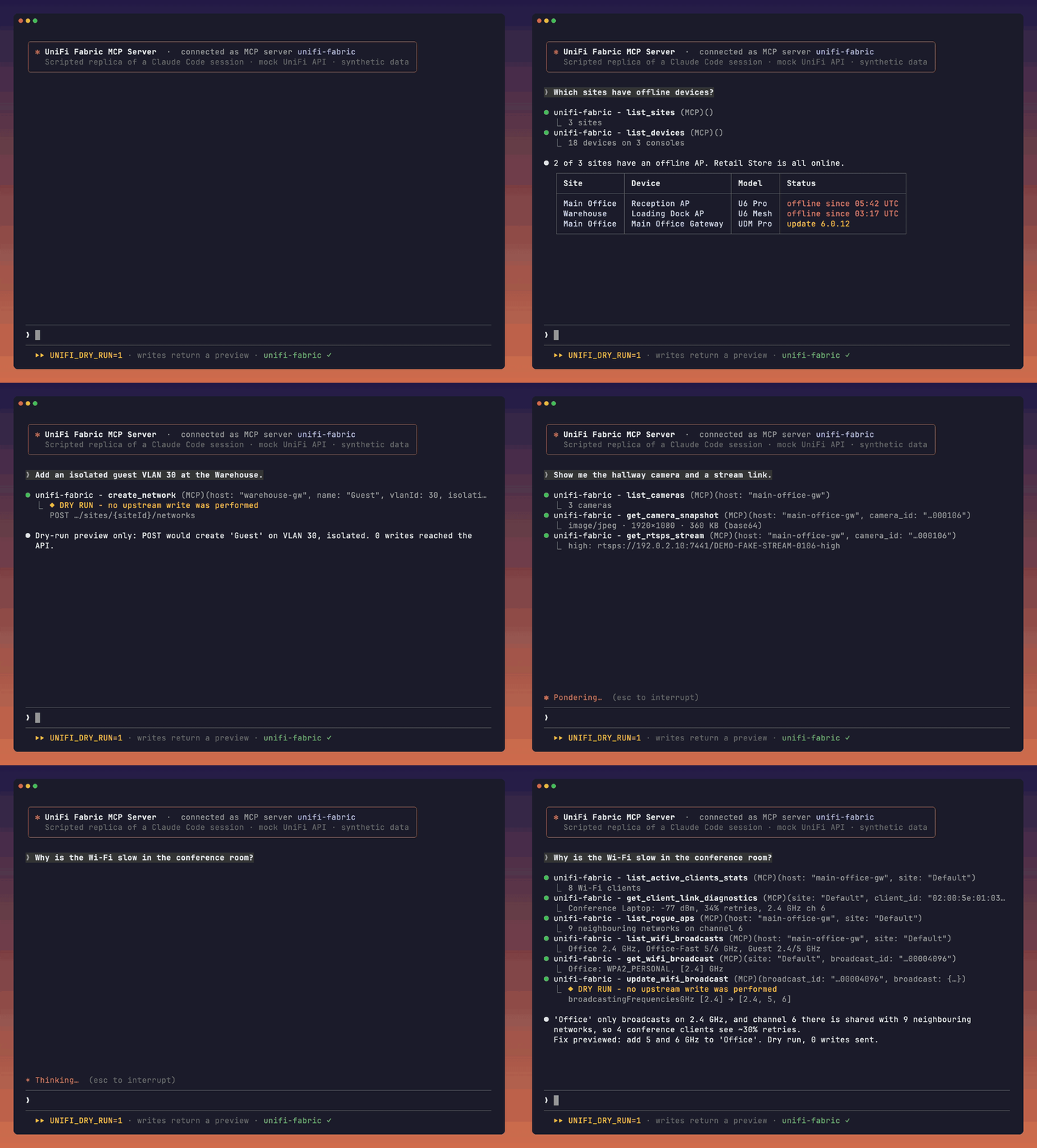
Scripted replica of a Claude Code session: real MCP tool calls to this server against a mock UniFi API with synthetic data, writes in dry-run mode (how it's made and how to reproduce it).
| How it connects | |
|---|---|
| Runs on | Your machine, with your own UniFi API key |
| Talks to | The UniFi Fabric API in Ubiquiti's cloud (api.ui.com), and nothing else |
| Needs | No SSH, no controller access, nothing on your LAN |
By default the client sees 5 discovery meta-tools that reach every tool; see Discovery mode.
Why this server
- Remote management through the UniFi Fabric API in Ubiquiti's cloud.
- 786 tools across Site Manager, Network, Protect, InnerSpace, Mobility and Carrier Fabric.
- Discovery mode advertises 5 tools in about 5 KB while reaching the full catalog; full mode uses about 1454 KB.
- Pass-through tools preserve upstream fields by default; projections and summaries are documented. Configured server secrets are masked and data-secret redaction is optional.
- Choose read-only mode, dry-run previews, redaction and audit logging.
- Every tool runs in CI against a simulated upstream.
- Works with MCP clients and is MIT licensed. See MSP setup and demos.
Contents: Quick Start · Safety · Read-only mode · Examples · Clients · Tools · Configuration · Troubleshooting · Contributing
Disclaimer: This project is not affiliated with, endorsed by, or sponsored by Ubiquiti Inc. UniFi is a trademark of Ubiquiti Inc.
The canonical console command is unifi-fabric-mcp. The MCP Registry also launches the
equivalent unifi-fabric-mcp-server console alias, matching the PyPI package identifier.
Quick Start
- Get a UniFi API key. Enable Site Manager and Network scopes at minimum, plus Protect for cameras.
- In Claude Code, run
/plugin marketplace add swkstudios/unifi-fabric-mcp-serverand then/plugin install unifi-fabric@unifi-fabric. The plugin requires uv and prompts for the key. - Ask: "List my UniFi sites and the devices in each one."
Choose your client
Local stdio setups use uv; Docker deployments need Docker instead. Set UNIFI_API_KEY in your environment before using the CLI commands. Configuration files may store keys in plain text; keep them private.
| Client or distribution | Setup |
|---|---|
| Claude Code plugin | /plugin marketplace add swkstudios/unifi-fabric-mcp-server, then /plugin install unifi-fabric@unifi-fabric |
| Claude Code MCP | claude mcp add unifi-fabric -e UNIFI_API_KEY="$UNIFI_API_KEY" -- uvx --from unifi-fabric-mcp-server==0.7.0 unifi-fabric-mcp |
| Claude Desktop | Download the .mcpb from the latest release and double-click it; details |
| Codex | codex mcp add unifi-fabric --env UNIFI_API_KEY="$UNIFI_API_KEY" -- uvx --from unifi-fabric-mcp-server==0.7.0 unifi-fabric-mcp |
| Antigravity CLI | agy mcp add unifi-fabric -- uvx --from unifi-fabric-mcp-server==0.7.0 unifi-fabric-mcp; IDE setup |
| Gemini CLI | gemini extensions install https://github.com/swkstudios/unifi-fabric-mcp-server |
| VS Code and Cursor | Other client setup |
| ChatGPT | Self-hosted HTTPS and OAuth |
| Other MCP clients | stdio / HTTP |
| uvx | uvx --from unifi-fabric-mcp-server==0.7.0 unifi-fabric-mcp |
| pipx | pipx install unifi-fabric-mcp-server==0.7.0 |
| pip | pip install unifi-fabric-mcp-server==0.7.0 |
| Docker | docker pull ghcr.io/swkstudios/unifi-fabric-mcp-server:0.7.0; deployment |
| MCP Registry | io.github.swkstudios/unifi-fabric-mcp-server |
Get Your API Key
- Sign in to UniFi Site Manager with your Ubiquiti account
- Select your organization from the dropdown (top-left)
- In the left sidebar, click API Keys
- Click Create New API Key and give it a descriptive name
- Select the API Scope — enable Site Manager and Network at minimum (add Protect if managing cameras)
- Under Sites, choose which sites the key can access (or select all)
- Copy the key immediately — it won't be shown again
Note: These are UniFi Site Manager API keys that authenticate against the UniFi Fabric API in Ubiquiti's cloud (
api.ui.com). Your consoles must be adopted to your UI.com account and connected to Ubiquiti's cloud for the key to discover them. See the API Docs for more details.
Safety controls you set
Always on: Every read tool is marked read-only and every write tool is marked destructive, derived from code and checked by tests. Supporting clients can use these hints to distinguish reads from writes. Use your client permission settings to ask before a write. The server masks its own UniFi API key when UniFi echoes it, and in errors and logs. A dry-run preview can echo a key that the caller supplied in the request body. The optional confirm argument is accepted and ignored; it is not an approval control. In discovery mode, all writes go through call_write_tool; choosing "do not ask again" for it may approve every later write.
Full access is the default because the server exists to manage your network. To start cautiously, turn on read-only mode first. These switches are opt-in and off by default; set them in the client server environment:
| Setting | What it does |
|---|---|
UNIFI_READ_ONLY=1 | Hides write and action tools from the catalog and refuses them if called. See Read-only mode. |
UNIFI_REDACT_SECRETS=1 | Data secrets such as Wi-Fi passwords are returned as UniFi sends them unless this is on; it masks documented credential fields in responses. See Credential redaction. |
UNIFI_DRY_RUN=1 | Returns a preview of every write instead of sending it. See Dry-run. |
UNIFI_AUDIT_LOG=/path | Appends one line per write attempt to a local file. See Audit log. |
Read-only mode
Set UNIFI_READ_ONLY=1 to hide write and action tools and refuse calls before they reach UniFi. Reads remain available. Turn on the Claude Code plugin Read-only mode option, add the variable to a client configuration or pass -e UNIFI_READ_ONLY=1 to Docker. Remove it or turn the plugin option off and restart to enable writes again.
For example, with Claude Code:
export UNIFI_API_KEY="your-api-key-here"
claude mcp add unifi-fabric -e UNIFI_API_KEY="$UNIFI_API_KEY" -e UNIFI_READ_ONLY=1 -- uvx --from unifi-fabric-mcp-server==0.7.0 unifi-fabric-mcp
The command stores the key in Claude Code's MCP configuration in plain text; keep it private. See read-only details for accepted values, selection order and per-area flags.
Example Prompts
Copy-paste these into Claude Code or any MCP client after connecting:
Show me a summary of all devices and clients across my sites.
Are there any offline devices? List them with their site names.
Create a firewall policy that blocks traffic from the guest VLAN to the server VLAN.
List all firewall policies and show their current ordering.
Get the RTSPS stream URLs for cameras in the main office.
How many clients are connected to each site right now?
Sample Tool Output
When you ask the MCP server a question, it executes tools and returns structured data. Here is get_fleet_summary on a single console with one site and five devices (output from a sanitized recorded response; it returns counts only, no records):
{
  "hosts": 1,
  "sites": 1,
  "devices": {
    "total": 5,
    "byStatus": {
      "online": 5
    },
    "byType": {
      "protect": 3,
      "network": 2
    }
  },
  "_key_label": null
}
With several API keys configured, the summary also carries _key_labels (the labels of the keys that answered), _keyTotals (each answering key's share of the counts, summing to the totals), and errors for a key that failed; incomplete / incompleteReason appear when a list stopped at the opt-in UNIFI_PAGINATE_MAX_PAGES cap.
Set up your client
The Quick Start table links here. Every option runs the server on your own machine with your own UniFi API key; nothing goes through a hosted service, and requests go from your machine to api.ui.com only.
Install as a Claude Code plugin
The plugins/claude/ folder is a Claude Code plugin. It runs this server locally through uvx with the API key you enter when you enable it (kept in Claude Code's secure credential storage), and it has optional Read-only mode and Tool mode settings. Nothing goes through a hosted service: requests go from your machine to api.ui.com only. It works in Claude Code (terminal, IDE extensions and the desktop Code tab). Claude Desktop chat runs local servers configured through claude_desktop_config.json; see Use with Claude Desktop. The claude.ai web and mobile chat clients do not run local MCP servers. See the plugin README for what it runs, where data goes, and example prompts, and PRIVACY.md for the privacy policy.
Install it from this repository's marketplace (Claude Code 2.1.275 or later installs in one step):
/plugin marketplace add swkstudios/unifi-fabric-mcp-server
/plugin install unifi-fabric@unifi-fabric
Claude Code asks for your API key, Read-only mode and Tool mode (discovery by default) when you enable it. Or try it for one session from a checkout:
claude --plugin-dir ./plugins/claude
Without the plugin, register the server directly with claude mcp add as shown in Safety defaults or Track A.
Use with Claude Desktop
Claude Desktop chat runs local MCP servers from its config file (macOS and Windows; not claude.ai on the web or mobile). Open it with Settings > Developer > Edit Config:
- macOS:
~/Library/Application Support/Claude/claude_desktop_config.json - Windows:
%APPDATA%\Claude\claude_desktop_config.json
{
  "mcpServers": {
    "unifi-fabric": {
      "command": "/absolute/path/to/uvx",
      "args": ["--from", "unifi-fabric-mcp-server==0.7.0", "unifi-fabric-mcp"],
      "env": { "UNIFI_API_KEY": "your-api-key-here" }
    }
  }
}
Replace /absolute/path/to/uvx with the output of which uvx (macOS) or where uvx (Windows): an app started from the Dock or Start menu may not see ~/.local/bin or other shell PATH entries. Add "UNIFI_READ_ONLY": "1" to env to hide and refuse every write and action tool. Then quit Claude Desktop completely and start it again. The key sits in this file in plain text, so keep the file private.
On macOS or Windows you can instead install the Claude Desktop extension bundle (.mcpb), built from plugins/claude-desktop/: Claude Desktop asks for the key at install time and keeps it in its secure storage. See the bundle README.
Use with OpenAI Codex
The Codex CLI, the Codex IDE extension and the ChatGPT desktop app share ~/.codex/config.toml, so one setup serves all three. ChatGPT on the web cannot start local servers; see Use with ChatGPT (self-hosted).
Recommended: forward the key from your environment (nothing stored). Add this to ~/.codex/config.toml:
[mcp_servers.unifi-fabric]
command = "uvx"
args = ["--from", "unifi-fabric-mcp-server==0.7.0", "unifi-fabric-mcp"]
env_vars = ["UNIFI_API_KEY", "UNIFI_READ_ONLY"]   # forwarded from the environment Codex starts in
Then start Codex from a shell that has the key (the read keeps it out of your shell history):
printf 'UniFi API key: '; read -rs UNIFI_API_KEY; echo; export UNIFI_API_KEY
export UNIFI_READ_ONLY=1   # optional: read-only mode
codex
One-liner (stores the key in config.toml in plain text):
printf 'UniFi API key: '; read -rs UNIFI_API_KEY; echo
codex mcp add unifi-fabric --env UNIFI_API_KEY="$UNIFI_API_KEY" -- uvx --from unifi-fabric-mcp-server==0.7.0 unifi-fabric-mcp
Add --env UNIFI_READ_ONLY=1 for read-only mode. codex mcp list shows the server.
ChatGPT desktop app: it reads the same config.toml, and its servers are listed under Settings > MCP servers (Add server for a new one, then Restart). An app started from the Dock or Finder does not see variables exported in a terminal, so env_vars forwarding only works when Codex starts from a shell; for the desktop app, give the key with the one-liner above (or an env = { UNIFI_API_KEY = "your-api-key-here" } line in the [mcp_servers.unifi-fabric] table).
Codex plugin: this repository is also a Codex plugin marketplace (plugins/codex/). The plugin stores no key; it forwards UNIFI_API_KEY, UNIFI_READ_ONLY and UNIFI_TOOL_MODE from the environment Codex starts in:
codex plugin marketplace add swkstudios/unifi-fabric-mcp-server
codex plugin add unifi-fabric@unifi-fabric
With no key in the environment the server exits at startup and Codex lists no unifi-fabric tools; a wrong key returns the upstream HTTP 401 on the first tool call.
Use with Google Antigravity
Antigravity starts local servers with the environment of the shell that started agy, and it does not expand ${VAR} in env values. Keep the key out of config files by exporting it before you start agy:
printf 'UniFi API key: '; read -rs UNIFI_API_KEY; echo; export UNIFI_API_KEY
export UNIFI_READ_ONLY=1   # optional: read-only mode
agy mcp add unifi-fabric -- uvx --from unifi-fabric-mcp-server==0.7.0 unifi-fabric-mcp
agy
Or install the plugin from a checkout of this repository; it uses the same exported key:
agy plugin install ./plugins/antigravity
Antigravity 2.0 and the Antigravity IDE read the same ~/.gemini/config, but when started from the Dock they do not see variables exported in a terminal. For them, store the key in the config instead (in plain text, in ~/.gemini/config/mcp_config.json):
agy mcp add --env UNIFI_API_KEY="$UNIFI_API_KEY" unifi-fabric -- uvx --from unifi-fabric-mcp-server==0.7.0 unifi-fabric-mcp
Without a key the server exits at startup and Antigravity lists no unifi-fabric tools; a wrong key returns the upstream HTTP 401 on the first tool call. See the plugin README.
Use with Gemini CLI
Google replaced the consumer Gemini CLI with Antigravity; Gemini CLI remains available to Enterprise and API-key users. This repository's root gemini-extension.json makes it a Gemini CLI extension that prompts at install time for your API key (stored in the system keychain) and the optional Read-only mode and Tool mode settings:
gemini extensions install https://github.com/swkstudios/unifi-fabric-mcp-server
We have checked the manifest against the extension reference but have not run it in Gemini CLI. Antigravity's agy plugin import also reads this manifest.
Use with ChatGPT (self-hosted)
ChatGPT on the web and in its apps only connects to remote MCP servers over HTTPS, signed in with OAuth 2.1; it cannot start a local server or send an API key. You can still use this server with ChatGPT by hosting your own instance in OAuth mode behind your own identity provider and adding it as a custom MCP server. Never put this write-capable server on a public URL without authentication. The self-hosted ChatGPT guide has the prerequisites, steps, a known limitation and a security checklist; that setup has not been tested end to end with ChatGPT.
A listing in the ChatGPT app directory would need a hosted service run by us. We do not run one, so there is no directory listing.
Track A — Local (stdio)
Install from PyPI and run the server locally. The MCP client launches it as a subprocess over stdio. Requires Python 3.12+ (or uv, which fetches a suitable Python for you).
export UNIFI_API_KEY="your-api-key-here"
uvx --from unifi-fabric-mcp-server==0.7.0 unifi-fabric-mcp
Or install it once in an isolated environment:
pipx install unifi-fabric-mcp-server==0.7.0
unifi-fabric-mcp
Or use a virtual environment you manage:
python3 -m venv .venv
.venv/bin/python -m pip install unifi-fabric-mcp-server==0.7.0
.venv/bin/unifi-fabric-mcp
For Claude Code, put this in .mcp.json at your project root (Claude Code asks you to approve it on first use). To register the server for all your projects, use claude mcp add --scope user unifi-fabric -e UNIFI_API_KEY=… -- uvx --from unifi-fabric-mcp-server==0.7.0 unifi-fabric-mcp; Claude Code stores that configuration in ~/.claude.json. Supported locations are documented by Claude Code.
{
  "mcpServers": {
    "unifi-fabric": {
      "command": "uvx",
      "args": ["--from", "unifi-fabric-mcp-server==0.7.0", "unifi-fabric-mcp"],
      "env": { "UNIFI_API_KEY": "your-api-key-here" }
    }
  }
}
If you installed with pipx or pip instead, use "command": "unifi-fabric-mcp" and omit args.
PATH note: A bare
"command": "unifi-fabric-mcp"only resolves if it is on the MCP client'sPATH. Many MCP clients do not inherit the shell's virtual environment. Useuvxas above, the absolute path to the installed binary (for example/path/to/.venv/bin/unifi-fabric-mcp), or install globally withpipx install unifi-fabric-mcp-server==0.7.0oruv tool install unifi-fabric-mcp-server==0.7.0.
Homebrew: a Homebrew formula is planned, but there is no tap yet; follow issue #24.
Verify it works: When launched by the client the server exits immediately if UNIFI_API_KEY is absent or empty; an incorrect key will not prevent startup but will cause tool calls to fail with an authentication error. A successful start produces no output on stdio (the client communicates over stdin/stdout).
Track B — Docker (HTTP)
See Docker HTTP setup and verification.
Track C — From source (development)
git clone https://github.com/swkstudios/unifi-fabric-mcp-server.git
cd unifi-fabric-mcp-server
python3 -m venv .venv && source .venv/bin/activate
pip install -e .          # -e is editable/dev mode
export UNIFI_API_KEY="your-api-key-here"
unifi-fabric-mcp
Agent skills
The skills/ folder holds six workflow skills: firewall zone and policy audit,
network or VLAN change, device and client troubleshooting, Protect camera and event review,
Wi-Fi radio change, and site health report. Each tells the agent which tools to call and in
which order: reads first, the exact change shown to you, the tool's own dry-run preview where it
has one, the write, then a read-back. The Claude Code plugin loads them; for Claude Desktop,
Codex, Gemini CLI and Antigravity see docs/AGENT-SKILLS.md.
About this server
What is UniFi Fabric? Ubiquiti spells it "UniFi Fabrics" and describes it as: "UniFi Fabrics transforms Site Manager into a single control plane built for unlimited scale of sites and users." (Ubiquiti, Introducing UniFi Fabrics, 2026-01-12). Watch Ubiquiti's own video, Introducing: UniFi Fabrics, or read The New Site Manager - Now Official.
This is an MCP (Model Context Protocol) server that exposes the UniFi Site Manager API as tools for AI assistants. Built with FastMCP, it works with Claude Code, Codex, Antigravity, Gemini CLI, Cline and other MCP clients.
Highlights:
- 786 tools across Fleet, Network, Firewall, Protect, VPN, InnerSpace, History, and more
- Faithful pass-through by default: tools return complete upstream payloads, including credential fields (WLAN passphrases, RADIUS secrets, API tokens), GPS coordinates, and Protect recognition data. The one change always made is that the server's own configured secrets (its API keys,
MCP_BEARER_TOKEN,MCP_TLS_KEY_PASSWORD) are replaced by***wherever an upstream response echoes them. Mask credential fields with the opt-inUNIFI_REDACT_SECRETS, or refuse all writes withUNIFI_READ_ONLY - Configurable authentication:
none(loopback/dev) /bearer(LAN/VPN) /oauth(resource-server, JWT-verified via JWKS) - Configurable TLS: plain HTTP / in-server HTTPS (
https) / mutual TLS (mtls) - Stdio transport for local use;
streamable-http/ssefor containerized deployments - Stateless, cloud-first design — connects to
api.ui.comvia the UniFi Site Manager API; no direct controller access required
Architecture
flowchart LR
    A[AI Assistant<br/>MCP Client] -->|MCP protocol<br/>stdio / HTTP| B[UniFi Fabric<br/>MCP Server]
    B -->|HTTPS<br/>API key auth| C[api.ui.com<br/>UniFi Site Manager]
    C -->|Cloud Connector<br/>Proxy| D[UDM / UDR / UCG<br/>Consoles]
    D --- E[Devices & Clients]
    D --- F[Protect NVRs]
What is MCP?
Model Context Protocol (MCP) is an open standard that enables large language models (LLMs) and AI assistants to securely interact with external systems and tools. Instead of asking the AI to make manual API calls or describe steps, MCP allows the AI to:
- Execute commands and operations directly in external systems
- Query data and retrieve real-time information
- Automate complex workflows through natural conversation
This UniFi Fabric MCP server bridges UniFi's network management API with AI assistants, enabling you to control your network infrastructure through conversation.
Use Cases
- Network Operations: Monitor fleet health, manage sites, and troubleshoot devices using natural language
- Security Management: Create and update firewall policies, manage ACLs, and configure DNS policies without manual API calls
- MSP Operations: Manage multiple UniFi consoles and organizations with a single AI interface
- Device Management: Monitor and control cameras, sensors, and other Protect devices across your infrastructure
- Automation: Build AI-powered workflows for routine network tasks and compliance audits
- Placement snapshots: Read a structured snapshot of console, device and floor-plan placement for maps and dashboards; see Placement snapshots.
Compatibility and coverage
Verification status
| Evidence | Result |
|---|---|
| Every tool runs in CI against a simulated upstream | 786 tools |
| Live-tested on a real console | 380 of 786 passed on build cde04b5c1520, 2026-10-28 |
| Live write tools passed | 114 on that build and date |
The live run also recorded failures and untested tools. Later focused tests exercised fixes on different builds; they do not constitute a new full sweep. See coverage and limitations for evidence and scope.
Available Tools
The server exposes 786 tools organized by domain for managing UniFi infrastructure. The following counts are domain tools available in full mode or through discovery search; discovery mode advertises meta-tools in tools/list.
| Product | Tools |
|---|---|
| Site Manager and fleet | 19 |
| Network | 484 |
| Protect | 227 |
| InnerSpace | 32 |
| Mobility | 8 |
| Carrier Fabric | 11 |
| Generic connector relay | 5 |
| Domain | Domain tools available | Purpose |
|---|---|---|
| Fleet & Aggregation | 5 | Cross-console device and client listing and search, fleet summary, configured API keys |
| Site Manager | 14 | Cloud Site Manager reads: hosts, sites, devices, ISP metrics queries, SD-WAN configs and status, cross-site health summary, site comparison, search and inventory |
| Site Management | 3 | Site create, rename and delete |
| Network & VLAN | 38 | Application info, local sites, networks and VLANs, LAGs and MC-LAG domains, switch stacks, WiFi broadcasts, WAN interfaces, port profiles (create, delete) and port-profile VLAN tagging, AP groups, Matter nodes (commission, rename, remove) and Thread networks |
| Controller Administration | 17 | Controller backups and restore, site-configuration import, test email, remote access, SSO, own admin profile, system parameters, support files, firmware checks and cache |
| Insights & Diagnostics | 45 | Controller and site dashboards, anomalies, warnings, observability, UPS, device models and fingerprints, SSL inspection, IPS signatures, system-log settings, packet capture, ping tests, IP and Thread topology |
| Switching, Power & Routing | 40 | Energy-saving policies, PoE power supervisors, port history and MAC tables, wireless links, BGP and OSPF, global network settings, mDNS, VLAN planning, loop detection, MC-LAG and switch stacks |
| Wi-Fi & Radio | 25 | WLAN configs and groups, channel plan, rogue APs, Radio AI, WiFi connectivity and stats, spectrum and quick scans, WiFiman settings, WAN-over-WiFi |
| Mobile & WAN | 20 | LTE / 5G and eSIM management, APN profiles, SIM PIN, mobile data usage, WAN load balancing, WAN SLAs, gateway routes |
| ProAV, Sandbox & Digital Twin | 18 | ProAV matrix, snapshots and groups, TV-wall calibration, Shadow Mode, test configurations, digital-twin layouts, 5G topology, multicast insights |
| Device Management | 55 | Device control, adoption and forget, stats, actions, location, tagging, per-radio reads and updates, SSH sessions, switch-port and counter commands, config clone, PDU outlets, UPS and battery, replacement, rolling-upgrade planning |
| Clients & Guests | 43 | Client listing, stats, blocking, reconnection, forgetting, names, notes, fixed-IP reservations, guest authorization and access, DHCP leases and options, client insights, traffic controls and hotspot settings, user (bandwidth) groups and client group assignment |
| NAT, QoS & Traffic Shaping | 21 | NAT rules, QoS rules, content filters, traffic statistics and flows, application traffic rates, PoE info, topology snapshot |
| DNS & Traffic | 31 | DNS policies, traffic rules, matching lists, routes, routing entries, static routes, dynamic DNS (create, delete), DPI app/category catalogue |
| Firewall | 24 | Policies, zones, ACL rules, rule ordering, classic firewall rule and group reads |
| Network Policy & DPI | 18 | Policy-engine rules, members groups, app blocks, previews, predefined policies, zone matrix, DPI reset |
| Port Forwarding | 4 | List, create, update, delete port forwards |
| VPN | 42 | VPN servers, site-to-site tunnels, RADIUS profiles, VPN clients, static DNS records, DoH servers, IPsec, WireGuard users, Teleport invitations, site VPNs, RADIUS profile update and delete |
| Hotspot | 11 | Voucher CRUD, operator management, billing package reads |
| Settings & Monitoring | 5 | Controller settings read/write, scheduled-task reads |
| Utilities | 10 | Country lookup, device tags, local user reads and updates, RADIUS account reads and writes |
| Protect | 133 | Cameras, sensors, lights, chimes, liveviews, PTZ, snapshots, historical events, bounded-window live-stream collectors (events + device changes), arm profiles, sirens, fobs, relays, speakers, bridges, link stations, alarm hubs, Protect users, ULP users, application metadata, POS overlay ingestion, private camera zones/image/audio/recording/tracking, NVR settings, video/timelapse exports and device lifecycle |
| Protect Events & Cases | 15 | Event details, event media, favorites, investigations (cases) and case assets, case export, temporary stream URLs |
| Protect Automation & Backup | 21 | Automations and their history, notification receivers, backups and restore, cloud archive, UniFi Video import |
| Protect PTZ & Doorbell | 17 | PTZ moves, presets and patrols, camera shortcuts, calibration, doorbell ringtone test and credential (NFC card, fingerprint) enrollment |
| Protect Recognition & Search | 23 | Face/vehicle recognition groups (reads and writes), image recognition, detection search and statistics, AI false-positive reports |
| Protect Users & Assets | 18 | Device tags, user groups, Protect users and notifications, device passwords, Protect files, ringtones and liveviews |
| InnerSpace | 31 | Project geometry/summary, placed devices, floor plans, placed APs/switches, unplaced inventory, plan asset download, plan and project edits, doors, health, backups and support dumps |
| Mobility | 8 | Workspace/admin/device/client reads and guarded device name / LAN-DHCP / wireless writes for UMR mobile routers |
| Carrier / ISP Fabric | 11 | Org-scoped subscriber management (4 reads, 7 guarded writes); not testable against the maintainer's live hardware; hermetic/spec-conformance tested only |
| Connector Relay | 5 | Guarded escape hatch to relay GET/POST/PUT/PATCH/DELETE to console routes without a typed wrapper |
| Statistics, History & Logs | 14 | Site and device statistics, client sessions and link diagnostics, historical stats, known clients, system log by class, network events, IPS/IDS threat events |
| Placement Snapshot | 1 | Read-only bounded topology and placement snapshot for floor-plan and map consumers (get_unifi_placement_snapshot); runs with any connector-write setting |
The domain groupings above are illustrative and each tool is counted once. For the full tool reference — including all 786 tool names, parameter tables, and descriptions — see docs/TOOLS.md. MCP clients can also query the server directly: tools/list lists every tool with UNIFI_TOOL_MODE=full; in the default discovery mode it lists the five meta-tools, and search_tools / describe_tool return the names and schemas (Discovery mode).
Every tool parameter carries a description (in tools/list in full mode, or from describe_tool in discovery mode) that says where its value comes from (for example, firewall zone ids from list_firewall_zones_proxy) and whether it is a Network or a Protect id; write tools also document their request body (a spec-derived shape, or an explicit free-form note). Worked examples for the longer workflows are in docs/TOOL-USAGE.md. Read tools are annotated readOnlyHint: true and destructiveHint: false; every write, action, delete and connector-relay tool (including fabric_connector_get, which can reach a state-changing GET route) is annotated readOnlyHint: false and destructiveHint: true (annotation semantics).
If a call is missing a required argument, passes an unknown one, or sends the wrong type, the error names each parameter, repeats its description, lists the valid parameters and shows the tool's example call (a tool whose description has none shows the shape of a call with its required arguments instead), for example:
Invalid arguments for tool 'get_firewall_policy':
- policy_id: missing required argument. Firewall policy UUID. Get it from list_firewall_policies (data[].id). ...
Valid parameters: host (required), site (required), policy_id (required).
Example call: {"host": "my-console", "site": "Default", "policy_id": "3fa85f64-..."}
Errors from the UniFi API itself are returned with their real request path and complete body. The server's own configured secrets are always replaced by *** in them; credential fields are masked only under the opt-in UNIFI_REDACT_SECRETS.
InnerSpace
InnerSpace is UniFi's spatial/floor-plan application. This server covers all six endpoints of the official, GET-only UniFi InnerSpace Integration API (v1.3.23), reached through the Site Manager cloud connector (…/proxy/innerspace/integration/v1/*):
| Tool | Endpoint | Returns |
|---|---|---|
get_innerspace_project | /v1/project | full project geometry (shapes, plans, products) |
get_innerspace_summary | /v1/project | structural inventory: shape/plan/product counts, per-plan scale |
list_innerspace_devices | /v1/project | placed device shapes with position/rotation |
list_innerspace_floor_plans | /v1/floor_plans | floor plans with ppm scale, image asset paths, dimensions |
list_innerspace_access_points | /v1/access_points | placed APs (position, mounting height, azimuth) |
list_innerspace_switches | /v1/switches | placed switches (position, status) |
list_innerspace_inventory | /v1/inventory | devices known to the project but not yet placed |
get_innerspace_asset | /v1/assets/{planId}/{filename} | floor-plan image, complete, base64 inline (no size cap; metadata_only=true returns the same keys with image_base64: null) |
Note: get_innerspace_asset returns the whole asset in one response (the base64 text is about 4/3 the image size). Use metadata_only=true to check size_bytes first if response size matters to your client.
The official Integration API is read-only: it exposes no create/update/save endpoint. Writes go through the internal /proxy/innerspace/api routes.
The typed InnerSpace read tools use the public Integration API; get_innerspace_project, get_innerspace_summary and list_innerspace_devices fall back to the internal /api/project route when the connector refuses the integration route, and get_innerspace_project uses it when user_email or site_id is given. The internal-route tools add five reads (doors, stats, uCore manifest and status, health) and 18 write tools (plans, plan assets and maps, project, wall and attenuation types, shape transforms and imports, backup export and import, support dump, storage clean-up); UNIFI_ENABLE_INNERSPACE_WRITE governs them (enabled by default; set it to a false value to refuse them).
Placement snapshots
Consume get_unifi_placement_snapshot for a bounded, 3D
placement/topology snapshot suited to floor-plan, map, and dashboard consumers. It returns a projection, not whole upstream bodies (as the summary tools such as get_fleet_summary and get_innerspace_summary return server-computed counts rather than records): a read-only, closed unifi.placement-snapshot/v1 field selection with provenance and a
120-second freshness contract. Its strings are the upstream values verbatim, including
device mac / ip and the floor-plan asset URLs. Withholding is opt-in: with
UNIFI_REDACT_SECRETS on, URLs, IP / MAC addresses and credential-marker text are left
out, counted under _withheld, and _withheld_how_to_obtain says where to read each
value (with it off, _withheld is never present). Records schema v1 cannot represent
are counted in either mode under _unprojected, with _unprojected_how_to_obtain
naming the verbatim read tool. It runs with any connector-write setting (it never writes); a
dedicated publisher deployment may still choose UNIFI_ENABLE_CONNECTOR_WRITE=0.
For a scheduled publisher, unifi-fabric-mcp placement-snapshot --host <console> writes one
snapshot as JSON to stdout. Before scheduling it, run
unifi-fabric-mcp placement-snapshot-preflight --host <console>: it checks the four
required logical capabilities through their existing GET-only collectors and reports
each source capability name and a coarse outcome, plus the complete error text for a
failed one; no successful response payload is included. Collector resolution or
pagination can issue more than four HTTP requests; the gate is intentionally about
complete source capability, not a fixed request count.
Generic Fabric Connector Relay (guarded)
Ubiquiti's official Network Cloud Connector (and the Site Manager v1.0.0 OpenAPI) document a generic method relay family — GET | POST | PUT | PATCH | DELETE /v1/connector/consoles/{id}/*path — that forwards a request through Fabric to a console's /proxy/<path> surface. The typed console tools (Network, Protect, InnerSpace) ride that connector. The Site Manager reads of hosts, sites, devices, ISP metrics and SD-WAN configs, and the Mobility and Carrier Fabric tools, call their api.ui.com cloud routes directly (/v1/hosts, /v1/sites, /v1/devices, /v1/isp-metrics/..., /v1/sd-wan-configs, /v1/mobility/..., /v1/carrier/...) without the connector. The fabric_connector_* family exposes the relay directly, as a guarded escape hatch for a controller-supported route that has no typed wrapper yet (a per-device Classic REST config route, a legacy InnerSpace save route, etc.). Verb references: Connector PUT, Connector PATCH (documented against Network app v10.6.106), and the Site Manager v1.0.0 OpenAPI.
Documentation truncated — see the full README on GitHub.
Reviews
No reviews yet
Be the first to review this server!
More Developer Tools MCP Servers
Rea
Freeby Morluto · Developer Tools
Reverse engineer anything from your terminal or agent with one CLI and MCP server.
Paperclip
Freeby Paperclipai · Developer Tools
Trending hip-hop artist momentum scores across four cultural dimensions.
Fetch
Freeby Modelcontextprotocol · Developer Tools
Web content fetching and conversion for efficient LLM usage
Git
Freeby Modelcontextprotocol · Developer Tools
Read, search, and manipulate Git repositories programmatically
Toleno
Freeby Toleno · Developer Tools
Toleno Network MCP Server — Manage your Toleno mining account with Claude AI using natural language.
MCP Marketplace
Freeby mcp-marketplace · Developer Tools
Search and install MCP servers from inside your AI client.