
Narrated, captioned product-demo MP4 from a storyboard.json; re-renders itself in CI at ~$0.
About
Narrated, captioned product-demo MP4 from a storyboard.json; re-renders itself in CI at ~$0.
Security Report
Valid MCP server (2 strong, 3 medium validity signals). No known CVEs in dependencies. Package registry verified. Imported from the Official MCP Registry.
6 files analyzed · 1 issue found
Security scores are indicators to help you make informed decisions, not guarantees. Always review permissions before connecting any MCP server.
Permissions Required
This plugin requests these system permissions. Most are normal for its category.
How to Install
Add this to your MCP configuration file:
{
  "mcpServers": {
    "io-github-tandryukha-aidemo": {
      "args": [
        "-y",
        "@tandryukha/aidemo"
      ],
      "command": "npx"
    }
  }
}Documentation
View on GitHubFrom the project's GitHub README.
aidemo — your coding agent makes the demo video
aidemo.top · watch a real 51s output ▶ · authoring guide · render in CI
Tell your coding agent "record a 45s demo of the checkout flow" — get back a
polished MP4 with voiceover, synced captions, and auto-zoom. Any MCP-capable
agent (Claude Code, Codex CLI, Gemini CLI) writes one storyboard.json; the
headless engine drives a real Chrome, records a deterministic replay, voices
it, captions it, and trims the dead time. Because the replay is deterministic,
the demo re-renders itself in CI when the product changes — no re-recording,
no API key, about $0 a render. An open-source (MIT) alternative to Screen
Studio, Clueso, or Demosmith for when you'd rather your coding agent make the
demo.









Install: Claude Code /plugin marketplace add tandryukha/aidemo · any agent npx skills add tandryukha/aidemo (skill only; add the MCP server with repo-init) · CI uses: tandryukha/aidemo@stable · CLI npx -y @tandryukha/aidemo · Homebrew brew install tandryukha/aidemo/aidemo
Published on the GitHub Marketplace, npm, a Homebrew tap, and the MCP Registry.
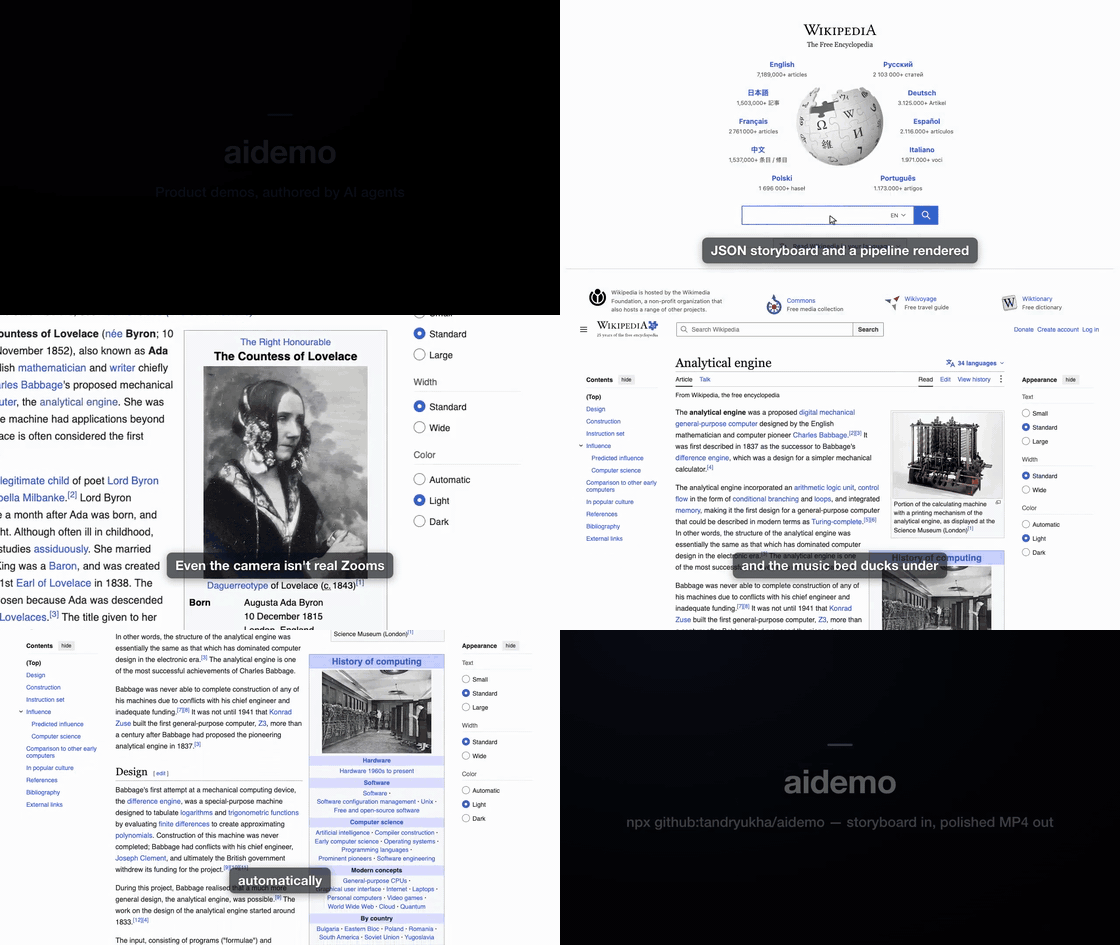
Real output — a ~51 s self-narrated tour of Wikipedia (portal search →
Ada Lovelace → focus-zoom → click through to the Analytical Engine → glide
scroll), authored by Claude from one storyboard.json and recorded as a
deterministic replay. The preview GIF is silent;
watch the full version with narration ▶.
Three ways to use it
- From your coding agent — the fastest path. In Claude Code:
/plugin marketplace add tandryukha/aidemothen/plugin install record-demo@aidemo(bundles the skill and the MCP server). In Codex / Gemini / any MCP agent:npx -y github:tandryukha/aidemo#stable repo-init. Then just say "record a 45s demo of <flow>" and the agent authors + renders it. - Locally, free & offline —
AIDEMO_TTS_PROVIDER=local aidemo render <dir> --headless. An in-process voice model + script-timed captions mean no API key, ~$0, fully offline. See docs/LOCAL_MODELS.md. - In CI, self-maintaining — drop
uses: tandryukha/aidemo@stableinto a workflow. When the product changes, it replays the committed storyboard and commits fresh media — no key, no LLM tokens, ~$0 on free runner minutes. See docs/CI.md.
Free & open source. MIT-licensed. Runs on GitHub's free Actions tier, or fully local at $0 with the in-process voice — no API key, no cloud upload, no telemetry. Works against localhost and auth-walled apps (your own Chrome).
From one sentence to a narrated MP4
You type a sentence, the agent writes an artifact you can read and edit, the engine records and cuts it:
1 · What you type — one line to any MCP-capable agent (Claude Code here):
claude "record a 45s demo touring Wikipedia: search for Ada Lovelace,
open the Analytical Engine, then glide down the article"
2 · What the agent authors — a plain, editable storyboard.json (excerpt:
narration + a fixed browser action-spec, side by side — no generated code):
{
  "title": "A quick tour of Wikipedia",
  "zoom": {},                                  // Screen-Studio-style auto-zoom
  "scenes": [
    { "id": "search",
      "narration": "Start at the Wikipedia portal and search for Ada Lovelace.",
      "actions": [
        { "op": "goto", "url": "https://www.wikipedia.org/" },
        { "op": "type", "target": { "selector": "#searchInput" }, "text": "Ada Lovelace" },
        { "op": "click", "target": { "selector": "button[type=submit]" } } ] },
    { "id": "engine",
      "narration": "Her notes on Babbage's Analytical Engine hold the first computer program.",
      "actions": [
        { "op": "focus", "target": { "selector": "#firstHeading" } },
        { "op": "click", "target": { "selector": "a[href*='Analytical_Engine']" } },
        { "op": "scrollBy", "dy": 900, "easing": "glide" } ] }
  ]
}
3 · How it's recorded + cut — aidemo render drives a real Chrome (smooth
animated cursor, human-cadence typing, auto-zoom), then trims the dead time and
syncs to the narration:
storyboard.json
   → voice     OpenAI / ElevenLabs / local TTS → audio/narration.mp3 + voice.json
   → record    drives Chrome, animated cursor  → recordings/raw.{webm,mp4} + timeline.json
   → captions  Whisper word timestamps         → generated/captions.{srt,vtt,cues.json}
   → compose   trim idle · sync · auto-zoom · cards · caption · mux → output/final-demo.mp4
4 · What you get — output/final-demo.mp4, plus a README-ready GIF
(aidemo gif) and named stills (aidemo stills) from the same take. UI changed?
Re-run against the same storyboard — no re-recording by hand.
The design goal: demos that look human-made and snappy, not like an AI clicking around and waiting between screenshots — by separating authoring (slow, one-time — figure out the flow) from recording (a fast deterministic replay with a smooth animated cursor).
What teams render with it
- GitHub README demos —
aidemo gif demos/onboarding, drop the autoplaying GIF into the readme (the GIFs on this page are exactly that). - Landing-page hero videos — the muted-autoplay MP4 on aidemo.top is a rendered demo, poster frame and all.
- Release / what-shipped demos — narrate the new feature, then
gh release upload v1.4.0 demos/whats-new/output/final-demo.mp4. - Customer & prospect demos — personalized flows against your real app: localhost, auth walls, your own logged-in Chrome; nothing leaves the machine.
Render in CI (self-maintaining demos)
Commit a storyboard and the aidemo GitHub Action keeps its demo media in sync — a fresh narrated, captioned MP4 (and GIF) on every relevant change. Deterministic replay + a local voice mean no API key, no LLM tokens, about $0 (just free runner minutes). It's the loop a screen recorder can't run: your demo maintains itself.
# .github/workflows/demo.yml
- uses: actions/checkout@v4
- run: sudo apt-get update && sudo apt-get install -y ffmpeg   # ubuntu ships Chrome, not ffmpeg
- uses: tandryukha/aidemo@stable
  with:
    demos: demos/*
    tts: local        # in-process voice → no keys, no tokens
    gif: "true"
Full recipe, templates (auto-commit / PR-comment / cron-refresh), and the always-fresh-embeds trick: docs/CI.md, docs/EMBEDS.md, docs/recipes/.
Quick start (self-contained smoke test)
A bundled fixture store (search → results → cart → checkout) that renders a finished demo with zero external dependencies:
npm install                                # Node 20+, system Chrome, ffmpeg on PATH
node examples/local-demo/serve.mjs         # terminal 1: fixture on :8787
node bin/aidemo.mjs render examples/local-demo --headless   # terminal 2
open examples/local-demo/output/final-demo.mp4   # xdg-open on Linux, start on Windows
Voice/captions need OPENAI_API_KEY in .env — or AIDEMO_TTS_PROVIDER=local
(no key, offline), or OPENAI_BASE_URL at a local server. See
docs/LOCAL_MODELS.md. No Playwright browser download is
needed — the engine uses your system Chrome (channel: "chrome").
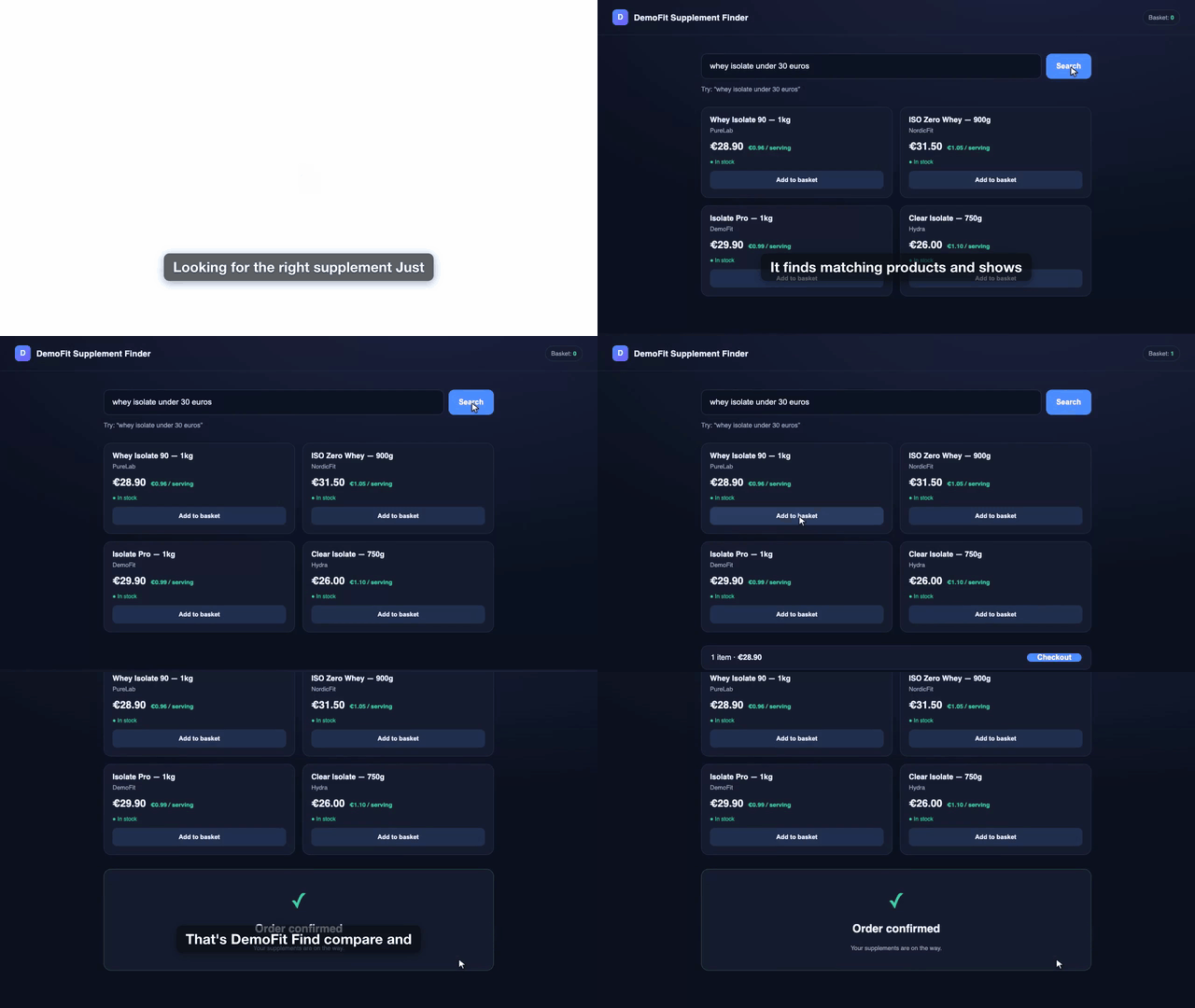
The bundled fixture rendered end-to-end — narrated, captioned, auto-trimmed. Silent preview; full version ▶.
CLI
Each step is independently runnable and re-runnable — regenerate voice without re-recording, recompose without re-transcribing, etc.
aidemo init <name>            # scaffold demos/<name>/ with a starter storyboard
aidemo init <name> --from-url <url>   # …drafted from the live page's headings + real selectors
aidemo import-trace trace.zip --name <name>   # …or from a Playwright trace / *.spec.ts (actions + selectors → scenes)
aidemo voice   <dir>          # per-scene TTS → narration.mp3 + voice.json
aidemo record  <dir>          # drive Chrome → raw video + timeline.json
aidemo probe   <dir>          # record-only dry run (verify selectors), no key needed
aidemo validate <dir>         # schema-check the storyboard, no browser (non-zero exit on issues)
aidemo lint    <dir>          # predict freezes/cuts + selector pitfalls before spending a take
aidemo captions <dir>         # Whisper → captions.{srt,vtt,cues.json} (--offline for no network)
aidemo compose <dir>          # trim + sync + zoom + cards + caption + mux → final-demo.mp4
aidemo gif     <dir>          # final-demo.mp4 → README-ready GIF (autoplays on GitHub)
aidemo frames  <dir>          # evenly spaced PNGs from the video for review (--source raw)
aidemo render  <dir>          # voice → record → captions → compose
aidemo guide                  # print the canonical authoring guide
aidemo doctor                 # check Node, ffmpeg, Chrome, voice endpoint
Add --headless for CI/fixtures; omit it for real sites that need your
logged-in session. --profile <dir> picks the Chrome user-data dir; --fresh
records on a wiped one; --storage-state <file> / --cookie "name=value;domain=host"
seed a cookie-gated site before the first action (or declare setup in the
storyboard, which can also run a preflight script before every take);
--capture native|obs switches to high-fidelity screen capture. voice/render
skip TTS for unchanged scenes, and record salvages a failed take (keeps
the footage + drops a screenshot/frame-dump in logs/).
Agent interface (MCP)
aidemo mcp runs a stdio MCP server (no network listener) exposing the engine
to any MCP client. The Claude Code plugin bundles it; aidemo repo-init registers
it agent-neutrally (.mcp.json for Claude Code, .gemini/settings.json for
Gemini; codex mcp add aidemo -- npx -y github:tandryukha/aidemo#stable mcp for
Codex).
- Authoring tools —
get_authoring_guideserves docs/AUTHORING.md version-matched from the engine (can't go stale);get_storyboard_schema,validate_storyboard,init_demo,doctor. - Pipeline tools run as jobs —
probe/record/render/voice/captions/compose/gifreturn ajobIdimmediately;job_statusreports stage, per-scene progress, and (on failure) the screenshot/frame-dump paths.
Why it's built this way
- Deterministic replay, not an LLM in the loop. The recording runs a fixed action-spec at full speed, so the video is smooth. The agent only authors the storyboard (and confirms selectors once), never during capture.
- Declarative action-spec + fixed player (not generated
spec.ts). Safer, editable, and it emits a timeline for free — compose fits each scene's video to its narration by trimming/speeding only the idle parts, freeze-holding a static page for any remainder instead of ugly slow-motion. - Captions via overlaid PNGs, not libass. Many ffmpeg builds lack
subtitles/drawtext; aidemo rasterizes each caption with headless Chrome and overlays it with time-gatedenable— works on any ffmpeg withoverlay. - Cinematic polish is compose-time, not record-time — a bad zoom is a recompose, never a re-record. See docs/POLISH.md.
Deeper docs
- docs/AUTHORING.md — the canonical storyboard schema, action vocabulary, and demo-director principles (served by the engine).
- docs/LOCAL_MODELS.md — no-key rendering: in-process Kokoro voice, local speech servers (speaches), ElevenLabs, offline captions.
- docs/POLISH.md — auto-zoom, scroll easing, music ducking, intro/outro cards, motion blur, cursor control, native/OBS high-fidelity capture.
- docs/CHATGPT_APPS.md — recording ChatGPT Apps SDK
widgets (dedicated profile, nested iframes,
waitForWidget). - docs/CI.md · docs/EMBEDS.md · docs/recipes/ — CI rendering, always-fresh embeds, agent-in-CI recipes.
Setup
Prereqs: Node 20+, Google Chrome, ffmpeg + ffprobe on PATH.
Developed and tested on macOS; Linux works for the default (Playwright) capture
and --capture obs. Run aidemo doctor to check your setup.
npm install
cp .env.example .env      # add OPENAI_API_KEY, or use AIDEMO_TTS_PROVIDER=local (no key)
Project layout (per demo)
demos/<name>/          ← your working area (untracked; scaffold with `aidemo init`)
  input/      brief.md
  generated/  storyboard.json  timeline.json  captions.{srt,vtt,cues.json}
  recordings/ raw.webm (or raw.mp4 for native/OBS capture)
  audio/      scene-*.mp3  narration.mp3  voice.json
  output/     final-demo.mp4
  logs/       <command>.log  fail-<scene>-<n>.{png,json} (on a failed action)
Security & trust
- No telemetry, no analytics, no install-time scripts (
package.jsonhas nopostinstall/preinstall). - Network is user-initiated only:
api.openai.com(onlyvoice/captions, your key — or a local server viaOPENAI_BASE_URL),api.elevenlabs.io(opt-in),huggingface.co(download-only, once, forAIDEMO_TTS_PROVIDER=local), andgithub.com(your owngh, foraidemo feedback). Recording/composing are fully local. The MCP server is stdio-only — no listener. - Small, auditable surface: ~20 source files, 7 runtime deps, MIT. Pin an
immutable ref if you're wary of the moving
#stabletag:npx -y github:tandryukha/aidemo#v0.14.0(any released tag). - Full detail: docs/LOCAL_MODELS.md · report vulnerabilities privately per SECURITY.md.
Roadmap
- Comments on the video (pause & comment) and in-place transcript editing:
captions map to scenes, so editing a line marks that scene dirty and
aidemo voice --scene <id>+composeregenerates only the delta. - Web UI, project history, brand kits, changelog integrations.
- Hosted public MCP (see docs/plans/public-mcp.md).
Shipped: the GitHub Action (CI re-render), cinematic polish (auto-zoom, scroll easing, music ducking, intro/outro cards, motion blur, post-hoc cursor control), native/OBS capture, the agent-neutral MCP server + authoring guide, ElevenLabs and in-process local voice providers, and the Claude Code plugin.
Contributing
Issues and PRs welcome — see CONTRIBUTING.md for dev setup, the
smoke test, and the DCO sign-off requirement. Recording-session feedback has a fast
path: aidemo feedback demos/<name> pre-fills a structured issue.
License
MIT © Andrii Taran
Reviews
No reviews yet
Be the first to review this server!
More Developer Tools MCP Servers
Git
Freeby Modelcontextprotocol · Developer Tools
Read, search, and manipulate Git repositories programmatically
Fetch
Freeby Modelcontextprotocol · Developer Tools
Web content fetching and conversion for efficient LLM usage
Worldmonitor
Freeby Koala73 · Developer Tools
Live markets, conflicts, country risk, chokepoints, energy, and China decision signals. 93 tools.
Paperclip
Freeby Paperclipai · Developer Tools
Trending hip-hop artist momentum scores across four cultural dimensions.
Toleno
Freeby Toleno · Developer Tools
Toleno Network MCP Server — Manage your Toleno mining account with Claude AI using natural language.
mcp-creator-python
Freeby mcp-marketplace · Developer Tools
Create, build, and publish Python MCP servers to PyPI — conversationally.