
Server data from the Official MCP Registry
Render App Store, Google Play and iPhone Duo screenshots and Apple Creative Assets from templates.
About
Render App Store, Google Play and iPhone Duo screenshots and Apple Creative Assets from templates.
Security Report
Valid MCP server (3 strong, 3 medium validity signals). No known CVEs in dependencies. Package registry verified. Imported from the Official MCP Registry.
12 files analyzed · 1 issue found
Security scores are indicators to help you make informed decisions, not guarantees. Always review permissions before connecting any MCP server.
Permissions Required
This plugin requests these system permissions. Most are normal for its category.
What You'll Need
Set these up before or after installing:
Environment variable: FRAMEGROVE_FONTS
Environment variable: FRAMEGROVE_OFFLINE
How to Install
Add this to your MCP configuration file:
{
  "mcpServers": {
    "io-github-tech-bam-framegrove": {
      "env": {
        "FRAMEGROVE_FONTS": "your-framegrove-fonts-here",
        "FRAMEGROVE_OFFLINE": "your-framegrove-offline-here"
      },
      "args": [
        "-y",
        "framegrove"
      ],
      "command": "npx"
    }
  }
}Documentation
View on GitHubFrom the project's GitHub README.
Framegrove
App Store, Google Play and iPhone Duo screenshot generator. A free, local-first web editor plus an MCP server and CLI that let your coding agent render store screenshots and Apple Creative Assets from your real app screenshots.


Live editor: https://framegrove.bamstudio.dev
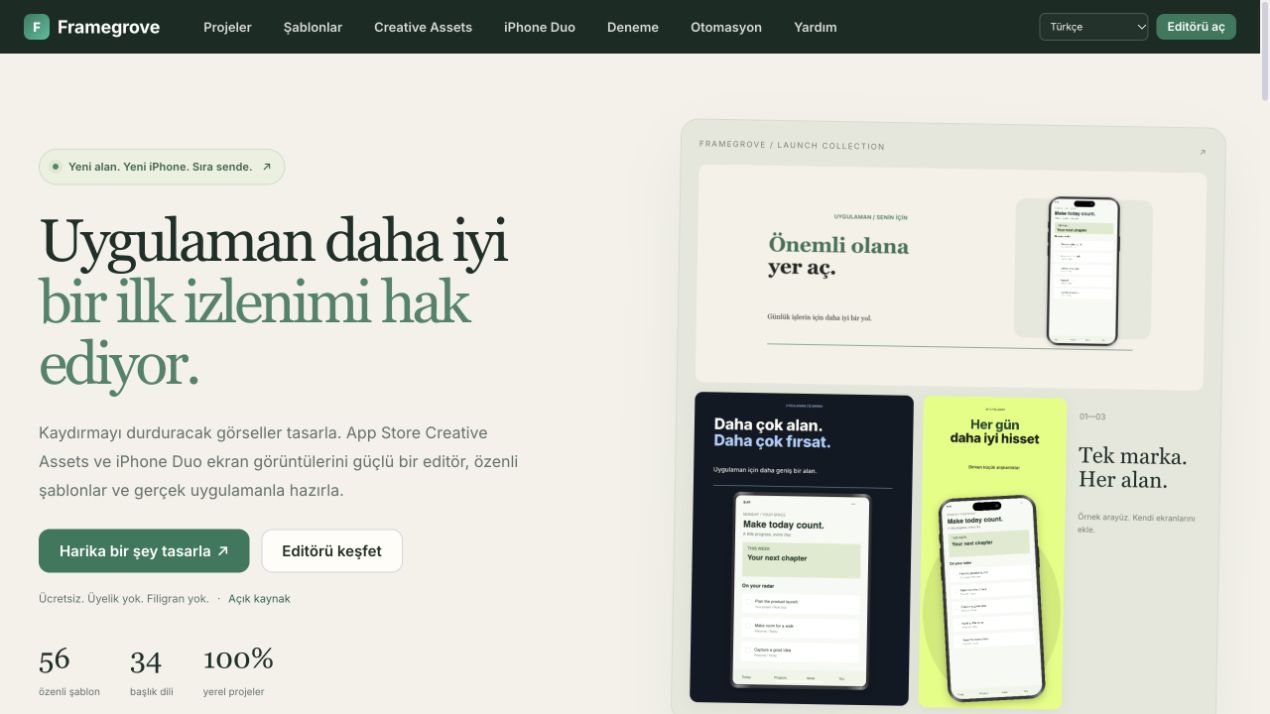
- 56 curated templates and 172 editable compositions: phone, tablet, iPhone Duo and Apple Creative Assets (Header, Search, Universal).
- Exact-size exports; Apple PNGs are RGB with no alpha channel.
- Captions in 34 languages; the website in eight.
- One engine for the web editor, MCP server and CLI. Projects stay on your machine.
- Free, MIT licensed, no signup or watermark.
Use it from your agent (MCP)
Requires Node.js 20+.
claude mcp add framegrove -- npx -y framegrove mcp
Other clients (Claude Desktop, Cursor, Windsurf, VS Code):
{
  "mcpServers": {
    "framegrove": { "command": "npx", "args": ["-y", "framegrove", "mcp"] }
  }
}
Codex: codex mcp add framegrove -- npx -y framegrove mcp
Then ask: "Take six screenshots of my app in the simulator and make App Store screenshots in English and German with Framegrove."
| Tool | What it does |
|---|---|
list_templates | Templates with theme, orientation, default sizes and screen count |
list_outputs | Exact dimensions for App Store, Google Play, iPhone Duo and Creative Assets |
render_screenshots | Render PNGs from a template, screenshot paths and captions per language |
build_project | Write an editable .sms.json to fine-tune in the web editor |
inspect_assets | Check exported dimensions and PNG alpha against an output preset |
Claude Code plugin
Installs the MCP server together with the Framegrove agent skill, which guides truthful captions, matching display slots and visual review:
claude plugin marketplace add tech-bam/framegrove
claude plugin install framegrove@framegrove
The skill alone lives in skills/framegrove/.
CLI
npx framegrove templates
npx framegrove outputs
npx framegrove render --template studio-paper --name "My App" --shots ./screens --lines en.txt --captions-de de.txt --out ./store
npx framegrove render --template creative-paper-header --shots ./screens --out ./header
npx framegrove inspect ./store/*.png --output iphone-6.9
npx framegrove project --template duo-paper-inner --shots ./inner --out ./editable.sms.json
npx framegrove --help
Caption files have one line per screen: Headline [highlight] | Subtitle. Template fonts (Google Fonts, OFL) download once on the first render to ~/.cache/framegrove/fonts; set FRAMEGROVE_FONTS to change the folder or FRAMEGROVE_OFFLINE=1 to skip it.
Framegrove does not capture simulator screenshots or upload to App Store Connect. Preview Creative Assets in App Store Connect for device-specific cropping. Apple says iPhone Duo uploads open later in 2026; check availability before submitting.
Repository layout
| Path | Contents |
|---|---|
engine/ | Canvas rendering engine and templates, shared by every surface |
app/ | Web editor |
mcp/ | npm package framegrove: MCP server, CLI and Node renderer |
skills/framegrove/ | Agent skill |
.claude-plugin/ | Claude Code plugin and marketplace manifests |
server.json | MCP Registry entry io.github.tech-bam/framegrove |
locales/ | Website and editor translations |
scripts/ | Site build and verification |
Development
cd mcp && npm ci && cd ..
npm test                   # renders every template, checks MCP tools and exports
python3 scripts/build.py   # builds the site into public/
python3 -m http.server 8766 --bind 127.0.0.1 --directory public
See CONTRIBUTING.md. Releases: bump the version in mcp/package.json, server.json and .claude-plugin/plugin.json, update CHANGELOG.md, then publish a GitHub release; the publish workflow releases to npm and the MCP Registry.
The live site is deployed by the maintainers to Cloudflare Workers (npx wrangler deploy, config not in the repository). The legacy product route redirects to Framegrove; the old editor stays on its original origin so local projects can still be exported and imported here.
Support
Framegrove is free. If it saves you time: https://buymeacoffee.com/bamstudio
Machine-readable docs: https://framegrove.bamstudio.dev/llms.txt
Reviews
No reviews yet
Be the first to review this server!
More Developer Tools MCP Servers
Git
Freeby Modelcontextprotocol · Developer Tools
Read, search, and manipulate Git repositories programmatically
Fetch
Freeby Modelcontextprotocol · Developer Tools
Web content fetching and conversion for efficient LLM usage
Worldmonitor
Freeby Koala73 · Developer Tools
Live markets, conflicts, country risk, chokepoints, energy, and China decision signals. 89 tools.
Paperclip
Freeby Paperclipai · Developer Tools
Trending hip-hop artist momentum scores across four cultural dimensions.
Toleno
Freeby Toleno · Developer Tools
Toleno Network MCP Server — Manage your Toleno mining account with Claude AI using natural language.
mcp-creator-python
Freeby mcp-marketplace · Developer Tools
Create, build, and publish Python MCP servers to PyPI — conversationally.