
Server data from the Official MCP Registry
Permission-aware MCP server for Odoo 18/19. OAuth 2.1; each call runs as one named Odoo user.
About
Permission-aware MCP server for Odoo 18/19. OAuth 2.1; each call runs as one named Odoo user.
Remote endpoints: streamable-http: https://{odoo_host}/mcp/v1
Security Report
Valid MCP server (1 strong, 1 medium validity signals). No known CVEs in dependencies. Imported from the Official MCP Registry. 1 finding(s) downgraded by scanner intelligence.
Endpoint verified · Open access · 1 issue found
Security scores are indicators to help you make informed decisions, not guarantees. Always review permissions before connecting any MCP server.
Permissions Found in Source Code
Found by scanning the linked source code. This listing connects to a hosted endpoint, so none of this runs on your machine: it describes what the server software does where it is hosted.
How to Connect
Remote Plugin
No local installation needed. Your AI client connects to the remote endpoint directly.
Add this to your MCP configuration to connect:
{
  "mcpServers": {
    "io-github-technovision-dev-odoo-claude-connector": {
      "url": "https://{odoo_host}/mcp/v1"
    }
  }
}Documentation
View on GitHubFrom the project's GitHub README.
Claude Connector for Odoo: a permission-aware MCP server
Connect Claude (web, desktop or mobile) and other MCP clients to your Odoo 18 or 19 database, without handing over an admin key.
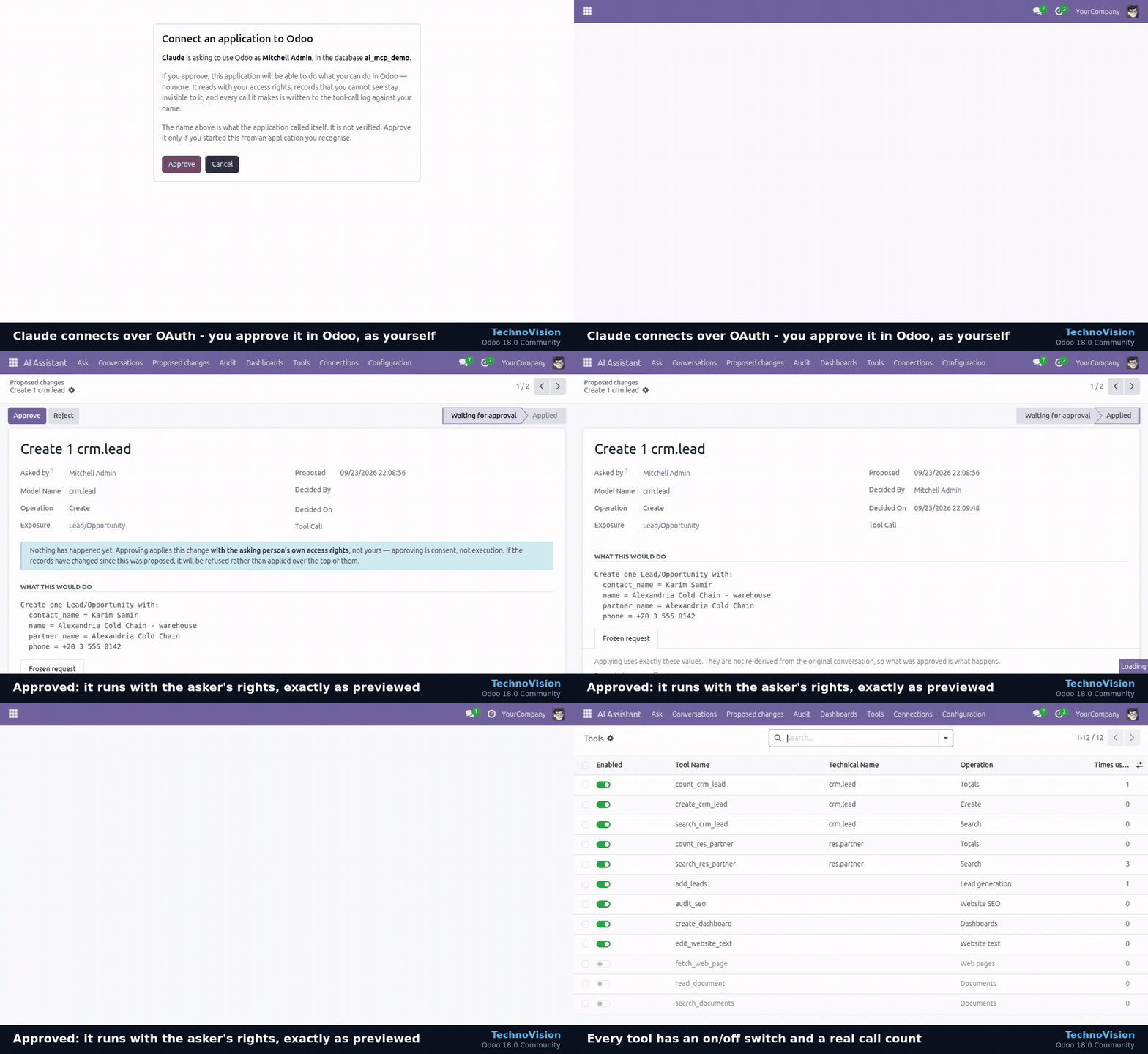
This module turns your Odoo into a remote Model Context Protocol (MCP) server. Claude connects with OAuth 2.1 in two clicks. Every request runs as one named Odoo user, with that user's access rights, so the AI sees exactly what that person could see in Odoo. No more.
Why it's different
| Typical "AI for Odoo" setup | Claude Connector for Odoo | |
|---|---|---|
| Identity | One admin API key for everyone | Each token or OAuth grant acts as one person (with_user) |
| What the AI can see | Everything | Only what that user's groups and record rules allow |
| Writes | Direct | Off by default. Enabled per model and per field, and by default each write is a proposal a person approves in Odoo |
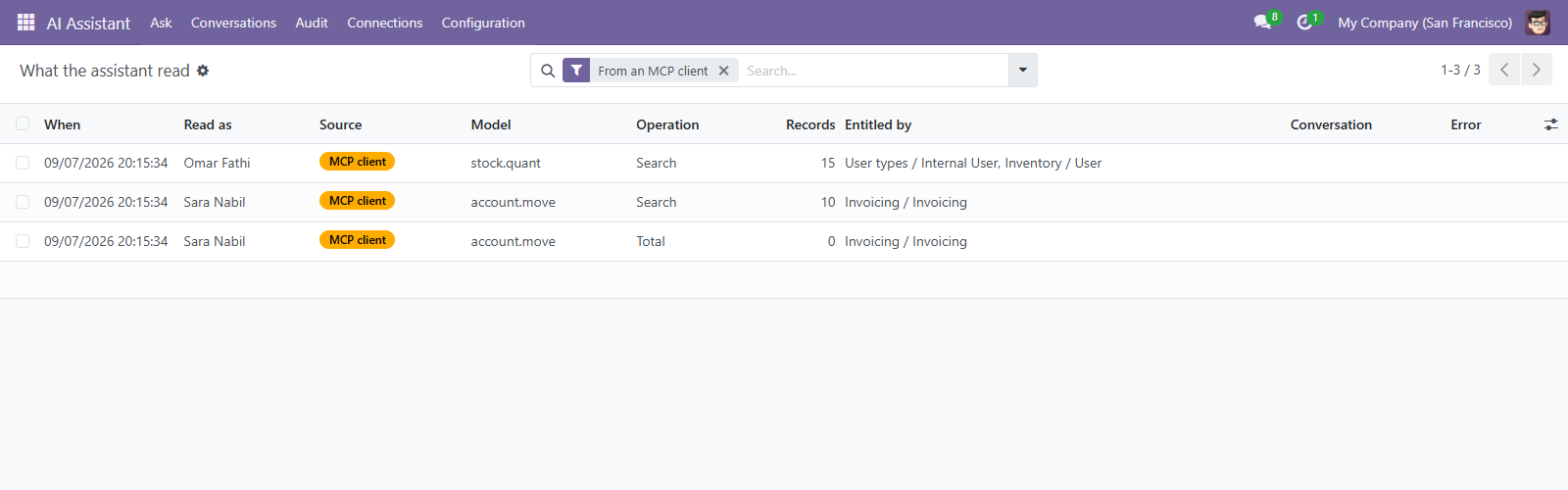
| Audit | None | Every call is logged with user, token, client name and source |
| Connecting Claude web and mobile | Config file on one desktop | OAuth 2.1 (RFC 9728 / 8414 / 7591, PKCE S256) |
Features
- Remote MCP endpoint (
/mcp/v1, JSON-RPC 2.0):initialize,tools/list,tools/call,ping - OAuth 2.1 for Claude: protected-resource and authorization-server metadata, dynamic client registration, authorization code + PKCE S256 only, rotating refresh tokens, an approval screen served by Odoo
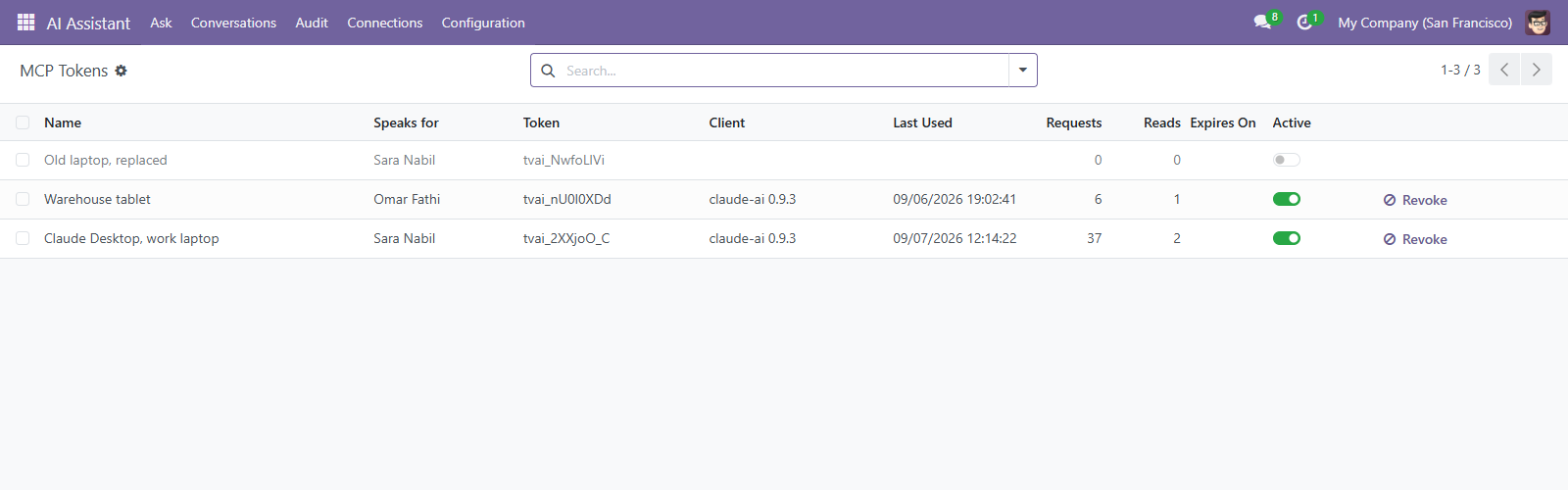
- Per-person tokens for desktop clients: shown once, stored only as a SHA-256 digest, with expiry and one-click revocation
- Tools scoped per request:
tools/listreturns only what that person can reach - Models exposed by allow-list: nothing is exposed until an administrator names the models
- Approval workflow for writes: create, update and delete are proposals unless an administrator decides otherwise for a named model
- Full audit trail: MCP reads and writes appear next to reads made inside Odoo
- Odoo 18.0 and 19.0, Community and Enterprise, Odoo.sh or self-hosted
Connect Claude in two clicks
- Install the module on your Odoo (HTTPS required).
- In Odoo, open AI Assistant → Connections and choose which models to expose.
- In Claude, go to Settings → Connectors → Add custom connector and paste your Odoo MCP URL
(
https://your-odoo.example.com/mcp/v1). - Approve the connection on the Odoo screen that opens. Claude now answers from your Odoo data, as you.
Desktop clients that use a config file get a ready-made JSON block from the token wizard.
Get it
The module is published on the official Odoo Apps Store:
- Odoo 19.0: https://apps.odoo.com/apps/modules/19.0/technovision_ai_mcp/
- Odoo 18.0: https://apps.odoo.com/apps/modules/18.0/technovision_ai_mcp/
It requires AI Assistant for Odoo — Permission-Aware (technovision_ai_core), which the store installs
with it.
Product page and documentation: https://technovision.dev/products/mcp-server
Need it set up?
We install and configure it on your database, including Odoo.sh, and can build a custom tool for one of your workflows. Contact info@technovision.dev.
This repository is the public information page for the connector. The module itself is licensed under OPL-1 and distributed through the Odoo Apps Store.
TechnoVision · technovision.dev
Reviews
No reviews yet
Be the first to review this server!
More Developer Tools MCP Servers
Fetch
Freeby Modelcontextprotocol · Developer Tools
Web content fetching and conversion for efficient LLM usage
Git
Freeby Modelcontextprotocol · Developer Tools
Read, search, and manipulate Git repositories programmatically
Toleno
Freeby Toleno · Developer Tools
Toleno Network MCP Server — Manage your Toleno mining account with Claude AI using natural language.
MCP Marketplace
Freeby mcp-marketplace · Developer Tools
Search and install MCP servers from inside your AI client.
mcp-creator-python
Freeby mcp-marketplace · Developer Tools
Create, build, and publish Python MCP servers to PyPI — conversationally.
FinAgent
Freeby mcp-marketplace · Finance
Free stock data and market news for any MCP-compatible AI assistant.