
Server data from the Official MCP Registry
Hand-drawn whiteboard for system design mock interviews; your AI watches, asks and gives feedback.
About
Hand-drawn whiteboard for system design mock interviews; your AI watches, asks and gives feedback.
Security Report
Valid MCP server (2 strong, 1 medium validity signals). No known CVEs in dependencies. Package registry verified. Imported from the Official MCP Registry.
6 files analyzed · 1 issue found
Security scores are indicators to help you make informed decisions, not guarantees. Always review permissions before connecting any MCP server.
Permissions Required
This plugin requests these system permissions. Most are normal for its category.
What You'll Need
Set these up before or after installing:
Environment variable: SYSDESIGN_PORT
How to Install
Add this to your MCP configuration file:
{
  "mcpServers": {
    "io-github-tghattas-sysdesign-board": {
      "env": {
        "SYSDESIGN_PORT": "your-sysdesign-port-here"
      },
      "args": [
        "-y",
        "sysdesign-board"
      ],
      "command": "npx"
    }
  }
}Documentation
View on GitHubFrom the project's GitHub README.
sketch/design — the system design interview board
A hand-drawn whiteboard for system design mock interviews, plus an MCP server that turns Claude or ChatGPT into your interviewer. It sees your board, listens to you, talks back, pins questions on your components, and ends with scored feedback.
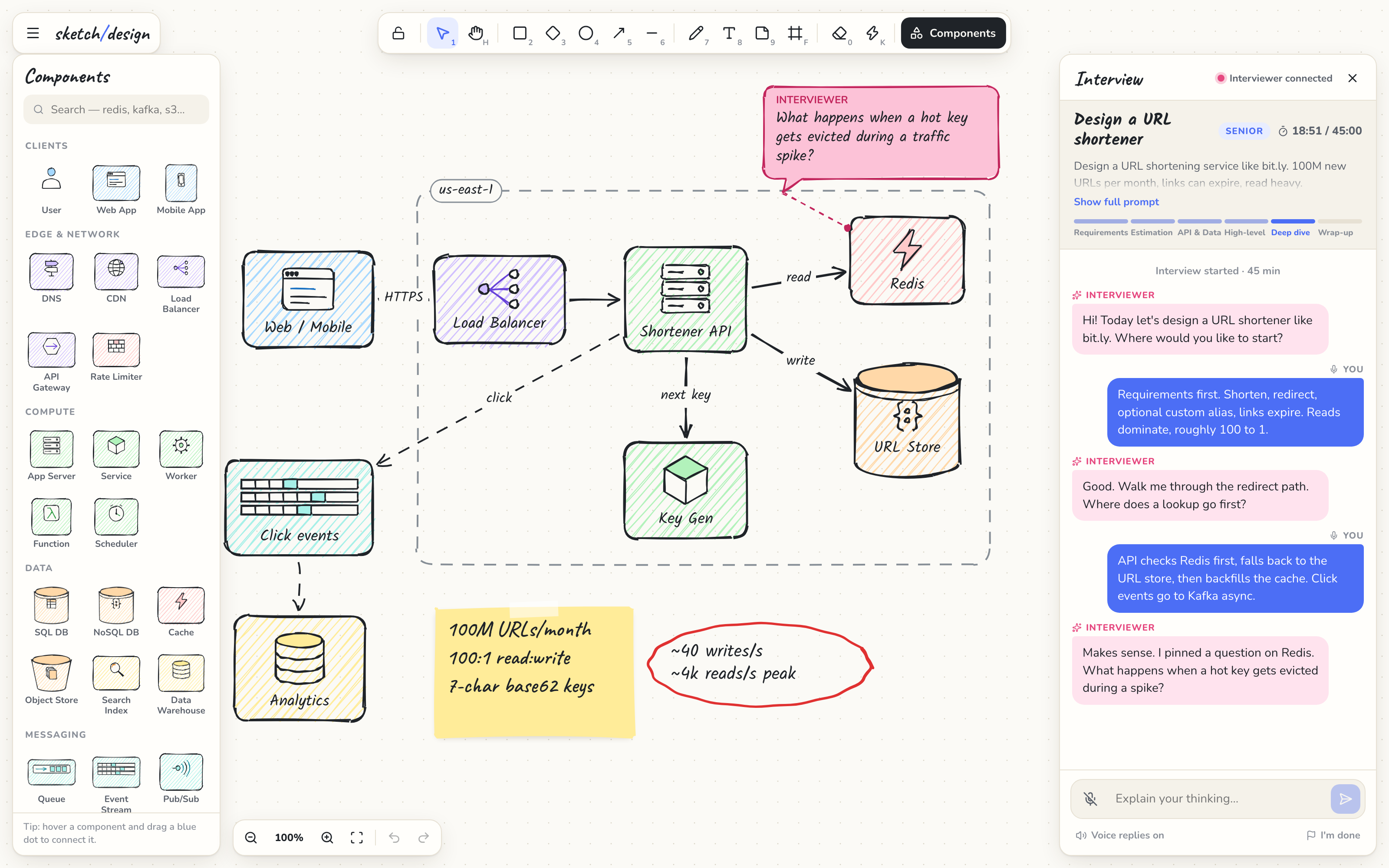
- Pencil-style canvas: a paper or chalkboard theme, with shapes that look drawn by hand (rough.js + perfect-freehand)
- 27 system design components: load balancer, API gateway, CDN, cache, SQL and NoSQL databases, object store, queue, Kafka-style stream, pub/sub, workers, serverless functions, auth, monitoring, ML and more
- Arrows that stay attached to components, with labels, curved or elbow routes, and dashed lines for async flows. Hover a component and drag its blue dot to connect it.
- Interview panel: the problem, a timer, a phase tracker, chat, voice in (speech-to-text) and voice out (the interviewer's replies are read aloud)
- The interviewer can read your diagram as structured data, look at a picture of it, pin comments on components, highlight things, sketch reference designs, and grade you at the end
- Runs entirely on your machine. The AI runs in your own Claude or ChatGPT app, on your existing subscription, with no API keys.
Install
Requires Node.js 18+.
| Your AI app | How to connect | Billed to |
|---|---|---|
| Claude Desktop | Double-click sysdesign-board-x.y.z.mcpb from Releases, or run npx -y sysdesign-board install | Claude Pro / Max |
| Claude Code | claude mcp add sysdesign-board -- npx -y sysdesign-board | Claude Pro / Max |
| Codex CLI | Add it to ~/.codex/config.toml (below) | ChatGPT Plus / Pro |
| ChatGPT (desktop / web) | Developer Mode connector through a tunnel (below) | ChatGPT Plus / Pro |
| Cursor, Windsurf, VS Code, others | The standard MCP JSON (below) | Your plan there |
The .mcpb one-click file is Claude Desktop only. Every other app runs the same npm package.
Claude Desktop
Option A: one-click. Download the .mcpb file from Releases and double-click it. Claude Desktop shows an install dialog.
Option B: command line. First quit Claude Desktop completely (macOS: ⌘Q; Windows: tray icon → Quit). Claude rewrites its config file from memory when it quits, which would drop the new entry. Then run:
npx -y sysdesign-board install
Reopen Claude Desktop.
Option C: edit the config yourself (again, with Claude Desktop quit). The file is at:
- macOS:
~/Library/Application Support/Claude/claude_desktop_config.json - Windows:
%APPDATA%\Claude\claude_desktop_config.json - Linux (unofficial builds):
~/.config/Claude/claude_desktop_config.json
{
  "mcpServers": {
    "sysdesign-board": { "command": "npx", "args": ["-y", "sysdesign-board"] }
  }
}
On Windows, use "command": "cmd", "args": ["/c", "npx", "-y", "sysdesign-board"]. If Claude can't find npx (common with nvm, Volta or asdf), use the absolute path from which npx (macOS/Linux) or where npx (Windows).
Claude Code
Either add the server directly:
claude mcp add sysdesign-board -- npx -y sysdesign-board
Or install the plugin, which also adds an interview skill, from this repo's marketplace. Run these inside Claude Code:
/plugin marketplace add tGhattas/sysdesign-board
/plugin install sysdesign-board@sysdesign-board
Codex CLI
Add this to ~/.codex/config.toml (Windows: %USERPROFILE%\.codex\config.toml):
[mcp_servers.sysdesign-board]
command = "npx"
args = ["-y", "sysdesign-board"]
tool_timeout_sec = 120
ChatGPT app
ChatGPT connects to MCP servers over public HTTPS, so you run the board locally and expose only its /mcp endpoint through a tunnel. The board itself, its API and its WebSocket refuse any request that doesn't come from localhost.
- Start the board, and keep this running:
npx -y sysdesign-board serve - In another terminal, open a tunnel (here with cloudflared):
cloudflared tunnel --url http://localhost:4321 - Get your private connector token:
npx -y sysdesign-board token - In ChatGPT, go to Settings → Apps & Connectors → Advanced, enable Developer Mode, then Create a connector with the URL
https://<your-tunnel>.trycloudflare.com/mcp?token=<token>and no authentication.
Treat that URL like a password. To change the token, delete ~/.sysdesign-board/token, or set SYSDESIGN_TOKEN yourself.
Any other MCP client
{ "command": "npx", "args": ["-y", "sysdesign-board"] }
Use it
Start a new chat and say:
Start a system design interview with me on my sketch board.
Or use the interview prompt from your app's prompt or slash menu. The board opens at http://localhost:4321.
- Draw your design. Talk with the 🎤 mic (your message is sent when you pause) or type in the panel.
- The interviewer keeps listening between replies. It is woken by what you say, and when you stop drawing for a few seconds.
- Click I'm done when you're finished to get a feedback card with scores.
The board also works without any AI: run npx -y sysdesign-board serve and open http://localhost:4321.
Tools the interviewer gets
| Tool | What it does |
|---|---|
start_interview | Sets the problem, level and duration, opens the board, and speaks the opening line |
wait_for_candidate | Waits for your speech or messages, or for board changes once you stop drawing |
say | Sends a chat message, read aloud |
get_board | Structured diagram: components, connections (with labels; dashed means async), zones, notes, and what changed |
get_board_image | A PNG of the whole board (for handwriting and sketches) |
annotate / clear_annotations | Pin or remove "INTERVIEWER" comment bubbles on components |
highlight | Makes components glow, optionally zooming to them |
draw_on_board | Adds components, connections, notes and zones in the same sketchy style |
set_phase | Requirements → Estimation → API & Data → High-level → Deep dive → Wrap-up |
end_interview | Feedback card with 1–5 scores, strengths and improvements |
get_transcript, open_board | Housekeeping |
Voice
- Speech-to-text uses the browser's Web Speech API. Use Chrome, Edge or Safari; Firefox doesn't support it.
- Text-to-speech uses your system voices. Toggle it with "Voice replies" in the panel. The mic pauses while the interviewer speaks, so it doesn't transcribe itself.
- The native voice modes inside the ChatGPT and Claude apps can't be piped into another page. Those voice models are only available through paid APIs.
Keyboard
V select · H hand / hold Space · R rect · D diamond · O ellipse · A arrow · L line · P pen · T text · N sticky note · F zone · E eraser · K laser · C components · I interview panel · Q tool lock · G grid snap · ⌘/Ctrl Z undo · ⌘/Ctrl D duplicate · ⇧1 fit · ? all shortcuts
Privacy Policy
The full policy is in PRIVACY.md. In short:
- What it handles: your board, the interview chat and voice transcripts, your settings, and a local access token.
- Where it's stored: only on your machine, in the browser's local storage for the board page and in
~/.sysdesign-board/. The author runs no server, and there are no accounts, analytics or telemetry. - What leaves your computer:
- When the AI interviewer calls a tool, the AI app you connected receives the board description, a picture of the board, your messages and your transcripts, under that provider's privacy policy.
- The mic uses your browser's speech recognition. Chrome sends the audio to Google; Safari uses Apple's speech service.
npxdownloads the package from npm.- With the optional tunnel,
/mcprequests pass through the tunnel provider.
- Security:
- The board, its API and its WebSocket only answer
localhostrequests fromlocalhostpages. Other websites and tunnels are refused, which also blocks DNS-rebinding attacks. - The HTTP endpoint (
/mcp) always requires the token.
- The board, its API and its WebSocket only answer
- Sharing and retention: nothing is sold or shared. Data stays until you clear the board or delete
~/.sysdesign-board/. - Contact: open an issue.
Troubleshooting
- The server doesn't appear in Claude Desktop. Claude was probably running when the config was edited and saved over it. Quit it fully, run
npx -y sysdesign-board install, then reopen. - "npx: command not found" in Claude's logs. Use an absolute path to
npx(see Option C), or runnpx -y sysdesign-board install, which writes absolute paths for you. - Port 4321 is taken. Set
SYSDESIGN_PORT(or--port=5000). In the.mcpbextension it's a setting. - The mic does nothing. Open the board in Chrome, Edge or Safari and allow microphone access.
- Several apps connected at once? That's fine. The first one hosts the board and the others share it.
CLI
sysdesign-board            MCP server over stdio (what AI apps launch)
sysdesign-board serve      Board + HTTP MCP endpoint only
sysdesign-board install    Add to Claude Desktop (quit it first)  [--npx | --local]
sysdesign-board token      Print the HTTP MCP token / URL
Development
git clone <this repo> && cd sysdesign-board
npm install
npm run dev
npm run dev starts the hub on :4321 with reload, and Vite on :5173. Other scripts:
| Command | What it does |
|---|---|
npm run build | Builds the board UI and bundles the server into one file |
npm run build:mcpb | Packs build/sysdesign-board-<version>.mcpb |
npm run typecheck | Type-checks the web and server code |
node scripts/mcp-smoke.mjs | Drives every MCP tool against a running board |
npm run lock:plugin | Refreshes the Claude plugin's package-lock.json (run after the new version is on npm) |
Releasing a new version:
- Run
npm version <x.y.z> --no-git-tag-version. This also updatesserver.jsonand the plugin's version and pinned dependency. - Run
npm publish. - Run
npm run lock:plugin. The lockfile needs the published package's checksum, so this comes after publishing. - Commit, then tag and push.
- Make a GitHub release with
npm run build:mcpb. - Run
mcp-publisher publishfor the MCP Registry.
The code lives in three folders:
web/: the board (React UI plus the canvas engine inweb/src/engine.ts; renderer and component glyphs inweb/src/render/)server/: the hub (HTTP, WebSocket and persistence), the MCP tools and the CLIshared/: the data model, component catalog and geometry
License
Reviews
No reviews yet
Be the first to review this server!
More Developer Tools MCP Servers
Rea
Freeby Morluto · Developer Tools
Reverse engineer anything from your terminal or agent with one CLI and MCP server.
Paperclip
Freeby Paperclipai · Developer Tools
Trending hip-hop artist momentum scores across four cultural dimensions.
Git
Freeby Modelcontextprotocol · Developer Tools
Read, search, and manipulate Git repositories programmatically
Fetch
Freeby Modelcontextprotocol · Developer Tools
Web content fetching and conversion for efficient LLM usage
Toleno
Freeby Toleno · Developer Tools
Toleno Network MCP Server — Manage your Toleno mining account with Claude AI using natural language.
MCP Marketplace
Freeby mcp-marketplace · Developer Tools
Search and install MCP servers from inside your AI client.