
Server data from the Official MCP Registry
MCP server for CDEK — delivery, tariffs, tracking, order management (Russia)
About
MCP server for CDEK — delivery, tariffs, tracking, order management (Russia)
Security Report
This is a well-structured MCP server for CDEK delivery API with proper OAuth 2.0 authentication, comprehensive input validation via Zod schemas, and appropriate error handling. Credentials are correctly sourced from environment variables rather than hardcoded. Permissions align well with the server's stated purpose of managing deliveries and logistics. Minor code quality observations around broad error handling and lack of request logging do not significantly impact the security posture. Supply chain analysis found 3 known vulnerabilities in dependencies (0 critical, 3 high severity). Package verification found 1 issue.
7 files analyzed · 7 issues found
Security scores are indicators to help you make informed decisions, not guarantees. Always review permissions before connecting any MCP server.
Permissions Required
This plugin requests these system permissions. Most are normal for its category.
How to Install
Add this to your MCP configuration file:
{
  "mcpServers": {
    "io-github-theyahia-cdek-mcp": {
      "args": [
        "-y",
        "@theyahia/cdek-mcp"
      ],
      "command": "npx"
    }
  }
}Documentation
View on GitHubFrom the project's GitHub README.
MCP-сервер для СДЭК API — 16 инструментов для ИИ-агента: тарифы, заказы, трекинг
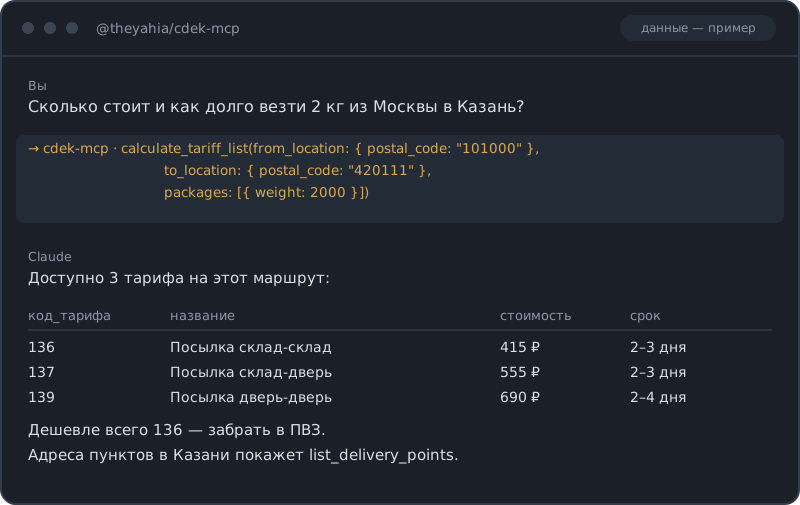
Если вы искали, как подключить доставку СДЭК к Claude или другому ИИ-агенту, — этот сервер закрывает весь цикл отправления через CDEK API v2: расчёт тарифов и сроков, создание и отмена заказов, трекинг по накладной, поиск городов и пунктов выдачи, вызов курьера, штрихкоды и квитанции, вебхуки. Спрашиваете «сколько стоит и как долго везти 2 кг из Москвы в Казань» — получаете сравнение тарифов таблицей, а не форму на сайте. Работает и на тестовом контуре СДЭК, и на боевом.


Инструменты (16)
Тарифы
| Инструмент | Описание |
|---|---|
calculate_tariff | Рассчитать стоимость и срок доставки по конкретному тарифу |
calculate_tariff_list | Все доступные тарифы с ценами по маршруту |
Заказы
| Инструмент | Описание |
|---|---|
create_order | Создать заказ на доставку с отправителем, получателем и местами |
get_order | Детали и статус заказа по UUID |
delete_order | Отменить или удалить заказ по UUID |
list_orders | Поиск и фильтрация заказов по периоду, номеру ИМ или накладной СДЭК |
Трекинг
| Инструмент | Описание |
|---|---|
track_shipment | Отследить отправление по номеру накладной СДЭК |
География
| Инструмент | Описание |
|---|---|
get_cities | Поиск по справочнику городов — по названию, индексу или стране |
get_regions | Поиск по справочнику регионов — по стране или названию |
list_delivery_points | Найти пункты выдачи и постаматы по городу или GPS-координатам |
Штрихкоды и печать
| Инструмент | Описание |
|---|---|
generate_barcode | Сформировать штрихкод или этикетку для заказа |
print_receipt | Сформировать PDF квитанции или накладной по заказу |
Вызов курьера
| Инструмент | Описание |
|---|---|
create_courier_pickup | Заказать забор груза курьером по заказу |
get_courier_pickup | Проверить статус заявки на вызов курьера |
Вебхуки
| Инструмент | Описание |
|---|---|
create_webhook | Зарегистрировать вебхук на смену статуса заказа или фото доставки |
delete_webhook | Удалить подписку на вебхук по UUID |
Быстрый старт
Claude Desktop
~/.config/claude/claude_desktop_config.json (macOS) или %APPDATA%\Claude\claude_desktop_config.json (Windows):
{
  "mcpServers": {
    "cdek": {
      "command": "npx",
      "args": ["-y", "@theyahia/cdek-mcp"],
      "env": {
        "CDEK_CLIENT_ID": "<YOUR_CLIENT_ID>",
        "CDEK_CLIENT_SECRET": "<YOUR_CLIENT_SECRET>",
        "CDEK_SANDBOX": "true"
      }
    }
  }
}
Cursor / Windsurf
.cursor/mcp.json или .windsurf/mcp.json:
{
  "mcpServers": {
    "cdek": {
      "command": "npx",
      "args": ["-y", "@theyahia/cdek-mcp"],
      "env": {
        "CDEK_CLIENT_ID": "<YOUR_CLIENT_ID>",
        "CDEK_CLIENT_SECRET": "<YOUR_CLIENT_SECRET>",
        "CDEK_SANDBOX": "true"
      }
    }
  }
}
VS Code (Copilot)
.vscode/mcp.json:
{
  "servers": {
    "cdek": {
      "command": "npx",
      "args": ["-y", "@theyahia/cdek-mcp"],
      "env": {
        "CDEK_CLIENT_ID": "<YOUR_CLIENT_ID>",
        "CDEK_CLIENT_SECRET": "<YOUR_CLIENT_SECRET>",
        "CDEK_SANDBOX": "true"
      }
    }
  }
}
Транспорт Streamable HTTP
Для веб-развёртываний используйте флаг --http или переменную HTTP_PORT:
HTTP_PORT=3000 npx @theyahia/cdek-mcp --http
Эндпоинты:
POST /mcp— MCP JSON-RPCGET /mcp— SSE-потокDELETE /mcp— завершение сессииGET /health— проверка состояния
Переменные окружения
| Переменная | Обяз. | Описание |
|---|---|---|
CDEK_CLIENT_ID | да | Client ID из личного кабинета СДЭК |
CDEK_CLIENT_SECRET | да | Client Secret из личного кабинета СДЭК |
CDEK_SANDBOX | нет | true — работать в песочнице (api.edu.cdek.ru) |
HTTP_PORT | нет | Порт HTTP-транспорта (включает HTTP-режим) |
Где взять ключи API: личный кабинет СДЭК → Интеграция → Ключи API.
Режим песочницы
Задайте CDEK_SANDBOX=true, чтобы работать с тестовым контуром СДЭК (api.edu.cdek.ru). Боевой контур — api.cdek.ru.
СДЭК публикует общий тестовый аккаунт для интеграционных проверок:
- Client ID:
EMscd6r9JnFiQ3bLoyjJY6eM78JrJceI - Client Secret:
PjLZkKBHEiLK3YsjtNrt3TGNG0ahs3kh
⚠️ СДЭК время от времени меняет этот общий тестовый аккаунт. Если вы получили
OAuth token error (HTTP 401) … invalid_client, публичная пара уже сменилась — запросите собственные ключи песочницы в кабинете интеграции (lk.cdek.ru → Интеграция → Ключи API).
Авторизация
OAuth 2.0, поток Client Credentials, реализован в OAuthStrategy из @theyahia/mcp-core:
- Токен запрашивается автоматически при первом обращении
- Кэширование токена с упреждающим обновлением незадолго до истечения
- Дедупликация параллельных запросов (одно обновление токена делится между всеми)
- Автоматический повтор на 401 со сбросом токена
E-commerce-стек
Соберите полный ИИ-стек для интернет-магазина вместе с другими серверами WWmcp:
| Сервер | Назначение |
|---|---|
| cdek-mcp | Доставка и логистика |
| dadata-mcp | Проверка адресов, поиск компаний |
Часть серии WWmcp.
Демо-промпты
-
«Сколько стоит отправить посылку 2 кг из Москвы в Санкт-Петербург?» Использует
get_citiesдля поиска кодов городов, затемcalculate_tariff_listдля сравнения всех доступных тарифов. -
«Найди ближайший пункт выдачи СДЭК к Красной площади» Использует
get_cities, чтобы получитьcity_codeМосквы, затемlist_delivery_pointsсlatitude: 55.7539,longitude: 37.6208,radius_km: 5— результаты фильтруются по радиусу и сортируются по расстоянию (у каждого есть полякоординатыирасстояние_км). -
«Создай заказ на отправку книги из Казани в Новосибирск, вызови курьера и распечатай квитанцию» Использует
create_order, затемcreate_courier_pickupдля забора груза иprint_receiptдля накладной.
Разработка
git clone https://github.com/theYahia/cdek-mcp.git
cd cdek-mcp
npm install

npm run lint        # ESLint (flat config)
npm run typecheck   # tsc --noEmit
npm run build       # сборка в dist/
npm test            # юнит-тесты (vitest)
npm run test:e2e    # e2e smoke-тест (перечисляет инструменты, без реальных ключей)
Запуск сервера локально против песочницы СДЭК (api.edu.cdek.ru) — с общей тестовой парой из раздела Режим песочницы или со своими ключами:
CDEK_SANDBOX=true \
CDEK_CLIENT_ID=<YOUR_SANDBOX_CLIENT_ID> \
CDEK_CLIENT_SECRET=<YOUR_SANDBOX_CLIENT_SECRET> \
npm run dev
Заметки о релизах — в CHANGELOG.md.
Лицензия
MIT
Reviews
No reviews yet
Be the first to review this server!
More Developer Tools MCP Servers
Fetch
Freeby Modelcontextprotocol · Developer Tools
Web content fetching and conversion for efficient LLM usage
Git
Freeby Modelcontextprotocol · Developer Tools
Read, search, and manipulate Git repositories programmatically
Paperclip
Freeby Paperclipai · Developer Tools
Trending hip-hop artist momentum scores across four cultural dimensions.
Toleno
Freeby Toleno · Developer Tools
Toleno Network MCP Server — Manage your Toleno mining account with Claude AI using natural language.
mcp-creator-python
Freeby mcp-marketplace · Developer Tools
Create, build, and publish Python MCP servers to PyPI — conversationally.
MCP Marketplace
Freeby mcp-marketplace · Developer Tools
Search and install MCP servers from inside your AI client.