
Server data from the Official MCP Registry
Cross-session WebFetch cache for Claude Code. Unlimited TTL by default, SQLite, MCP plugin.
About
Cross-session WebFetch cache for Claude Code. Unlimited TTL by default, SQLite, MCP plugin.
Security Report
Valid MCP server (2 strong, 4 medium validity signals). 2 known CVEs in dependencies (0 critical, 2 high severity) Package registry verified. Imported from the Official MCP Registry. Trust signals: trusted author (49/49 approved).
6 files analyzed · 3 issues found
Security scores are indicators to help you make informed decisions, not guarantees. Always review permissions before connecting any MCP server.
Permissions Required
This plugin requests these system permissions. Most are normal for its category.
How to Install
Add this to your MCP configuration file:
{
  "mcpServers": {
    "io-github-theyahia-claude-webcache": {
      "args": [
        "-y",
        "@theyahia/claude-webcache"
      ],
      "command": "npx"
    }
  }
}Documentation
View on GitHubFrom the project's GitHub README.
claude-webcache




Persistent cross-session WebFetch cache for Claude Code. Cached reads in ~0.07ms — orders of magnitude faster than re-fetching.
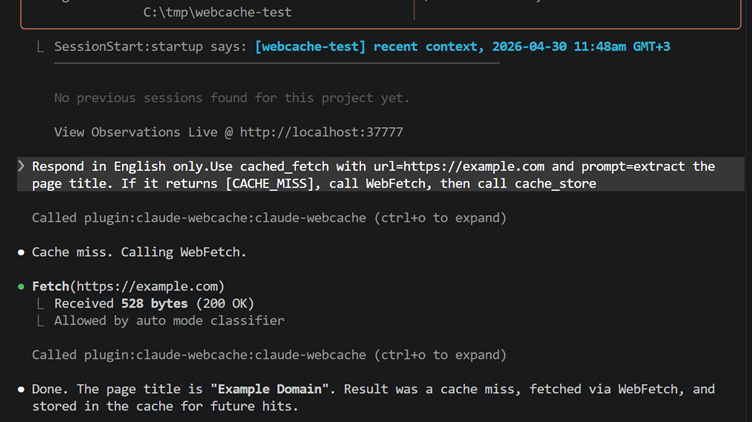
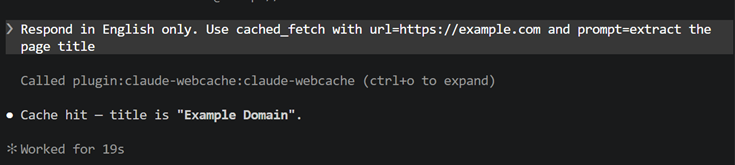
Claude Code's built-in cache lasts 15 minutes, within one session. Every new session re-fetches from scratch. claude-webcache persists results across sessions in a local SQLite database — instant cache hits, zero network cost.
Session 1  →  WebFetch("docs.example.com")  →  fetched, auto-cached ✓
Session 2  →  cached_fetch("docs.example.com")  →  instant hit, no network call
Session 7  →  cached_fetch("docs.example.com")  →  still instant, unlimited TTL
v0.1.5+: every WebFetch is automatically saved via PostToolUse hook — nothing to configure.
Install
claude plugin marketplace add theYahia/claude-webcache && claude plugin install claude-webcache@theyahia
Works in: Claude Code CLI · Desktop (Mac/Windows) · VS Code extension · JetBrains plugin — same command everywhere.
Done. Every WebFetch is auto-cached from now on.
Optionally add the usage pattern to ~/.claude/CLAUDE.md to also check the cache before fetching (saves the WebFetch call entirely on repeat URLs).
Plugin TUI not working? There's an open Claude Code bug (#41653) where
/plugin installrejects third-party sources with "source type not supported." Use the CLI command above — it bypasses the TUI and works fine.Fallback (no marketplace):
git clone https://github.com/theYahia/claude-webcache && claude --plugin-dir ./claude-webcache/plugin
Option 2 — npm global
npm i -g @theyahia/claude-webcache
Requires Node.js 22.5+ (uses built-in node:sqlite — no native deps, no install step).
Then register in ~/.claude/settings.json (replace path with output of npm root -g):
{
  "mcpServers": {
    "claude-webcache": {
      "command": "node",
      "args": ["/path/from/npm-root-g/claude-webcache/scripts/mcp-server.cjs"]
    }
  },
  "hooks": {
    "SessionStart": [
      {
        "matcher": "startup|clear|compact",
        "hooks": [
          { "type": "command", "command": "node /path/from/npm-root-g/claude-webcache/scripts/hook-stats.cjs" }
        ]
      }
    ]
  }
}
Option 3 — clone (contributors)
See CONTRIBUTING.md.
Usage pattern (optional — for pre-fetch cache checks)
v0.1.5+ auto-caches every WebFetch automatically. The pattern below is optional: add it to ~/.claude/CLAUDE.md to also check the cache before making a WebFetch — this saves the WebFetch call entirely on repeat URLs.
Auto-read (v0.5+): nothing to do. A PreToolUse hook checks the cache before every WebFetch/WebSearch. On a hit it serves the cached copy and skips the network; on a miss the call runs normally and the PostToolUse hook stores the result. Same URL + same prompt (or same search query) in any future session = instant hit, zero network cost.
Manual lookup is still available if you want it: call cached_fetch(url, prompt) (or cached_search(query)) — returns the cached text, or [CACHE_MISS] … if absent. Disable auto-read with WEBCACHE_AUTOREAD=0.
⚠ Security — authenticated URLs
The cache stores the URL alongside the response in ~/.webcache/cache.db. By default, claude-webcache strips obvious credentials from the stored URL before write (user:pass@host and query params named token, api_key, apikey, access_token, auth, secret, password, key, signature, etc.).
That's display-level redaction, not key-level. The cache key still hashes the original URL, so re-fetching the same authenticated URL hits the cache. If you want a stricter trade-off:
export WEBCACHE_STRICT_REDACT=1
With WEBCACHE_STRICT_REDACT=1, the cache key is computed from the redacted URL too — endpoints differing only in ?token=A vs ?token=B collide in one slot. Safe for pass-through auth (identical content), unsafe for personalized endpoints (different users see each other's cached data).
Bottom line: prefer header-based auth (Authorization: headers) over URL-embedded tokens. Don't commit ~/.webcache/cache.db to git.
Namespaces
Multiple projects sharing one machine? Isolate per-project caches:
WEBCACHE_NAMESPACE=gosdelo  claude    # cache writes/reads scoped to ns "gosdelo"
WEBCACHE_NAMESPACE=qsearch  claude    # separate ns, no cross-contamination
Default namespace is the empty string "" (shared cache for v0.3 behavior). Inspect/manage per-namespace via CLI: claude-webcache namespaces, claude-webcache --namespace gosdelo stats.
Tools (MCP)
| Tool | Args | Returns |
|---|---|---|
cached_fetch | url, prompt | cached text, or [CACHE_MISS] <url> |
cached_search | query | cached WebSearch results, or [CACHE_MISS] <query> (websearch namespace, short TTL) |
cache_store | url, prompt, output | stored |
cache_stats | global? | { namespace, total, hits, misses, hit_rate, last, db_size_bytes, evicted, oversize_skipped, last_hook_error_at, top_urls, ... } |
cache_list | limit?, offset?, global? | recent URLs (most recent first) |
cache_invalidate | url | { deleted: N } — drops every entry for that URL in current namespace |
cache_clear | older_than_days?, confirm? | { deleted: N } — partial wipe by age, or full wipe with confirm:"YES" |
cache_warm | entries: [{url,prompt}] or urls[]+prompt | { hits, misses, invalid } — bulk pre-flight in one call |
cache_refresh | url, prompt | [CACHE_MISS] <url> — invalidates and signals re-fetch |
CLI
The npm package ships a claude-webcache binary for ad-hoc inspection and a local web dashboard:
claude-webcache stats                            # JSON stats
claude-webcache stats --by-domain                # per-domain breakdown
claude-webcache list 20                          # 20 most-recent URLs
claude-webcache list 50 --offset 100             # pagination
claude-webcache invalidate https://news.com/123  # drop one URL
claude-webcache refresh https://news.com/123 --prompt "extract title"   # invalidate one (url,prompt) pair
claude-webcache warm urls.txt --prompt "extract" # bulk pre-flight check
claude-webcache clear --older-than-days 30       # partial wipe
claude-webcache clear --confirm YES              # full wipe (requires explicit confirm)
claude-webcache clear-logs                       # truncate ~/.webcache/hook.log
claude-webcache namespaces                       # list all namespaces present
claude-webcache export --out cache.json --all    # export metadata
claude-webcache dashboard                        # open http://localhost:37778
claude-webcache --namespace gosdelo stats        # scope command to namespace
The dashboard renders top URLs by hits, top domains (with avg hits / last fetch / entry counts), full search-able paginated list with one-click invalidate + refresh buttons. Pure stdlib — no extra deps to install.
Configuration (env vars)
| Variable | Default | Effect |
|---|---|---|
WEBCACHE_TTL_DAYS | unlimited | Global TTL in days. 0 or unset = unlimited. |
WEBCACHE_MAX_SIZE_MB | unlimited | Above this size, LRU eviction drops ~20% of oldest-by-last_hit_at entries on next write (debounced every 100 writes). |
WEBCACHE_DOMAIN_TTL | none | Per-domain TTL JSON: {"news.com":1,"reuters.com":1,"arxiv.org":0}. Days; 0 = unlimited. Suffix-matches subdomains. Overrides global TTL when matched. |
WEBCACHE_NAMESPACE | "" (shared) | Isolate the cache per project. Different namespaces never see each other's entries. |
WEBCACHE_MAX_OUTPUT_MB | 10 | Reject WebFetch responses larger than N MB. Stats track oversize_skipped counter and last_oversize_url. |
WEBCACHE_COMPRESS | off | 1 enables gzip on responses ≥4 KB. Stored as base64 in TEXT column. Existing uncompressed rows read fine (BC). |
WEBCACHE_STRICT_REDACT | off | 1 makes the cache key use the redacted URL — collides per endpoint regardless of token value. See Security above. |
WEBCACHE_QUIET | off | 1 suppresses hook stderr output (file log at ~/.webcache/hook.log still written). |
WEBCACHE_DEBUG | off | 1 enables verbose tracing in the auto-cache hook. |
WEBCACHE_SEARCH_TTL_HOURS | 6 | TTL for cached WebSearch results (the websearch namespace). Search rankings drift, so this is short by default. 0 = never expire. |
WEBCACHE_AUTOREAD | on | 0 disables the PreToolUse auto-read hooks (cache still fills via PostToolUse; you read it manually via cached_fetch/cached_search). |
SessionStart hook
Every new session injects a one-liner so Claude knows the cache exists:
webcache [ns=gosdelo] 142 pages cached, 87% hit rate, last fetch 3h ago
No output if cache is empty. [ns=...] is omitted when using the default namespace.
Storage
SQLite at ~/.webcache/cache.db (WAL mode, synchronous=NORMAL, busy_timeout=5000).
Cache key = SHA256(namespace + "|" + canonical(url) + "|" + prompt). Default TTL: unlimited (set WEBCACHE_TTL_DAYS=N for N-day expiry).
URL canonicalization (v0.4+): lowercase hostname, strip default ports (:80/:443), strip fragment, sort query parameters alphabetically. So https://EXAMPLE.com/p?b=2&a=1#frag and https://example.com/p?a=1&b=2 produce the same cache key — no silent miss on URL formatting variance.
| Field | Type |
|---|---|
key | TEXT PRIMARY KEY |
url | TEXT (redacted) |
prompt_hash | TEXT |
output | TEXT (gzip+base64 when compressed=1) |
cached_at | INTEGER (ms epoch) |
hit_count | INTEGER |
last_hit_at | INTEGER |
namespace | TEXT (default "") |
compressed | INTEGER (0/1) |
Concurrent-safe via WAL + 5-second busy_timeout — multiple Claude Code sessions can read/write simultaneously without SQLITE_BUSY errors.
Limits
- Cache key includes the prompt — use consistent prompts to maximize hit rate.
- Output is whatever WebFetch returns (already summarized). No re-processing.
- No semantic search. Exact
(namespace, canonical_url, prompt)match only.
Benchmarks
Single-process latency on a populated DB (N=10000 entries, 1KB output each), measured via npm run bench:
| Op | p50 | p95 | p99 | ops/sec |
|---|---|---|---|---|
write | 0.09ms | 0.15ms | 2.66ms | 5,800 |
read_hit | 0.07ms | 0.12ms | 0.23ms | 7,600 |
read_miss | 0.04ms | 0.07ms | 0.13ms | 17,600 |
list_50 | 0.11ms | 0.16ms | 0.53ms | 7,400 |
Storage overhead: ~2 KB per entry for a 1 KB payload (key + indexes + WAL + new v0.4 columns). With WEBCACHE_COMPRESS=1 on text-heavy responses, expect 3-7× reduction.
WebFetch over the network typically takes 1-5 seconds — a cached hit is ~15,000-70,000× faster. Reproduce on your hardware: npm run bench. See bench/README.md for methodology and full results metadata (CPU, RAM, OS, commit) saved per run.
Related
- claude-mem — persistent memory across sessions (complements claude-webcache: memory vs. web cache)
- WWmcp — catalog of 46 MCP servers for non-Western APIs
License
MIT — see LICENSE.
Reviews
No reviews yet
Be the first to review this server!
More Developer Tools MCP Servers
Paperclip
Freeby Paperclipai · Developer Tools
Trending hip-hop artist momentum scores across four cultural dimensions.
Netdata
Freeby Netdata · Developer Tools
Real-time infrastructure monitoring with metrics, logs, alerts, and ML-based anomaly detection.
Toleno
Freeby Toleno · Developer Tools
Toleno Network MCP Server — Manage your Toleno mining account with Claude AI using natural language.
mcp-creator-python
Freeby mcp-marketplace · Developer Tools
Create, build, and publish Python MCP servers to PyPI — conversationally.
MCP Marketplace
Freeby mcp-marketplace · Developer Tools
Search and install MCP servers from inside your AI client.
MarkItDown
Freeby Microsoft · Content & Media
Convert files (PDF, Word, Excel, images, audio) to Markdown for LLM consumption